1
DVD Control Non Dish Net Satellite Control
Remote Control
dvd
DVD
Play
Vol
For
Rew
trk
Stop
Gd
F
Speaks:
“Select”
DVD
DVD
Play / Pause
Rew / Stop / Play / Stop
DVD
DVD
Fast Forward /
Stop / Play / Stop
+10, 1, 2, … 10
pwr
Speaks:
“F”
DVD Stop
DVD
On / Off / Standby
DVD F-keys
F1 … F10, M1
Mute
Vol+
TV
Speaks:
“1-10, M”
Amp
Speaks:
“Decrease”
Speaks:
“Increase”
DVD
Mute
Vol-
DVD
Vol Up
DVD Vol
Vol Down
Speaks:
“Tuner”
DVD
TV Select
DVD
Amp Select
Speaks:
“Tuner”
Speaks:
“Decrease”
Speaks:
“Increase”
Speaks:
“Control”
Ent
Ch
Up
Down
Rt
Lt
Inf
ESC
Gd
Pvr
Speaks:
“Check”
DVD Menu
Enter
DVD Menu
Ch Down
SAT Channel
001-999
Speaks:
“Increase”
DVD Menu
Guide right
Speaks: “Increase”
Speaks:
“P”
DVD Menu
Guide Info
Speaks: “I”
Speaks:
“Decrease”
DVD Menu
Guide Cancel
Speaks: “I”
DVD Menu
Ch Up
DVD Menu
Guide left
DVD Menu
Pvr Button
Speaks:
“Previous”
Speaks:
“Enter”
Speaks:
“Control”
DVD Menu
Guide Button
Speaks: “Decrease”
Speaks:
“Enter”
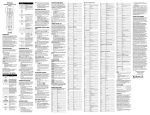
Figure 6. Flowchart of the DVD (Non Dish Net Satellite Control) Menu
27