1
1010GNFM-3B
FIELD MANUAL
SYSTEM 1010GN/GDN UNIFLOW
DEDICATED NEMA-4/IP65
GAS FLOWMETER
FOR TECHNICAL ASSISTANCE
Call: (800) 275-8480
(631) 231-3600
Fax: (631) 231-3334
E-mail: [email protected]
FOR GENERAL INFORMATION:
Website: www.controlotron.com
E-mail: [email protected]
Or: [email protected]
Copyright©2006 Controlotron Corp. All Rights Reserved
Made in the USA
CONTROLOTRON WARRANTY APPLIES TO SYSTEM 1010
CONTROLOTRON CORPORATION (the Company) warrants to the original purchaser of this equipment
that should this equipment or any part thereof (except the items indicated below), under normal use and
conditions, be proven defective in material or workmanship within two (2) years from the date of original
purchase, such defect(s) will be repaired or replaced (at the Company’s option) without charge for standard
parts and repair labor.
High temperature transducers and system batteries are not warranted.
To obtain repair or replacement within the terms of this Warranty, a Return Merchandise Authorization
number (RMA) must be obtained from Customer Service by calling (631) 231-3600 prior to shipment. This
RMA number must appear prominently on the outside of all returned packages. Returned merchandise
must include packing slip with specification of defect(s) and be shipped freight prepaid, directly to Controlotron Corporation, 155 Plant Avenue, Hauppauge, NY 11788.
System 1010 material returned for Certification, Validation, Repair, or Replacement may result in the loss
of memorized pipe site data in equipment computer memory. Controlotron can save and then restore this
data for some NEMA type systems and all Portable systems, if requested at the time of equipment return.
A fee may be imposed for this service.
This Warranty does not extend to costs incurred for removal or reinstallation of the equipment, or to damage to equipment, accessories or components caused by such removal or reinstallation.
This Warranty does not apply to any equipment or part thereof which in the opinion of the Company has
been damaged through alteration, improper installation, mishandling, misuse, neglect, or accident. THE
EXTENT OF THE COMPANY’S LIABILITY UNDER THIS WARRANTY IS LIMITED TO THE REPAIR
OR REPLACEMENT PROVIDED ABOVE AND, IN NO EVENT, SHALL THE COMPANY’S LIABILITY
EXCEED THE PURCHASE PRICE PAID BY PURCHASER FOR THE PRODUCT.
This Warranty is in lieu of all other express warranties or liabilities. ANY IMPLIED WARRANTIES, INCLUDING ANY IMPLIED WARRANTY OF MERCHANTABILITY OR FITNESS FOR USE ARE HEREBY
EXCLUDED. IN NO CASE SHALL THE COMPANY BE LIABLE FOR ANY CONSEQUENTIAL OR INCIDENTAL DAMAGES FOR BREACH OF THIS OR ANY OTHER WARRANTY, EXPRESS OR IMPLIED,
WHATSOEVER. No person or representative is authorized to assume for the Company any liability other
than expressed herein in connection with the sale of this equipment.
SOFTWARE PRODUCT LICENSE
Controlotron Corporation owns the software contained in this equipment (System 1010). Controlotron Corporation hereby grants to Renter/Buyer a non-exclusive, non-transferable, personal license to use this software. This license is meant to limit the use of Controlotron’s software by Renter/Buyer and only within
Renter/Buyer’s wholly owned facility. The licensed software cannot be used under any circumstances or
arrangement by or on behalf of any third party in any facility. Acknowledgment of these conditions is made
by the first act of applying power to the equipment. This license shall be terminated by any use of the
software inconsistent with the above terms.
At its sole discretion, Controlotron Corporation may grant special licenses for limited use of this product by
or for the benefit of third parties upon written application of Renter/Buyer. Such special licenses must be in
writing and signed by an officer of Controlotron Corporation.
FIELD MANUAL
SYSTEM 1010GN/GDN UNIFLOW
DEDICATED NEMA-4/IP65
GAS FLOWMETER
This equipment contains components that are
susceptible to electrostatic discharge (ESD).
Please observe ESD control measures during
the handling and connection process.
Field Manual 1010GNFM-3B
April 2006
For use with Operating System
Software Version 3.01.06 or later
Prepared By
Date
Reviewed By
Date
FOR TECHNICAL ASSISTANCE:
Call: (800) 275-8480
(631) 231-3600
Fax: (631) 231-3334
E-mail: [email protected]
Copyright©2006 Controlotron Corp. All Rights Reserved
FOR GENERAL INFORMATION:
Website: www.controlotron.com
E-mail: [email protected]
Or:
[email protected]
Made in the USA
Printed April 2006
Manual Changes
NOTE: For the latest updates and revisions to this field manual go to
www.controlotron.com/downloads.htm and check the Product Manual
listing.
1010FMA-14
MANUAL
ADDENDUM
SYSTEM 1010
EXPANDED I/O OPTION
(For Systems Equipped With 1010N-7 Modules)
Manual Addendum
May 2002
FOR TECHNICAL ASSISTANCE
Call: (800) 275-8480
(631) 231-3600
Fax:
(631) 231-3334
E-mail: [email protected]
Copyright © 2002 Controlotron Corp. All rights reserved
FOR GENERAL INFORMATION
Website: www.controlotron.com
E-mail: [email protected]
or: [email protected]
Manual Addendum
1010FMA-14
EXPANDED I/O OPTION
(For Systems Equipped With 1010N-7 Modules)
INTRODUCTION
The 1010N-2 I/O Module and 1010N-7 Expanded I/O Module both provide current (Io1, Io2),
voltage (V01 and Vo2) and pulse rate (Pgen 1 and Pgen 2) analog outputs. The Expanded I/O
Module Option allows users to drive as many as four additional 4-20 mA loop-powered instrumentation outputs. The following information is intended to be used with the I/O Data Control and Span Data sections and Analog Output Trim Menu in the field manual.
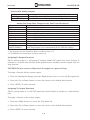
The System 1010 flowmeter provides an Analog Output Setup menu (see below) that allows
the user to assign data functions for these output signals (refer to Analog Output Setup in the
appropriate 1010 field manual). In addition, refer to Installation Drawings 1010N-2-7 and
1010N-7-7 in the field manual appendices for additional connection information and terminal
block numerical designators.
NOTE: All meters in the System 1010N and DN product family can accept the Expanded
I/O Module Option except 4- Channel meters.
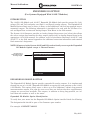
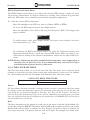
Use this menu to
assign data functions
to analog outputs.
Controlotron
Dual Path
Assign Data to Analog Outputs
SITE1
Analog Out Setup
Relay Setup
Analog Input Setup
I/O Data Control
EXPANDED I/O MODULE OPTION
The Expanded I/O Module Option provides expanded Io analog outputs. It is implemented
through the use of a 1010N-7 Expanded I/O Module occupying the same position as the 1010N2 I/O Module. This option allows users to drive up to four additional 4-20mA loop-powered
instrumentation outputs. Note that the meter menu does not indicate that these supplementary
outputs are present and available. The outputs, in addition to being loop-powered, are isolated from one another as well as the meter.
Expanded I/O Module Option Identification
To verify that your meter has the Expanded I/O Module Option installed check the following:
The designation A1 should be part of the flowmeter part number.
For example: 1010ENRE-T1A1KGS
1
May 2002
Manual Addendum
1010FMA-14
1010N-2 I/O Module
The conventional 1010N-2 I/O module provides the following:
l
Two self-powered, isolated 4-20 mA current loops (signals Io1 and Io2) that are assignable and spannable by the user to many flowmeter variables such as flow, sonic velocity, signal strength, etc. These self-powered outputs also provide an industry-standard
fault indication by dropping to 2 mA if assigned to flow rate and under fault conditions.
Note that these outputs, though isolated from the system, are NOT isolated from each
other.
l
Two 0-10 Vdc outputs (signals Vo1 and Vo2) that are also assignable and spannable by
the user as above. These are also self-powered, but are not isolated from the system.
l
Two 0-5000 Hz Pgen signals (Pgen1 and Pgen2) also assignable and spannable by the
user. These are TTL level pulses.
The 1010N/DN class of meters has a total of six analog outputs as indicated above. In addition
(refer to Installation Drawings 1010N-2-7 and 1010N-7-7):
l
Alarms/Status/Totalizer pulses are generally presented as relay closures as either
Mercury Wetted Form 1A or Dry Reed Form C relays.
l
Analog inputs, when provided, are in the form of 4-20 mA non-isolated inputs.
l
The meter also has four non-isolated totalizer command lines providing Totalizer Clear
and Totalizer Hold (NoTot) functionality.
1010N-7 Expanded I/O Module Option
The Expanded I/O Module Option provides all of the above plus the following outputs:
l
The four signals that drive the pulse generator outputs (Pgen 1 and Pgen2) and voltage
outputs (Vo1 and Vo2) of the meter create four current outputs: Aux Io1, Aux Io2, Aux
Io3 and Aux Io4 (see diagram on next page).
l
By spanning and assigning a system variable to 0-10 volt (Vo1 and Vo2) or 0-5000 Hz
pulse output (Pgen1 and Pgen2) the module simultaneously outputs these signals to
the Expanded I/O Module Option Aux outputs. For a 2-Channel meter the programming assignments are as follows:
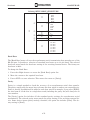
TYPICAL 2-CHANNEL METER EXPANDED I/O OPTION CONNECTIONS
l
CHANNEL
CH1
SIGNAL
Pgen1
Vo1
CH2
Pgen2
Vo2
AUX Io
Io1
Io3
Io2
Io4
METER MENU DISPLAY
Vo1
Pgen1
Vo1
Pgen1
Note that the four Aux Io outputs are externally powered.
2
May 2002
Manual Addendum
1010FMA-14
EXPANDED I/O MODULE OPTION PROGRAMMING
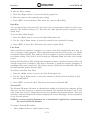
The diagram below illustrates the Expanded I/O Module Option programming for a Single
Channel meter with a 1010N-7 Expanded I/O Module.
FLOW COMPUTER
INTERNAL
CONNECTIONS
OUTPUT
TERMINAL STRIP
y
Io1
y
Io1
y
Pgen1
y
Pgen2
y
Vo1
y
Vo2
l
Aux Io1
l
Aux Io2
l
Aux Io3
l
Aux Io4
NOTE: The 1010N-7 Expanded I/O Module auxiliary output signals (Aux Io1 - Aux Io4)
generated from Pgen1, Pgen2, Vo1 and Vo2 are “mirrored” output currents.
For example, if Vo1 is a 5 Vdc signal then Aux Io3 will be 12 mA.
NOTE: The method used to create auxiliary current loops makes it impractical to generate the 2 mA fault current produced by the primary 4-20 mA outputs of the
meter.
3
May 2002
Table Of Contents
1010GNFM-3B
TABLE OF CONTENTS
Section 1
1.
1.1
1.2
1.3
1.3.1
1.3.2
1.3.3
1.3.4
1.4
1.5
Section 2
2.
2.1
2.1.1
2.1.2
2.1.3
2.1.4
2.1.5
2.2
2.3
2.3.1
2.3.2
2.4
2.4.1
2.5
2.5.1
Sect./Page
Introduction ........................................................................................................
Important Safety Considerations ..................................................................
Flowmeter Installation Steps .........................................................................
Theory Of Operation .........................................................................................
Introduction ........................................................................................................
Flow Profile Compensation .............................................................................
Standard Volume Compensation ...................................................................
Mass Flow Compensation And Molecular Weight .....................................
Specifications ......................................................................................................
1010WX Gas Flowmeters .................................................................................
1-1
1-1
1-1
1-2
1-2
1-3
1-3
1-3
1-4
1-5
Installation and Maintenance of 1013G Series Spools and 1011S Gas
Transducers ........................................................................................................ 2-1
Introduction ........................................................................................................ 2-1
Description and Installation of 1013G Insert Gas Spool ......................... 2-1
1013G Spool Markings ...................................................................................... 2-1
1011GS Gas Spool Part Numbering Code ................................................... 2-2
Pre-Installation Checklist ................................................................................ 2-2
Installation of Gas Spool .................................................................................. 2-3
Figure 1 - Gas Spool With Transducers ..................................................... 2-3
General Description of the 1011G Transducers ........................................ 2-3
Servicing of 1011GF (Fixed Flange) Style Insert Gas Transducers .... 2-4
Figure 2 - Flange Mount Transducers ....................................................... 2-5
The 1011GF Transducers Components ....................................................... 2-5
1011GF Transducer Installation and Removal (Refer to drawing 1011GFS5-7) ....................................................................................................................... 2-5
Installation of 1011GF Transducers .......................................................... 2-6
Figure 3 - Transducer Alignment ............................................................... 2-6
Removal of 1011GF Transducers ................................................................ 2-7
Servicing of 1011GC (Compression Seal) Style Insert Gas Transducers .
........................................................................................................................ 2-7
Figure 4 - Compression Seal Transducers ................................................ 2-8
1011GC Transducer Installation and Removal (Refer to drawing 1011GCS5-7 ........................................................................................................................ 2-8
Installation of 1011GC Transducers .......................................................... 2-8
Removal of 1011GC Transducers ............................................................... 2-9
The 1011GS (Field Serviceable) Style Insert Gas Transducers ............ 2-9
Installation and Servicing of Low Pressure 1011GS Transducer (For ANSI
150, 300 and 600#) ............................................................................................ 2-10
1011GS Transducers Components ........................................................... 2-10
Figure 5 - Transducer Components ......................................................... 2-11
Required Tools for Installation of 1011GS Transducer into Gas Line . 2-12
Description of 1011GS Low Pressure Retriever System ....................... 2-12
Figure 6 - Retriever Assembly .................................................................. 2-13
Required Clearance Around Pipe ............................................................ 2-14
i
Table Of Contents
2.5.2
2.6
2.6.1
2.6.2
2.7
2.8
2.8.1
2.8.2
Section 3
3.
3.1
3.2
3.3
3.4
3.4.1
3.4.2
3.4.3
1010GNFM-3B
Figure 7 - Pipe Clearances ........................................................................ 2-14
Servicing the 1011GS Gas Transducers using COSASCO Low Pressure Retriever Model #60 ....................................................................................... 2-15
Figure 8 - Transducer Alignment ............................................................. 2-15
Removal of an Installed 1011GS Transducer using Low Pressure Retriever
...................................................................................................................... 2-16
Installation of a 1011GS Transducer using Low Pressure Retriever ... 2-17
Installation ad Servicing of High Pressure 1011GS Transducers (For ANSI
900# and 1500#) ................................................................................................ 2-19
1011GS Transducer Components (ANSI 900# and 1500#) ..................... 2-19
Figure 9 - Transducer Components ......................................................... 2-19
Required Tools for Installation of 1011GS Transducers into Gas Lines..2-20
Required Clearance Around Pipe ............................................................ 2-20
Figure 10 - Pipe Clearances ...................................................................... 2-20
Servicing the 1011GS Gas Transducers into using COSASCO High Pressure Retriever Model #RBSA ................................................................... 2-20
Removal of an Installed 1011GS Transducer using High Pressure Retriever
...................................................................................................................... 2-21
Installation of a 1011GS Transducer using High Pressure Retriever . 2-21
Service and Maintenance of 1011G Insert Transducers ....................... 2-22
Transducer Head Fouling .............................................................................. 2-22
General Maintenance ..................................................................................... 2-22
Figure 11 - Interconnection Diagram....................................................... 2-23
Power Supply Wiring ...................................................................................... 2-24
Input Power Connector (P10) Wiring ...................................................... 2-24
Preliminary Setup Procedure ...................................................................... 2-25
Graphic Display Settings ............................................................................... 2-25
Installation of Spool Parameters ................................................................. 2-25
Factory-Installed Flowmeters and Spools .............................................. 2-25
Installation of Stand-Alone Flowmeters and Spools .............................. 2-25
Getting Started ...................................................................................................
The Keypad Enable Switch ..............................................................................
The 1010 Keypad ................................................................................................
Keypad Function Chart ...............................................................................
Introduction To The 1010 Menu Screens ....................................................
Explanation Of Callouts ..............................................................................
How To Use The Installation Menu ...............................................................
Accessing And Leaving The Menu .................................................................
How To Enter Data ............................................................................................
Selecting Items From An Option List ........................................................
Multiple Select Option Lists.......................................................................
Entering Numeric Data ...............................................................................
Entering Alphanumeric Strings .................................................................
The Meter Type Menu ......................................................................................
Dual Channel Flow ......................................................................................
Dual Path Flow .............................................................................................
Selecting A Meter Type ...............................................................................
Creating A New Site Setup .........................................................................
ii
3-1
3-1
3-1
3-1
3-2
3-2
3-3
3-3
3-4
3-4
3-5
3-6
3-6
3-7
3-7
3-8
3-9
3-9
Table Of Contents
1010GNFM-3B
Section 4
4.
The 1010GN Installation Menu ...................................................................... 4-1
Manual Conventions .................................................................................... 4-1
General Installation Menu Notes ............................................................... 4-1
4.1
The Channel/Path Setup Menu....................................................................... 4-2
Channel/Path Setup Menu Structure......................................................... 4-2
4.1.1
How To Recall A Site Setup ............................................................................. 4-3
4.1.2
How To Enable And Disable A Sensing Path .............................................. 4-3
4.1.3
How To Create/Name A Site Setup ................................................................ 4-4
4.1.4
How To Enable/Disable Site Security ........................................................... 4-4
4.1.5
How To Delete A Site Setup ............................................................................ 4-5
4.1.6
How To Save/Rename A Site Setup ............................................................... 4-5
4.2
The Gas Parameters Menu .............................................................................. 4-6
Gas Parameters Menu Structure And Defaults ........................................ 4-7
4.2.1
Base Temp and Base Pres. PSIA .................................................................... 4-7
4.2.2
Spec. Heat Ratio ................................................................................................. 4-7
4.2.3
Viscosity (cP) ....................................................................................................... 4-8
4.2.4
Fixed MW g/mole ................................................................................................ 4-8
4.2.5
Estimated Vs ........................................................................................................ 4-8
4.2.6
Fixed Temp and Fixed Pres. PSIA ................................................................. 4-8
4.2.7
Z Base .................................................................................................................... 4-9
4.2.8
Z Actual ................................................................................................................. 4-9
4.2.9
AGA8 Comp .......................................................................................................... 4-9
AGA8 Table Generation and Installation Instructions ......................... 4-10
4.3
The Edit/Install Meter Menu ......................................................................... 4-13
Edit/Install Meter Menu Structure .......................................................... 4-13
4.3.1
How To Select [Install Path] ........................................................................ 4-14
4.3.2
Editing The Spool Parameters...................................................................... 4-14
4.3.3
How To Use [Install Complete] .................................................................... 4-14
4.3.4
The Zero Flow Adjust Menu .......................................................................... 4-15
4.4
The Operation Adjust Menu .......................................................................... 4-15
Operation Adjust Menu Structure ........................................................... 4-16
4.4.1
Damping Control .............................................................................................. 4-16
4.4.2
Deadband Control ........................................................................................... 4-17
4.4.3
Memory/Fault Set ............................................................................................. 4-17
Memory Delay (sec).................................................................................... 4-18
4.5
The Flow/Total Units Menu ........................................................................... 4-18
Totalizer Controls ...................................................................................... 4-18
The Flow/Total Units Menu Structure .................................................... 4-19
4.5.1
Flow Volume Units ........................................................................................... 4-19
4.5.2
Std Vol Corr. ...................................................................................................... 4-19
4.5.3
Flow Time Units ............................................................................................... 4-20
4.5.4
Flow Display Range ......................................................................................... 4-20
4.5.5
Flow Display Scale ........................................................................................... 4-20
4.5.6
Total Volume Units .......................................................................................... 4-21
4.5.7
Totalizer Scale .................................................................................................. 4-21
4.5.8
Total Resolution ............................................................................................... 4-21
4.5.9
Totalizer Mode .................................................................................................. 4-22
4.5.10
Batch/Sample Total .......................................................................................... 4-22
iii
Table Of Contents
4.6
4.6.1
4.6.2
4.6.3
4.7
4.7.1
4.7.2
4.7.3
4.7.4
4.8
4.8.1
4.8.2
4.8.3
4.8.4
1010GNFM-3B
The Data Span/Set/Cal Menu ........................................................................
The Data Span/Set/Cal Menu Structure ..................................................
Span Data ...........................................................................................................
Pgen .............................................................................................................
Pgen Wiring Diagram ..........................................................................
Max Flow .....................................................................................................
Max Flow 2 ..................................................................................................
Min Flow .....................................................................................................
Min Flow 2 ..................................................................................................
Max Vs m/s ..................................................................................................
Min Vs m/s ...................................................................................................
Max S.G. ......................................................................................................
Min S.G. .......................................................................................................
Max Base S.G. .............................................................................................
Min Base S.G. .............................................................................................
Max Viscosity cS .........................................................................................
Min Viscosity cS .........................................................................................
Max Temperature ......................................................................................
Min Temperature .......................................................................................
Set Alarm Levels ..............................................................................................
High Flow....................................................................................................
Low Flow .....................................................................................................
High S.G. .....................................................................................................
Low S.G. ......................................................................................................
High Base S.G. ............................................................................................
Low Base S.G. .............................................................................................
High Viscosity cS .......................................................................................
Low Viscosity cS .........................................................................................
High Temperature .....................................................................................
Low Temperature ......................................................................................
Interface Vs (m/sec) and Interface SG .....................................................
Turbulence % ..............................................................................................
Makeup Latch .............................................................................................
Calibrate Flow Rate And Calibration Tables ...........................................
Intrinsic .......................................................................................................
Kc Calibration ............................................................................................
Calibration Tables 1 through 3 .................................................................
MultiPoint Calibration (for non-Custody Transfer meters only)..........
The Stripchart Setup Menu ...........................................................................
The Stripchart Setup Menu Structure .....................................................
Select Data .........................................................................................................
Data Display ......................................................................................................
Time Base ...........................................................................................................
Stripchart Clear ...............................................................................................
The Datalogger Setup Menu .........................................................................
Datalogger Mode ..............................................................................................
The Datalogger Setup Menu Structure ...................................................
Datalogger Data ...............................................................................................
Alarm Codes and Descriptions .................................................................
Log Time Interval ............................................................................................
Datalogger Events ...........................................................................................
iv
4-23
4-23
4-25
4-25
4-26
4-28
4-28
4-28
4-28
4-28
4-28
4-28
4-29
4-29
4-29
4-29
4-29
4-29
4-29
4-29
4-29
4-30
4-30
4-30
4-30
4-30
4-30
4-30
4-30
4-31
4-31
4-31
4-31
4-32
2-32
4-32
2-33
4-35
4-36
4-36
4-37
4-37
4-37
4-38
4-38
4-38
4-39
4-40
4-40
4-41
4-41
Table Of Contents
4.8.5
4.9
4.9.1
4.9.2
4.9.3
4.10
4.10.1
4.10.2
4.10.3
4.10.4
4.10.5
4.10.6
4.10.7
1010GNFM-3B
Display Datalogger ..........................................................................................
The I/O Data Control Menu ...........................................................................
The I/O Data Control Menu Structure .....................................................
Analog Output Setup .......................................................................................
System 1010 Analog Outputs ....................................................................
Analog Out Setup Data Categories ..........................................................
Assigning Io Output Functions .................................................................
Assigning Vo Output Functions ...............................................................
Assigning Pgen Output Functions ...........................................................
Pulse Output (Pgen Wiring)......................................................................
Relay Setup ........................................................................................................
Assigning Relay 1 and 2 Functions ..........................................................
Relay Option List .......................................................................................
Analog Input Setup ..........................................................................................
Setting Up The Analog Current Input .....................................................
The Diagnostic Data Menu ............................................................................
Diagnostic Data Menu Structure .............................................................
Main Diagnostics Screen ................................................................................
Main Diagnostic Menu Description .........................................................
Flow Data Menu ...............................................................................................
Flow Data Menu Items ..............................................................................
Vs m/s ..........................................................................................................
AnCal ...........................................................................................................
The Application Info Menu ............................................................................
Application Info Menu Items ....................................................................
The Gas Data Menu .........................................................................................
Gas Data Menu Items ................................................................................
The Site Setup Data Menu .............................................................................
Site Setup Menu Items ..............................................................................
Introduction to [HF] Menu Item ..............................................................
Using the [HF] Menu Item ........................................................................
“Manual” Adjustment Procedure .....................................................
“Automatic” Adjustment Procedure ................................................
The Test Facilities Menu ................................................................................
Test Facilities Commands .........................................................................
Detection Modes ...............................................................................................
The Test Facilities Graph Screen ............................................................
Entering The Diagnostic Graph Screen ..................................................
Diagnostic Text Display ............................................................................
Time Base Control .....................................................................................
Correlated Plot ...........................................................................................
Command Modes ........................................................................................
Digital Damping Control (Hot Key 1 and 2) ...........................................
Transit Time Adjustment (Hot Key 3) .....................................................
Zero Crossover Adjustment (Hot Key 4) .................................................
Envelope Threshold Adjustment (Hot Key 5) .........................................
Signal Masking Function (Hot Key 6) ......................................................
Description Of Graph Screen Text Display Parameters .......................
Hot Key Summary ......................................................................................
Makeup ........................................................................................................
v
4-41
4-42
4-43
4-43
4-44
4-44
4-44
4-45
4-45
4-45
4-46
4-46
4-46
4-47
4-47
4-48
4-48
4-49
4-49
4-49
4-50
4-50
4-50
4-51
4-51
4-52
4-52
4-52
4-53
4-53
4-53
4-54
4-55
4-56
4-56
4-57
4-57
4-58
4-58
4-58
4-58
4-59
4-59
4-59
4-59
4-60
4-60
4-61
4-61
4-61
Table Of Contents
4.10.8
4.11
4.11.1
4.11.2
4.11.3
4.11.4
4.11.5
4.11.6
4.11.7
4.11.8
4.11.9
1010GNFM-3B
Troubleshooting Tips ......................................................................................
Flow Computer Messages .........................................................................
Using The “F4” Reset Sequence ................................................................
The Meter Facilities Menu and Graphic Display Screen ......................
Preferred Units ................................................................................................
The Datalogger Control Menu ......................................................................
Datalogger Control Menu Structure ........................................................
Display Datalogger ....................................................................................
Output Datalogger .....................................................................................
Circular Memory ........................................................................................
Est Log Time Left ......................................................................................
Clear Datalogger ........................................................................................
The Memory Control Menu ...........................................................................
Memory Control Menu ..............................................................................
The Analog Output Trim Menu.....................................................................
Analog Output Trim Menu Structure ......................................................
Current Output Trim (Io1 & Io2) .............................................................
Voltage Output Trim (Vo1 & Vo2) ............................................................
Pgen Output Trim (Pgen 1 & Pgen 2).......................................................
The RTD Calibration Menu (optional) .......................................................
RTD Calibration Menu Structure (Single Channel 1010) ......................
RTD Calibration By Data Entry ...............................................................
The Clock Set Menu ........................................................................................
Clock Set Menu Structure .........................................................................
Date .............................................................................................................
Time .............................................................................................................
RS-232 Setup .....................................................................................................
RS-232 Setup Menu Structure ..................................................................
Baud Rate....................................................................................................
Parity ...........................................................................................................
Data Bits .....................................................................................................
Line Feed ....................................................................................................
Network ID .................................................................................................
RTS Key Time .............................................................................................
Backlight ............................................................................................................
System Info ........................................................................................................
System Info Menu Structure .....................................................................
4-61
4-62
4-62
4-64
4-64
4-65
4-65
4-65
4-66
4-66
4-67
4-67
4-67
4-67
4-68
4-68
2-68
2-68
2-69
2-69
2-69
2-70
2-70
2-70
2-70
2-71
2-71
2-72
2-72
2-72
2-73
2-73
2-73
2-74
2-74
2-74
2-74
Section 5
5.
System 1010 Application Notes ......................................................................
5.1
To Obtain Technical Assistance .....................................................................
5.2
Overview Of System Performance ................................................................
5.2.1
Accuracy ...............................................................................................................
5.2.2
Repeatability .......................................................................................................
5.2.3
Data Stability ......................................................................................................
Data Scatter ..................................................................................................
Data Drift ......................................................................................................
5.3
Flow Conditions ..................................................................................................
5.3.1
Low Flow Rates ..................................................................................................
5.3.2
Flow Data Scatter And Damping ....................................................................
vi
5-1
5-1
5-1
5-1
5-2
5-2
5-2
5-2
5-2
5-2
5-3
Table Of Contents
5.3.3
5.3.4
5.3.5
5.3.6
5.4
5.5
5.6
1010GNFM-3B
System 1010 Damping and Slewing Controls ........................................... 5-3
Time Average ................................................................................................ 5-3
SmartSlew™ ................................................................................................. 5-3
Notes On Fluid Conditions .............................................................................. 5-3
Erroneous Fluid Parameter Specification .................................................. 5-3
Turbulence .......................................................................................................... 5-3
Two-Phase Fluids ............................................................................................... 5-4
Overview Of System 1010GN Memory Resources .................................... 5-4
Active Memory ............................................................................................. 5-4
Site Storage Memory ................................................................................... 5-4
Datalogger Memory ..................................................................................... 5-4
Reference Tables ............................................................................................... 5-5
System 1010 Reynolds Compensation Factors.......................................... 5-5
Terminology Chart ....................................................................................... 5-6
The Dual Path Flow Menu Chart ................................................................... 5-8
The Meter Menu ........................................................................................... 5-8
The Dual Path Menu .................................................................................... 5-8
The Meter Facilities Menu ....................................................................... 5-11
APPENDICES
Appendix A
Site Setup Considerations for 1010GN Blind Systems ...................... A-1
Appendix B
Engineering Drawings ................................................................................ B-1
INDEX
vii
Section 1
1.
1010GNFM-3B
INTRODUCTION
Thank you for purchasing the System 1010GN/GDN Gas flowmeter. Intended for dedicated
applications, this versatile transit-time flowmeter is easy to set up and operate. The 1010
flowmeter represents the state-of-the-art in computerized instrumentation. We are confident
that in a very short time you will appreciate its unrivaled performance and features.
This section presents an example of how to install the System 1010GN Gas flowmeter with a
minimum of effort. It explains how to make basic connections to and from the flow computer and
how to use the Installation Menu to set-up the system for transit-time operation. This manual
covers System 1010 Single Channel, Dual Channel/Dual Path and Custody Transfer flowmeter types in NEMA-4 and NEMA-7 wall mount enclosures.
CAUTION: Please review the safety considerations below before proceeding.
1.1
IMPORTANT SAFETY CONSIDERATIONS
The System 1010GN Gas flowmeter is electrical equipment that operates from either an external DC or AC power source. Please observe all the electric safety codes, etc., that apply to
your application. We recommend that only experienced personnel with knowledge of local
electrical codes and operating safety procedures of the facility perform the installation and
wiring. Since regulations vary by geographic location, industry, etc., it is solely the user’s
responsibility to operate this equipment safely.
Controlotron cannot accept responsibility for any damage that may occur due to failure to
observe any local safety rules. If this equipment is used for a hazardous application (high line
pressure, hostile liquid characteristics, perilous atmosphere, etc.), the end-user must ensure
that only properly trained personnel are involved in the installation and operation.
1.2
FLOWMETER INSTALLATION STEPS
The following are typical steps necessary to complete a stand-alone installation procedure.
NOTE: For flowmeters with factory-installed parameters, the flowmeter should be mated
with the designated gas spool.
Refer to the Installation/Outline drawings in Appendix B before beginning installation.
•
Install gas spool into pipe line (see Section 2).
•
Determine the spool parameters and gas data (viscosity, specific heat ratio, base pressure
and temperature, etc.).
•
Mount the flow computer at the selected location and attach transducer and I/O cables.
•
Access the Installation Menu and create a site (paragraph 3.4).
•
Enter gas parameters (paragraph 4.2).
•
Complete transducer Installation Menu operation (paragraph 4.3).
1-1
Section 1
1.3
1010GNFM-3B
THEORY OF OPERATION
1.3.1 INTRODUCTION
The System 1010GN Gas meter relies on the same Digitally Coded MultiPulse™ transit-time
technology used in our patented 1010 line of liquid flowmeters. Two ultrasonic transducers per
measuring path, alternating as transmitter and receiver, are used to interrogate the gas flowing
within the metering section. The resulting time of arrival for each direction of transmit (upstream and downstream) is then measured using a highly accurate and stable digital signal
processing method.
Using this detection scheme, the 1010GN Gas meter is capable of resolving the relative transit-time difference (dT) to within ±100 psec. Considering typical gas flow transit-time differences ranging from 400x103 to 150x106 psec, the 1010GN meter is capable of providing an
exceptional turn-down ratio. The 1010GN also incorporates a correlation technique which
enables the system to detect very high flow velocities (>100fps) with the same high degree of
resolution. The 1010 ultrasonic transducers are designed with sufficient beam divergence
characteristics to insure that the receive transducer will always have sufficient signal to maintain operation under conditions of high beam blowing associated with high flow velocities.
With accurate signal arrival time available, the flow meter can compute the raw flow velocity
from the measured upstream and downstream transit times.
"L"
VF
"x"
VF = L2 ∆t
2x TUPTDN
1-2
Section 1
1010GNFM-3B
1.3.2 FLOW PROFILE COMPENSATION
Although gas has a very low absolute viscosity, its kinematic viscosity can be greater than water.
The 1010GN flowmeter continually computes the kinematic viscosity (centistokes) by dividing the fixed viscosity entry (from gas parameters menu) by the computed gas density (see
paragraph 1.3.3). The Reynolds number is then computed as follows:
Rn = 645 * Pipe ID * VF
Viscosity
where viscosity = cS = cP/density
The meter then uses this computation of Reynolds number to compensate the raw flow velocity
for conditions of laminar or turbulent flow profile as defined by an internal Reynolds compensation table. The meter then converts the compensated flow velocity to volumetric flow rate.
Rate = VF * Comp(Rn) * Pipe area
1.3.3 STANDARD VOLUME COMPENSATION
Due to the high compressibility of gas, volumetric flow rate and total are commonly reported in
standard volume (or normal) units. This requires the 1010GN flowmeter to dynamically compensate the actual measured volume to the volume anticipated at some specified reference
pressure and temperature (referred to as base press and base temp in the Gas Parameters
menu).
To compute this volume correction the flowmeter requires the input of actual operating temperature and pressure. With this information the flowmeter computes the standard flow rate as shown:
Note: The flowmeter allows for a fixed entry of the gas compressibility factor or provides dynamic
AGA8 compensation via an internal lookup table for standard volume compensation. If the gas
composition varies significantly then an AGA8 volume compensating flow computer must be used
where very high volume correction accuracy is required.
.
Std. Rate = Qact ⋅
Pact Tbase Zbase
⋅
⋅
Pbase Tact Zact
where: Q = Volumetic flow rate
P = Pressure (absolute)
T = Temperature (absolute)
Z = Compressibility
base = Base conditions (pressure and temperature)
act = Actual flowing condition (pressure and temperature)
1.3.4 MASS FLOW COMPUTATION AND SPECIFIC GRAVITY
The 1010GN flowmeter includes two different methods for computing the actual density of
the gas being metered. The first method takes advantage of the transit-time measurement of
the gas sound velocity (VOS or Vs) along with the measured temperature and the input of the
gas specific heat ratio to determine the average specific gravity of the gas. This method is
suitable for lower pressure applications where the gas composition varies dramatically.
The second method requires the input of an AGA8 based volume compensation table, which contains both the Z-factor and gas density for a specified range of pressure and temperature. This
method is suitable for any pressure and temperature as long as the gas composition does not vary
significantly, however a new table can be generated and installed to accommodate changes in gas
composition. As with the standard volume compensation, a flow computer and gas chromatograph should be used where very high accuracy is required.
1-3
Section 1
1.4
1010GNFM-3B
SPECIFICATIONS
Application:
Natural Gas, Flare Gas, Process Gas, Fuel Gas
Meter body sizes and material:
Diameter:
2” to 24” (50mm to 600 mm). Larger size available as special order.
Pressure Rating: (ANSI Class): 150, 300, 600, 900 and 1500 lb
Material:
Carbon Steel or Stainless Steel
Flanges:
Raised face standard
Transducers:
No. of Paths:
1, 2, 3, or 4 path systems (depending on body size and accuracy requirements).
Pressure range: 0 to 3000 psig (210 bar). (Minimum operating pressure depends on body
size.)
Temperature Range:
-40 to 250 F (-40 to 120 C)
Material:
316 Stainless Steel or Titanium, Hermetically sealed.
Performance Specifications (for Diametral beam configuration):
Flow Range:
Repeatability:
Accuracy:
Rangeability:
Resolution:
0 to ±150 ft/s (46 m/s) bidirectional
±0.1%
±0.5%
100:1
0.001 ft/s (0.0003 m/s) typical
Flare Gas Performance Specifications (for Chordal beam configurations):
Flow Range:
Repeatability:
Accuracy:
Rangeability:
Resolution:
0 to ±300 ft/s (80 m/s) bidirectional
±0.2%
± 2% (± 5% for hot tap installations)
1000:1
0.001 ft/s (0.0003 m/s) typical
Flow Meter Computer / Transmitter
Enclosure:
Power Supply:
Power Consumption:
NEMA 4X / IP65, NEMA 7
90-250VAC, 60/60 Hz, 9-36VDC for all models
<15 Watts
1-4
Section 1
1.5
1010GNFM-3B
1010WX GAS FLOWMETERS
The 1010WX flowmeter model numbers are listed below.
1010WX Series Flowmeters
1010GNWX
1010GDNWX
1010GUDNWX (Custody Transfer)
1010WX METER TYPES
The 1010WX series flowmeters are available in Single and Dual Path versions. The flowmeters
may include a display providing flow rate, diagnostics data and keypad interface to access onscreen software setup menus. Safety agency approved 1010WX series flowmeters have
hazardous area certification as indicated in the label example below.
NOTE: Graphic displays and local keypads are only available as options. The standard
1010WX is not equipped with a graphic display or local keypad. Refer to
Appendix B in this field manual for hardware and software requirements for
programming these models.
1010WX FLOWMETER LABEL
Blank unless flowmeter is rated suitable for hydrogen atmosphere. See
“System Hardware” description below.
CLASS 1, ZONE 1, AEx d [ia] IIB +H2 T5
APPROVED
EXPLOSION PROOF WITH I. S. OUTPUTS FOR CL I, GROUPS B C, D, CL II, GROUPS E, F, G
INSTALL PER CONTROLOTRON DRAWING 1010-443
CL I, DIV 2, GROUPS A, B, C, D SUITABLE FOR CL II, DIV 2, GROUPS E, F, G
RATING: 250 VAC OR 36 VDC MAX. 25 W
ENCL. TYPE 4X IP66
CAUTION-DISCONNECT FROM SUPPLY BEFORE OPENING. KEEP COVER TIGHT WHILE
CIRCUITS ARE ALIVE. CONDUIT SEALS MUST BE INSTALLED WITHIN 18" OF THE ENCLOSURE
Exia
Associated
Apparatus
SYSTEM HARDWARE
ENCLOSURE:
The System 1010WX Series flowmeters have two available case configurations:
Standard 1010WX Case
The System 1010GNWX Series flowmeter housed in a cast aluminum enclosure suitable for
gas groups up to and including hydrogen (Class 1, Zone 1, AEx d [ia] IIB +H2 T5).
Alternate Light Weight 1010WX Case
The System 1010GNWX Series flowmeter housed in a lightweight cast aluminum case
suitable for gas groups up to and including propane (Class 1, Zone 1, AEx d [ia] IIB T5).
1-5
Section 1
1010GNFM-3B
ELECTRONIC MODULES:
All standard 1010GN, 1010GDN and 1010GUDN flowmeter modules are available in the 1010WX
series. See the appropriate manual section for functionality of these modules.
DISPLAY AND KEYPAD OPTIONS
The standard 1010WX flowmeters are not equipped with a graphic display or local keypad.
The local display and keypad are options that can be combined with different case enclosure configurations, which include the standard case with a window, the standard case
without a window, the lightweight case with a window and the lightweight case without a
window.
CAUTION: Consult local codes for permit needed to setup units using the graphic
display and local keypad. Setup must be done with cover opened.
7 8 9
4 5 6
1 2 3
0
Standard Case Enclosure with Window
including the 1010WX equipped with optional graphic display and local keypad.
7 8 9
4 5 6
1 2 3
0
Standard Case Enclosure without Window
including the 1010WX equipped with optional graphic display and local keypad.
(Shown with cover opened)
1-6
Section 2
1010GNFM-3B
2.
INSTALLATION AND MAINTENANCE OF 1013G SERIES
SPOOLS AND 1011G GAS TRANSDUCERS
2.1
INTRODUCTION
This section provides instructions for the safe installation and maintenance of Controlotron’s
1013G Insert Gas Spools, including the servicing of Controlotron’s 1011GF, 1011GC, 1011GS,
1011FF, 1011FC and 1011FS series Insert Gas Transducers. If the order does not include a
full metering section spool, but only transducers and pipe mounting kits (for a hot tap or field
installation) then skip paragraphs 2.1.2 through 2.1.5 below, which describes the installation
of Insert Gas Spools.
NOTE: Due to widely varying welding requirements and specifications, this manual
does not cover the details involving the welding of transducer access fitting
onto customer pipes or the process of Hot Tapping, where applicable. For
these operations it is the responsibility of the facility to insure that local codes
and regulations are satisfied before proceeding. In this case Controlotron will
provide the customer with the necessary drawings, instructions and templates
(where applicable) to insure proper mounting kit orientation.
2.1.1 DESCRIPTION AND INSTALLATION OF 1013G INSERT GAS SPOOL
All Controlotron Insert Ultrasonic Gas Spools use the “time-of-flight” technique for flow
measurement. Depending on the spool size and required accuracy one or more ultrasonic
beams may be employed. The ultrasonic transducers are paired with a common serial number
and either an “A” or “B” suffix to denote the two transducers of the pair. Transducers are
installed through access ports, which can be either perpendicular or angled to the pipe axis,
depending on the model purchased. Several transducer styles accommodating a range of
application requirements are available for use in 1013G Insert Gas Spool. These transducer
configurations are briefly described in paragraph 2.2.
The Flow Meter electronics or Flow Display Computer (FDC) is available in three different
styles, two of which are suitable for explosion proof environment and therefore can be integrally
mounted onto the metering spool body. These systems have hazardous area certification EEx
d [ia] IIC T5. The third type has a NEMA 4 rating with EEx nC [ia] IIC T5 certification that
can be used for remote installations in division 2 areas.
2.1.2 1013G SPOOL MARKINGS
All Controlotron Gas Spools are supplied with a metallic nameplate attached directly to the
surface of the meter body. The nameplate displays information regarding the operating limits of the spool as well as dimensional and other information required to insure the proper
application and operation of the gas meter. The information included in the spool nameplate
is listed below:
®
®
®
®
®
®
®
®
®
®
CONTROLOTRON (Manufacturer of this flowmeter)
SPOOL MODEL and SERIAL # (Code contains meter’s material, size and flange class)
FLOWMETER P/N and SERIAL # (Indicates the specific flowmeter electronic configured for this spool)
TRANSDUCER P/N (Indicates part number of the transducers installed in this spool)
DOM (Date of Manufacture MM/DD/YY)
METER SIZE / CL (Meter size with ANSI or DIN flange class rating)
I.D. (Internal Diameter of spool)
WEIGHT (Weight of spool indicated in either Lbs or Kg)
MAT BODY/FLANGE (Material of meter body and flanges)
BODY DESIGN CODE (Design code to which meter body is fabricated)
2-1
1010GNFM-3B
Section 2
®
®
®
®
®
®
FLANGE DESIGN CODE (Design code to which meter flanges are fabricated)
Qmin / Qmax (Minimum and maximum actual flow that can be measured within AGA9 accuracy guidelines)
Min OP (minimum operating pressure required for accurate flow measurement)
MAOP (maximum allowable operating pressure of spool)
OP TEMP (Operating temperature range of spool, including transducers)
STORAGE TEMP (Recommended storage temperature of spool)
A flow direction arrow also appears at the top of the spool. This arrow simply indicates the
direction of positive flow, where both negative and positive flow reading would be observed
in a bi-directional flow application.
Additionally, each transducer port includes a stainless steel tag designating its Path #. This
insures that the transducer cables are routed to the appropriate transducer (especially
important for remotely installed FDC’s).
1010 SPOOL
SPOOL MODEL
S/N
FLOWMETER P/N
S/N
TRANSDUCER P/N
DOM
METER SIZE / CL
I.D.
WEIGHT
MAT BODY/FLANGE
BODY DESIGN CODE
FLANGE DESIGN CODE
Qmin / Qmax
Min OP / MAOP
OP TEMP
STORAGE TEMP
2.1.3 1013GS GAS SPOOL PART NUMBERING CODE
SPOOL PART NUMBERING SYSTEM
P/N = 1013GSABCD-EFGH-I
A
B
C
D
E
F
G
H
I
Number of Beams
Xdcr Type
Transducer Type
Beam Mode
Spool Type
Pipe Diameter
Pipe Material
Flange Class
Drawing and Specification Code
1=One
2=Two
3=Three
4=Four
C=Compression
F=Flange
S=Field Serviceable
N=Normal An=Angled Head at letter code or n degrees
D=Direct
C=Chordal
R=Reflect
Blank=Straight Pipe
P=Profiler
F=Flange Size in Inches
DIN Size if preceded by M
CS=Carbon Steel
SS=Stainless Steel
150, 300, 600, 900, 1500; unless DIN Flange
Specification Code, if Special
2.1.4 PRE-INSTALLATION CHECKLIST
All 1013G Insert Gas Spools are assembled with the final transducers and mated to the selected
flow meter electronic (FDC) prior to performing a “dry” calibration using nitrogen gas. The
FDC is pre-programmed with the installation and calibration parameters specific to this gas
spool, therefore the installer should verify that the FDC serial number matches the FDC
serial number indicated on the Meter Body nameplate.
Perform the following checklist before installing the 1013G Insert Gas Spool into the line:
Step 1. Verify that the line operating conditions (flow velocity, pressure, temperature range)
and line MAOP are within the limits specified on the meter’s nameplate.
Step 2. Verify that the flow meter electronics (FDC) is properly paired with the serial number
listed on the spool nameplate.
Step 3. Confirm that sufficient clearances exist around the designated installation location to
accommodate the servicing (removal and installation) of the ultrasonic transducers
2-2
Section 2
1010GNFM-3B
using the appropriate retriever tool. Review paragraph 2.5 of this manual for
transducer extraction clearances for 1010GN style transducers.
Step 4. Check the condition of any pressure taps or Thermowell Ports that may be provided
with the spool. Install block valves, Thermowell, or plugs as necessary.
2.1.5 INSTALLATION OF GAS SPOOL
Each gas spool is labeled with a flow direction arrow indicating the direction of positive
(POS) FLOW. Although the meter allows bi-directional flow, this arrow simply indicates the
direction of positive flow so that the transducer cables can be installed without confusion.
Install the spools into the lines with careful attention to this flow direction arrow and also
the rotational orientation as described below.
Generally the Gas Spools should be installed with the transducer ports above the horizontal
plane to avoid the collection of liquid inside the wells. Dual Beam gas meters may have
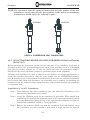
transducers that are mounted in a “Direct Mode” configuration as shown below. This spool
should be installed such that the transducer ports are on the horizontal plane, with the lifting
eye always on top. Vertical installations are not recommended as condensate can collect inside
the transducer ports.
Lifting Eye
Horizontal Plane
FIGURE 1. GAS SPOOL WITH TRANSDUCERS
Always use flange bolts and nuts (not supplied) that are appropriate for the size and class of
the meter flange. Flange Isolation kits (not supplied) should be utilized when indicated by
the facility.
2.2
GENERAL DESCRIPTION OF THE 1011G TRANSDUCERS
All 1011G ultrasonic gas transducers are rated for hazardous area use with an EEX ia IIC T5
rating, and are hermetically sealed with electron beam welded emitting surfaces to prevent
gas penetration into the impedance matching layers. Rapid decompression of the gas line will
not damage the transducer.
1011G and 1011F Insert Transducer Configurations
The 1011G and 1011F series of gas transducers are available in several different styles and
mounting configurations. This variety of configurations is provided to satisfy a wide range of
installation as well as budgetary requirements. A general description of each transducer
configuration is listed below along with their main features and operating limitations:
2-3
1010GNFM-3B
Section 2
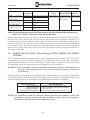
Transducer Style Code* Transducer
Transducer Description Operating Temp
Variations
1011GS
(Para. 2.3)
Field Serviceable style with
O-Ring gas seals.
1011GF
(Para. 2.4)
Fixed Flange style with
flange gasket seals.
1011GC
(Para. 2.5)
Compression seal style
1011GS#A
1011GS#N
1011GF#A
1011GF#N
1011GC#A
1011GC#N
Range
Angled head / normal mount -40 to 250 deg F
Normal head / 45 degree
(-40 to 120 deg C)
mount
Angled head / Normal mount
Normal head / 45 degree
mount
Angled head / normal mount
Normal head /45 degree
mount
Operating
Wetted
Pressure Range
Materials
From atmospheric
pressure to limit of
flange rating.
Stainless Steel
Viton O-Rings
Stainless Steel
Stainless Steel
*NOTE: 1011G natural gas transducers are represented. for Flare Gas systems simply replace the “G”
with “F” (i.e., 1011FS, 1011FF and 1011FC) denote ANSI rating.
Of these three styles only the 1011GS is capable of being inserted or retrieved from a pressurized gas line. The 1011GF and 1011GC are not serviceable at line pressure; therefore it is
recommended that these transducer styles be used only where line shutdown or bypassing is
permitted. Refer to the transducer part number designation located on the spool nameplate
or transducer body. The first 6 characters in the part number should match one of the Style
Codes listed in the table above. Proceed to the appropriate manual paragraph indicated to
the right of this code.
2.3
SERVICING OF 1011GF (Fixed Flange) STYLE INSERT GAS TRANSDUCERS
The 1011GF transducer represents one of the simplest styles available. The gas seal is
accomplished by what essentially amounts to a blind flange with an ultrasonic transducer
rigidly welded through the center of the flange. A pilot on the transducer flange mates with
the mounting flange to insure proper axial alignment of the transducer.
WARNING: This transducer is not serviceable under line pressure. Line must be depressurized and purged of any hazardous gas before removal of
transducers.
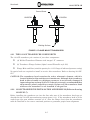
This transducer is available in the configurations represented in the table below and Figure
2. The part number of this transducer style allows for variation in transducer length, head
angle and flange rating as described in the following part number description.
Insert Gas Xdcr P/N
Pressure Rating=A
Xdcr Head Type=B
Transducer Length=C
Drawing and Specifications=D
P/N=1011GF(AB-CD)
ANSI Flange Rating: 150, 300, 600, 900, 1500
N=Orthogonal Beam, An=Angled Head in degrees
XYZ=Length code
Drawing Number Reference and Specification Code #
NOTE: If a transducer must be replaced, insure that the part number of the new
transducer exactly matches the part number of the defective transducer.
Transducers should always be replaced in pairs.
2-4
Section 2
1010GNFM-3B
Ground Screw
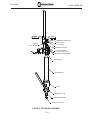
1010GF#A
1010GF#N
Emitting Surface
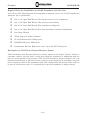
FIGURE 2. FLANGE MOUNT TRANSDUCERS
2.3.1 THE 1011GF TRANSDUCER COMPONENTS
The 1011GF transducer pair consists of just three components:
o
(2) Welded Transducer Element with integral “F” connector
o
(2) Transducer Flange Gaskets (Spiral wound Flextallic style LS)
o
Flange Bolts and Nuts (suitable quantity for 1-1/2" flange of indicated pressure rating)
No special tools are required to install or service this transducer. Refer to drawing 1011GFS5-7
CAUTION: The transducer head contains the active ultrasonic element, which is
located behind a thin stainless steel membrane. Although this transducer
head is able to handle very high gas pressures, it can be easily damaged if
impacted against a sharp object. It is therefore strongly recommended that
the protective plastic cap always remain in place over the transducer head
whenever the transducer is not installed in the gas line.
2.3.2 1011GF TRANSDUCER INSTALLATION AND REMOVAL (Refer to drawing
1011GF-S5-7)
Before installing the transducer set into the line take note of the transducer head type as
described in the 1011GF part numbering system (para 2.1.3). If the transducer head is of the
angled type (the part number contains an “A” after the flange class) then the transducers
must be installed at the correct rotational position to guarantee proper beam alignment.
2-5
1010GNFM-3B
Section 2
Although each transducer in a pair is identical to one another, it is always good practice to
install the transducer with the “A” after the serial number into the UPSTREAM transducer
port. If transducers are to be removed for maintenance then record the associated transducer
port (or path) into which each transducer set is installed prior to removal. Re-installing the
transducers into the same port from which they were retrieved will minimize any possibility
of calibration shift.
Installation of 1011GF Transducers
Step 1. First determine the correct transducer port into which the transducer is to be
inserted (see installation notes above).
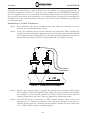
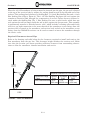
Step 2. Locate the alignment screw on the transducer (if applicable). When angled head
transducers are installed the alignment screw for the upstream transducer should
be facing downstream (along the axis of the pipe) and the alignment screw for the
downstream transducer should be facing upstream (see Figure 3 below).
FIGURE 3. TRANSDUCER ALIGNMENT
Step 3. Remove the protective plastic cap from the transducer head and carefully insert
the transducer (with the supplied flange gasket) into the transducer port. Rotate
the transducer to the desired position (see Step 2 above) then secure with the
supplied flange bolts and nuts using an appropriate tightening torque.
Step 4. Install Teflon tape around the ½” NPT conduit adapter then connect the
appropriate “F” connector transducer cable (paying attention to the path or
channel # and upstream / downstream orientation). Install the cable gland over
the ½” NPT conduit adapter and hand tighten.
2-6
Section 2
1010GNFM-3B
SPECIAL NOTE FOR LINES WITH CATHODIC PROTECTION
All 1011G transducer electronics (signal and return lines) are electrically isolated from the
metal body of the transducer to a minimum resistance of 10 Mega Ohms. If phenolic flange
isolators are used with this transducer it is recommended that the transducer body be
connected to earth ground using the attached lug connector. Connect transducers in accordance
with the Interconnection Diagram (Figure 11).
Removal of 1011GF Transducers
Step 1. First verify that gas line is completely depressurized and purged of any hazardous
gases.
Step 2. Record the transducer serial number and associated port location for each
transducer to be removed.
Step 3. Loosen the transducer cable gland and adapter then slide the adapter back onto
coaxial cable. Before removing the transducer cables be sure to note (or mark)
the position of the cables (port number and upstream/downstream position).
Remove transducer grounding wire, if present.
Step 4. Remove the transducer flange nuts and bolts then carefully withdraw the transducer from the port. Install a protective plastic cap onto the transducer head.
Step 5. If necessary install a blind flange (not supplied) over the open transducer port.
2.4
SERVICING OF 1011GC (Compression Seal) STYLE INSERT GAS
TRANSDUCERS
The gas seal of the 1011GC transducer is provided thought the use of a SwageLok style
compression seal as shown in Figure 4 below. This transducer is a one-component system that
does not rely on gaskets, o-rings or loose bolts to seal or secure the transducer inside the pipe.
No special tools are required to install or service this transducer. Refer to drawing 1011GFS5-7
WARNING: This transducer is not serviceable under line pressure. Line must be depressurized and purged of any hazardous gas before removal of transducers.
CAUTION: The transducer head contains the active ultrasonic element, which is located behind a thin stainless steel membrane. Although this transducer
head is able to handle very high gas pressures, it can be easily damaged if
impacted against a sharp object. It is therefore strongly recommended that
the protective plastic cap always remain in place over the transducer head
whenever the transducer is not installed in the gas line.
1011GC transducers are available in the configurations represented in the table below and
Figure 4. The part number of this transducer style allows for variation in transducer length,
head angle and ANSI rating as described in the following part number description.
Insert Gas Xdcr P/N
Pressure Rating=A
Xdcr Head Type=B
Transducer Length=C
Drawing and Specifications=D
P/N=1011GC(AB-CD)
ANSI Flange Rating: 150, 300, 600, 900, 1500
N=Orthogonal Beam, An=Angled Head in degrees
XYZ=Length code
Drawing Number Reference and Specification Code #
2-7
1010GNFM-3B
Section 2
NOTE: If a transducer must be replaced, insure that the part number of the new
transducer exactly matches the part number of the defective transducer.
Transducers should always be replaced in pairs.
1010GC#N
1010GC#A
FIGURE 4. COMPRESSION SEAL TRANSDUCERS
2.4.1 1011GC TRANSDUCER INSTALLATION AND REMOVAL (Refer to Drawing
1011GC-S5-7)
Before installing the transducer set into the line take note of the transducer head type as
described in the 1011GC part numbering system above. If the transducer head is of the angled
type (the part number contains an “A” after the ANSI class) then the transducers must be
installed at the correct rotational position to guarantee proper beam alignment.
Although each transducer in a pair is identical to one another, it is always good practice to
install the transducer with the “A” after the serial number into the UPSTREAM transducer
port. If transducers are to be removed for maintenance then record the associated transducer
port (or path) into which each transducer set is installed prior to removal. Re-installing the
transducers into the same port from which they were retrieved will minimize any possibility
of calibration shift.
Installation of 1011GC Transducers
Step 1. First determine the correct transducer port into which the transducer is to be
inserted (see installation notes above).
Step 2. Locate the alignment screw on the transducer (if applicable). When angled head
transducers are installed the alignment screw for the upstream transducer should
be facing downstream (along the axis of the pipe) and the alignment screw for the
downstream transducer should be facing upstream.
Step 3. Remove the protective plastic cap from the transducer head and carefully insert
the transducer into the transducer port until it stops against the tapered
2-8
Section 2
1010GNFM-3B
compression seal. Rotate the transducer to the desired position (see Step 2 above)
then secure by tightening the Compression Nut to the torque setting indicated on
drawing 1010GC-S5-7.
Step 4. Install Teflon tape around the ½” NPT conduit adapter then connect the
appropriate “F” connector transducer cable (paying attention to the path or
channel # and upstream / downstream orientation). Install the cable gland over
the ½” NPT conduit adapter and hand tighten.
NOTE: All 1010GC gas transducers are supplied with pre-swagged compression seals.
It is therefore only necessary to tighten the transducer Compression Nut to
the torque setting indicated on the 1011GC-S5-7 drawing.
Removal of 1011GC Transducers
Step 1. First verify that gas line is completely depressurized and purged of any hazardous
gases.
Step 2. Record the transducer serial number and associated port location for each
transducer to be removed.
Step 3. Loosen the transducer cable gland and adapter then slide the adapter back onto
coaxial cable. Before removing the transducer cables be sure to note (or mark)
the position of the cables (port number and upstream/downstream position).
Remove transducer grounding wire is present.
Step 4. Slowly loosen the transducer Compression Nut then carefully withdraw the
transducer from the port. Install a protective plastic cap onto the transducer
head.
Step 5. Install a protective dust cover over the transducer port to keep debris out.
2.5
THE 1011GS (Field Serviceable) STYLE INSERT GAS TRANSDUCER
The 1011GS style gas transducers are capable of being installed or removed from gas spool at
operating line pressure with the use of a redundant rotating shaft O-rings seal, with backup
rings to insure a gas tight installation. Installation and removal of this transducer is
accomplished by means of a COSASCO retriever model RBSA for high-pressure service (900#
and greater) or model #60 for low pressure service (600# or less).
2-9
1010GNFM-3B
Section 2
CAUTION: The transducer head contains the active ultrasonic element, which is
located behind a thin stainless steel membrane. Although this transducer
head is able to handle very high gas pressures, it can be easily damaged if
impacted against a sharp object. It is therefore strongly recommended that
the protective plastic cap always remain in place over the transducer head
whenever the transducer is not installed in the gas line.
The 1011GS transducer part number allows for variation in transducer length, head angle
and ANSI rating as described in the following part number description.
Insert Gas Xdcr P/N
Pressure Rating=A
Xdcr Head Type=B
Transducer Length=C
Drawing and Specifications=D
P/N=1011GS(AB-CD)
ANSI Flange Rating: 150, 300, 600, 900, 1500
N=Orthogonal Beam, An=Angled Head in degrees
XYZ=Length code
Drawing Number Reference and Specification Code #
NOTE: If a transducer must be replaced, insure that the part number of the new
transducer exactly matches the part number of the defective transducer.
Transducers should always be replaced in pairs.
NOTE: If the transducer being serviced (or installed) is rated for ANSI class 900# or
1500# then skip to paragraph 2.5.2. This paragraph describes the use of the
Cosasco #RBSA High Pressure Retriever.
2.5.1 INSTALLATION AND SERVICING OF LOW PRESSURE 1011GS TRANSDUCER (For ANSI 150, 300 and 600#)
1011GS Transducer Components
The 1011GS low pressure insert transducer and mounting kit consists of the following components (refer to Figure 5 below):
o
(2) Transducer Access Fitting
o
(2) Welded Transducer Element with O-Ring gas seals
o
(2) Transducer Flange Gaskets (Spiral wound Flextallic style LS)
o
(2) Transducer Locking Nut (1-3/4" machine thread)
o
(2) Access Fitting Cap (not shown in Figure 5)
o
Flange Bolts and Nuts (suitable quantity for 1-1/2" flange of indicated pressure rating)
2-10
Section 2
1010GNFM-3B
1/2” NPT
TRANSDUCER LOCKING NUT
O-RING SEALS
TRANSDUCER
TRANSDUCER ACCESS FITTING
TRANSDUCER FLANGE GASKET
PIPETTE
FIGURE 5. TRANSDUCER COMPONENTS
2-11
1010GNFM-3B
Section 2
Required Tools for Installation of 1011GS Transducer into Gas Line
You will need the following tools and compounds to properly service the 1011GS transducers
when the line is pressurized.
o
One 1-1/8" Open End Wrench (To attach retriever rod to transducer)
o
One 1-3/8" Open End Wrench (For retriever rod rotation)
o
One 2-1/4" Open End Wrench (For transducer locking nut)
o
One 1-1/4" Open End Wrench (For final transducer rotational adjustment)
o
One Strap Wrench
o
Teflon Tape (for conduit adapter)
o
CC122 Lubricant (for O-Ring seals)
o
COSASCO Retriever Model # 60
o
Controlotron Receiver Body with access valve and NPT locking nut
Description of 1011GS Low Pressure Retriever System
The Controlotron Low Pressure Retriever system, shown in the Figure 6 below, utilizes a
concentric reducer “receiver body” section into which the transducer is withdrawn from the
pipe for servicing under line pressure. The 1011GS transducer design eliminates the cost
associated with having a dedicated service valve for each transducer by providing a gas seal
that is relatively close to the transducer head. This configuration allows the service valve to
be part of the retriever since it is required only when the transducer is being serviced.
2-12
Section 2
1010GNFM-3B
RETRIEVER COUPLING NUT
LOCK WASHER
THRUST
COUPLING ARM
FLAT WASHER
RETRIEVER COUPLING
1” HEX LOCKING NUT
1-1/2” HEX STUFFING NUT
RETRIEVER CLAMP ASSEMBLY
STUFFING BOX
RECIEVER BODY
VALVE
THREADED COLLAR
TRANSDUCER ADAPTER
1/2” NPT LOCKING NUT
FIGURE 6. RETRIEVER ASSEMBLY
2-13
1010GNFM-3B
Section 2
When the 1011GS transducer is being removed or inserted into the pipe, the gas seal is formed
at the top of the receiver body by means of a sealing gland located at the threaded end of the
reducer. This sealing gland consists of a Stuffing Box, 1-1/2 inch Hex Stuffing Nut and a 1-inch
Hex Locking Nut (refer to Figure 6). The 1-1/2" Hex Stuffing Nut forms the seal against the
transducer Retrieval Rod through the compression of several Teflon chevron washers located within the Stuffing Box. The 1" Hex Locking Nut uses a split ferrule, which does not
seal against the rod but simply holds the rod in place against the gas pressure. This assembly
is permanently mated to a threaded service valve, which includes a rotating collar and O-ring
seal for a gas tight connection to the acme threads of the transducer access fitting. Once the
retriever rod is secured to the transducer and receiver body sealed on the transducer access
fitting, then the COSASCO retriever can be used to remove or insert the transducer through
the service valve.
Required Clearances Around Pipe
Refer to the drawing and table below for the clearances required to install and retrieve the
flow transducer from the gas line. This clearance height includes the retriever tool. Make
sure that the location you choose provides sufficient clearance from surrounding obstructions to allow for transducer element installation and service.
Withdrawn
Clearance
Dimension
Entry Angle
Required Clearance for Full Extraction
Transducer Flange
Class
150#, 300# and 600#
PIPE
FIGURE 7. PIPE CLEARANCES
2-14
Normal
30 Degree
45 Degree
Entry
Entry
Entry
87 in.
77 in.
64 in.
(2200 mm) (91959 mm) (1630 mm)
Section 2
1010GNFM-3B
Servicing the 1011GS Gas Transducer using COSASCO Low Pressure Retriever Model #60
The Controlotron model 1011GS transducers are designed to be safely serviced using the
Cosasco model # 60 series retriever and service valve up to a line pressure of 1500 psi (103
bar). Please familiarize yourself with the Cosasco model #60 user manuals for this equipment
before proceeding. As transducer service is infrequently required, proper maintenance of
the tools and practice with their use will facilitate sensor retrieval should the need arise.
The Controlotron pressure seal is a redundant rotating shaft seal (O-rings with back up rings)
that is designed to release system pressure after opening approximately 6 – 9 turns.
Before installing the transducer set into the line take note of the transducer head type as
described in the 1011GS part numbering system above. If the transducer head is of the angled
type (the part number contains an “A” after the ANSI class) then the transducers must be
installed at the correct rotational position to guarantee proper beam alignment. Refer to
transducer alignment diagram for proper positioning of these transducers.
PROPER ALIGNMENT FOR LOW PRESSURE TRANSDUCER
ALIGNMENT MARK
1 01 1 F LA R E GA S T R A N S D U C E R
1 01 1
S /N
1 01 1 F LA R E GA S T R A N S D U C E R
1 01 1
V /M
MAD E IN U SA
S /N
V /M
MAD E IN U SA
PROPER ALIGNMENT FOR HIGH PRESSURE TRANSDUCER
ALIGNMENT MARK
FIGURE 8. TRANSDUCER ALIGNMENT
Although each transducer in a pair is identical to one another, it is always good practice to
install the transducer with the “A” after the serial number into the UPSTREAM transducer
port. If transducers are to be removed for maintenance then record the associated transducer
port (or path) into which each transducer set is installed prior to removal. Re-installing the
transducers into the same port from which they were retrieved will minimize any possibility
of calibration shift.
2-15
1010GNFM-3B
Section 2
Removal of an Installed 1011GS Transducer using Low Pressure Retriever
NOTE: This operation requires a minimum of two people to safely support the receiver body while connecting the retriever rod to the transducer.
1. First record the transducer serial number and associated port location for each transducer
to be removed.
2. Remove the cable gland, transducer cable, access fitting cap and locking nut from the
transducer.
3. Install the ½” NPT locking nut (supplied with the retriever kit) over the transducer’s
conduit adapter threads then wrap 2 or 3 layers of Teflon tape around the adapter threads.
4. With a 1-1/4" open-end wrench loosen the transducer ¼ turn (counterclockwise) to insure
that it turns freely once the retriever is in place.
5. On the retriever system check the condition of the receiver body’s threaded collar. Verify
that the internal acme threads are clean and undamaged and that the large face sealing Oring is in place within the O-ring groove.
NOTE: This O-Ring must be properly installed to guarantee a gas tight seal.
6. Loosen the receiver body Stuffing Nut and Hex Locking Nut then push the retriever rod
until the transducer adapter is extended out from the service valve.
7. With one person supporting the receiver body in-line with the installed transducer,
carefully thread the ½” transducer adapter NPT connection (at end of retriever rod) onto
the transducer’s ½” NPT conduit adapter. Tighten this connection then secure the locking
nut against female NPT connection.
NOTE: The retrieval Rod connection to the transducer must be tight, otherwise it
may loosen during the retrieval process.
8. Push the receiver body toward the transducer access fitting and secure with the threaded
collar, then tighten the collar with a strap wrench. Tighten the hex stuffing nut hand
tight but leave the hex locking nut loose.
9. Assemble the two halves of the retriever Clamp Assembly around the probe Stuffing Box
as shown in Figure 6. Draw the clamp assembly together and secure with the Lever Nut.
Install the Quick Release Pin into the hole provided on the right half of the Clamp Assembly.
10. Install the retriever Thrust Coupling arm over the Retriever Coupling so that it properly
nests within the fitting’s projection, then install the Flat Washer, Lock Washer and
Retriever Coupling Nut as shown in Figure 6. Tighten nut sufficiently to provide slight
compression of the lock washer. This nut allows the transducer to be pulled out with the
retriever if the line pressure is too low.
11. Rotate the retriever handle nut until it rests lightly against the retriever Thrust Coupling.
12. Begin retrieving the transducer by turning the 1-3/8" Hex (retriever coupling at the top of
the retriever rod) counterclockwise, just ½ a turn at a time, while maintaining the retriever
handle in close contact with the thrust coupling at all times. Keep track of the number of
½ turns, as the transducer seal should break after about 6 complete turns, after which the
receiver body becomes pressurized. If gas begins leaking past the Stuffing Nut then tighten
this nut sufficiently to minimize leakage but still allow rotation.
2-16
Section 2
1010GNFM-3B
13. Continue turning the retriever rod until the transducer threads completely disengage,
then continue to rotate the retriever handle, allowing line pressure to drive the probe out
until fully retracted.
NOTE: The retriever’s lower 2-1/4" hex nut is provided on the threaded shaft in the
event that the system pressure is not sufficient to drive out the transducer
(wrench supplied with retriever). If this nut is used, keep the handle nut just
2 threads above the thrust coupling as the transducer is retracted. This will
act as a backup in the event of sudden movement.
14. Fully close the isolation ball valve.
NOTE: If significant valve resistance is experienced then the transducer may not be
retracted enough.
15. Slowly loosen the Stuffing Nut and begin bleeding the gas until pressure within the receiver
body is eliminated and the retriever rod moves freely. Remove the Retriever Coupling
Nut then back off the handle nut and lift the thrust coupling arm clear of the transducer.
Next, remove the quick release pin and loosen the lever nut on the clamp assembly. Swing
open the clamp assembly and remove the retriever from the receiver body.
16. Carefully loosen and disconnect the receiver body from the top of the service valve to
remove the transducer from the line. Use the strap wrench for this operation.
17. Cover valve opening to keep contamination out. Replace transducer as soon as possible or
install P/N: 101561 Service Plug if replacement transducer is not available.
Installation of a 1011GS Transducer using Low Pressure Retriever
If a transducer is to be replaced then first remove the existing transducer following the steps
outlined at the beginning of this section, otherwise it is assumed that an isolation valve is
already in place.
1. First determine the correct transducer port into which the transducer or Service Plug is
to be inserted by verifying the transducer part number and serial number.
2. Install the ½” NPT locking nut (supplied with the retriever kit) over the transducer’s
conduit adapter threads then wrap 2 or 3 layers of Teflon tape around the adapter threads.
3. The receiver body (of the retriever system) should be unscrewed from the isolation valve
(as this valve is already installed on the transducer port). If a valve is present on the
receiver body then it must first be removed before proceeding.
4. Loosen the receiver body Stuffing Nut and Hex Locking Nut then push in the retriever
rod until the transducer adapter extends out from the receiver body.
5. Carefully thread the ½” transducer adapter NPT connection (at end of retriever rod) onto
the transducer’s ½” NPT conduit adapter. Tighten this connection then secure the locking
nut against female NPT connection then withdraw the transducer fully into the receiver
body.
NOTE: The Retrieval Rod connection to the transducer must be tight, otherwise it
may loosen should transducer need to be removed.
6. Wrap 2 to 3 layers of Teflon tape around the NPT threads of the receiver body then screw
the receiver body onto the isolation valve already installed on the transducer port. Tighten
2-17
1010GNFM-3B
Section 2
the hex stuffing nut hand tight but leave the hex locking nut loose. DO NOT OPEN THE
VALVE AT THIS TIME.
7. Assemble the two halves of the Cosasco model #60 retriever Clamp Assembly around the
probe Stuffing Box as shown in Figure 6. Draw the clamp assembly together and secure
with the Lever Nut. Install the Quick Release Pin into the hole provided on the right half
of the Clamp Assembly.
8. Install the retriever Thrust Coupling arm over the Retriever Coupling so that it properly
nests within the fitting’s projection then install the Flat Washer, Lock Washer and
Retriever Coupling Nut as shown in Figure 6. Tighten nut sufficiently to provide slight
compression of the lock washer. This nut allows the transducer to be pulled out with the
retriever if the line pressure is too low.
9. Rotate the retriever handle nut until it rests against the retriever Thrust Coupling.
10. Slowly open the isolation ball valve and check for leaks in the receiver body threads and
compression seal. Tighten as necessary, but do not tighten to the point that it is difficult
to push the probe through the packing.
11. Begin inserting the transducer into the line by slowly rotating the retriever handle
clockwise. When increased resistance is perceived begin rotating the retriever rod
clockwise (using a 1-3/8" open end wrench) while continuing to insert the transducer.
Once the transducer threads are engaged the thrust coupling will start to pull away from
the retriever handle nut. During this time maintain a slight but constant load on the
transducer using the retriever handle.
12. The transducer should bottom out in the access fitting after about 9 complete turns of the
retriever rod (following thread engagement).
13. Slowly loosen the Stuffing Nut to begin bleeding the gas until pressure within the receiver
body is eliminated. Remove the Retriever Coupling Nut and washers then back off the
handle nut and lift the thrust coupling clear of the retriever rod. Next, remove the quick
release pin and loosen the lever nut on the clamp assembly. Swing open the clamp assembly
and remove the retriever from the receiver body.
14. With one person supporting the receiver body in-line with the installed transducer loosen
the threaded collar and carefully back off the valve and receiver body away from the
transducer. Loosen the NPT locking nut and unscrew the retriever rod to remove the
receiver body from the transducer.
15. After the retriever is removed the 1011GS150A, 1011GS300A and 1011GS600A series
transducers must be rotated into the correct position to obtain proper beam direction.
Using a 1-1/4" wrench rotate the transducer counterclockwise to properly align the
transducers along the axis of the pipe (refer to Figure 8 above).
16. Grease the top portion of the transducer machine threads then install and tighten the
transducer LOCKNUT. Next thoroughly grease the acme threads on the access fitting and
install the access fitting cap.
17. Install Teflon tape around the ½” NPT conduit adapter then connect the appropriate “F”
connector transducer cable (paying attention to the path or channel # and upstream /
downstream orientation). Install the cable gland over the ½” NPT conduit adapter and
hand tighten.
2-18
Section 2
1010GNFM-3B
2.5.2 INSTALLATION AND SERVICING OF HIGH PRESSURE 1011GS TRANSDUCERS (For ANSI 900# and 1500#)
1011GS Transducer Components (ANSI 900# and 1500#)
The 1011GS low pressure insert transducer and mounting kit consists of the following
components (refer to diagram below):
o
(2) Transducer Access Fitting
o
(2) Welded Transducer Element with O-Ring gas seals
o
(2) Transducer Flange Gaskets (Spiral wound Flextallic style LS)
o
(2) ½” NPT Conduit Adapter
o
(2) Connector Adapter
o
(2) Hex Lock Plate
o
(2) Access Fitting Cap
o
Flange Bolts and Nuts (suitable quantity for 1-1/2" flange of indicated pressure rating)
EExe CABLE GLAND
ADAPTER
“F” CONNECTOR
ACCESS FITTING CAP
HEX LOCK PLATE
CONNECTOR ADAPTER
1/2” NPT CONDUIT ADAPTER
1011GS SERIES TRANSDUCER
ACCESS FITTING
FIGURE 9. TRANSDUCER COMPONENTS
2-19
1010GNFM-3B
Section 2
Required Tools for Installation of 1011GS Transducer into Gas Line
You will need the following tools and compounds to properly service the 1011GS transducers
when the line is pressurized.
o
One 1-1/8" Open End Wrench (For transducer rotational adjustment)
o
1/16" Allen Key Wrench (for conduit adapter set screw)
o
Teflon Tape (for conduit adapter)
o
CC122 Lubricant (for O-Ring seals)
o
COSASCO Retriever Model # RBSA and Service Valve with instruction manual
Required Clearances Around Pipe
Refer to the drawing and table below for the clearances required to install and retrieve the
flow transducer from the gas line. This clearance height includes the retriever tool. Make
sure that the location you choose provides sufficient clearance from surrounding obstructions
to allow for transducer element installation and service.
Required Clearance for Full Extraction
Re
trie
v
er
Entry Angle
Withdrawn
Clearance
Dimension
Transducer Flange
Class
900# and 1500#
Normal
30 Degree
Entry
Entry
82 in.
71 in.
(2083 mm) (1803 mm)
45 Degree
Entry
58 in.
(1473 mm)
Pipe
FIGURE 10. PIPE CLEARANCES
Servicing the 1011GS Gas Transducer using COSASCO High Pressure Retriever Model
#RBSA
NOTE: This section is provided as a manual addendum to the COSASCO Retriever
Model #RBSA Users Manual for use with Controlotron Model 1011GS Gas
Transducers.
The Controlotron model 1011GS transducers are designed to be safely serviced using the
COSASCO Model RBSA series retriever and service valve. Please familiarize yourself with
the COSASCO User manuals for this equipment before proceeding. Pay careful attention to
Sections 8.0 and 9.0 dealing with retriever tool and valve maintenance. As transducer service
is infrequently required, proper maintenance of the tools and practice with their use will
facilitate sensor retrieval should the need arise.
While the Controlotron system utilizes many of the components of the COSASCO stock access
fitting, plug and seal, the arrangement is not exactly identical and care must be taken to
thoroughly understand the differences.
2-20
Section 2
1010GNFM-3B
The COSASCO main seal is accomplished with a tapered Teflon packing which will release
system pressure into the valve and retriever after “backing off” the plug assembly one or two
turns. The Controlotron pressure seal is a redundant rotating shaft seal, O-rings with back
up rings, that is designed to release system pressure after opening approximately 6 – 9 turns.
Before installing the transducer set into the line take note of the transducer head type as
described in the 1011GS part numbering system above (para. 2.1.3). If the transducer head is
of the angled type (the part number contains an “A” after the ANSI class) then the transducers
must be installed at the correct rotational position to guarantee proper beam alignment.
Angled head transducers have an alignment mark scored into the side of the transducer body
to indicate the orientation relative to the pipe axis.
Although each transducer in a pair is identical to one another, it is always good practice to
install the transducer with the “A” after the serial number into the UPSTREAM transducer
port. If transducers are to be removed for maintenance then record the associated transducer
port (or path) into which each transducer set is installed prior to removal. Re-installing the
transducers into the same port from which they were retrieved will minimize any possibility
of calibration shift.
Removal of an installed 1011GS transducer using High Pressure Retriever
First record the transducer serial number and associated port location for each transducer to
be removed then follow the COSASCO User Manual section 4.0, Retrieval of Solid or Hollow
Plug Assemblies with the following modifications:
Step 2. Set the socket adapter assembly in the third and fifth holes from the hex end.
Step 3. Remove the cable gland and transducer cable. Remove the connector adapter by
loosening the set screw in the hex NPT adapter. Remove the NPT adapter. Remove
the access fitting cap and hex locking plate.
.
Step 4. Loosen the plug 1-2 turns. If significant resistance is encountered, plan on back
pressuring the retriever during the removal operation. See Section 6. Re-seat
the plug but do not tighten.
Step 15.b,c,d.
Retriever pressurization will begin after 6 - 9 turns of the outer barrel.
After 6 turns, proceed slowly, 1/8th turn at a time, stopping when the
retriever begins to pressurize. If the retriever has not pressurized after 9
turns back pressuring will be required. See Section 6.
Install P/N 1015-61 Service Plug if replacement transducer is not available.
Installation of a 1011GS transducer using High Pressure Retriever
First determine the correct transducer port into which the transducer is to be inserted. Remove
service Plug if installed (using above transducer removal procedure).
Follow the COSASCO User Manual section 5.0, Installation of Solid or Hollow Plug
Assemblies Under Pressure with the following modifications:
Step 5.1.b. Lubricate the O-rings and back-up rings with CC122 grease.
Step 5.1.c. The sensor sub-assembly and the plug are assembled and secured with the set
screw at the factory. Disassembly in the field is not recommended.
Step 5.1.d. 1011GS900N and 1011GS1500N series transducers require no orientation
relative to the flow axis.
2-21
1010GNFM-3B
Section 2
Step 5.11.
The transducer will meet with a positive stop after 14 or 15 turns of the outer
barrel. Do not over tighten. NOTE: The 1011GS900A and 1011GS1500A series
transducers must be rotated into the correct position to obtain proper beam
direction. Using a 1-1/8" wrench rotate the transducer counterclockwise to
properly align the transducers along the axis of the pipe (refer to Figure 8).
Steps 5.16,17,18.
Thoroughly grease the acme threads on the access fitting and install
the hex locking plate and the access fitting cap. Install the connector
adapter; assuring the keyed end is fully seated. Use Teflon pipe tape
on the NPT adapter threads then slip it over the connector adapter O
ring, thread into place and secure the connector adapter with the set
screw.
Install Teflon tape around the ½” NPT conduit adapter then connect the appropriate “F”
connector transducer cable (paying attention to the path or channel # and upstream/
downstream orientation). Install the cable gland over the ½” NPT conduit adapter and hand
tighten.
2.6
SERVICE AND MAINTENANCE OF 1011G INSERT TRANSDUCERS
2.6.1 TRANSDUCER HEAD FOULING
The 1011G ultrasonic transducers will provide many years of service under normal operating
conditions, however a significant degradation in signal level, as indicated by the meter’s
automatic level control (ALC), may indicate fouling of the transducer heads. The degree and
frequency of transducer fouling depends solely on the properties of the gas (such as the presence
of condensate). In such cases it may be necessary to remove the transducers from the pipe to
clean any buildup of tar or other heavy contamination from the transducer head.
After retrieving the transducer from the pipe use a clean towel dampened with kerosene or
other solvent to remove any coating that may be present on the flat (active) surface as well as
the sides of the transducer head.
Install transducers back into the pipe and compare prior to new ALC signal levels. If
contamination was found to be the problem with poor meter performance then a regular
transducer cleaning schedule should be considered to avoid unanticipated meter down time.
2.6.2 GENERAL MAINTENANCE
o
Transducer Repair: The entire transducer element is hermetically sealed and cannot
be easily repaired in the field. In the unlikely event that the transducer fails or is
physically damaged, it should be returned to the factory for repair or replacement.
o
COSASCO Model #60 retriever tool: The retriever should be kept clean and free of
dirt, sand and foreign material that could hamper operation. The threaded shaft
should be kept lightly lubricated with a high quality waterproof grease.
o
Refer to the COSASCO Model # RBSA manual for any required maintenance of this
retriever.
2-22
Section 2
1010GNFM-3B
TRANSDUCER CABLE
CONNECTORS
1010GN
FLOWMETER
POWER
SWITCH
INPUT POWER
CONNECTOR J10
POWER IN
UP CONNECTOR
DOWN CONNECTOR
INPUT MODULE
Analog Outputs
Digital Outputs
Analog Inputs
RS-232 I/O
UPSTREAM
TRANSDUCER
CABLE
DOWNSTREAM
TRANSDUCER
CABLE
Channel 1 (UP)
Channel 1 (DN)
POS FLOW
FIGURE 11. Interconnection Diagram
2-23
1010GNFM-3B
Section 2
2.7
POWER SUPPLY WIRING
WARNING: Turn off main power before installing AC connections to the 1010GS flowmeter. Contact with exposed wiring may lead to fire, electric shock, or
serious personal injury.
l
l
l
l
Open the 1010GN flowmeter top cover by releasing the cover latch (see drawing 1010GN-7).
Unscrew the two power supply access cover fasteners and remove access cover.
Locate power supply connector J10.
Wire input power connector P10 for AC or DC power as shown below. Insert wires into
wire entry holes and secure by tightening wire clamp screws.
NOTE: Power Supply connector wires should be stripped stranded or solid conductors AWG 12 -18.
1
2
3
P10
1
AC HOT NEU GND
DC + GND
2
3
Stripped Wire
Connector
Mounting
Screws
Wire
Clamp
Screws
Input Power Connector (P10) Wiring
l
l
l
l
l
l
Plug input power connector (P10) into connector J10 and secure using two captive connector mounting screws as indicated above.
Pull wires through flowmeter case cable hole.
Replace access cover.
Place power ON/OFF switch to the OFF position.
Connect the power cables to the appropriate power source (100-250 VAC @ 50/60 Hz or 936 VDC).
Place power ON/OFF switch to the ON position and power up unit. If unit is operational,
turn power off and install transducer cables.
2-24
Section 2
2.8
l
l
1010GNFM-3B
PRELIMINARY SETUP PROCEDURE
Pressurize spool, if necessary to acheive operation, then check connections for leaks.
Place 1010GN flowmeter power switch to the ON position.
2.8.1 GRAPHIC DISPLAY SETTINGS
l
Within 30 seconds of power-up the flowmeter main display will become active.
Selected
Measurement
Path or [5] Sys
Site Setup Name
Meter Type
Channel [1]
FT 1201
FLOW CU FT/HR
Percent
of Span
Bargraph
Display
Vfo
(Volumetric
Average
Flow
Output)
Flow
Total
KCU FT
392
Measured
Sonic Velocity
Instantaneous
Volumetric
Flow Rate (%)
NOTE: Typical display screen for factory-installed units.
l
Press the
to scroll between the available display screens and modes.
2.8.2 INSTALLATION OF SPOOL PARAMETERS
Factory-Installed Flowmeters and Spools
If a FDC and Gas Spool was shipped as a set from Controlotron, all of the critical gas spool
parameters should already be pre-installed into the FDC. In this case, simply turn the meter
ON and proceed to Section 3 - Getting Started. If these parameters were not pre-installed
then proceed as indicated below, where the initial installation of the FDC and gas spool must
be completed before the system can measure gas flow.
Installation of Stand-Alone Flowmeters and Spools
Refer to the appropriate Gas Spool Setup Data Sheet for the Gas Spool and FDC pair being
installed. For a summary of the minimum steps needed to get the meter operational with the
transducers, refer to Section 1, paragraph 1.2 - Flowmeter Installation Steps. For detailed
explanations of these installation steps, refer to Section 4 - The 1010GN Installation Menu.
2-25
Section 3
1010GNFM-3B
3.
GETTING STARTED
3.1
THE KEYPAD ENABLE SWITCH
System 1010GN models with integral keypads provide a keypad enable/disable switch to prevent unauthorized access to the Installation Menu. In addition, a password entry option is
available (see paragraph 4.1 Channel/Path Setup Menu). The keypad enable/disable switch is
located inside the lockable enclosure right above the I/O wiring terminal. Please switch to the
enable position before proceeding further. If necessary, see drawings 1010N-7 or 1010DN-7
for its location.
3.2
THE 1010 KEYPAD
The 1010GN integral keypad provides 32 numeric and function keys (see table below). Use
these keys to enter, review or edit the site data. Certain keys control the graphics display,
KEYPAD FUNCTION CHART
KEY
MENU
ENT
LEFT, RIGHT ARROWS
UP, DOWN ARROWS
CLR
NUMBERS 0-9
DECIMAL POINT
MATH OPERATORS
“F” KEYS 1-3
“F4” KEY
CTL & ALT
DATALOG
PLUS/MINUS [+/-]
USAGE
Press to activate the Installation Menu.
Press <ENT> to store numeric data, select from option lists, etc.
Menu navigation keys move cursor in respective directions.
Same as <Left> and <Right>. Also scrolls option list and graphic
display screen.
Clear Key for erasing data, or selecting list options.
Use to type numeric data.
Use for decimal points in numeric data.
Allows 4-function math operations in numeric entry cells.
Totalizer control and special function keys.
CAUTION: SYSTEM RESET KEY (during power up)
Used as shift keys for alternate key functions.
Triggers immediate Datalogger report.
Changes the sign of numeric data.
NOTE: The keypad does not have alphabetic keys. Scrolling lists provide alpha-numeric characters as needed.
3-1
1010GNFM-3B
Section 3
3.3
INTRODUCTION TO THE 1010 MENU SCREENS
The figure below shows a typical 1010 menu screen for a dual path system (in this case, the
Edit/Install Meter Menu).
Current Selected
Measurement Path
Menu Prompt Line
(Reverse Video)
Highlighted Data
Controlotron
Highlighted
Menu Cell
Menu Cell Data
(left-hand column)
Site Name Identified
Current Selected
Meter Type
Dual Path [1]
Spool ID (in)
Path Length (in)
Axial Offset
Fixed Time uSecs
Install Complete
Zero Flow Adjust
SITE 1
7.900
8.000
7.980
5.0
Yes
Actual Zero
Menu Cell Data
(right-hand column)
Edit/Install Meteriquid Class
Current Selected Menu
TYPICAL INSTALLATION MENU SCREEN
EXPLANATION OF THE CALLOUTS
Menu Prompt Line
Current Selected
Meter Type
Selected Path
Highlighted Menu
Cell
Highlighted Data
Menu Cell
Menu Cell Data
Current Selected
Menu
When you select a menu cell, a highlighted text prompt appears on the top of
the screen to explain the function of the cell.
[Dual Path] indicates Dual path meter operating mode selected.
The [1] indicates that measurement Path 1 is currently selected.
The menu cursor (highlight bar) shows where you are currently working by
reversing the display colors for that cell (white type on black).
The right-hand column shows the current value highlighted. Pressing the
<Right Arrow> provides access to an option list or numeric field where you
can change the current value as required.
A menu cell is an individual location within a menu (e.g., Gas Parameters)
that stores a parameter (either a numeric entry or an option list selection.
The right-hand column shows the current value stored by left-hand column
menu cell. The Gas Parameters menu includes option list items and numeric
entries.
The highlighted bar at the bottom of the screen shows the name of the menu
that you are accessing (e.g., Gas Parameters).
3-2
Section 3
3.4
1010GNFM-3B
HOW TO USE THE INSTALLATION MENU
This section introduces the System 1010 Installation Menu. It explains how to access and
leave the Installation Menu and how to enter site data. The Installation Menu consists of submenus, each providing individual menu locations (menu cells) that store site data. For convenience, this manual refers to sub-menus simply as menus (e.g., the Gas Parameters Menu).
Shown below is the setup screen for of a dual path meter. Single path systems are similiar to
Dual Path menus.
Controlotron
Dual Path
SITE 1
Create-Name-Recall-Enable & Delete Site
Channel/Path Setup
Gas Parameters
Edit/Install Meter
Operation Adjust
Flow/Total Units
Data Span/Set/Cal
Stripchart Setup
Datalogger Setup
I/O Data Control
Diagnostic Data
7.900
Channel/Path Setup
Please do not let the size the Installation menu intimidate you. Almost all menu cells already
contain default parameters. To begin operation, you only need to access the menu cells that
control a required parameter, such as the [Edit/Install Meter]. You will see that by accepting
most defaults, you can set up the meter in about five minutes.
3.4.1 ACCESSING AND LEAVING THE MENU
Upon first turning the meter on you see a graphic of Controlotron’s main facility. This means
that there is no active site setup currently stored in memory. Note that this screen identifies
the software version of the meter on the upper right-hand corner of the display.
ver. 3.00.00
Software Version
(x.xx.xx)
Make sure the keypad enable switch is in the correct position then press the <MENU> key to
select the menu. The first time you access the Installation Menu, you can leave it only by
saving a site or by turning the meter off. After installing and activating a site, use the <MENU>
key to toggle between a graphic display screen and the last accessed menu location.
3-3
1010GNFM-3B
Section 3
When you press the <MENU> key, the cursor arrives at the first level of the Installation
Menu. Refer to the sample screens below. The left screen is from a dual path model. The right
screen is from a single path model. Note that two columns, one on the left-hand side and the
other on right-hand side, divide the screen. The first left-hand item, [Meter Type], is highlighted (white type on black). [Meter Type] allows you to choose a meter configuration from
the highlighted right-hand column list. With single channel models, the only option is [Single
Channel]. The next left-hand selection is [Meter Facilities]. Use the [Meter Facilities] menu
to set global meter options and controls.
Top menu screen for single-channel system
Controlotron
Site
[1]
Select Meter Type
Top menu screen for dual-channel system
Controlotron
Dual Path
SITE 1
Select Meter Type
Meter Type
Meter Facilities
>Dual Path Flow
Meter Type
Meter Facilities
Single Channel
3.4.2 HOW TO ENTER DATA
The left-hand column shows the menu cells (described previously). Another way to think about
left-hand column items is to consider them menu questions. Then you can see that the righthand column answers these questions. Right-hand column answers can be:
l
l
l
l
Another series of menu cells (may become left column items when selected).
An item from a scrollable option list.
A numeric entry.
An alphanumeric string (e.g., a site name).
Selecting Items from an Option List
This example shows how to use an option list to select the preferred flow units for your application. Do not worry about how to access this menu right now. That will be explained later.
Examine the screen below. Note that the menu name [Flow/Total Units] appears in reversevideo text on lower left of the screen. Note also that a reverse video bar highlights the menu
cell [Flow Volume Units] and the right-hand column shows the current default [Cubic Feet].
Controlotron
Dual Path
SITE 1
Choose desired Flow rate volume units
Flow Volume Units
Std Flow Comp.
Flow Time Units
Flow Display Range
Flow Display Scale
Total Volume Units
Totalizer Scale
Total Resolution
Totalizer Mode
Batch/Sample Total
Cubic Feet
No
HR
Autorange
KCU FT/HR
Cubic Feet
KCU FT
00000x00
NETFLOW
0.000
Flow/Total Units
3-4
Section 3
1010GNFM-3B
Pressing the <Right Arrow> again accesses the option list. This expands the reverse video
highlight to show the list contents. Note that a cursor (arrow) points to the top item on the
list.
Controlotron
Dual Path
SITE 1
Choose desired Flow rate volume units
Flow Volume Units
Std Vol Corr
Flow Time Units
Flow Display Range
Flow Display Scale
Total Volume Units
Totalizer Scale
Total Resolution
Totalizer Mode
Batch/Sample Total
>Cubic Feet
No
Cubic Meters
Pounds
Kilograms
Tons
Metric Tons
Ft/Sec (Vel)
M/Sec (Vel)
0.000
Flow/Total Units
The <Up and Down Arrows> scroll option lists in their respective directions. Every press
moves the cursor to the next item in sequence. Due to the size of the display screen, some
option lists include more items than those shown on the initial display. In which case you
arrive at the last item on a list and the next <Down Arrow> press brings you back to the top of
the list. This is because the option lists are of the “wrap-around” type.
To select an option list item, move the cursor to the item and then press the <ENT> key.
This places your selection at the top of the list and moves you out of the option list to the
next menu cell. The option list item: [Pounds] has been selected. Note that this appears on the
right-hand column and that the reverse video highlight area moves to the next menu cell in
sequence: [Std Vol Corr].
Controlotron
Dual Path
SITE 1
Choose desired Flow rate volume units
Flow Volume Units
Std Vol Corr
Flow Time Units
Flow Display Range
Flow Display Scale
Total Volume Units
Totalizer Scale
Total Resolution
Totalizer Mode
Batch/Sample Total
Cubic Feet
No
HR
Autorange
KCU FT/HR
Cubic Feet
KCU FT
00000x00
NETFLOW
0.000
Flow/Total Units
Multiple Select Option Lists
Certain option lists allow you to make more than one selection. For example, the [Datalogger
Data] option list allows you to select any or all of the available data items for your reports. As
previously described, you can use the <Up and Down Arrows> to move the cursor through the
list. However, if you press <ENT> to select an item, a plus sign (+) appears next to that item.
The cursor remains within the option list so that you can make other selections. To deselect a
previously selected item, move the cursor next to that item and then press <CLR>. You use
the <Left Arrow> to leave a multiple select option list.
3-5
1010GNFM-3B
Section 3
Controlotron
Dual Path
Select Datalogger Data
Datalogger Mode
Datalogger Data
Log Time Interval
Datalogger Events
Display Datalogger
Path 2
+Site Id
+Date
+Time
Flow
+Average Flow
Raw Flow
+Total
+Vs
Vtrb
>Alarms
Datalogger Setup
Entering Numeric Data
When a menu cell requires a numeric answer, press the <Right Arrow> to access a number
entry field. An equal sign (=) appears before current entry. For example, in the following Gas
parameters menu screen the [Base Pres. PSIA] menu cell shows: [=14.7]. You can now use the
number keys and the decimal point key to type a new value. If applicable, you can use <+/->
keys to change the mathematical sign of the number. Press <ENT> to store the numeric data.
NOTE: All Numeric Data cells provide a four-function calculator via the keypad’s arithmetic function keys.
Controlotron
Base Temp. F
Base Pres. PSIA
Spec. Heat Ratio
Viscosity (cP)
Fixed MW g/mole
Estimated Vs m/s
Fixed Temp. F
Fixed Pres. PSIA
Z Base
Z Actual
AGA8 Comp
Dual Path
SITE 1
60.0
= 14.7
1.30
0.010
0.0
450
60.0
14.7
1.000
1.000
Yes
Gas Parameters
Entering Alphanumeric Strings
An alphanumeric string refers to a series of ASCII characters, (either numbers, letters or
symbols), that the meter uses to identify a specific site setup or user-modified table. The
1010GN keypad does not provide letter keys. However, when you access a menu cell that
requires an alphanumeric string answer, the menu cell right-hand column provides an eightcharacter entry field.
Press the <Right Arrow> to access the alphanumeric entry field and to select the first character position. Note that the prompt changes to a question mark (?). With the cursor at the first
character position, use the <Up or Down Arrows> to scroll through a single-character ASCII
list. For example, as shown below, an <Up Arrow> at the first character position produces the
letter: upper-case [A]. The <Right Arrow> moves the cursor to the second position.
3-6
Section 3
1010GNFM-3B
Controlotron
Dual Path
SITE 1
Right Arrow & Enter Creates a new Site
Recall Site Setup
Channel Enable
Create/Name Site
Site Security
Delete Site Setup
Save/Rename Site
No
n
?An
Off
No Sites
Channel/Path Setup
Use the <Right and Left Arrows> to move through the character positions. If you wish to use
numbers in your string, you can type them directly from the keypad. After you finish selecting
your string, press <ENT> to register it.
3.4.3 THE METER TYPE MENU
This is the first list presented upon entering the Installation Menu. Select the type of meter
required for your application. The meter automatically conditions Installation Menu choices
to suit the selected meter type. The following paragraphs introduce the available meter types
for dual path systems.
NOTE: On Single Channel systems, you do not get a choice of meter types, since this
requires two independent measurement paths. However, you can operate the
single channel with any optionally supplied measurement technology.
Dual Channel Flow (Only available as Special Order)
Dual Channel Flow provides two independent measurement channels that operate simultaneously.
Channel 1
Flow
Spool 'A' Flow Rate
SPOOL `A'
SPOOL `B'
Channel 2
Flow
3-7
Spool 'B' Flow Rate
1010GNFM-3B
Section 3
Dual Path Flow
Dual Path Flow uses two measurement channels to achieve a single output via a “virtual”
third channel. The resultant data is the average of the two channels. Benefits include highest
available precision and enhanced immunity to distorted flow profile conditions.
Channel 1
Flow
Ch1 + Ch2
2
Gas Spool
Output
(average of
Ch 1 & Ch 2)
Channel 2
Flow
Selecting a Meter Type
The following example explains how to select a dual path clamp-on meter and initiate site
programming for the sensing path. Your [Meter Type] selection, as well as other menu selections, are “remembered” through power cycles.
NOTE: If you have a single channel system, once selected, the menu goes directly to
the Channel/Path Setup menu by pressing the <Right Arrow>. The site setup
procedure for a single-channel system is identical to setting up a measurement channel on a dual path system.
As shown in the steps below, selecting this mode only requires <Right Arrow> key presses.
This is because dual path is the default configuration for this instrument.
1. Make sure that the keypad enable switch is in the Enable position. Turn on power and press
<MENU> to access the [Meter Type] screen. Refer to the figure below. Note that on the lefthand column [Meter Type] is highlighted. Press the <Right Arrow>. This places a cursor
(è) next to [Dual Path Flow].
Controlotron
Dual Path
Select Meter Type
Meter Type
Meter Facilities
>Dual Path Flow
Liquid Class
3-8
Section 3
1010GNFM-3B
2. Press the <Right Arrow> again. This selects [Dual Path Flow] menu.
Controlotron
Dual Path
Create-Name-Recall-Enable & Delete Site
Channel/Path Setup
Gas Parameters
Edit/Install Meter
Operation Adjust
Flow/Total Units
Data Span/Set/Cal
Stripchart Setup
Datalogger Setup
I/O Data Control
Diagnostic Data
7.900
Dual Path Flow
3. Note that the first menu, [Channel/Path Setup], is highlighted. Press the <Right Arrow> to
access the Channel/Path Setup menu.
Creating a New Site Setup (See also paragraph 4.1.3)
The Channel/Path Setup section of this manual provides detailed instructions on how to use
all the Channel/Path Setup menu commands. This section provides an example of how to use
the [Create/Rename Site] command to create a new site setup. Always begin a new installation by issuing the [Create/Name Site] command. Although you do not need to enter a site
name to create a new site setup, you have to provide one to save the site setup or to identify
the source of logged data. In this example, we will use [SITE1] for the site name.
1. At the [Dual Path Flow] menu cell, press the <Right Arrow> to access the [Channel/Path
Setup] menu. Press the <Right Arrow> again and then move the highlight down to [Create/
Name Site].
Controlotron
Dual Path
Right Arrow & Enter Creates a new Site
Recall Site Setup
Channel Enable
Create/Name Site
Site Security
Delete Site Setup
Save/Rename Site
No Sites
No
Off
No Sites
Channel/Path Setup
2. Press the <Right Arrow>. Note that the cursor changes to a block, which appears after a
question mark (?). This indicates that you have accessed the first character position of an
eight-character (max.) alphanumeric entry field.
3-9
1010GNFM-3B
Section 3
Controlotron
Dual Path
Right Arrow & Enter Creates a new Site
Recall Site Setup
Channel Enable
Create/Name Site
Site Security
Delete Site Setup
Save/Rename Site
No Sites
No
n
?n
Off
No Sites
This block cursor is
currently placed at
the first character
position.
Channel/Path Setup
3. Press and hold the <Up Arrow>. Note that the character position begins to scroll upward
through the alphabet of capital letters. Continue to scroll until the block cursor shows [S].
Press the <Right Arrow>.
NOTE: The character [S] remains at the first character position and the block cursor
moves to the second character position.
Controlotron
Dual Path
Right Arrow & Enter Creates a new Site
Recall Site Setup
Channel Enable
Create/Name Site
Site Security
Delete Site Setup
Save/Rename Site
No Sites
No
n
?Sn
Off
No Sites
Channel/Path Setup
4. Press and hold the <Down Arrow>. Note that the capitalized alphabet list begins to scroll
downward through the alphabet from [S]. Stop scrolling at letter [I]. Press the <Right Arrow> to move the block cursor to the third character position.
5. Scroll back up to letter [T]. Move the cursor to the fourth character position. Scroll down to
letter [E]. Move the cursor to the fifth character position. Type [1] on the numeric keypad to
complete the site name.
Controlotron
Dual Path
Right Arrow & Enter Creates a new Site
Recall Site Setup
Channel Enable
Create/Name Site
Site Security
Delete Site Setup
Save/Rename Site
No Sites
No
n
?SITE1n
Off
No Sites
Channel/Path Setup
3-10
Section 3
1010GNFM-3B
6. Press <ENT> to create the site setup named [SITE1]. Note that the name now appears in
the [Save/Rename Site] menu cell and on the upper right corner of the graphic screen.
Controlotron
Dual Path
SITE1
Use with Care -- Turn Security On or Off
Recall Site Setup
Channel Enable
Create/Name Site
Site Security
Delete Site Setup
Save/Rename Site
No Sites
No
SITE1
Off
No Sites
SITE1
After creating a Site
Setup, the assigned
name appears in
these places.
Channel/Path Setup
3-11
Section 4
4.
1010GNFM-3B
THE 1010GN INSTALLATION MENU
CAUTION: The 1010GN flowmeter menu parameters may have been pre-set at the
factory. The following section is provided for user reference should it be
needed. Highlighted paragraph headings within this section indicate those
menu cells that should be used only if the site needs to be completely installed.
For example: THE CHANNEL/PATH SETUP MENU
Use care particularly when changing Site Setup and Transducer Install
menu cells. Note also that the 1010GN may be shipped with a factory preset Site Setup and that it is recallable.
Programming System 1010GN requires no special experience or training. This field manual
contains all the necessary information. If you intend to connect this instrument to an external device, then please have the instruction manual for the device available for reference.
The following paragraphs present a generic menu reference that applies to all configurations
of 1010 meters.
This section contains a general description of how to enter site setup data via
Installation Menu. It assumes that you have already selected a meter type as
the Getting Started section. For convenience, it presents the Installation Menu
sequence as it appears on the menu screen. Please note, however, that it is not
program the meter sequentially.
the 1010GN
described in
in the same
necessary to
Manual Conventions
l
When the text refers to a keypad key, it will be enclosed in “less than” (<) and “greater
than” (>) symbols: e.g., <MENU>, <ENT>, <Up Arrow>, etc. Where a visual of the key is
shown; this means press this key.
l
When the text refers to a menu or menu cell name, it will be enclosed with square brackets: e.g., [Gas Parameters], [Channel Enable], etc.
l
Each menu includes an image of its main screen and a diagram of its structure. The rightmost
column of the structure diagram lists the option list choices of the menu cell, if applicable.
General Installation Menu Notes
l
If a power failure occurs while you are entering or editing data, the entered data may not be
retained in Active Memory.
l
Although you can operate the meter immediately after completion of a site setup, we recommend that you preserve your settings by saving them under a site name. Site data can be
saved at any time before invoking [Recall Site Setup] or [Create/Rename Site] commands.
These commands overwrite all data present in Active Memory.
l
We do not recommend that you attempt to operate the flowmeter at a new site by recalling
and then editing an existing site setup. Each site must have its own set of transducer install
parameters, even if the data from the recalled site setup is identical. Always issue the
[Create/Rename Site] to begin a new site setup. This will fill all the menu cells with defaults to eliminate the possibility of retaining unwanted parameters.
l
The meter allows you to create your own personal site setup defaults. After creating a site
setup and editing default parameters as desired, save the site using the name [FASTSTRT].
The next time you issue the Create/Name Site command, your custom parameters will become the systems defaults.
4-1
Section 4
4.1
1010GNFM-3B
THE CHANNEL/PATH SETUP MENU
The Channel/Path Setup Menu is available after picking a meter type and a measurement
technology. Use this menu to manage site setups. You can create, recall, delete and save entire site setups. You can apply Site Security, which permits read-only access to the Installation Menu unless you enter a password. The [Channel Enable] menu cell allows you to disable
and enable a measurement channel. Be aware that site name option lists only show sites that
are consistent with the currently selected meter type.
CHANNEL/PATH SETUP MENU STRUCTURE
Channel/Path Setup
ô
ð Recall Site Setup *Site Name List
ð Channel Enable ð Yes
ô No
Create/Name
Site
ð
ð*Site Name Entry/Edit
Site
Security
ðôOff
ð
On
Delete
Site
Setup
ð
ðSite Name List
Save/Rename
Site
ð
ðSite Name Entry/Edit
This shows that the
Meter Type is Dual
Path, operating with
Path 1 active.
This shows that
the site setup
[XYZ] is the active
site.
Controlotron
Dual Path [1]
Scroll saved Site Setup list and Enter
Recall Site Setup
Channel Enable
Create/Name Site
Site Security
Delete Site Setup
Save/Rename Site
Use this menu cell to create and
name a site setup. Note that the
cell retains the name of the
most recently created site setup
[XYZ].
Use this menu cell at any time
to manually save the site data.
Note that attempting to leave
the menu after entering/editing
any site data triggers a Save
Site pop-up window
automatically.
XYZ
Yes
1
Off
1
1
XYZ
Flow
Channel/Path Setup
Use this menu cell to free up site storage
memory by deleting obsolete site setups.
Note that the cell retains the name of the
most recently created site setup [XYZ].
This option list expands as you save more
sites.
4-2
This cell shows that
site setup [XYZ] is
stored in memory,
and can be recalled.
This option list
expands as you save
more sites.
Use this menu cell to
enable or disable Site
Security. Provide a
password to enable.
Re-enter the
password to disable.
Section 4
1010GNFM-3B
4.1.1 HOW TO RECALL A SITE SETUP
The [Recall Site] command allows you to reinstall the system at a former site. For an original
installation, see Create/Name Site for instructions on how to create a new Site Setup. This
menu cell provides a list of saved site names. Scrolling to a site name and pressing <ENT>
moves all the parameters associated with that name into Active Memory.
If there are no site setups present in site storage memory, the menu cell reports [No Sites] in
the right-hand column. Saving a site setup with a site name adds the name to this option list.
The first selection on the list is the currently active Site Setup. The system will be ready for
operation after you install the transducers and make the required hardware connections.
Note that the installed transducers must comply with the recalled site parameters.
To recall a Saved Site Setup: (Where a visual of the keys is shown; this means press this key)
1. Press the <Right Arrow> to access the list of saved site names.
2. Use the <Down Arrow> to move the cursor to the Site Name.
3. Press <ENT>. This triggers a pop-up window that asks if you intend to use the original
transducer position (recommended). This means that you have to remount the transducers
exactly as they were in the previous install.
4. Press <ENT> to recall the stored site setup. This enables the measurement channel for
immediate operation.
If you cannot recreate the original transducer installation, then press the <Down Arrow> to
change the pop-up list from [Original] to [New]. Press <ENT>.
This disables the measurement channel until you repeat the Pick/Install Spool routine.
4.1.2 HOW TO ENABLE AND DISABLE A SENSING PATH
The flow computer disables a sensing path until the completion of the required Site Setup
entries and the transducer installation procedure. The meter enables the measurement channel automatically after it receives all required site data and completes the Spool install routine. (The [Site Enable] menu cell allows you to disable or enable a measurement channel after
there has been a successful transducer install).
The system does not require your presence for routine operation. If a fault condition (e.g., an
empty pipe) disrupts operation, the system will recover automatically after the fault clears.
Use Channel Enable [No] to turn off a channel that is currently unused but active; for example, if the transducers have been removed for servicing.
To disable a channel that is operating:
1. Press the <Right Arrow> to access the [Channel Enable] option list.
2. Use the <Up or Down Arrow> to move the cursor to [No].
3. Press <ENT> to disable the measurement channel.
To enable a channel:
1. Press the <Right Arrow> to access the [Channel Enable] option list.
2. Use the <Up or Down Arrows> to move the cursor to [Yes].
3. Press <ENT> to enable the measurement channel.
4-3
Section 4
1010GNFM-3B
4.1.3 HOW TO CREATE/NAME A SITE SETUP
Use this command to create a new Site Setup. This is the first action required for an original
installation. Create/Name Site inserts system defaults in all the appropriate menu cells. You
can edit these defaults as necessary to suit your needs.
You do not have to provide a site name in order to create a new Site Setup. You can create a
site simply by pressing the <Right Arrow> to access the menu cell entry field and then pressing <ENT>.
This creates a “nameless” Site Setup. However, if you intend to use the meter’s multi-site
storage facility, you must enter a unique site name for each site setup you want to retain in the
site storage memory.
To create and name a new Site Setup:
1. Press the <Right Arrow> to access the first character position.
2. Use the <Up or Down Arrow> to select a character, then press the <Right Arrow> to highlight to next character position.
3. Use the <Up or Down Arrow> to select the second character.
4. Repeat this process to select all the characters (8 max.) you want to use to identify the new
Site Setup.
5. Press <ENT> to create the new Site Setup.
NOTE: If you decide to use numbers or a decimal point in the site name, you can type
these characters directly from the keypad.
4.1.4 HOW TO ENABLE/DISABLE SITE SECURITY
With Site Security enabled, the meter will require a password before it allows any activity
that could interrupt or affect system operation. You can still access the Installation Menu.
However, Site Security limits access to the viewing of parameters only. In other words, you
will still be able to review site data, but you will not be able to make any changes.
Activate Site Security with care. Once activated, the only way to deactivate it is via the Site
Security [Off] command. However, the cursor will not move to the Site Security option list
until you enter the correct password. Therefore, it is essential that you never forget or misplace the password. The only way to deactivate Site Security without knowing the password is to return the unit to Controlotron. However, the process the factory uses
to remove site security will eliminate any existing Site Data as well. The flowmeter will allow
an <F4> Reset Sequence when Security is active, however, it also contains a Menu Enable
switch that allows you to inhibit this function (see drawing 1010N-7).
CAUTION: MAKE CERTAIN THAT YOU RETAIN A COPY OF THE PASSWORD IN A SECURE LOCATION.
To activate Site Security:
1. Press the <Right Arrow> to access [Site Security] option list.
4-4
Section 4
1010GNFM-3B
2. Press the <Up or Down Arrows> to scroll the option list to [On], then press <ENT>. [Enter
Code?] appears at the top of the display screen.
3. Use the numeric keys or the <Up or Down Arrows> to move the cursor to the first character
position.
4. Press the <Right Arrow> to move the cursor to the second character position.
5. Repeat the selection process for the second character. Continue this process until all the
required characters (8 max.) appear in the field.
6. Press <ENT> to store code. [Confirm Code ?] appears at the top of the display screen.
7. Re-type the code exactly as described above.
8. This moves the cursor to the [Site Security] option list.
9. Use the <Up or Down Arrows> to scroll the option list to [Site Security: On]. Once you turn
on Site Security, you must enter the correct code to turn it off.
10. Press <ENT> to activate Site Security
4.1.5 HOW TO DELETE A SITE SETUP
If you attempt to save a Site Setup when the memory is full, the screen will show [Memory
Full]. If you receive this message after issuing a Save/Rename Site command, then you will
have to delete an unneeded Site Setup to clear memory space. Note that Datalogger storage
and Site Storage share a common memory pool. Therefore, a large amount of logged data could
also trigger the [Memory Full] message. See [Meter Facilities/Datalogger Control] for instructions on how to clear Datalogger memory. Using the Defragment Command may also allow
additional sites to be stored (see Meter Facility/Memory Control Menu).
To delete a stored Site Setup:
1. Press the <Down Arrow> to highlight [Delete Site].
2. Press the <Right Arrow> to access the [Delete Site] option list.
3. Move the cursor to the site name of the site setup you want to delete.
4. Press <ENT> to delete the obsolete site setup.
4.1.6 HOW TO SAVE/RENAME A SITE SETUP
The Save/Rename Site command copies data from Active Memory to the Site Storage Memory. Saved Site Setups can be recalled for future use. This menu cell allows you to save a
Site Setup at any time during the programming process. However, you must recall and complete the Site Setup in order to achieve operation.
When you access the [Save/Rename Site] menu cell, the name of the most recently created Site
Setup (see Create/Name Site) appears automatically. If this name is acceptable, you can press
<ENT> to save the Site Setup. You may select up to eight characters. If you decide to use
numbers or a decimal point in the site name, you can type these characters directly from the
keypad.
4-5
Section 4
1010GNFM-3B
To Save or Rename a Site Setup:
1. Press the <Right Arrow> to access the first character position.
2. Use the <Up/Down Arrows> to select a character, then press the <Right Arrow> to highlight to next character position.
3. Use the <Up/Down Arrows> to select the second character. Repeat this process to select all
the characters (8 max.).
4. Press <ENT> to save the site data present in Active Memory.
If Contolotron’s Flowtalk software is used to save or restore sites, you can avoid ceating illegal
file names by not using spaces or decimal points (.) in your site names.
4.2
THE GAS PARAMETERS MENU
This menu becomes available after picking a Meter Type and Path. We recommend that you
edit the Gas Parameters immediately after creating a new Site Setup, however any item in the
Gas Parameters menu can be altered at any time, even during normal meter operation. The
default setting are probably suitable for most applications, however if reliable data can be
provided regarding the gas specific heat ratio, gas viscosity or gas compressibility factor, these
settings should be modified.
The 1010 Gas flow computer uses the Gas Parameters data to establish the specific gravity
and the volume correction factors required for mass flow or standard volume computations.
The Gas Parameters menu allows you to edit the base temperature and base pressure settings
that the computer uses when it applies the standard volume correction to the measured volumetric output. The specific heat ratio item is required for the computation of the average gas
specific gravity. The Viscosity (cP) item is needed for proper flow profile compensation. The
fixed MW (molecular weight) item allows you to force the flow computer to use a specific
molecular weight for well-defined gases. The fixed Temperature and Pressure items allow
you to set these parameters when external pressure and temperature (analog inputs) are not
available. The meter is also capable of providing an AGA8 volume compensation for fixed gas
compositions. This is accomplished by creating an offline lookup table that contains the compressibility and density values for a defined range of pressure and temperature. Once completed, the table must be downloaded to the 1010GN (refer to paragraph 4.2.9).
The list below shows the defaults and description for all the Gas Parameters menu items.
Each item in the gas parameters menu can be edited by the user. Pressing the <Right Arrow>
key on any of these menu items will enable numeric entry, allowing you to override the default
values.
Controlotron
Base Temp. F
Base Pres. PSIA
Spec. Heat Ratio
Viscosity (cP)
Fixed MW g/mole
Estimated Vs m/s
Fixed Temp. F
Fixed Pres. PSIA
Z Base
Z Actual
AGA8 Comp
Dual Path
60.0
= 14.7
1.30
0.010
0.0
450
60.0
14.7
1.000
1.000
Yes
Gas Parameters
4-6
SITE 1
Section 4
1010GNFM-3B
NOTE: The [Fixed Temp. F] menu cell in the Gas Parameters menu will not be present
for systems with integrated temperature RTD capability.
GAS PARAMETERS MENU STRUCTURE AND DEFAULTS
60oF (15.5oC)
Enter reference temperature in C or F.
Base Pres. PSIA
Spec. Heat Ratio
14.7 psia (1.014 bara)
1.3
Viscosity (cP)
Fixed MW g/mole
0.010 centipoise
0.0 grams/mole
Enter reference pressure in PSIA or BARA.
Enter gas specific heat ratio (constant pressure to constant volume.)
Enter absolute gas viscosity in centipoise.
Enter fixed molecular weight to override automatic computation.
Enter the nominal sound velocity of the gas if significantly different from this default.
Enter fixed operating temperature if external input is not
available.
Enter fixed operating pressure if external input is not
available.
Enter the compressibility factor for the gas at base conditions.
Enter fixed compressibility factor where pressure, temperature and gas compostition do not vary significantly.
If a valid AGA8 table is installed (see para. 4.2.9) then
select [YES] to activate the AGA8 compensation (Std.
Vol. Comp from the Flow/Total Units menu must also
be selected).
Gas Parameters Base Temp
Estimated Vs m/s
450 m/sec
Fixed Temp. F
60oF (15.5oC)
Fixed Pres. PSIA
14.7 psia (1.014 bara)
Z Base
1.000
Z Actual
1.000
AGA8 Comp
YES/NO
4.2.1 BASE TEMP and BASE PRES. PSIA
The base temperature and base pressure represents the conditions to which the reported
volumetric flow rate and volumetric total will be compensated to (standard or normal conditions) as described in the equation below. The required units for data entry are determined by
the [Preferred Units] menu cell (English or Metric) selected in the Meter Facilities menu. If
Metric units are selected then the units for temperature and pressure will be degrees Celsius
and BARA (absolute) respectively. For English units, temperature and pressure will be in
degrees Fahrenheit and PSIA.
Qbase = Qact ⋅
Pact Tbase Zbase
⋅
⋅
Pbase Tact Zact
where: Q = Volumetic flow rate
P = Pressure (absolute)
T = Temperature (absolute)
Z = Compressibility
base = Base conditions (pressure and temperature)
act = Actual flowing condition (pressure and
temperature)
4.2.2 SPEC. HEAT RATIO
The specific heat ratio refers to the ratio of the gas specific heat at constant pressure to specific heat at constant volume. This ratio (along with the measure gas temperature and sonic
velocity) allows the flow computer to compute (dynamically) the average specific gravity of
the gas. The default value of 1.3 is suitable for most gases, but should be modified if this value
is known for your specific application.
4-7
Section 4
1010GNFM-3B
4.2.3 VISCOSITY (cP)
The absolute gas viscosity (along with the measured gas density and raw flow velocity) is used
by the flow computer to compute the instantaneous Reynolds number. The Reynolds number
is then used to derive the correction factor the required flow profile compensation.
The expected units for viscosity is “centipoise”. The default value of 0.01 is suitable for most
gases, but should be modified if this value is known for your specific application. The Reynolds number is computed as indicated:
Rn = 645 ⋅
ρ ⋅ id ⋅ Vf
cP
where: ρ = density at flowing conditions (g/cc)
id = spool inside dia (in)
Vf = Flow velocity (ips)
cP = absolute gas viscosity (centipoise)
4.2.4 FIXED MW g/mole
The flow computer uses the measured gas temperature, sonic velocity and specific heat ratio
to compute the average specific gravity of the gas being measure. This feature is useful for
identification of the gas as well as for proper reporting of mass flow in cases where the gas
composition varies.
In cases where the gas composition does not vary significantly, a fixed value for molecular
weight can be entered here. A non-zero value for Fixed MW (grams/mole) will override the
automatic computation of specific gravity. Setting Fixed MW back to 0.0 will cause the automatic specific gravity computation to resume.
4.2.5 ESTIMATED Vs
The [Estimated Vs] menu cell allows the numerical entry for the nominal sound velocity of
natural gas. Consult Controlotron Technical Service Group for gases other than natural gas.
4.2.6 FIXED TEMP and FIXED PRES. PSIA
The 1010GN flow computer can accept temperature and pressure input from an external direct sensing instrument. If you do not have external temperature or pressure available, then
the meter will automatically use the fixed value(s) as the assumed gas temperature and/or
pressure. Keep in mind that for proper reporting of volume corrected flow, mass flow or specific gravity, the computer must have reliable temperature and pressure input. However, if
the operating temperature and pressure is very constant, then fixed values may be used where
higher accuracy is not required.
NOTE: For meters with on-board RTD temperature capability, the [Fixed Temp] parameter will not be present. In this case, a fixed value for temperature can be
set by spanning the analog input 4mA setting to the desired temperature value.
Providing the analog input channel is not connected to any current source, the
valued returned will be the 4 mA temperature value. (See paragraph 4.9.3 for
details regarding the use of analog inputs).
4-8
Section 4
1010GNFM-3B
The required units for data entry are determined by the [Preferred Units] menu cell (English
or Metric) selected in the [Meter Facilities] menu. If [Metric] units are selected then the units
for temperature and pressure will be degrees Celsius and BARA (absolute), respectively. For
English units, temperature and pressure will be in degrees Fahrenheit and PSIA.
4.2.7 Z Base
The [Z Base] menu cell allows entry for the compressibility factor, at base conditions, for a
given gas composition. If using the internal AGA8 compensation, Z Base should be set appropriately for the gas composition.
4.2.8 Z Actual
The [Z Actual] menu cell allows for a fixed entry of the compressibility factor in cases where
pressure, temperature and gas composition do not vary significantly. If standard volume compensation is desired (refer to paragraph 4.5.2 STD VOL COMP.) then enter the average compressibility factor for the specific gas application.
4.2.9 AGA8 COMP
All 1010G gas flowmeters include a facility for performing internal volume compensation using an AGA8 lookup table. This volume correction method is suitable and accurate for applications where the gas composition does not vary significantly or where the gas is infrequently
sampled (not automatically sampled).
NOTE: In cases where automatic sampling is performed, a gas flow computer must be
used in conjunction with the 1010G to provide the most accurate volume compensated flow output.
The internal AGA8 lookup table provides the meter with the actual gas density (Kg/M3) and
compressibility factor (Z Actual) for the indicated pressure and temperature (as obtained via
the analog input or fixed P/T entry). These values are then used to compute either mass flow
rate or standard volume corrected flow rate as indicated in the Flow/Total Units menu.
The table must first be generated externally using a software package which computes the
appropriate density and compressibility factors for the specified gas composition. Note: Controlotron recommends using SonicWare (Lomic Inc.) to generate this lookup table. After the
lookup table is generated and appropriately formatted, it can then be downloaded to the 1010G
via the serial data port. At any time during operation a new table may be downloaded to the
1010G, should a change in gas composition require the calculation of new Z-factors and Density values.
The AGA8 lookup table is essentially a 10 x 10 array or grid containing both Z-factor and
Density, with a 10 point temperature and 10 point pressure index. Based on the current temperature and pressure measurement, Z-factor and Density are interpolated to provide accurate volume correction. The table should be configured to cover the full range of operating
temperature and pressure, however, if the measured pressure or temperature fall outside the
table limits the 1010G lookup algorithm will extrapolate the Z-factor and Density values accordingly.
If a gas composition was provided to Controlotron with the purchase order, then the meter
may already be configured for the specified gas composition and would be indicated in the
documentation provided with each meter. If a new table or an updated table is required, follow the AGA8 table generation and installation instructions below.
4-9
Section 4
1010GNFM-3B
NOTE: Table values are installed into the meter using a facility providing direct access to many system variables without error handling, therefore, care should
be exercised during the formatting of this table prior to downloading to the
meter.
When generating an AGA8 lookup table follow these guidelines (refer to Example #1).
z
The table values for pressure must be arranged in ascending order and consist of exactly 10 points. The units of entry must be PSIA.
z
The table values for temperature must be arranged in ascending order and consist of
exactly 10 points. The units of entry must be degrees Kelvin.
z
The table values for Density and Z-factor must be entered for each combination of entered temperature and pressure (100 points for each). The units of entry for density
must be Kg/M3.
AGA8 Table Generation and Installation Instructions
1. Start by first creating the gas composition file within the SonicWare software application.
2. Next customize the output units by selecting PSI absolute and degrees Kelvin.
3. Now determine the application range for pressure and temperature with sufficient margin to insure that the measured temperature and pressure always falls within the table
limits.
4. Compute the temperature increment for 10 points: Tincr = (Tmax – Tmin) / 9, then round
off Tincr to the next higher integer. Now recomputed Tmax = Tmin + 9*Tincr.
5. Repeat Step 4 to compute the pressure increment “Pincr,” “Pmin” and “Pmax.”
6. From the SonicWare menu select [Perform Range Calculation] and [Varying T & P], then
enter the temperature and pressure range and increments from Steps 4 and 5. Verify that
there are exactly 10 “temp. points” and 10 “pres. points” indicated.
7. Select [Density] and [Z-factor] from the output data menu, then click on [Compute].
8. From the SonicWare toolbar select [Table] then [Copy All]. These tables can now be pasted
into EXCEL (see Example #1). Select “General” formatting to remove any commas from
the data.
9. The final text file must follow the syntax indicated in the example shown on the next page.
To accomplish this the data needs to be manipulated within EXCEL and then saved as a
comma separated file, then further modification will be necessary (using a text editor) to
obtain the final text file format shown in Example #2.
NOTE: The data strings must conform to the syntax rules listed below.
10. Save the final AGA8 text file in an appropriate directory on your PC.
11. Now that the file is properly formatted, it can be downloaded to the 1010GN flowmeter
using HyperTerminalTM or other communication software. With the RS-232 baud rate set
to 9600 or lower, confirm that the meter is properly communicating with the terminal
program.
4-10
Section 4
1010GNFM-3B
Syntax for entry of the pressure and temperature index array is:
cv pres_grid[i] pressurei
where i = 0 to 9
cv temp_grid[j] tempj
where j = 0 to 9
Syntax for entry of the density and Z factor values is:
cv dens_grid[k] densityk
where k = 0 to 99
cv z_grid[k] zfactork
where k = 0 to 99
To simplify the creation of the AGA8 table file, the data can be arranged with comma
separators indicating the next item in the array. In this way the “cv” command does not
have to be issued for each data point.
For example, the string below loads all temperature points for the entire temperature
array from point 0 to point 9 or (0 to 87 deg C).
cv temp_[0] 273.0, 283.0, 293.0, 303.0, 313.0, 323.0, 333.0, 343.0, 353.0, 363.0
NOTE; If the flowmeter is actively measuring flow the channel must be disabled by
either using the meter keypad or HyperTeminalTM. In HyperTeminalTM type:
MENU. Select the Chan/Path menu and then [Channel Enable]. Select the [No]
option.
12. Select the desired default channel for download of the AGA8 table. In HyperTerminalTM
type “cv 0” for Single Channel systems or “cv 2” for Dual Beam systems. Press <ENT>.
13. Select [Send Text File] from the HyperTerminalTM menu and proceed to transfer the AGA8
compensation file created in Step 10.
14. Once the table is installed, set the [AGA8 Comp] menu to [Yes] to enable AGA8 compensation. Note that the [Std. Vol Comp] menu must also be set to [Yes] if standard volume flow
output is desired.
EXAMPLE #1
Density (kg-m/m³) vs. Pressure and Temperature
100
250
400
550
700
850
1000
1150
1300
1450
273
5.4641
13.7105
22.4055
31.5813
41.2659
51.4778
62.2197
73.4705
85.1762
97.2428
283
5.2928
13.2438
21.5764
30.3107
39.462
49.0368
59.0296
69.4174
80.1557
91.1746
293
5.1324
12.8109
20.8158
29.1586
37.8464
46.8787
56.2454
65.9241
75.8769
86.0497
303
4.9819
12.4082
20.1146
28.107
36.3869
44.9499
53.7836
62.8666
72.1668
81.6406
313
4.8402
12.0322
19.4653
27.1416
35.059
43.2106
51.5835
60.1575
68.9049
77.7902
323
4.7067
11.6801
18.8618
26.251
33.8433
41.6306
49.5998
57.7324
66.0045
74.3861
333
4.5806
11.3497
18.299
25.4258
32.7244
40.186
47.7979
55.5432
63.4009
71.3457
343
4.4612
11.0388
17.7724
24.6582
31.6897
38.8579
46.1506
53.5524
61.045
68.6067
353
4.3481
10.7456
17.2785
23.9418
30.729
37.631
44.6363
51.731
58.8988
66.121
363
4.2408
10.4686
16.8138
23.2712
29.8337
36.4927
43.2375
50.0554
56.9319
63.8507
4-11
Section 4
1010GNFM-3B
EXAMPLE #1 (continued)
Z-factor vs. Pressure and Temperature
100
250
400
550
700
850
1000
1150
1300
1450
273
0.9825
0.9571
0.9318
0.9066
0.8817
0.8575
0.8341
0.8119
0.7913
0.7729
283
0.9842
0.9615
0.9389
0.9166
0.8947
0.8735
0.8531
0.8338
0.816
0.7999
293
0.9858
0.9654
0.9452
0.9254
0.9061
0.8874
0.8696
0.8528
0.8372
0.8232
303
0.9872
0.9689
0.9508
0.9332
0.9161
0.8996
0.8839
0.8692
0.8556
0.8434
313
0.9884
0.972
0.9558
0.9401
0.9249
0.9104
0.8966
0.8837
0.8718
0.861
323
0.9896
0.9747
0.9603
0.9463
0.9328
0.9199
0.9077
0.8964
0.886
0.8766
333
0.9906
0.9772
0.9643
0.9518
0.9398
0.9284
0.9176
0.9077
0.8986
0.8904
343
0.9915
0.9795
0.9679
0.9567
0.946
0.936
0.9265
0.9177
0.9098
0.9026
353
0.9923
0.9815
0.9711
0.9612
0.9517
0.9428
0.9344
0.9268
0.9198
0.9136
363
0.9931
0.9834
0.9741
0.9652
0.9568
0.9489
0.9416
0.9348
0.9288
0.9234
EXAMPLE #2
cv temp_grid[0] 273,283,293,303,313,323,333,343,353,363
cv pres_grid[0] 100,250,400,550,700,850,1000,1150,1300,1450
cv dens_grid[0] 5.4641,13.7105,22.4055,31.5813,41.2659,51.4778,62.2197,73.4705,85.1762,97.2428
cv dens_grid[10] 5.2928,13.2438,21.5764,30.3107,39.462,49.0368,59.0296,69.4174,80.1557,91.1746
cv dens_grid[20] 5.1324,12.8109,20.8158,29.1586,37.8464,46.8787,56.2454,65.9241,75.8769,86.0497
cv dens_grid[30] 4.9819,12.4082,20.1146,28.107,36.3869,44.9499,53.7836,62.8666,72.1668,81.6406
cv dens_grid[40] 4.8402,12.0322,19.4653,27.1416,35.059,43.2106,51.5835,60.1575,68.9049,77.7902
cvdens_grid[50]
4.7067,11.6801,18.8618,26.251,33.8433,41.6306,49.5998,57.7324,66.0045,74.3861
cv dens_grid[60] 4.5806,11.3497,18.299,25.4258,32.7244,40.186,47.7979,55.5432,63.4009,71.3457
cv dens_grid[70] 4.4612,11.0388,17.7724,24.6582,31.6897,38.8579,46.1506,53.5524,61.045,68.6067
cv dens_grid[80] 4.3481,10.7456,17.2785,23.9418,30.729,37.631,44.6363,51.731,58.8988,66.121
cv dens_grid[90] 4.2408,10.4686,16.8138,23.2712,29.8337,36.4927,43.2375,50.0554,56.9319,63.8507
cv z_grid[0] 0.9825,0.9571,0.9318,0.9066,0.8817,0.8575,0.8341,0.8119,0.7913,0.7729
cv z_grid[10] 0.9842,0.9615,0.9389,0.9166,0.8947,0.8735,0.8531,0.8338,0.816,0.7999
cv z_grid[20] 0.9858,0.9654,0.9452,0.9254,0.9061,0.8874,0.8696,0.8528,0.8372,0.8232
cv z_grid[30] 0.9872,0.9689,0.9508,0.9332,0.9161,0.8996,0.8839,0.8692,0.8556,0.8434
cv z_grid[40] 0.9884,0.972,0.9558,0.9401,0.9249,0.9104,0.8966,0.8837,0.8718,0.861
cv z_grid[50] 0.9896,0.9747,0.9603,0.9463,0.9328,0.9199,0.9077,0.8964,0.886,0.8766
cv z_grid[60] 0.9906,0.9772,0.9643,0.9518,0.9398,0.9284,0.9176,0.9077,0.8986,0.8904
cv z_grid[70] 0.9915,0.9795,0.9679,0.9567,0.946,0.936,0.9265,0.9177,0.9098,0.9026
cv z_grid[80] 0.9923,0.9815,0.9711,0.9612,0.9517,0.9428,0.9344,0.9268,0.9198,0.9136
cv z_grid[90] 0.9931,0.9834,0.9741,0.9652,0.9568,0.9489,0.9416,0.9348,0.9288,0.9234
4-12
Section 4
4.3
1010GNFM-3B
THE EDIT/INSTALL METER MENU
Use this menu after creating a new site setup in the Channel/Path Setup menu.
The [Edit/Install Meter] menu allows you to modify the spool and transducer parameters, if
necessary, and then complete the install process. After this step is successfully completed the
meter will then be actively measuring the gas flow within the spool section. A description of
the [Edit/Install Meter] menu is shown below.
Use this menu
cell to select
an Install Path.
This menu cell allows
you to override the
default value for the
acoustic beam path
setting relative to the
axis of the pipe.
Controlotron
Dual Path
Choose Path to Install Xdcrs
Install Path
Spool ID (in)
Path Length
Axial Offset
Fixed Time uSecs
Install Complete
Zero Flow Adjust
Path 1
1
12.000
34.642
24.000
5.00
Yes
Path Disabled
Edit/Install Meter
After the transducers
are operating, you
can use this menu cell
to manually set the
zero flow correction.
This menu cell allows you
to select the combined
transducer time delay for
accurate sound velocity
computation.
Indicates numerical
beam path. Shown
on Dual Path meter
setups only.
This menu cell
allows you to
override the
default spool
inside diameter.
This menu allows you to
override the default value
of the transducer sonic
beam path length.
Use this menu
cell to inform
the meter when
you are ready
to complete
installation.
EDIT/INSTALL METER MENU STRUCTURE
Edit/Install Spool
Spool ID (in or mm)
Path Length (in or mm)
Axial Offset
Fixed Time uSecs
Install Complete
Zero Flow Adjust
12.000
34.642
24.000
5.00
No [Yes]
New Makeup
Actual Zero
ZeroClr
4-13
Spool inside diameter
Sonic beam path length
Acoustic beam path (relative to pipe axis).
Combined time delay in Transducer pair
*[Yes] indicates installed
Corrects zero offset
Clears zero offset correction
Section 4
1010GNFM-3B
4.3.1 HOW TO SELECT [INSTALL PATH]
To select a path:
1. Press the <Right Arrow> to access the [Install Path] option list.
2. Use the <Up or Down Arrow> to move the cursor to desired Path (1 or 2).
3. Press <ENT> to store your selection.
4.3.2 EDITING THE SPOOL PARAMETERS (Spool ID, Path Length, Axial Offset and Fixed Time uSecs)
The Spool parameters shown in the menu screen represent the default values for the standard design of that particular size. These parameters should not be altered unless special instruction is provided with the delivered metering spool section.
4.3.3 HOW TO USE [INSTALL COMPLETE]
Use the [Install Complete] menu cell to inform the flow computer that you have connected the
transducer cables to the selected metering spool and are ready to start operation.
To start the [Install Complete] routine for an original installation:
1. Press the <Right Arrow> to access the option list.
2. Move the cursor down to [Install].
CAUTION: DO NOT PRESS <ENT> AT THIS TIME UNLESS THE TRANSDUCER
CABLES ARE CONNECTED.
3. Press <ENT> to complete the Install process.
Immediately after you press <ENT>, the flow computer starts an internal process called an
Initial Makeup. The current Initial Makeup activity, for example: Drive 272 [6:---------:0]
appears at the top of Display Screen. During the Initial Makeup, the flow computer reads
your site data, records the sonic characteristics gas signal and then adjusts internal parameters to optimize flow measurement. Please remain patient. This process could take up to
several minutes to complete. There is no relationship between the length of an Initial Makeup
and the meter’s subsequent performance. An Initial Makeup for larger spool (or more demanding application conditions) simply takes a little longer.
After the system completes the Install process, the highlighted cursor will move to the [Zero
Flow Adjust] menu cell. This indicates that the system has successfully completed the install
procedure and is now measuring gas flow. The [Install Completed?] option list changes to:
Install Complete
Yes
New Makeup
If you want to redo the Initial Makeup, move the cursor to New Makeup, then press <ENT>.
This resets the option list. You can now repeat the install routine described previously.
4-14
Section 4
1010GNFM-3B
4.3.4 THE ZERO FLOW ADJUST MENU
The [Zero Flow Adjust] menu cell aids the meter in removing a zero offset due to any transducer asymmetry. In addition, setting the zero flow allows the meter to provide the best performance under low flow conditions. The [Zero Flow Adjust] menu cell becomes active after
the meter completes the transducer install procedure.
Actual Zero: requires zero flow in pipe (recommended).
If an Actual Zero is mistakenly performed while the gas is flowing, the correction can be
removed by performing a ZeroClr operation.
ZeroClr: clears the zero register (used to remove erroneous setting)
Actual Zero requires you to stop flow to allow the meter to sense any offset. The best possible
zero setting can be obtained by closing a valve to stabilize the gas in the pipe, before performing an Actual Zero. The ZeroClr command instantly resets the zero offset registers to [0.000]
or no zero correction.
To use Actual Zero:
1. Press the <Right Arrow> to access the [Zero Flow Adjust] option list.
2. Press <ENT>. A pop-up window prompts you to set the current flow rate (in selected rate
units) to equal zero (0.000).
If a numeric flow offset is desired for test purposes (e.g., checking output signals):
1. Press the <Right Arrow> to enable numeric entry.
2. Use the numeric keys to type any offset (e.g., 12 cubic ft/min) and then press <ENT>; or
simply press <ENT> if the flow is known to be stopped.
In either case, when you send the command, the flow computer analyzes the current flow rate
for up to sixty seconds, integrating (averaging) the data for the best zero correlation. During
this time, the menu prompt at the top of the display screen shows a timer that counts from
zero to sixty. You can allow zero averaging for the entire period, or cancel the process at any
time by pressing the <ENT> key. This controls the amount of data the meter averages to
obtain a zero level.
4.4
THE OPERATION ADJUST MENU
This menu becomes available after picking a meter type and measurement channel.
We recommend that you use it after the transducers are installed and operating to “finetune” the meter’s output characteristics.
Each application presents different data display and output requirements due to unique pipe
and gas conditions. Use the [Operation Adjust] menu to match meter operation to the application requirement. You can set damping controls for the primary flow rate output. You can
define a Deadband (usually a very low flow rate), below which the flow output will be forced to
zero. You can also select the meter response to a continuous Fault condition.
4-15
Section 4
1010GNFM-3B
Use this menu cell to
select either
SmartSlew™ or Time
Average output
damping.
Controlotron
Dual Path
Determine Fault Memory Delay
Damping Control
Deadband Control
Memory/Fault Set
Memory Delay <sec>
Use this menu cell to
enter a flow rate
deadband threshold.
Flow rates below this
level will be reported
as zero flow.
SITE1
Smart Slew
0.000
Memory
120
Use this menu cell to
select meter response
to a fault condition.
Fault drops outputs to
zero. Memory retains
last valid reading for
duration of Memory
Delay.
Use this menu cell to enter
the duration (in sec.) that you
want the meter to maintain its
last reading for during a fault
condition. The hidden cell only
appears if you select Memory
Mode.
Operation Adjust
OPERATION ADJUST MENU STRUCTURE
Operation Adjust
ô
ð ô Damping Control
ð ô Smart Slew
ô Deadband Control ð
ôMemory/Fault Set
x (numeric selection)
Time Average* xx.x (numeric entry)
x.xx (numeric entry)
ð ô Memory
ô Memory Delay (sec) ð
Fault
xxx (numeric entry) (hidden in Fault Mode)
*Default
4.4.1 DAMPING CONTROL
System 1010 provides two different data output filter types, SmartSlew™ and Time Average.
SmartSlew™ provides the best combination of data smoothing and quick response to sudden
rate changes. It performs data scatter damping during steady flow periods while maintaining
the ability to respond instantaneously to changing flow rates. SmartSlew™ values range from
[1 to 9]. The default is [6]. Pick a higher number to slow meter response to a rate change.
Time Average allows you to select a standard output delay. You enter a value (in seconds),
which sets the time it takes the meter to respond to a rate change. The default is 10 seconds.
You can enter any amount of time up to 60 seconds maximum.
To edit the default SmartSlew™ setting:
1. Press the <Right Arrow> three times to access the SmartSlew™ option list.
2. Scroll the numeric list to the desired choice.
3. Press <ENT> to register the new value.
To select Time Average:
1. Press the <Right Arrow> to access the [Damping Control] option list.
2. Move the cursor down to [Time Average]. Press <ENT>.
3. Press the <Right Arrow> to enable Time Average entry.
4. Use the numeric keys to type the new Time Average setting.
5. Press <ENT> to register the new value.
4-16
Section 4
1010GNFM-3B
4.4.2 DEADBAND CONTROL
Use Deadband Control to instruct the meter to report zero flow if the flow rate falls below a
specified level (usually a very low rate). It will prevent the possibility of data scatter (a natural result of digital computation) from causing false totalizer accumulation during long nonflowing periods. Inspect the actual data scatter during zero flow conditions to find the proper
deadband setting for your application.
To edit the default setting (0.000):
1. Press the <Right Arrow> to enable numeric entry.
2. Use the numeric keys to type in the desired rate (using selected flow rate units).
3. Press <ENT> to register the new value.
4.4.3 MEMORY/FAULT SET
Certain situations (e.g., excessive turbulence) will interrupt data production. Use Memory/
Fault Set to select the meter response to such an interruption. The Fault setting (default) will
zero the flow rate output and declare an alarm on a flow display screen, Datalogger report and
an assigned relay output.
However, for some applications, occasional temporary Fault conditions may be a normal part
of the process and therefore would not require an alarm response. The system offers a Memory
operating mode to support such an application. Memory Mode suspends the system’s Fault
response by preventing the flow outputs from dropping to zero for the interval specified in the
Memory Delay menu cell. During the Memory duration, the meter will maintain the last valid
flow reading measured before the onset of the fault condition. The default Memory Delay is 60
seconds. You may select any duration from 3 to 604,800 seconds (one week).
To select Memory Mode:
1. Press the <Right Arrow> to access the [Memory/Fault] option list.
2. Move the cursor down to [Memory].
3. Press <ENT> to make selection.
4. This moves the highlight to [Memory Delay (sec)].
Memory Delay (sec)
Selecting [Memory] activates the suppressed [Memory Delay] menu cell. Memory Delay (sec)
allows you to specify the amount in seconds that the meter maintains its last valid flow reading. When the memory delay expires, it triggers the fault alarm response described previously.
To specify the Memory delay:
1. Press the <Right Arrow> to enable numeric entry.
2. Use the number keys to type the delay amount in seconds.
3. Press <ENT> to register the new value.
4-17
Section 4
4.5
1010GNFM-3B
THE FLOW/TOTAL UNITS MENU
The [Flow/Total Units] menu is available after selecting a meter type and path. Use the [Flow/
Total Units] menu to select mass and volumetric flow units and an associated time base. Independent volume/mass units can be selected by the Totalizer. After making your selections, a
view-only menu cell shows the resultant scaling. Another menu cell lets you adjust the output
resolution by selecting a display range.
This system provides three totalizer display modes:
POSFLOW .......................... Positive (forward) flow total only
NEGFLOW ......................... Negative (reverse) flow total only
NETFLOW ......................... The net of the Positive and Negative flow (default)
The flow computer stores positive and negative accumulations in separate independent registers. It develops the NETFLOW output by summing the positive and negative totalizer registers. You use the keypad’s function and numeric keys to control the flow totalizer registers.
Use this menu cell to
enable Standard
Volume Compensation
of volumetric flow rate
and total volume.
Use this menu cell to select a
time base for the flow rate
units.
Use this menu cell to select a
range for the flow rate display
screen.
Use this menu cell to select
either volumetric or mass flow
total units.
Controlotron
Dual Path
SITE1
Choose desired Flow rate volume units
Flow Volume Units
Std. Vol Corr
Flow Time Units
Flow Display Range
Flow Display Scale
Total Volume Units
Totalizer Scale
Total Resolution
Totalizer Mode
Batch/Sample Total
Cubic Feet
No
HR
Autorange
KCU FT/HR
Cubic Feet
KCU Ft
00000x00
NETFLOW
0.000
Flow/Total Units
Use this menu cell to set the
resolution of the totalizer.
Use these menu cells
to set the scaling for the
flow rate and flow total
outputs.
Use this menu cell to
select how the totalizer
accumulates flow.
Use this menu cell to enter a
volume accumulation for the
batching or sampling totalizer
relay trigger.
TOTALIZER CONTROLS (the ‘n’ in <Fn> = channel number)
<Fn><1>
CLEAR (also clears overflow)
Resetting the Totalizer registers clears all total data accumulated during operation.
Note: In Dual-Beam mode, the Totalizer operates only on the
virtual system channel (Ch 3). Therefore, in this case, the
CLEAR trigger would be <F3> <1>
<Fn><2>
NOTOT(Totalizer Freeze)
Invoking the NOTOT command disables the Totalizer. Totalization will not resume until you repeat the Fn and Numeric 2
key sequence. When you activate NOTOT, an N precedes
the TOTAL symbol (i.e., [NTOTAL]) on the LCD Screen.
<Fn><3>
LAPTOT(Totalizer snapshot)
The LAPTOT command freezes the Totalizer screen display.
However, the flow computer will continue to update its internal registers. The flow computer will show the current total
when you repeat the F1 - Numeric 3 key sequence. When
you activate LAPTOT, an L precedes the TOTAL symbol (i.e.,
[LTOTAL]) on the LCD Screen.
<Fn><4>
CLEAR (Batch/Tot Register)
Clears the Batch Sample totalizer register. See Batch/Sample
Tot.
4-18
Section 4
1010GNFM-3B
THE FLOW/TOTAL UNITS MENU STRUCTURE
Flow/Total Units ð
Flow Volume Units
ð ô Cubic Feet
ô
Std Vol Corr
ð
Flow Time Units
ð
ô
ô
ô
Flow Display Range
ð
Flow Display Scale
ð
ô
ô
Total Volume Units
ð
Totalizer Scale
ð
ô
ô
Total Resolution
ð
ô
Totalizer Mode
ð
ô
Batch/Sample Total
ð
Cubic Meters
Pounds
Kilograms
Tons
Metric Tons
Ft/Sec (Vel)
M/Sec (Vel)
ô No
Yes
ô MIN
HR
DAY
SEC
ô Autorange
High
ô CU FT/HR
KCU FT/HR
MCU FT/HR
ô Same as Flow Volume
Units except Velocity
ô CU FT
KCU FT
MCU FT
ô 0000000X
00000X00
000000X0
ô NEGFLOW
NETFLOW
POSFLOW
x.xxx (numeric entry)
4.5.1 FLOW VOLUME UNITS
The [Flow Volume Units] option list allows you to select the rate units the meter uses to
report volumetric or mass flow. If you select mass units, the meter uses the computed gas
specific gravity to convert volumetric flow to mass flow. The default, English Units, is [Cubic
Feet].
To select a Volumetric or Mass Unit:
1. Press the <Right Arrow> to access the [Flow Volume Unit] option list.
2. Use the <Up or Down Arrow> to move the cursor to the required units.
3. Press <ENT> to store selection.
4.5.2 STD VOL CORR
The [Std Vol Corr] menu cell (Standard Volume Correction) allows you to enable or disable
the reporting of standard volume flow and total volume.
4-19
Section 4
1010GNFM-3B
To enable or disable the Std Vol Corr:
1. Press the <Right Arrow> to access the [Std Vol Corr] option list.
2. Use the <Up or Down Arrow> to move the cursor to the required selection (NO or YES).
3. Press <ENT> to store selection.
4.5.3 FLOW TIME UNITS
The [Flow Time Units] option list allows you to select a flow display time base. The system
default is [Minutes]. If this suits the application, press the <Down Arrow> to bypass this
menu cell.
To select a Time Unit:
1. Press the <Right Arrow> to access the [Time Unit] option list.
2. Use the <Up or Down Arrow> to move the cursor to the required time units.
3. Press <ENT> to store the time units.
4.5.4 FLOW DISPLAY RANGE
The [Flow Display Range] option list offers a choice of [Autorange] (default), or [High] range.
The [Autorange] selection increases resolution automatically at low flow rates and reduces
resolution at high flow rates as required to prevent data overflow. If you select [High] range,
the meter controls its screen resolution to prevent data overflow at the highest possible flow.
To edit the Flow Display Range:
1. Press the <Right Arrow> to access the [Flow Display Range] option list.
2. Use the <Up or Down Arrow> to move the cursor to the required display range.
3. Press <ENT> to store selection.
4.5.5 FLOW DISPLAY SCALE
After you select rate units, the meter automatically computes a prefix to provide the best
combination of capacity and resolution (e.g., KCU FT/HR). The [Flow Display Scale] menu cell
shows the results. If the displayed scaling is not suitable, you can edit it by accessing the
option list. Note that this scaling applies to all flow rate data displayed on the flow display
screen, even if the units do not appear next to the data (because there may not be room on the
screen). Therefore, always keep this prefix in mind when you enter flow-related data.
To select a different Flow Display Scale:
1. Press the <Right Arrow> to access the [Flow Display Scale] option list.
2. Move the cursor to the desired display scale.
3. Press <ENT> to register selection.
4-20
Section 4
1010GNFM-3B
4.5.6 TOTAL VOLUME UNITS
This menu cell allows you to select which units the meter uses for the flow total output. If you
select mass units, the meter uses the computed gas specific gravity along with the indicated
pressure and temperature to convert volumetric total to mass flow. The default English Volume Units is [Cubic Feet]. If this suits the application, press the <Down Arrow> to bypass this
menu cell.
To change the default setting:
1. Press the <Right Arrow> to access the [Total Volume Units] option list.
2. Use the <Up or Down Arrow> to move the cursor to the desired Total volume units.
3. Press <ENT> to store selection.
4.5.7 TOTALIZER SCALE
After you select totalizer units, the meter automatically computes a prefix to provide the best
combination of capacity and resolution (e.g., KCU FT/HR). The Totalizer Scale menu cell shows
the results. If the displayed scaling is not suitable, you can edit it by accessing the option list.
Note that this scaling applies to all flow total data displayed on the flow display screen, even
if the units do not appear next to the data (because there may not be room on the screen).
Therefore, always keep this prefix in mind when you enter totalizer-related data.
To select a different Totalizer Scale:
1. Press the <Right Arrow> to access the [Totalizer Scale] option list.
2. Move the cursor to the desired display scale.
3. Press <ENT> to register selection.
4.5.8 TOTAL RESOLUTION
The meter assigns multiplier prefixes for the flow total units you selected (e.g., KCU FT). It
provides three resolution (or capacity) levels. Therefore, actual Totalizer display units depends on the selected multiplier. Check the total units by accessing the Totalizer Scale menu
cell.
If you use the totalizer (TOTCNT) relay output, take into account:
a) The TOTCNT relay output pulses at a maximum rate of .5 pulses per second (.5 Hz).
b) The meter sends a totalizer output pulse for every advance of the rightmost visible totalizer digit.
It is therefore possible for a high flow rate to persist long enough to exceed the relay output’s
.5 Hz rate. If this occurs, the meter will store excess pulses in an overflow buffer, then route
them back to the relay when the flow rate drops enough to allow the TOTCNT output to “catch
up.” However, exceeding the .5 Hz rate for long periods could cause an excessive accumulation of buffered pulses. These will continue to trip the relay after the flow rate lessens, or
even stops. If this occurs, an external Totalizer driven by the output will be unable to indicate
the current flow total. Therefore, you should select a resolution to ensure that, even at the
maximum expected flow rate, the TOTCNT pulse will not be activated more that .5 times per
second for any appreciable length of time. Note that resetting the Totalizer also clears the
overflow buffer.
4-21
Section 4
1010GNFM-3B
To change the default resolution:
1. Press the <Right Arrow> to access the [Total Resolution] option list.
2. Move the cursor to the required resolution.
3. Press <ENT> to store selection.
4.5.9 TOTALIZER MODE
The Totalizer function operates in any of the modes listed below:
MODE
POSFLOW
NEGFLOW
NETFLOW
FLOW DIRECTION
positive flow
negative flow
positive or negative
NOTES
Accumulates flow in positive direction only
Accumulates flow in reverse direction only
Adds to positive total; subtracts from reverse total
NETFLOW (default) is best for applications where there may be zero flow for long periods.
It minimizes false Totalizer register increments due to data scatter. Press the <Down
Arrow> to accept the default setting.
To select a Totalizer Mode:
1. Press the <Right Arrow> to access the [Totalizer Mode] option list.
2. Use the <Up or Down Arrow> to move the cursor to the required Totalizer mode.
3. Press <ENT> to store selection.
4.5.10 BATCH/SAMPLE TOTAL
The meter maintains a separate totalizer register for Batching or Sampling applications. Unlike the Flow Total registers, you cannot access this register directly. It is used for relay control only. If you assign the system relay to this function, a momentary (200 mS) relay
pulse occurs whenever the BATCHTOT register accumulates a specified liquid quantity. You
enter the total flow volume required to activate the relay, in the [Batch/Sample Total] menu
cell. The numeric entry must reflect the selected flow total units. The [Totalizer Display Scaling] menu cell shows the applicable flow total units. The sign of the Batch/Sample Total determines positive or negative accumulation.
NOTE: The Batch/Sample total relay requires the same consideration for exceeding the maximum rate as the TOTCNT relay (see Total Resolution).
To enter a Batch/Sample Volume:
1. Press the <Right Arrow> to activate numeric entry.
2. Use the numeric keys to type the desired Batch/Sample TOT accumulation.
3. Press <ENT> to store data.
4-22
Section 4
4.6
1010GNFM-3B
THE DATA SPAN/SET/CAL MENU
This menu becomes available after picking a Meter Type and Path. However, some functions
will only be active after the transducers are installed and operating properly.
Use the [Data Span/Set/Cal] menu to set the range for analog outputs and setpoints for Alarm
relay outputs. Additionally, the Calibrate Flow Rate menu allows you to apply external adjustments to the meter’s intrinsic primary outputs.
THE DATA SPAN/SET/CAL MENU STRUCTURE
Data Span/Set/Cal
ð Span Data
ð ô PGEN P/(Units)*
ô
Set Alarm Levels
ô
ð
ô
Calibrate Flowrate
Max Flow (Units)
Min Flow (Units)
Max Flow2 (Units)
Min Flow2 (Units)
Max Vs m/s
Min Vs m/s
Max S.G.
Min S.G.
Max Base S.G.
Min Base S.G.
Max Viscosity cS
Min Viscosity cS
Max Temperature
Min Temperature
Flow
ô High
Low Flow
High S.G.
Low S.G.
High Base S.G.
Low Base S.G.
High Viscosity cS
Low Viscosity cS
High Temperature
Low Temperature
Interface Vs m/s
Interface S.G.
Turbulence %
Makeup Latch
ð
ð ô Intrinsic
Kc
Multipoint
ô
(Not in Custody
Transfer Meters)
*Calib. Table 1
ð
ô
Index Variable 1
ô
ð
ð
xxxx.xxx (numeric entry)
x.xxx (numeric entry)
x.xxx (numeric entry)
x.xxx (numeric entry)
x.xxx (numeric entry)
x.xxx (numeric entry)
x.xxx (numeric entry)
x.xxx (numeric entry)
x.xxx (numeric entry)
x.xxx (numeric entry)
x.xxx (numeric entry)
x.xxx (numeric entry)
x.xxx (numeric entry)
x.xxx (numeric entry)
x.xxx (numeric entry)
x.xxx (numeric entry)
x.xxx (numeric entry)
x.xxx (numeric entry)
x.xxx (numeric entry)
x.xxx (numeric entry)
x.xxx (numeric entry)
x.xxx (numeric entry)
x.xxx (numeric entry)
x.xxx (numeric entry)
x.xxx (numeric entry)
x.xxx (numeric entry)
x.xxx (numeric entry)
x.xxx (numeric entry)
ô OFF
ON
x.xxx (numeric entry)
Point #
x.xxx (numeric entry)
Indicated Rate
x.xxx (numeric entry)
% Correction
x.xxx (numeric entry)
ô Flow
Vs
Viscosity (cS)
Viscosity(cP)
S.G.
Valc
Vaer
Temp1
Reynolds #
Pressure
Aux
(continued)
*Present in Custody Transfer flowmeters only.
4-23
Section 4
1010GNFM-3B
THE DATA SPAN/SET/CAL MENU STRUCTURE (continued)
Data Span/Set/Cal
ð
Calib. Table 1 ð Calib. Table 1
ð
New Point
PosFlow Corr
NegFlow Corr
Accept/Clear
ô
ô
Table Active 1
Clear Table 1
ô
Yes
Same List as
Index Variable 1
New Point
ð
Yes
Same List as
Index Variable 1
New Point
ð
ôCal. Index Value
PosFlow Corr
NegFlow Corr
Accept/Clear
ô
Table Active 3
Clear Table 3
x.xxx
x.xxx
x.xxx
Accept Pt.
ô Clear Pt.
ð No
ð ô No
Calib. Table 3 ð Index Variable 3 ð
Calib. Table 3
ôCal. Index Value
PosFlow Corr
NegFlow Corr
Accept/Clear
ô
Table Active 2
Clear Table 2
x.xxx
x.xxx
x.xxx
Pt.
ô Accept
Clear Pt.
ð No
ð ôNo
Calib. Table 2 ð Index Variable 2 ð
Calib. Table 2
ðôCal. Index Value
x.xxx
x.xxx
x.xxx
Accept Pt.
ô Clear Pt.
ð No
ð ô No
Yes
Use this menu to set the
low and high range for
analog outputs.
Use this menu cell to
enter a calibration
slope factor for
volumetric flow (Vfo).
Controlotron
Dual Path
Define data Alarm thresholds
Span Data
Set Alarm Levels
Calibrate Flowrate
SITE 1
Use this menu to define
setpoints for the alarm
relay outputs.
Intrinsic
Data Span/Set/Cal
4.6.1 SPAN DATA
The Span Data menu allows you to set 0% and 100% output limits for volumetric flow (Vfo),
absolute flow (Vfab), sonic velocity (Vs) and specific gravity (Vsg). Each menu cell shows appropriate rate units and time base. If you change flow rate units after spanning the system,
the computer automatically updates the output data setup to reflect the change. Span limits
apply to both the analog outputs and the on-screen stripchart. The flow outputs operate as
follows:
4-24
Section 4
1010GNFM-3B
Vfo
Spanned volumetric
or mass flow:
The minimum and maximum flow rate entries establish the Vfo
span. The [Max Flow] menu cell sets 100% of span. The [Min Flow]
menu cell sets 0% of span. Use signed numbers for bi-directional
spanning. Note that negative (reverse) flow always is lower than
positive flow, whatever its absolute magnitude. For example, for a
flow measurement range of -30 CF/M to +10 CF/M, the 4 mA span
will be -30 CF/M, and the 20 mA span will be +10 CF/M.
Vfab
Spanned absolute
volumetric flow rate:
Vfab is the absolute magnitude of the volumetric flow rate (Vfo).
There are no menu cells provided to span this output. Vfab shares
the Vfo span entries. The Vfab minimum span is always zero. The
maximum span for Vfab is the largest absolute value of either the
min. or the max. flow rate (Vfo) entries. For example, a span between +10 CF/M and -30 CF/M, spans the Vfab output from 0 CF/
M to 30 CF/M.
Vs
Spanned gas
sonic velocity:
Vs is the sonic velocity in meters-per-second (m/s) of the flowing
gas. The min. and max. Vs entries establish the Vs span. Max Vs
(m/s) defines 100% of span. The Min Vs (m/s) defines 0% of span.
Vsg
spanned gas
specific gravity:
Vsg is the inferred operating specific gravity of the gas. The min.
and max. Vsg entries establish the Vsg span. Max Vsg defines
100% of span and Min Vsg defines 0% span.
Maximum span values represent:
Minimum span values represent:
100% of span
Current output of 20 mA
Voltage output of 10 Vdc
Pulse output of 5000 Hz
0% of span
Current output of 4 mA
Voltage output of 0 Vdc
Pulse output of 0 Hz
PGEN
The [PGEN P/Unit Volume] menu cell entry controls a digital output pulse function and is
available in Custody Transfer units only (designated by a “C” or “U” in their part number). It
allows the assigning of PGEN digital signal pulses per unit of volume. For example, 1000
output pulses per cubic foot of gas.
The default PGEN value is configured to provide a 5000 Hz output frequency at a flow velocity
of 100 ft/sec (30 meters/sec).
NOTE: The unit of volume is determined by the Volume Units initially selected from
the [Total Volume Units] menu cell option list (refer to paragraph 4.6.6).
Custody Transfer System 1010GUDN
(Expanded 1010N-7 I/O Module)
Installation Drawing 1010N-7-7 (Sheet 3 of 3)
TB2
PIN#
9
10
11
12
(Ultra Performance Flowmeters)
SIGNAL
PG1
PG2
PG3
PG4
FUNCTION
PRIMARY FREQUENCY OUTPUT / OPEN COLLECTOR
PRIMARY FREQUENCY OUTPUT / TTL
QUADRATURE FREQUENCY OUTPUT / OPEN COLLECTOR
QUADRATURE FREQUENCY OUTPUT / TTL
4-25
NOTES
Digitally Synthesized
Pulse Waveform
Section 4
1010GNFM-3B
PGEN Wiring Diagram
The unit must be wired as shown below before assigning PGEN output pulses.
1010N-1
MAIN BOARD
1010N-7K, -7K2 OR -7K3
I/O CONNECTION BOARD
+5V
PG4
5
2
4
TTL/CMOS
3
DPGEN_2-Ø2
TTL PGEN SIGNAL
TB2-12 DPGEN_2-Ø2
TTL LOGIC
QUADRATURE PHASE
TO END USER
EQUIPMENT
TB2-4 GND
[VO2-]
GROUND
PG3
2
OC PGEN SIGNAL
1
3
DPGEN_1-Ø2
SEE TABLE
TB2-11 DPGEN_1-Ø2
OPEN COLLECTOR
QUADRATURE PHASE
GROUND
TB2-4 GND
[VO2-]
5-36VDC, 15-20mA
NOMINAL CURRENT
CONSUMPTION
TO END USER
EQUIPMENT
+5V
PG2
5
2
4
3
DPGEN_2-Ø1
TTL/CMOS
TTL PGEN SIGNAL
TB2-10 DPGEN_2-Ø1
TTL LOGIC
REFERENCE PHASE
TO END USER
EQUIPMENT
TB2-2 GND
[VO1-]
GROUND
2
PG1
OC PGEN SIGNAL
1
3
DPGEN_1-Ø1
SEE TABLE
TB2-09 DPGEN_1-Ø1
OPEN COLLECTOR
REFERENCE PHASE
GROUND
TB2-2 GND
[VO1-]
5-36VDC, 15-20mA
NOMINAL CURRENT
CONSUMPTION
TO END USER
EQUIPMENT
NOTES
2: TB2-10 & TB2-12 are TTL/CMOS compatible
outputs.
No pullup resistor is required.
CAUTION: Application of any external voltage, even
via a resistor, could permanently damage this circuit.
1. TB2-9 & TB2-11 are Open Collector Outputs that
require external pull up resistors for operation.
See table on next page for External Supply Voltage
and suggested resistor value and ratings.
Maximum current into the transistor is 100mA.
Maximum Voltage is +36Vdc.
CAUTION: Negative voltages with respect ground will
permanently damage the transistors.
1010N-7K, -7K2 or 7K3 I/O MODULES WITH ULTRA PRECISION FLOWMETERS
OPEN COLLECTOR USER RESISTOR RECOMMENDATIONS
USER SUPPLY
VOLTAGE
[Vdc]
5
9
12
18
24
28
36
EXTERNAL
R1 OR R2
[Ohms]
270
510
680
1000
1500
1800
2400
EXPECTED
CURRENT DRAW
[mA]
18.5
17.6
17.6
18
16
15.5
15
4-26
RECOMMENDED
RESISTOR WATTAGE
[WATTS]
1/2
1/2
1/2
3/4
1
1-1/4
1-1/4
Section 4
1010GNFM-3B
FOR POSITIVE FLOW
PG3 and PG4 LAGS PG1 and PG2 by 90º
REFERENCE
PG1 or PG2
QUADRATURE LAGS
FOR POSITIVE FLOW
PG3 or PG4
FOR NEGATIVE FLOW
PG3 and PG4 LEADS PG1 and PG2 by 90º
REFERENCE
PG1 or PG2
QUADRATURE LEADS
FOR NEGATIVE FLOW
PG3 or PG4
To change the default PGEN settings:
From the [Span Data] menu press
From the [PGEN P/Unit Volume] menu cell, press
to activate the numeric entry.
Use the numeric keys to enter the desired number of PGEN pulses per unit volume.
NOTE: Ensure that the number entered will provide sufficient resolution while remaining within the 20 Hz to 5000 Hz pulse frequency range. Note that the
PGEN output will stop sending pulses at flow rates corresponding to frequencies less than 20 Hz. In this case the PGEN value must be increased.
To store the data press ENT
4-27
Section 4
1010GNFM-3B
Max Flow
The [Max Flow] menu cell stores the maximum range for the flow rate output (Vfo). It can be a
positive or negative value. Enter the data using the flow rate units you selected. This entry
also spans the unsigned flow variable (Vfab) as noted above.
To enter the Max Flow range setting:
1. Press the <Right Arrow> to activate numeric entry.
2. Use the numeric keys to type the maximum flow rate (100% of range).
3. Press <ENT> to store the data.
Min Flow
The [Min Flow] menu cell stores the minimum range for the flow rate output (Vfo). It can be a
positive or negative value (to reflect bi-directional flow). However, the minimum span for the
unsigned flow (Vfab) is always zero. Enter the data using the flow rate units you selected.
To set the Min Flow range:
1. Press the <Right Arrow> to activate numeric entry.
2. Use the numeric keys to type the minimum flow rate (0% of range).
3. Press <ENT> to store data.
The following Span Data items are set in the same way as the previously shown examples by
entering numeric values and storing the data.
The Max Flow2 and Min Flow2 outputs provide a second independently spanned output that
can be used for improved I/O resolution when high turndown ratio is required.
Max Flow2
The [Max Flow2] menu cell stores the maximum range for the flow rate output (Vfo). It can be
a positive or negative value. Enter the data using the flow rate units you selected.
Min Flow2
The [Min Flow2] menu cell stores the minimum range for the flow rate output (Vfo). It can be
a positive or negative value. Enter the data using the flow rate units you selected.
Max Vs m/s
The [Max Vs m/s] menu cell stores the maximum range for the sonic velocity output. The sonic
velocity (Vs) appears on the Stripchart display and can drive any analog output or the alarm
relay. The [Max Vs m/s] menu cell restricts this parameter to a maximum range of 1500 m/sec.
to store the data.
Min Vs m/s
The [Min Vs m/s] menu cell stores the minimum range value for the sonic velocity output. The
sonic velocity (Vs) can be displayed on the Stripchart and drive any analog output or the alarm
relay. The [Min Vs m/s] menu cell restricts this parameter to a minimum range of 0 m/sec.
Max S.G.
The [Max S.G.] menu cell stores the maximum range value for the specific gravity output. The
specific gravity appears on the Stripchart display and can drive any analog output or alarm
relay. The [Max S.G.] menu cell restricts this parameter to a maximum range of 100.
4-28
Section 4
1010GNFM-3B
Min S.G.
The [Min S.G.] menu cell stores the minimum range value for the specific gravity output. The
specific gravity can be displayed on the Stripchart and drive any analog output or alarm relay.
The [Min S.G.] menu cell restricts this parameter to a minimum range of 0.
Max Base S.G.
The [Max Base S.G.] menu cell stores the maximum range value for the Specific Gravity of a
gas at base temperature. The specific gravity (S.G.) will be displayed as the maximum on the
Stripchart.
Min Base S.G.
The [Min Base S.G.] menu cell stores the minimum range value for the Specific Gravity of a
gas at base temperature. The specific gravity will be displayed as the minimum on the Stripchart.
Max Viscosity cS
The [Max Viscosity cS] menu cell stores the maximum range for the analog span. The viscosity
units are centistokes with no alternatives offered.
Min Viscosity cS
The [Min Viscosity cS] menu cell stores the minimum range for the analog span. The viscosity
units are centistokes with no alternatives offered.
Max Temperature
The [Max Temperature] menu cell stores the maximum temperature range for the analog
span. If metric preferences are selected prior to site creation the temperature units will be in
Centigrade. If English preferences are selected prior to site creation the temperature units
will be in Fahrenheit.
Min Temperature
The [Min Temperature] menu cell stores the minimum temperature range for the analog span.
If metric preferences are selected prior to site creation the temperature units will be in Centigrade. If English preferences are selected prior to site creation the temperature units will be
in Fahrenheit.
4.6.2 SET ALARM LEVELS
The Set Alarm Levels menu allows you to select system alarm functions. Alarms appear locally on the LCD digital display. In addition, you can use the [Relay Setup] menu to assign the
these functions to system’s relays. You may select from high or low flow rate, gas interface
(Vs) and gas turbulence alarm functions. The entry of all alarm setpoints is accomplished
using the selected rate units. In addition, you can enable or disable a Makeup Alarm Latch to
keep the makeup alarm active until you reset it manually by an <Fn>6 simultaneous key
press.
Press the <Right Arrow> to access the [Set Alarm Levels] menu.
High Flow
The [High Flow] alarm menu cell allows you to set the HI Alarm relay trip-point and the
position of the HI Alarm cursor on the Stripchart Display. The entered value must fall within
the volumetric flow (Vfo) analog span for the Hi Alarm cursor to appear on the Graphic Screen.
4-29
Section 4
1010GNFM-3B
To set the High Flow alarm:
1. Press the <Right Arrow> to activate numeric entry.
2. Use the numeric keys to type the High Flow Alarm setpoint in the selected flow rate units.
3. Press <ENT> to store data.
Low Flow
The [Low Flow] menu cell allows you to set the LO Alarm relay trip-point and the position of
the LO Alarm cursor on the Stripchart Display. The entered value must fall within the volumetric flow (Vfo) analog span for the Low Alarm cursor to appear on the Graphic Screen.
To set the Low Flow alarm:
1. Press the <Right Arrow> to activate numeric entry.
2. Use the numeric keys to type the Low Flow alarm setpoint.
3. Press <ENT> to store data.
The following Alarm Levels are set in the same way as the previously shown examples by
entering numeric values and storing the data.
High S.G.
This selection sets the High S.G. alarm function for the gas specific gravity.
Low S.G.
This selection sets the Low S.G. alarm function for the gas specific gravity.
High Base S.G.
The [High Base S.G.] menu cell sets the high Base S.G. alarm relay setpoint.
Low Base S.G.
The [Low Base S.G.] menu cell sets the low Base S.G. alarm relay setpoint.
High Viscosity cS
The [High Viscosity cS] menu cell sets the high gas viscosity alarm relay setpoint. The viscosity units are centistokes with no alternatives offered.
Low Viscosity cS
The [Low Viscosity cS] menu cell sets the low gas viscosity alarm relay setpoint. The viscosity
units are centistokes with no alternatives offered.
High Temperature
The [High Temperature] menu cell sets the high temperature alarm relay setpoint. If metric
preferences are selected prior to site creation the temperature units will be in Centigrade. If
English preferences are selected prior to site creation the temperature units will be in Fahrenheit.
4-30
Section 4
1010GNFM-3B
Low Temperature
The [Low Temperature] menu cell sets the low temperature alarm relay setpoint If metric
preferences are selected prior to site creation the temperature units will be in Centigrade. If
English preferences are selected prior to site creation the temperature units will be in Fahrenheit.
Interface Vs (m/sec) and Interface SG
The 1010 gas meter continuously measures the gas velocity of sound (Vs) and computes the
gas specific gravity. Therefore, it can infer the type of gas is in the line at any given time. The
Interface Vs or Interface SG provides a facility which can cause a relay alarm to trigger in
response to a change in gas composition.
When the gas SG equals or exceeds the entered setpoint, the meter will indicate an interface
SG alarm condition. Likewise if the measure gas sound velocity (Vs) exceeds the entered
setpoint, the meter will indicate an interface alarm condition.
To enter an Interface Vs or SG alarm setpoint:
1. Press the <Right Arrow> to activate numeric entry.
2. Use the numeric keys to type the Interface value (meters/sec for Vs or SG).
3. Press <ENT> to store the data.
Turbulence %
The ability of System 1010 to operate with substantial gas non-homogeneity (possibly caused
by water vapor mixing) surpasses all other transit-time systems. Some applications may require an alarm indication if turbulence exceeds a particular level. Therefore, the meter detects the turbulence level and provides this data as an output. The turbulence percentage
triggers the alarm relay whenever it meets or exceeds the threshold you set in this menu cell.
The turbulence percentage (Vtrb %) appears in the Flow Data section of the Diagnostic Data
Menu. In addition, the digital display screen shows the current turbulence percentage.
NOTE: Severely non-homogeneity may induce meter fault. The 50% default usually
allows enough leeway for continued operation. For intermittent faults, see
memory interval in the Output Control menu.
To set the Turbulence % Alarm:
1. Press the <Right Arrow> to move the cursor to activate numeric entry.
2. Use the numeric keys to type the Turbulence percentage setpoint.
3. Press <ENT> to store data.
Makeup Latch
A fault condition could interrupt system operation temporarily. After recovery from the fault,
the meter executes an in-process makeup to restore operating parameters. During the InProcess Makeup, the meter sets a Makeup Alarm flag, which it clears upon completion. Therefore, unless you were monitoring the unit continuously, you could miss the fact that an InProcess Makeup occurred. The Makeup Alarm Latch alerts you that the system implemented
an In-Process Makeup by holding the Makeup Alarm active until you reset it manually by the
simultaneous keystrokes: <Fn>6 (where “n” represents the measurement channel).
4-31
Section 4
1010GNFM-3B
In addition, if the Datalogger is active with Status Alarms selected, generating a Datalogger
report will reset the Makeup Alarm Latch. This ensures that the Alarm does not appear on
succeeding Datalogger reports. A Makeup Alarm appearing on a subsequent report indicates
that an In-Process Makeup must have occurred since the last Datalogger report.
To Enable (or Disable) the Makeup Latch:
1. Press the <Right Arrow> to access the [Makeup Latch] option list.
2. Move the cursor to select either [On or Off].
3. Press <ENT> to turn Makeup Latch [On] or [Off].
4.6.3 CALIBRATE FLOWRATE AND CALIBRATION TABLES
System 1010 equipment provides three ways to condition the calibration performance of its
flowrate output: Intrinsic (factory set), Kc, and Calibration Tables 1 through 3. Access to these
calibration options is found in the [Calibrate Flowrate] menu cell and the three [Calib. Table]
menu cells of the Data Span/Set/Cal menu (refer to Data Span/Set/Cal menu on next page).
The intrinsic calibration of the 1010 is excellent as confirmed by numerous laboratory and
field trials under diverse application conditions. Controlotron can confidently say that in any
given application, the majority of conventional flowmeters can not match the system’s measurement range or its linearity.
Intrinsic
When selected, the meter uses no slope adjustment at all. Output data is still zeroed and
corrected for Reynolds number, but no slope adjustment is imposed on the meter’s flow register.
Some applications may require an output adjustment to match an official external reference.
The [Calibrate Flowrate] menu allows you to select a calibration mode. The right-hand column shows the active calibration mode. You can select Intrinsic (factory) and Kc (Slope Correction) Calibration. Selecting either of the external calibration modes will not eliminate the
Intrinsic (factory) calibration. You can use this menu cell to switch between Intrinsic and Kc
at any time.
Kc Calibration
For most applications, the measured flow range produces a linear meter response. Therefore,
the Kc (slope correction) calibration is the preferred method since it only requires a single
correction factor for all the flow rates encountered.
NOTE: Changing the calibration can cause profound changes in a flowmeter’s operating characteristics. Use only the most respected flow standard to obtain a correction factor. The percentage you enter must provide an accurate and consistent shift across the entire flow range anticipated for the application.
Kc Factor
To obtain the Kc factor, compare flow total data taken simultaneously from the 1010 and a
reference meter whose accuracy meets the required standard. Allow both meters to accumulate flow total data long enough to average out any differences due to flow fluctuation between
the two meter locations. Compare outputs of the two totalizers to determine percentage increase (+) or decrease (-) that is necessary to produce the best average correlation between
System 1010 and the reference standard.
4-32
Section 4
1010GNFM-3B
Data Span/Set/Cal Menu (Calibration Section)
Data Span/Set/Cal
ð
Calibrate Flowrate ð Intrinsic
Kc
Calib. Table 1
ð Index Variable ð
ô
ô
Calib. Table 1
ð
x.xxx
ôFlow
Vs
Viscosity (cS)
Viscosity (cP)
S.G.
Valc
Vaer
Temp1
Reynolds #
Pressure
Aux
New Point ð
ô
Table Active 1
Clear Table 1
ô Cal. Index Value
PosFlow Corr
NegFlow Corr
Accept/Clear
x.xxx
x.xxx
x.xxx
Accept Pt.
ô Clear Pt.
ð No
ð ôNo
Yes
Selecting the Kc Factor
When the [Kc] menu cell is selected, the meter imposes this % slope adjustment of its rate
output. Output data is zeroed and corrected for the Reynolds number (flow profile compensated), however, in addition, a percent change in the rate output is imposed based on the data
entered in this cell. The number entered by the user is evaluated into a slope correction factor
by dividing it by 100 and algebraically adding it to 1. The resulting factor is used as a multiplier on the rate register of the instrument. Thus an entry of -3% will multiply the rate register by 0.97, for example.
To calculate Kc:
Kc =
Actual Rate
Indicated Rate
-1
x 100
To enter the Kc Factor:
To enable numeric entry press
.
Use the numeric keys to type the required Kc (as calculated above). Note that the Kc
value can be negative or positive. Enter the - or + sign first, then type in the calibrated
value.
To store the data press ENT . Note that Kc now appears in the right-hand column of the
[Calibrate Flow Rate] menu cell with its new value. Also note that this Kc value can be
viewed on the site printout.
Calibration Tables 1 through 3
System 1010 instruments offer a unique methodology by which a particular flow response of
an instrument may be linearized or optimized by tabulating the results of a series of calibration exercises or collected batch data points. In essence, the meter allows the user to select
any of a wide variety of system variables (flowrate, pressure, viscosity, etc.) as a pointer into a
table of calibration factors (up to 32). As the system variable is updated, the value of the table’s
4-33
Section 4
1010GNFM-3B
output factors (or positive and negative flow) is re-evaluated and used as a modifier for the
current rate register. Note that the flow register is still zeroed and Reynolds number compensated normally and these slope corrections are in addition to these fundamentals. Kc is still
active when this facility is being used.
To install a Calibration Table, proceed as follows:.
1. The user selects a system variable that appears to correlate strongly with calibration
shifts observed.
2. A table of values is formed comprised of the values that this index could assume over the
range of system operation. Remember, the tables created do not extrapolate beyond their
end points, they ”clip.”
3. A calibration factor, a number usually close to 1.00, is entered as a positive and a negative
flowrate correction factor (termed PosFlow Corr and NegFlow Corr) for each of the desired
index points.
The table may contain up to 32 pairs of these slope correction factors. Note that the Kc factor,
unlike these slope correction factors, is entered as a signed percent change in rate, while
these factors are simply rate multipliers. As points are entered, the point editor will provide
list access to the already entered points plus access to the [New Point] menu cell, used to add
a new point. The table may be created in its entirety and then activated by selecting [Yes] in
the [Table Active] menu cell. The entire table may be cleared by selecting [Yes] in the [Clear
Table] menu cell.
Note that the flowmeter allows you to use [Aux] as an [Index Variable] input. Effectively you
may slope modulate the flowmeter’s output based on the value of a 4 - 20 mA input signal.
Since the table of slope correction coefficients resides between the meter’s internal flow
register(s) and the flow register, which actually provides reports to the user, poorly formed or
defective Calibration Tables may severely impact the performance of the instrument. Take
precautions before enabling these calibration tables. Although we recognize that it is unlikely
that all three tables would ever be employed in a real installation, three tables are offered for
maximum user flexibility. Since the tables can be disabled without being destroyed, 2 or 3
optimization strategies may be tested by this means in order to determine which approach is
most effective.
4-34
Section 4
1010GNFM-3B
MultiPoint Calibration (for non-Custody Transfer meters only)
MultiPoint calibration serves applications that require a non-linear meter calibration. You
can enter correction factors for up to ten significant points over the entire measurement range.
This is accomplished by:
(a) Selecting up to 10 separate calibration points by entering a raw (un-calibrated) flow rate.
(b) Entering a negative or positive correction for each calibration point that you select.
Like the Kc slope correction described in the previous section, you locate critical flow rate
points by comparing flow total data taken simultaneously from the 1010GN and a reference
meter whose accuracy meets the required standard. Again, it is important to note that you
must allow both meters to accumulate flow total data for long enough to average out any
differences due to flow fluctuation between the meter locations.
Compare the two flow total readings to identify up to ten separate points (termed raw flow
rates) where there are significant deviations between System 1010GN and the reference meter.
Calculate correction factors (either negative or positive percentages) for up to ten points along
the flow range. For example, entering [-0.1] for point 1 produces a negative 0.1% change in the
meter output whenever the system measures the raw flow rate specified for point 1, etc. The
valid range for each percent correction is from -50% to +50%. If you enter a value outside of
this range, the flow computer will set the calibration factor to the nearest limit.
Use these to match the output of the System 1010GN with the reference meter’s response
curve. Selected calibration points must increase in magnitude from point 1 to point 10 (or the
last point that you wish to calibrate).
NOTE: You must enter the raw flow rates in ascending order.
To perform a MultiPoint Calibration:
1. Press the <Right Arrow> to access the [Calibrate Flowrate] option list.
2. Move the cursor up to [MultiPoint], then press <ENT>.
3. This selects the MultiPoint calibration screen, which shows:
Point #
Indicated Rate
% Correction
(point 1 selected)
(shows current rate for point # 1)
(amount of correction applied either (-) or (+) percentage)
4. Press the <Down Arrow> to move to the [Indicated Rate] field, then press the <Right
Arrow> to enable numeric entry.
5. Use the numeric keys to type a flow rate for point #1. Press <ENT>.
6. The highlight moves to the [% Correction] field for point #1. Press the <Right Arrow> to
enable numeric entry.
4-35
Section 4
1010GNFM-3B
7. Use the numeric keys to type the required % correction for point #1.
8. Press <ENT>. The highlight returns to the [Point #] field.
9. Press the <Right Arrow> to enable numeric entry, then type [2] (for the second calibration
point).
10. Press <ENT>. The cursor moves to the point #2 - [Indicated Rate] field.
11. Use the numeric keys to type a flow rate for point #2. The value entered here must be of a
greater magnitude than the value entered for point #1.
12. Press <ENT>. The cursor moves to the [% Correction] field.
13. Press the <Right Arrow> to enable numeric entry.
14. Use the numeric keys to type the required % correction for point #2. Press <ENT>.
15. Repeat this procedure for all required calibration points. After entering the last Flow
Calibration Point, press the <Right Arrow> to exit MultiPoint calibration.
4.7
THE STRIPCHART SETUP MENU
This menu becomes available after picking a Meter Type and Path. Use the [Stripchart Setup]
menu to select a data category, the type of scaling and the update interval for the on-screen
stripchart display. You can also clear the stripchart screen.
THE STRIPCHART SETUP MENU STRUCTURE
Stripchart Setup
ð
Select Data
ð ô Vfo
ô
ô
ð
Data Display
ð
ð
Time Base
ð
ô
ô
ð
Stripchart Clear
ô
4-36
ð
Vfo2
Vfab
BSG
Visc
TEMP
Vs
Valc
Vtrb
Vsg
Rate Units
ô Data
Percent of Span
ô 1 Second
3 seconds
6 seconds
12 seconds
24 seconds
1 minute
3 minutes
6 minutes
12 minutes
24 minutes
1.2 hours
ô No
Yes
Section 4
Use this menu cell
to select a data
item to display on
the stripchart.
1010GNFM-3B
Controlotron
2 Channel [1]
FLOW1
Select Data Units or Percent Display
Select Data
Data Display
Time Base
Stripchart Clear
Use this menu cell
to select whether
the stripchart
shows data as
either a rate or a
percentage of
span.
Vfo
Data Rate Units
1 second
Yes
Use this menu cell
to clear the current
stripchart.
Use this menu cell
to select an update
interval for the
stripchart.
Stripchart Setup
4.7.1 SELECT DATA
The [Select Data] option list allows you to select a data function for the on-screen stripchart
display. The stripchart provides a data plot using the selected data units and time base. All
data items except Valc and Vtrb use the span settings from the [Data Span/Set/Cal] menu. The
following Data Items are available for the Stripchart Display:
l
l
l
l
l
l
l
l
l
l
Vfo ...........................
Vfo2 .........................
Vfab .........................
Vs .............................
BSG .........................
Visc ..........................
Temp........................
Valc ..........................
Vtrb .........................
Vsg ...........................
(spanned flow) *default
(spanned flow) additional
(spanned unsigned flow magnitude)
(sonic velocity)
Specific Gravity of gas (mwgas/mwair)
(Kinematic viscosity in centistoke units)
(Temperature)
(signal amplitude)
(turbulence)
(spanned specific gravity)
To select a data item for the stripchart:
1. Press the <Right Arrow> to access the [Select Data] option list.
2. Move the cursor to the desired item.
3. Press <ENT> to store your selection.
4.7.2 DATA DISPLAY
The [Data Display] option list allows you to select a format for the stripchart plot. It offers the
choice of displaying data either in the current data rate units or as a percent of span defined
in the [Data Span/Set/Cal] menu. [Data Rate Units] is the default selection.
To select a format for the data display:
1. Press the <Right Arrow> to access the [Data Display] option list.
2. Use the <Up or Down Arrow> to move the cursor to the required scale unit.
3. Press <ENT> to store your selection.
4.7.3 TIME BASE
The [Time Base] option list defines the stripchart x-axis display interval. The stripchart plots
an average of the readings obtained during the elapsed time between reports. The stripchart
resolution is 1 data point per pixel, of which there are approximately 100 on the short stripchart
4-37
Section 4
1010GNFM-3B
plot and approximately 200 on the full screen stripchart plot. Five pixel reports occur between major stripchart divisions. Note that the stripchart display identifies the “real time”
when the flow computer records the most recent graduation. Therefore, you can time-stamp
any graduation by counting back in graduation intervals. The default interval setting is one
second.
To select a Time Base:
1. Press the <Right Arrow> to access the [Time Interval] option list.
2. Move the cursor to the desired interval.
3. Press <ENT> to store your selection.
4.7.4 STRIPCHART CLEAR
Use this menu cell to clear the stripchart. Selecting [Yes] erases all current stripchart data.
To erase the Stripchart plot:
1. Press the <Right Arrow> to access the [Stripchart Clear] option list.
2. Move the cursor to [Yes].
3. Press <ENT> to clear the current Stripchart plot.
4.8
THE DATALOGGER SETUP MENU
The menu becomes available after picking a Meter Type and Measurement Channel.
The integral Datalogger records data for eventual display on the Graphics Screen, or for connection to an RS-232 compatible external device (printer, computer, network, etc.). Use [Datalogger Setup] to select data items and real-time events for datalogger reports. You can also
set the logging interval, operating mode and screen format. The [Datalogger Setup] menu
allows you to choose time interval-based data categories or event-based status alarms, and to
specify the interval between data reports.
You can view Datalogger reports on the graphics display screen or transmit them via the RS232 Serial Port to external printers or computers. Note that a single-channel meter uses a
compression algorithm to maximize Datalogger storage. This disables back scrolling of datalogger reports.
Use this menu cell to
pick a destination for
Datalogger reports.
Use this menu cell to
select items for
Datalogger reports.
Controlotron
Dual Path
Select datalogger destination
Datalogger Mode
Datalogger Data
Log Time Interval
Datalogger Events
Display Datalogger
Use this menu cell to
select real-time
Datalogger triggers.
Datalogger Setup
Off
None
1 Min.
None
Off
SITE1
Use this menu cell
to select a logging
interval.
Use this menu cell to
send Datalogger reports
to selected a destination
and pick a line wrap
mode.
4.8.1 DATALOGGER MODE
The [Datalogger Mode] option list allows you to disable Datalogger, transmit reports to an
external target via RS-232 port, or store selected data for later display. The default setting is
[Off]. After enabling the Datalogger, select a data format before generating a report.
4-38
Section 4
1010GNFM-3B
To select a Datalogger Mode:
1. Press the <Right Arrow> to access the [Datalogger Mode] option list.
2. Press <Up or Down Arrow> to move the cursor to the desired mode.
3
Press <ENT> to store the selection.
THE DATALOGGER SETUP MENU STRUCTURE
Datalogger Setup
ð
Datalogger Mode
ð ô Off
ô
Datalogger Data
ð
ô
Log Time Interval
ð
ô
ô
Datalogger Events ð
ô
Display Dataloggerð
ô
4-39
Memory
RS-232 Output
ô None
Site Id
Date
Time
Path Flow
Flow
Average Flow
Raw Flow
Total
Path Vs
Vs
Path Valc
Valc
Vtrb
S.G.
Base S.G.
Path Alarms
Alarms
Temperature
Path Delta T
Analog Inputs
ô 5 Sec.
10 Sec.
15 Sec.
30 Sec.
1 Min.
5 Min.
15 Min.
30 Min.
1 Hr.
2 Hr.
4 Hr.
6 Hr.
12 Hr.
24 Hr.
Demand
ô None
Relay 4
Relay 3
Relay 2
Relay 1
Turbulence
Fault Alarm
Memory
Makeup
Interface
ô Off
No Line Wrap
Line Wrap
Section 4
1010GNFM-3B
4.8.2 DATALOGGER DATA
You can set the Datalogger to record any or all of the data offered on the Datalogger Data
option list. However, you should be aware that recording unneeded data wastes valuable system RAM. However, we recommend that you always select [Site ID] (name) and [Time] to
identify each line of data. The [Datalogger Data] option list provides the following items:
None
Site ID
Date
Time
Flow
Average Flow
Flow Velocity
Raw Flow
Total
Vs
Valc
Vrtb
S.G.
Base S.G.
Alarms
Temperature
Delta T (uSecs)
Analog Inputs
Default – Datalogging is disabled.
You entered this site name when you created the site.
The report date according to the meter’s real time clock. (Format: MM.DD.YYYY)
The report time according to the meter’s real time clock. (Format: HH.MM)*
The instantaneous flow measured at the time of the report.
The average flow rate measured since the last report.
Linear flow velocity in f/s and m/s depending on preferred units.
The uncompensated flow rate in in2/sec (only zeroed - no Reynolds number curve applied).
The total flow accumulation measured at the time of the report.
The average liquid sonic velocity since the last report.
The signal strength measured at the time of the report.
The turbulence percentage recorded at the time of the report.
The computed Specific Gravity at the time of the report.
The computed Specific Gravity at base temperature and pressure at the time of the report.
The letter codes of any alarms active at the time of the report (see below).
The computed temperature at the time of the report.
The Up to Down transit-time difference measured at the time of the report.
Any data appearing on an auxiliary input at the time of the report (temperature, pressure).
*The Time field expands to HH.MM.SS when you select a logging interval of more than once per minute.
If you select Alarms, the Datalogger logs the state of each alarm function upon generating
a report. A dash [-] represents an inactive alarm. A letter code represents an active alarm.
Alarm Letter Codes and Descriptions
R ...... Flow above High setting or below Low setting
F ...... Three continuous seconds without new data update
T ...... Current turbulence percentage exceeds the alarm setpoint
M ..... Displaying last valid reading for a selected interval during a Fault condition
K ...... In-Process Makeup occurred
I ....... Gas Vs exceeds Vs Interface setpoint
S ....... Specific Gravity exceeds SG Interface setpoint
NOTE: The time interval-based Datalogger records the state of all the alarms at the
selected report time only. Therefore, if an alarm condition resets before the
report time, it would not appear on the report. Use Datalogger Events to log
transient alarms. This mode generates a report upon the detection of an alarm
event.
To select Datalogger Data items:
1. Press the <Right Arrow> to access the [Datalogger Data] option list.
2. Move the cursor to a desired data item then press <ENT> to select it. Note that a plus sign
(+) appears before the item.
4-40
Section 4
1010GNFM-3B
To deselect Datalogger Data:
1. Move the cursor to the data item then press <CLR>. Note that this removes the plus sign
(+) from the item.
2. After selecting/deselecting all desired items, press the <Left Arrow> to leave the [Datalogger Data] option list.
4.8.3 LOG TIME INTERVAL
The Datalogger records a “snapshot” of conditions at each log time interval. Datalogging uses
a considerable amount of RAM, so only select short log intervals if it is fully justified.
NOTE: The meter maps the first Datalogger report time to an even division of its clock.
Subsequent reports will conform to the selected interval.
To set the Log Time Interval:
1. Press the <Right Arrow> to access the [Log Interval] option list.
2. Move the cursor to desired interval.
3. Press <ENT> to store your selection.
4.8.4 DATALOGGER EVENTS
System 1010 offers “event-based” data logging that operates concurrently with “time interval”
based data logging. The event-based function generates a Datalogger report upon the triggering of any of the alarms. This is useful for recording transient alarms (e.g., a gas interface, or
a short turbulence alert). Note that an Alarm Event report will be generated immediately
after the transition from a non-alarm to an alarm event. The reverse situation (alarm state to
non-alarm state) does not trigger the event-based Datalogger.
Event-based Datalogger messages conserve memory. However, if you use this feature to monitor
a level such as Flow Alarm, set the alarm threshold high enough to avoid repetitive triggering. You must select Site ID (Name) and Time to “time-stamp” the alarm events. Note that on
the Datalogger report, a [-] represents a reserved letter code space (inactive alarm) and a
letter code represents an active alarm.
To select Datalogger Event items:
1
Press the <Right Arrow> to access the [Datalogger Events] option list.
2. Move the cursor to a desired item then press <ENT> to select it. Note that a plus sign (+)
appears before the item.
To deselect Datalogger Events:
1. Move the cursor to the item then press <CLR>. Note that this removes the plus sign (+)
from the item.
2. After selecting all desired items, press the <Left Arrow> to leave the [Datalogger Events]
option list.
4.8.5 DISPLAY DATALOGGER
Use this menu cell to enable and format the on-screen datalogger. You can allow the report to
scroll on the screen with or without line wrapping. Selecting line wrap forces a line feed after
4-41
Section 4
1010GNFM-3B
approximately 40 characters. This command is effective only after you select data items and
the Datalogger has accumulated some data.
To enable the on-screen datalogger display:
1. Press the <Right Arrow> to access the [Display Datalogger] option list.
2. Move the cursor to the desired function.
3. Press <ENT> to invoke the function.
To scroll the on-screen datalogger display:
1. Use the <Down Arrow> to display one line at a time.
2. Use <+> key to scroll down one screen (12 lines) at a time.
3. Use the <=> key to jump to the last screen (12 lines).
In No Line Wrap mode:
Use <Right Arrow>, <Left Arrow>, <ALT + Right Arrow> and <ALT + Left Arrow> to affect
lateral screen movement.
NOTE: The Datalogger uses a compression scheme that precludes backward scrolling.
Important point about Datalogger resources and dual-channel systems
When logging data on both measurement channels simultaneously, please be aware that the
Datalogger stores reports in a single common file. It is important that you select [Site Id] to
appear on each line of data so that you can always identify which channel generated the report.
4.9
THE I/O DATA CONTROL MENU
This menu becomes available after picking a Meter Type and Path.
Use this menu to assign functions for the meter’s analog outputs and optional inputs. The
[Analog Out Setup] assigns functions to the meter’s current, voltage and pulse rate outputs.
Each menu cell presents an option list of the available data items. In addition, you can
set up the alarm relays, enable and span the analog input ports.
Use this menu to
assign data functions
to analog outputs.
Controlotron
Dual Path
Assign Data to Analog Outputs
Analog Out Setup
Relay Setup
Analog Input Setup
Use this menu to
assign alarm
functions to relay
outputs.
I/O Data Control
4-42
TEST1
Use this menu to enable
and span optional
analog inputs.
Section 4
1010GNFM-3B
THE I/O DATA CONTROL MENU STRUCTURE
(Note: For Dual Path flowmeters: “1” = Path 1, “2” = Path 2 and “S” represents the system or
average channel. These characters appear to the left of the option list parameter.)
I/O Data Control
ð
Analog Output Setup
ô
ð
ð ô Vfo
ð Io1 - Io2
ô
ð Vo1/2
ð Pgen1/2
ð Relay 1
Relay Setup
ð
ð
ð
ô
ô
ô
ð
Analog Input Setup
ð Relay 2/3/4
ð Iin1 - lin4
ð
ð
ô
ô
ð
ð
4 mA
20 mA
ð
ð
Vfo2
Vfab
Iin1
Iin2
Vs
Valc
Vtrb
Vsg
Base S.G.
Viscosity
T1
Iin1
Iin2
Iin3**
Iin4**
*See Io option list
See Io option list
ô Off
Power On
S.G.
Base S.G.
High Viscosity
Low Viscosity
Hi Temperature
Low Temperature
High Flow
Low Flow
Flow Alarm
Fault Alarm
Turbulence
Interface
Reverse Flow
BatchTot
Pos Total
Neg Total
Fltwarn
Soft Fault
*See Relay 1 list
ô Off
Aux
PSIA
BARA
DEG F
DEG C
*numeric entry
*numeric entry
*The Dual Path meter has four analog inputs (Iin1, Iin2, Iin3 and I in4), two analog outputs (Io1Io2), two Pgen and four Relay functions. Note: Single Path meters have Io1 only.
** For Multi-Path and Arithmetic modes only.
4.9.1 ANALOG OUTPUT SETUP
System 1010 provides current, voltage and pulse-rate analog outputs. [Analog Output Setup]
allows you to assign data functions for these signals. The computer’s terminal strip contains
the analog output terminals.
4-43
Section 4
1010GNFM-3B
System 1010 Analog Outputs
Io (Isolated current)
Vo (DC voltage)
Pgen (TTL logic)
4 to 20 mA varies in proportion to an assigned data function.
0 to 10 Vdc varies in proportion to an assigned data function.
0 to 5000 Hz varies in proportion to an assigned data function.
Analog Out Setup Data Categories (for Dual Path flowmeter)*
Vfo
Spanned volumetric/mass flow rate
Vfo2
Additional spanned volumetric/mass flow rate
Vfab
Spanned unsigned flow magnitude
Vs
Spanned liquid sonic velocity
Valc
Receive signal amplitude
Vtrb
Relative degree of gas turbulence
Vsg
Spanned specific gravity
Base S.G.
Spanned SG referenced to user temperature**
Viscosity
Gas viscosity in centistoke units
T1
Current gas temperature
Iin1, Iin2,
Represents a re-transmit of the analog input signals (e.g., Pressure
Iin3***, Iin4***
and Temp inputs can be transmitted on the 4/20 mA output).
*Dual Path meters have data categories listed above plus characters 1 (Path 1), 2 (Path 2) and S (System).
** See paragraph 4.2 Gas Parameters Menu to set Base Temp F or C.
*** For Multi-Path and Arithmetic operating modes only.
Assigning Io Output Functions
The Io analog output is a self-powered, isolated 4-20mA DC signal that varies linearly in
relation to a selected data function. Some models feature auxiliary current outputs that are
loop powered.
CAUTION: Do not connect self-powered Io outputs to a powered loop.
To assign a function for the current output:
1. From the [Analog Out Setup], press the <Right Arrow> twice to access the [Io] option list.
2. Press the <Up or Down Arrow> to move the cursor to the desired data function.
3. Press <ENT> To store selection.
Assigning Vo Output Functions
The Vo analog output is a 0-10V DC signal that varies linearly in relation to a selected function.
To assign a function to the voltage output:
1. Press the <Right Arrow> to access the [Vo] option list.
2. Press the <Up or Down Arrow> to move the cursor to the desired data function.
3. Press <ENT> To store selection.
4-44
Section 4
1010GNFM-3B
Assigning Pgen Output Functions
The Pgen analog output is an pulse rate signal whose configuration is detailed in Installation
Drawing 1010N-2-7. It varies linearly from 0-5000 Hz in relation to a selected data function.
(Note: For Custody Transfer flowmeters the Analog Pgen is replaced by the Digital Pgen option as indicated in Installation Drawing 1010N-7-7 sheet 3 of 3.)
To assign a function to the Pgen output:
1. Press the <Right Arrow> to access the [Pgen] option list.
2. Press the <Up or Down Arrow> to move the cursor to the desired data function.
3. Press <ENT> To store selection.
PULSE OUTPUT (Pgen Wiring)
1010GN & 1010GDN with 1010N-2 Modules
Installation Drawing 1010N-2-7 (Sheet 2 of 2)
PIN#
11
12
13
14
SIGNAL
PGEN 1+
PGEN 1PGEN 2+
PGEN 2-
FUNCTION
FREQUENCY OUTPUT 1
REF. GROUND
FREQUENCY OUTPUT 2
REF. GROUND
NOTES
0 - 5000 Hz, 5 Volt Logic, Square Waveform
1010GN & 1010GDN with Expanded 1010N-7 I/O Modules
Installation Drawing 1010N-7-7 (Sheet 2 of 3)
(Standard, High Performance and Enhanced Performance Flowmeters)
PIN#
9
10
11
12
SIGNAL
PG1
PG2
PG3
PG4
FUNCTION
FREQUENCY OUTPUT 1
REF. GROUND
FREQUENCY OUTPUT 2
REF. GROUND
NOTES
0 - 5000 Hz, 5 Volt Logic, Square Waveform
Custody Transfer 1010GUDN (Expanded 1010N-7 I/O Module)
Installation Drawing 1010N-7-7 (Sheet 3 of 3)
TB2
PIN#
9
10
11
12
(Ultra Performance Flowmeters)
SIGNAL
PG1
PG2
PG3
PG4
FUNCTION
PRIMARY FREQUENCY OUTPUT / OPEN COLLECTOR
PRIMARY FREQUENCY OUTPUT / TTL
QUADRATURE FREQUENCY OUTPUT / OPEN COLLECTOR
QUADRATURE FREQUENCY OUTPUT / TTL
4-45
NOTES
Digitally Synthesized
Pulse Waveform
Section 4
4.9.2
1010GNFM-3B
RELAY SETUP
Use this menu to assign a function to channel relays. System 1010 supports 2 types of relay outputs, Alarm Relay and Pulse Relay. Alarm Relay outputs operate in “fail-safe” mode.
The relay(s) are energized under normal conditions - an alarm condition causes the relay(s) to
de-energize until alarm clears. The Pulse Relay output supports totalizer and batch relay
functions. The output pulse width approximately 200 ms; maximum activation rate is 2.5 pulses
per sec. If totalizer pulses exceed this rate, excess pulses are stored in an overflow register.
This allows the relay to “catch up” when flow decreases enough.
NOTE: Using the <Fn>1 Totalizer clear command also clears all channel totalizers
plus the overflow register described in the last paragraph.
Assigning Relay 1 and 2 Functions
System 1010GN, depending on the model, provides at least two alarm relays. Please refer to
the Hardware Installation Drawing for wiring details. Relays respond to any of the alarm
conditions/data functions included on the Relay Option List.
Relay Option List
Not Used
Power Off
S.G
Base S.G.
High Viscosity
Low Viscosity
Hi Temperature
Low Temperature
High Flow
Low Flow
Flow Alarm
Fault Alarm
Tubulence
Interface
Reverse Flow
BatchTot
Pos Total
Neg Total
Fltwarn
Soft Fault
Not active
Power off alarm occurs when power fails
Specifc Gravity value relay trip-point
S.G. value relay trip-point at reference temperature
Kinematic viscosity (centistokes) exceeds high Setpoint
Kinematic viscosity (centistokes) falls below Low Setpoint
Hi temperature value relay trip-point
Low Temperature value relay trip-point
Flow rate exceeds high flow setpoint
Flow rate falls below low flow setpoint
Flow rate exceeds or falls below flow setpoints
System loses receive signal
Turbulence percentage exceeds alarm setpoint
Interface setpoint exceeded
Flow is in negative direction
Batch/Sample total advances
Positive total volume advances by 1 digit
Negative total volume advances by 1 digit
System fault warning
Fault condition - memory mode active
To assign functions to Relay 1:
1. Press the <Right Arrow> to access the [Relay1] option list.
2. Press the <Up or Down Arrow> to move the cursor to the desired Relay assignment.
3. Press <ENT> to store selection.
4. Repeat procedure for [Relay 2].
4-46
Section 4
1010GNFM-3B
4.9.3 ANALOG INPUT SETUP
The Analog Input Setup function assigns an active analog input to a measurement channel/
path. The meter provides four DC current input ports for single channel or Dual Path units.
The DC current input ranges from a zero level of 4 mA to a full scale of 20 mA. The [Analog
Input Setup] menu cell allows you to enable this port and then span it to any desired scaling.
For example, when using the analog input pressure the numeric variables might be spanned
as follows: 4mA=14.7 PSIA and 20mA=1000 PSIA. The various flowmeter models allow you to
associate the analog input to active system variables such as temperature, pressure and others (see table below).
(Keep in mind that the flow computer expects “absolute” pressure. If the external device reports
“gauge pressure” then be careful to span the pressure input so that 4mA represents 1 ATM (14.7
PSIA or 1.014 BARA) and not 0.0.
NOTE: Refer to the appropriate Installation Drawing for the locations of these inputs
and the wiring procedure.
I/O Data Control
ð
Analog Inp Setup
ô
ð
ð
Iin1
ô
ô
Iin2/Iin3/Iin4*
Input
ôOff
Aux
PSIA
ô
BARA
Deg F
Deg C
4 mA
numeric entry
20 mA
numeric entry
See Iin1 option list
Note that the flowmeter recognizes the first analog input variable that is assigned to any
given parameter and ignores any subsequent input with the same assignment. For example, if
Iin1 and Iin2 are both assigned to represent pressure (PSIA), the meter will only use the
pressure input from Iin1.
Setting up the Analog Current Input
The first step is to enable the DC current input port.
From Analog Input setup:
1. Press the <Right Arrow> once to access the desired input port [Iin1 to Iin4] option list.
2. Move the cursor to down to the desired port and then press <Right Arrow> twice. Scroll
<Down Arrow> to select the desired input parameter then press <ENT>. (Select from a
list of PSIA, BARA, Deg F, Deg C, AUX or Off.) The cursor moves to [4 mA].
3. Press the <Right Arrow> to enable numeric entry.
4. Type the numeric value corresponding to a 4 mA input signal.
5. Press <ENT> to store the data. This moves the cursor to [20 mA].
6. Press the <Right Arrow> to enable numeric entry.
7. Type the numeric value corresponding to a 20 mA input signal.
8. Press <ENT> to store the data.
4-47
Section 4
4.10
1010GNFM-3B
THE DIAGNOSTICS DATA MENU
Some Diagnostic Data items require a successful transducer installation and meter initialization to become available. These will report [Chan Not Setup] until you complete the installation
procedure. The Diagnostics Data menu provides real-time application and setup data, plus
test routines for the selected channel. To receive the best technical support, please be prepared to report any diagnostic data item upon request. Note also that these menus contain
information that may only be meaningful to our technical support staff. The available diagnostic data depends on the meter type and channel configuration. All diagnostic items are available when you select channel 1 or 2 in [Dual Channel Flow], [Ch 1+2 Flow] or [Ch 1-2 Flow]
modes. In [Dual Path Flow] mode, all diagnostic items are available for [Path 1] or [Path 2].
Some items are not available (N/A) when you select virtual channel [1 and 2]. In addition,
selecting virtual Channel 3, in either the [1+2 Flow] or [1-2 Flow] modes will limit the list to
flow data only.and 2]. In addition, selecting virtual Channel 3, in either the [1+2 Flow] or [1-2
Flow] modes will limit the list to flow data only.
DIAGNOSTIC DATA MENU STRUCTURE
Diagnostic Data
ð
Path Select
ð
ð
Path Enable
Flow Data
ð ô
ô
ð
ð ô
ô
ð
Application Info
ð ô
ô
ô
ð
Gas Data
ð ô
ô
ð
Site Setup Data
ð ô
ô
ð
Test Facilities
ð ô
ô
ð
ð
Print Site Setup
Date Site Created:
4-48
ð
1
2
1 and 2
Yes/No
Flow
Flow Vel F/S
Total
Vs m/s
Signal mV
Valc %
Vtrb %
Alarm Status
Ancal
TN uSec
TL uSec
DeltaT uSec
Burst/Sec
Last Makeup
Makeup Status
TEMP 1
TEMP 2
Reynolds #
Specific Gravity
Base S.G.
Temperature
Pressure
Volume Corr.
Viscosity cS
fx (drive)
N (burst length
Vs max m/s
Vs min m/s
Samples/Cycle
HF
Makeup
Graph
Tx Up
Tx Dn
Fixed ALC
Tx Up Fixed ALC
Tx Dn Fixed ALC
No/Yes
xx.xx.xx xx.xx.xx
Section 4
1010GNFM-3B
4.10.1 MAIN DIAGNOSTICS SCREEN
This is the main Diagnostics Data screen. It provides menus that show Flow, Application, Gas
Data and Site Setup information. In addition, the Test Facilities menu provides test/control
functions to optimize operation, analyze application conditions and to recover system operation. As shown below, diagnostics provides five menus and two menu cells:
Controlotron
Dual Path
Real-Time flow-related data
Path Select
Path Enable
Flow Data
Application Info
Gas Data
Site Setup Data
Test Facilities
Print Site Setup
Date Site Created:
SITE1
1
Yes
No
07.17.01 13.47.36
Diagnostic Data
MAIN DIAGNOSTIC MENU DESCRIPTION
Flow Data
Application Info
Gas Data
This menu shows flow rate, total and alarm data.
This menu shows current meter operating status .
This menu shows current Reynolds #, measured temperature and pressure as well as molecular weight and computed volume correction.
Site Setup Data
This menu shows current transducer setup data and signal status.
Test Facilities
This menu provides system test and recovery routines.
Print Site Setup This Menu cell allows you to send an ASCII dump of the current Site
Data to a RS-232 port device (e.g., a printer or laptop computer).
Date Site Created This menu cell shows the date and time when the current site was created.
4.10.2 FLOW DATA MENU
This menu provides a “live” display of all primary output data.
Controlotron
Dual Path
Current Flow Rate and Units
Flow KCU FT/HR
Flow Vel F/S
Total KCU FT
Vs m/s
Signal mV
Valc %
Vtrb
Alarm Status
AnCal KCU FT/HR
SITE1
-0.05
3.2895
334.79
10.8
56
0
------------0.000
Flow Data
4-49
Section 4
Flow
Flow Vel F/S
Total
Vs m/s
Signal (mV)
Valc %
Vtrb %
Alarm Status
AnCal
1010GNFM-3B
FLOW DATA MENU ITEMS
This is a real-time (updated) flow rate display in current rate units
(e.g., KCU FT).
Linear flow velocity in f/s and m/s depending on preferred units.
This is a real-time (updated) flow total display in current total units
(e.g., KCU FT).
Current gas sonic velocity (Vs) in m/s. The Vs value depends on the
gas composition and its operating temperature and pressure. This
menu cell allows “fine-tuning” when highlighted. Press the [+] key
(coarse adjustment) or [1] key (fine adjustment) to increase; or the [-]
key (coarse adjustment) or [2] key (fine adjustment) to decrease the
reading.
CAUTION: Incorrect usage can result in reduced accuracy.
Xdcr signal strength (in mV). This is the amplitude of the transittime receive signals. Very low pressure or attenuative gas could
cause a low value.
Input Amplifier gain indication. Larger % indicates a stronger gas
signal.
This shows the current percent of turbulence detected by the meter.
This letter code field shows the status of the meter’s built-in alarms.
A dash indicates an inactive alarm. Letter codes reflect the following
alarm conditions:
R = Flow Rate Alarm (High or Low rate threshold exceeded)
F = Fault Alarm
T = Turbulence Alarm
M = Memory Activated (Fault Suppressed)
K = Makeup Flag (May be latched)
I = Interface Alarm
Flow Rate Simulator for calibrating external devices, etc. Highlight
this item then press the <Right Arrow> to enable numeric entry.
Type desired simulated flow rate. Be aware of the units prefix (K,M,
etc.).
NOTE: AnCal remains active only while you remain in this
menu cell.
Vs m/s
This menu cell shows the current gas sonic velocity in m/s. If you move the cursor to this menu
cell you will note that it switches from the usual arrow(à) to a question mark (?). This indicates that you can increase the reading by pressing the [+] key (coarse adjustment) or [1] key
(fine adjustment); or reduce the reading by pressing the [-] key (coarse adjustment) or [2] key
(fine adjustment). Sonic velocity (Vs) adjustment is a diagnostic tool intended for our technicians or experienced users only. Improper use will affect the meter accuracy.
AnCal
This menu cell allows you to enter an artificial flow rate in current rate units that will drive
the meter’s analog outputs, totalizer output and the screen shown below. You can use AnCal
to check the analog outputs or as a reference source for calibrating external devices such as
remote display screens or chart recorders and RTU’s. Note: [Std Vol Comp.] must be set to [No]
to obtain the desired AnCal value. To test the Totalizer function, leave AnCal active for enough
4-50
Section 4
1010GNFM-3B
time for an accumulation to appear on the screen below. Moving the cursor from the menu cell
cancels the AnCal function.
To activate AnCal:
1. Move the cursor to the AnCal menu cell. Press the <Right Arrow> to enable numeric entry.
Note that an equal sign (=) appears before the number.
2. Type the desired flow rate using current rate units (e.g., 65.00 KCU FT/HR). Note that the
[Flow] menu cell now reflects the artificial rate.
3. Move the cursor away from the menu cell to turn AnCal off.
Controlotron
Dual Path
Flow Rate Simulation Control
When AnCal is
invoked the Alarm
Status indicates
memory.
Flow KCU FT/HR
Flow Vel F/S
Total KCU FT
Vs m/s
Signal mV
Valc %
Vtrb %
Alarm Status
AnCal KCU FT/HR
SITE1
2.14
3.3048
334.00
10.0
56
13
------M--> 2.140
Note that the [Flow]
menu cell immediately
reflects the AnCal
entry. Over time, the
Total display will also
increase.
Flow
Flow Data
4.10.3 THE APPLICATION INFO MENU
This menu provides a live display of the basic timing data used by meter during operation.
Controlotron
TN up uSec
TN dn uSec
DeltaT uSec
Burst/Sec
% Accepted
Last Makeup
Makeup Status
Dual Path
SITE1
586.483
605.721
6.25
82
100
(Re)Start
Measurement
Application Info
APPLICATION INFO MENU ITEMS
TN up uSec
The total elapsed time between the transmission and reception of a sonic
pulse for the upstream transducer transmission.
TN dn uSec
The total elapsed time between the transmission and reception of a sonic
pulse for the downstream transducer transmission.
DeltaT uSec
This is the instantaneous result of subtracting the down from the up transit times. Note: This will appear to be more active than dampened flow
readings.
Burst/Sec
Number of transmissions per second under current operating conditions.
The following factors influence this parameter: Pipe size, number of channels, pressure transients, signal strength variation.
% Accepted
The % accepted up/down transmit burst sets.
Last Makeup
Reason for last Makeup (signal reacquisition).
Makeup Status Current stage of Makeup routine. [Measurement = normal operation]
4-51
Section 4
1010GNFM-3B
4.10.4 THE GAS DATA MENU
This menu shows the current Reynolds number used by the meter to implement flow profile
compensation, as well as operating pressure and temperature and computed gas properties.
Controlotron
Dual Path
Current Reynolds number
TEMP 1
TEMP 2
Reynolds #
Specific Gravity
Base S.G.
Temperature
Pressure
Volume Corr.
Viscosity cS
Actively displays pressure
and temperature from either
analog input, computation or
fixed gas parameters menu.
SITE1
0.00 F
0.00 F
784
1.718 OFF
102.20 Deg F
26.30 PSIA
1.65
4.756 OFF
Gas Data
GAS DATA MENU ITEMS
TEMP1
TEMP2
Reynolds #
Specific Gravity
Base S.G.
Temperature
Pressure
Volume Corr.
Viscosity cS
Measured temperature from Channel 1 RTD.*
Measured temperature from Channel 2 RTD.
1010 corrects the current flow rate in accordance with this Reynolds number. This number is determined from pipe ID, current flow rate and gas kinematic viscosity.
Actual specific gravity of gas computed as follows: molecular weight of gas divided by
molecular weight of air.
Specific Gravity measured at base temperature.
Measured temperature (analog input or from RTD input).
Measured pressure (Analog input or from gas parameters menu.)
Flow rate/total multiplier used to correct the measure volume to standard volume.
Kinematic viscosity of gas.
* If the analog input for temperature is enabled, it will override the internal RTD temperature measurement and TEMP1 will reflect the analog input temperature instead. For Dual Path operation only TEMP1
is used for volume correction.
4.10.5 THE SITE SETUP DATA MENU
This menu provides data pertaining to transducer characteristics and operation. Some menu
items are for technical support interpretation only.
Controlotron
Dual Path
Current transmit drive code
fx (drive)
N (burst length)
Vs max m/s
Vs min m/s
Samples/Cycle
HF
275
38
450.00
300.00
18
0.00
Site Setup Data
4-52
SITE1
Section 4
1010GNFM-3B
SITE SETUP MENU ITEMS
Current Transmit drive code selected during Initial Makeup. The drive
code controls the sonic transmit signal.
N (burst length) Transmit burst duration selected during Initial Makeup. To change N
count press <Right Arrow>. At equal sign enter numeric value (1 to 9
only).
Vs max m/s
Maximum correctly calibrated Vs for current transducer spacing.
Vs min m/s
Minimum correctly calibrated Vs for current transducer spacing.
Samples/Cycle Digital sampling rate.
HF
Flow registration correction parameter.
fx (drive)
Introduction to [HF] Menu Item
All 1010 flowmeters with version 3.01.02 and later operating systems include a new Diagnostics
Menu item that permits the entry of a flow registration correction parameter labeled [HF].
This “HF” parameter is the input for a proprietary algorithm which automatically compensates
for signal beam blowing in pipes utilizing either 1011 clamp-on or insert transducers, thereby
extending the upper flow limit of all 1010 flowmeters. This algorithm provides the most benefit
for clamp-on gas meters.
Using the [HF] Menu Item
Two methods for adjusting this parameter are provided via the [HF] menu cell, located within
the “Diagnostics / Site Setup” submenu. The “Manual” method provides direct entry of this
parameter and is primarily intended for the advanced user, whereas the “Automatic” method
allows the 1010 flowmeter to automatically measure the required correction and install the
parameter.
Guidelines for using the [HF] menu item are described below:
l
This menu is only accessible for the transducer channels, not the virtual (average flow)
channel of the flowmeter. (i.e., Diagnostics Path 1 or Path 2, but not Path 1 & 2).
l
The 1010 flowmeter will inhibit the “Automatic” installation of the [HF] parameter if
the flow rate is insufficient (too low) to accurately measure the required correction. If
the maximum flow rate for the application is relatively low then this correction should
not be required.
l
If the flow rate is very high and the flowmeter is reporting erroneous or unstable flow,
then the flowmeter may already be having trouble resolving the upstream and
downstream signals. In this event, it may be necessary to first lower the flow rate to a
moderate level before performing the “Automatic” HF adjustment. Once this is done
the flowmeter should be able to properly measure the highest flow rates without
problems.
l
The limits of the “HF” parameter are +/- 0.7 and any attempt to manually install a
larger value will cause the flowmeter to abort the installation of the parameter.
NOTE: Pressing the <Left Arrow> at any stage prior to accepting the measured value
will abort the installation and return to the previous setting.
4-53
Section 4
1010GNFM-3B
To access this [HF] menu item proceed as follows:
z
At the [Meter Type] Menu, press the <Right Arrow> and then <ENT> to select the
desired Path (e.g., Dual Path Flow).
z
In the [Dual Path Flow] Menu, press the <Down Arrow> and scroll to the [Diagnostic
Data] menu cell. Press the <Right Arrow> to select it.
Controlotron
Dual Path
Access Path/Channel Diagnostic Data
4SS10G
Controlotron
Dual Path
Transducer Setup Data
Path Select
Path Enable
Flow Rate
Application Info
Liquid Data
Site Seup Data
Test Facilities
Print Site Setup
Date Site Created:
Channel /Path Setup
Pipe Data
Application Data
Pick/Install Xdcr
Operation Adjust
Flow/Total Units
Data Span/Set/Cal
Stripchart Setup
Datalogger Setup
I/O Data Control
Diagnostic Data
Dual Path Flow
4SS10G
1
Yes
No
04.09.0314.52.23
Diagnostic Data
z
In the [Diagnostic Data] Menu, highlight [Path Select] and select the desired transducer
path. Press <ENT> to select path.
z
Press the <Down Arrow> and scroll to the [Site Setup Data] menu cell. Press the <Right
Arrow> to select it.
“Manual” Adjustment Procedure
z
In the [Site Setup Data] Menu, press the <Down Arrow> and scroll to the [HF] menu
cell. Press the <Right Arrow> and a pop-up [Manual] prompt will appear as shown
below. Note: Press the <Up/Down Arrow> to select [Automatic], if desired.
z
Use the numerical keys to input the desired correction value. Press <ENT> to input
value.
Controlotron
fx (drive)
N (burst length)
Vs max m/s
Vs min m/s
Samples/Cycle
HF
Dual Path
4SS10G
Controlotron
29
5
Adjustment
>Manual
fx (drive)
N (burst length)
Vs max m/s
Vs min m/s
Samples/Cycle
HF
>-0.000
Site Setup Data
Site Setup Data
4-54
Dual Path
29
5
>Manual
= -0.120
29
>-0.000
4SS10G
Section 4
l
1010GNFM-3B
The new correction value will appear next to the [HF] menu cell as shown below.
Controlotron
fx (drive)
N (burst length)
Vs max m/s
Vs min m/s
Samples/Cycle
HF
Dual Path
4SS10G
29
5
1355.00
29
>-0.120
Site Setup Data
“Automatic” Adjustment Procedure
l
In the [Site Setup Data] Menu, press the <Down Arrow> and scroll to the [HF] menu
cell. Press the <Right Arrow> and a pop-up [Manual] prompt will appear.
l
Press the <Up or Down Arrow> to select [Automatic] then press <ENT>.
l
The current measured correction value is displayed (see below).
l
Press <ENT> again to install this correction value which will now appear next to the
[HF] menu cell.
NOTE: The value shown in the [Automatic] pop-up prompt can not be changed and is
for user information only.
Controlotron
fx (drive)
N (burst length)
Vs max m/sstment
Vs min m/s
Samples/Cycle
HF
Site Setup Data
l
Dual Path
29
5
>Automatic
29
>-0.000
4SS10G
Controlotron
fx (drive)
N (burst length)
Vs max m/s
Vs min m/s
Samples/Cycle
HF
Dual Path
4SS10G
29
5
>Automatic
= 0.026
29
>-0.026
Site Setup Data
If you decide not to use the [Automatic] selection, press any key other than <ENT> to
abort the operation.
4-55
Section 4
1010GNFM-3B
4.10.6 THE TEST FACILITIES MENU
The Test Facilities menu provides commands for system analysis and recovery. The most
useful for the end-user are Makeup and Graph. Using these routines under the supervision of
our technical support staff will help us to provide technical analysis and solutions.
Controlotron
Dual Path
SITE1
Right arrow invokes an InProcess Makeup
Makeup
Graph
Tx Up
Tx Dn
Fixed ALC
Tx Up Fixed ALC
Tx Dn Fixed ALC
No
No
No
No
No
No
No
Test Facilities
To start a Test Routine:
1. Use the <Up or Down Arrow> to scroll the cursor to the test routine you want to use.
2. Press the <Right Arrow> to access the test option list. Use the <Up or Down Arrow> to
move the asterisk to [Yes].
3. Press <ENT> to start the routine.
4. Press <Left Arrow> to end the routine.
TEST FACILITIES COMMANDS
Makeup
Graph
Tx Up
Tx Dn
Fixed ALC
TX Up Fixed ALC
TX Dn Fixed ALC
Commands the meter to re-acquire the receive signal.
Enables an on-screen marker display.
Forces upstream transmission only.*
Forces downstream transmission only.*
Select “Yes” to command amplifier to hold a constant gain.*
Fixed ALC while transmitting up only.*
Fixed ALC while transmitting down only.*
* For technical service diagnostics.
4-56
Section 4
1010GNFM-3B
4.10.7 DETECTION MODES
System 1010 flowmeters Version 3 or higher are equipped with a Test Facilities Graph Screen.
The following paragraphs explain how the Test Facilities Graph Screen is used for troubleshooting System 1010 flowmeters.
The Test Facilities Graph Screen
NOTE: The following is intended for 1010 VFMT systems with Graphic Displays only.
For VFMT capable 1010X systems (with or without digital displays) or 1010
blind systems, the digital receive signal can only be viewed as a text dump
over the RS-232 output (i.e., by pressing the [F1] key and then the [.] (period)
key). Access to the digital damping parameters can be found in the [Site Setup]
menu cell of the Diagnostic Data menu. Refer to the appropriate System 1010
field manual for details.
When operating in the transit time mode the Test Facilities Graph Screen is an exceptional
diagnostic tool for troubleshooting problem applications or simply determining receive signal
quality. The primary function of this screen is the display of the digitized receive signal waveform with similar appearance and function of a digital oscilloscope. This screen also allows
the user to override some of the 1010 default settings by permitting adjustment to the measured transit time, the digital averaging and the zero crossover used in the measurement of
the up/down transit time difference. The figure shown below is a representation of the 1010
diagnostic graph.
NOTE: The Test Facilities Graphic Screen requires significant CPU overhead. The
1010 meter should not be left in this mode during normal operation, where the
Datalogger is the primary output, or during calibration work.
F
VS
[]
D
Tn
dT
S
SN
CQ
0.73
1469.73
1691:1929 476
4:4 4
55.06 55.06
3.11
72 1 91
124:1 3
17:1
Digitized Receive Signal
Crossover Marker
TN marker
Command Line appears here
4-57
Section 4
1010GNFM-3B
Entering the Diagnostic Graph Screen
Before you can view the Diagnostic Graph Screen the 1010 flow channel must first be properly
installed and operating with any fault condition (refer to the appropriate 1010 field manual).
To view the Graph Screen first enter the [Test Facilities] menu, which is a submenu of the
main [Diagnostic Data] menu.
l
Pressing the <Up/Down Arrows>, scroll to the [Graph] menu item.
l
Press the <Right Arrow> to enter the [Graph] menu and scroll to highlight the [Yes] item
in the option list.
l
Now press the <ENT> key to access the Graph Screen.
l
To exit the Graph Screen and return to the main menu, press the <MENU> key once.
Diagnostic Text Display
The text to the upper left-hand corner of the screen represents diagnostic items which can be
individually turned on or off to reduce unnecessary clutter on the screen. This text display can
be modified by pressing the <ENT> key and scrolling up or down through the various parameters that appear in the Graph Display menu. Pressing the <ENT> key will select the highlighted parameter (a “+” sign appears next to selected items) and pressing <CLR> will deselect the item. Pressing the <Left Arrow> will return you to the graph screen with the selected
parameters appearing at the top left corner of the screen. (The preceding figure is shown with
all diagnostics items selected).
Time Base Control
The digitized receive signal can be moved either to the left or right on the screen by pressing
the <Left> or <Right> keypad arrows. The direction of the arrow actually represents the direction in which the receive “window” will move, thereby causing the receive signal to shift in
the opposite direction on the screen (e.g., Pressing the <Left Arrow> moves the signal to the
right).
The digitized receive signal can be expanded or contracted in the time domain by pressing the
<+> or <-> keys on the keypad. This allows you to see the entire contents of the receive window, or zoom in to see greater detail. Pressing the <CLR> key once will automatically center
the receive signal on the screen. When zooming in on the receive signal small vertical “tick”
marks may appear. These marks represent the time at which the receive signal is digitally
sampled.
Correlated Plot
During conditions of flow, the actual transit time delta (difference) can be observed in the
displayed receive signal waveform when the [Correlated Plot] menu parameter is not selected.
To observe this time difference simply depress the <+> key (to see greater signal detail) until
the individual up and down receive signals are clearly discernible.
To verify that the 1010 signal processing algorithms are properly correlating the up and down
stream receive signals, select the [Correlated Plot] option from the display menu list. Return
to the graph screen and observe the relative position of the up and down waveforms. In a
properly correlated receive signal the two images should be nearly superimposed on top of
each other, even during high flow conditions. In the unlikely situation where the two images
appear to be offset by one or more receive cycles then the flow readings should be considered
questionable.
4-58
Section 4
1010GNFM-3B
Command Modes
Although the 1010 signal processing algorithms are capable of accommodating a very wide
range of signal conditions, it may be desirable to override these default settings under extremely difficult operating conditions. The following functions are available for this purpose:
Digital Damping Control: (Hot Key 1 and 2)
The 1010 permits user modification of the digital averaging used by the signal processing
routines. In general, the default damping values selected by System 1010 will provide optimal
performance over a wide range of transit time applications. However, in extreme cases of
unstable flow profile, low signal levels or high aeration it may be necessary to override these
default settings to permit uninterrupted and reliable flow measurement.
The 1010 Graph Screen includes the capability to access a set of command codes, which enable
a user to override a number of default setup parameters. The most important parameter is the
digital damping control, which can be accessed by pressing number <1> or <2> on the keypad
while in the graph screen mode.
Pressing the <1> key will cause [MinDamp #] to appear on the command line at the lower lefthand corner of the screen. The number listed to the right of the command code represents the
exponent in the System 1010 exponential averaging routine, where the larger the number the
greater the digital averaging. Pressing the <+> key will increase the damping value. Likewise, pressing the <-> key will decrease the damping value. To exit this mode, press the <0>
key on the keypad.
Pressing the <2> key will bring up the [MaxDamp] command. The function of this parameter
is similar to the [MinDamp] command described above, however, the two parameters interact
in the following manner. The MinDamp value must not exceed the MaxDamp value, therefore
increasing the MinDamp value above the previous MaxDamp value will set both parameters
to the same value. In most cases, it is preferred that both damping parameters be set to the
same value, however, in cases where rapid response to changes in liquid sound velocity is
required, the two values may be set differently. In this situation the meter will use the MaxDamp
value when sound velocity is stable, but then switch to a faster damping value (limited by
MinDamp) when a significant change in sound velocity is perceived. To exit this mode, press
the <0> key on the keypad.
Transit Time Adjustment: (Hot Key 3)
Observe the short vertical marker at the beginning of the receive signal in the Graph Screen
above. This line represents the position in time (Tn) where the 1010 flowmeter perceives the
arrival of the ultrasonic signal. There are actually two Tn markers, one for the upstream
arrival time and one for the downstream arrival time. For proper liquid sound velocity measurement these Tn markers should be positioned near the beginning edge of the receive waveform envelope (as shown), however, in cases of poor signal conditions it is possible for this
measurement to be off by several receive waveform cycles. To adjust the Tn mark position
press the <3> key on the keypad to bring up the [TnSet] command. Pressing the <+> or <->
keys will cause the Tn marker to move later or earlier, respectively. As you adjust the Tn
marker, both Tn and Vs (liquid sound velocity) will change accordingly. To exit this mode,
press the <0> key on the keypad.
Zero Crossover Adjustment: (Hot Key 4)
Observe the small “X” mark located on the zero crossing line near the middle of the receive
signal in the Graph Screen above. This “X” indicates the central crossover which the 1010 is
4-59
Section 4
1010GNFM-3B
using to measure the transit-time delta. This crossover will generally be close to the peak of
the receive signal with at least one well formed (non-aberrated) receive cycle on each side of
the crossover. If it appears that the placement of this crossover is unsatisfactory then it can be
adjusted by pressing the <4> key on the keypad, which will invoke the [ZCOSet] command.
The crossover point can then be moved in either direction on the waveform using the <+> or <> keys. The change from the default value (in receive cycles) will appear in the number to the
right of the command. To exit this mode, press the <0> key.
Envelope Threshold Adjustment: (Hot Key 5& 6)
Pressing the <=> key causes the graph to toggle between the default signal waveform screen
and the signal envelope screen (see example below). This envelope screen can aid in the diagnosis of Tn errors caused by unusual receive waveform distortion. Signal distortion is sometimes caused by poor transducer selection or poor pipe wall conditions, which may result in
an incorrectly measured fluid sound velocity. To improve the automatic measurement of Tn,
the envelope threshold limit can be adjusted to exclude portions of the envelope, which may
be causing the Tn detection problem.
F
VS
[]
D
Tn
dT
S
SN
CQ
0.73
1469.73
1691:1929 476
4:4 4
55.06 55.06
3.11
72 1 91
124:1 3
17:1
Envelope Signal
Envelope Threshold
Crossover Marker
TN marker
Command
Line appears here
HiSet
If it appears that the default placement of the Tn marker is incorrect or unstable, it can be
adjusted by pressing the <5> key on the keypad to invoke the [EnvSet] command (while viewing the envelope screen). A horizontal line representing the envelope threshold level will
appear along with a number indicating the percentage level. The High and Low thresholds
can then be moved either up or down on the envelope using the <+> or <-> keys. While viewing
the Tn marker position, adjust the thresholds so that they are well above the baseline “noise”
level but below the first major peak. To exit this mode, press the <0> key.
Signal Masking Function: (Hot Key 7)
Under conditions of extremely low signal amplitude, a noise spike associated with 1010’s receive signal window may be present on the extreme left side of the graph display. If this spike
is large enough it may interfere with the signal detection routines. To eliminate this noise
from the signal processing routines, press the <7> key to invoke the [MaskSet] command, then
press the <+> key until the noise is no longer present in the receive waveform. Press <0> to
exit this command.
4-60
Section 4
1010GNFM-3B
DESCRIPTION OF GRAPH SCREEN TEXT DISPLAY PARAMETERS
Screen Text
Parameters
F
Menu List item
Flow
Description
Measured flow rate in selected flow units.
VS
Vs (m/s)
Sound Velocity in meters per second.
[]
Display Metrics
Represents the digital sample position of the receive window.
Correlated Plot
Displays the receive waveform in its proper superposition or registration. The true delta time will be displayed by NOT selecting “Correlated Plot”.
Centroid Mark
Indicates with a large vertical marker the peak energy of the receive
waveform.
D
Damping
Displays the minimum and maximum digital damping exponent along
with the active damping exponent.
Tn
Tn (usec)
Receive signal transit time in microseconds.
dT
Delta T (nsec)
Transit time delta (difference) in nanoseconds.
S
Signal Strength
Displays %Valc (amplitude), %Vaer (aeration factor) and numeric ALC.
SN
Signal to Noise Ratio
Indicates the signal to noise ratio of the receive signal. Increased
damping will increase the S/N ratio as the asynchronous noise reduces.
Envelope Signature
Percentage change of the signal from Initial Makeup conditions.
HOT KEY SUMMARY
Key
<+>
<->
<Left Arrow>
<Right Arrow>
<CLR>
<ENTER>
<MENU>
<1>
<2>
<3>
<4>
<5>
<6>
<7>
<8>
<0>
<=>
<F1> and <.>
Command Line
MinDamp
MaxDamp
TnSet
ZCOSet
HiSet
LoSet
MaskSet
Hold Set
Description
Expands (magnifies) waveform to view more detail.
Contracts waveform to view more or the waveform.
Shifts receive window to the left (waveform to the right).
Shifts receive window to the right (waveform to the left).
Brings waveform to the center of the screen.
Calls up Text Display menu items. <Left Arrow> to return to graph.
Exits the Graph Screen and returns to the main menu.
Minimum damping exponent control (+ or - to increase or decrease).
Maximum damping exponent control (+ or - to increase or decrease).
Transit time adjustment (use + or - to move Tn marker).
Zero Crossover adjustment (use + or - to move crossover marker).
Signal envelope threshold level (use + or - to move threshold).
Signal envelope threshold level (use + or - to move threshold).
Leading edge masking functions (use + or - to alter number of samples
masked).
Set this number higher if intermittant mis-registration occurs.
Exits the command line.
Toggle graph between receive waveform and envelope waveform.
Dumps the digitized waveform data over the RS232 port. You must first
leave the Graph Screen mode before invoking this command.
Makeup
The Test Facility Makeup routine allows you to command the meter to re-acquire the operating parameters established during the Initial Makeup routine invoked by the [Install Completed?] command (see Pick/Install Xdcr).
4.10.8 TROUBLESHOOTING TIPS
The System 1010 has highly reliable circuitry and will provide trouble-free operation within
specified environments. Even a well-crafted precision instrument can fail if exposed to extreme temperature or vibration conditions during service, storage or transportation. The
Diagnostic menu shows how the system interprets a problem. The test functions and alarm
4-61
Section 4
1010GNFM-3B
indicators identify “hidden” problems automatically. If a problem seems unsolvable, call our
Technical Service Department or your local Controlotron Representative for expert help.
Flow Computer Messages
Certain actions or conditions invoke messages that may appear as a pop-up window, in the
right-hand column of a given menu cell, or the highlighted prompt line at the top of the display screen. The following is a list of messages that you may encounter along with explanations, and in some cases, a recommended action.
MESSAGE
Memory Full!
Memory Corrupted!
Chan Not Setup
Clr Active Memory?
Clr Saved Data?
<EOT>
No Sites
Not Installed
Detection Fault
Press <ENT>
DESCRIPTION
Response to an attempt to save site data, when data memory is
full. Delete an obsolete site or clear Datalogger memory to make
room for the new site setup.
Memory read error occurred while accessing the active site
data.
Response to an attempt to invoke an operation that requires a
channel to be enabled. Enable the channel:
[Channel Setup è Channel Enable èYes]. Note that a channel
cannot be enabled until its transducers are operating.
Response to pressing the F4 key. Use the F4 function to restore operation if a severe event (e.g., a violent power surge)
disrupts system operation.
Response to pressing the F4 key, then selecting [No] for Clr
Saved Data?
Response to a request to output datalogger data to the printer
or the Graphics screen when no datalogger data exists. Set up
the Datalogger.
Response to an attempt to recall or delete a site setup when no
Sites are stored.
Response to an attempt to access a menu function that is not
included.
Appears if the meter cannot complete an Initial Makeup. It
means that the pipe and/or gas conditions do not permit a receive signal that meets the flow detection standards. The system will not be able to operate. Attempt to improve operating
conditions by reinstalling the transducers at a different letter
index, or even at a different location on the pipe. In addition,
switching from Reflect to Direct mount may solve the problem.
However, operation may not be possible if there is poor gas or
pipe wall sonic conductivity or extreme gas turbulence.
NOTICE: If you receive a Detection Fault message, it is strongly recommended that
you contact Technical Service for further orientation.
Using the “F4” Reset Sequence
You may encounter an operating problem that blocks access to the Diagnostics Menu, or the
meter may operate erratically after exposure to a power transient or some other traumatic
event. These cases may require use of the F4-reset sequence to restore operation.
The F4-reset sequence operates on two levels. The first F4-reset deletes all the data currently
in Active Memory, but leaves Datalogger data and all stored Site Setups intact. This is the
4-62
Section 4
1010GNFM-3B
most desirable method since all you have to do to restore operation is reload a saved Site
Setup. If this fails then you have to resort to the second level of the F4 sequence, which allows
you to clear ALL Dynamic Memory. Be aware that this erases all saved Site Setups (including flow calibrated sites). Datalogger Data and user-defined pipe and transducer tables.
This will require you to completely re-install the system and repeat all desired default settings, custom pipe tables, etc.
The chart below shows the sequence of the [F4] routine:
[Power On/Off + F4}
[Clr Active Memory?]
No
Yes
[Clr Saved Data?]
No
Yes
Procedure to clear Active Memory only:
1. Turn off power (if it is currently on).
2. Press the <F4> key and keep it pressed while you turn on power. The prompt: [Clr Active
Memory? No] appears at the top of the screen.
3. Press the <Right Arrow> to access the [F4 Reset] option list. Press the <Down Arrow> to
switch the option list to [Clr Active Memory? Yes]. Press <ENT> to clear all Active Site
Data (but not saved Site Setups).
4. To restore operation, press <MENU> to access the installation menu. Create a new site
setup or recall a stored site setup.
5. Re-select any Meter Facilities items (e.g., RS-232 setup parameters).
Procedure to clear ALL Dynamic Memory:
1. Turn off power (if it is currently on).
2. Press the [F4] key and keep it pressed while you turn on power. The prompt: [Clr Active
Memory?
No] appears at the top of the screen. Press the Down Arrow. Note that the
prompt switches to [Clr Saved Data? No].
3. Press the <Right Arrow> to access the F4 Reset option list. Press the <Down Arrow> to
switch the option list to [Clr Saved Data?
Yes].
CAUTION: Before proceeding further it is essential to understand that this function
eliminates ALL data stored in RAM. This means that all saved site setups
including the site data of a flow-calibrated site will be erased! In addition, the entire Datalogger file plus any custom factory or user-created
pipe or transducer tables will be eliminated. The impact of this is such
that we strongly recommend that you consult technical service before continuing with this procedure. Be aware that you will have to create a new
Site Setup, re-enter all site specific parameters including pipe or transducer tables, plus all desired Meter Facilities entries.
4. Press <ENT> to clear all Dynamic Memory.
5. Create a Site Setup before attempting to access other menu items.
4-63
Section 4
1010GNFM-3B
6. To restore operation, press <MENU> to access the installation menu. Create a new site
setup and complete the installation procedure.
7. Re-select desired Meter Facilities items (e.g., RS-232 setup parameters).
4.11
THE METER FACILITIES MENU AND GRAPHIC DISPLAY SCREEN
Meter Facilities functions are available immediately after pressing <MENU>. The Meter Facilities menu provides global control that enables you to identify and activate the following
functions and features of the hardware supported by this model (refer to paragraph 5.6 for
Meter Facilities Menu structure).
z
z
z
z
z
z
z
z
z
Select data entry and meter output in either English (default) or metric units.
Customize the default pipe and transducer tables to suit your requirements.
Output, display, erase and select a memory management method for the Datalogger.
Determine the amount of memory available.
Verify/Adjust the analog output voltage and current using a multimeter.
Verify/Adjust the analog pulse output using a frequency counter.
Calibrate the RTD temperature sensors.
Set the system clock/calendar.
Obtain detailed software/hardware identification.
This menu allows you to
specify default
measurement units.
This menu allows you to
work with and select a
datalogger.
This menu allows you to
calibrate the RTD
Temperature Sensors.
Controlotron
Dual Path
Select Default Units for all Menus
Preferred Units
Datalogger Control
Memory Control
Analog Output Trim
RTD Calibrate
Clock Set
RS-232 Setup
Backlight
System Info
SITE 1
English
This menu allows you to
view the number of data
memory bytes.
This menu allows you to
fine-tune the analog
outputs.
09.02.99 09.30.06
9600 Odd 7
On
This menu allows
you to set the
system
clock/calendar.
This menu allows
you to select RS232 port
parameters.
Meter Facilities
This menu shows detailed information about
this model’s hardware and software.
4.11.1 PREFERRED UNITS
The selection you make in this menu cell becomes the default units for all menu items and
data outputs. You can choose either English or metric units. The factory setting is English.
To specify metric default units for all meter functions:
1. Press the <Right Arrow> to access the [Preferred Units] option list.
2. Use the <Up or Down Arrows> to move the cursor to [Metric].
3. Press <ENT> to register your selection.
4-64
Section 4
1010GNFM-3B
4.11.2 THE DATALOGGER CONTROL MENU
The Datalogger Setup menu in the Channel Setup menu provides the Datalogger controls for
the meter’s measurement channels. It allows you to enable usage, select data items/alarm
events, a logging interval and a destination for your Datalogger reports. While the Datalogger
Setup menu is measurement channel specific, this Datalogger Control menu provides global
control functions. This means that the settings made here apply to all measurement channels,
meter types, operating modes, etc. This is possible because the meter stores logged data in a
single file. This is significant for dual-channel systems, since the logged data from both channels are combined. Therefore, select the Site ID item for each channel to be logged.
Datalogger Control allows you to select a Circular Memory mode that will over-write the
oldest Datalogger data automatically when the Datalogger memory becomes full due to the
data compression scheme employed. Note that this is only available for dual-channel systems.
The [Est Log Time Left] menu view-only menu cell shows an estimate of the hours and minutes of logging time remaining. This only applies to non-circular datalogging. Selecting Circular memory blanks this field. For convenience sake, the Display Datalogger command is essentially a duplicate of the menu cell in Datalogger Setup. It sends Datalogger data to the
graphic screen with or without line wrapping. For dual-channel systems with logging enabled
on both channels, a screen dump from menu will show data from both channels. The Output
Datalogger command sends data to an external device via the RS-232 serial port. Data transmitted from this menu will be from both channels of a dual-channel system. The Clear Datalogger command erases the entire Datalogger file. For dual-channel systems, you are cautioned not to use this command if your intention is to clear the logged data of only one channel.
Press the <Right Arrow> to access the Datalogger Control Menu.
DATALOGGER CONTROL MENU STRUCTURE
Datalogger Control
ð
Display Datalogger
Off
ô Line Wrap
No Line Wrap
Output Datalogger ð
ô No
Yes
Circular Memory ð
ô No
Yes
Est. Log Time Left ð ô —:—
Clear Datalogger ð
ô No
Yes
ð
Display Datalogger
This menu cell allows you to send the Datalogger contents to the display screen. This command is effective only after a successful install. You can set the report to scroll on the screen
with or without line-wrap. Selecting line wrap, forces a line feed after approximately 40 characters. In addition, you have to enable datalogging and then select items in the Datalogger
Setup menu. Note that this command transmits the data from both channels.
To send Datalogger contents to the display screen:
1. Press the <Right Arrow> to access the [Display Datalogger] option list.
4-65
Section 4
1010GNFM-3B
2. Use the <Up or Down Arrows> to scroll cursor to either [Line Wrap] or [No Line Wrap].
3. Press <ENT> to view Datalogger contents.
4. Press <MENU> key to return to [Datalogger Control].
Output Datalogger
This menu cell allows you to send the Datalogger contents to an external device (usually a
computer or printer) via the meter’s RS-232 Serial I/O port. This command is effective only
after a successful install. In addition, you have to enable datalogging and select data items in
the Datalogger Setup menu. Note: This command sends the data collected by both channels of
a dual-channel system. Therefore, you should include [Site ID] (current site setup name),
[Date] and [Time] in your report so that you can identify the source of each report.
The meter interfaces with most serial printers or personal computers. Controlotron offers
the model 996P portable serial printer. You must use the proper cabling between the flow
computer and the external device. In addition, you must configure the RS-232 Setup correctly.
You should turn off the Datalogger function before you transmit an extensive printout. This
will avoid contaminating the printout with new Datalogger data. Datalogger reports are sequential ASCII text files.
NOTE: The meter suspends flow measurement while it transmits serial data.
To send Datalogger contents to the RS-232 Serial Port:
1. Check the flow computer-to-external device connections and your RS-232 Setup parameters (see RS-232 Setup).
2. Press <Right Arrow> to access the [Output Datalogger] option list.
3. Press <Up or Down Arrows> to scroll the cursor to [Yes].
4. Press <ENT> to transmit Datalogger contents to external device via the serial port.
5. Press the <Left Arrow> to stop printout.
Circular Memory
In its default mode, the Datalogger collects data until its memory becomes full. At that time
the flowmeter suspends data logging and cannot resume until the datalogger memory is cleared
(see Clear Datalogger command). Multi-Path systems include Circular Memory and Single
Path systems do not. Circular Memory allows the Datalogger to ”‘write over” its oldest records
when memory reaches full capacity. If you enable Circular Memory, you are assured of always
collecting the most recent data. But, also remember that you will lose the oldest Datalogger
reports. Note further that invoking Circular Memory deletes the current contents of the Datalogger and pre-allocates a substantial amount of memory for this function, removing it from
site storage memory.
NOTE: To avoid potential data loss, the flowmeter prevents you from altering the Circular Memory setting when a path is active.
To setup and enable Circular Memory:
The Datalogger Mode menu must have the [Memory] menu cell selected.
Datalogger items must be selected (e.g., Site ID, Date, Time, etc.).
4-66
Section 4
1010GNFM-3B
All active paths in the Channel/Path Setup menu must be disabled. To disable active
Paths, select the [Channel Enable] menu cell and then [No].
In the Datalogger Control menu, select [Circular Memory].
Press <Right Arrow> to access the [Circular Memory] option list.
Move the cursor to [Yes] by pressing the <Up/Down Arrow>.
To store selection press <ENT>.
Lastly, re-enable the paths that you disabled earlier to begin logging.
Est Log Time Left
[Est Log Time Left] is a “view-only” menu cell that shows an estimate of the amount of Datalogger time remaining in hours and minutes. This menu cell becomes active after you enable
datalogging. Selecting Circular Memory and/or event-based datalogging (see Datalogger Setup),
blanks the field [Est Log Time Left]. Estimate is based on the log interval and data selections
made in the Datalogger Setup. For Single-Channel flowmeters, this time is an estimated minimum since data compression is employed for improved storage efficiency.
Clear Datalogger
If you use the Datalogger in its default mode, eventually you will use all the memory available
for Datalogger storage. When this occurs, you will not be able to log more data until you free
up the memory. The Clear Datalogger command erases ALL stored Datalogger data. Therefore, you should evaluate the currently stored data, and print any valuable information before
using this command. Note: Saved Sites also consume datalogger RAM.
To clear Datalogger Data Memory:
1. Press the <Right Arrow> to access the [Clear Datalogger] option list.
2. Press the <Up or Down Arrows> to move the cursor to [Yes].
3. Press <ENT> to clear the memory.
4.11.3 THE MEMORY CONTROL MENU
Memory Control is a reference menu that shows the amount of bytes of data memory left.
The data memory capacity depends on the number and complexity of the site setups stored in
memory and the size of the current datalogger file. Capacity is also affected by the RAM
option with which your 1010 is equipped with - either 900k expanded or 170k standard RAM.
Press the <Right Arrow> to view the amount of memory bytes available.
Data Memory Left: This view only menu cell
MEMORY CONTROL MENU
shows the minimum remaining number of
Data Memory Left
ð ò XXXXX
characters available for Datalogger and site
Memory Map
ð ò Yes
storage. When the Datalogger is enabled for
No
circular mode, the meter alocates all of
Defragment
ð ò No
memory except for two conventional empty
Yes
sites worth for datalogger use.
Memory Map: Selecting [YES] for this item enables a snapshot display of current memory
usage. In this display, the asterisk indicates a used block, a space indicates a free block, while
a dash character indicates unused filler.
4-67
Section 4
1010GNFM-3B
Defragment: Selecting [YES] for this item consolidates memory data blocks into contiguous
storage; collapsing the filler regions. You may be able to use an additional block for site or
datalogger storage as a result. Use this command if you seem to be out of memory even though
the [Data Memory Left] item indicates free capacity.
4.11.4 THE ANALOG OUTPUT TRIM MENU
Analog Output Trim allows you to fine-tune the meter’s analog voltage and current outputs
using a multimeter connected to the output under test. In addition, you can use a frequency
counter to fine-tune the meter’s pulse rate output.
NOTE: The current, voltage, and Pgen trimming will be limited by the 12-bit resolution of the meter’s D/A Convertor (DAC).
Press the <Right Arrow> to access the [Analog Output Trim] menu.
ANALOG OUTPUT TRIM MENU STRUCTURE
Analog Output Trim
ô
ð
ð
ð
Io1 (Io2)
ð ôOperate
Trim @ 4mA ð Indicated mA = x.xx
ð ôOperate
Trim @ 2V ð Indicated V = x.xx
Pgen1 & 2 ð Operate
ôTrim @ 1kHz ð Indicated Hz = xxxx
Vo1 (Vo2)
Current Output Trim (Io1 & Io2)
(Note: Can be trimmed to within .005 mA of nominal.)
To calibrate a current output (Io1 or Io2):
1. Set up the multimeter to read Amps, then connect it to the supply and return terminals of
the current output under test.
2. Move the highlight to the port to be tested, press the <Right Arrow>, then press the <Down
Arrow> to move the cursor to [Trim @ 4mA].
3. Press <ENT>. This triggers a 4.00 mA pop-up window. The multimeter should now be
reading 4.00 mA.
4. If the multimeter reading does not match, use the numeric keys to type in the multimeter
reading.
5. Press <ENT> to register setting. This adjusts the meter’s DAC (digital-to-analog converter)
so that a 4mA output corresponds with 4mA on the multimeter.
6. Re-check the multimeter to make sure that it is now reading 4mA.
Voltage Output Trim (Vo1 & Vo2)
(Note: Can be trimmed to within .0025 V of nominal.)
To calibrate a voltage output (Vo1 or Vo2):
1. Set up the multimeter to read volts, then connect it to the supply and return terminals of
the voltage output under test.
2. Move the highlight to the port to be tested, press the <Right Arrow>, then press the <Down
Arrow> to move the cursor to [Trim @ 2V].
4-68
Section 4
1010GNFM-3B
3. Press <ENT>. This triggers a 2.00 Volts pop-up window. The multimeter should now be
reading 2.00 Volts.
4. If the multimeter reading does not match, use the numeric keys to type in the multimeter
reading.
5. Press <ENT> to register setting. This adjusts the meter’s DAC (digital-to-analog converter)
so that a 2.00 Volts output corresponds with 2.00 Volts on the multimeter.
6. Re-check the multimeter to make sure that it is now reading 2.00 Volts.
Pgen Output Trim (Pgen 1 & Pgen 2)
(Note: Can be trimmed to within 1.25 Hz of nominal.)
To calibrate a pulse rate output (Pgen1 or Pgen2):
1. Connect a frequency counter to the supply and return terminals of the pulse rate output
under test.
2. Move the highlight to the port to be tested, press the <Right Arrow>, then press the <Down
Arrow> to move the cursor to [Trim @ 1kHz].
3. Press <ENT>. This triggers a 1 kHz pop-up window. The frequency counter should now be
reading 1 kHz.
4. If the frequency counter reading does not match, use the numeric keys to type in the frequency counter reading.
5. Press <ENT> to register setting. This adjusts the meter’s DAC (digital-to-analog converter) so that a 1 kHz output corresponds with 1 kHz on the frequency counter.
6. Re-check the frequency counter to make sure that it is now reading 1 kHz.
4.11.5 THE RTD CALIBRATE MENU (optional)
The RTD Calibrate Menu appears on all 1010N models. Use this menu to calibrate the 991T or
1011TN RTD Temperature Sensors to an external standard. It is important to note that Controlotron RTD temperature sensors are factory-calibrated for high accuracy. We recommend
that before deciding to perform the calibration, check the current RTD reading in [Diagnostics/Gas Data]. You may find that you do not even need to calibrate the sensor. In any case,
make sure that the temperature reading stabilizes before proceeding further. The RTD Calibrate menu allows you to perform an external calibration, which can be accomplished either
by data entry of the current RTD temperature or by a 320F (00C) Ice-Bath procedure. You can
switch between the intrinsic and external calibration modes at any time.
NOTE: If you perform an external temperature calibration, you should mark and record
the location of each connector and sensor-cable. Once you have re-calibrated
the temperature sensors, changing the sensor/connector orientation established during the procedure may void the calibration.
To access the RTD Calibrate menu press the <Right Arrow>.
RTD CALIBRATION MENU STRUCTURE (Single Channel 1010)
RTD Calibrate
ð
RTD 1
ð
ô
RTD 2
ð
ô
4-69
Factory
User Cal
Factory
User Cal
Section 4
1010GNFM-3B
RTD Calibration By Data Entry
The RTD Calibrate menu allows you to adjust the intrinsic RTD reading to match an external reference thermometer by directly entering its reading. Only perform this procedure
while the RTD under test is installed and currently measuring temperature.
To enter the current RTD temperature
Move the highlight to the RTD you want to calibrate (RTD1 or RTD2).
To access the RTD option list press the <Right Arrow>.
Move the highlight to [User Cal] or [Factory] Cal then press <ENT>. This triggers the
pop-up window:
Calib @ deg F
=32.0
To enable numeric entry press <Right Arrow>, then type in the reading of the reference thermometer (e.g., 72.0).
Calib @ deg F
=72.0
To recalibrate the RDT sensor press <ENT>. To verify the calibrated reading, go to
[Diagnostics/Liquid Data] to check the current RTD output. Make sure that it coincides with the reading of the reference thermometer. Repeat for the other RTD if necessary.
NOTE: Factory Calibration provides an additional prompt after a new temperature is
entered: [Are you Sure? No Yes]. It is recommended that you use [User Cal] to
avoid alteration of preset factory calibration.
4.11.6 THE CLOCK SET MENU
The Clock Set menu allows you to set the time and date. The meter uses its internal clock/
calendar to record the real-time when certain data and diagnostic events occur. In addition,
the clock/calendar provides the Datalogger and Stripchart date and time stamps.
Clock Set
CLOCK SET MENU STRUCTURE
Date
xx.xx.xx (date entry)
Time
xx.xx (time entry)
Notice:
All Controlotron flowmeters include a real-time clock to provide a convenient date/time stamp
for display screens and datalogger reports. The operating system does not rely on the date and
time-of-day for any flowmeter operation. Therefore, the “Turn Of The Century” will have no
effect on the proper functioning of any of our systems. Regarding the arrival of the year 2000,
since our real-time clock uses a six-digit code for month/day/year [MM.DD.YY], the first day of
the year 2000 will be: [01.01.00].
Date
The Date command sets the month, day and year for the meter’s internal clock/calendar. Enter the date using the [MM.DD.YY] format. Replace MM with two digits to indicate the month.
Replace DD with two digits to indicate the day. Replace YY with two digits to indicate the
year. Type the period (.) separator between each set of digits. For example, you would enter
4-70
Section 4
1010GNFM-3B
December 7, 2001 by typing 12.07.01. You can use the <Right Arrow> to move the cursor back
to a number if you need to re-type it. Press the <CLR> key to remove the current setting.
To set the Date:
1. Press the <Right Arrow> to enable numeric entry.
2. Use the numeric keys to type the date (MM.DD.YY).
3. Press <ENT> to store the date. This moves the cursor to [Time].
Time
The Time command sets the hours and minutes for the meter’s internal clock/calendar. Enter
the time using the [HH.MM.SS] format. Replace HH with 2 digits to indicate the hour (use 24hr. clock format). Replace MM with 2 digits to indicate the minutes. Replace SS to indicate the
seconds. You also have to type the period (.) separator between each set of digits. For example, you would enter ten minutes after two o’clock in the afternoon by typing: 14.10.00 You
can use the <Right Arrow> to move the cursor back to a number if you need to re-type it. Press
the <CLR> key to remove the current setting.
To set the clock:
1. Press the <Right Arrow> to enable numeric entry.
2. Use the numeric keys to type the time (HH.MM).
3. Press <ENT> to store the time. This moves the cursor to [RS-232 Setup].
4.11.7 RS-232 SETUP
Use the [RS-232 Setup] menu to set the operating parameters of the serial I/O port. Settings
include baud rate, parity, data bits, line feed, network I.D number and waiting period before a
RTS time-out. Only activate the RS-232 output if you intend to transmit serial data. This will
avoid burdening the system with unnecessary data transferals while it is performing flow
computations.
NOTE: The RS-232 stop bit implementation is fixed. If you are using a communication
program, such as Windows 3.xx Terminal™ or Windows 95/98 HyperTerminal™,
that includes a field for stop bits, select 1 stop bit.
Controlotron
Dual Path
Match to connected Device
Baud Rate
Parity
Data Bits
Line Feed
Network ID
RTS Key Time
9600
odd
7
Yes
0
0.2 Secs
RS-232 Setup
4-71
SITE 1
Section 4
1010GNFM-3B
RS-232 SETUP MENU STRUCTURE
RS-232 Setup
ð
Baud Rate
ðô
ô
ð
ðô
Parity
ô
ô
ð
Data Bits
ð
Line Feed
ð
ð
Network ID
RTS Key Time
ô
ô
ô
ðô
ðô
ð
ðô
300
1200
2400
4800
9600
38400
None
Odd
Space
Even
Mark
7
8
Yes
No
xx (numeric entry)
0.2 Secs
0.4
0.6
0.8
1.0
2.0
3.0
4.0
Secs
Secs
Secs
Secs
Secs
Secs
Secs
Baud Rate
The [Baud Rate] menu cell sets the asynchronous serial transmission data transfer rate of the
RS-232 port. It provides a selection of standard baud rates up to 38,400 baud. The selected
baud rate must match the baud rate setting of the receiving external device. The factory-set
baud rate is 9600.
To change the Baud Rate:
1. Press the <Right Arrow> to access the [Baud Rate] option list.
2. Move the cursor to the required baud rate.
3. Press <ENT> to store selection. This moves the cursor to [Parity].
Parity
Parity is a simple method to check the accuracy of an asynchronous serial data transfer.
The parity setting tells the meter how to format the data words it sends to an external device.
Parity is usually an additional bit added to each data word. For example, if you select [EVEN],
the total sum of all the bits in a single data word (including the parity bit) will always be an
even number.
The [Parity] option list includes all the standard parity settings for asynchronous serial
transmission. The selected parity must match the parity setting of the receiving external device. Some devices ignore parity entirely; therefore, the option list includes [None]. The factory setting is [None].
4-72
Section 4
1010GNFM-3B
To edit the Parity setting:
1. Press the <Right Arrow> to access the [Parity] option list.
2. Move the cursor to the required parity setting.
3. Press <ENT> to store the data. This moves the cursor to [Data Bits].
Data Bits
You can specify how many data bits the meter uses to format data words for serial transmissions. The default setting is [7]. Note that the 996P portable printer requires a word
length of [8].
To set the Data Word Length:
1. Press the <Right Arrow> to access the [Data Bits] option list.
2. Use the <Up or Down Arrow> to move the asterisk to the required bit setting.
3. Press <ENT> to store data. This moves the cursor to [Line Feed].
Line Feed
Some serial devices (printers, terminals, etc.) insert a line feed automatically after they receive a carriage return character. When communicating with these device types, you should
set the Line Feed to [OFF]. This instructs the flow computer to send a carriage return character without adding a line feed to avoid creating an additional blank line after each carriage
return.
Setting the Line Feed to [ON] tells the flow computer to insert a line feed character after each
carriage return that it transmits. This may be necessary to avoid the constant “wrapping” of
transmitted data onto a single line. The factory setting is [NO] (line feed disabled). Note that
the 996P portable printer requires [NO].
To enable (or disable) Line Feed:
1. Press the <Right Arrow> to access the [Line Feed] option list.
2. Use the <Up or Down Arrow> to move the asterisk to [Yes] Line Feed enabled, or [No]
Line Feeddisabled.
3. Press <ENT> to store the data. This moves the cursor to [Network ID].
Network ID
The Network ID menu cell stores an identification number to facilitate host computer polling
when you use this system in a network environment. The Network ID number can be any
value other than 0 (zero). The default setting, zero, disables the network function. Note that
entering a non-zero Network ID number suspends all routine Datalogger activity regardless
of any selected options.
NOTE: If you are using the flowmeter for a “stand-alone” application, you must keep
the zero Network ID number.
To assign a Network ID number
1.
Press <Right Arrow> to enable numeric entry.
4-73
Section 4
1010GNFM-3B
2. Use the numeric keys to type the Network ID number.
3. Press <ENT> to store Network ID. This moves the cursor to [RTS Key Time].
RTS Key Time
During a serial transmission session, you can select how long the flow computer holds its
request-to-send line high until it receives a clear-to-send signal. If the RTS key time expires,
the 1010 will return its RTS line low and abort the transmission attempt. Data entry units are
seconds. The default RTS key time is 0.2 seconds.
NOTE: The RTS Key Time function is only provided when the meter’s network ID
number is non-zero.
To set the RTS Key Time:
1. Press <Right Arrow> to access the [RTS Key Time] option list.
2. Use the <Up or Down Arrow> to move the asterisk to the required RTS time.
3. Press <ENT to store the data.
4.11.8 BACKLIGHT
This menu cell allows you to specify how long you want to maintain the backlighting for
the LCD Graphic Display. Select [On] for continuous illumination. Press the <Right
Arrow> to access the option list and then scroll to desired time delay (before turn-off). Press
<ENT> to store your setting.
4.11.9 SYSTEM INFO
This menu provides general information about the flowmeter.
System Info Menu Structure
Version
Reset Date/Time
Op System P/N
Checksum
Code
System Time
This is the meter’s operating system version number. Controlotron’s Technical
Services Group may request this number during consultations.
Shows the date and time of this meter’s last <F4> reset.
Meter’s operating system part number.
Operating System verifying code. Controlotron’s Technical Services Group may
request this number during a consultation.
Software Compile Date/Time. Operating System identifier. Controlotron’s
Technical Services Group may request this number during a consultation.
Used to set system time and date. Format: xx.xx.xx xx.xx.xx
4-74
Section 5
5.
1010GNFM-3B
SYSTEM 1010 APPLICATION NOTES
System 1010 is an extremely versatile transit-time flowmeter that operates on fluids including low or high pressure gases. Please review to the following application guidelines to obtain
the best service from this equipment.
System 1010 provides a simple menu-driven interface for site programming. During the installation procedure, you provide the system with information regarding the physical installation (e.g., ID and transducer parameters). Based on your selections, the flow computer optimizes operation automatically. However, the system cannot protect itself from a critical data
entry error. Therefore, satisfactory performance depends also on the accuracy of the information that you provide.
For normal operation, the flow computer only needs a receive signal of sufficient amplitude to
activate its automatic gain controlled detection circuits. In almost all cases, adverse application conditions reduce system performance, or cause apparent operational failures. Finding
the culprit application condition usually reveals an appropriate remedy.
5.1
TO OBTAIN TECHNICAL ASSISTANCE
The flow computer provides comprehensive diagnostics data. Using this data, our Engineers
can analyze system in relation to the application in detail. Proper analysis will provide solutions to virtually any application problem. Our Technical Service Group provides assistance
upon request. You can obtain toll-free assistance from 8:30 am until 5:00 PM EST by calling
800-275-8480. In addition, you can request help via e-mail by contacting the Technical Service
Group at [email protected].
NOTE: Only install transducer pairs with matching serial numbers.
5.2
OVERVIEW OF SYSTEM PERFORMANCE
We base our system performance specifications on acceptable fluid sonic conductivity and
other pertinent application conditions. Obviously, the diversity that characterizes fluid flow,
makes it impractical for us to cover all possible application conditions that have the potential
to reduce performance.
However, performance within specifications depends primarily on the receive signal’s signalto-noise ratio and amplitude. The information presented below may point to application conditions that could reduce system performance below its normally high level.
5.2.1 ACCURACY
Be aware that although system accuracy is exceptional over a wide turndown ratio, at extremely low flow rates, a small zero offset becomes a high percentage of actual flow. Obviously, the ultimate accuracy will be obtained by performing an on-site flow calibration. A flow
calibration can increase system accuracy to between 0.30% to 0.5%, depending on application
conditions.
Two common data-entry mistakes may reduce performance. If you enter an incorrect fluid
viscosity value, you could compromise the intrinsic flow profile compensation curve. In addition, you could reduce accuracy by incorrectly identifying the transducers. Measured sonic
velocity (Vs) errors usually reveal this problem. This can be resolved by simply returning to
the appropriate menu cells, entering the correct values, then repeating the transducer installation.
5-1
Section 5
1010GNFM-3B
5.2.2 REPEATABILITY
Some applications emphasize repeatability rather than absolute accuracy. System 1010 features excellent repeatability specifications since its digital “no moving parts” design avoids
the adverse effects of hysteresis and other wear mechanisms typical of mechanical devices.
5.2.3 DATA STABILITY
Two main factors influence the system’s data stability: Data Scatter and Drift
Data Scatter
Data scatter is defined as a rapid variation in flow readings (within a span of about 0.1 to 5
seconds). Minimal data scatter (approximately 0.005 to 0.01 ft/sec) is a natural by-product of
the digital computation that extracts the extremely small difference in the up vs. down sonic
transit time. However, minimal data scatter will not influence the integrated flow total over
periods as short as several minutes. Naturally, it will be a greater percentage of reading when
the meter measures extremely low flow rates. Poor fluid sonic conductivity could attenuate
the sonic signal to a level that increases data scatter. You should check the signal level (Valc
%) item on the Diagnostic Menu. Usually, this condition is indicated by a low Valc % value
(less than 30).
System 1010 does not exhibit inertia since it has no moving parts. In addition, it takes readings ten times per second. Therefore, it can detect and track very brief flow fluctuations that
are beyond the response capability of some conventional meters. This performance level is
required for detecting very fast and short flow transients or for a fast-response servo control
loop application. However, you can use the damping and slewing controls to smooth the output response if you want the system to ignore rapid flow fluctuations or data scatter.
Data Drift
Drift is a defined as a long-term cyclical flow deviation resulting from the variation of fluid
temperature or fluid sonic velocity. Drift may be more noticeable when combined with a poor
signal-to-noise ratio. System 1010 is carefully designed to minimize the effects of drift. There
are no drift-prone analog phase-locked loop devices in the primary detection circuits.
5.3
FLOW CONDITIONS
Very rarely are real-world flow conditions uniform and predictable. Therefore, the 1010 operating system provides a considerable degree of control over the stability/agility of the flow
rate output. System 1010 is significantly more agile in tracking pressure wave induced Vs
transients, and will recover from mis-tracking more quickly and smoothly than any other
competing transit-time flowmeter.
5.3.1 LOW FLOW RATES
Our 1010 Systems provide a flow resolution and measurement range that surpasses any other
type of flowmeter. Therefore, it operates superbly for low or high flow rate applications. However, with our clamp-on systems, using the highest resolution when measuring a low flow rate
may cause natural data scatter to become a high percentage of the reading. Since it is data
scatter, it will not contribute any error to a totalizer reading accumulating for at least several
minutes. However, if the flow rate is extremely low (e.g., under 0.25 ft/sec) the minute zero
drift retained by the system may cause an observable performance decline.
5-2
Section 5
1010GNFM-3B
5.3.2 FLOW DATA SCATTER AND DAMPING
The transit-time flowmeter’s ability to respond to the extremely fast flow fluctuations that
characterize “real” flow may surprise you. Most conventional flowmeters cannot detect these
rapid flow fluctuations since they are subject to unavoidable mechanical inertia. System 1010’s
response speed is ideal for tracking fast flow transients. However, if this performance is unnecessary, System 1010 includes controls to smooth its response time to suit any application.
System 1010 Damping and Slewing Controls
System 1010 can detect and display minute flow fluctuations that are always present, though
not usually detectable by typical flowmeters. This rapid response accommodates applications
that require the tracking of fast flow transients.
Time Average is a filter that controls the output damping (the number of samples averaged
together to produce the instrument’s primary rate output). It allows you to enter a value in
seconds that the flow computer uses to integrate its response to flow changes. Do not confuse
this with the update speed of analog outputs. This occurs every 0.25 seconds, regardless of the
time average that you select. One practical application is to set the time average damping so
that the meter maintains a smooth output, when it is installed downstream from devices (e.g.,
a positive displacement pump) that may cause regular surges in the fluid flow.
SmartSlew™ is a digital signal processing method that generates a variable time constant
based on the real-time assessment of collected data. When the flow data exhibits a steady
trend, SmartSlew™ extends the time constant - resulting in very smooth data output. However, SmartSlew™ instantaneously reduces the time constant whenever the trend of flow
changes, even for a short duration. This permits the flow output to quickly follow the slewing
of actual flow. SmartSlew™ thus provides excellent data without sacrificing the fast response
required for precise flow control. Feel free to experiment with time average damping and
slewing factors to discover which settings optimize the collected data. With SmartSlew™
enabled, you can create very smooth output graphs without losing the ability to respond to
fast flow transients that may be undetectable with the fixed time average filter enabled.
5.3.3 NOTES ON FLUID CONDITIONS
Successful transit-time flow measurement depends on sonic transmit signals traveling through
the fluid and arriving at the receive transducer without excessive attenuation. Receive signals can be scattered by fluids carrying dispersed particulate matter, either of a solid, nonhomogeneous or gaseous nature (for liquid flow). This is especially apparent if the dispersed
material is of different sonic impedance than the base fluid.
5.3.4 ERRONEOUS FLUID PARAMETER SPECIFICATION
The viscosity of the fluid is an important factor. It governs the degree of Reynolds Number
compensation that the flow computer applies to the final rate output. Therefore, flow data
errors could result if you enter an inaccurate viscosity value. Controlotron’s Technical Service Dept. can provide reliable viscosity data for most fluids.
5.3.5 TURBULENCE
Gases having large quantities of condensate or water vapor, may cause sonic beam scattering.
In large quantities, they can reduce the sonic signal strength and cause rapid variations in the
receive signal amplitude. This rapid amplitude variation is related to the “Turbulence” variable, where 100% represents the maximum level of turbulence. System 1010 can operate successfully with a larger amount of turbulence than any other transit-time flowmeter.
5-3
Section 5
1010GNFM-3B
Therefore, it measures and reports the aeration level as the analog output, Vtrb %. This represents the relative degree of turbulence detected within the flow stream. The flow computer
reports the Vtrb level until it impedes operation and forces a Fault Alarm. The Vtrb output
accommodates applications requiring an aeration indicator. You can use the turbulence percentage as an alarm relay set-point. Vtrb appears also on the graphic display screen. The
system will issue a fault alarm before aeration reaches a level that impairs flow measurement.
5.3.6 TWO-PHASE FLUIDS
Two-phase fluids (e.g., gas and water) cause sonic beam scattering. Two-phase fluids with
large quantities of different components, such as oil or water, could prove to be too attenuative
for transit-time operation.
5.4
OVERVIEW OF SYSTEM 1010GN MEMORY RESOURCES
System 1010GN’s memory resources include both Read-Only-Memory (ROM) and batterybacked Random Access Memory (RAM). The ROM memory contains the system operating
instructions, the on-line help text, the default data, and the pipe, transducer and fluid tables.
The flowmeter uses 1 Megabyte of RAM (standard) to provide three discrete storage functions:
•
•
•
Active Memory
Site Storage Memory
Datalogger Memory
Upon creating a site, the meter copies all ROM-based defaults into the meter’s operational
database, the Active Memory. This provides two advantages. First, RAM-based operation increases performance. In addition, this action creates an immediate Site Setup, based on the
meter’s defaults. Therefore, to make the meter operational, you only have to enter required
data (e.g., pipe and transducer data) and optionally edit other default settings to suit your
application. When you program the meter, all your entries are retained in the Active Memory.
This allows you to use the meter immediately after finishing a Site Setup. However, you are
not limited to one set of site parameters. System 1010 allows you to copy site data from Active
Memory to Site Storage Memory.
Site Storage Memory provides a permanent storage area for several inactive Site Setups. The
multi-site storage feature allows rapid reinstallation at many different locations. All you have
to do to reactivate an inactive Site Setup is to recall it back into to Active Memory. However,
be aware that this action over-writes ALL the data residing in the Active Memory area.
The Datalogger logs data collected at preset intervals during operation. It uses the system
RAM resources independently of Active Memory and Site Storage Memory. Therefore, data
movement between Active Memory and Site Storage memory will not affect it directly. However, all stored data shares a common RAM pool. The meter allocates the actual amount of
bytes available for each storage function dynamically, depending on the demands of each facility. Therefore, an unusually large Datalogger file may reduce the amount of site storage memory
available. On the other hand, storing several inactive site setups may reduce the available
logging capacity. If you receive a [Memory Full!] message when you try to save a Site Setup,
then you will have to delete an obsolete Site Setup or clear the Datalogger Memory to make
room. Another Datalogger memory consideration applies to dual-channel systems, when both
measurement channels are actively logging data. Dual-channel meters store logged data from
BOTH channels in a common file so you must include Site Id for each line to identify the
applicable measurement channel.
5-4
Section 5
5.5
1010GNFM-3B
REFERENCE TABLES
The following tables provide reference data that may be required during site setup.
SYSTEM 1010 REYNOLDS COMPENSATION FACTORS
Reynolds #
0
1277
1566
1694
1830
1930
1986
2044
2104
2166
2227
2287
2348
2410
2476
2558
2656
2759
2853
3077
3477
4006
4651
5678
7582
10000
13326
33832
97443
278428
779166
2184262
Positive Comp Negative Comp
0.7808
0.7808
0.7869
0.7869
0.7930
0.7930
0.7991
0.7991
0.8052
0.8052
0.8113
0.8113
0.8174
0.8174
0.8234
0.8234
0.8295
0.8295
0.8356
0.8356
0.8417
0.8417
0.8478
0.8478
0.8539
0.8539
0.8600
0.8600
0.8661
0.8661
0.8722
0.8722
0.8783
0.8783
0.8844
0.8844
0.8905
0.8905
0.8965
0.8965
0.9026
0.9026
0.9087
0.9087
0.9148
0.9148
0.9209
0.9209
0.9270
0.9270
0.9296
0.9296
0.9331
0.9331
0.9375
0.9375
0.9420
0.9420
0.9464
0.9464
0.9508
0.9508
0.9553
0.9553
5-5
Section 5
1010GNFM-3B
TERMINOLOGY CHART
This chart provides explanations for uncommon terms used in this manual.
TERM
Active Memory
Alphanumeric Field
Arrow Keys
Asterisk
CLR (Clear) Key
Cursor
Data Entry
Datalogger Memory
ENT (Enter) Key
Flow Computer
Graphic Screen
Initial Makeup
In-Process Makeup
Installation Menu
LAPTOT
Standard Volume
Local Display
Menu
EXPLANATION
Section of RAM allocated for active site parameters (all current
values). The flow computer receives site-specific operating instructions from Active Memory.
An 8-character data entry field that allows you to specify a Site
Name or a Security code.
Use the <Up, Down, Left and Right> Arrows to navigate through
the Installation Menu in their respective directions. The <Up or
Down> Arrows allow you also to scroll through option list items.
Refers to the marker used in the Installation Menu to indicate a
current option list selection. When you access an option list, you
can move the asterisk with the <Up or Down> Arrows to a new
selection, then press <ENT> to select the item.
Use the <CLR> key to erase a numeric value or clear a selection
from a multiple select option list.
This refers to the highlighted text and the arrow cursor that you
move via the arrow direction when navigating through menus or
menu cells.
Refers to data entered into a menu cell (either numeric or option
list selection).
Memory segment that stores data items logged during operation.
You can view the Datalogger contents either on-screen or transmit it to an external device via the RS-232 serial port. The amount
of Datalogger memory depends on how many sites reside in Site
Storage memory.
Use the <ENT> key to store a current numeric value or option list
item.
Refers to the meter itself (system refers to the meter and transducers combined).
Refers to the integral display screen.
An internal process performed during installation, where the flow
computer acquires its receive signal and enhances other parameters for optimal operation at a site.
An internal process where the flow computer recovers its Initial
Makeup parameters, after a fault condition interrupts operation.
The meter’s overall menu structure. Allows you to define all aspects of the meter’s operation.
Refers to a system function that freezes the Totalizer display, while
the Totalizer continues to update its registers.
Rate or volume anticipated at conditions indicated by the entered
base pressure and temperature.
Refers to the 1010GN’s integral display.
Sub-sections of the Installation Menu that are used to define specific functions (e.g., RS-232).
5-6
Section 5
TERM
Menu Cell
NEGFLOW
NETFLOW
NOTOT
Numeric Data
Numeric Entry
Numeric Keys
OpSys ROM
Option List
Parameter
POSFLOW
Site Name
Site Setup
Site Storage Memory
TOTCNT
Transducer
Register
Vtrb
Vps
Vs
1010GNFM-3B
EXPLANATION
A location within a Menu where you define either a single numeric value or option list selection that supports the Sub-Menu’s
function. Certain view-only menu cells show reference data
appropriate to the current application.
Totalizer mode for negative flow total only.
Totalizer mode that combines positive and negative flow totals.
System function that disables the internal Totalizer.
Refers to a value entered into a menu cell. An example would
be the pipe outer diameter.
Refers to a number you type into menu cell that stores numeric
data.
Use the numeric keys to type a numeric value where appropriate.
The read only memory that stores its basic operating instructions and permanent defaults.
Lists of options presented at menu cells that allow you to select
either a single item or multiple items (depending on the function that the menu cell controls).
Refers to value (either numeric or list selection) stored in a menu
cell.
Totalizer mode for positive flow total only.
A user-entered name that meter associates with a stored Site
Setup. You retreive a particular Site by selecting its name from
a site name list.
A collection of parameters used by the meter to service a specific site (or location).1010 allows you to store several independent Site Setups.
Section of RAM allocated for permanent data storage. This
memory segment stores inactive site setups (including a backup
of active site). The meter’s Site Setup storage capacity depends
on the dynamic memory allocation as dictated by each application. In addition, the meter uses Site Storage Memory to store
configurable operating parameters such as pipe and liquid
tables.
A totalizer pulse count function used for Batching or Sampling.
Transit-time ultrasonic gas transducer.
Refers to a memory location used by the flow computer to store
data such as the flow total, etc.
The meter’s tubulence percent output.
The sonic propagation velocity of a pipe.
The sonic velocity of a gas.
5-7
Section 5
5.6
1010GNFM-3B
THE NEMA DUAL PATH MENU CHART
This section shows the 1010 Dual Path Menu Chart.
NOTE: The Installation menu for single channel systems does not provide the Meter
Type choices shown below.
THE METER MENU
Meter Type
ð
Dual Path Flow
ð
Chan/Path Setup
THE DUAL PATH FLOW MENU
Dual Path Flow ð Channel/Path Setup ð
ô
ô Recall Site Setup
Channel Enable
Create/Name Site
ô
Site Security
Delete Site Setup
Save/Rename Site
Gas Parameters ð ô Base Temp. F
Base Pres. PSIA
Spec. Heat Ratio
Viscosity (cP)
Fixed MW g/mole
ô
Fixed Temp. F
Fixed Pres. PSIA
Z Base
Z A ctual
AGA8 Comp.
Edit/Install Meter ð ô Install Path
Spool ID (in)
Path Length
Axial Offset
ô
Fixed Time uSecs
Install Complete?
Zero Flow Adjust
Operation Adjust ð ô Damping Control ð
ô
Flow/Total Units
ð
ð
ð
Std Vol Corr
Flow Time Units
Std Vol Comp.
Flow Display Range
Flow Display Scale
Total Volume Units
Totalizer Scale
Total Resolution
Totalizer Mode
Batch/Sample Total
Span Data
ð
ô
*Present in Custody Transfer meters.
ð ô Memory
ð Memory Delay (sec)
ð ô Flow Volume Units
ô
Data Span/Set/Cal
Deadband Control
Memory/Fault Set
ô
5-8
ô SmartSlew
Time Average
Fault
xxx (numeric entry)
ô Pgen*
Max Flow
Max Flow2
Min Flow
Min Flow2
Max Vs m/s
Min Vs m/s
Max SG
Min SG
(continued)
Section 5
1010GNFM-3B
DUAL PATH FLOW MENU (continued)
Dual Path Flow ð
Data Span/Set/Cal
ð
Span Data
ð ô Max Base S.G.
ô
ð
Set Alarm Levels
ð ô
ô
ô
ð
Calibrate Flow Rate
ô
ð
*Calib. Table 1
ð ô
ð
ô
ô
Stripchart Setup
ð Calib. Table 2
ð Calib. Table 3
ð ô Select Data
ô
Datalogger Setup
ð
ô
I/O Data Control
ð
ð
ð
ð
ð
ð
Data Display
Time Base
Stripchart Clear
Mode
ô Datalogger
Datalogger Data
Log Time Interval
Datalogger Events
Display Datalogger
Analog Out Setup ð
ô
ô
Diagnostic Data
ô
ð
ð
ð
Relay Setup
ð ô
Analog Input Setup
Path Select
ð
ô
ð
Path Enable
*Present in Custody Transfer meters.
ô
ð
ô
Min Base S.G.
Max Viscosity cS
Min Viscosity cS
Max Temperature
Min Temperature
High Flow
Low Flow
High S.G.
Low S.G.
High Base S.G.
Low Base S.G.
High Viscosity cS
Low Viscosity cS
High Temperature
Low Temperature
Interface Vs m/s
Interface SG
Turbulence %
Makeup Latch
Intrinsic
Kc
Multipoint (non-Custody Transfer meters)
Index Variable 1
ð ô None
Flow
Vs
Viscosity <cS>
Viscosity <cP>
S.G.
ô
Valc
Vaer
Temp 1
Reynolds #
Pressure
Aux
Calib. Table 1
New Point
Table Active
No
Clear Table 1
No/Yes
Same as Calib. Table 1
Same as Calib. Table 1
Io1 - Io2
Vo1/2
Pgen1/2
Relay 1
Relay 2/3/4
Iin(N)
1
2
1 and 2
No
(continued)
5-9
Section 5
1010GNFM-3B
DUAL PATH FLOW MENU (continued)
Dual Path Flow
ð
Diagnostic Data
ð
Flow Data
ð ô Flow
Flow Vel F/S
ô
ð
Application Data
ð
ô
ð
ô
ð
Gas Data
ô
ô
ð
Site Setup Data
ð
ô
ð
Test Facilities
ð
ô
ð
ð
Print Site Setup ð
Date Site Created:
5-10
Total
Vs m/s
Signal mV
Valc %
Vtrb %
Alarm Status
AnCal
up uSec
ô TN
TN dn uSec
DeltaT uSec
Burst/Sec
Last Makeup
Makeup Status
TEMP1
ô TEMP2
Reynolds #
Specific Gravity
Base S.G.
Temperature
Pressure
Volume Corr.
Viscosity cS
ô fxN (drive)
(burst length)
Vs Max m/s
Vs Min m/s
Samples/Cycle
HF
ô Makeup
Graph
Tx UP
Tx Dn
Fixed ALC
Tx Up Fixed ALC
Tx Dn Fixed ALC
No/Yes
xx.xx.xx xx.xx.xx
Section 5
1010GNFM-3B
THE METER FACILITIES MENU
Meter Facilities ð
ð
Preferred Units
ô
Datalogger Control
ð ô English
Metric
Display
Datalogger
ð ô
ô
ð
Memory Control
ð
Analog Output Trim
ô
ô
ô
ð
ð
ð
RTD Calibrate
Clock Set
ô
RS-232 Setup
ð
ð
Trim Io 2
ð
ð
Trim Vo 1
ð
ð
Trim Vo 2
ð
Trim Pgen 1
ð
ð
ð Trim Pgen 2
ð RTD-1/RTD-2
ð ô Date
Time
ð ô Baud Rate
ð
ð
Backlight
System Info
ô
ð
ð
ô
ð
ð
Output Datalogger
Circular Memory
Est Log Time Left
Clear Datalogger
ô Data Memory Left
Memory Map
Defragment
Trim Io 1
ð
ð
Operate
Trim @ 4mA
Operate
Trim @ 4mA
Operate
Trim @ 2V
Operate
Trim @ 2V
Operate
Trim @ 1KHz
Operate
Trim @ 1 KHz
User Cal. Factory
Parity
Data Bits
Line Feed
Network ID
Rts Key Time
On, 30 sec, 1 min, 2 min, 3 min, 5 min, 10 min
ô Version
Reset Date/Time
Op System P/N
Checksum
Code
System Time
5-11
Appendix
1010GNFM-3B
APPENDIX A
SITE SETUP CONSIDERATIONS FOR 1010/1020N BLIND SYSTEMS
Controlotron offers an economical “blind” 1010/1020 NEMA system (without a local keypad and
graphic display screen). This supplement describes the hardware and software requirements for
programming these models. Site setup for a blind unit requires a PC connected to the RS-232
serial port. These models include a serial interface cable for this purpose. The serial interface
cable includes 9-pin and 25-pin connectors to accommodate both types of IBM-compatible serial
ports. A PC communication program such as Terminal (Windows 3.x™) or HyperTerminal (Windows 95/98/NT/2000/XP™) serves as the data entry interface. These programs reproduce the
menu screens that would appear on the system’s graphic screen. In fact, the example screens in
this manual are actual HyperTerminal™ screen captures. Once the serial interface is established, the site setup procedure for blind and graphic display systems are identical. You could
choose to program a graphic display system using a PC and a communications program. However, note that for models with a local display screen, the serial interface cable is an option.
NOTE: You can use a DOS-based communications program also. Make sure that your
PC is loading the ANSI.SYS driver via your Config.sys file. Set the program’s
RS-232 parameters to match those of the flowmeter (see HyperTerminal™ example screen on next page).
NOTE: Many newer Laptop PC’s are not equipped with serial ports, having USB ports
only. These PC’s will require a USB RS-232 adaptor that can be purchased
commercially. Not all of these adaptors are suitable. Controlotron has found
the best performance is achieved with the adaptor from Radio Shack, (Part# 26183).
THE RS-232 INTERFACE CABLE
The physical connection between the flow computer and your PC is accomplished using a serial
interface cable, part number: 1015CPC-N. The schematic below shows the configuration of the
cable. The wire ends for the flow computer termination are tinned for easy insertion into TB1 on
the flow computer. Each wire is labeled to identify the correct terminal pin on TB1. In addition,
both connectors have their CTS pin shorted to the RTS pin (pins 4 - 5 on 25-pin connector and
pins 7 - 8 on 9-pin connector). This eliminates the need for hardware “handshaking.”
*Solder side shown
*Solder side shown
6
GND
4
RX
1
TX
TB1
1015CPC-N SERIAL INTERFACE CABLE
A-1
1010GNFM-3B
Appendix
Due to the different System 1010/1020 meter configurations, there are 3 types of RS-232 communication cables employed. You can determine which cable is required for the your model flowmeter from the table below. Be sure you have the appropriate cable available for use.
Meter Type
Weatherproof Portable
1010P/1020N
All NEMA4X
NEMA 4X with Expanded
I/O Module
All 1010X
Cable Type
DB-9F – Amphenol
DB-9F – DB-9F
DB-9F – 3 Wire
DB-9F - DB-9F
Controlotron Part Number
1015CPC-WP
1015CPC-P
1015CPC-N
1015CPC-P
DB-9F – 3 Wire
Notes
Except Energy
Use for Energy WP
For 1010N with “A1”
option (1010N-7 module)
1015CPC-N
For those who would prefer to make the cables themselves, the required parts (except for the
RS-232 connector for the 1010WP meter types) should be available at most computer or
electronics stores. You will find drawings of the terminations for these cables with the
reference table below. It provides the signal names, PC termination and 1010/1020 meter
termination for each type of flowmeter.
Also, in most computer stores or online, you will be able to find or you may already have a
serial “LapLink” cable or “Null Modem” cable. These cables can be used to communicate with
the 1010P/DP and 1020N systems.
If you purchased a 1010W model, you may have received the special connector used for the
RS-232 terminal in a packet included with your 1010W. This will enable you to construct the
appropriate cable for this meter type.
If you prefer to construct your own cable, the following conventions apply in the table:
PC: Refers to an IBM compatible, DB-9 serial Com port.
1010N: Includes all models (N, DN, MN, E, EXCEPT those with “A1” option). Termination is
made to the 1010N-2 I/O Data Module. Flowmeter end of cable is unterminated wire.
1010N With “A1” Option: Meters that carry ”A1” option have 1010N-7 module installed
that houses a DB-9 connector for RS-232 communication.
1010P/1020N: Includes all models (P/DP). Termination is made to the RS-232 port DB-9
connector. A DB-9 Female connector is needed to mate with the meter connector.
1010WP: Includes all models (WP, WDP except energy meters). Termination is made to the
RS-232 port on the connector panel. A special cable terminal is required and can be obtained
from Controlotron (Part #1015XWP).
1010X: Includes all models (X, DX). Termination is made to the 1010X-8 I/O module Terminal
TB2. Flowmeter end of cable is unterminated wire.
A-2
Appendix
Signal
Name
Ground
Tx
Rx
1010GNFM-3B
PC DB-9
Terminal
Pin 5
Pin 2
Pin 3
1010P/1020N
Terminal
Pin 5
Pin 3
Pin 2
1
1010WP
Terminal
Pin E
Pin C
Pin B
H
5
6
1010N
Terminal
TB1- pin 6
TB1- pin 1
TB1- pin 4
G
9
K
F
PC DB-9 Connector
1010P/1020N/990P Connector
(Wiring Side View)
A
1010X
Terminal
TB2-pin 16
TB2-pin 11
TB2-pin 14
B
J
E
C
D
1010WP/WDP Connector
(Wiring Side View)
COMMUNICATING WITH SYSTEM 1010/1020 VIA THE RS-232 INTERFACE
The following sections assume that you are familiar with the basics of using a Windows 3.x™ or
Windows 95/98/NT/2000/XP™ based communications program. All PC computers provide at least
one serial port using either a 9-pin or 25-pin D-type connector. The port designation can be either
COM 1 or COM 2. Usually, when a computer includes two serial ports, COM 1 will be the 9-pin
connector and COM 2 will be the 25-pin connector. However, port designations can vary from
manufacturer to manufacturer, so you will have to positively identify the COM port you wish to
use for the flowmeter interface. Connect the cable between the flowmeter and your PC using
either the 25-pin, 9-pin or USB to RS-232 adapter connector, depending upon the port’s architecture.
HOW TO USE THE Windows HyperTerminal™ PROGRAM
Windows provides a communication program called HyperTerminal™, which is ideal for interfacing your computer with the flowmeter. The following typical example explains how to set up
HyperTerminal. NOTE: Depending upon the Windows applications being used this setup procedure may vary.
1. From the Windows desktop, left-click on the [START] button.
2. Holding down the left mouse button, move the highlight up to [Programs], then across to
[Accessories]. Slide the highlight down to [HyperTerminal], then release the left mouse button.
3. Within the HyperTerminal window, move the mouse pointer down to [Hyperterm.exe] and
then double-click the left mouse button.
4. This selects the [Connection Description] dialog box. Enter a name for your connection (e.g.,
1010N). You can optionally select an icon for this connection by clicking on one of the icons
displayed in the scrolling frame at the bottom of the window. Click [OK].
5. This selects the [Phone Number] dialog box. Move the cursor to the arrow at the right of the
[Connect Using] field. Left click on the arrow to expand the field and then move the highlight
down to [Direct to Com 1 (or 2)] depending on the port connected to the interface cable. Click
[OK] to select the [Com 1 (or 2) Properties] Dialog box. Set up your RS-232 parameters as
shown in the example below. Left-click on the [OK] button.
A-3
1010GNFM-3B
Appendix
None
6. You will now see a blank terminal screen. Next left-click [File] on the top menu bar. Drag the
highlight down to [Properties] and then left-click.
7. Left-click the [Settings] tab. Expand the [Emulation] box by left-clicking the <Down Arrow>
on the right-hand side. Drag the highlight down to [VT-100] and then left-click to select it (as
shown below).
8. Next, left-click on the [ASCII Setup] button (see screen above). In the [ASCII Sending] dialog
box, make sure that both [send line ends with line feeds] and [Echo Typed characters locally]
are UNCHECKED. In the [ASCII Receiving] dialog box, left-click to place a check mark before
the [Append line feeds to incoming line ends] dialog. When your screen looks like the example
below, left-click the [OK] button.
A-4
Appendix
1010GNFM-3B
9. You are now ready to communicate with the 1010 flowmeter. But first, save your settings by
moving the mouse cursor to [File], sliding the cursor to [Save], then clicking [OK] on the Save
dialog box.
10. The next time you want to use HyperTerminal™:
Click on Start.
Drag to Programs.
Drag to Accessories. Drag to HyperTerminal, and click.
Double-click the icon you selected for the connection.
NOTE: For easier access, create a shortcut to the connect icon from your desktop. Rightclick on the icon to open its dialog box. Left-click on [Copy] or [Create a Short
Cut] and then move the mouse cursor to a blank area on your desktop. Rightclick to open dialog box and then left-click on [Paste] to place a shortcut to the
connect icon on your desktop.
Accessing the Installation Menu
Once the parameters are set, HyperTerminal ™ automatically initiates Command mode. You
will see a blank screen.
Press <ENT> a few times until you see [? For Help] on the screen.
Type: ? (question mark) and then press <ENT> to see a list of the available commands.
Use the MENU command (type [Menu] and then press <ENT> to access the top level of the
Installation Menu. You will see a screen similar to the example below.
A-5
1010GNFM-3B
Appendix
Controlotron
Select Meter Type
Meter Type
Meter Facilities
Site
[1]
Single Channel
NOTE: To facilitate connecting through modems, the [Menu] command times out after
three minutes of inactivity. To maintain a longer connection type: menu 1000
and press <ENT>. The optional number is the amount in minutes that the connection will be maintained. Typing [Menu 1000] essentially keeps the interface
alive until you cancel it.
Data Display Mode
After you complete the installation, you can toggle between Installation Menu mode to Data
Display mode. This is the same as using the <MENU> key on the 1010 keypad (see manual). The
PC keyboard equivalent to the <MENU> key is <CNTRL> + <L>. Note that the 1010 RS-232
interface does not support graphics. Therefore, when you use HyperTerminal™ to view the data
display screens, you will see the same data in alphanumeric form only (as shown below). You can
still use the <Up Arrow> and <Down Arrow> to switch between available display screens.
This is the current flow
reading and flow units.
(This would be a large
graphic characters on
the1010 screen.
This is the name of the current active
site setup. The [1] indicates that
measurement channel is currently
active.
This is the current measured liquid
sonic velocity
velocity (Vs).
(Vs).
sonic
This is the flow
total display.
A-6
Appendix
1010GNFM-3B
Navigating Through the Installation Menu
After accessing the Installation Menu, you can begin to setup your flowmeter according to the
instructions in this manual. The chart below shows the PC keyboard equivalents to the 1010
keypad keys while you are in the menu.
1010 Keyboard
<Up Arrow>
<Down Arrow>
<Right Arrow>
<Left Arrow>
<Menu>
<Datalog>
<CLR>
<ALT+Up Arrow>
<+/-> (chg sign)
<ENT>
Digits
/
X
+
=
.
PC Keyboard
<Up Arrow>
<Down Arrow>
<Right Arrow>
<Left Arrow>
^L (Cntrl L)
^D (Cntrl D)
<Backspace> or <DEL>
^U (Cntrl U)
| (bar, shift + backslash)
<Carriage Return>
Digits
/
* (upper case 8)
+
=
.
Description
Move up 1 menu cell (or Flow Display screen)
Move down 1 menu cell (or Flow Display screen)
Move right 1 menu cell (or Flow Display screen)
Move left 1 menu cell (or Flow Display screen)
Toggle between Menu and Flow Display
Generate Datalogger report
Deselect list selection
Logger Display Page Advance
Change numeric sign. Can also type (-) key.
Enter Key
Numerals zero through 9
Divide by
Multiply by
Plus
Minus
Equals
Decimal Point
Terminal Mode Menu Commands
In addition to Menu, the following commands (followed by the <ENT> key) can be used to control
the flowmeter while in Terminal Mode.
Note that “n” refers to the flowmeter Channel number. For a dual channel Arithmetic site (Ch1
+ Ch2 or Ch1 – Ch2) the virtual Channel is number 3.
Logger – Invokes the download of all data stored in the datalogger. Note that the datalogger
data is not erased from the flowmeter memory when it is downloaded. It is recommended to
capture this information into a file with a “csv” extension, which can be easily imported into MS
EXCEL.
SITE – Invokes a full site download for a single channel or multi-path 1010 flowmeter.
SITE “n” – Invokes a site download for channel “n”, where “n” = the Channel # (1, 2, 3, 4, etc.).
DP “n” – Commands the flowmeter to download the digitized receive signal data for Channel or
Path “n”.
CLRTOT – Clears the Totalizer for a single channel or multi-path 1010 flowmeter.
CLRTOT “n” – Clears the Totalizer for Channel “n” of a multi-channel flowmeter.
Lf on – Turns on the Line Feed at the end of any text string sent by the flowmeter.
Lf off – Turns off the Line Feed at the end of any text string sent by the flowmeter.
? – Provides a list of available Terminal Mode meter commands.
A-7
1010GNFM-3B
Appendix
Transfer of Information from a 1010/1020 Flowmeter to the PC
With HyperTerminal active:
1. Point to Transfers, and click.
2. Select Capture Text.
3. Select desired drive path or directory, enter a file name, and click the Start button.
4. Use the following conventions for data file names:
For site data or Waveshape data: filename.txt
For Datalogger data: filename.csv
5. On PC type the proper command for the data desired (Logger, Site, or DP) & [Enter].
6. The data should begin streaming on the HyperTerminal screen.
7. Wait for EOT (End OF Transmission) to be displayed.
8. Close the file by pointing to Transfer, drag to Capture Text and click Stop button.
Close the Terminal or HyperTerminal Program.
You may now close the Terminal program. The file(s) you have downloaded are now saved in the
location you selected. You may now import the file you have saved into the appropriate program
(i.e., MS word for site data, or MS Excel for Datalogger or Waveshape data for graphing or analysis).
The datalogger contains data that has its fields separated by commas. By using the file extension
“.csv” (comma separated values) suggested earlier, the data will import directly into MS Excel
without any further modification. For the waveshape data, the fields are separated by spaces,
therefore, it is best to save those files as “.txt”, then use the MS Excel Import Wizard to select
“Space Delimiters” for importation of the data.
Site data is downloaded in plain text and can be imported directly into MS Word.
A-8
Appendix
1010GNFM-3B
RESET PROCEDURE FOR BLIND SYSTEMS
1010N Blind systems allow you to perform a system reset via the RS-232 interface. The following
instructions require the flowmeter to be connected serially to a PC.
NOTE: Custom RS-232 settings for baud rate, parity and data bits may not be preserved.
Therefore, be prepared to set your communications program back to the default (9600, Odd, 7) settings.
To Clear Active Memory Using the RS-232 Interface
1. Turn off power (if it is currently on). Turn power on. As soon as you apply power, immediately
type the @ character three times. The prompt: [Clr Active Memory? No] appears at the top of
the screen.
2. Press the <Right Arrow> and then the <Down Arrow> to switch the option list to:
[Clr Active Memory? Yes] Press <ENT> to clear all Active Site Data (but not saved site setups).
3. To restore operation, press <MENU> to access the Installation Menu. Create a new site setup
or recall a stored site setup. Re-select any Meter Facilities items (e.g., RS-232 setup parameters).
To Clear All Dynamic Memory Using the RS-232 Interface:
CAUTION: Before proceeding further , it is essential to understand that this function
eliminates all data stored in RAM. This means that all saved site setups,
including the site data of a flow-calibrated site will be erased! Also, the
entire Datalogger file plus any custom factory or user-created pipe or transducer tables will be eliminated. The impact of this is such that we strongly
recommend that you consult our technical service department before continuing with this procedure. If you choose to continue, be aware that you
will have to create a new site setup, re-enter all site specific parameters
including pipe or transducer tables, plus all desired Meter Facilities entries.
1. Turn off power (if it is currently on).
2. Turn the power on. As soon as you apply power, type the @ character three times.
The prompt: [Clr Active Memory?] appears at the top of the screen. Press the <Down Arrow>.
Note that the prompt switches to [Clr Saved Data? No] .
3. Press the <Right Arrow> and then the <Down Arrow> to switch the option list to:
[Clr Saved Data? Yes].
4. Press <ENT> to clear all Saved Site Data, Datalogger Data, user created Pipe Data and Transducer Data.
5. To restore operation, press <MENU> to access the Installation Menu. Create a new site setup
or recall a stored site setup. Reselect any Meter Facilities items (e.g., RS-232 setup parameters).
A-9
1010GNFM-3B
Appendix
APPENDIX B
ENGINEERING DRAWINGS
Flow Computer Drawings
1010NS2-7
1010NS2-8
1010N-5S2-7
1010N-2-7
1010N-7-7
1010-304
1010-339
1010WX-7
1010WX-8
1010WXC5-8
1011FS-S2-7
1011FS-S2-8
1012GA45S-8
1012GA90S-8
991TWS2-8
Installation Drawing, 1010 Series, Flow Computer, FM Approved
Outline Dimensions, 1010 Series, Flow Computer, FM Approved
Installation Drawing, Analog Input Module
Installation Drawing, I/O Module
Installation Wiring, Expanded I/O Module
Connection Diagram, Agency Approved For Class I, II DIV 1 GRPS
A,B,C,D,E,F,G 1010 System, NEMA 4X Flow Computer
Connection Diagram, Agency Approved For Class I, II DIV 1 GRPS
A,B,C,D,E,F,G 1010 System, NEMA 4X Flow Computer
Installation Drawing, 1010 Series Single/Dual Channel Flow Computer
Outline Dimensions, 1010 Series Flow Computer
Outline Dimensions, 1010 Series Flow Computer
Installation Drawing, 1011FS Series Transducers
Outline Drawing, 1011FS Series Transducers
Installation/Outline, Transducer Mount
Installation/Outline, Transducer Mount
Installation/Outline, Insert Temperature Sensor, “FM” System
B-1
Index
1010GNFM-3B
Index
Symbols
1010GN Gas Meter 2-1
1013G Gas Spool 2-1
1010WX Gas Flowmeters 1-5
A
Absolute Flow 4-25
Vfab, Vfo, Vs, Vsg 4-25
Accuracy 5-1
Active Memory 4-1, 5-4
Actual Zero 4-15
AGA8 Comp 4-9
Installation Instructions 4-10
Table Generation 4-10
Alarm Letter Codes And Descriptions 4-40
Alarm Levels, setting 4-29
High Base S.G., High S.G., High Temperature, High Viscosity cS, Low Base S.G., Low
Flow, Low S.G., Low Viscosity 4-30
High Flow 4-29
Interface SG, Interface Vs (m/s), Makeup Latch, Turbulence % 4-31
Low Temperature 4-31
Alphanumeric Strings 3-4, 3-6
Analog Input Setup 4-47
Setting Current Input 4-47
Analog Out Setup 4-43
Outputs 4-44
Setup Data Categories 4-44
Assigning Functions: Io, Vo 4-44
Pgen 4-45
Analog Output Trim Menu 4-68
Analog Output Span 4-44
AnCal 4-50
Application Info Menu 4-51
Menu Items 4-51
Application Notes, System 1010 5-1
Axial Offset 4-14
B
Backlight 4-74
Selecting 4-74
Base Pressure 4-7
Base Temperature 4-7
Batch/Sample Total 4-22
Batch/Sample Volume 4-22
Entering 4-22
C
cP, viscosity 4-7
Index-1
Index
1010GNFM-3B
Calibrating FlowRate and Calibration Tables 4-32
Intrinsic Calibration 4-32
Kc Calibration 4-32
MultiPoint Calibration 4-35
[Channel/Path Setup] 3-8, 4-2
Channel/Path Setup Menu 4-2
Channel/Path Setup Menu Structure 4-2
Character Entry Field 3-10
Circular Memory 4-66
CLEAR Command, totalizer 4-18
Clearing Active Memory Only 4-63
Clearing All Dynamic Memory 4-63
Clearing Datalogger 4-67
Clock Set Menu 4-70
Setting Date 4-70
Setting Time 4-71
Compressibility factor 4-9
Conventions, Field Manual 4-1
Create/Name a Site Setup 3-9, 4-4
New Site Setup 4-4
Current Output Trim (Io1 & Io2) 4-68
D
Damping Control 4-16
Data Output Filter Types 4-16
SmartSlew™ 4-16
Time Average 4-16
Datalogger
Control 4-65
Data 4-40
Display 4-49
Events 4-49
Memory 5-4
Mode 4-38
Output 4-66
Setup 5-9
Datalogger Control Menu 4-65
Datalogger Setup Menu 4-38
Menu Structure 4-39
Data Bits 4-73
Setting The Data Word Length 4-73
Data Scatter 5-2
Data Span/Set/Cal 5-9
Data Span/Set/Cal Menu 4-23
Data Stability 5-2
Data Drift 5-2
Data Scatter 5-2
Deadband Control 4-17
Defragment Command 4-5
Defragmenting Memory 4-67
Density (SG) 1-3
Detection Modes 4-57
Diagnostic
Data 5-9
Data Menu 4-48
Index-2
Index
1010GNFM-3B
Main Menu Description 4-49
Main Screen 4-49
Diagnostic Graph Screen 4-58
Hot Key Summary 4-61
Text Display 4-60
Correlated Plot Menu 4-58
Command Modes
Digital Damping Control (Hot Key 1 and 2) 4-59
Envelope Threshold Adjustment (Hot Key 5) 4-60
Signal Masking Function (Hot Key 6) 4-60
Transit-Time Adjustment (Hot Key 3) 4-59
Zero Crossover Adjustment (Hot Key 4) 4-59
Time Base Control 4-58
Display Datalogger 4-41, 4-65
Enable, No-line Wrap Mode, Scroll 4-42, 4-65
Display and Keypad Options (1010WX enclosures) 1-6
Dual Channel Flow 3-7
Dual Path Menu Chart 5-8
Dual Path Flow 3-8
E
Edit/Install Menu 4-13
Menu Structure 4-13
Editing The Default SmartSlew™ 4-16
Editing The Viscosity (cP) Setting 4-8
Entering Alphanumeric Strings 3-6
Entering Numeric Data 3-4
Estimating Log Time Left 4-41
F
Factory-installed
Flowmeter and Spools 2-25
Fault Messages 4-62
Fixed MW 4-8
Fixed Pressure 4-8
Fixed Temperature 4-8
Flow Conditions 5-2
Low Flow Rates 5-2
Flow Data Scatter, Data Damping 5-3
Flow Data Menu 4-49
Flow Display 2-25
Flow Display Range 4-20
Autorange (Default), High Range 4-20
Flow Display Scale 4-20
Flow Profile Compensation 1-3
Flow Time Units 4-20
Selecting Time Units 4-20
Flow Volume Units 4-19
Selecting Volumetric or Mass 4-19
Flow/Total Units 5-8
Flow/Total Units Menu 4-18
Flowmeter Installation Steps 1-1
Four-function Calculator 3-6
Function Keys 3-1
Index-3
Index
1010GNFM-3B
G
Gas Data Menu 4-52
Menu Items 4-52
Parameters 4-7
Menu 4-6
Gas Spool
1013G type spool 2-1
Description, 1013G Spool 2-1
Label 2-2
Part Numbering Code 2-2
Spool Markings 2-1
Installation/Maintenance Procedures 2-3
Matching Spool to Flowmeter 2-1
Parameters 2-25
Getting Started 3-1
Graphic Display Screens 2-25, 4-57, 4-65
Settings 2-25
H
[HF] Menu Item 4-53
Heat Ratio, specific 4-7
How To Recall A Site Setup 4-3
I
I/O Data Control 5-9
I/O Data Control Menu 4-42
Menu Structure 4-43
Inaccurate Viscosity Values 5-3
Initial Makeup 4-14
Input Power Connector (P10)
Wiring 2-24
[Install Complete] Command 4-14
[Install Path] Command 4-14
Installation Menu 3-3
Accessing 3-3
Interface SG 4-31
Interface Vs (m/s) 4-31
Interconnection Diagram, 1010GN 2-23
Intrinsic Calibration 4-32
K
Kc Calibration 4-32
Kelvin 4-10
Keypad 3-1
Enable/Disable Switch 3-1
Function Chart 3-1
L
LAPTOT Command, totalizer 4-18
Line Feed 4-73
RS-232 4-71
Log Time Interval 4-41
Index-4
Index
1010GNFM-3B
M
Makeup Latch 4-31
Disable, Enable 4-32
Managing Site Setups 4-3
Mass Flow Computation 1-3
Max Flow 4-28
Range Setting 4-28
Max Flow 2 4-28
Max S.G. 4-28
Max Vs m/s 4-28
Measurement Channel 4-2
Disable, Enable 4-3
Memory Control 5-4, 5-11
Memory Control Menu 4-67
Memory Delay (Sec) 4-17
Specify 4-17
[Memory Full!] Message 4-62
Memory Map 4-67
Memory Mode 4-17
Memory Resources 5-4
ROM, RAM 5-4
Memory/Fault Set 4-17
Menu Screens 3-2
Meter Facilities 3-4
Default Units 4-64
Meter Facilities Menu 4-64, 5-11
Meter Type Menu 3-7
Dual Channel Flow 3-7
Dual Path Flow 3-8
Min Flow 4-28
Range Setting 4-28
Min Flow 2 4-28
Min Vs m/s 4-28
Multiple Select Option Lists 3-5
N
NEGFLOW 4-18
NETFLOW 4-18
Network ID 4-73
Assigning ID Number 4-73
RST Key Time 4-74
New Site Setup, Creating 3-9
NOTOT 4-18
Numeric Entry 3-6
O
Operation Adjust Menu 4-15
Menu Structure 4-16
Operation Adjust 5-8
Outputting Datalogger 4-66
Index-5
Index
1010GNFM-3B
P
Pgen 4-25
Pgen Pulse Output (Pgen Wiring) 4-45
Pgen Wiring Diagrams 4-26
Parity 4-72
Part Numbers, Gas Spool 2-1
Password Entry Option 4-4
Pgen Output Trim (Pgen 1 & Pgen 2) 4-69
POSFLOW 4-18
Power Failure 1-1
Power Supply
Wiring 2-24
Preliminary Setup Procedures 1-1
Pressure/Temperature
Index Array 4-11
Print Site Setup 5-11
PSIA 4-7
R
[Recall Site] Command 4-3
Recall Site Setup 4-3
Relay Option List 4-46
Relay Setup 4-43, 4-46
Assigning Relay Functions 4-46
Resultant Data 3-8
Reynolds Number 4-8
Compensation Factors 5-5
RS-232 Setup Menu 4-71
Baud Rate 4-72
Parity 4-72
RTD
Calibrate Menu 4-69
Calibration By Data Entry 4-70
Entering Current RTD Temperature 4-70
RTS Key Time 4-74
Setting RTS Key Time 4-74
S
Safety Considerations 1-1
Save and Recall Data Sites 4-3
Save/Rename Site Command 4-5
Scrollable Option List 3-5
Selecting
Channel 3-4, 3-7, 4-2
Data Options 4-40
Datalogger Data Items 4-40
Datalogger Event Items 4-41
Deselecting, Selecting 4-41
Meter Type 3-8
Memory Mode 4-17
Path 4-14
Time Average 4-16
Zero Flow Adjust Menu 4-15
Serial Data Port (see also RS-232) 4-66
Index-6
Index
1010GNFM-3B
Setup Procedure, Gas Spool 2-3
Setting Analog Output Span 4-44
Setting Clock 4-71
Setting The Log Time Interval 4-41
Site Programming 4-52
Site Setup 1-1
Site Setup Reference Tables 5-5
SmartSlew™ 4-16, 5-3
Software Version 3-3
Span, Analog Output 4-25, 4-42
Specific Gravity 1-3
Specific Heat Ratio 4-7
Specifications 1-4
Spool
1013G 2-1
Factory-installed 2-25
Labels 2-2
Parameters 2-25, 4-14
Serial Numbers 2-2
Standard Volume Compensation 1-3
StripChart Setup 5-9
StripChart Setup Menu 4-36
System Information 4-68
Checksum, Code, Op System P/N, Reset Date/Time, Version 4-74
System Performance 5-1
Accuracy, Repeatability 5-1
T
Terminology Chart For 1010 Series 5-6
Test Facilities 5-11
Test Facilities Commands 4-56
Makeup, Graph Screen 4-61
Test Facilities Menu 4-56
The Flow/Total Units Menu Structure 4-19
Theory of Operation 1-2
Time Average 4-16
Time Base 4-37
Total Resolution 4-21
Total Volume Units 4-21
To Change Default 4-21
Totalizer
Controls 4-18
Totalizer Display Modes
NEGFLOW, NETFLOW, POSFLOW 4-18
Totalizer Mode
Selecting 4-22
Totalizer Scale
Selecting A Different Scale 4-21
TOTCNT 4-21
Technical Assistance 5-1
Transducer
Cable Connections 2-23
Transducer Edit/Install Menu 4-13
Transit-time 1-2
Transmit/Receive Functions 1-2
Index-7
Index
1010GNFM-3B
Troubleshooting Tips 4-61
Flow Computer Messages 4-62
Using F4 Sequence 4-62
Two-Phase Liquids 5-4
Overflow Buffer 4-21
Turbulence % 4-31, 5-3
U
Ultrasonic Transit-Time 1-2
Units, Flow/Total 4-18
Units, Flow Volume 4-19
V
Valc % Value 5-2
Virtual Channel 3-8
Viscosity (cP) 4-8
Voltage Output Trim (Vo1 & Vo2) 4-68
Calibration 4-65
Volumetric Flow Rate 4-25
Vfab, Vfo, Vs, Vsg 4-25
Vs (Sonic Velocity) 4-25
Z
Z Actual 4-9
Z Base 4-9
ZeroClr 4-15
Z-factor 4-9
Zero Flow Adjust Menu 4-15
Index-8
Controlotron Corporation
155 Plant Avenue, Hauppauge, New York 11788-3801
Tel. +1 (631) 231-3600 Toll Free. + 1 (800) 275-8479 Fax. +1 (631) 231-3334
Web. www.controlotron.com E-mail. [email protected]
DUCTILE IRON PIPE
Nominal Actual CLASS 50
Diameter O.D. Wall I.D.
3.96 N/A N/A
3
4.80 N/A N/A
4
6.90 0.25 6.40
6
9.05 0.27 8.51
8
11.10 0.29 10.52
10
13.20 0.31 12.58
12
15.30 0.33 14.64
14
17.40 0.34 16.72
16
19.50 0.35 18.80
18
21.60 0.36 20.88
20
25.80 0.38 25.04
24
32.00 0.39 31.22
30
38.30 0.43 37.44
36
44.50 0.47 43.56
42
50.80 0.51 49.78
48
57.56 0.57 56.42
54
CLASS 51
Wall I.D.
0.25 3.46
0.26 4.28
0.28 6.34
0.30 8.45
0.32 10.46
0.34 12.52
0.36 14.58
0.37 16.66
0.38 18.74
0.39 20.82
0.41 24.98
0.43 31.14
0.48 37.34
0.53 43.44
0.58 49.64
0.65 56.26
CLASS 52
Wall I.D.
0.28 3.40
0.29 4.22
0.31 6.28
0.33 8.39
0.35 10.40
0.37 12.46
0.39 14.52
0.40 16.60
0.41 18.68
0.42 20.76
0.44 24.92
0.47 31.06
0.53 37.24
0.59 43.32
0.65 49.50
0.73 56.10
CLASS 53
Wall I.D.
0.31 3.34
0.32 4.16
0.34 6.22
0.36 8.33
0.38 10.34
0.40 12.40
0.42 14.46
0.43 16.54
0.44 18.62
0.45 20.70
0.47 24.86
0.51 30.99
0.58 37.14
0.65 43.20
0.72 49.36
0.81 55.94
CLASS 54
Wall I.D.
0.34 3.28
0.35 4.10
0.37 6.16
0.39 8.27
0.41 10.28
0.43 12.34
0.45 14.40
0.46 16.48
0.47 18.56
0.48 20.64
0.50 24.80
0.55 30.90
0.63 37.04
0.71 43.08
0.79 49.22
0.89 55.78
CLASS 55
Wall I.D.
0.37 3.22
0.38 4.04
0.40 6.10
0.42 8.21
0.44 10.22
0.46 12.28
0.48 14.34
0.49 16.42
0.50 18.50
0.51 20.58
0.53 24.74
0.59 30.82
0.68 36.94
0.77 42.96
0.86 49.08
0.97 55.62
CLASS 56
Wall I.D.
0.40 3.16
0.41 3.98
0.43 6.04
0.45 8.15
0.47 10.16
0.49 12.22
0.51 14.28
0.52 16.36
0.53 18.44
0.54 20.52
0.56 24.68
0.63 30.74
0.73 36.84
0.83 42.84
0.93 48.94
1.05 55.46
Liner (Cement)
Single
Double
0.125
0.250
0.125
0.250
0.125
0.250
0.125
0.250
0.125
0.250
0.125
0.250
0.1875
0.375
0.1875
0.375
0.1875
0.375
0.1875
0.375
0.1875
0.375
0.250
0.500
0.250
0.500
0.250
0.500
0.250
0.500
0.250
0.500
CAST IRON PIPE - AWWA STANDARD
Pipe
Size
3
4
6
8
10
12
14
16
18
20
24
30
36
42
48
54
60
72
84
CLASS A
CLASS B
CLASS C
CLASS D
CLASS E
CLASS F
CLASS G
CLASS H
O.D Wall I.D.
3.80 0.39 3.02
4.80 0.42 3.96
6.90 0.44 6.02
9.05 0.46 8.13
11.10 0.50 10.10
13.20 0.54 12.12
15.30 0.57 14.16
17.40 0.60 16.20
19.50 0.64 18.22
21.60 0.67 20.26
25.80 0.76 24.28
31.74 0.88 29.98
37.96 0.99 35.98
44.20 1.10 42.00
50.50 1.26 47.98
56.66 1.35 53.96
62.80 1.39 60.02
75.34 1.62 72.10
87.54 1.72 84.10
O.D Wall I.D.
3.96 0.42 3.12
5.00 0.45 4.10
7.10 0.48 6.14
9.05 0.51 8.03
11.10 0.57 9.96
13.20 0.62 11.96
15.30 0.66 13.96
17.40 0.70 16.00
19.50 0.75 18.00
21.60 0.80 20.00
25.80 0.89 24.02
32.00 1.03 29.94
38.30 1.15 36.00
44.50 1.28 41.94
50.80 1.42 47.96
57.10 1.55 54.00
64.40 1.67 60.06
76.00 1.95 72.10
88.54 2.22 84.10
O.D Wall I.D.
3.96 0.45 3.06
5.00 0.48 4.04
7.10 0.51 6.08
9.30 0.56 8.18
11.40 0.62 10.16
13.50 0.68 12.14
15.65 0.74 14.17
17.80 0.80 16.20
19.92 0.87 18.18
22.06 0.92 20.22
26.32 1.04 24.22
32.40 1.20 30.00
38.70 1.36 39.98
45.10 1.54 42.02
51.40 1.71 47.98
57.80 1.90 54.00
64.20 2.00 60.20
76.88 2.39 72.10
O.D Wall I.D.
3.96 0.48 3.00
5.00 0.52 3.96
7.10 0.55 6.00
9.30 0.60 8.10
11.40 0.68 10.04
13.50 0.75 12.00
15.65 0.82 14.01
17.80 0.89 16.02
19.92 0.96 18.00
22.06 1.03 20.00
26.32 1.16 24.00
32.74 1.37 30.00
39.16 1.58 36.00
45.58 1.78 42.02
51.98 1.96 48.06
58.40 2.23 53.94
64.82 2.38 60.06
O.D Wall I.D.
O.D Wall I.D.
O.D Wall I.D.
O.D Wall I.D.
7.22 0.58 6.06
9.42 0.66 8.10
11.60 0.74 10.12
13.78 0.82 12.14
15.98 0.90 14.18
18.16 0.98 16.20
20.34 1.07 18.20
22.54 1.15 20.24
26.90 1.31 24.28
33.10 1.55 30.00
39.60 1.80 36.00
7.22 0.61 6.00
9.42 0.71 8.00
11.60 0.80 10.00
13.78 0.89 12.00
15.98 0.99 14.00
18.16 1.08 16.00
20.34 1.17 18.00
22.54 1.27 20.00
26.90 1.45 24.00
33.46 1.73 30.00
40.04 2.02 36.00
7.38 0.65 6.08
9.60 0.75 8.10
11.84 0.86 10.12
14.08 0.97 12.14
16.32 1.07 14.18
18.54 1.18 16.18
20.78 1.28 18.22
23.02 1.39 20.24
27.76 1.75 24.26
7.38 0.69 6.00
9.60 0.80 8.00
11.84 0.92 10.00
14.08 1.04 12.00
16.32 1.16 14.00
18.54 1.27 16.00
20.78 1.39 18.00
23.02 1.51 20.00
27.76 1.88 24.00
STAINLESS STEEL, HASTELLOY “C” & TITANIUMr PIPE
Sched. Size
5S|
10S|
40S
80S
O.D.
I.D.
Wall
I.D.
Wall
I.D.
Wall
I.D.
Wall
1/2
3/4
0.840
0.710
0.065
0.674
0.083
0.622
0.109V
0.546
^.147
1
1 1/4
1.050 1.315
0.920 1.185
0.065 0.065
0.884 1.097
0.083 0.109
0.824 1.049
0.113V 0.133V
0.742 0.957
^.154 ^.179
1 1/2
2
1.660 1.900
1.530 1.770
0.065 0.065
1.442 1.682
0.109 0.109
1.380 1.610
0.140V 0.145V
1.278 1.500
^.191 ^.200
2 1/2
2.375 2.875
2.245 2.709
0.065 0.083
2.157 2.635
0.109 0.120
2.067 2.469
0.154V 0.203V
1.939 2.323
^.218 ^.276
3
3 1/2
3.500 4.000
3.334 3.834
0.083 0.083
3.260 3.760
0.120 0.120
3.068 3.548
0.216V 0.226V
2.900 3.364
^.300 ^.318
5
4
6
4.500 5.563
4.334 5.345
0.083 0.109
4.260 5.295
0.120 0.134
4.026 5.047
0.237V 0.258V
3.826 4.813
^.337 ^.375
8
6.625 8.625
6.407 8.407
0.109 0.109
6.357 8.329
0.134 0.148
6.065 7.981
0.280V 0.322V
5.761 7.625
^.432 ^.500
10
12
10.750
10.482
0.134
10.420
0.165
10.020
0.365V
9.750
^.500
12.750
12.438
0.156
12.390
0.180
12.000
* .375
11.750
* .500
16
14
14.000 16.000
13.688 15.670
0.156 0.165
13.624 15.624
0.188 0.188
18
20
22
24
18.000
17.670
0.165
17.624
0.188
20.000
19.634
0.188
19.564
0.218
22.000
21.624
0.188
21.564
0.218
24.000
23.563
0.218
23.500
0.250
CARBON STEEL and PVCr PIPE
Pipe Size
O.D.
Stand- I.D.
Wall
ard
Extra I.D.
Strong
Wall
(XS)
Double I.D
Extra
Strong Wall
(XXS)
Sched. I.D.
10
Wall
Sched. I.D.
Wall
20
Sched. I.D.
Wall
30
Sched. I.D.
40
Wall
Sched. I.D.
60
Wall
Sched. I.D.
Wall
80
Sched. I.D.
100 Wall
Sched. I.D.
120 Wall
Sched. I.D.
140 Wall
Sched. I.D.
160 Wall
r
1/2
3/4
1
0.840
0.622
0.109
0.546
1.050
0.824
0.113
0.742
1.315
1.049
0.133
0.957
0.147
0.252
0.294
1 1/4 1 1/2
2
2 1/2
3
3 1/2
4
5
6
8
32
34
36
42
2.375
2.067
0.154
1.939
2.875
2.469
0.203
2.323
3.500
3.068
0.216
2.900
4.000
3.548
0.226
3.364
4.500
4.026
0.237
3.826
5.563
5.047
0.258
4.813
6.625
6.065
0.280
5.761
8.625
7.981
0.322
7.625
10.750 12.750 14.000 16.000 18.000
10.020 12.000 13.250 15.250 17.250
0.365 0.375 0.375 0.375 0.375
9.750 11.750 13.000 15.000 17.000
20.000
19.250
0.375
19.000
22.000 24.000 26.000
21.250 23.250 25.250
0.375 0.375 0.375
21.000 23.000 25.000
28.000 30.000
27.250 29.250
0.375 0.375
27.000 29.000
32.000
31.250
0.375
31.000
34.000
33.250
0.375
33.000
36.000
35.250
0.375
35.000
42.000
41.250
* .375
41.000
0.154 0.179 0.191 0.200 0.218
0.276 0.300 0.318 0.337
0.375
0.432
0.500
0.500
0.500
0.500
0.500 0.500 0.500
0.500 0.500
0.500
0.500
0.500
* .500
0.434 0.599 0.896 1.100 1.503
1.771 2.300 2.728 3.152
4.063
4.897
6.875
8.750
10.750
0.308 0.358 0.382 0.400 0.436
0.552 0.600 0.636 0.674
0.750
0.864
0.875
1.000
1.000
31.376
0.312
31.000
^.500
30.750
0.625
33.376
0.312
33.000
^.500
32.750
0.625
35.376
0.312
35.000
^.500
34.750
0.625
41.000
^.500
40.750
* .625
1.660
1.380
0.140
1.278
1.900
1.610
0.145
1.500
0.622 0.824 1.049 1.380 1.610 2.067 2.469 3.068 3.548 4.026 5.047 6.065
0.109V 0.113V 0.133V 0.140V 0.145V 0.154V 0.203V 0.216V 0.226V 0.237V 0.258V 0.280V
0.546
^.147
0.466
0.187
0.742 0.957 1.278 1.500 1.939 2.323 2.900 3.364 3.826
^.154 ^.179 ^.191 ^.200 ^.218 ^.276 ^.300 ^.318 ^.337
0.614 0.815 1.160 1.338 1.689
0.218 0.250 0.250 0.281 0.343
2.125 2.624
0.375 0.438
4.813
^.375
5.761
^.432
3.624 4.563
0.438 0.500
5.501
0.562
3.438
0.531
5.189
0.718
4.313
0.625
These materials are generally available in Schedules 40 and 80 only.
| Wall Thickness of Schedule 5S & 10S does not permit threading in
accordance with the American Standard for Pipe Threads (ASA No. B2.1)
10
8.125
0.250
8.071
0.277
7.981
0.322V
7.813
0.406
7.625
^.500
7.439
0.593
7.189
0.718
7.001
0.812
6.813
0.906
V
10.250
0.250
10.136
0.307
10.020
0.365V
9.750
^.500
9.564
0.593
9.314
0.718
9.064
0.843
8.750
1.000
8.500
1.125
12
14
0.500
16
0.500
18
0.500
20
22
24
26
13.500 15.500 17.500 19.500 21.500 23.500 25.376
0.250 0.250 0.250 0.250 0.250 0.250 0.312
12.250 13.376 15.376 17.376 19.250 21.250 23.250 25.000
0.250 0.312 0.312 0.312 0.375V 0.375V 0.375V ^.500
12.090 13.250 15.250 17.124 19.000 21.000 22.876
0.330 0.375V 0.375V 0.438 ^.500 ^.500 0.562
11.938 13.124 15.000 16.876 18.184
22.626
0.406 0.438 ^.500 0.562 0.593
0.687
11.626 12.814 14.688 16.500 18.376 20.250 22.064
0.562 0.593 0.656 0.750 0.812 0.875 0.968
11.376 12.500 14.314 16.126 17.938 19.750 21.564
0.687 0.750 0.843 0.937 1.031 1.125
1.218
11.064 12.126 13.938 15.688 17.438 19.250 20.938
0.843 0.937 1.031 1.156 1.281 1.375 1.531
10.750 11.814 13.564 15.250 17.000 18.750 20.376
1.000 1.093 1.218 1.375 1.500 1.625 1.812
10.500 11.500 13.124 14.876 16.500 18.250 19.876
1.125 1.250 1.438 1.562 1.750 1.875 2.062
10.126 11.188 12.814 14.438 16.064 17.750 19.314
1.312 1.406 1.593 1.781 1.968 2.125 2.343
28
30
27.376
0.312
27.000
^.500
26.750
0.625
29.376
0.312
29.000
^.500
28.750
0.625
NON-STANDARD CARBON
Size
10
20
24
24
O.D.
10.750 20.000 24.000 24.000
I.D.
Wall
10.192 19.375 23.375 22.126
0.279 0.312 0.312 0.937
The above sizes are produced by pipe mills but
dimensions do not conform to any regular standard or schedule.
Wall thickness identical with thickness of “Standard Weight” pipe.
^ Wall Thickness identical with thickness of “Extra-Heavy” pipe.
* These do not conform to American Standard B36. 10.
PIPE WEIGHT FORMULA FOR STEEL PIPE (lbs per foot)
10.68 (D-t) t, where D=Outside Diameter and t=Wall Thickness
Controlotron Corporation
155 Plant Avenue, Hauppauge, New York 11788-3801
Tel. +1 (631) 231-3600 Toll Free. + 1 (800) 275-8479 Fax. +1 (631) 231-3334
Web. www.controlotron.com E-mail. [email protected]