1
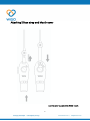
Content Basics …….……………………………………………………………………………….………..….3 I nt ro d u c t i o n …… … …… … … …… … …… …… … ……… … … …… … …… …… … ……. … … … …… 4 H a r d wa r e o v e r v i e w … … … … … … … . … … … . . … … … … … … … … … … … … … … … … … … … 4 I nsta lli ng batte ry …………………………………… . ……………………………………………… .5 Attaching Silicon strap and Mouth cover…….…………………………………………..6 Setting up WISO ……………………………………………………………………………………7 Preparing to use WISO ……………….…………………………………………………………….7 To set up WISO…….…………………………………………………………………………..7 Reconnecting WISO ……………….…………………………………………………………….7 To force restart reconnection attempts …………………………………………7 Using WISO …………………………………………………………………………………………… …8 B lo wi ng WI SO …………………………………………………………………………………………… 8 Pressing WISO for 2 sec………………………………………………………………………………8 Settings for WISO APP ……………………………………………………………………….9 Using the WISO APP…………………………………………………………………………………….9 List ……………………………………………………………………………………………………………….9 To view WISO information……………………………………………………………….9 To add new WISO……………………………………………………………………………..9 To change settings………………………………………………………………………….10 To delete WISO……………………………………………………………………………….10 To test emergency action………………………………………………………………10 History ……………………………………………………………………………………………………….10 To view history ……………………………………………………………………………….10 Extended SMS service subscription………………………………………………………….11 To subscribe Extended SMS service ………………………………………………11 Important Information…………………………………………………………………….12 Safety Instructions …………………………………………………………….…………………….1 2 Environmental conditions………………………………………………………………………..12 Size and weight …………………………………………………………………………………………1 3 2