1
Windows Setup:
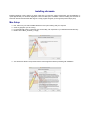
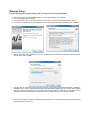
It is recommended that you just select “Next” for each screen and use the defaults.
♦ First make sure your audio and MIDI hardware is set up and working with your computer.
♦ Close any programs you are running.
♦ For the Download version of sforzando, after download, unzip by double-clicking WIN_sforzando_v1.6.exe.
♦ You will then be asked to read and accept the End User License Agreement before proceeding with installation.
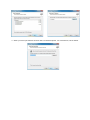
♦ And the destination folder. Defaults are fine since no samples are streamed while using this virtual instrument.
(the full size is close to 10MB.)
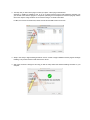
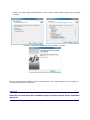
♦ The setup lets you select which plug-in formats you require. These plug-in formats allow sforzando, in addition to
standalone use, to run as a virtual instrument plug-in that seamlessly integrates into your favorite music software
program or sequencer (assuming that it accepts such instrument plug-ins). Please refer to the chapter “Using
sforzando as an Instrument Plug-In” for further information .For Windows the choices are VST & RTAS
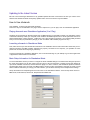
♦ If you select to install the VST32 and VST64 versions of sforzando, you will also be prompted with your preferred
VST plugins folder in each case: