1
Focus
8
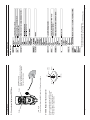
How to use tactile switch on the OSD control
Push – to enter the menu, to save settings.
Push up or down – to select functions
Push left or right – to adjust levels.
5-4. OSD Manual for functions control
LEFT (L)
DOWN (D)
UP (U)
RIGHT (R)
MENU
(PUSH)
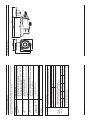
ZOOM & FOCUS
Make your adjustments by turning the
Zoom & Focus dials at the underside
front end of the camera
- How to use
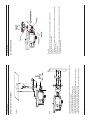
Connect Extra video output (BNC cable) to LCD monitor as a picture.
Zoom
5-3. Lens external adjustment, EXT-Video
5. Installation
*
*
* Some menu is excluded in IR LED cameras.
For detailed information regarding OSD menu, refer to OSD guide.
*
*
OSD Menu tree
6. OSD Menu tree
9