1
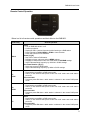
DAB1002 User Guide General Operation Display The DAB1002 unit is operated by using a remote controller; the system messages from the remote control operation are converted to RDS text and displayed as an 8 character display on the LCD screen of your in-car audio system. Below is a list of DAB1002 system messages displayed on the in-car audio system: Messages Display after DAB1002 is powered on. Display the 8-character short service name of the DAB station. text info Display DLS/DL+ (station text information) if enabled. TUNING Indicate tuning a DAB station is in progress. Indicate performing a DAB reset or factory reset is in progress. Confirm completion for certain system operation, i.e., set a DAB preset mode. Indicate FM transmitting frequency is being returned to a new frequency. Indicate DAB1002 is changing FM transmitting frequency to a new frequency from a manual setting. Indicate DAB1002 is changing FM transmitting frequency to a new frequency from the AFC function. Display after DAB1002 is turned off (into the standby mode). Indicates the remote controls battery is low. Battery replacement is recommended. DABRADIO station name RESETING DONE RETUNING TO frequency AF frequency POWEROFF RC LOW 8 Description