1
·
·
·
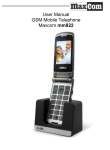
The device and its accessories may include small
parts. The phone should be kept away from children.
Do not attempt any repairs or reworks. All defects
should be corrected by a qualified service.
Use only original batteries and chargers. Using nonoriginal accessories can cause damage to the device
or explosion.
WATER RESISTANCE – this mobile phone is not
waterproof. Keep it in a dry place.
2. Components installation
Before switching the phone on, install SIM card. Be careful
to avoid damaging the card during installation.
The SIM card should be kept away from children.
2.1
SIM card and battery installation
Before inserting the SIM card, make sure the phone is off.
The charger should be disconnected. To insert the SIM
card, remove the battery first in accordance with the
following drawings and description:
·
·
10
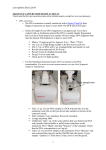
With the phone off, lever the battery cover on the
right side at the bottom of the phone up with your
fingernail.
Take out the battery levering it up with your
fingernail from the top of the phone