1
When transferring data to a CNC with any version of easyDnc you always see a progress indicator.
easyDncXP always shows the large progress indicator across the bottom of the window and because
easyDncXP doesn’t allow you to switch to a different machine while a transfer is in progress there was
no requirement for any additional indicators.
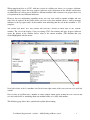
However, the new multitasking capability means you ‘can’ now switch to another machine and start
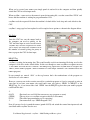
more tasks if required. In the picture below you can see the first machine shows a small percentage
indicator to the top right corner of the machine icon indicating that the job on that machine is 33%
complete.
The second icon shows 61% and, because this icon has a border we know that it’s the ‘current’
machine. The rest of the display, Com port settings CNC data window and large progress indicator
across the bottom of the window always relate to the current machine. (The machine that you
clicked/highlighted with the mouse.
Now look closely at the 1st machine icon. In the lower right corner of the icon you can see a small red
symbol.
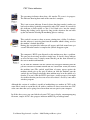
New versions of easyDnc have a number of small symbols which appear around the CNC icon. In this
case the symbol tells us something about one machine while we’re busy with another.
The following page shows these symbol and explains their meaning.
User Manual Supplemental – easyDnc – ‘MultiTasking and Remo options’
4