1
3
Sensors
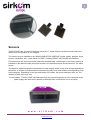
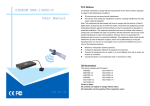
TOUCH POINT has 16 inputs for sensors named 0 to F, these being the characters that transmit by
default if the configuration is not changed.
The sensors may be installed on any NON-CONDUCTIVE SURFACE (timber, plastic, perspex, stone,
ceramic, cardboard, etc.). It also works on POINT, including POINT with Climalit® air chambers.
Connection from the sensors must be made with shielded cable, respecting the connection polarity as
indicated on the adhesive label, being the terminal + the detection sensor and the terminal - the cable
screen.
The detection method is based on the detection in each sensor, which is why when a finger approaches
the sensor, a variation is produced which is detected by USB Touch and sends the corresponding code
to the computer. Depending on the type and length of the cable, the sensor detection area, etc., the
capacity of each input may vary.
For this reason, TOUCH POINT self-calibrates from the inputs during start-up once connected to the
power supply and each time it detects a cable has been connected to one of its inputs.
w w w . s i r k o m . c o m
Avda. Lehendakari Aguirre, 50-52
48014 BILBAO – VIZCAYA - (SPAIN)
[email protected]
Tfno. +34 944.765.344
Fax +34 944.750.814