1
the school software company - training and software solutions for behaviour management
Task Two - Referring an incident to a colleague
Part One
It is midway through period 4 and Jon Kingsley is teaching English to a Year 9 group. He has asked
them to read through a passage of text and complete a series of short written tasks. Having settled to
task, one of the class, Carl Atkinson, begins to disturb others by pushing their exercise books off the
table. JK points out to Carl that his behaviour is preventing others working and asks him to stop.
Minutes later he is out of his seat disturbing another group of students by taking their equipment and
throwing it across the classroom. Again JK challenges the student and he returns to his seat but
continues to disturb those around him and despite encouragement refuses to start the assigned task.
He is disruptive for the rest of the lesson and has completed none of the set activities by the lesson
end. JK decides to refer the incident to Andrea Bradford, Head of English.
Part Two
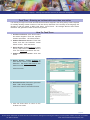
Andrea Bradford, Head of English logs into sleuth to check if any incidents have been referred to her.
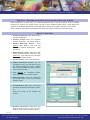
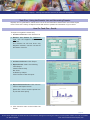
She finds the incident referred to her by John Kingsley and edits the information entered. As HoD she
decides to put Carl Atkinson into after school detention.
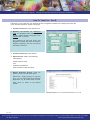
How To: Task Two - Part A
Create a new incident reflecting the disruption
caused by Carl Atkinson in Jon Kingsley’s
English lesson. [Tip: Follow process in Task
1 up to step 6]
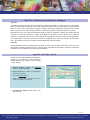
1. Action Screen: Update the Actioner
name to Andrea Bradford
2. Select Referred to Head of Department
from action options
3. Tick the Follow Up box
4. Click OK and then OK twice more to
return to Incident List screen
5. Incident List Screen: Click Exit to log
out of sleuth
page 3/10
For the latest information on sleuth and all of our behaviour management training and advisory services please contact us or visit our website
tel: 0871 7115 345
web: www.schoolsoftwarecompany.com