1
the school software company - training and software solutions for behaviour management
Task Five - Using the Restrict List and Generating Reports
Reports can be generated in sleuth which use all of the information entered from the incident report
forms. There are a variety of Report formats with which to present the information of your choice
How To: Task Five - Part A
To report on negative incidents only
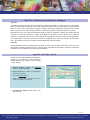
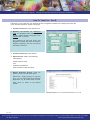
1. Incident List Screen: Click Restrict List
2. Restrict List Screen: For Behaviour
Type, click the Negative radio button.
Click OK
The Incident List will now show only
Negative incidents, note the red text at
the bottom of the list.
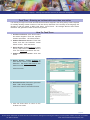
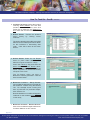
3. Incident List Screen: Click Report
4.
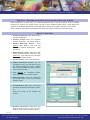
Report Screen: Select the following
Chart Report
Listed Incidents Only
Bar Chart
Incidents by Subject
Click Preview to view the report
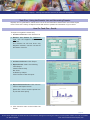
5. Report Selection Screen: Click Close to
return to the Report Screen.
[Select File - Print or click the printer icon
to print the chart report]
6. Click Cancel to return to the Incident List
Screen
page 7/10
For the latest information on sleuth and all of our behaviour management training and advisory services please contact us or visit our website
tel: 0871 7115 345
web: www.schoolsoftwarecompany.com