1
I
Chapter 1
Introduction
-~
p~
1.1
About This Manual
This manual provides detailed instructions for setup,
operation and maintenance of the Photovac Snapshot TM
Handheld Gas Chromatograph.
Before unpacking the instrument, please read Section 1.2
Warnings and Safety Practices. This section describes
possible hazards that might injure the user, damage the
instrument or compromise its operation. Some general
safety information is also provided.
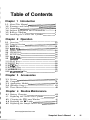
To help you learn to use SnapShot quickly this manual is
organized by tasks beginning with setup and operation in
Chapters 1 and 2. Connecting accessories is covered in
Chapter 3. Routine maintenance is covered in Chapter 4.
Troubleshooting techniques are covered in Chapter 5.
Chapter 6 provides a technical description of SnapShot.
The SnapShot manual uses a few conventions for key
names on the SnapShot keypad and for text that is shown
on the SnapShot display. Key names a r e denoted by
uppercase text. (LArrowkeys" is the collective name for the
UP ARROW and DOWN ARROW keys. Text that appears
on the SnapShot display is in quotation marks. In Chapter
3 computer keyboard names are denoted by angle brackets, e.g. <Ctrl>. Text that must be typed in using the
computer keyboard is shown in italics.
In the text you will find various warnings and notes.
Warning: A warning indicates a n operation which could
cause personal injury if precautions are not
followed.
1
I
I
1
Note: A note indicates an operation which could cause
instrument damage if precautions are not followed.
A note also indicates significant information and is
provided with various procedures.
3
www.equipcoservices.com
Snapshot User's Manual
1