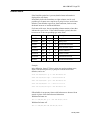
1
Page 22 AN-X-PBCAPT
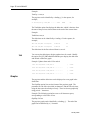
Example:
TmeGap sc.ms,us
The gap time can be identified by a leading ‘g’ in the capture, for
example,
2: a11.000,517 g 0.000,010 ........ 54<0
SRDH
00
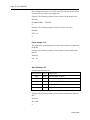
The TmeDelta option line displays the delta time, which is the time from
the start of the previous selected frame to the start of the current frame.
Example:
TmeDelta sc.ms,us
The delta time can be identified by a leading ‘d’ in the capture, for
example,
145: a11.003,248 d 0.000,000
0<125 DL
00
401: a11.010,346 d 0.006,634
0<125 DL
00
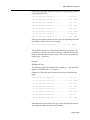
The delta time for the first selected frame is set to 0.
TIP
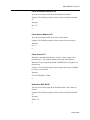
You can use the delta time to display update times for a node. Modify
the option file QTS_PBToNodeFromNode.opt to display the delta time
and include a delta time graph.
Example: Updates from node 125 to node 0
145: a11.003,248 d 0.000,000 d
|
0<125
401: a11.010,346 d 0.006,634 d.............
|
0<125
659: a11.017,016 d 0.006,669 d.............
|
0<125
915: a11.023,651 d 0.006,635 d.............
|
0<125
Graphs
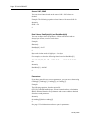
The gap time and the delta time can be displayed as a text graph in the
frame data.
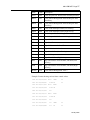
The GrphGap option line sets the format of the gap time graph. The
parameters are the full scale width, in characters, and the full scale time,
using the time units described previously. Times are shown graphically
using period ‘.’ characters.
Example: The following option line reserves 20 character spaces,
corresponding to a full scale of 5 ms
GrphGap 20 5ms
The gap time graph can be identified by a leading ‘g’. The end of the
graph can be identified by a ‘|’ character.
January 2008