1
Introduction
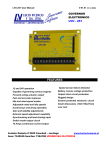
Operator Panel
(USER’S MANUAL SECTIONS 1&2)
The IQ Analyzer is a compact, panel mounted, micro-processor based device for users
who want to monitor all aspects of their
electrical distribution system. It has been
engineered to provide comprehensive
metering, power quality analysis, remote
input monitoring, control relaying, analog
inputs/outputs and communications
capabilities. It will replace dozens of existing
individual meters, recorders, and relays.
The IQ Analyzer displays a comprehensive
list of metered parameters, historical values,
harmonic profiles, peak demands and alarm
data. Custom screens may be easily programmed to conveniently view parameter
groupings, or to concurrently observe relationships as system conditions change.
Information display options and device programming are accessible through a communications port via IMPACC (Integrated
Monitoring Protection and Control
Communications), or directly at the Operator
Panel using Meter Menu and Function Keys.
The IQ Analyzer directly monitors 3-phase
lines to 600 Vac without the need for
external potential transformers. Above 600
Vac, external transformers are required.
The device complies with rigid ANSI C12.16
Class 10 revenue meter accuracy standards,
and provides true rms readings through the
50th harmonic. Accuracy is maintained in
applications with high distortion levels,
including systems exhibiting 3.0 Crest
Factor.
(USER’S MANUAL SECTION 3)
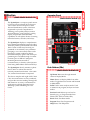
Function
LEDs
Display
Window
(F1-F4)
Previous Level
Home
Function
PBs
Meter
Menu
Up/Down
PBs
Program PB
Help PB
Push Buttons (PBs)
(USER’S MANUAL SECTIONS 3&4)
Up/Down: Maneuver through metered
values in Display Mode.
Home: Return to Display Mode from other
modes. Toggle between Current and Demand
in Meter Menu.
F1-F4: Used to enter analysis modes. Used
to maneuver in program, analysis and reset
modes.
Previous Level: Moves up one level in
hierarchy (e.g., in Program mode from
PGM/GEN/TYPE to PGM/GEN).
Reset: Enter/Exit Reset mode.
Program: Enter/Exit Program mode.
Help: Enter/Exit Help menu.
5