1
Maya Plug-in User Manual
3D Solutions
2 Installation
2.1 Requirements
The Maya plug-in requires an original Maya, installed on the target system. Plug-ins are available for the
following Maya versions:
• Maya 7.0
• Maya 8.0
• Maya 8.5
• Maya 2008
Maya Personal Learning Editions are not supported by the plug-ins.
Current Maya plug-ins are for 32-bit Maya versions.
Operating system compatibility
• Windows XP
• Windows Vista
There is an installer for each above mentioned Maya version that enables you to install the plug-in. Just
click on the executable of the version needed and follow the instructions on screen. Make sure that on
selection of the destination directory you select the plug-ins directory of Maya.
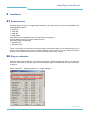
2.2 Plug-in activation
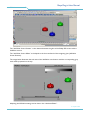
Open the Maya “Plug-in Manager” and check the box with “WOWvx-plugin.mll”. Be sure to check the
box with “auto load” as well, this will cause the WOWvx plug-in to automatically start up when Maya
is opened.
Select: “Window → Settings/preferences → Plug-in Manager”
01 April 2009
6 of 17
©2009 Philips Electronics Nederland B.V.