1
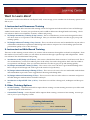
Let DynaSCAPE Assist You
1. Online Help
Website address: www.dynascape.com Visit our website and click on ‘Support’ for all the online help available to you including Discussion Fo‐
rums, FAQ’s and downloads. The Discussion Forums are an excellent resource for asking questions and finding answers. 2. Email
Email address: [email protected] 3. Phone
5. The DynaSCAPE User’s Guide
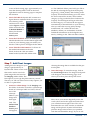
If a Userʹs Guide did not come with your software purchase, you can acquire the DS|Design User’s Guide as a hard copy by calling (1‐800‐710‐1900). You can also download an electronic copy for free. How to download the User’s Guide: From the Help menu in DS|Design you can download an electronic version of the DynaSCAPE User’s Guide by clicking on ‘Online User Manual’. Clicking on this option will open a browser in which you can choose a DynaSCAPE Product Manual. Click on the ‘Open’ option to download and view the User’s Guide . The User’s Guide opens in a separate browser window as a PDF. Once opened, you can use the bookmarks to find the topic you are looking for or use the ‘Search’ option to find help for specific subjects. To save the User’s Guide on your hard drive, click on the ‘Save a Copy’ option. 1.800.710.1900 Ext 278
(Monday—Friday 9:00am—5:00pm Eastern Standard Time, excluding Ca‐
nadian Holidays) 4. Training Videos
Your software trial includes a DynaSCAPE Training DVD. Take some time to view these detailed instruc‐
tional videos which show you how to use many more of the DS|Design tools. Learn how to use the various Drawing and Editing tool, the Plant List Editor and much more! Quick Start
3