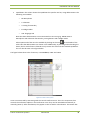
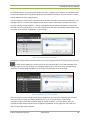
1
CoCon Installation and User Manual Installation and User Manual All information in this document is subject to change without notice. No part of this document may be reproduced or transmitted in any form or by any means, electronic or mechanical, for any purpose, without the express written permission of Televic NV. Copyright © 2012 Televic Conference NV. All rights reserved. Title Author Date History Cocon – Installation and User Manual JV – EVC 2012/05/31 2012/09/25 CoCon v2.0: Authentication, Voting, … added 2012/05/31 T-Cast Connector added 2012/02/01 Initial Version . Televic Conference Systems 2012-10-29 2 Installation and User Manual Table of Contents Table of Contents Table of Contents .................................................................................................................................... 3 Section 1 – General Information ............................................................................................................. 9 1 Copyright Statement ..................................................................................................................... 10 2 Trademarks .................................................................................................................................... 11 3 General description ....................................................................................................................... 12 3.1 General system architecture ................................................................................................. 12 3.2 Server application.................................................................................................................. 13 3.3 Client applications ................................................................................................................. 14 3.4 Typical room setup ................................................................................................................ 14 Section 2 – Installation .......................................................................................................................... 16 4 System requirements .................................................................................................................... 17 4.1 4.1.1 Server application .......................................................................................................... 17 4.1.2 Client applications ......................................................................................................... 17 4.2 5 Hardware requirements ........................................................................................................ 17 Software requirements ......................................................................................................... 17 Installation procedure ................................................................................................................... 18 5.1 Prerequisites.......................................................................................................................... 18 5.2 Installer .................................................................................................................................. 18 Section 3 – Application description ....................................................................................................... 20 6 7 License ........................................................................................................................................... 21 6.1 License modules .................................................................................................................... 21 6.2 Use License in CoCon............................................................................................................. 22 Server............................................................................................................................................. 24 7.1 Room configuration wizard ................................................................................................... 24 7.1.1 General settings............................................................................................................. 24 7.1.2 Database ........................................................................................................................ 25 7.1.3 Room selection .............................................................................................................. 33 7.1.4 Conference system setup .............................................................................................. 34 7.1.5 WCAP+ in coupled mode ............................................................................................... 36 7.1.6 Finish.............................................................................................................................. 36 Televic Conference Systems 2012-10-29 3 Installation and User Manual 7.2 8 9 Room server window............................................................................................................. 36 7.2.1 Info................................................................................................................................. 37 7.2.2 License ........................................................................................................................... 37 7.2.3 System ........................................................................................................................... 37 7.2.4 Database ........................................................................................................................ 37 7.2.5 Clients ............................................................................................................................ 37 7.2.6 T-Cast ............................................................................................................................. 38 7.2.7 Log ................................................................................................................................. 38 Shared client components............................................................................................................. 39 8.1 Login window ........................................................................................................................ 39 8.2 General Settings .................................................................................................................... 40 8.2.1 Language setting............................................................................................................ 40 8.2.2 Remember Server .......................................................................................................... 41 8.3 Manual................................................................................................................................... 41 8.4 Status bar............................................................................................................................... 42 8.5 Date chooser ......................................................................................................................... 43 Room configurator ........................................................................................................................ 45 9.1 Synoptic concept ................................................................................................................... 45 9.1.1 Units .............................................................................................................................. 47 9.1.2 Nodes............................................................................................................................. 49 9.1.3 Background .................................................................................................................... 50 9.1.4 Locking of the room....................................................................................................... 51 9.2 Home ribbon.......................................................................................................................... 51 9.2.1 Edit ................................................................................................................................. 52 9.2.2 Page ............................................................................................................................... 52 9.2.3 Grid ................................................................................................................................ 52 9.2.4 Background .................................................................................................................... 52 9.3 Detect units ribbon................................................................................................................ 53 9.4 Synoptic nodes ribbon ........................................................................................................... 54 9.4.1 Select ............................................................................................................................. 54 9.4.2 Add nodes ...................................................................................................................... 54 9.4.3 Remove nodes ............................................................................................................... 54 9.4.4 Label location ................................................................................................................ 54 9.4.5 Label fontsize ................................................................................................................. 54 Televic Conference Systems 2012-10-29 4 Installation and User Manual 9.4.6 9.5 Node priority ................................................................................................................. 55 Assign units ribbon ................................................................................................................ 55 9.5.1 Wizard............................................................................................................................ 55 9.5.2 Associate........................................................................................................................ 55 9.5.3 Disassociate ................................................................................................................... 55 9.5.4 Badge Writer ................................................................................................................. 56 9.6 General functions and hot keys............................................................................................. 56 9.7 Special functions.................................................................................................................... 57 9.7.1 Confidea Wired: units with a badge reader .................................................................. 57 9.7.2 Confidea Wired: units with voting buttons ................................................................... 58 9.7.3 CPU 5500: split combined units .................................................................................... 60 9.8 Other Settings........................................................................................................................ 61 9.8.1 General Settings ............................................................................................................ 61 9.8.2 Camera Settings............................................................................................................. 61 10 Meeting Manager ...................................................................................................................... 63 10.1 Delegate concept................................................................................................................... 63 10.2 Database management ......................................................................................................... 63 10.2.1 Main screen ................................................................................................................... 64 10.2.2 Delegates ....................................................................................................................... 66 10.2.3 Badge Writer ................................................................................................................. 68 10.2.4 Authority........................................................................................................................ 70 10.2.5 Groups ........................................................................................................................... 72 10.3 Meeting concept ................................................................................................................... 75 10.4 File menu ............................................................................................................................... 75 10.4.1 New meeting ................................................................................................................. 76 10.4.2 Existing meetings ........................................................................................................... 76 10.4.3 Tools .............................................................................................................................. 77 10.4.4 Settings .......................................................................................................................... 77 10.5 Home tab and ribbon ............................................................................................................ 78 10.6 Meeting tab ........................................................................................................................... 80 10.6.1 Title ................................................................................................................................ 81 10.6.2 Description .................................................................................................................... 81 10.6.3 Date of the meeting ...................................................................................................... 81 10.6.4 Meeting agenda editing during meeting ....................................................................... 81 Televic Conference Systems 2012-10-29 5 Installation and User Manual 10.6.5 Conference settings ....................................................................................................... 82 10.6.6 T-Cast. ............................................................................................................................ 82 10.7 Agenda tab ............................................................................................................................ 82 10.7.1 General agenda item functionality ................................................................................ 84 10.7.2 Lecturer agenda item .................................................................................................... 85 10.7.3 Voting agenda item ....................................................................................................... 85 10.8 Delegate list tab..................................................................................................................... 91 10.8.1 10.9 Delegate identification .................................................................................................. 92 Speech timer tab ................................................................................................................... 93 10.9.1 Meeting timer................................................................................................................ 94 10.9.2 Agenda item timer ......................................................................................................... 94 10.9.3 Group speech timer ....................................................................................................... 94 10.9.4 Delegate speech timer................................................................................................... 96 10.10 11 Synoptic tab ....................................................................................................................... 97 Operator Application ............................................................................................................... 100 11.1 Meeting concept ................................................................................................................. 100 11.1.1 Open prepared meeting .............................................................................................. 101 11.1.2 Create new meeting .................................................................................................... 102 11.1.3 Main screen ................................................................................................................. 104 11.1.4 Closing the Operator Application ................................................................................ 105 11.2 Operator Application views ................................................................................................. 105 11.2.1 Room synoptic ............................................................................................................. 105 11.2.2 Microphone list ........................................................................................................... 109 11.2.3 Agenda ......................................................................................................................... 110 11.2.4 Speech Timers ............................................................................................................. 111 11.2.5 Voting view .................................................................................................................. 112 11.3 Home ribbon........................................................................................................................ 113 11.3.1 Meeting ....................................................................................................................... 113 11.3.2 Conference settings ..................................................................................................... 114 11.3.3 All speech timers ......................................................................................................... 114 11.3.4 Volume ........................................................................................................................ 114 11.3.5 Audio settings .............................................................................................................. 114 11.3.6 Microphone controls ................................................................................................... 115 11.3.7 Agenda ......................................................................................................................... 115 Televic Conference Systems 2012-10-29 6 Installation and User Manual 11.4 Signage ribbon ..................................................................................................................... 115 11.5 Voting ribbon ....................................................................................................................... 115 11.5.1 Voting .......................................................................................................................... 115 11.5.2 Print ............................................................................................................................. 116 11.5.3 Register as voting master ............................................................................................ 116 11.6 Synoptic ribbon ................................................................................................................... 116 11.7 Diagnostics information ...................................................................................................... 117 11.8 General functions and hot keys........................................................................................... 118 12 Signage Application ................................................................................................................. 119 12.1 Signage wizard ..................................................................................................................... 119 12.1.1 Choose the room ......................................................................................................... 119 12.1.2 Choose which screen to use ........................................................................................ 120 12.1.3 Signage screen layout .................................................................................................. 121 12.1.4 Voting Display Options ................................................................................................ 122 12.1.5 Automatically start Signage Application ..................................................................... 123 12.1.6 Choose the blank screen ............................................................................................. 124 12.1.7 Key combination .......................................................................................................... 125 12.2 Closing the signage .............................................................................................................. 126 12.3 Starting the signage ............................................................................................................. 126 13 T-Cast Connector ..................................................................................................................... 127 13.1 Room Server ........................................................................................................................ 128 13.1.1 Room configuration wizard ......................................................................................... 128 13.1.2 Room server window................................................................................................... 130 13.2 Meeting Manager ................................................................................................................ 131 13.3 Operator Application ........................................................................................................... 133 14 FAQ .......................................................................................................................................... 134 14.1 How can I change the language of the CoCon applications? .............................................. 134 14.2 How do I connect the CoCon software to my Televic Central Conference Unit? ............... 135 14.3 How do I define a synoptic for my meeting room? ............................................................. 136 14.3.1 How do I define a background image for the room synoptic? .................................... 136 14.3.2 How to initialize or retrieve the microphones connected to the Central Unit? ......... 137 14.3.3 How do I create microphone nodes in the synoptic?.................................................. 137 14.4 How can I change a delegate into a chairman?................................................................... 137 14.5 How do I quickly start a meeting? ....................................................................................... 138 Televic Conference Systems 2012-10-29 7 Installation and User Manual 14.6 How do I quickly start a vote? ............................................................................................. 141 14.7 How do I manage my delegate database? .......................................................................... 146 14.7.1 How do I create and manage delegates? .................................................................... 146 14.7.2 How do I add delegates to the meeting? .................................................................... 147 14.7.3 How do I add delegates to a seat in the synoptic?...................................................... 147 14.8 15 Where can I find the different speech times? ..................................................................... 148 Known Issues ........................................................................................................................... 152 Table of figures .................................................................................................................................... 153 Televic Conference Systems 2012-10-29 8 Installation and User Manual Section 1 – General Information Televic Conference Systems 2012-10-29 9 Installation and User Manual 1 Copyright Statement No part of this publication or documentation accompanying this product may be reproduced in any form or by any means or used to make any derivative such as translation, transformation, or adaptation without the prior written permission of the publisher, except in case of brief quotations embodied in critical articles or reviews. Contents are subject to change without prior notice. Copyright© 2011 by Televic NV. All rights reserved. The authors of this manual have made every effort in the preparation of this book to ensure the accuracy of the information. However, the information in this manual is supplied without warranty, either express or implied. Neither the authors, Televic NV, nor its dealers or distributors will be held liable for any damages caused or alleged to be caused either directly or indirectly by this book. Televic Conference Systems 2012-10-29 10 Installation and User Manual 2 Trademarks All terms mentioned in this manual that are known to be trademarks or service marks have been appropriately capitalized. Televic NV cannot attest to the accuracy of this information. Use of a term in this document should not be regarded as affecting the validity of any trademark or service mark. Televic Conference Systems 2012-10-29 11 Installation and User Manual 3 General description This document is a manual for the CoCon software suite of Televic. It contains a description of the various components, as well as giving information about the functionality of the applications it consists of. 3.1 General system architecture The aim of CoCon is to provide a software suite for conference management and assistance. It is normally connected to a central conference unit that steers a number of microphones (and possible other conference equipment, eg. voting panels, camera control,). CoCon interacts with the central conference unit to enable various functionalities and views on the conference. Typical functions as related to the typical phases of a meeting can be seen in Figure 3-1 CoCon overview. Figure 3-1 CoCon overview Televic Conference Systems 2012-10-29 12 Installation and User Manual As shown in the figure, a number of applications are provided which enable different functions for the user. Each of these applications needs access to the central conference unit by going through a server application. Hence the architecture is built as a client-server framework, as can be seen in figure 3-2. Clients Server Figure 3-2 Client-server A server is typically connected to one central conference unit and responsible for one meeting room. Each of the clients connects to a server and provides functionality to the user in the context of the meeting room that the server is connected to. 3.2 Server application The server application is responsible for the communication with the central conference unit and is hence typically installed on a machine located in a server room. In that way, it enjoys the same power advantages as the central unit itself. The server application is meant to be active continuously; turning it off and on again for each meeting is not recommended. Televic Conference Systems 2012-10-29 13 Installation and User Manual The server application allows connection to any type of central conference unit and keeps track of the conference activity. Next to that, it makes connection to a database which allows to store and load data pertaining to the conference. 3.3 Client applications Currently, the following types of client applications are available: Room configurator: this is the application where the room synoptic is created, where the microphones are allocated to the seats etc. Operator Application: this is the application that is used during a meeting by eg. a chairman or operator. It allows to monitoring and steering the microphone activity and other conference settings. Signage Application: this allows showing the conference activity on eg. a screen in the conference room containing the room synoptic, the speaker list etc. Meeting Manager: in this application, it is possible to create a meeting up front and specify its details. Additionally, a database with all delegate information can be accessed and edited. Home Screen: this is a screen with shortcuts and a short description of the other applications. 3.4 Typical room setup The figure below shows a possible setup of a conference room, using the CoCon software suite. This figure shows a number of delegates on the left-hand side, and an operator on the bottom right-hand side. The delegates can see changes the Signage Applications (screens in the room), controlled by the operator using this Operator Application. All client applications are connected to the CoCon Room Server, which provides connectivity to the conference Central Unit. Televic Conference Systems 2012-10-29 14 Installation and User Manual Figure 3-3 Typical conference room setup Televic Conference Systems 2012-10-29 15 Installation and User Manual Section 2 – Installation Televic Conference Systems 2012-10-29 16 Installation and User Manual 4 System requirements 4.1 Hardware requirements 4.1.1 Server application Processor: 2 GHz or higher RAM: minimum 4 GB Free disk space: minimum 10 GB Network connectivity 4.1.2 Client applications Processor: Intel dual-core 2 GHz or higher RAM: minimum 2GB Recommended graphical hardware supporting DirectX 9.0 or better. Free disk space: minimum 10 GB Network connectivity 4.2 Software requirements Operating systems supported: Windows XP SP3 Windows Server 2003 SP2 Windows Vista SP1 or later Windows Server 2008 (not supported on Server Core Role) Windows 7 Televic Conference Systems 2012-10-29 17 Installation and User Manual 5 Installation procedure The installation of CoCon is performed by executing the file CoCon-Installer-v2.0.exe. This will guide you through a typical install wizard with some configuration options. It is recommended that this installation is performed by technically trained personnel. Note that it is necessary to let this installation be performed by a user with Administrator rights. 5.1 Prerequisites In order to be able to install CoCon, a number of other installed programs are necessary. These are Microsoft .NET Framework 4.0. This framework is included in the installer package and will be installed automatically if needed. Windows Installer 4.5. During installation of the SQL Server Express (the database that CoCon uses to store its data), Windows Installer 4.5 is needed. This is a software component that might not be present on older Windows versions. Therefore, the necessary files are installed with the CoCon suite, and are included in the CoCon installation at C:\Program Files (x86)\Televic Conference\CoCon\Server\WindowsInstaller4_5 (or similar for your installation). 5.2 Installer The installer of CoCon itself consists of various steps; the most important ones are: License Agreement. Choose components: here it is possible to select which components of the CoCon software suit will be installed on the current PC. Bear in mind that there is usually only 1 Server per meeting room and only 1 meeting room per Server. The various client applications that will be installed can also be selected here. Note that the functionality of the applications plays a role: it is e.g. rather illogical to install the Room Configurator on a machine which will only be used for signage – installing only the Signage Application is better suited here. You can position the mouse over any of the client applications to see a description in the text box on the bottom. Choose install location. Installation is performed. The final step allows you to view the release note. Here some remarks are located regarding the current installation version. During the installation, Windows firewall will ask your permission to let this program communicate. Make sure that you allow all connections for the CoCon applications. Televic Conference Systems 2012-10-29 18 Installation and User Manual Icons for the selected installed applications can be found on the Desktop and in the Start menu. Televic Conference Systems 2012-10-29 19 Installation and User Manual Section 3 – Application description Televic Conference Systems 2012-10-29 20 Installation and User Manual 6 License The CoCon software needs a license issued by Televic in order to function. 6.1 License modules The following license modules are available: CoCon Discussion. It contains all functionality that is required to run a conference system in a discussion-only situation. It is perfect for corporate board meetings and council meetings that do not require electronic voting or simultaneous interpretation. Important functionality is delegate management, meeting construction and control, microphone control, … Applications included here are the Room Server, Operator Application and Meeting Manager. CoCon Signage: CoCon Signage is the display application within the CoCon Control suite. It is a plugin for CoCon Discussion, so the latter is required to run CoCon Signage. CoCon Signage can be used to display information to the delegates in the room using large screens or projectors. The license of the CoCon Signage specifies how many signage screens can be simultaneously active. CoCon T-Cast Connector: The T-Cast Connector plug-in integrates the T-Cast on-line management and control environment into the CoCon Conference Control software. It offers a seamless synchronisation between the CoCon meeting preparation and the on-line webcasting environment, as well as control of the T-Cast during a live meeting from the CoCon Operator Application. Note that this is a plugin for CoCon Discussion, so the latter is required to run CoCon the TCast Connector. CoCon Authentication: This module contains the interaction of CoCon with badges. If this module is present, badges can be read from and written to. For each delegate, a badge can be created with which he can identify himself to the system. Note that this is a plugin for CoCon Discussion, so the latter is required to run CoCon Authentication. CoCon Voting: The Voting module contains all functionality that relates to the process of voting. This module will allow to create voting agenda items and templates, start, stop and control voting sessions and visualize the voting results. Note that this is a plugin for CoCon Discussion, so the latter is required to run CoCon Voting. Televic Conference Systems 2012-10-29 21 Installation and User Manual 6.2 Use License in CoCon The license is located on the machine where the server application is installed. All the clients connecting to this server will then use the same license. In this way, only one license is necessary for a single server or conference room. The screen below will appear when starting the server application without a license file present: Figure 6-1 License validation In the top part of this screen, fill in as much information as possible about your company site, contact person etc. This information will be useful for Televic to be able to contact you in case of updates, bug fixes, … In order to generate a license, your Televic contact person needs a MAC-address of a component present in your system. CoCon chooses a MAC-address by default. Note that you can select a different one if it concerns a component that can be removed from your system (eg. a USB-device). Click the “Other devices (Advanced)” to display a table where you can select a different one. Once you are satisfied, click the “Copy information to the clipboard” and paste it in a mail to your Televic contact person. You will receive an XML-file which contains your license. Use the button “Browse for license file” to open a file chooser which allows you to select the received license file. Make sure the name and content of this file has not been changed, and that it is an XML-file. After validation of the file, the following screen will appear, and CoCon will be licensed and ready to function. Televic Conference Systems 2012-10-29 22 Installation and User Manual Figure 6-2 License validation Televic Conference Systems 2012-10-29 23 Installation and User Manual 7 Server The room server is the application which is responsible for the following functionality: Connection with the central conference unit Database connectivity The component to which the various client applications connect 7.1 Room configuration wizard This wizard is shown when the server is first started, or afterwards if a change to the server configuration is required. It is built up of the screens shown in the following sections. 7.1.1 General settings Figure 7-1 Welcome to the room configuration wizard Televic Conference Systems 2012-10-29 24 Installation and User Manual Figure 7-2 General settings Check the box “Run the room server at Windows start up” if you want to ensure that the CoCon server gets started every time this machine starts up. This can be very convenient for the server application, as no CoCon functionality is available when the server application is not started. 7.1.2 Database The next steps in the configuration wizard will allow you to choose, create and/or update the database that CoCon uses to store its data. 7.1.2.1 Database detection This step detects any databases that are already present or can be used to run CoCon on. The first step lets you choose between automatic detection and manual setup. Televic Conference Systems 2012-10-29 25 Installation and User Manual Figure 7-3 Database setup: recommended or manual The recommended option will show the following screen, where the CoCon Server is looking for usable database servers. Televic Conference Systems 2012-10-29 26 Installation and User Manual Figure 7-4 Database setup: recommended The manual option will show the following screen. In the top half you can select the database server where from a list, or enter it manually. It also allows for Windows or SQL Authentication. The bottom half allows you to install a new database instance, see next section. Televic Conference Systems 2012-10-29 27 Installation and User Manual Figure 7-5 Database setup: manual 7.1.2.2 No database found: create new database If no usable database is found, CoCon will recommend creating a new database; this is shown in the following screen: Televic Conference Systems 2012-10-29 28 Installation and User Manual Figure 7-6 Database setup: new database The following paragraphs describe two possibilities in this situation. 7.1.2.2.1 Install SQL Server Express 2008 No Microsoft SQL Server Express 2008 is installed. The wizard will automatically install this database component and install a valid instance on the database so CoCon server can function correctly. Note that this is an automated procedure during which no user input is required. It can however take some time to complete this operation. Televic Conference Systems 2012-10-29 29 Installation and User Manual Figure 7-7 Installing SQL Server 2008 - part1 Figure 7-8 Installing SQL Server 2008 - part2 Televic Conference Systems 2012-10-29 30 Installation and User Manual Figure 7-9 Installing SQL Server 2008 - part3 7.1.2.2.2 SQL Server Express 2008 installed but no database found Microsoft SQL Server Express 2008 installed but no instance found. At this point, you should follow the wizard and allow it to create a new instance. 7.1.2.3 Compatible database found and usable In this situation, a usable database has been found. CoCon will use this database to store its data. The screenshot below illustrates this. Televic Conference Systems 2012-10-29 31 Installation and User Manual Figure 7-10 Database setup: database found 7.1.2.4 Compatible database found and need to update Occasionally, the CoCon database will need to be updated. You will be notified of this, using a special wizard step, as shown in the figure below. The update procedure will take some time to update the database tables in your database, but no data will be lost. Televic Conference Systems 2012-10-29 32 Installation and User Manual Figure 7-11 Database setup: update needed 7.1.2.5 Database configuration OK If you would run through the configuration again and the database is configured correctly, you will see the following screen. Clicking on the button “Change database (advanced)” will allow you to change the database, using the steps described in the previous sections. Figure 7-12 Database setup: OK 7.1.3 Room selection 7.1.3.1 Room selection This screen contains the room selection. Here you can create a new room, or connect to an existing room. In the upper right-hand corner of this window the effects of the action you choose are shown. To create a new room, fill in name and an optional description in the fields at the top. If you want to take over an existing room, select any of the room names under “Take over an existing room”. Be aware that these rooms are already assigned to another server. If you select this, the current room server will take over the control of the room from the other server. Take control of an unassigned room. By selecting any of the names here you can control an orphaned room (where no CoCon room server is associated with it) and assign it to this server. Televic Conference Systems 2012-10-29 33 Installation and User Manual Figure 7-13 Room selection 7.1.3.2 T-Cast configuration If there is an expander called “T-Cast config”, you can click this to fill in the configuration parameters for the T-Cast setup. For more details about this, see Section 13.1.1 - Room configuration wizard. 7.1.4 Conference system setup This screen lets you select the properties for the connection with the central conference unit. A dropdown box is provided which allows selecting any of the available plugins in the current installation. Provided plugins are: TCS5500 Plugin: this component allows connection to the Televic CPU5500 Central Unit. This connection is established over a standard LAN-connection using the TCP/IP protocol. Parameters here include: o IP-address. This is the IP address of the central conference unit you want to connect to. o Port: this is usually port 5011 for the CPU5500. o Write badge option (if applicable): this allows you to specify how much information should be written on the badges. The following possibilities are present: ID only: the badges will only contain the ID of the delegate written on it. Full badge: in this case, more information will be written to the badge. This will include the delegate ID, first name, last name, … Televic Conference Systems 2012-10-29 34 Installation and User Manual o Voting buttons: here you can specify if your setup has units with 3 or 5 voting buttons. This will determine the type of voting items you can create in the client applications. Confidea Wired Plugin: this component allows connection to the Televic Confidea Wired (CE2500) Central Unit. This connection is established using a serial connection over RS232. Parameters here include: o COM-port: specify here the COM-port on the computer to which the serial cable going to the central conference unit is connected. The other side of the serial cable should be connected to the port COM 3 on the Confidea Wired Central Unit. o Voting buttons: here you can specify if your setup has units with 3 or 5 voting buttons. This will determine the type of voting items you can create in the client applications. WCAP + Plugin: This component allows connection to the Televic WCAP. This connection is established over a standard LAN-connection using the TCP/IP protocol. Parameters here include: o IP-address. This is the IP address of the WCAP unit you want to connect to. o Port: this is usually port 9000. Televic Conference Systems 2012-10-29 35 Installation and User Manual Figure 7-14 Conference system setup 7.1.5 WCAP+ in coupled mode The following section describes the behaviour of a WCAP+ in slave mode and is only applicable for the Confidea CU and CPU5500. If a WCAP+ Central Unit is connected in slave mode to the Confidea CU or CPU5500, then CoCon can make a parallel connection to this WCAP+ to retrieve additional information about the wireless units. This additional information consists of the RF and battery status for each of the wireless units. The Operator Application will then show the states of the wireless units so the operator can quickly see which of the units is almost out of range or needs to be recharged. Up to 5 WCAP+ Central Units can be connected in slave mode to a Confidea CU or CPU5500. In order to make a parallel connection to a WCAP+, the IP address of the WCAP+ needs to be configured in the Conference system setup. See Figure 7-15 for the configuration of the IP addresses. Click on the column “Value” of the table to enter the IP addresses of one or more WCAP+. 7.1.6 Finish After completing the room configuration wizard, a restart of the server is needed. The server will restart automatically. 7.2 Room server window When the room server is active, an icon will appear in the task bar notification area: or Right-clicking on this icon gives access to one of three functions: Room server: see below. Configuration wizard: see previous section. Exit: shuts down the room server. The room server window is shown below. Televic Conference Systems 2012-10-29 36 Installation and User Manual Figure 7-15 Room server window 7.2.1 Info This tab contains information about the name of the server, the server version, Room Server IP address and the protocol version. 7.2.2 License This tab contains the expiration date of the license and the possibility to change your license to another. 7.2.3 System This tab contains information about the current connection with the central conference unit, its name, description and current status (Connect, Disconnect). By pressing the button “Restart System Connection”, the connection with the conference system is restarted. By pressing the button “Reboot Central Unit” (if applicable), the central unit to which this Room Server is connected will be rebooted. 7.2.4 Database This tab shows the connection state and version of the database. 7.2.5 Clients This tab shows an overview of all the connected clients, the type of application, the computer name and “last alive check”, which indicates when their connection was last verified. Televic Conference Systems 2012-10-29 37 Installation and User Manual 7.2.6 T-Cast For more information about this tab, see Section 13.1.2 Room server window. 7.2.7 Log This tab contains a hyperlink to the folder where all the log files of the CoCon applications are stored. Televic Conference Systems 2012-10-29 38 Installation and User Manual 8 Shared client components This section contains a description of all the components which are shared among the client applications. 8.1 Login window In order for the client applications to function, they need to connect to the conference room server. Therefore, a login dialog appears when starting up the application. This is shown in the figure below. Figure 8-1 Login dialog This dialog allows selecting the language in which the application is displayed (this can also be changed within the applications, see Section 8.2). The applications contain an auto-detection mechanism by which they automatically search for any active CoCon servers. These are shown in the dialog, and you can select one to logon to. Check the “Remember Server” box to automatically login to the selected server the next time you start up this client application. You can change this setting in the General Settings, as described in the Section 8.2.2. This setting will also be removed if you click the “Logout admin” at the bottom righthand side of the client applications. After clicking OK, you are logged in to the CoCon client application. The following advanced parameter is present (see figure below): Televic Conference Systems 2012-10-29 39 Installation and User Manual Manually provide the host address: This means that you manually enter the IP-address or the server host name in the box “IP or Host name”. Note that you have to check the box marked “Use these manual settings” in order for these advanced settings to be used. Figure 8-2 Login dialog: advanced 8.2 General Settings 8.2.1 Language setting All the CoCon client applications allow to be translated in other languages. In the login-window (section 8.1) as well as in the Settings-menu, the language can be changed. After selection of the language, the user interface will directly change into the selected language. As can be seen in the figure below, selection of the current user interface language is available in the File-menu, in the section Settings. Here you can select your preferred language to view the current CoCon application in. For availability of more languages than those presented here, contact your Televic contact person. Televic Conference Systems 2012-10-29 40 Installation and User Manual Figure 8-3 General Settings This setting will be saved per application, so the next time you start the same client application, the same language will be used for the interface. If you want to have CoCon translated in more languages than are currently available, please contact your Televic Conference contact person. In cooperation with Televic Conference, it is possible to provide CoCon in other languages as well. 8.2.2 Remember Server This option shows if there is currently a default remembered Room Server for this application. You can select here if you want to remember or forget the default Room Server. If you select “No” here, the client application will ask you to specify the server to log on to when next starting up. On the right-hand side, the default Room Server is shown. 8.3 Manual In the File-menu, under the Help-menu, a button is available which will open this Help-file. Alternatively, you can click the Televic Conference Systems icon in the upper right corner of the screen. 2012-10-29 41 Installation and User Manual There is also a PDF-version located in the installation folder; it can be reached using the WindowsStart Menu folder, under Televic Conference\CoCon\Help\CoCon Manual. 8.4 Status bar At the bottom of most CoCon client applications, you will see the status bar. It looks like this: Figure 8-4 Status bar This component contains (from left to right): Connections status: this icon shows the status of three connections. If the icon is white, no connection problems are present. By double-clicking on it, the following window appears: Figure 8-5 Connection states window Three components are shown here: o Server connection state: status of connection with the CoCon server application. o Conference system connection state: the status of the connection with the central conference unit. o Database connection state o T-Cast connection state Faults status: this icon shows if there are any faults. This can e.g. be microphone faults as well as errors with the connection states described above. Each error has a timestamp when it occurred. The following colour code is used: o Yellow background: the fault has occurred and has not yet been solved o Green background: the fault has occurred and has been solved. Twos button at the top allow clearing the solved faults from the list, as well as clearing the entire list. Televic Conference Systems 2012-10-29 42 Installation and User Manual Figure 8-6 Fault list window Televic icon Meeting symbol Name of the room Logout button: this button logs you out of the current session, and lets you connect to another room server. This will also forget the currently remembered default Room Server; so you will be able to specify which 8.5 Date chooser In several of the CoCon client applications, date choosers are present (eg. to select the start time of a meeting or the birth data of a delegate). Three of views of this can be seen in the figure below. Figure 8-7 Language setting In the text field representing the date, you can manually fill in the date (by using numbers and /), or you can click the icon next to the field to open the drop-down date chooser. The first view in the figure above shows the way to pick a date in any month. The currently selected month is shown first. By clicking the left and right arrows next to the month, you can navigate through the months. After clicking on a day in a month, this date is selected and the chooser closes. If you want to navigate over longer periods of time, click the month/year combination at the top of the chooser. This will result in the second view of the figure which allows you to pick a month in the current year, or navigate the year using the left and right arrows. Televic Conference Systems 2012-10-29 43 Installation and User Manual Clicking once again on the year at the top of the date chooser, you will get a view of the years that are available. Clicking on a year will select it, and return to the month view, etc. Televic Conference Systems 2012-10-29 44 Installation and User Manual 9 Room configurator This is the application which is responsible for configuring the room; some of its functions are: Create and edit the synoptic of the room (background image, colour, …) Automatic or manual detection of conference units (microphones, voting units, badge readers, …) Placing of the conference units on the synoptic Designation of chairman/delegate property 9.1 Synoptic concept A synoptic is a set of room graphics. It can contain microphones, a background image… The Room Configurator is used to create and edit the room synoptic. Initially, there is no synoptic attached to the room, and you will see the following screen. Figure 9-1 Room configurator start screen Televic Conference Systems 2012-10-29 45 Installation and User Manual After defining a name for the synoptic and clicking “Create new”, you will enter the Room Configurator itself. A few concepts here are crucial to understand how to define the synoptic of your meeting room: Unit: a unit is a representation of a physical conference unit connected to the central conference unit. This can e.g. be a microphone, a voting panel, a camera… Each of these can be placed on the room synoptic by attaching them to a node. Node: a node is a location in the room, where a person/delegate/meeting attendee can take a seat. On a node, a number of conference units can be associated. This can be a microphone, a voting panel, a badge reader… This means that a node can contain more than one unit. A node is a part of the synoptic which has a location, and to which conference units can be attached. Background: the background image of your synoptic. This can be a picture or a diagram of the conference room. The following screen shows an example of the Room Configurator. It contains 10 units (shown on the left-hand side), and 5 nodes (shown on the right-hand side). The objects themselves are visible in the middle, the synoptic itself. Of the 10 units, 4 are associated with a node in the synoptic (shown in green), 6 are not yet associated (shown in red). Televic Conference Systems 2012-10-29 46 Installation and User Manual Figure 9-2 Room configurator main screen 9.1.1 Units The units represent the physical units connected to the central conference unit. This can e.g. be a microphone, a voting panel, a camera… Each of these can be placed on the room synoptic by attaching them to a node. They are controlled on the left hand side of the Room Configurator; this table contains the data and columns described below. Note that the headers in this table can be clicked upon to sort the content. Nr: this is the ID that the system uses to identify this unit. It also corresponds to the order in which the unit buttons have been pushed during manual initialization (see Section 9.3). Type: this describes the type of the conference unit. The following unit types can be shown here: o MIC: this stands for microphone. o DCS: this stands for voting panel. o MIC&DCS: this is a unit which combines microphone and voting functionalities (eg. Confidea). Televic Conference Systems 2012-10-29 47 Installation and User Manual Capabilities: this column shows the capabilities this specific unit has, using abbreviations. The following are available: o M: Microphone o C: Chairman o V: Voting functionality o B : Badge reader o LCD: language LCD Note that these abbreviations are concatenated into one string. Eg. MCVB means a Microphone with Chairman functionality, Voting buttons and a Badge reader. A description and a filter are also available by clicking on the icon in the header of the table. Here the abbreviations are shown in full. Additionally, by checking and unchecking the boxes, the list with all units is filtered to only contain the units with the checked capabilities. This can also be seen in the figure below. The figure below shows a list of 10 units; 4 are MIC&DCS, 3 MIC and 3 DCS. Figure 9-3 Units in the system Units are constructed by interacting with the central conference unit. This is the component that controls the conference objects in the conference room. They can be initialized automatically or manually (see 9.3). After initialization, they appear in this list with a red indication. This means that Televic Conference Systems 2012-10-29 48 Installation and User Manual they have not yet been associated with a node in the synoptic. Once this is the case, they are shown with a green indication. In the left upper corner, a wizard button is available to start a wizard which guides you through the initialization procedure. The two buttons in the upper right corner select all or none of the units in the list. Association can be done using the functions described in 9.5, or units can be drag-and-dropped onto the synoptic. If they are dragged onto an existing node, the unit will be associated with this node. Note that a check will be performed if eg. no two vote units are allocated to the same node. If they are dragged into the open, a new node will be created to which the unit is associated. 9.1.2 Nodes A node is a part of the synoptic which has a location, and to which conference units can be attached. This means that one node can e.g. contain a microphone and/or a voting panel. The figure below shows the list containing the nodes in the synoptic (shown on the right in the Room Configurator). Figure 9-4 Nodes in the synoptic Each of the nodes has some characteristics (from left to right): A ‘+’ shows if any units are associated with it. The number next to it shows how many units it contains. Clicking on this shows which units are associated: Televic Conference Systems 2012-10-29 49 Installation and User Manual Figure 9-5 Nodes in the synoptic detail Note that, by adding multiple units to the same seat, you will activate the microphone couple mode. This means that the microphones that are attached to the same node will be activated and deactivated all at once if any of them are activated /deactivated. This is usually a function given to chairman positions, so the application will ask if the current node is to be made into a chairman. Name: by double-clicking on the name contained here, you can edit it. This way it is possible to assign names to the various nodes present in the synoptic. Priority: here you can define if a certain seat has delegate or chairman priority. A chairman gets another icon on the synoptic and can always speak. Double-click on this to get a dropdown list to change the property. Coordinates: X and Y Description For the creation of nodes, see 9.4, for the association of units to nodes, see 9.5. 9.1.3 Background The background image of the synoptic is typically a photograph or a graphic representation (plan, diagram) of the conference room. Here the nodes can be placed to indicate the physical position of the microphones in the room. For actions concerning this background, see 9.2.4. Televic Conference Systems 2012-10-29 50 Installation and User Manual Figure 9-6 Sample synoptic 9.1.4 Locking of the room The Room Configurator locks the room it is editing for as long as it is active. This means that: No other user has access to the Room Configurator. Only one user can edit the room at the same time. No CoCon Operator Application has access to the room; no meetings can take place as long as the room is being edited. This is because the room is in the process of being configured and it is not allowed to have a meeting here. Note that if the Room Configurator does not close properly, the room remains in the locked state and any new instances of the Room Configurator would not have access to the room. It suffices to restart the Room Configurator to remove this lock. 9.2 Home ribbon This is the ribbon you see when “Home” is highlighted. Televic Conference Systems 2012-10-29 51 Installation and User Manual Figure 9-7 Home ribbon It contains a number of functionalities; these are described in the following sections. 9.2.1 Edit Save: this saves the current synoptic with the current settings to the database. 9.2.2 Page Here you can set the width and height of the page area. This is defined as the “useful” area with in the synoptic editor. Changing this size can also be achieved by clicking and dragging the bottom right corner of the page (shown by a small grey rectangle). 9.2.3 Grid The grid is an overlay to the synoptic editor which allows you to position the objects in a more structured way. The button “Show Grid” switches this functionality on and off. The button “Snap to grid” specifies whether the objects in the synoptic are automatically aligned to the grid. The last option allows adjusting the grid size. If the grid size is reduced, it is possible to place the objects with a greater degree of accuracy. 9.2.4 Background The functions here control the background image. Under the button “Signage”, you can access the following functions: Open new image from file. This opens a file browser where you can select the background you want. Reset current image to original. This undoes the editing you performed on the background and returns the image to the originally loaded file. Clear current background image. This erases the background image, but keeps the other components of the synoptic. The button “Keep aspect” specifies whether to scale the length of breadth of the figure in a correlated way. Televic Conference Systems 2012-10-29 52 Installation and User Manual “Center” places the figure in the middle of the synoptic. “Fill” expands the figure to fill the entire page area of the synoptic. “Image width” and “image height” can be set in the next boxes (either entering numerical values or clicking the up- and down-arrows). Likewise, “Position left” and “position top” shift the image in the desired direction. Finally, the button “Background colour” lets you select the colour of the background; this is the area where the background image does not cover the page area. 9.3 Detect units ribbon This ribbon lets you detect units connected to the central conference unit and load them into the CoCon Room Configurator. Figure 9-8 Detect units ribbon The first button opens a wizard which guides you through the process of initialization. The “Start init”-button allows the user to select one of two options: In the automatic initialization–mode, the central conference unit will detect the units connected to it automatically, and pass the information to the Room Configurator. This entails that the user does not need to do anything other than waiting for the units to appear in the left-hand side of the Room Configurator. The numbering of the microphones in this case has no link to their physical location, but is based on the underlying cabling of the conference system. Manual initialization means that all of the microphones will have to be identified by an action of the user. This usually happens by pushing the on-button. This method can be used if microphones located next to one another should have subsequent numbers. The “Stop init”-button stops the currently running initialization. This is necessary in a manual init since the CoCon Room Configurator does not know when all the microphones have been activated. The “Resume init”-button allows to add units to a previous initialization. This is always a manual initialization. The “Retrieve Initialization”-button will request the current initialization from the central unit and show the initialized microphones in the list with units on the left-hand side. Televic Conference Systems 2012-10-29 53 Installation and User Manual 9.4 Synoptic nodes ribbon This ribbon lets you construct and manipulate synoptic nodes. Figure 9-9 Synoptic nodes ribbon 9.4.1 Select The button “Select all” selects all the nodes currently present in the synoptic view. The button “Unselect all” deselects any nodes currently selected in the synoptic view. 9.4.2 Add nodes The functions on the left are options for the adding of nodes. Amount: specify the amount of nodes that will be added to the synoptic when you click the “Add nodes”-button. Add node by click: if this box is checked, then you will create a node every time you click on the synoptic. Node prefix: this is the word that will appear on the synoptic in front of the number. Note that the node name can be changed manually for each node once the node has been created. 9.4.3 Remove nodes By clicking this button, you delete the currently selected nodes. 9.4.4 Label location By clicking these buttons after the selection of one or more nodes in the synoptic view, the label location of the nodes is moved to the direction clicked. This can be useful to arrange the nodes and their label in a aesthetically pleasing way. 9.4.5 Label fontsize By clicking these buttons after the selection of one or more nodes in the synoptic view, the font size of the labels of the selected nodes is decreased, increased or reset to the default value. The button “Enable/Disable background” will show or hide a semi-transparent background to the label. This is to ensure that the text is readable, even with challenging background images. Televic Conference Systems 2012-10-29 54 Installation and User Manual 9.4.6 Node priority These two buttons allow to select the priority of the selected node(s). A chairman is a user in a meeting who has higher priority than the others. This means he can always speak, even when the speaker-list is full. By clicking either Delegate or Chairman Priority, the selected priority is set to the selected node. This will be visible in the Room Configurator in the following ways: The node icon will look like this: On the right-hand side, the column “Priority” of the node will change to “Chairman”. , whereas the delegate nodes look like this: 9.5 Assign units ribbon Figure 9-10 Assign units ribbon This ribbon contains functions to associate detected units to nodes in the synoptic. 9.5.1 Wizard The first button “Node allocation wizard” opens the node allocation wizard, which will help you to create and/or associate nodes. The second button “Make synoptic by click”, when toggled, starts a mode in which the unallocated units (on the left-hand side) are each in turn highlighted. When you click on a location in the synoptic, a new node is created and the highlighted unit is allocated to that node. This continues until there are no unallocated nodes left. The third button “Skip unit” can be used to skip a node when the “Make synoptic by click” is active. 9.5.2 Associate The button “Auto-create seats for all units” creates a new node for each of the units that are not yet associated to a node. These nodes are created in the upper left corner of the synoptic viewer. “Auto-create seats for selected units” performs the same tasks, but only for the selected units that are not associated to a node. 9.5.3 Disassociate Televic Conference Systems 2012-10-29 55 Installation and User Manual “Reset all associations” clears all the unit associations to any node. “Reset associations for selected units” clears the unit associations for the units that are selected in the list on the left side of the screen. “Reset associations for selected nodes” clears the unit associations for all selected nodes in the synoptic viewer. 9.5.4 Badge Writer Here you can define the standard badge writer you want to use to write badges. This will then be selected by default when reading and writing badges for delegates in the Meeting Manager (see Section 10.2.3). 9.6 General functions and hot keys This section contains a number of general functions and hot keys that are available within the CoCon Room Configurator. When you are working in the synoptic viewer, these hot keys are at your disposal: In the upper right corner, there is a zoom control with the following actions available: o Mini-map: click to drop down or disappear. o Slider: allows zooming in and out. o Zoom to fit: click to have the synoptic fill the available area. Click on any node: select the node. CTRL+click on multiple nodes: select all of the nodes at the same time. CTRL+click and hold and drag: creates a square with which you can select all nodes present in this area. CTRL+A: select all nodes in the current synoptic. Escape: deselects all currently selected nodes. Click-and-hold any node on the synoptic viewer and drag it around: move the node to another location on the synoptic. This also works if multiple nodes are selected. CTRL+wheel mouse up/down: zoom in/out. You can also use the slider on the upper right corner of the viewer. Delete: deletes all selected nodes Televic Conference Systems 2012-10-29 56 Installation and User Manual Click-and-hold any unassociated unit on the left-hand side and drag it onto the synoptic: this creates a new node on the synoptic and associates the unit with it. This also works if multiple nodes are selected. Note that multiple microphones can be added to a single seat by drag-and-dropping multiple units to the seat (as mentioned in the step above). Select nodes on the right-hand side of the field: the corresponding nodes in the synoptic viewer are selected and vice versa. Each of the green arrows allows you to collapse the top controls, or the left- or right-hand side components to increase the visible area of the Room Configurator. Assigning names to seats can be done by double-clicking on the “Name” column in the “Nodes in the synoptic” on the right-hand side of the synoptic viewer. 9.7 Special functions This section describes a number of special functions available in the Room Configurator. These are not meant for daily use, but are available to make sure the software configuration reflects the hardware situation. They are subdivided in a section for Confidea Wired and CPU 5500. 9.7.1 Confidea Wired: units with a badge reader For Confidea Wired, it is possible that certain units have the possibility to insert a badge and read/write it. However, the hardware does not permit to detect this possibility automatically. Therefore, the user needs to indicate himself which units have the “badge capability”. In order to do this, select a unit in the Unit List on the left-hand side of the screen (see Section 9.1.1), and right-click on it. The Room Configurator will show a context menu with a number of functions. Click the “Change badge capability”, and the message-box shown below will appear to verify if the selected unit has a badge reader or not. After clicking Yes or No, the functionality will be shown in the unit table, in the column “Capabilities” (B for Badge reader). Figure 9-11 Single badge capability Televic Conference Systems 2012-10-29 57 Installation and User Manual Note that it is also possible to select more than one unit (using the button at the top of the unit view or CTRL+click or SHIFT+click in the Unit list on the left-hand side). If you select multiple units and then right-click on any of them, you will get a context menu, where you click “Change badge capability” to assign badge capabilities to all of your selected units at the same time. Figure 9-12 Multiple badge capability Under “File” > “Settings” there is an option in the settings of the Room Configurator that can help in identifying the various units you want to change the badge capabilities for. See Figure 9-13. If you check the option “Activate the microphone when indicating units with badge or voting capability”, as shown below, then the microphone light will be activated if you change the capabilities of any single unit. Note that this does not work with multi-selection. Other settings will be discussed in section 9.7.4. Figure 9-13 Room Configurator Indicator setting 9.7.2 Confidea Wired: units with voting buttons Televic Conference Systems 2012-10-29 58 Installation and User Manual For Confidea Wired, it is possible that certain units have voting buttons. However, the hardware does not permit to detect the voting button presence automatically. Therefore, the user needs to indicate himself which units have voting buttons. In order to do this, select a unit in the Unit List on the left-hand side of the screen (see Section 9.1.1), and right-click on it. The Room Configurator will show a context menu with a number of functions. Click the “Change voting capability”, and the message-box shown below will appear to verify if the selected unit has voting buttons or not. After clicking Yes or No, the functionality will be shown in the unit table, in the column “Capabilities” (V for Voting). Figure 9-13 Single voting button capability Note that it is also possible to select more than one unit (using the button at the top of the unit view or CTRL+click or SHIFT+click in the Unit list on the left-hand side). If you select multiple units and then right-click on any of them, you will get a context menu, where you click “Change voting capability” to assign badge capabilities to all of your selected units at the same time. Figure 9-14 Multiple voting button capability There is an option in the settings of the Room Configurator that can help in identifying the various units you want to change the badge capabilities for. If you check the option “Activate the microphone when indicating units with badge or voting capability”, as shown below, then the microphone light will be activated if you change the capabilities of any single unit. Note that this does not work with multi-selection. Televic Conference Systems 2012-10-29 59 Installation and User Manual Figure 9-15 Room Configurator Indicator setting 9.7.3 CPU 5500: split combined units The physical cabling of the CPU 5500 is used to determine which units are combined units (MIC&DCS as described in Section 9.1.1). However, it is possible that the cabling erroneously identifies a unit as being combined when it is not. Therefore, it is possible to split a MIC&DCS unit in the Room Configurator. To do this, select the unit in the Unit List on the left-hand side of the screen (see Section 9.1.1), and right-click on it. The question shown below will appear Figure 9-16 Unit to split Afterwards, the Unit List will look like the figure shown below. Note the split unit with ID 2; there is now one MIC unit and one DCS unit. Televic Conference Systems 2012-10-29 60 Installation and User Manual Figure 9-17 Split unit 9.8 Other Settings Under the “Settings” view, there are some other options. 9.8.1 General Settings Here you can select the language of the program and choose to Remember Server. When choosing “Yes” you don’t need to select the Room Server each time you open a client application. It also shows which server is chosen. Figure 18: Remeber Server option 9.8.2 Camera Settings If the central unit is a CPU5500 the Camera Settings can be chosen. These can either be set on the CPU itself or in the CoCon software. But it is advised to apply the settings only on one of both. Televic Conference Systems 2012-10-29 61 Installation and User Manual Here’s a description of the possible camera settings: As there are 2 COM ports on the CPU5500, 2 camera control devices can be connected. Both are equal except for the type of connection. (see further) Status: Here you can choose to switch the camera control option on or off. Type: For Camera 1 you have the choice between RS232, TCP/IP and UDP. Protocol: In total there are 7 protocols to choose from. These all have the same basics namely: sending a string when a microphone is switched on or off but some give some more information e.g. Delegates name, Agenda item, etc. For a detailed description of these different protocols we refer to the manual of the CPU5500. COM Port: Here you can choose which one of the 2 COM ports you want to use. COM Speed: By default the communication baudrate is 19200 but this is configurable. UPD1 and UDP2: these options set the UDP protocol, IP address and port. Camera 2 can only choose between RS232 as type. Other settings remain the same. After configuring the settings don’t forget to press “Save” or the actions won’t be sent to the CPU. Televic Conference Systems 2012-10-29 62 Installation and User Manual 10 Meeting Manager This section contains a description of the use of the Meeting Manager. This is the application which is responsible for: - Creating and managing the database management. This includes the creation and management of users, groups, voting rights & weight, creation of authority passes, … - Creating a meeting, including the title, time, conference settings, … - Specifying the delegates who will be attending the meeting - Adding the delegate list to the nodes in the synoptic - Creating an agenda for a meeting - Creating a voting agenda - Specifying the voting settings - Specifying the time constraints for various parts of the meeting (speech time for the delegates and groups, agenda item time, meeting time, …) Note that the Meeting Manager has need of a synoptic in the room before defining a meeting. This is necessary because the delegates present should be attributed to a seat. For the definition of a synoptic, see section 9 or FAQ How do I define a synoptic for my meeting room? 10.1 Delegate concept A delegate in the CoCon software suite is defined as a person with a number of characteristics (name, surname, title, address …). A delegate can belong to any number of groups. A group is defined by a name and (optional) a colour, and have any number of delegates. When defining a meeting, the delegates that are participating can be defined. As such, there is knowledge in the system of who participated in what meeting and when. 10.2 Database management The database management is the part of the Meeting Manager where CoCon allows you to manage the database with delegates, groups etc. The underlying data is all stored in the central database connected to the CoCon Room Server. Important to note here is that no delegate data is stored on the local system; all information entered and modified here is stored in the database, which is connected to the CoCon Room Server. The Database Management can be accessed by clicking the right-most button on the Home ribbon of the Meeting Manager, as shown below. Televic Conference Systems 2012-10-29 63 Installation and User Manual Figure 10-1 Home Ribbon Alternatively, at various locations in the Meeting Manager-application, the Database Management is available by clicking the following button: In the Database Management tool, a substantial amount of information is represented in lists (groups, delegates …). At the top of these lists, a number of functions are available. The figure below illustrates this. Figure 10-2 Common list actions At the top right, two buttons are present to select all ( ) or nothing ( ) in the list. Under that, a search box is present which will filter the list when you type text in the box. This will be instant: the list is filtered as you type the data. Any component of the list below can be entered (if multiple columns are present). If you have entered text, the icon on the right-hand side of the box ( ) will change to an icon that allows you to clear the search terms ( ). Add ( ): Click this button to create an empty delegate. All his/her details can be filled in the right-hand column. Remove ( ): If one or more delegates are selected in the left column, they can be deleted by clicking this button The column headers are all sortable. By clicking once, the contents of the list will be sorted alphabetically according to the clicked column. If you click again, the order will be reversed. 10.2.1Main screen After starting the Database Management, the following screen is shown: Televic Conference Systems 2012-10-29 64 Installation and User Manual Figure 10-3 Main Screen of the Delegate Management On the left-hand side, it is possible to select either “Groups” or “Delegates”. Clicking on these tabs, the view will change to show either the defined groups or the delegates contained in the database. At the top, in the menu bar, the contextual menus will also change and provide other functionalities (see below). At the top, in the Home-ribbon, the following functions are available: Back: Clicking this button will close the Database Management-window and return to the Meeting Manager. Import from TMS: this function will allow you to select a delegate file from the Televic Conference TMS-software and import the delegates contained into the current CoCon database format. The extension of this type of file is .del, but it is actually just a renaming of a .mdb file (MS Access 2003 database). This can also be used to import delegates and groups for users who have a database in a different format. The expected format of the MS Access database can be found in a sample database located under C:\Program Files (x86)\Televic Conference\CoCon\Meeting Manager\TMSImporter\Sample\Sample_100_Delegates.mdb and Sample_100_Delegates.del (or similar for your installation). Be mindful of the following items: o The names of the tables (“groups” and “delegates”), as well as the column headers should not be changed. The import process uses these fields to identify the data contained. o Note that the input file does not have to be renamed to a .del extension; it can also remain a .mdb format. Televic Conference Systems 2012-10-29 65 Installation and User Manual Import from …: this button allows you to import delegates from a local file to the central database. Currently, only a proprietary XML-format is defined as file format for importing and exporting delegates. This data format is used when exporting (see next bullet). Export to …: using this button, you can export the delegates and groups contained in the database to a local file, which you can later import again (using the button described above). 10.2.2Delegates The delegates are managed in the first tab of the Meeting Management-tool; click “Delegates” on the left-hand side of the screen to open this. You will now see the screen as is shown below. Figure 10-4 Delegate tab Two columns are present here: the first (ALL DELEGATES) shows a list of all the delegates currently contained in the database. The second column (DETAILS) shows the details of the currently selected delegate in the left column (if any). In this second column, you can view (and modify) the following details for any delegate: Title Badge number: this is a read-only field, generated by the CoCon software suite. Name First name Street Televic Conference Systems 2012-10-29 66 Installation and User Manual Street number City Postal code Country District Date of birth Biography Vote options: o Voting right o Voting weight Authority pass from/to: an overview of the authority passes for this delegate Groups: a list of all the groups in the current system. A checked box in front of the group signifies the current delegate belongs to this group. Picture The delegates can be added, modified or deleted by pressing the buttons on the Delegate-ribbon as shown below. Figure 10-5 Delegate Ribbon The following buttons are present: Back: Clicking this button will close the Database Management-window and return to the Meeting Manager Add: Click this button to create an empty delegate. All his/her details can be filled in the right-hand column. This functionality can also be achieved by pressing the hotkey CTRL+N on the keyboard. Delete: If one or more delegates are selected in the left column, they can be deleted by clicking this button. Edit: after selection of a delegate in the left column, this button allows you to modify its data in the right column. At that time, the following two buttons are available at the top of the Televic Conference Systems 2012-10-29 67 Installation and User Manual right column: . They will allow you to save or cancel your changes. Saving a delegate can also be achieved by pressing the hotkey CTRL+S on the keyboard. Find: Searching for a delegate can be done using this functionality. This functionality can also be achieved by pressing the hotkey CTRL+F on the keyboard. Clicking this button will show the following window: Figure 10-6 Search delegates window Here you can specify various fields on which the list with delegates will be filtered. Note that you can enter part of a name or field. Note as well that the search criteria are all applied (AND-filter). Clicking the “Search”-button at the bottom-right corner will apply your selection criteria. Afterwards, use the “Remove filter” to clear the filter. Remove filter: use this button to clear the search criteria describe in the previous step. 10.2.3Badge Writer This section of the Delegate Management ribbon contains functions to read and write badges. The following controls are available: Badge reader: This is a drop-down box containing all units capable of reading and writing a badge. Select here the device you want to use to read or write. After selection of a unit, a colour-code will appear next to the drop-down box (you can also hover with the mouse pointer over the colour to see more information): o Red: this means that there is currently no badge inserted in the selected unit. Televic Conference Systems 2012-10-29 68 Installation and User Manual o o Orange: this means that you can write to the badge, but not read from it. Green: this means that there is valid delegate information on the badge and you can write to it. Read: This button reads the badge present in the currently selected unit (if any), and will do one of two things: o If the badge contains information about a delegate that is already present in the database, the delegate will be selected in the list. The following window will appear: Figure 10-7 Badge containing a delegate in the database o You can check the box “Don’t show this message in the future” to make sure the message is not shown in the future. You can turn this back on in the Meeting Manager Settings (see Section 10.4.4) If the badge contains information about a delegate that is not already present in the database, it is possible to read this information and save it to the database. The following window will appear: Figure 10-8 Badge containing a delegate in the database The information that is read from the badge is shown in the delegate information window on the right. You can edit it here, and click Save to save it to the database, or click Cancel to discard the information. You can check the box “Don’t show this message in the future” to make sure the message is not shown in the future. You can turn this back on in the Meeting Manager Settings (see Section 10.4.4) Write: After selection of a delegate in the list with All Delegates, you can click this button to write the delegate to the inserted badge of the selected unit. Televic Conference Systems 2012-10-29 69 Installation and User Manual 10.2.4Authority This part of the Delegate Management-ribbon allows you to create authority passes. This means that one delegate gives his voting right to another delegate for a certain period of time or the duration of a meeting. Add authority pass/Delete authority pass: After selection of a delegate in the list with All Delegates, you can create an authority pass for this user and give his voting right to another delegate by clicking this button. In 4 steps it is possible to pass a voting authority to another delegate. o STEP1: Choose a delegate to give the voting authority to Figure 10-9 Step1: Choose a delegate o STEP2: Choose the authority validation period. This can either be a time period, or the duration of any meeting that has already been defined in the system. Figure 10-10 Step 2: Choose the authority validation period o STEP3: Choose a badge number. An authority badge is defined as a badge that contains only the passed voting right of the first delegate. This badge cannot be used for identification, but is only useful when voting. After the second delegate has cast his own vote, he can insert the authority badge in the system to vote with the received authority. As a consequence, this means that the own vote and the received vote (with the authority pass) can be different. It will then be registered in the system that this is a voting authority pass from the first delegate to the second delegate. Televic Conference Systems 2012-10-29 70 Installation and User Manual If you don’t create an authority badge, this means that the second delegate will vote only once, and that his vote will be his own vote and the received authority. Figure 10-11 Step 3: Choose a badge number o If you select the first option, you can choose one of the following actions: Read: read the badge currently in the selected badge reader. This badge will then be used as the authority badge for the current authority pass. Generate: generate a new authority badge and write the relevant information to the badge currently in the selected badge reader. Edit: use a previously created authority badge by entering the badge number of the authority badge. STEP4: Confirm information Figure 10-12 Step 4: Confirm Information If you select a delegate that has a passed voting authority, you can see the following indications of given and received authority passes in the Delegate Details on the right hand side: Figure 10-13 Step 4: Authority for a delegate Televic Conference Systems 2012-10-29 71 Installation and User Manual After selection of any of the authorities, you can click the Delete Voting authority pass; this button will delete the selected authority pass. After selection of any of the authorities, you can click the Authority Detail button to see more information about the authority pass between delegates. This is shown below: Figure 10-14 Step 4: Specific authority details 10.2.5Groups Groups are sets of delegates with some common attribute which is expressed using a common name and a colour. Groups can be defined with a great level of flexibility: a delegate can be in none, one or many groups though a group can contain a delegate only once. The main screen consists of three columns: First column: ALL GROUPS: overview of the existing groups (see figure below) Figure 10-15 Overview groups Second column: DETAILS: details of the currently selected group (in the first column) Third column: UNASSIGNED DELEGATES: this column contains the delegates that are not assigned to the current group. You can add and remove users from a group by dragging and dropping them in these columns. Televic Conference Systems 2012-10-29 72 Installation and User Manual A group can be added, deleted or changed by pressing the corresponding buttons in the Groupsribbon (see figure below). Figure 10-16 Group ribbon The following functions are available here: Add: After pressing this button, you can edit the column in the middle of the screen with the data of the group you are creating: name and colour. At the top of this column, you can either save this new group or cancel the modification. Delete: After selecting a group in the left-hand column, you can press this button to delete it from the database. The delegates contained will not be deleted, only the grouping of these delegates. A verification dialog is shown to prevent errors. Edit: After selecting a group in the left-hand column, this button allows you to modify the delegate (name & colour). At the top of the column, buttons allow you to save or cancel the modification. Find: By pressing this button, you will activate the window below: Figure 10-17 Search groups window This window allows you to search a group using one of the following criteria: o Name or any part of the name o Colour o Any delegate or set of delegates Televic Conference Systems 2012-10-29 73 Installation and User Manual After filling in the criteria of your choice select the “Search”-button to close this window and filter the list of groups according to the criteria. Remove filter: After specifying a filter in the step above, click this button to remove the applied filter. Assign delegates to a group After selecting a group in the left-most column of the Groups-screen (ALL GROUPS), a delegate can be assigned to this group by selecting him/her in the right-most column (UNASSIGNED DELEGATES), and clicking the button “Add to group” at the top of this column. Figure 10-18 Unassigned delegates Alternatively, you can also select one or more delegates in the list of Unassigned Delegates and drag & drop them to the currently selected group (list of delegates) to add them to this group. Remove delegates from a group After selecting a group in the left-most column of the Groups-screen (ALL GROUPS), a delegate can be removed from this group by selecting him/her in the middle column (DELEGATES IN THIS GROUP), and clicking the button “Remove from group” at the top of this column. Figure 10-19 Delegates in this group Alternatively, you can also select one or more delegates in the list of Delegates In This Group and drag & drop them to list of Unassigned Delegates to delete them. Televic Conference Systems 2012-10-29 74 Installation and User Manual 10.3 Meeting concept When creating a new (temporary) meeting in the Operator Application (see Section Error! Reference ource not found.), a certain amount of information can be specified for the meeting: Title Description Start and end time For a temporary meeting, this is sufficient but a full-fledged meeting has more parameters to be set. Therefore, the Meeting Manager allows to additionally specifying the following data for a meeting: Define conference settings up front (speech mode, …) Create an agenda for the meeting with topics and sub-topics. This can be a lecturer, discussion or voting topics. Specify a number of speech timers (for delegates, groups, agenda items, voting…) Define which delegates are present at the meeting and place them in the synoptic view of the meeting room Apart from the definition of a meeting, it is also possible to define a meeting template. The difference with a meeting is that a meeting template does not have a specific start time and date. A meeting template should be defined when the same type of meeting (with the same delegates or the same agenda or any other component that is always the same) is repeated a number of times. Instead of creating a similar meeting every time, it suffices to create the Meeting Template once, and then opening a new meeting in the Operator Application with this Meeting Template. 10.4 File menu The File-menu is shown below, and its functions will be described in the following paragraphs. Televic Conference Systems 2012-10-29 75 Installation and User Manual Figure 10-20 File menu 10.4.1New meeting A new meeting can be created by selecting “Blank meeting” at the top. If a meeting is currently opened, the CoCon Meeting Manager will ask whether you want to close the current meeting and open a new one. It is also possible to open a Meeting Template, and specify the meeting starting from the data already contained in the Meeting Template. To do this, select any of the Meeting Templates in the lower list. Additionally, it is possible to delete Meeting Templates here: right-click on the Meeting Template, and select “Delete this template”. 10.4.2Existing meetings This tab gives you an overview of the currently created meetings in the database. A calendar filter at the top allows you to select a time interval. The colour of the meeting indicates the status of the meeting: Grey: new meeting Blue: meeting which is being edited Green: running meeting Yellow: paused meeting Red: ended meeting Televic Conference Systems 2012-10-29 76 Installation and User Manual A new meeting can be opened by selecting on the corresponding meeting title and then clicking “Open” under the list. After selection of a meeting, it can also be deleted from the centralized database by clicking the “Delete”-button under the list. Figure 10-21 Existing meetings 10.4.3Tools This tab-menu will give you access to the other applications of the CoCon software suite. Click any of the icons or programs to start the application. Figure 10-22 Tools 10.4.4Settings Televic Conference Systems 2012-10-29 77 Installation and User Manual For General Settings see Section 8.2. The figure below shows the additional settings available in the Meeting Manager. They specify if a message should be shown when a delegate is successfully read from or written to a badge. Figure 10-23 Settings 10.5 Home tab and ribbon This is the main view of the Meeting Manager. It is shown by default if starting the Meeting Manager; alternatively it can be reached by clicking the “Home”-tab at the top of the screen. The figure below shows the home screen. Televic Conference Systems 2012-10-29 78 Installation and User Manual Figure 10-24 Home screen The main steps to create a meeting are shown here, using tabs on the left side of the screen: Meeting: Here you can define the main meeting parameters: title, description, time, duration… Delegates list: Here you can indicate which delegates will be attending the meeting. Agenda: This tab will allow you to define the agenda for the meeting. Speech time: This tab contains all the settings regarding speech time in the meeting. Synoptic: Here you can specify what positions the delegates will have in the meeting room. The Home-ribbon at the top of the screen contains the following functions: Save: Clicking this button will save the current meeting to the central database connected to the CoCon Room server. Note that this is an operation which transfers the data from the meeting you are created to the central database. Therefore, no local information is saved when you perform a Save action. Televic Conference Systems 2012-10-29 79 Installation and User Manual Save as template: This function will save the current meeting as a meeting template (see Section 10.3). This will allow you to create multiple meetings starting from this template. Load: After exporting a meeting to a local file, this function will allow you to import it again by presenting you a browse-dialog where you can select the previously exported meeting. CoCon Meeting Manager will load the exported meeting – note that at this point, the meeting is not yet present or saved in the database. To do that, you must save the meeting using the first Save-button. Save: This function will export the current meeting to a local file with all its attributes. You can specify a location using a browse-dialog. The meeting will be saved to the location of your choosing, so you can later import it again with the “Import from…”-function described above. Database management: As described in Section 10.2, this button opens the Database Management window, which will allow you to manage the database. 10.6 Meeting tab After the creation of a new meeting, you can fill the data and specify the parameters of this meeting. The screen below shows the first tab in the specification of all the parameters: the meeting data. More information about a meeting can be entered in these fields. Figure 10-25 Meeting tab Televic Conference Systems 2012-10-29 80 Installation and User Manual 10.6.1Title A title can be given to a meeting. 10.6.2Description More information about the meeting can be entered in this field. 10.6.3Date of the meeting The date and time of a meeting can be entered here. Under the start and end time of the meeting, you have the option to enable a meeting timer (by default this is switched off). If you enable the meeting timer, a timer will count during the meeting (visible in the Operator Application for the operator and the Signage Application for the delegates). The duration of the timer is determined by the time elapsed between begin and end time. The following options are available: Warning before exceed: this is the time before the scheduled end of the meeting that a warning will be given. At that time, the colour of the timer bar will change (from green to orange) to indicate that the meeting time is nearly spent. It can be specified manually or by using the up/down-spinner next to it. Timer mode: count down or up. This option will select whether the meeting timer will count down from the specified duration or up to the specified duration. Note that the entire meeting duration is specified by begin and end time. Timer can exceed: this option will specify whether the timer will continue counting if the meeting timer is spent. If you don’t check this box, the timer will stop counting if the meeting time has been spent; if you check the box, the meeting timer will continue counting (and thus exceed the specified time interval). 10.6.4Meeting agenda editing during meeting This setting allows you to specify how much editing is available by the operator during the meeting (using the Operator Application). The following options are available: Title editable during meeting: check this box to allow the operator to change the title of the meeting while it is running. Allow editing of these agenda items during the meeting: here you can specify which agenda items the operator can edit during the meeting. Available options are: o None: no editing of the agenda is allowed during the meeting. o Only non-treated items: the Operator Application will only allow to change agenda items that have not yet been treated and marked as finished (or busy) during the meeting. Televic Conference Systems 2012-10-29 81 Installation and User Manual o All non-lecturer items: this allows the operator to change all agenda items (excepting the lecturer items). 10.6.5Conference settings Here you can control the way in which delegates can control their microphones. The first section allows you to select the speech mode. Three possibilities here: Operator: in this mode, the operator controls all conference activity. The delegates cannot switch on their microphones. Auto Request: in this mode, the microphones that are in request get activated automatically when one of the active microphones is switched off. Direct Speak: in this mode, the delegates can switch on their own microphones. The options next to this speech mode allow the operator to modify it according to his wishes: “Speakers”: here you can enter the maximum number of microphones that can be active at the same time. Note that a chairman microphone (indicated with a star) can always be active on top of the number specified here. “Requests”: here you can enter the maximum number of microphones that can be in request at the same time. Note that this is not applicable for some of the microphone modes. “Options”: here you can select the following (note once again that some options may not be available for any given microphone mode): o Allow delegate to request o Allow delegates to cancel requests o One delegate overrides another when the speaker-list is full Volume: this slider controls the volume of the loudspeakers connected to the central unit. 10.6.6 T-Cast. Check this box to enable the webcasting and archiving functionality for this meeting. This makes a live stream of all meeting activity (video, audio, microphone activity, agenda…) available over the internet during the meeting. For more details, see Section 13.2. 10.7 Agenda tab A meeting agenda can be defined using this tab. The figure below shows the main functionality of the screen. Televic Conference Systems 2012-10-29 82 Installation and User Manual Figure 10-26 Agenda tab The main part of this window shows the current agenda. Initially this is empty. After adding agenda items, they will be shown here. The following actions are available on agenda items: Double-clicking on the header will expand the item and show all the details. If the item is expanded, double-clicking on the header will collapse it. Click anywhere on an agenda item to select it. This item then appears in bold. De-selecting can be done again by clicking in empty space or on another agenda item. The following functions are available in the Agenda-ribbon at the top: Add item: Drop-down button which allows you to choose between o Discussion item o Lecturer item. A lecturer agenda item is one where one or more delegates can be specified as lecturer(s). See Section 10.7.2. o Voting item. See Section 10.7.3. Televic Conference Systems 2012-10-29 83 Installation and User Manual Figure 10-27 Agenda item possibilities Delete item: Deletes the currently selected agenda item. Note that if the selected item has sub-items, these will be removed as well. Delete all: This will delete the entire agenda. Selected type: Using this drop-down box, you can modify the type of the currently selected item. Move up/down: These functions will move the currently selected agenda item forward or backward in the agenda. If the selected item is a sub-item, it can only be moved within its parent. Decrease indent: This will move the currently selected agenda item one up in the hierarchy of the agenda items. This can also be controlled by clicking the same icon appearing on the agenda item itself. Note that the indent cannot be decreased if it is already at the top level. Increase indent: This will move the currently selected agenda item one down in the hierarchy of the agenda items. This can also be controlled by clicking the same icon appearing on the agenda item itself. Note that the indent cannot be increased if it is the subitem. Expand all/Collapse all: these buttons will expand/collapse all the present agenda items. Note that there is a + or – button next to an agenda item if it has sub-items. 10.7.1General agenda item functionality Agenda items of any type have the following attributes that can be filled: General: this tab lets you fill in the title and description of the agenda item. Timer: this tab lets you enable or disable the agenda item timer for this item. The button “Enable agenda item timer” allows you to activate a meeting timer for the currently selected agenda item. This timer will automatically start when activating the agenda item during the meeting and be shown in the Operator Application and the Signage Application. The following options are available: o Agenda item duration: This is the time you want the currently selected agenda item to last. It can be specified manually or by using the up/down-spinner next to it. Televic Conference Systems 2012-10-29 84 Installation and User Manual o Warning before exceed: this is the time before the scheduled end of the agenda item that a warning will be given. At that time, the colour of the timer bar will change (from green to orange) to indicate that the agenda item time is nearly spent. It can be specified manually or by using the up/down-spinner next to it. o Timer mode: This option will select whether the agenda item timer will count down from the specified duration or up to the specified duration. o Timer can exceed: This option will specify whether the timer will continue counting if the agenda item timer is spent. If you don’t check this box, the timer will stop counting if the agenda item time has been spent; if you check the box, the agenda item timer will continue counting (and thus exceed the specified time interval). 10.7.2Lecturer agenda item This agenda item type allows specifying one or more delegates who will bring a lecture. When selecting a lecturer agenda item, the list with all delegates present in the database will appear on the right-hand side of the screen. Select one or more delegates and click the “Add to agenda item” button to add them. The agenda item itself will show an overview of all the currently associated lecturers. You can select one or more of them and click the “Remove”-button on the agenda item to remove them. 10.7.3Voting agenda item Note that for the Confidea CU, a number of voting options are not available. This means that when the Meeting Manager is connected to a Room Server using a Confidea CU as system plugin, the voting functionality will be reduced somewhat. In the following section, the full possibilities of voting (as used with eg. the CPU5500 and the WCAP+) are described. The following sections contain a considerable number of configuration options for the voting settings. However, a mechanism called “Voting Templates” is available to make sure that you can create a configuration once and re-use indefinitely afterwards. See Section 10.7.3.9 for more details. 10.7.3.1 General The General tab contains some default fields, but adds a number of configuration options. Figure 10-28 Voting General Title/description: Here you can enter the name (and optional description) of the voting item. Televic Conference Systems 2012-10-29 85 Installation and User Manual Print after voting stopped: The voting results will automatically print when you select this check box. Nr of voting options: 2, 3, 4 or 5 voting possibilities are possible. After selection of the number of voting options you want, the user interface will change so you can enter the details for each of the options. Description/Color/Choice: For each of the voting options you can provide a description and color. Choice: here you can modify the physical voting button that the delegates have to push on their voting unit to vote on this option. A default configuration is provided which should work in most situations. Abstain: for each of the voting options, you can select if this is an abstain vote. The following option will appear on the right-hand side: Allocate abstain options to: o None: Select this option if you do not want to abstain options to count towards the voting results. o Any of the other items. Select this option if you want to abstain options to be added to the votes for any of the other voting options. You can select a voting option which will receive the abstain votes. 10.7.3.2 Settings The Settings tab contains a number of advanced settings about voting. Figure 10-29 Voting settings Who can participate in the vote? Here you can select who can participate the vote. Possibilities are: o Only delegates with a badge: only the delegates who have introduced their badge and who have voting right will be allowed to participate in the voting session. o Only delegates allocated on a seat: this means that only the delegates that have been placed on a seat (see Section 10.10) will be able to vote. o Delegates with a badge and allocated on a seat: combination of the above; one or the other. o All voting units: all voting units present in the room will be able to vote. Who sees the overall results during the vote? Here you can select who can see the voting result during the vote: o No one: no overall voting results will be shown during the vote. This means no graphical results will be shown in Signage and Operator Application. Televic Conference Systems 2012-10-29 86 Installation and User Manual o o o Only Vote Master: Vote Master is a function in the Operator Application which can be activated by the Operator (or chairman) who wants to control the vote. Select this option if only the Operator Application assigned as Vote Master should see the overall voting results. No graphical results will be shown in Signage and other Operator Application. All Operators: all Operator Applications will show the overall voting results. The Signage Applications will not show anything. Delegates: all Operator and Signage Applications will show the overall voting results during the vote. Who sees the individual voting results? Here you can select who can see the individual voting results during and after the vote. o No one, never: choose this option if you want to have a real secret vote. After the vote, all traces of the individual votes are removed. o No one during the vote: choose this option if the individual results should not be shown during the vote. After the vote is finished, the individual voting results will be visible to all. o Only Vote Master: Vote Master is a function in the Operator Application which can be activated by the Operator (or chairman) who wants to control the vote. Select this option if only the Operator Application assigned as Vote Master should see the individual voting results. No graphical results will be shown in Signage and other Operator Application. o All Operators: all Operator Applications will show the individual voting results. The Signage Applications will not show anything. o Delegates: all Operator and Signage Applications will show the individual voting results during the vote. Voting correction: If voting correction is activated, the delegates have the possibility to correct their vote during the entire vote session. If deactivated, the voting keys are blocked after the voter cast his vote. No changes possible. Vote indication: here you can specify (in some of the options mentioned above) if there should be an indication THAT a delegate has voted (as opposed to WHAT he voted): o Operator voting indication: select this option if the Operator Applications should show an indication (gray border) that a delegate has voted. o Signage voting indication: select this option if the Signage Applications should show an indication (gray border) that a delegate has voted. o Vote panel: select here what the vote panel should show after the delegate has cast his vote. Televic Conference Systems 2012-10-29 87 Installation and User Manual No vote indication: There is no indication that the delegate has voted. This means the voting LEDs keep flashing and there is no visual feedback to the delegate that his vote has been registered. On the other hand, his neighbor also has no indication if the delegate has voted. Vote indication: There is an indication that the delegate has voted. All the voting LEDs light up (instead of flashing). The real vote choice is not shown. Real vote choice: The voting LED with the real vote choice is highlighted. The delegate can see what he has voted (but his neighbor too). 10.7.3.3 Timer Enable agenda item timer: Here you can enable the agenda item timer if you want to limit the agenda in time. (For more information about timer setting see Section 10.7.1.) 10.7.3.4 Voting Timer Here you can enable the voting timer if you want to limit the voting session in time. This timer is started automatically when the voting is started. If the box “Timer can exceed” is not checked, the voting session will automatically stop once the timer has reached 0 (or its maximum). Figure 10-30 Voting timer 10.7.3.5 Quorum The quorum is defined as the percentage of delegates that have to be present in order for the vote to start. The following options can be set here: Enable Quorum: check this box to enable the quorum. Checking this box will result in a check before the voting session can be started, to verify that the quorum is reached. If it is not checked, a voting session can always be started. The quorum can be defined: o Absolute: a number of delegates that has to be present. o Relative: a fraction of the totally expected delegates to be present. Presence determined by: here you can select which method will be used to determine the presence. Following options are available: o Introduced badges: the number of delegates that have introduced their badge will be used to count & determine if the quorum is reached. o Presence detection phase before vote: before the real vote is started, the delegates will have the opportunity to press the middle vote button to signify their presence. o Delegates allocated on a seat: the number of delegates that are allocated on a seat will be used to count & determine if the quorum is reached. Televic Conference Systems 2012-10-29 88 Installation and User Manual o Entered manually by operator. Figure 10-31 Voting Quorum 10.7.3.6 Majority and Outcome Here you can define two options for the current voting item: Majority: here you can specify how much of the votes one single voting options should receive before it is valid/retained/passed. The default majority is 100% / number of voting options (eg. for 2 voting options: 50% and so on). If you want to change it, check the box at the top, and select if you want an Absolute or Relative majority. Enable Outcome message: if this box is checked, you can define an optional message that will be shown (on Operator and Signage Application) when: o Pass: one of the votes has reached the majority. o Hung: two or more votes have received an equal amount of votes, this is defined as a “Hung vote”. o Fail: no single vote option has reached the majority. Figure 10-32 Voting Outcome 10.7.3.7 Hung vote A hung vote is defined as a non-conclusive vote. This means that more than one vote option have the required number of votes to reach the majority. In this tab, you can define what should happen if this situation occurs. If you don’t specify a special solution here, then the vote is saved to the database without a successful outcome. Televic Conference Systems 2012-10-29 89 Installation and User Manual The options to solve a hung vote are: Keep the voting session active until the Operator manually stops it. Restart the voting session with all voting options available. Stop voting and the chairmen decide. There is no new voting round only for the chairmen; the votes that were cast by the units designated as chairmen are used. Stop voting and the operator decides. A message box will appear where the operator can choose from the two (or more) options that caused the hung vote. Figure 10-33 Voting Hung vote 10.7.3.8 Save Voting Template When expanded, on the upper right hand side of an agenda item, the following control can be seen: Figure 10-34 Save as template If you click the button “Save Voting Template”, the current settings of this voting agenda item are saved to a voting template. The name of this template is the title of the voting agenda item, followed by “_Template”. The second part allows you to apply a previously saved voting template to the current item. Click the arrow on the drop-down box to show all the voting templates, and select one to apply it on your item. 10.7.3.9 Voting template CoCon allows you to save the voting settings to a “voting template”. A collection of these items is kept in the database and available when creating new voting agenda items. On installation, a number of default voting templates are available in the database. The voting templates can be reviewed using the component shown below. This component can be shown by clicking the expander Meeting Manager and Operator Application. Televic Conference Systems at the bottom of the agenda screen in both 2012-10-29 90 Installation and User Manual Figure 10-35 Voting Template The controls here are very similar to the ones described in the previous few paragraphs. On the left-hand side, you can show all the voting templates in the drop-down box. Selecting one here will show its details in the other tabs. After you click the “New”-button, you can also create a new voting template here and save it under the name you enter in the name box. 10.8 Delegate list tab The figure below shows the Delegate List tab. The main functionality of this tab is to specify the delegates that will be attending this meeting. The various functions are described below. Figure 10-36 Delegate list tab The left-hand column (DELEGATES IN THIS MEETING) shows the delegates that are currently attending this meeting. For delegates that have already been added to the meeting, it is possible to Televic Conference Systems 2012-10-29 91 Installation and User Manual consult the groups they belong by clicking the “+” in front of their name. This will show the groups they belong to; if (for any reason) the delegate should not be in this group for this meeting, the group can be deleted by clicking the X next to the group. Adding delegates to this list can be done by clicking the “Add to meeting” button, or dragging & dropping delegates or groups in this column. You can reorder the delegates in this list by dragging and dropping them on another location in the list. Delegates that have been added to the meeting can be removed by selecting them and clicking the following button at the top: The middle column (ALL DELEGATES) shows a list of all the delegates in the database. After selection of one or more delegates, they can be added to the group by clicking the following button at the top of the column: The column on the right (ALL GROUPS) shows the groups that are present in the database. After selection of the group, you can add an entire group to the meeting by clicking the button at the top of the column. If you click the “+” icon in front of the group, all the users that belong to this group are shown beneath it. By default all users are selected; if you deselect any, they will not be added to the meeting when adding the group. 10.8.1Delegate identification Here it is also possible to specify how the delegates will identify themselves for this meeting. Following options are available: Delegates are allocated on a fixed seat; the delegate must introduce their badge before they can participate in the meeting. This means that delegates will be allocated a fixed seat in the preparation of the meeting (here in the Meeting Manager). For the meeting, they will have to identify themselves with their badge to make their presence known to the conference system. The Operator Application will show this using green (for valid) and red (for invalid) inserted badges. Delegates are allocated in a fixed seat; Inserted badges are ignored. This option puts the delegates on a fixed seat. Badges are not used. Free seating: Identification through inserted badge. Here delegates do not have to be put on a seat; their names will be automatically shown on the seat where they insert their badge. It is also possible to put delegates on a seat (as in both options above). If they also have a badge, this should of course be inserted on their allotted place. The Operator Application will show a badge indicator in green (for valid) and red (for invalid) inserted badges. Televic Conference Systems 2012-10-29 92 Installation and User Manual On the right hand side of this choice, you can click the “Make default” button. This will make sure your currently selected identification mechanism is saved and re-used the next time you create a meeting. Note that an empty meeting in the Operator Application (without preparation in the Meeting Manager) is always created with the third delegate identification mechanism. 10.9 Speech timer tab This tab allows you to specify various timers for the meeting. The figure below shows the main layout of the speech timer tab. Three columns are present: GLOBAL SPEECH TIME: this column will allow you to define the global speech time (applicable for ALL groups or delegates). GROUP SPEECH TIME: this column will show the groups currently present in the meeting. There will be a timer-icon in front of them if a speech timer is applicable for the group. DELEGATE SPEECH TIME: this column contains the delegates present in the meeting, and their speech time information (an icon in front of the delegate if a speech timer is applicable for this delegate). At the top of the screen, in the Speech timer-ribbon, you can define the specific timers. These will only be applicable for the group or delegate currently selected. The difference is also discussed further in this section. Televic Conference Systems 2012-10-29 93 Installation and User Manual Group specific and delegate specific speech timers Figure 10-37 Speech time tab Overall group and overall delegate speech timers The possible timers to be defined are described below. 10.9.1Meeting timer This is an overall timer to determine the length of the meeting. See section 10.5 for more details how to define this. 10.9.2Agenda item timer This is a timer for the duration of an agenda item. More information can be found in section 10.7.1. 10.9.3Group speech timer This timer will determine the total speech time for a group within the meeting. Any delegate who is part of the group will have an impact on the timer. There are two types of group timers (as can be seen in Figure 10-37 Speech time tab above): Overall group speech timer: this timer is applicable for all the groups present in the meeting. Televic Conference Systems 2012-10-29 94 Installation and User Manual Group specific speech timer: this is a timer that is defined for any one group. This can be as an exception to the previous overall group speech time. Alternatively it can be used because only one group has need of speech time, and not the others. The Overall group speech timer is defined in the left-most column of the speech timer interface, in the panel titled “Overall group speech time”. There is one button to enable or disable the group speech timer (the action on the button indicates which action you will perform if clicking on it). The options for this type of timer are: Speech duration: This is the time you want to give to all the groups for their speech time. This is the duration during which they will be allowed to speak in the entire meeting. It can be specified manually or by using the up/down-spinner next to it. Warning before exceed: this is the time before the scheduled end of the group speech time that a warning will be given. At that time, the colour of the timer bar will change (from green to orange) to indicate that the group speech time is nearly spent. It can be specified manually or by using the up/down-spinner next to it. Timer mode: This option will select whether the group speech timer will count down from the specified duration or up to the specified duration. Options: here you can select/deselect the following options: o Include chairmen: This option will specify whether the chairmen should be included in the group speech time. If activated, the group speech time will diminish for the chairmen as well; if deselected, the speech time will not diminish for the chairmen. o Count for every speaker: This option specifies whether multiple active microphones from the same group count multiply towards the speech timer. If this option is selected, and two microphones of the same group are active at the same time, then 2 seconds will be counted in the speech time for every 1 second real-time. o Timer can exceed: This option will specify whether the timer will continue counting if the group speech timer is spent. If you don’t check this box, the timer will stop counting if the group speech time has been spent; if you check the box, the group speech timer will continue counting (and thus exceed the specified time interval). o Automatically switch off microphone: This allows you to define whether the microphones of the group will automatically switch off once the group speech time has been spent. The Group specific speech timer is defined in the speech time ribbon at the top of the screen, in the panel titled “Group specific speech time”. After selection of one or more groups in the middle column, the first button “Specify group timer” can be clicked. If this button is selected, then you are specifying group specific settings for the currently selected group(s). The second button “Enable speech timer” allows you to specify speech time settings for that specific group(s). If the second Televic Conference Systems 2012-10-29 95 Installation and User Manual button is not selected, then no speech time settings are applicable for the currently selected group(s). If you are specifying a timer, then the options for this type of timer are the same as the overall group timer (see the options described directly above). 10.9.4Delegate speech timer This timer will determine the total speech time for delegates participating in the meeting. There are two types of delegate timers (as can be seen in Figure 10-37 Speech time tab above): Overall delegate speech timer: this timer is applicable for all delegates present in the meeting. Delegate specific speech timer: this is a timer that is defined for any one delegate. This can be as an exception to the previous overall delegate speech time. Alternatively it can be used because only one delegate has need of speech time, and not the others. The Overall delegate speech timer is defined in the left-most column of the speech timer interface, in the panel titled “Overall delegate speech time”. There is one button to enable or disable the delegate speech timer (the action on the button indicates which action you will perform if clicking on it). The options for this type of timer are: Speech duration: This is the time you want to give to all the delegates as speech time. It can be specified manually or by using the up/down-spinner next to it. Warning before exceed: This is the time before the scheduled end of the speech time that a warning will be given. At that time, the colour of the timer bar will change (from green to orange) to indicate that the speech time of the delegate is nearly spent. It can be specified manually or by using the up/down-spinner next to it. Timer mode: This option will select whether the delegate speech timer will count down from the specified duration or up to the specified duration. Options: here you can select/deselect the following options: o Include chairmen: This option will specify whether the chairmen should be included in the speech time. If activated, the chairmen will have speech time as well; if deselected, no speech time will be counted for the chairmen (it will be possible to start a chairman speech time counter during the meeting). o Speech time can exceed: This option will specify whether the timer will continue counting if the delegate speech timer is spent. If you don’t check this box, the timer will stop counting if the delegate speech time has been spent; if you check the box, the delegate speech timer will continue counting (and thus exceed the specified time interval). Televic Conference Systems 2012-10-29 96 Installation and User Manual o Automatically switch off microphone: This allows you to define whether the microphones of the delegate will automatically switch off once the delegate speech time has been spent. o Reset timer on microphone switch off: If activated, the speech time will be reset if the microphone is switched off. This means that each delegate can eg. Speak for maximally 5 minutes at one time. When his/her microphone is deactivated, the speech timer is reset. If this option is not selected, then the delegate will only be allocated the given amount of time once in the meeting. The Delegate specific speech timer is defined in the speech time ribbon at the top of the screen, in the panel titled “Delegate specific speech time”. After selection of one or more delegates in the right column, the first button “Specify delegate timer” can be clicked. If this button is selected, then you are specifying delegate specific settings for the currently selected delegate(s). The second button “Enable speech timer” allows you to specify speech time settings for that specific delegate(s). If the second button is not selected, then no speech time settings are applicable for the currently selected delegate(s). If you are specifying a timer, then the options for this type of timer are the same as the overall delegate timer (see the options described directly above). 10.10 Synoptic tab This tab in the Meeting Manager allows you to place the delegates that have been added to the meeting (see section 10.8) on the seats present in the room. The figure below shows the Synoptic tab. Televic Conference Systems 2012-10-29 97 Installation and User Manual Figure 10-38 Synoptic tab The main objective here is to associate the delegates contained in this meeting (shown on the righthand side in the panel DELEGATES IN THIS MEETING) to the seats defined in the meeting room. This can be performed by performing one of the following two actions: Drag-and-drop: click-and-hold a delegate in the list with delegates in this meeting, and drag it to a seat in the synoptic. Use the button “Position all” in the Edit-part of the Synoptic ribbon. This will position all the delegates in the list to the seats with the same identification number in the synoptic. The number in front of the delegate will be used. Note that this feature is only available if no delegates have already been positioned on a seat. Note that as a result of these actions the coloured square in front of the delegate name will change: Red: not positioned on a seat in the room; Green: positioned on a seat in the room. The “+” in front of the delegate names can be clicked to view the groups the delegate belongs to in this meeting. Click “X” to remove a group from this delegate for the duration of the current meeting. Televic Conference Systems 2012-10-29 98 Installation and User Manual The functions in the Synoptic ribbon at the top of the screen are the following: Zoom to fit: Click this button to zoom the synoptic view to fit the current visible area. Select all: Clicking this button will select all nodes in the current room. Unselect all: Click this button to deselect all nodes. Clear all associations: This button will clear all the associated delegates. Clear selected: This button will clear the delegates from the selected nodes. Three toggle buttons determining how each of the seats appear on the synoptic screen: o Show seat names o Show delegate names o Show group names Make default: save the configuration of the toggle buttons to automatically use the next time you use the Meeting Manager. Note that the synoptic window in the Meeting Manager also shows the following information: Badge capability and information: to the right of the seat, a small square is visible if the unit has a badge reader/writer. The following colour code is used: o Gray for a badge reader that is present with no badge introduced. o Green for a badge reader that is present with a badge introduced. Voting indications for the seats with units that can vote. Televic Conference Systems 2012-10-29 99 Installation and User Manual 11 Operator Application This is the application that is used to control and operate the meetings. Here, the operator can view and control microphone activity, have a clear view on the meeting synoptic and define the way in which the delegates interact with the conference system. Note that the Operator has need of a synoptic in the room before controlling a meeting. This is necessary because the microphone activity is reflected by the synoptic nodes. For the definition of a synoptic, see section 9 or FAQ How do I define a synoptic for my meeting room? 11.1 Meeting concept The Operator Application works with the concept of a meeting. A meeting takes place in a room, and only one meeting can take place in a room at the same time. A meeting has the following attributes: Title Description Start and end time Possibly additional attributes if the meeting has been defined in the Meeting Manager up front (see Section 10.3). There is also a clearly defined meeting state. A meeting can have only one of these five meeting states at any one time: New: a newly created meeting which has not yet been started. Being edited: a meeting that is opened in the Meeting Manager and to which changes are being made. Running: a started meeting which is running. Paused: a started meeting which is currently paused. Ended: a meeting which has been started and finished. Only a meeting that is in the new, running or paused state can be opened in the Operator Application. After logging in to the CoCon room server, this is the start screen of the Operator Application: Televic Conference Systems 2012-10-29 100 Installation and User Manual Figure 11-1 Operator Application start screen On the left-hand side, you can access typical functions of the CoCon client applications. They include: Open: the default tab which allows you to open prepared or new meetings. Meeting status: here you can see an overview of the current room status and meeting status (if any). Tools: this tab-menu will give you access to the other applications of the CoCon software suite. Click any of the icons or programs to start the application. Settings: the language of the interface can be changed here. Under the Open-tab, you can choose between two options: Open prepared meeting Create new meeting These are discussed in the next sections. 11.1.1 Open prepared meeting Click the option “Open prepared meeting” to view the meetings that have already been prepared. This shows the following screen: Televic Conference Systems 2012-10-29 101 Installation and User Manual Figure 11-2 Operator Application: open prepared meeting Here you can browse the prepared meetings for a certain time-range using the two date-choosers available at the top. By standard all the meetings of the current day are shown, but you can specify a range. The window shows all meetings found in the specified time-range, ordered by date. A colour-code is present here to represent the meeting states (see Section 11.1): New: grey Being edited: blue Running: green Paused: orange Ended: red After selection of a meeting in the scrolling list, it can be opened by clicking the “Open”-button. If you want to connect multiple Operator Applications to the same meeting, start the meeting in the first Operator Application. Then open the second Operator Application search for the meeting on the current day which is coloured green. If you then click “Open”, the meeting is concurrently opened in multiple Operator Applications and you can control it simultaneously from the different applications. 11.1.2 Create new meeting A new meeting is a meeting which has not been prepared with the date and time information in the Meeting Manager. Televic Conference Systems 2012-10-29 102 Installation and User Manual Click the option “Create new meeting” to view the following screen: Figure 11-3 Operator Application: create new meeting In the middle column, there are again two options: “Empty meeting” and “Use Template”. The difference is that an empty meeting has not been prepared in the Meeting Manager, whereas a new meeting based on a Meeting Template contains a number of settings prepared in the Meeting Manager (delegates attending, agenda, …). On the right-hand side, you can enter the information you want, and click the “Open”-button. Once you have done this, the meeting has been created and is in the new state. This means that you can see the synoptic of the room, but cannot yet access the meeting room functionality. At the top of the synoptic screen you will see the message: Figure 11-4 New meeting Any other instances of the Operator Application which would connect now will detect the new meeting state. They will then display the following dialog with title “Open running meeting” Televic Conference Systems 2012-10-29 103 Installation and User Manual Figure 11-5 Operator Application open running meeting If you answer “Yes” here, you will open the currently constructed meeting. If you answer “No”, then the start screen of the Operator Application will be opened. Here you can specify the details for another meeting, but you will not be able to start it. 11.1.3 Main screen The following figure shows the main screen of the Operator Application. Figure 11-6 Operator Application main screen This contains the following components: At the top: control ribbons Televic Conference Systems 2012-10-29 104 Installation and User Manual On the left: switch between various views: synoptic view, microphone list, agenda tab, speech timers. Note that some of these may not be available in a meeting. In the centre: room synoptic At the right: speaker list, request list, group list. At the bottom: diagnostics information Each of these will be discussed in the following sections 11.1.4 Closing the Operator Application When closing the Operator Application and there is a meeting running, you will be asked if you want to finish the current meeting. If you stop the current meeting, it will be archived and you won’t be able to start it again. If you exit the Operator Application without finishing the meeting, this means that another Operator Application can take over the current meeting session. 11.2 Operator Application views The Operator Application allows the operator to have various views on the conference. These can be selected by clicking the tab items on the left-hand side. 11.2.1 Room synoptic The room synoptic is the area where the meeting activity can be monitored and controlled. It contains the synoptic, as defined in the CoCon Room Configurator (for more info about this application, see Chapter 9). This contains the following elements: Nodes: locations where no conference equipment is associated (see 9.1.2) Units: conference units in the room that can be controlled (see 9.1.1). E.g. microphones, voting panels… The example below contains a background, 1 node without any equipment, and 6 microphone units that can be controlled. The colour code for the activity is the following: Red: microphone is active; delegate can speak. This can usually be switched on and off in the Operator Application by left-clicking on a unit (if no other constraints are active, see 11.3). Green: microphone is in request; delegate cannot speak but has shown the intention of wanting to speak. This can usually be switched on and off in the Operator Application by holding the Control button and right-clicking on a unit (if no other constraints are active, see 11.3). Televic Conference Systems 2012-10-29 105 Installation and User Manual Figure 11-7 Operator Application synoptic In the upper right corner, there is a zoom control with the following actions available: Mini-map: click to drop down or disappear. Slider: allowing to zoom in and out. Zoom to fit: click to have the synoptic fill the available area. Speaker and request list On the right-hand side of the Operator Application, the Speaker List and Request List can be found. Here you can see which microphones are active, in request etc. An example of this can be seen in the following figure. This is a case where there is no speech time activated in the meeting. Televic Conference Systems 2012-10-29 106 Installation and User Manual Figure 11-8 Operator Application speaker and request list without delegate speech timers The top half contains the Speaker List. The list in the figure above shows 2 speakers currently active. Seat 1 is a Chairman microphone (indicated by the star), the other active microphone is a regular delegate microphones. At the top, you can see that currently 1 of the 3 speaker is allowed in the current conference settings (See 11.3). Additionally, one chairman microphone is active (+1); chairmen can always activate their microphones on top of the number of allowed microphones. The crosses at the right-hand side, when clicked, delete the line they are located on. The bottom half contains the request list. Currently there is one speaker in the request list (Seat 4). The seat can be activated by clicking the arrow (“Next”) or the microphone-icon next to their name. If there is a slot available in the speakers list, the seat will be added to this and become active. The figure bellows illustrates the same components, but in a meeting where speech timers for the delegates have been specified (see Section 10.9). Here a green progress bar is shown in the background of all speaking delegates. This indicates how much time they have remaining. If a “Time before exceed” has been specified, then the progress bar will colour orange for the last part of the allotted speech time. Additional controls are present on the top bar: Reset: This will reset all delegate speech timers. Play: This will start the delegate speech timers, starting from their previous point. Televic Conference Systems 2012-10-29 107 Installation and User Manual Pause: Pause all delegate speech timers. The same functions are present for each delegate separately. Figure 11-9 Operator Application speaker and request list with delegate speech timers Group list If delegates that are located in groups are present in the meeting, the following group list will be shown at the right-hand side of the Operator Application. Figure 11-10 Operator Application group list with group timers Here you can see the various groups that are present in the meeting. The “+” in front of the group will, if clicked, show which delegates are present of this group in the meeting. The figure above shows a case where a group timer is active. The controls are the same as described in the previous section for the delegate speech timers. Speech timer indications Televic Conference Systems 2012-10-29 108 Installation and User Manual If additional timers have been activated, these will also be shown in the bottom right-hand corner. The figure below shows an example of this. Figure 11-11 Operator Application: timer indications An agenda item timer is shown if the currently active agenda item has a speech timer associated. Two buttons are available: reset and pause. The meeting timer is shown if there was a meeting timer specified for the current meeting. Similar functions are available. 11.2.2 Microphone list On the left-hand side of the Operator Application screen, the second tab item will switch to the microphone list view. Figure 11-12 Operator Application microphone list Televic Conference Systems 2012-10-29 109 Installation and User Manual At the top of this list, there is a search bar where you can enter any part of the delegate information to search for (priority, name, groups …). Sorting on the headers is possible by clicking on them. The symbols are the same as in 11.2): red for active microphone, green for a microphone in request. You can also left-click on a microphone symbol to turn it on or off (or in request or off while holding Control and right-clicking). The colour bars underneath the microphone symbol indicate to which group the delegates belong. 11.2.3 Agenda The Operator Application allows you to view and control the agenda of the currently active meeting (if one is available). To view the agenda, click the third tab in the left-hand side list of tabs. The figure below shows an example of this. Figure 11-13 Operator Application: agenda tab The figure shows an agenda with 6 items. The first item has been handled (icon on the right-hand side). The second item is active (indicated by the two arrows left and right), and has an agenda item timer that is active. By double clicking an agenda item you can also edit the item. The options are completely similar to the ones in the meeting manager. It is important to click the save icon after editing an agenda item otherwise the change will only be available locally, and not on the Server. There is also the possibility to save the current voting item configuration as a template by clicking “Save Voting Template”. The current title will be automatically assigned as the template name. Configuring a voting template can also be done by clicking the green arrow at the bottom of the agenda view: Televic Conference Systems 2012-10-29 110 Installation and User Manual Figure 11-14: Click the green arrow to access the voting template editor Figure 11-15: Make or edit a voting template By clicking the drop-down menu you can select a template you want to edit. Or by clicking “New”, you can make a new template with a user-specified name. After clicking “Save” you can use this template for your voting items. In each ribbon you have the “Agenda” part with the “Next” and “Previous” arrows. This lets you start the next agenda item. You can check the status of the agenda item in the agenda view as shown on figure 11-16. A symbol appears when an agenda item is treated and an arrow is shown at the current agenda. When an agenda item is selected an extra ribbon appears called “Voting”. This will be discussed in section 11.5 of this manual. Figure 11-16: Symbols showing the current and previously treated agenda items 11.2.4 Speech Timers The fourth tab item allows you to view all the speech timers active in the current meeting. The figure below shows an example. Televic Conference Systems 2012-10-29 111 Installation and User Manual Figure 11-14 Operator Application: speech timer tab This view presents you with three columns: GROUP LIST: here you can see all the groups present in the meeting. Clicking the “+” on the left-hand side will show all the delegates who are present in the meeting. The total group timer is shown next to the group, along with reset- and pause-buttons. If the delegates in the group have a speech time associated, these are also shown. The middle column shows the SPEAKER LIST and the REQUEST LIST. For more information about these common components, see Section 11.2.1. The column on the right shows all the DELEGATES IN THE MEETING with their speech timers (if applicable). Note that delegates that are present in the meeting, but not associated with a microphone are also shown. 11.2.5 Voting view Figure 11-18: Voting view - Textual The textual view shows the name of each delegate with his name that is entitled to vote. When they didn’t vote, the rectangle is black. Televic Conference Systems 2012-10-29 112 Installation and User Manual The other possible voting charts are displayed in Figure 11-19. Figure 11-19: Horizontal bar chart, vertical bar chart, pie chart. 11.3 Home ribbon Figure 11-15 Home ribbon 11.3.1 Meeting These two buttons allow you to control the meeting: The first button will show “Start” when the meeting has not yet started (New state). Clicking it will start the meeting and enable all conference controls. Once the meeting is active (as above) this button will show “Pause”, and clicking it will pause the meeting (Paused state) and disable all conference functionality once again. A banner will also appear on the synoptic to show this. Clicking the Pause button or “Resume meeting” will resume the meeting. The button “Finish” will show the following screen: Figure 11-16 Finish meeting popup Answering “Yes’” will finish the meeting. “No” will return you to the meeting. Televic Conference Systems 2012-10-29 113 Installation and User Manual 11.3.2 Conference settings Here you can control the way in which delegates can control their microphones. The first section allows you to select the speech mode. Three possibilities here: Operator: in this mode, the operator controls all conference activity. The delegates cannot switch on their microphones. Auto Request: in this mode, the microphones that are in request get activated automatically when one of the active microphones is switched off. Direct Speak: in this mode, the delegates can switch on their own microphones. The options next to this speech mode allow the operator to modify it according to his wishes: “Speakers”: here you can enter the maximum number of microphones that can be active at the same time. Note that a chairman microphone (indicated with a star) can always be active on top of the number specified here. “Requests”: here you can enter the maximum number of microphones that can be in request at the same time. Note that this is not applicable for some of the microphone modes. “Options”: here you can select the following (note once again that some options may not be available for any given microphone mode): Allow delegates to request Allow delegates to cancel requests One delegate overrides another when the speaker-list is full 11.3.3 All speech timers The first button allows you to enable or disable speech time for this meeting. The second button will reset all the speech timers applicable for the current meeting. 11.3.4 Volume Here you can enter the floor volume by entering a value in the field or dragging the slider. 11.3.5 Audio settings These two sliders allow you to set these parameters on the central unit. Use the slides to change the setting. More information about what is being changed: The limiter gain is used to achieve a constant level of audio output from the microphone, by determining the reach of the microphone. When the delegate raises or lowers his voice, or changes the distance from the microphone, the level can change. Televic Conference Systems 2012-10-29 114 Installation and User Manual The gain reduction indicates how much the gain will be recuded when multiple microphones become active. The higher the number, the higher the reduction will be applied for multiple microphones. 11.3.6 Microphone controls These two buttons allow controlling the microphones: “Next”: this will allow the next speaker in the request list to become active. Note that some constraints can overrule this (e.g. maximum number of microphones active). “Clear all”: clicking on this button will turn off all microphones, including chairmen microphones and those that were in request. If you click on the little arrow on the side, you get the choice to either “Clear Speakers” (leaving any active chairman microphones unchanged) or “Clear Requests”. 11.3.7 Agenda These two buttons will navigate through the items in the agenda for the current meeting (if any agenda is present for the current meeting). 11.4 Signage ribbon Figure 11-17 Signage ribbon Here you can click “Blank All Screens” blank all the signage screens which are connected to the room server. The font size of the agenda items shown on the signage can also be increased or decreased. The “Hide Badge” or “Show Badge” functionality allows you to show or hide the badge icons on the Signage screens. 11.5 Voting ribbon Figure 11-23: Voting ribbon 11.5.1 Voting Televic Conference Systems 2012-10-29 115 Installation and User Manual If in the agenda a voting item is activated the ribbon “Voting” appears. To start the voting, press the “Start” button. When the voting is completed the operator can press “Stop” to stop the voting. Also the possibility is given to pause or restart the voting. After clicking stop, the operator can “Clear” the results. Then on the signage the normal synoptic view is shown again. If a voting is started where a presence check was required a green bar will appear in the agenda overview (See Figure 11-26). On the delegate units the 0-vote LED will blink. By pressing the 0-vote button, you confirm your presence (cf. Figure 11-25). If the required number of people have confirmed, the voting can be started. If the presence is detected by badge a message will appear if not enough people are present. Figure 11-24: Presence check Figure 11-25: Blinking LED to confirm presence. Depending on the hung vote options there are some possibilities. It can be that the voting immediately restarts. Or a pop-up message can appear so the operator decides what the outcome must be. 11.5.2 Print Under “Print” you can always choose “Print Entire”. This shows a printable PDF of the complete agenda with the voting results, if these are already available. “Print” only comes available if the voting has been stopped. This gives a printable PDF of the results of the last voting. 11.5.3 Register as voting master If “Register as Voting Master” is selected, then this Operator Application is the only one who can control the vote in any way e.g. start, stop, clear vote results. There can only be 1 vote master in the system. 11.6 Synoptic ribbon Televic Conference Systems 2012-10-29 116 Installation and User Manual Figure 11-26: Synoptic ribbon “Zoom to fit”: To resize the names of the delegates in the synoptic view to fit in the visible area. “Hide badge”: In the synoptic view, units with badge reader are shown with a small rectangle (grey, green or red depending if the badge is present or not). With the “Hide badge” button you can choose not to show this. “Delegate seats”: Lets you choose what must be shown under the unit icons in the synoptic view. 11.7 Diagnostics information In the bottom part of the screen you find some diagnostics information. By clicking “Connections” a pop-up screen appears with the status of the connections. Figure 11-27: Connection states pop-up When for some reason a connection would get lost then the “Connections icon” will turn orange. In this example the T-Cast connection is not activated so this does not trigger a lost connection. By clicking “Faults” a pop-up appears with a list of faults. The ones in green are resolved problems. By clicking “Remove all problems” you can clear the list. Clicking “Remove resolved problems” only clears the “green” problems. When a problem occurs the “Faults icon” turns red and a message appears. See Figure 1121. Televic Conference Systems 2012-10-29 117 Installation and User Manual Figure 11-28: Fault list Figure 11-29: Message popping up after fault. In the right bottom corner some information can be found such as the meeting title and the used database. There you also have the possibility to log out of the database to switch database by clicking “Logout admin”. 11.8 General functions and hot keys This section contains a number of general functions and hot keys that are available within the Operator Application. These hot keys are at your disposal: In the upper right corner of the synoptic, there is a zoom control with the following actions available: o Mini-map: click to drop down or disappear. o Slider: allows to zoom in and out. o Zoom to fit: click to have the synoptic fill the available area. CTRL+wheel mouse up/down: zoom in/out. You can also use the slider on the upper right corner of the viewer. Left-click on any microphone to activate it. Note that some operator modes will not allow the microphone to be switched on. Hold down Control and right-click on any microphone to put it in request. Note that some operator modes and central units may not allow a microphone to be put in request. Televic Conference Systems 2012-10-29 118 Installation and User Manual 12 Signage Application This is the application that can be used to show to the delegates in the meeting room what is going on in the meeting. The floor plan, microphone activity, agenda etc. can be displayed. An example of such a screen is shown below. Figure 12-1 Signage Application: example This Signage screen shows the following items: At the top: title of the meeting and meeting timer. On the left: speaker list and delegate speech timers. On the right: group list and group speech timers. In the middle: synoptic view of the room with microphone activity. At the bottom: agenda with current agenda item. 12.1 Signage wizard 12.1.1Choose the room When first starting the Signage Application (or afterwards when configuring), the signage wizard is displayed. This allows you to enter all the settings necessary to let the signage function as you wish. Refer to section 8.1 for a description of the login-component; this is also shown in the figure below. Televic Conference Systems 2012-10-29 119 Installation and User Manual Figure 12-2 Signage Application: Choose the room 12.1.2Choose which screen to use If multiple screens are connected to this computer, you can choose in the next step on which the Signage Application is displayed; see figure below. Televic Conference Systems 2012-10-29 120 Installation and User Manual Figure 12-3 Signage Application: Screen selection 12.1.3Signage screen layout The next screen lets you determine the layout of the signage screens. Check the boxes to select if these components will be present on the screen: Title of the meeting and meeting timer Speaker list and speaker timers o Here you can also indicate the position (Left or Right) on the screen and the width of this component (in pixels). Group list and group timers o Here you can also indicate the position (Left or Right) on the screen and the width of this component (in pixels). Synoptic view of the room Agenda of the meeting and agenda timer o Here you can also indicate the height of this component(in pixels). o Two check boxes are available to choose whether you want to show the agenda timer and the voting timer. At the bottom of the screen, a preview is given of what the signage will look like. Televic Conference Systems 2012-10-29 121 Installation and User Manual Figure 12-4 Signage screen layout 12.1.4Voting Display Options This screen is only available when the Voting license module is activated. In this screen, you can specify – for the current Signage screen – what should be shown in which phase of the voting. There are three voting phases: Voting Not Started: the normal situation, where no voting is in progress. Voting Started: the situation where a voting is in progress, and the delegates are able to vote. Voting Stopped: the final situation, in which the results of the voting are shown and can be discussed. In most of the phases, you can select which of the following visualisation to show on the Signage screen: Default View: this is the view that was configured in the previous screen (see Section 12.1.3). Show Synoptic: only show the synoptic view of the room. During a voting procedure, each seat symbol can show which vote has been cast for this seat. o There is an option Full Screen here to show this component full screen. Show Result: select this to show the voting results. Here you can select which visualisation of the result you want to see on the screen. Possibilities are: Televic Conference Systems 2012-10-29 122 Installation and User Manual o Textual View o Horizontal Bar Chart o Vertical Bar Chart o Pie Chart Note there is an option Full Screen here to show this component full screen. Figure 12-5 Signage voting screen layout 12.1.5Automatically start Signage Application The next screen presents you with a checkbox specifying whether the Signage Application should start when Windows starts. This can be convenient for computers which are solely used for signage functions. Televic Conference Systems 2012-10-29 123 Installation and User Manual Figure 12-6 Automatically start Signage Application 12.1.6Choose the blank screen The blank screen is used to display when there is no meeting information to display. This is when no meeting is started, the meeting is paused, or no connection with the server can be established. This can e.g. be the logo of the company or meeting centre. Televic Conference Systems 2012-10-29 124 Installation and User Manual Figure 12-7 Blank screen 12.1.7Key combination Since the Signage Application functions in full screen, a key combination is required to bring up the wizard again and configure the Signage Application. By default, this is CTRL+W. Televic Conference Systems 2012-10-29 125 Installation and User Manual Figure 12-8 Fault list window 12.2 Closing the signage The Signage Application can be closed by pressing Alt+F4 when the application is active. Alternatively, in each of the wizard steps, a button “Exit Signage” is present in the bottom right corner. 12.3 Starting the signage If the Signage Application has been configured once (as shown in Section 12.1), then this configuration is saved. Each time the Signage Application starts after that, it will automatically re-use the settings entered previously. This facilitates the use of the Signage Application on a stand-alone computer showing information to the delegates. Televic Conference Systems 2012-10-29 126 Installation and User Manual 13 T-Cast Connector The T-Cast Connector plug-in integrates the T-Cast on-line management and control environment into the CoCon Conference Control software. It offers a seamless synchronisation between the CoCon meeting preparation and the on-line webcasting environment, as well as control of the T-Cast during a live meeting from the CoCon Operator Application. The figure below shows a typical setup for the CoCon T-Cast Connector and a central unit. The following items can be identified in the figure: Central Unit: on the bottom left-hand side. This central unit gather the microphone signals and passes on information to both the CoCon Room Server and the T-Cast Encoder. T-Cast Encoder: on the left-hand side. Here the audio and video of the conference room is gathered, buffered and sent for streaming to the Internet. Viewers can follow the conference activity over the Internet. CoCon Room Server: in the middle lower half. CoCon client applications: o Meeting Manager. During preparation of a meeting, it is possible to specify this will be a T-Casted meeting. When saving a meeting of this type, all meta-data (title, start time of the meeting, agenda, speaker information) is uploaded to the T-Cast cloud service. o Operator Application. When controlling a T-Casted meeting from the Operator Application, the actions taken in the Operator Application will also control the T-Cast itself. These include start/stop of the meeting, indicating the active agenda topic, active speaker information. Televic Conference Systems 2012-10-29 127 Installation and User Manual Figure 13-1 Typical conference room setup Each of the CoCon components involved in the T-Cast Connector will be discussed in the following sections. There is an additional set of functionality available in each of these components if the license used in the CoCon Room Server supports this (see Section 6.1 for more information). For information about the physical setup and connectivity of the T-Cast Encoder itself, see the related manual. 13.1 Room Server The Room Server adds functionality when the T-Cast Connector is enabled, mostly related to authentication to the T-Cast platform. 13.1.1Room configuration wizard The options in the figure below are added to the Server Room configuration wizard, Room Selection. Here you should enter your credentials for the T-Cast platform. Televic Conference Systems 2012-10-29 128 Installation and User Manual Figure 13-2 Room configuration wizard: T-Cast user information Once the credentials have been entered, you can click the “Test connection and choose a customer” link. A check is now being made if the connection to the cloud service is available and functioning correctly. A customer must be chosen in order to proceed. Refer to the information received upon creation of your T-Cast profile to guide you which customer to choose. Televic Conference Systems 2012-10-29 129 Installation and User Manual Figure 13-3 Room configuration wizard: T-Cast customer information 13.1.2Room server window In the Room Server window, there is an additional tab when the T-Cast Connector is available; this is shown in the figure below. Figure 13-4 Room Server window: T-Cast Connector tab Here you can see the User Name and Customer Code you selected in the Room configuration wizard. There is an indication of the status; you click the “Test connection” to start a check regarding to the connection and functionality of the T-Cast Connector. Televic Conference Systems 2012-10-29 130 Installation and User Manual Note that it is possible to change the profile you are using with the T-Cast Connector here. Click the “Change”-expander to show the following section: Figure 13-5 Room Server window: T-Cast Connector change credentials Here the same interface is available as in the Room configuration wizard (Section 13.1.1), where you can enter the T-Cast platform credentials, retrieve the customers and select a customer to work with. It is recommended that no clients are connected to the Room Server when doing this. 13.2 Meeting Manager If the T-Cast Connector is available, the meetings that are prepared in the Meeting Manager have an additional option: “Enable T-Cast for this meeting”. This is shown in the following figure: Televic Conference Systems 2012-10-29 131 Installation and User Manual Figure 13-6 Meeting Manager T-Cast Connector This is the main adaptation of the Meeting Manager when the T-Cast Connector is available. Checking the box has the effect that, when a meeting is saved to the database, it is also created in the T-Cast platform. Additionally, the following information is uploaded to the T-Cast platform: Meeting title Meeting description Start time of the meeting Agenda Speaker information for the delegates that are allocated to a seat with an active microphone. These are the delegates that have been associated to a seat with a microphone symbol in the “Synoptic” tab. Televic Conference Systems 2012-10-29 132 Installation and User Manual There is also an indication of connectivity to the T-Cast platform in the cloud. This can be shown by clicking on the “Connections”-button in the bottom left corner. This shows the following: Figure 13-7 Connection states The last item in this list indicates whether the connection with the T-Cast platform is up and running. If it is not, you cannot select the “Enable T-Cast” function, and a Save for a T-Cast enabled function will fail. It is not recommended to save a meeting when the connection state is disconnected. 13.3 Operator Application This application does not show any additional functionality when the T-Cast Connector is available. However, when opening a T-Cast enabled meeting, the following functionality is relayed from the Operator Application to the T-Cast platform in the cloud: Start meeting Stop meeting Select a currently active agenda topic Information about the delegate associated with the currently active microphone. Televic Conference Systems 2012-10-29 133 Installation and User Manual 14 FAQ 14.1 How can I change the language of the CoCon applications? There are two ways to change the language of the CoCon client applications. These are the following: At the login screen, there is a drop-down list where you can select the language in which you want to see the CoCon application. This is shown in the following figure: In the applications themselves, click on the “File”-menu, then select the “Settings”-tab to change the settings for the current application. Here you can also select the language from a drop-down list, as illustrated in the following figure: Televic Conference Systems 2012-10-29 134 Installation and User Manual 14.2 How do I connect the CoCon software to my Televic Central Conference Unit? In order to run a meeting from the CoCon software, the CoCon Room Server needs to be configured to communicate with your conference hardware. To do this, start the CoCon Room Server The first time you start this server, you will see the Room Configuration wizard that will guide you through some general settings. For full details, see the CoCon manual section 7.1. The last of these settings is the setup of the conference system. Here you can select the following plugins to communicate with your Televic Conference hardware: TCS5500 Plugin: this component allows connection to the Televic CPU5500 Central Unit. This connection is established over a standard LAN-connection using the TCP/IP protocol. Parameters here include: o IP-address. This is the IP address of the central conference unit you want to connect to. o Port: this is usually port 5011 for the CPU5500. Confidea Wired Plugin: this component allows connection to the Televic Confidea Wired (CE2500) Central Unit. This connection is established using a serial connection over RS232. Parameters here include: Televic Conference Systems 2012-10-29 135 Installation and User Manual o COM-port: the COM-port on the computer to which the serial port of the central conference unit is connected. WCAP + Plugin: This component allows connection to the Televic WCAP. This connection is established over a standard LAN-connection using the TCP/IP protocol. Parameters here include: o IP-address. This is the IP address of the WCAP unit you want to connect to. o Port: this is usually port 9000. After selecting the appropriate plugin and entering the necessary settings, you can press the “Test Connection”-button in order to test your settings. If the test succeeds, you will see a message “Connection OK”. If it does not succeed after a few minutes, click the “Cancel Test”-button and consult the log files to determine the problem. Common problems are: o o TCS5500 Plugin and WCAP+ Plugin: wrong IP-address or port. Confidea Wired Plugin: wrong COM-port. Check the Device Manager of your Windows system to determine the correct COM-port. 14.3 How do I define a synoptic for my meeting room? After starting the CoCon Room Server and setting up the communication with the conference hardware (see previous question), you should start with defining a synoptic for your room. This synoptic consists of a number of interactive nodes where the microphones and delegates are located and a background image (eg. picture of the room). To define this, start the CoCon Room Configurator After selecting the appropriate CoCon Room Server, this application shows there is no synoptic defined for the current room. Enter a name for the synoptic and click “Create new”. The following actions should be taken here: 14.3.1How do I define a background image for the room synoptic? If you have a picture or blueprint of your conference room, you can define it as the background image of your synoptic by clicking the “Background Image” at the top, and then “Open new image from file” to browse to it. Once you have selected it, you can resize it using the controls shown at the top, or clicking the buttons “Center” and “Fill” to let it fill the available drawing canvas. Televic Conference Systems 2012-10-29 136 Installation and User Manual Note that you can resize the drawing canvas by changing the Page attributes (“Page width” and Page height” in the top left corner), or dragging the small grey square in the bottom right corner of the drawing canvas. 14.3.2How to initialize or retrieve the microphones connected to the Central Unit? Depending on the situation, there are a number of actions that are required here. The best course of action is to follow the Wizard to define the Units in the System. This wizard can be activated by clicking the button “Wizard” at the top of the list of Units in the System on the left-hand side. This wizard will guide you step by step through the process of initializing or retrieving the conference units connected to your system. The result of this step should be that you have a number of microphones in the list of Units on the left side of the screen. 14.3.3How do I create microphone nodes in the synoptic? After determining which units you have in the system, you should allocate them to a position in the room. This can be done by the following actions: You can drag and drop the units from the left column onto the drawing canvas. This will create nodes in the synoptic, and associate the selected microphone with it. You can click the “Wizard” button on the right-hand side of the screen. This will guide you through the steps to create nodes and associate microphones to them. 14.4 How can I change a delegate into a chairman? This is done in the Room Configurator application: Make sure you select the microphone icon of the seat you want to change. By clicking either Delegate or Chairman Priority in the ribbon at the top, the selected priority is set to the selected node. Televic Conference Systems 2012-10-29 137 Installation and User Manual 14.5 How do I quickly start a meeting? To quickly start a meeting without any preparation (agenda, attending delegates, …), perform the following actions: Make sure your CoCon Room Server is running and configured (See the CoCon Walkthrough or the CoCon Manual for this). Start the CoCon Operator Application Choose your CoCon Room Server in the logon dialog. Click “Create New Meeting”. Televic Conference Systems 2012-10-29 138 Installation and User Manual Enter the meeting details on the right-hand side Click “Open”. Click “Start Meeting” at the top of the synoptic view of the room. The meeting is now started, you can now monitor and control microphone activity. You can also create an agenda during the meeting. To do this, click on the Agenda-tab on the left-hand side of the Operator Application: Televic Conference Systems 2012-10-29 139 Installation and User Manual You will now see the Agenda-tab, where the current agenda is shown. This is off course empty, since no preparation was done for this meeting. You can use the functions under the “Edit Agenda”-ribbon at the top to Add and delete agenda items Make a hierarchy using the increase and decrease indent Change the view by expanding or collapsing all Televic Conference Systems 2012-10-29 140 Installation and User Manual On the Home-ribbon, you can use the Previous- and Next-buttons to activate the agenda items and navigate through the agenda: 14.6 How do I quickly start a vote? First, you need to have a meeting active and started. See the previous question how to do this. Click the Agenda-tab on the left side of the screen to access the agenda. Each vote is coupled to an agenda item, so you need to create a new agenda item to be able to start a vote. Go to the “Edit Agenda”-ribbon at the top of the screen, and then click the “Add Agenda”-button, and select “Voting”, as shown in the figure below: Televic Conference Systems 2012-10-29 141 Installation and User Manual A new voting agenda item will now be create in the agenda. Double-click the header to fill in the voting settings. You will now see this view: Now you have two options to fill in the options of your voting item: 1. Use a voting template. To do this, click the drop-down button on the top right of the voting item, as indicated in the figure above. Here is a list of all current voting templates, with a few pre-filled by Televic CoCon. For example, you can select the template 3_Vote_Public. Now the details of the voting template are filled in your voting agenda item. These include: a. 3 voting options and their colour b. A number of settings in the various other tab pages. You can for example consult the tab Settings to see how the voting results are shown to who. 2. Fill in the details on your own. The most important ones include: a. Title b. Number of voting options c. Description and colour of your voting options On the settings tab: d. Who can participate in the vote? Televic Conference Systems 2012-10-29 142 Installation and User Manual e. Who sees the overall results during the vote? After the vote, all will see the overall voting results f. Who sees the individual voting results? g. …and a number of other options. For a full description of all voting options and settings, see Section 10.7.3. After you have filled the voting options, it is important to click the small Save button on the agenda item, to transfer your changes to the Server. Up until now, you have been working locally in the Operator Application. After saving the item, you should activate it in the current agenda, by clicking the Next-button on the Home, Voting, or Edit Agenda-ribbon. Your voting item is currently active, which you can see by the arrows next to it as shown below: Now there are two ways to control the vote: Click the small Start and Stop vote-button on the item itself: Click the large Start and Stop vote-button on the “Voting”ribbon: Televic Conference Systems 2012-10-29 143 Installation and User Manual Starting the vote from any location will have the same effect: the voting units will activate their voting LEDs to indicate to the delegates that they can vote. Dependent on the options you specified, you can follow the results on one of the following locations: Synoptic tab: Voting results tab: Televic Conference Systems 2012-10-29 144 Installation and User Manual Signage application: Televic Conference Systems 2012-10-29 145 Installation and User Manual After you stop the vote, you can still look at the results, until another agenda item is activated, or you click the “Clear” button on the Voting ribbon. 14.7 How do I manage my delegate database? All of the actions described here are done in the Meeting Manager application; start this application by starting the Meeting Manager application with the following icon: 14.7.1How do I create and manage delegates? First, you have to open the Delegate Management-view. Click on “Delegate Management” at the top of the main window to open this. The delegates are managed in the second tab of the Meeting Management-tool; click “Delegates” on the left-hand side of the screen to open this. You will now see the screen as shown below. Two columns are present here: The first (ALL DELEGATES) shows a list of all the delegates currently contained in the database. The second column (DETAILS) shows the details of the currently selected delegate in the left column (if any). The delegates can be added, modified or deleted by pressing the buttons on the Delegate-ribbon. Televic Conference Systems 2012-10-29 146 Installation and User Manual 14.7.2How do I add delegates to the meeting? Close the delegate management screen and go to the delegate list (on the left-hand side). Now you can add the delegates you want to the meeting. This can be done by selecting the delegates and clicking “Add to meeting” to add them to the meeting. Alternatively, you can drag and drop them from the list of delegates (or groups) to the list of delegates in this meeting. 14.7.3How do I add delegates to a seat in the synoptic? Go to the synoptic tab on the left-hand side. Drag and drop the delegates currently in the meeting to their seats. Televic Conference Systems 2012-10-29 147 Installation and User Manual Alternatively, you can use the “Allocate all” button at the top to allocate all of the delegates in one move to the synoptic. The identification number of the delegates will be used to put them on the seat with the same number. You can first move the delegates in the list by dragging and dropping them into the correct order. 14.8 Where can I find the different speech times? Speech timers are all set during the preparation of a meeting in the Meeting Manager. Select the “Speech Time”-tab at the left-hand side. Here you will see the following items: GLOBAL SPEECH TIME: this column will allow you to define the global speech time (applicable for ALL groups or delegates). GROUP SPEECH TIME: this column will show the groups currently present in the meeting. There will be a timer-icon in front of them if a speech timer is applicable for the group. DELEGATE SPEECH TIME: this column contains the delegates present in the meeting, and their speech time information (an icon in front of the delegate if a speech timer is applicable for this delegate). Televic Conference Systems 2012-10-29 148 Installation and User Manual There are three more timers available in CoCon. These are the following: MEETING SPEECH TIMER: This is set in the “Meeting”-tab; this tab allows you to define contains all the settings regarding speech time in the meeting. AGENDA ITEM TIMER: This is a timer for the duration of an agenda item and can be defined in the Timer-tab of a voting agenda item: Televic Conference Systems 2012-10-29 149 Installation and User Manual VOTING TIMER: This is a timer for the duration of a voting agenda item and can be defined in the Voting Timer-tab of a voting agenda item: Options available for the timers are: Speech duration: This is the time you want to give to the current timer. This is the duration during which delegates/groups/… will be allowed to speak in the entire meeting. It can be specified manually or by using the up/down-spinner next to it. Warning before exceed: this is the time before the scheduled end of the speech time that a warning will be given. At that time, the color of the timer bar will change (from green to orange) to indicate that the group speech time is nearly spent. It can be specified manually or by using the up/down-spinner next to it. Timer mode: This option will select whether the group speech timer will count down from the specified duration or up to the specified duration. Options: here you can select/deselect the following options: o Include chairmen: This option will specify whether the chairmen should be included in the speech time. If activated, the speech time will diminish for the chairmen as well; if deselected, the speech time will not diminish for the chairmen. o Count for every speaker: This option specifies whether multiple active microphones from the same group count multiply towards the speech timer. If this option is selected, and two microphones of the same group are active at the same time, then 2 seconds will be counted in the speech time for every 1 second real-time. o Timer can exceed: This option will specify whether the timer will continue counting if the speech timer is spent. If you don’t check this box, the timer will stop counting if the group speech time has been spent; if you check the box, the group speech timer will continue counting (and thus exceed the specified time interval). Televic Conference Systems 2012-10-29 150 Installation and User Manual o Automatically switch off microphone: This allows you to define whether the microphones of the group will automatically switch off once the group speech time has been spent. Televic Conference Systems 2012-10-29 151 Installation and User Manual 15 Known Issues The following is a list of known issues with the current version of the software: All applications: The Windows multi-user support at this point is limited and depends on the Windows-platform on which the applications are installed. For the CoCon client applications, the following is applicable: after the installation has been done, multiple Windows users on the same machine will be able to access the CoCon client applications, each with their own settings. For the CoCon Server application, the following is applicable: o Windows 7 and Vista: The CoCon Room Server application should be run as a regular user (without Administrator rights). However, the first time the CoCon Room Server is started, the installation of SQL Server might ask for Administrator rights to install this. o Windows XP: Due to the SQL Server rights policy, the CoCon Room Server should always be run by a user with Administrator rights. This can be circumvented by using an external SQL Server installation; in this case the CoCon Room Server can be run by a regular user. Server application: During installation of the SQL Server Express (the database that CoCon uses to store its data), Windows Installer 4.5 is needed. This is a software component that might not be present on older Windows versions. Therefore, the necessary files have been included in the CoCon installation at C:\Program Files (x86)\Televic Conference\CoCon\Server\WindowsInstaller4_5 (or similar for your installation). Server application: The “First Time Configuration Wizard” has to be followed until the end before it can be closed. Server application: If the serial communication to the Confidea CU-plugin is specified as connecting to a COM-port which is used for Bluetooth Serial Communication, then the CoCon Server is not able to start. This is due to a problem in the .Net framework. The solution is to change the setting TCS2500COMPort in the Server Config file located in C:\ProgramData\Televic Conference\CoCon. Server application: If a USB-to-serial convertor is used, the CoCon server might stop functioning if the USB-convertor is unexpectedly removed. This is due to a problem in the .Net framework. Room Configurator: by sorting rapidly on the list of units and nodes, a crash might occur due to a problem in the Microsoft .Net framework. A patch is available in the CoCon installed files: from the Solutions for this problem can be found at C:\Program Files (x86)\Televic Conference\CoCon\Room Configurator\Patch_Net (or similar for your installation) Operator Application: very infrequently the Operator Application will generate a “Runtime Error” when exiting. No fix found as yet. Operator Application: if an Operator Application connects to the Server while a voting session is active, results will not be shown on this Operator Application. Control of the voting is possible. Televic Conference Systems 2012-10-29 152 Installation and User Manual Table of figures Figure 3-1 CoCon overview ................................................................................................................... 12 Figure 3-2 Client-server ......................................................................................................................... 13 Figure 3-3 Typical conference room setup ............................................................................................ 15 Figure 6-1 License validation ................................................................................................................. 22 Figure 6-2 License validation ................................................................................................................. 23 Figure 7-1 Welcome to the room configuration wizard ........................................................................ 24 Figure 7-2 General settings ................................................................................................................... 25 Figure 7-3 Database setup: recommended or manual ......................................................................... 26 Figure 7-4 Database setup: recommended ........................................................................................... 27 Figure 7-5 Database setup: manual....................................................................................................... 28 Figure 7-6 Database setup: new database ............................................................................................ 29 Figure 7-7 Installing SQL Server 2008 - part1 ........................................................................................ 30 Figure 7-8 Installing SQL Server 2008 - part2 ........................................................................................ 30 Figure 7-9 Installing SQL Server 2008 - part3 ........................................................................................ 31 Figure 7-10 Database setup: database found ....................................................................................... 32 Figure 7-11 Database setup: update needed ........................................................................................ 33 Figure 7-12 Database setup: OK ............................................................................................................ 33 Figure 7-13 Room selection ................................................................................................................... 34 Figure 7-14 Conference system setup ................................................................................................... 36 Figure 7-15 Room server window ......................................................................................................... 37 Figure 8-1 Login dialog .......................................................................................................................... 39 Figure 8-2 Login dialog: advanced ......................................................................................................... 40 Figure 8-3 General Settings ................................................................................................................... 41 Figure 8-4 Status bar ............................................................................................................................. 42 Figure 8-5 Connection states window ................................................................................................... 42 Figure 8-6 Fault list window .................................................................................................................. 43 Figure 8-7 Language setting .................................................................................................................. 43 Figure 9-1 Room configurator start screen ........................................................................................... 45 Figure 9-2 Room configurator main screen........................................................................................... 47 Figure 9-3 Units in the system ............................................................................................................... 48 Figure 9-4 Nodes in the synoptic ........................................................................................................... 49 Figure 9-5 Nodes in the synoptic detail................................................................................................. 50 Figure 9-6 Sample synoptic ................................................................................................................... 51 Figure 9-7 Home ribbon ........................................................................................................................ 52 Figure 9-8 Detect units ribbon .............................................................................................................. 53 Figure 9-9 Synoptic nodes ribbon.......................................................................................................... 54 Figure 9-10 Assign units ribbon ............................................................................................................. 55 Figure 9-11 Single badge capability ....................................................................................................... 57 Figure 9-12 Multiple badge capability ................................................................................................... 58 Figure 9-13 Single voting button capability........................................................................................... 59 Figure 9-14 Multiple voting button capability....................................................................................... 59 Televic Conference Systems 2012-10-29 153 Installation and User Manual Figure 9-15 Room Configurator Indicator setting ................................................................................. 60 Figure 9-16 Unit to split ......................................................................................................................... 60 Figure 9-17 Split unit ............................................................................................................................. 61 Figure 18: Remeber Server option ........................................................................................................ 61 Figure 10-1 Home Ribbon...................................................................................................................... 64 Figure 10-2 Common list actions ........................................................................................................... 64 Figure 10-3 Main Screen of the Delegate Management ....................................................................... 65 Figure 10-4 Delegate tab ....................................................................................................................... 66 Figure 10-5 Delegate Ribbon ................................................................................................................. 67 Figure 10-6 Search delegates window .................................................................................................. 68 Figure 10-7 Badge containing a delegate in the database .................................................................... 69 Figure 10-8 Badge containing a delegate in the database .................................................................... 69 Figure 10-9 Step1: Choose a delegate ................................................................................................... 70 Figure 10-10 Step 2: Choose the authority validation period ............................................................... 70 Figure 10-11 Step 3: Choose a badge number ...................................................................................... 71 Figure 10-12 Step 4: Confirm Information ............................................................................................ 71 Figure 10-13 Step 4: Authority for a delegate ....................................................................................... 71 Figure 10-14 Step 4: Specific authority details ...................................................................................... 72 Figure 10-15 Overview groups .............................................................................................................. 72 Figure 10-16 Group ribbon .................................................................................................................... 73 Figure 10-17 Search groups window ..................................................................................................... 73 Figure 10-18 Unassigned delegates ...................................................................................................... 74 Figure 10-19 Delegates in this group .................................................................................................... 74 Figure 10-20 File menu .......................................................................................................................... 76 Figure 10-21 Existing meetings ............................................................................................................. 77 Figure 10-22 Tools ................................................................................................................................. 77 Figure 10-23 Settings ............................................................................................................................. 78 Figure 10-24 Home screen .................................................................................................................... 79 Figure 10-25 Meeting tab ...................................................................................................................... 80 Figure 10-26 Agenda tab ....................................................................................................................... 83 Figure 10-27 Agenda item possibilities ................................................................................................. 84 Figure 10-28 Voting General ................................................................................................................. 85 Figure 10-29 Voting settings.................................................................................................................. 86 Figure 10-30 Voting timer ..................................................................................................................... 88 Figure 10-31 Voting Quorum................................................................................................................. 89 Figure 10-32 Voting Outcome ............................................................................................................... 89 Figure 10-33 Voting Hung vote.............................................................................................................. 90 Figure 10-34 Save as template .............................................................................................................. 90 Figure 10-35 Voting Template ............................................................................................................... 91 Figure 10-36 Delegate list tab ............................................................................................................... 91 Figure 10-37 Speech time tab ............................................................................................................... 94 Figure 10-38 Synoptic tab...................................................................................................................... 98 Figure 11-1 Operator Application start screen.................................................................................... 101 Figure 11-2 Operator Application: open prepared meeting ............................................................... 102 Televic Conference Systems 2012-10-29 154 Installation and User Manual Figure 11-3 Operator Application: create new meeting ..................................................................... 103 Figure 11-4 New meeting .................................................................................................................... 103 Figure 11-5 Operator Application open running meeting ................................................................... 104 Figure 11-6 Operator Application main screen ................................................................................... 104 Figure 11-7 Operator Application synoptic ......................................................................................... 106 Figure 11-8 Operator Application speaker and request list without delegate speech timers ............ 107 Figure 11-9 Operator Application speaker and request list with delegate speech timers ................. 108 Figure 11-10 Operator Application group list with group timers ........................................................ 108 Figure 11-11 Operator Application: timer indications ........................................................................ 109 Figure 11-12 Operator Application microphone list ........................................................................... 109 Figure 11-13 Operator Application: agenda tab ................................................................................. 110 Figure 11-14 Operator Application: speech timer tab ........................................................................ 112 Figure 11-15 Home ribbon .................................................................................................................. 113 Figure 11-16 Finish meeting popup..................................................................................................... 113 Figure 11-17 Signage ribbon................................................................................................................ 115 Figure 12-1 Signage Application: example .......................................................................................... 119 Figure 12-2 Signage Application: Choose the room ............................................................................ 120 Figure 12-3 Signage Application: Screen selection.............................................................................. 121 Figure 12-4 Signage screen layout....................................................................................................... 122 Figure 12-5 Signage voting screen layout............................................................................................ 123 Figure 12-6 Automatically start Signage Application .......................................................................... 124 Figure 12-7 Blank screen ..................................................................................................................... 125 Figure 12-8 Fault list window .............................................................................................................. 126 Figure 13-1 Typical conference room setup ........................................................................................ 128 Figure 13-2 Room configuration wizard: T-Cast user information ...................................................... 129 Figure 13-3 Room configuration wizard: T-Cast customer information ............................................. 130 Figure 13-4 Room Server window: T-Cast Connector tab ................................................................... 130 Figure 13-5 Room Server window: T-Cast Connector change credentials .......................................... 131 Figure 13-6 Meeting Manager T-Cast Connector ................................................................................ 132 Figure 13-7 Connection states............................................................................................................. 133 Televic Conference Systems 2012-10-29 155