1
SF100 user manual V1.0
4.2 Enroll a user
‘Enroll’
enrollment’ status
enroll a administrator
button
to
Please confirm with
ess ‘Enroll’ button to
unch card again
tri
exit
please Press fingerprint
ec
or punch card. Press
ad
or
el
‘Enroll’ button to exit
Duplicated
ain. b:Please p-
ci
the administrator. Pr-
a:Please try ag-
st
Extended press the
Enter into the ‘user
a
Each user can only enroll a fingerprint or a card, the range of user ID is
1~999.
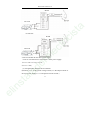
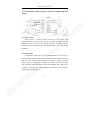
The operation steps are shown as the following flow chat.
Administrator faied
al
st
in
el
b:Please try again.
18
confirm,
System back to
validated status
Users are full,
System back to
validated status
card number
a:Duplicated finger
to
user ID xxx,Enrollment
succeeded.