1
i&*i& &*.
aeeriii&inirr
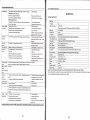
The power is off
. The air inlet g,ille, outlet grille
Operaiian
q
U Ifrsh
RaMla,ioa PruJectu
. Remove the obj@t.
airfilter is clogg€d with dust or some objets.
Specifications
POWER lndlcator does not light up.
. Pwer cqd is unplugged frm lho outlst.
.
Prer cqd
is
disonstsd frm
the
.Plug ihe
prcjstq.
pwer cord into the outlet.
. lnsst the power cord into the prcjgctor.
lndl€tor bllnb Bd.
proj*tq hs been tumsd on again t@ s@n sfter
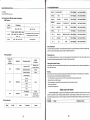
Technical specifi cations
FOWER
. The
. Wait
having beEn turned off.
. Lamp la no longer working.
'
No picture appeac
Lons ls covered by lens cap,
on the scr@n.
Tho equipment
. The air inlet grille, outlet grille
d
cffetly.
airfilter is clogged with dust or some obists
tumed crf.
. The
The image is
prcjeto
is not at a right angle to the
scrsn.
distorted
The image is
dak
. Brightnss, tint and color are not adjusted correlly.
The image is
The prcj@ting distance is beyond
blured.
Lens is dirty.
nry one.
thef6used area
Bdghtn6a and
are not adjusted
Physical resolution: native 1280*768,support
3000 ansi(MAX)
.
Contrast Etio
2OO0:1
Sdst
the corect
sorc6 ffiqding to the
Lamp power
l20W led bulb
. Rgmove th€ object and turn off the main
Focus adjustments
Manual Focusing,Support Vertical Zoomllmage Zoomllmage Shrink
HorizonialNertical rotation
power switch. After about 10 minuts, Turn the
Picture Rotiation function
proj€ctoron.
Compatibility
HDMI: Support
. Adjust tho angle of the p.ojectorto make a
Aspect Etio
4:3/16:9 (support All input 16:9)
right angle to tho screen.
Built-in Sp€ker
2W .2 Audio output (8 o )
. Adjust brightnGs,
OSD Languages
English/Franais/Espaol/PortuguCs/Arabic/chinese
lnput Socket
AVTV,S-video,Audic'out,Audio-in,VGA,YPbPr,
Advanced Feature
3D de.interlace,ZooM,l6:g,video support H.264 for usb/sd input
Lamp life
20000-50000 hours
Dimensions(LxWxH)
L:330 x W:245 x H: 115
iint and color corrsily.
. Adiust the angle of the prcjector
to make a
right angle to the screen
Th€ image remains
. When you see the stationary image for a long time, it may remain
q
bluned.
image. lt is not a breakdMn. The blured image will disappear in a
fil
Red, blue orgreen
It is
the screen if you change the
minuts.
nqmal.
dds are
viiled
1
080P1 1O80i1720P I 576P I 480P1576i1480i
Weight
N.W:3.65 KG; GW:4.5KG
Voltage
AC90-240V s0/60H2:
Noise
30dB
Prcjtrtion distance
1.0-6.0m
Prcjection size
25-250 inch
HDMl.3, USB,SD card reader
Supplied Accessories:Remote control, power cord, user manual,warranty card, AV signal line,lens clear cloth,fuse.
on the text of
Thank you for reading the User Manual. lfyou have any question, please feel fr@ to contact us or lhe dealers. We will provide excellent
image.
The image is
. The cable for conn@tlq with other €quipment is not plugged
disttrted
tqminal,
on the screen
. The prcjstor is installed t@
. The cabls
ssurety into the
No sound is heard.
fq constion
to you. We sincerely hope that you will enjoy your life with our products.
with olher equipmenl
ls not plugged s@urely inio the teminal.
dco
. Tho prcj@ttr i8 installed t@
to other equlpm6nt,
and noise is heard
dce
to other
€qulpment.
. Volume is not turned up.
. Turn up the volume.
. Connection to other equipment is not made corstly.
. This mark is displayed when an invalid opqation ls exeut€d
. Chek csnstions.
(fq examplo, when
lhe COMPUTER or VIDEO button is press€d whlle the m€nu ls dlsplayod). Thts
18
not failure.
Romgts
does not
1280X1024 and 1366x768
equipment conn@t€d to this prcjEtor.
. Adiust brightnss, contrast.
is not at a righl angle to the scr@n
5.8 inch LCD
Brightness
. Reduce screen size to within 35" to 150".
cflectly.
PAL
Display Ttrhnology
csnected equipment.
. Adjust the prcjecting distance.
scrsn size sp@ifications.
cstrst
TV Systm
. Confirm the h@kup,
. Clean lens,
Screen size exceeds
The projetd
Replace the lamp with a
. Tum on the
cffiCtly,with other oqulpment,
The input source is not sel@ted
The imagE i8
Model No.
lighting sequence,
. Take the lens cap off.
cmneted to this proj@tq is not turned on.
H@kup is nol made
fqthe
control
rcrk
. Change new batte.i6
The batteriE in the remote control used up
. lnstall the battery correctly
th€ battery is inslalled not cdr@tly
obstacle between the
projslq
. Remove the object
singal r@eiver ?
. Cl6e
ls the remote control out of operating distance?
the remote control to prcj$tor (ma
distance:7M)
lf all above method can
nd
solve the oroblem. please contact us or the dealoE immediatelv Do not open the machine bv voutself.
21
22
seMe