1
Operutioil Of Eiah Resol,.rk n Prui@tot
(c) lf the proiector does not operate normally after you follow ths operating instructions.
Do not look into the ai, outlet grille when projec'tor i8 operaiing.
Adjust only those controls that are covered by the operating instructions. An improper adjustment of othsr controls may result in damagg
Heat. dust etc. may blow out of it and hurt your eyes.
and may often require extensive work by a qualifed technician to restore the projector to its normal optration.
(d) lf the proiector has b€en exposed to rain or water.
Place of installation
(e) lf the projector has been dropp€d or the cabinst has b€€n damaged.
For safety's sake, refrain from setting the prcjtrtor at any place subjected to high temperature and high
(D
lfthe projector exhibib
a
distinct change in performancs - this indicates a ne€d for s6rvice.
humidity. Please maintain an operating tmperature, humidity, and altitude as specified below.
16. Replacement parts
When replacement parts are required, be sure that the seruie ttrhnician has used replac€rnent parts specified by the manufaclurer or
parts having the same charaderistiG as the original part. Unauthorized substitutions may result in fire, electric shock or other
1
h%rds.
7. Safety check
Upon completion of any serylce or repair to this prcjector, ask the serui@ tshnician to perfom safety checks detemining that the projsc'tor
is in a safe operating mndition. An appliane and mrt combination should be moved with Ere. Quick stops, excessive
fore
and uneven
surfaces may cause the appliane and mrt mmbination to overturn.
. Operating temperature: between +41 T (+5C) and +95T (+351])
. Operating humidity: between 30% and 90%
. Never put any heat-producing device under the projector so that the projector does not overheat.
. Do not attach the projector to a place that is unstable or subject to vibEtion.
. Do not install the poector near any equipment that produces a strong magnetic field. Also refrain from installing near the prcjector any cabls
carrying a large curent
. Place the prcjector on a solid, vibration
18. Ventilation
fre
surface: otheruise it may fall, eusing serious injury to a child or adult, and serious damage to the
producl.
Slots and openings in the cabinet are provided for ventilation, ensuring roliabls opsration ofthe projector and to protect it from
Do not block these openings or allow them to be blocked by placing the projector on a bed, sofa, rug, or bookcase. Ensure that there is
adequate ventilation and that the manufacturer's instructions have
ben
adhered to.
. Do not stand the prqjector: it.may fall, causing serious injury and damage to the projstor.
. Slanting the projector more than '1o'(right and lefr) o|15' (front and rer) may cause trouble or explosion of the lamp.
. Do not place the prcjeclor near air-conditioning unit or heater to avoid hot air to the exhaust and ventilation hole of the prcjector
WARNING..
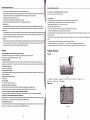
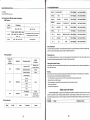
Projector Overview
Unplug immediately if there is something wrong with your prcjector.
Top view
Do not operate if smoke, strange noise or odor mmes out of your projector. lt might cause fire or electric
shock. ln this case, unplug immediately and coniacl your dealer.
Never remove the cabinet.
This projector contains high voltage circuiiry An inadvertent contact may result in an electric shock.Except as specifically explained in the
Ome/s
Guide, do not attempl to service this product yourself. Please contiact your dealer when you want to fix, adjust or inspecl the
Do not modify this equipment
It can lead to fire or electric shock.
lfyou break or drop the cablnet.
Do not
kep
using this equipment if you
br€k
or drop it. Unplug the prcjector and @ntacl your dealerftr inspstion. lt may
l€d
to fre if you
keep using the equipment.
Do not face tho projector lens to the sun.
It
(picture 1)
1.
mn lead to fire.
Use corec't voltage.
MenuButton 2.PowerButton
indi€tor 10. Remote
Bottom view
g.Red
lfyou use incorrect voltage, it can lead to fire.
sensor
3.Source
1
Button
4.V+
Button
5.V-
l.Green indicator
Do not place the prcjectol on uneven surface.
Place the projection on a leveled and stable surface only. Plsase do not place squlpmsnt on unebbls surfaces.
Do not look into the lens when it is operating. lt may hurt your eyss.Nevor let chlldron look lnto the lens whsn lt ls on.
Do not turn off the main power abrupuy or unplug ths proJsctor durlng oporrtlon.
It can lead to lamp breakage,
fire, electric shock or other troubla. lt is best to walt for th6 fan to tum
of
boforo tuming main power off.
Do not touch Air outlet grille and Bottom plate whlch becomes hot.
Do not touch them
s
put other equipmst in front ofAir outlet grille. The heated Alr outlot grtllo and Bottom plate may cause iniury or damage to
other equipment.Also, do not set the prcjector on the desk which is easlly afioc'ted by heat.
Clean the
airf
lter once a month.
Cl6an the air-filter frequently. lf the filter or ventilalion slots become clogged with dirt or dust, the tmperature inside of the proimtor may rise
and cause some boubles, such as damage of inside parts, and shortgning ths lifo of panel.
(picture 2)
Button o.CH+ Button
7.CH-
Button
8.Lens