1
3
SettinguptheAdvanceCommunicator™
1. Place the AdvanceCommunicator™ in a convenient position within
easyreachofanACpoweroutlet.
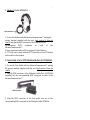
2.Attachtheplugattheendofthecoilcordofthehandsetintothe
corresponding RJ45 handset receptacle on the back of the
AdvanceCommunicator™.
3.Plugthepowersupplyintothewallpoweroutletandtheround
barrel plug at the end of the cord of the power supply into the
corresponding power receptacle on the back of the
AdvanceCommunicator™
4.AtthispointtheLEDwillflashRED
Installing the Cable to connect the phone to the
AdvanceCommunicator™
1. Remove the rubber protective cover from the connector
receptaclecoveringthemicroUSBconnectorontheBOTTOMofthe
handset (handset facing you) and insert the USB connector at the
endoftheonecableinto thephonewiththe cableconnectorfacing
totheLEFT.
2. Remove the rubber protective cover from the connector
receptacle covering the audio connector on the TOP of the handset
(handset facing you) and insert the straight audio pin connector at
theendoftheothercableintothehandset.
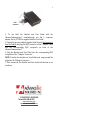
3. Insert the 2 pin connector into the receptacle below the rim on
theleftsideoftheAdvanceCommunicator.
Inserting into/removing the phone from cradle 1. Insert the bottom of the phone behind the ridge on the cradle and press the top of the phone back into the Cradle until it snaps securely into place.