1
CS215 Temperature and Relative Humidity Probe
•
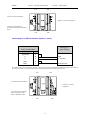
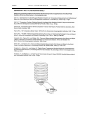
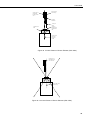
The correct orientation is with the black moulded tip of the element (that
contains the sensing components) mounted directly above the centre of
the socket.
•
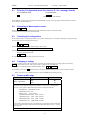
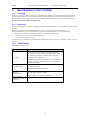
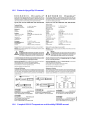
Figure 4a shows the correct orientation, whilst figure 4b shows the
incorrect orientation
CAUTION: If the sensor is inserted in one of the wrong
orientations it will not work, excessive power will be drawn
from the supply and the element may be damaged if left
powered in this state for more than a few seconds.
4.
Once the correct orientation of the probe is identified, first make sure that
your hands are clean to avoid getting dirt or grease on the element.
5.
Grasp the body of the sensor (this also ensures you are at the same electrical
potential as the element) and holding the black tip of the element between
your finger tips pull the element out of the socket. Store the old element in
electrostatic protective packaging if you wish to retain it.
6.
With the element removed check for dirt and/or corrosion around the socket.
Clean any dirt away using a damp cloth to remove any salts that might be
there.
7.
Unpack the replacement element making sure that you touch the packaging
rather than the element first to avoid static discharges directly to the element.
8.
Either hold the element by the black top of the package (the other end to the
gold plated pins) or use a pair of fine nosed pliers or tweezers to grip the
sensor by the pins. Carefully offer up the pins to the socket in the end of
probe.
9.
Confirm the correct orientation and then gently push the pins into the socket
until they will not go in any further.
10. Before replacing the filter element and turning on the power to the sensor
double-check the sensor is inserted in the correct orientation, referring to
Figure 4.
11. Screw the filter back onto the end of the probe making sure it clears the
sensor element. If the element appears too close to the filter there is a fair
chance that it has been inserted in the incorrect orientation or that the legs of
the element have been bent. Screw the filter onto the thread and tighten gently
with your fingers.
CAUTION: Only tighten the filter approximately ⅛ th of a turn
by hand when the filter is fully screwed onto the thread. Over
tightening the filter will damage it and cause problems in
inserting and removing the probe from some shields.
NOTE: It is virtually impossible to touch and damage the sensing
elements which are enclosed within the black moulded plastic at the
tip. However, if during the process of handling the element dirt, salt
or grease are left on the plastic it may influence the measurements
made.
14