1
Appendix A. Environmental
Performance
This Appendix details tests and limitations of the sensor when exposed to extremes of the
environment.
A.1 Tests to Defined Standards
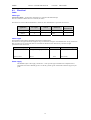
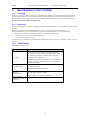
The sensor element has been tested by the manufacturer and found to comply with
various environmental test standards as shown in the table below:
Table A-1 Environmental Tests
Environment
Temperature
Cycles
HAST Pressure
Cooker
Salt Atmosphere
Condensing Air
Freezing cycles
fully submerged
Various
Automotive
Chemicals
Cigarette smoke
Norm
JESD22-A104-B 40/+125°C, 1000 cycles
JESD22-A110-B 2.3bar
125°C 85%RH
DIN-50021SS
-20/+90°C, 100cycles,
30min dwell time
DIN 72300-5
Equivalent to 15years in a
mid-size car
Results
Within Specifications
Reversible shift by +2%RH
Within Specifications
Within Specifications
Reversible shift by +2%RH
Within Specifications
Within Specifications
N.B. The temperature sensor passed all tests without any detectable drift. Package and
electronics also passed 100%
A.2 Exposure to Pollutants
All capacitative sensors are susceptible to pollutants to some degree. The vapours
may interfere with the polymer layers used in the structure of the sensing element.
The diffusion of chemicals into the polymer may cause temporary or even
permanent shifts in both offset and sensitivity.
After low levels of exposure, in a clean environment the contaminants will slowly
outgas and the sensor recover. High levels of pollutants may cause permanent
damage to the sensing polymer.
As a general rule the sensor will not be damaged by levels of chemicals which are
not too dangerous to human health (see table A-1) so damage is not normally a
problem in outdoor applications. Avoid exposing the sensor to chemicals at higher
concentrations.
A.3 Operating Range of RH Element
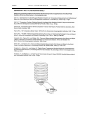
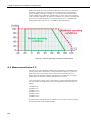
The RH sensor is specified to work over the entire humidity range of 0-100% RH
for the temperature range -20 to +60°C. It will give readings over an extended
range as shown in the figure below (although the electronics of the CS215 probe
are not specified to operate beyond +70°C).
A-1