1
Creating Dataextracts with DATAEXTRACT
Format Specifications for the Output File
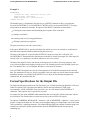
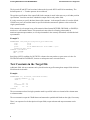
Example 3:
DATAEXTRACT
customer.cno, name, reservation.arrival, price
FROM customer, reservation
WHERE customer.cno = reservation.cno;
OUTFILE cres.data
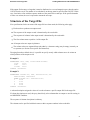
The database query is formulated in the same way as a SELECT statement in SQL, except that the
keyword DATAEXTRACT or DATAEXTRACT WITH LOCK is used instead of SELECT. The query
must produce an unnamed result table. All options of the SELECT statement are allowed here:
selecting the result columns and determining their sequence in the result table,
joining several tables,
selecting result rows by using qualifications,
defining a particular sort sequence.
The query must always end with a semi-colon (;).
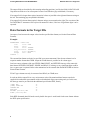
If the option WITH LOCK is specified, all tables from which rows are to be selected are read-locked so
that other users cannot modify these tables during the extract run.
The name of the target file is specified after OUTFILE. Usually, the target file is a disk file. The
DATAEXTRACT statement has the effect that the result table is written to the target file. If the target file
already exists, it is completely overwritten; otherwise a new one is created.
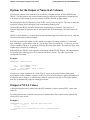
The data of the target file can be sent directly to the tape device or printer. For testing purposes, some
rows of the result table can be displayed on the screen. The filename specific to the operating system (see
the "User Manual Unix" or "User Manual Windows") can be used for selection.
If two OUTFILE descriptions are specified, Load generates a DATALOAD statement for the extracted
data. The statement will, however, only be executable if only one table was used for data selection and all
mandatory columns were included in the SELECT list. As usual, the first filename designates the
statement file, the second the data file.
Format Specifications for the Output File
The format specifications related to the file described in 3.4, "Format Specifications Related to a File and
Other File Options" DEC (decimal representation), DATE (date representation), TIME (time
representation), ASCII or EBCDIC (code conversion), etc., are also allowed in DATAEXTRACT
statements. These options may be specified in any order.
For output files, the option APPEND which determines that an existing file with the same name will not
be overwritten. The extracted data is written successively to the end of this file instead.
The options COMPRESS, SEPARATOR ’<character>’ and/ or DELIMITER ’<character>’ can be used to
produce a compressed output file. The data is written without leading or closing blanks, with each column
value separated by a separating character. The default SEPARATOR is the comma. Character strings (not
numbers) are enclosed in double quotation marks when the DELIMITER option does not specify
something else.
2