1
Structure of the Target File
Creating Dataextracts with DATAEXTRACT
If the output file becomes so large that it must be distributed over several magnetic tapes, then the option
COUNT must be used. The number of records that fit on the tape must be specified after COUNT. In this
case, Load writes a line with the sequence number of the partial file to each tape. If the specified number
of lines was written, the user is requested to mount the next tape.
Structure of the Target File
If no specifications for the structure of the target file have been made, the following rules apply:
Each result row produces an output record.
The sequence of the output records is determined by the result table.
The sequence of columns in the output record is determined by the result table.
The first column starts at position 1 of the output file.
All output values are output in plaintext.
The column values are separated from each other by a character string (may be empty) currently set
as separator (see Section User-specific Set Parameters).
Diverging from these default rules, it is possible to specify exactly which columns are to be written to
which positions of the output record.
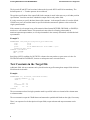
Example 1:
DATAEXTRACT title, name, account FROM customer;
title
01-05
name
10-19
account
20-29
OUTFILE custextract
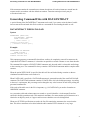
Example 2:
DATAEXTRACT customer.cno, name, reservation.rno, hno
FROM customer, reservation
WHERE customer.cno = reservation.cno;
1
01-05
2
07-13
3
15-19
4
21-25
OUTFILE custextract
A column description assigns the values of a result column to a specific output field in the target file.
If column descriptions are used, the query should only select columns that are output or used for sorting in
an ORDER BY condition.
The sequence of column descriptions is arbitrary.
The columns can be specified with their names or their sequence numbers in the result table.
3