1
UM0250
Running the Low-speed USB/RS232 Evaluation Kit
2.2
Low-speed USB/RS232 evaluation program
2.2.1
Device Selection
USB Enumeration
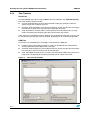
The Device Selection window, shown in Figure 4, displays the following information:
●
Available USB HID devices
All applicable devices connected to the PC are displayed in this window. The ST7
RS232 USB Bridge is displayed if the enumeration has been successfully completed.
●
Device information
This information, obtained during the enumeration phase, refers to the highlighted
device in the “Available Devices” window: Vendor ID, Product ID and Version numbers.
(Refer to the USB Specification version 1.1 or higher). Additionally, as string information is
supported, the Manufacturer name, Product and Serial Number are displayed.
COM port settings
This function selects the COM port used by the Low-speed USB/RS232 Evaluation program
to emulate a serial port communication. The selection None is not fully implemented in
version 1.0.0 of the evaluation software.
Common settings
This function is used to select the baudrate of the bridge in the bridge firmware. If the applet
is used to emulate the serial port, it also configures the COM port of the PC. Otherwise, the
serial port baudrate must be defined as the same value in the other applet or device. The
maximum applicable baudrate for this board is 38400 bit/s.
Figure 4.
Device Selection Window
38400
7/12