1
used once per installation. If more computers need to be added to the shutdown process, additional
RCCMD client licenses are required.
To send shutdown-signals to computers in case of a powerfail event you have to install and configure
the RCCMD client at the computers you want to shutdown and make some configurations at the
adapter’s event settings.
Note:
All network components, such as routers, hubs etc. need to be full UPS-supported,
as it is otherwise not possible to reach all clients during the network shutdown.
Installation of the RCCMD client: You find a setup procedure for RCCMD on the UPS
Management Software CD or downloadable from www.generex.de.
The RCCMD Setup contains a wizard, which guides you through the installation. At the first window
you have to enter the IP address of the SITEMONITOR, from which the client receives the RCCMD
shutdown-signal. Confirm the following pre-settings and mind the shutdown file at the ultimate window.
Press „Configure“ to edit the actual shutdown sequence at the client. (Alternatively you can also edit
the batchfile to add or change the actions to be executed.) Finally press „Install“ to complete the
configuration and to start the RCCMD service.
Note:
Each RCCMD installation needs its own licence code. Usually the SITEMONITOR
package contains at least one licence (depends on the model). Contact your UPS
dealer to obtain further licence codes.
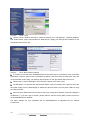
Configuration of the SITEMONITOR’s’s event settings: Call the menu “Events & Alarms” at the
adapter’s HTTP-configuration, click on the event “Powerfail” and press the button “Add new job” to
open the Job Editor.
There, choose as function from the drop-down menu the option “Send RCCMD Shutdown to remote
client” and enter the IP-address of the client. (the listener port is usually 6003) At the right side you
can specifiy when the shutdown-signal is to be released, e.g. „do after 300 seconds“.
Note:
For security reasons we recommend to make the same RCCMD shutdown entries at
„Powerfail“ for the Event “Battery low” - but here without any delays to avoid that the
server crashes because of low battery alarm!
18
Copyright of the European Union is effective (Copyright EU) (c) 2011 GENEREX GmbH, Hamburg, Germany, All rights reserved
TEL +49(40)22692910 - EMAIL [email protected] - WEB www.generex.de (This and all other product datasheets are available for download.)