1
to your company through an initial training period, takes note of the company's valid outbound email
(and recognizes ‘mortgage’ as being frequently used in legitimate messages), it will have a much better spam detection rate and a far lower false positive rate.
Creating the Bayesian spam database
Besides ham email, the Bayesian filter also relies on a spam data file. This spam data file must include
a large sample of known spam. In addition it must also constantly be updated with the latest spam by
the anti-spam software. This will ensure that the Bayesian filter is aware of the latest spam trends,
resulting in a high spam detection rate.
How is Bayesian filtering done?
Once the ham and spam databases have been created, the word probabilities can be calculated and
the filter is ready for use.
On arrival, the new email is broken down into words and the most relevant words (those that are
most significant in identifying whether the email is spam or not) are identified. Using these words, the
Bayesian filter calculates the probability of the new message being spam. If the probability is greater
than a threshold, the message is classified as spam.
NOTE
For more information on Bayesian Filtering and its advantages refer to:
http://go.gfi.com/?pageid=ME_Bayesian
Training the Bayesian Analysis filter
NOTE
The Bayesian Analysis filter can also be trained using Public folders. For more information, refer
to Configuring the Bayesian filter (page 135).
It is recommended that the Bayesian Analysis filter is trained through the organization’s mail flow
over a period of time. It is also possible for Bayesian Analysis to be trained from emails sent or
received before GFI MailEssentials is installed by using the Bayesian Analysis wizard. This allows
Bayesian Analysis to be enabled immediately.
This wizard analyzes sources of:
legitimate mail - for example a mailbox’ sent items folder
spam mail - for example a mailbox folder dedicated to spam emails.
Step 1: Install the Bayesian Analysis wizard
The Bayesian Analysis wizard can be installed on:
A machine that communicates with Microsoft® Exchange - to analyze emails in a mailbox
A machine with Microsoft Outlook installed - to analyze emails in Microsoft Outlook
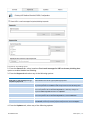
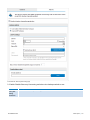
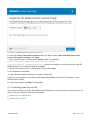
To install the Bayesian Analysis wizard:
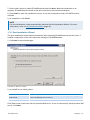
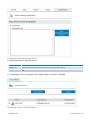
1. Copy the setup file Bayesian Analysis Wizard.exe to the chosen machine. This is located in: GFI
MailEssentials installation path\AntiSpam\BSW\
2. Launch Bayesian Analysis Wizard.exe.
GFI MailEssentials
14 Appendix - Bayesian Filtering | 289