1
4-0 Using the Squid plugin
In this chapter the Aker Web Control for Squid usage and configuration will
be discussed
4-1 Introduction
The Aker Web Control for Squid is a product which enables a powerful, profile-based
filtering scheme to run alongside the Squid caching abilities.
According to its configuration file, Squid will run several plugin, instances and have the
URLs analyzed by it.
4-2 Squid Configurations
There are four Squid configuration directives which are relevant to the Aker Web
Control for Squid:
•
•
•
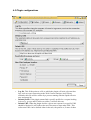
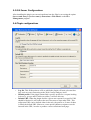
cache_effective_user - Defines the O.S. user Squid uses to run its processes.
This user should be a non-privileged one, and must be also set in the plugin
GUI.
cache_effective_group - Defines the O.S. user Squid uses to run its
processes. This user should be a non-privileged one, and must be also set in the
plugin GUI.
redirect_program - Tells Squid which program it should use to filter the user
accesses requests. This should point to the file:
/usr/local/squid-urld/squid-urld
•
•
redirect_children - Defines how many plugin process instances Squid will
run. This number is the maximum number of simultaneous requests being
analyzed at any given time. It is recommended to set it to a value never less than
5 and to increment it slowly, in order to avoid severe O.S. resource overuse.
auth_param basic program - Tells Squid which program it should use to
authenticate users. This should point to the file:
/usr/local/squid-urld/squid_auth /etc/passwd
•
auth_param basic children - Defines how many squid_auth process
instances Squid will run. This number is the maximum number of simultaneous
requests being analyzed at any given time. It is recommended to set it to a value
never less than 5 and to increment it slowly, in order to avoid severe O.S.
resource overuse.