1
i
JAMAR Echo User's Manual
LIMITED WARRANTY
JAMAR Technologies, Inc. warrants the JAMAR Echo against defects in material
and workmanship for a period of one (1) year limited warranty on parts and labor
from the date of purchase. For information on extended warranty call 1-800-7760940.
JAMAR Technologies, Inc. warrants each new instrument manufactured by the
company to be free from defective material and workmanship and agrees to remedy
any such defect. At its option, it may furnish a new part in exchange for any part
of any instrument of its manufacture which, under normal installation, use and
service discloses such defect. The instrument must be returned to our factory or
authorized service agent intact, for examination, with all transportation charges
prepaid.
This warranty does not extend to any products which have been subject to misuse,
neglect, accident, vandalism or incorrect wiring not our own. This warranty does
not extend to water damage caused by improper installation in disregard of the
instructions furnished by us. This warranty does not extend to products which have
been repaired or altered outside our factory or authorized service agent.
In no event shall JAMAR Technologies, Inc. be liable for any damages arising from
the use of this product including damages arising from the loss of information.
This warranty is in lieu of all other warranties expressed or implied and no
representative or person is authorized to assume for us any other liability in
connection with the sale or use of our products.
JAMAR Technologies, Inc. reserves the right to make improvements on the product
and/or specifications at any time without notice.
Questions concerning this warranty or any JAMAR Technologies, Inc. product
should be directed by mail or telephone to:
JAMAR Technologies, Inc.
151 Keith Valley Road
Horsham, PA 19044
215-491-4899
COPYRIGHT NOTICE
This manual is copyrighted. All rights are reserved. This document may not
be, in whole or part, photocopied, reproduced, translated, or reduced to any
electronic medium or machine readable form without prior consent, in writing, from JAMAR Technologies, Inc.
Copyright 2007 by JAMAR Technologies, Inc.
ii
If you have any questions about the use of the JAMAR Echo, please call
the following number:
215-491-4899
Monday - Friday 8:00 AM to 5:00 PM Eastern time
You may also contact us by e-mail at:
[email protected]
Address any correspondence to:
JAMAR Technologies, Inc.
151 Keith Valley Road
Horsham, PA 19044-1411
Volume 1.6 August 2007
iii
JAMAR Echo User's Manual
Table of Contents
Technical Support
.................................................................. iii
Initial Setup Guide for the JAMAR Echo ...................................................... v
Quick Programming Guide for the JAMAR Echo ....................................... vi
Chapter 1: Using The JAMAR Echo............................................................ 1-1
What is The JAMAR Echo?
................................................................ 1-2
How it Works
................................................................ 1-2
Setting Up The JAMAR Echo ................................................................ 1-3
Main Screen
................................................................ 1-4
Selecting Options
................................................................ 1-5
Reset Screen
................................................................ 1-5
Start Time-stamped Study Screen ..................................................... 1-6
GPS Screen
................................................................ 1-7
Clear Memory Screen
................................................................ 1-8
Sensitivity Screen
................................................................ 1-8
Uploading Information to the JAMAR Echo............................................ 1-9
Downloading the JAMAR Echo ............................................................. 1-13
Chapter 2: Using the JPDA Software........................................................... 2-1
Introduction to JPDA
................................................................ 2-2
Installing the Software
................................................................ 2-3
Getting Started
................................................................ 2-6
Main Screen
................................................................ 2-6
Preferences Screen
................................................................ 2-7
Setup Screen
................................................................ 2-8
Status Screen
................................................................ 2-9
Retrieving Data from the Echo .............................................................. 2-11
View Downloaded Files
.............................................................. 2-13
Transferring Data from JPDA with JRead .............................................. 2-14
Chapter 3: Installing The JAMAR Echo ..................................................... 3-1
Installing the Mounting Bracket ............................................................... 3-2
Installing the JAMAR Echo in the Field................................................... 3-4
What Makes for a Good Location?........................................................... 3-4
Chapter 4: Battery Care
Chapter 5: Troubleshooting
................................................................ 4-1
................................................................ 5-1
Appendix
...............................................................A-1
iv
Initial Setup Guide
for the JAMAR Echo
Step 1
Remove the faceplate of the Echo and remove the paper tab from the battery holder to allow the batteries to connect. This will provide power.
Step 2
At this point, if you are only interested in recording overall totals, you can
proceed to installing the Echo in the field, as discussed in Step 4. Overall
totals can be read directly off the display of the Echo. If, however, you
would like to use some of the other options the Echo has, like storing GPS
coordinates or starting a time-stamped study, go to Step 3.
Step 3
Familiarize yourself with the JPDA software, which is covered in Chapter
2 of this manual. This program can be used to configure the settings of the
Echo. These settings include the time and date, which you should set for
your location if you will be doing time-stamped studies. JPDA can also be
used to start & stop studies, and retrieve data from the Echo.
Step 4
Install the Echo in the field. Refer to Chapter 3 for information on how to
pick and good location and how to physically install the Echo.
Step 5
Start a new study using either the JPDA software or the programming guide
listed on the next page.
v
JAMAR Echo User's Manual
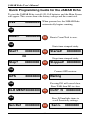
Quick Programming Guide for the JAMAR Echo
To start the JAMAR Echo, install 4 D-Cell batteries and the Main Screen
will appear. This screen shows the battery voltage and the count total.
5.8V
00000000
When powered on, the JAMAR Echo
automatically begins counting.
TAB
Reset?
00000000
DO
Resets Count Total to zero.
TAB
Starts time-stamped study.
Start?
00000000
DO
OR
Stop?
00000000
Started!
00000000
Stops time-stamped study.
DO
Stopped! 00000000
TAB
Connect GPS receiver.
GPS
00000000
DO
TAB
Pressing DO will cancel clear.
Press TAB, then DO to clear.
CLR MEM?00000000
DO
TAB
Sen:Def
Waiting
CLR? N
00000000
Press DO multiple times to
scroll Sensitivity settings.
00000000
DO
vi
Sen:L
00000000
Chapter 1 — Using the JAMAR Echo
Chapter 1
Using the
JAMAR Echo
1-1
JAMAR Echo User's Manual
What is the JAMAR Echo?
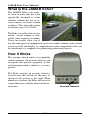
The JAMAR Echo is an acoustic data recorder that has been
specifically designed to count
vehicles without the use of invasive sensors on lower volume
roadways. This unit will register
at distances up to 40-50 feet.
The Echo can collect data in two
modes: overall volume or individual time-stamped recording.
These two modes allow you to
use the same piece of equipment to go from a simple volume count, which
can be read off the display, to comprehensive time-stamped data that can
be transferred to a computer for generating professional reports.
How It Works
The average vehicle emits a recognizable
sound signature. An acoustic detector can
recognize the specific signature of this
and determine when a vehicle is, or is not,
present.
The Echo contains an acoustic detector,
located near the bottom of the unit, as
shown in the picture to the right. When
aimed at a roadway, the Echo will record a
count whenever a vehicle enters the detection zone.
1-2
Acoustic Detector
Chapter 1 — Using the JAMAR Echo
Setting Up the JAMAR Echo
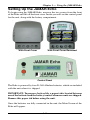
To begin using the JAMAR Echo, unscrew the two screws from the front
of the Echo and lift off the front cover. Inside you will see the control panel
for the unit, along with the battery compartment.
With Front Cover
With Front Cover Removed
Control Panel
The Echo is powered by four D-Cell Alkaline batteries, which are included
with the unit when it is shipped.
IMPORTANT: To preserve battery life, a paper tab is located between
one of the batteries and the battery contact when new units are shipped.
Remove this paper tab before using the unit.
Once the batteries are fully connected in the unit, the Main Screen of the
Echo will appear.
1-3
JAMAR Echo User's Manual
Main Screen
A 16-character LCD display, located in the middle of the JAMAR Echo's
control panel is used to display the current options and status. NOTE: The
display of the Echo has a power-saving feature that turns off the screen if
the unit has not been disturbed for several minutes. To bring the display
back up, simply hit either the TAB or DO key.
Once power is provided to the Echo, the Main Screen appears.
5.9V
00000000
This screen shows the battery voltage on the left side of the display, which
allows you to monitor the battery status. Generally, fresh batteries should
register at 5.8 to 6.0 VDC. Batteries should be replaced when this voltage
falls to around 4.5 to 5.0. The unit will stop recording data once the voltage
falls to approximately 4.0 volts.
Depending upon use and temperature where the unit is installed, the batteries
may last for more than six months before they need to be replaced. Refer to
Chapter 4 Battery Care for more information on battery maintenance.
When the Echo is powered on, it begins recording counts, which are
displayed on the right side of the Main Screen. At this point, if you are
only interested in recording overall totals, you can proceed to installing the
Echo in the field, as discussed in chapter 3. If, however, you would like to
use some of the other options the Echo has, like storing GPS coordinates
or starting a time-stamped study, read on.
The remainder of this chapter covers, in a tutorial style, some of the additional options you have in setting up the Echo using the control panel.
Note that you can also perform these functions remotely using the JPDA
software, which is discussed in Chapter 2.
1-4
Chapter 1 — Using the JAMAR Echo
Selecting Options
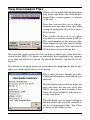
There are two buttons on the control panel of the JAMAR Echo that are
used to navigate through the various screens and select options. The black
TAB key is used for navigation, while the red DO key is used to select an
option.
With the Main Screen visible (remember, if the display goes into power
saving mode, press either key to bring it back up), go ahead and press the
TAB key. Notice that the screen changes to show Reset? on the left side of
the display rather than the battery voltage. Your current count total is still
visible on the right side.
Press TAB again, and the screen changes to show Start?. Press TAB again
and it shows GPS. Press TAB again and it shows CLR MEM?. Press TAB
again and it shows Sen:Def. Press TAB on more time, at it takes you back
to the Main Screen, which shows the current battery voltage.
The five screens we just went through are the ones used to select various
options in the JAMAR Echo. Press the TAB button repeatedly and notice
that you loop through these five screens, always coming back to the Main
Screen.
Now we'll take a look at what we can do with the five option screens.
Reset Screen
When at the Main Screen, press the TAB key once and the Reset Screen
will appear.
Reset?
00000000
This screen is used to reset the current count total visible on the right side of
the display. Press the DO key while on this screen and notice that the count
total resets to zero and you are taken back to the Main Screen.
Note that if you are in the Reset Screen and decide that you do not want to
reset the count total, simply wait a few second without doing anything and
the JAMAR Echo will return to the Main Screen on its own. Alternatively,
you can press the TAB key until you return to the Main Screen.
Note also that selecting the Reset option will also stop any current timestamped study being done, and immediately start a new one. We will find
out more about time-stamped studies in the next section.
1-5
JAMAR Echo User's Manual
Start Time-stamped Study Screen
When at the Main Screen, press the TAB key twice and the Start Timestamped Study Screen will appear.
Start?
00000000
As we have learned, when you power on the JAMAR Echo it begins counting
and shows the count total on the right side of the display. This information is
useful if you want an overall count of vehicle volumes. However, what if you
want more detailed information, such as specific information on when the
volumes are occurring? That's where the Time-stamped study comes in.
The Echo has the ability to record and store a time stamp of every individual
count it records. These time stamps are stored in memory and can later
be downloaded into the TRAXPro or JPDA software for processing. The
Echo's internal memory is 256 KB, which will hold approximately 80,000
time stamps before becoming full.
Press the DO key while on the Start? screen and the display will change
to the one shown below.
Started!
00000000
The overall count total shown on the display will reset to zero, and the unit
will begin storing the time-stamped data internally. The Echo will then
return to the Main Screen.
Note: For your time-stamped study to be accurate, it is important that the
Echo have the correct time stored in its memory. Refer to the Uploading
Information to the JAMAR Echo section on page 1-8 for more information
on this.
From the Main Screen, hit the TAB key twice and notice that the Start?
option has now been replaced by Stop?. This screen will appear if you currently have a time-stamped study in progress and it gives you the option
to stop that study.
Stop?
00000000
1-6
Chapter 1 — Using the JAMAR Echo
Hit the TAB key a few more times and notice that it will loop you through
only two options: Reset? and Stop?. When a time-stamped study is in progress, these are the only two options of the original four that are available
for selection. You must end the time-stamped study to access the additional
options.
Tab back to Stop? showing on the display and press the DO key. The display
will change to the one shown below.
Stopped! 00000000
At this point, the time-stamped study is stopped and stored in memory. A
little later on we will see how this study can be downloaded and how it can
be cleared from memory. After a few seconds, the Echo will reset itself to
the Main Screen.
GPS Screen
When at the Main Screen, press the TAB key three times and the GPS
Screen will appear.
GPS
00000000
GPS coordinates can be loaded into the Echo by connecting a handheld
GPS receiver to the serial port on the Echo's control panel.
Note: The GPS receiver must be set to transmit one of the following NMEA
messages at 4800 baud: GPRMC, GPGLL or GPGGA.
Press the DO key and the display will change to the one shown below.
Waiting
Plug the GPS receiver into the Echo's serial port and, if the receiver is configured properly, the Echo will receive the coordinates and begin showing them
on the display, alternating between showing latitude and longitude. Press
the DO key to accept the coordinates and the Echo will return to the Main
Screen. Note that if you press the DO key on the Waiting screen when no
GPS receiver is connected, the Echo will cancel out to the Main Screen.
1-7
JAMAR Echo User's Manual
Clear Memory Screen
When at the Main Screen, press the TAB key four times and the Clear
Memory Screen will appear.
CLR MEM?00000000
The Clear Memory option can be used to delete time-stamped studies that
have been stored in memory. However, to prevent studies from being accidently deleted, you are required to confirm that you want to clear the
memory. Press the DO key and the screen shown below will appear.
CLR? N
00000000
On this screen, the 'N' means No, do not clear memory. If you press DO at
this point, the Echo will cancel out of the memory clear process and return
to the Main Screen. Press TAB instead, and the screen shown below will
appear.
CLR? Y
00000000
On this screen, the 'Y' means Yes, do clear memory. If you press DO at this
point, the Echo will clear all stored time-stamp studies from memory and
return to the Main Screen.
Sensitivity Screen
When at the Main Screen, press the TAB key five times and the Sensitivity
Screen will appear.
Sen:Def
00000000
The Sensitivity option can be used to select how sensitive the acoustic sensor
should be when recording data. The initial setting, Def, stands for Default
and will work fine for most applications. However, if you install the Echo
at a location where it appears to be overcounting due to extraneous noise,
or undercounting due to its distance from the vehicle sounds, this setting
can be used to make adjustments.
1-8
Chapter 1 — Using the JAMAR Echo
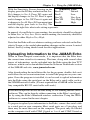
With the Sensitivity Screen showing on the
Sensitivity Table
display, press the DO key and notice that Sen: Sen:Def
Default
Def changes to Sen:L. Press DO again and Sen:L
Low
the display changes to Sen:VL. Press it again Sen:VL
Very Low
and it changes to Sen:VH. Press it again and Sen:VH
Very High
it changes to Sen:H. Press DO one more time Sen:H
High
and the display goes back to Sen:Def. The
table to the right lists what each setting represents.
In general, if your Echo is overcounting, the sensitivity should be adjusted
to either Low or Very Low. If it is undercounting, the sensitivity should be
adjusted to either High or Very High.
Note that the Echo will use whatever setting you have selected on the Sensitivity Screen, so be careful when making changes on this screen. As noted
before, the Def setting should work for most applications.
Uploading Information to the JAMAR Echo
When in Time-stamped count mode, it is important that the Echo have
the correct time stored in its memory. The time, along with several other
pieces of information, can be uploaded into the Echo using the free TCU
software, which can be downloaded from the Software Downloads section
of the JAMAR web site, www.jamartech.com.
After downloading the installation file for the program, double click on it
and follow the on-screen instructions to install the program on your computer. Once the program is installed, it can be used to upload information
into the Echo using the serial port on the Echo and a serial cable, such as
the JAMAR universal cable. (It is not required that a JAMAR cable be used.
Any compatible RS-232 serial cable will work.)
Note that the upload can also be done using a PDA running the free JPDA
software. This can be done by either connecting to the Echo's serial port,
or by using the Echo's Bluetooth wireless connection. Using the JPDA
software is covered in the next chapter.
To prepare to upload your information to the Echo, connect the serial cable
to a serial port on your computer. Most serial ports are a 9 pin plug, and
there may be more than one on the computer. The ports may be labeled
on the computer itself with COM 1 listed as 1 or A and COM 2 listed as
1-9
JAMAR Echo User's Manual
2 or B. Refer to chapter 5, Troubleshooting, for tips on avoiding problems
when using a computer's serial port, or what to do if your computer does
not have a serial port.
On the Echo itself, you must have the display visible to upload information. If the unit is in power saving mode and the display is not visible, hit
either the TAB or DO key to bring it back up. Once the display is visible,
start the TCU software.
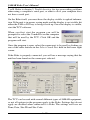
When you first start the program you will be
prompted to select the Comm Port on the computer
that will be used by the TCU. Click OK and the
program will start.
Once the program is open, select the comm port to be used by clicking on
one of the radio buttons in the Select Comm Port field in the lower right
corner.
If the Echo is properly connected, you will see a message saying that the
unit has been found on the comm port selected.
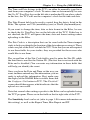
The TCU can be used with several different types of JAMAR equipment,
so not all options in the program apply to the Echo. Settings that do not
apply are disabled when connected to a Echo. The settings we'll use are
Time, Date, Site ID and Site Code.
1-10
Chapter 1 — Using the JAMAR Echo
The Time and Date listings in the TCU can either be manually typed in or
read from your computer’s clock. To enter a time or date manually, be sure
the Use PC Time/Date box on the left side is unchecked. If you place a check
in this box, the TCU will use the computer’s clock for the time and date.
The Date Format field can be used to control how the date is listed in the
Echo. The options are USA (month/day/year) or World (day/month/year).
If you want to change the time, date or date format in the Echo, be sure
to check the Set Time/Date box on the left side of the TCU. If this box is
not checked, the TCU will ignore the time, date and format settings when
uploading to the Echo.
The Site Code is a description that can be saved with the Time-stamped
study to help you identify the location of the data when processing it. These
values are part of the Site Code field in TCU. Note that you are not required
to use these fields for your studies, they are provided for those users who
would like to use them.
The second line of the Site Code field is used to enter the Site ID, while
the third line is used for the Station ID. (The first line is not used with the
Echo and is disabled.) You can enter any information in these fields that
will help you identify the count.
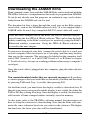
Once you have the Date and Time set the way you
want, and have entered any Site information, you are
ready to upload this information. First, make sure
the display of the JAMAR Echo is visible, then click
the Configure Unit button in TCU. The 'Finished!'
screen should then appear, which indicates that the
upload was successful.
Note that several other settings specific to the Echo can be uploaded using
the TCU program. These are in the field on the far right side of the TCU.
The Sensitivity level can be set (refer to page 1-8 for more information on
this setting), as well as the Repeat Time, Max Repeat and DT.
1-11
JAMAR Echo User's Manual
When multiple vehicles pass the Echo in quick succession, the sound from
the two vehicles can merge together. The Repeat Time setting allows you
to address this.
Enter, in milliseconds, how long the Echo should wait before it assumes the
sound it hears is from more than one vehicle and records a second count.
The default setting is 3000 ms, which should work well for typical traffic
speeds from 25-45 mph. If the Echo appears to be undercounting the vehicles
in platoons, decrease the number.
For small platoons, the Repeat Time works well. However, for larger platoons this can cause the Echo to begin overcounting. To reduce the impact
of large platoons, the Max Repeat setting is used to limit the number of
detections from a single platoon. The default value for this is 3.
The DT, or Dead Time, setting allows you to enter a period of time, in milliseconds, that the Echo will wait after it records a count before it will accept
another one. This setting can help to prevent 'double-counting' of individual
vehicles. The default value is 500 ms. If the Echo appears to be double counting vehicles, increase this value. If the Echo appears to be missing vehicles
that are close together and undercounting, decrease this value.
1-12
Downloading the JAMAR Echo
Time-stamped counts done with the JAMAR Echo can be analyzed with the
TRAXPro software, a comprehensive data analysis program from JAMAR.
If you do not already own this program, an evaluation copy can be downloaded from the JAMAR web site for trial.
The download of data is done through the serial port on the Echo using a
serial cable, such as the JAMAR universal cable. (It is not required that a
JAMAR cable be used. Any compatible RS-232 serial cable will work.)
Note that time-stamped data in the Echo can also be retrieved and processed using the free JPDA & JRead software. This can be done through
either connecting to the Echo's serial port or wirelessly using the Echo's
Bluetooth wireless connection. Using the JPDA & JRead software is
covered in the next chapter.
To prepare to download your data, connect the serial cable to a serial port
on your computer. Most serial ports are a 9 pin plug, and there may be more
than one on the computer. The ports may be labeled on the computer itself
with COM 1 listed as 1 or A and COM 2 listed as 2 or B. Refer to chapter
5, Troubleshooting, for tips on avoiding problems when using a computer's
serial port.
Once the serial cable is plugged into the computer, plug the other end into
the Echo.
You cannot download studies that are currently in progress. If you have
a count in progress that you would like to download, you must end the study
by pressing TAB until Stop? is visible, then pressing DO.
On the Echo itself, you must have the display visible to download data. If
the unit is in power saving mode and the display is not visible, hit either the
TAB or DO key to bring it back up. Once the display is visible, the download
will transfer all time-stamped studies currently stored in memory.
At this point, refer to the TRAXPro software manual for information on
how to setup the software for downloading. Note that the Echo will automatically sense whatever baud rate you select in the software. The higher
the baud rate, the faster your data will be downloaded.
1-13
JAMAR Echo User's Manual
Downloaded counts will remain in the memory of the Echo until they are
cleared. Refer to page 1-8 for information on how to clear the memory.
Important: Do not clear the memory of the Echo until you are certain that
the data has been successfully downloaded to you computer.
1-14
Chapter 2 — Using the JPDA Software
Chapter 2
Using the
JPDA
Software
2-1
JAMAR Echo User's Manual
Introduction to JPDA
JPDA is free interface software for the JAMAR Echo that runs on a Personal
Digital Assistant (PDA). This program is designed to make setup of the
JAMAR Echo, and retrieval of data from it, a more convenient process. Data
that has been retrieved with JPDA can be transferred to a desktop computer
using the free JRead software. JRead allows the data to be processed and
output to a TRAXPro or Excel file, along with other formats.
Supported PDAs
JPDA currently runs on Pocket PC based PDAs. It does not currently support Palm PDAs. In general, almost any Pocket PC version PDA made
in the last couple of years should work. There are several companies that
sell Pocket PC PDAs, with the most popular being those made by Hewlett
Packard (the Ipaq series). Regardless of brand, Pocket PC PDAs look very
much the same since they run the same operating system.
Choosing which PDA is right for you can be complicated because there
are many different features available. However, JPDA will be much more
useful if the PDA you use has Bluetooth wireless capability. With JPDA
software running on a PDA equipped with Bluetooth wireless capability,
it is possible to setup and retrieve data from the Echo without ever having
to remove it from the field.
Software Updates
Updated versions of JAMAR software are released periodically and are
posted on the JAMAR web site. Users of JPDA may download updates
to the program to make sure they always have the latest version of the
software on their PDA. To download the latest version of JPDA, go to
www.jamartech.com and then select Downloads from the list of options.
Software Support
If you encounter any problems while using the program, or have any questions on specific operations, refer first to this manual. For up to the minute
information on all known issues with the program, refer to the JPDA support
web page at: www.jamartech.com/JPDAsupport.html.
2-2
Chapter 2 — Using the JPDA Software
Installing The Software
It is a simple process to install JPDA on your PDA. It is required, though,
that you have set up an ActiveSync partnership with your desktop computer.
If you are unsure of how to do this, consult the instructions that came with
your PDA.
It is recommended that you place your PDA into its cradle and allow ActiveSync to run prior to starting the installation procedure. The installation
software will use ActiveSync to copy the files to your PDA.
Place the JPDA CD into the CD drive of your computer. The computer should
recognize the new CD and show you the Installation Options, including one
to Install JPDA. Select this option.
Installing .NET Framework
If this is a new installation, you must first install the .NET framework for
your PDA’s operating system. If you are unsure of what operating system
is running on your PDA, on the PDA go to the Start menu, then select Settings, select the System tab and click on
About. Note that JPDA only supports the
Windows Mobile 5.0 or 2003 operating
systems.
Click on the installation button for your
PDA's operating system, and the installation of the .NET framework will begin.
During installation you'll see a screen
similar to the one shown to the left.
Once the installation is complete, you'll
see a screen prompting you to check
your PDA to see if any additional steps
are needed. On the PDA itself, you may
be prompted to restart.
Installing JPDA
Once the .NET framework is installed, you are ready to install JPDA. Click
on the Install JPDA option on your computer. When the first installation
screen appears, click Next.
2-3
JAMAR Echo User's Manual
Next you will see the License Agreement displayed on the screen. If you
agree to the terms of the agreement, select the I accept the terms in the
licence agreement option and click the Finish button.
Active Sync connects to the PDA and begins installing the program. When
complete, you'll see a screen prompting you to check your PDA to see if
any additional steps are needed.
Once you've installed your JPDA software, the icon for JPDA has been
added to your list of applications on your Programs Screen of the PDA.
You tap on the JPDA icon to run the software.
Installing JRead
JRead is a utility program who's purpose is to allow you to transfer the data
in your PDA to your computer for processing.
The JPDA CD Installation Options should still be running on your computer. If not, re-insert the CD.
Select the Install JRead option and the installation for the program will
begin. When the Welcome screen appears, click Next. The next screen details
the license information for the program. To accept the license agreement
and continue with the installation, click Yes.
The Read Me file for the program will then be displayed. Click Next to
continue.
The Choose Destination Location screen then appears. You can use this
screen to select where the program is installed. To use the default location,
click Next.
The Select Program Folder screen allows you to select the program folder
for the installation. To use the default location, click Next.
At this point you have provided all the information necessary to start installing the program. A summary of the information is provided. Click Next to
begin copying files.
Once all the files have been copied, the InstallShield Wizard Complete
screen will appear.
2-4
Chapter 2 — Using the JPDA Software
2-5
JAMAR Echo User's Manual
Getting Started
Once you have installed JPDA and JRead you are ready to start using JPDA.
Tap on the JPDA icon in the Programs menu. This loads the Main screen.
Main Screen
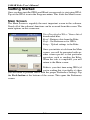
The Main Screen is arguably the most important screen in the software.
Nearly all of the software's functions can be accessed from this screen. The
main options on this screen are:
View Downloaded Files - View a list of
downloaded files.
Read - Retrieve data from the Echo.
Prefs - Set Preferences for JPDA.
Setup - Upload settings to the Echo.
Once you initiate a task from the Main
screen, you will be presented with another screen specific to that particular
operation, such as reading the Echo.
When the task is completed, you will
return to the Main screen.
If this is your first time using JPDA (if
you're reading this, it probably is), then
you will need to provide JPDA with the proper Preference Settings. Tap
the Prefs button at the bottom of the screen. This opens the Preference
screen.
2-6
Chapter 2 — Using the JPDA Software
Preferences Screen
The Preferences screen allows you to adjust the major parameters of JPDA.
You can select the port number and baud rate that will be used to communicate with the data recorder by selecting the desired option from each
drop-down box.
Set the Comm Port to 1 if you'll be
connecting through your PDA's cradle
port connector.
If you'll be connecting via wireless
Bluetooth, select the outbound bluetooth
port of the PDA. This is typically the
second port listed with the (BT) suffix
in the list of ports.
If you'll be connecting using an adapter
plugged into the CF slot, select the port
option listed with the (CF) suffix.
Set the Baud Rate as desired. This
controls the speed of the data transfer.
The higher the number, the faster the transfer. Some older PDA's may not
be able to handle baud rates over 19200 baud. For now, select 57,600 as
the baud rate.
JPDA allows you to use a GPS receiver to store the exact location of the
study along with the data, if you have a GPS receiver plugged into your
PDA. Enable this if you are using GPS, otherwise leave it set to 'No'.
Now JPDA's settings are tailored to your equipment and the program is
ready to be put to work for you. Tap Done to return to the Main screen.
2-7
JAMAR Echo User's Manual
Setup Screen
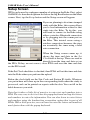
JPDA can be used to configure a number of settings in the Echo. First, select
JAMAR Echo from the dropdown list below the big Read button on the Main
screen. Next, tap the Setup button and the Setup screen will appear.
If you are planning to do a time-stamped
study with the Echo, this screen allows
you to load information related to that
study into the Echo. To do this, you
will need to connect to the Echo using
either a wireless Bluetooth connection
or by plugging into the comm port on
the Echo. This tutorial covers using a
wireless connection; however, the steps
are essentially the same using a hard
wire connection.
When the Setup screen comes up, it
shows the time and date in the Set
Clock field at the top. These are read in
directly from the time and date set on
the PDA. If they are not correct, close JPDA and reset the time and date
on the PDA itself.
If the Set Clock checkbox is checked, then JPDA will set this time and date
into the Echo when you perform the upload.
Below the clock field are the Site Code and Station ID fields. Whatever
you put in here will show up in the corresponding fields when the study is
processed, and can be printed on reports with the data. You can fill in the
fields however you wish.
Note that it takes a little bit of practice to enter text and numbers into a
PDA. The easy way to do it is to use the popup keyboard and tap the letters
and numbers to enter the information. You can also learn to enter letters
and numbers using the handwriting recognition option that is part of all
PDAs. With a little practice you can learn to enter the letters and numbers
much faster than with the popup keyboard.
2-8
Chapter 2 — Using the JPDA Software
Once you have the information entered
that you want, tap the Upload Info
button to begin the transfer to the data
recorder.
If you are using Bluetooth, and the PDA
is able to find an available Bluetoothequipped device nearby, you'll see a
screen like the one shown to the left.
This screen allows you to select the
Bluetooth device you want to connect
to. Each Bluetooth-equipped data recorder is listed with its serial number,
so if you have multiple devices you can
choose a specific one.
Tap on the Echo you want and the setup info will be transferred. You will
then be returned to the Setup screen.
If you ever what to check what information is currently stored in your Echo,
the Get Info button basically does the reverse of the Upload Info button.
Tap Get Info and JPDA will read in the Site Code, Station ID and GPS info
that is currently stored in the Echo.
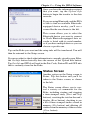
Status Screen
Another option on the Setup screen is
Status. Tap this button and you'll be
taken to the Status screen, as shown
to the left.
The Status screen allows you to control a variety of commands for the
Echo, including starting and stopping
a time-stamped study (Start and Stop
buttons), resetting the total on the unit's
display (Reset button), checking to see
a list of time-stamped studies stored in
memory (Dir button) and deleting all
studies from the memory of the recorder
(Clear button).
2-9
JAMAR Echo User's Manual
In addition, this screen can be used to check the current volume total from
the Echo's display.
Tap the green Status button at the lower left of the display to check the current status of the Echo. If you are using Bluetooth, you have to select the
device you want, as described in the previous section.
If JPDA is able to connect to the Echo,
it will display the unit's status, as shown
to the left.
The top line displays the unit type. This
is followed by the firmware version.
The next line displays the Echo's serial number, which is followed by the
current battery voltage. The fifth line
displays the Time and Date, which is
followed by any Site ID and Station
ID information that has been uploaded
into the unit. The eighth and ninth lines
list any GPS coordinates that have been
stored. The next line lists whether the
Echo is recording a time-stamped count or is idle. The final line list the
current total on the Echo's display.
Now that we've checked the status of the Echo, we can have it start a new
time-stamped count for later downloading. To do this, we tap the Start button to begin a new time-stamped count. A confirmation screen then tells us
the count has started.
2-10
Chapter 2 — Using the JPDA Software
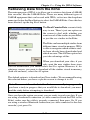
Retrieving Data from the Echo
The main purpose of JPDA is to allow you to retrieve data from a JAMAR
data recorder, like the JAMAR Echo. There are many different types of
JAMAR equipment that can be used with JPDA, so first use the dropdown
menu just below the Read button to select the JAMAR Echo. Once this has
been selected, tap the big Read button.
The Read Counter Data screen is fairly
easy to use. There's just one option on
the screen to deal with: whether you
want to read all the studies in your Echo,
or just the new studies in the Echo.
The Echo can have multiple studies from
different times stored in memory. JPDA
is able to recognize which of these studies have already been downloaded and
which are new. The All/New option lets
you take advantage of this.
When you download your data, if you
only want the new studies done since
you last downloaded, you should select the New option. However, if, for
whatever reason, you want to download all the studies stored in memory
(both old and new), select the All option.
The default option is to download just New studies. We recommend leaving
this selected unless you have a specific reason to change it to All.
Note: You cannot download studies that are currently in progress. If
you have a study in progress that you would like to download, you must
end the study before attempting to download.
Once you have the option you want, you are ready to read your data. If you
are using a hardwired connection (a cable connected from the PDA to the
Echo), make sure the cable is properly connected, then press Go. If you
are using a wireless Bluetooth connection (no cable connected to the data
recorder), just press Go.
2-11
JAMAR Echo User's Manual
The rest of this tutorial covers using a wireless connection; however, the
steps are essentially the same using a hard wire connection.
Reading Data with Wireless Bluetooth
If you are using a wireless Bluetooth
connection to connect to the Echo, when
you tap the Go button JPDA will attempt
to find all the nearby Bluetooth devices.
You'll then see a screen similar to the
one to the left.
This screen allows you to select the
Bluetooth device you want to connect
to. Each Echo is listed with its serial
number, so if you have multiple devices
you can choose a specific one.
Tap the device you want to connect to
and JPDA will attempt to connect. If
successful, the screen will change to
show the message 'Downloading Block:" followed by a number representing
the block of data that is being read in. (Each block represents approximately
1000 characters.) JPDA doesn't know how many blocks the Echo is going
to send, it just processes each block until the Echo is done.
Note that if JPDA is not able to connect, the screen will show and error that
the download has timed out. In this case, see the troubleshooting chapter
for issues to check.
Once the download is complete, the View Downloaded Files screen will
appear.
2-12
View Downloaded Files
When you have finished downloading
data from your Echo, the View Downloaded Files screen appears, as shown
to the left.
Note that you can also access this information at any time from the Main
screen by tapping the View Downloaded
Files button.
This screen allows you to see what
data files are currently stored in JPDA.
The serial number of the data recorder
from which the file was read is listed,
followed by any Site Code and Station
ID that were stored with the file.
Note that this screen can be used if you want to delete any of the data files
stored in the JPDA. To delete an individual file, highlight it by tapping
on it, then tap the Delete button. To delete all the files, tap the Delete All
button.
If you want to see more details of a particular file, highlight the file by tapping on it, then tap the Header Info button.
This screen, shown to the left, provides
additional information about the file you
selected.
The information provided includes the
date and time the file was read into
JPDA, the type of data recorder it was
from, the serial number of the data recorder, and more.
Tap OK when you are done looking at
the file details and you'll be returned to
the list of downloaded files. Tap Close
to return to the Main screen.
2-13
JAMAR Echo User's Manual
Transferring Data from JPDA with JRead
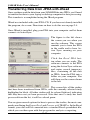
Once you have read the data from your JAMAR Echo into JPDA, you’ll need
to transfer that data to your laptop or desktop computer for data processing.
This transfer is accomplished using the JRead program.
JRead was included with your JPDA CD. If you have not already installed
the program, do so now. Directions on how to do this are on page 2-4.
Once JRead is installed, plug your PDA into your computer and let them
connect via ActiveSync.
The figure to the left shows
the screen you see when you
run the software. This screen
reminds you to have the PDA
in the cradle and to have Active Sync running on your
computer.
Click the Read PDA button when you are ready. The
software connects to the PDA
using the Active Sync software
and copies several temporary
files, containing all the data
in JPDA, from the PDA into a
folder on your computer. You
will then see the screen shown
to the left.
This screen lists all the studies
that have been transferred from JPDA, with the currently selected study
highlighted in black. All other studies will be colored light red, indicating
that they have not yet been processed. Note that once a study has been
processed from the list, it will be colored green.
You are given several options for how to process the studies, the most commonly used being the Export Excel and Process with TRAXPro. In the Excel
format, your data will be converted into a standard Excel spreadsheet file,
which you can then open with that program for analysis or reporting.
2-14
Chapter 2 — Using the JPDA Software
To export a file into Excel, the first thing you need to do is select the interval
length for the data. This is done by clicking on the Interval= button on the
left of the button row.
When this button is selected, a list of the available interval
lengths is shown. The options are: Time Stamp, 1 Minute,
5 Minutes, 10 Minutes, 15 Minutes, 30 Minutes and 60
Minutes.
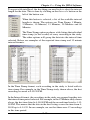
The Time Stamp option produces a file listing the individual
time stamp (to the second) of every recording in the study.
The other options will group the data into the interval time
selected. Below are examples of the exported time stamp and 15 minute
interval formats.
In the Time Stamp format, each recording in the study is listed with its
time stamp. For example, in the Time Stamp study shown above, the first
recording occurred at 4:09:20 PM.
In the Interval format, the recordings in the study are grouped together into
the interval time period selected. For example, in the 15 Minute study shown
above, the first time listed is 4:00:00 PM and the second time listed is 4:15:
00 PM. This means that the data in the first listing covers the time from 4:
00:00 up to 4:14:59. In our example, we see that there were 13 recordings
in this time period.
2-15
JAMAR Echo User's Manual
Once you have selected the Interval Length you want, click OK. Next, click
the Export Excel button and you will be prompted to assign the file a name
and select a folder to save it in.
Once you click Save, the Verify Export
window will appear, as shown to the
left. This window allows you to either
directly open the newly created file with
Excel, open the folder where the file was
saved, or exit back to the JRead processing screen.
In addition to the Excel format, you also have the option to save the data
in an ASCII format. This is a standard comma-delimited text format which
can be opened with any word processing program, like Word or Notepad.
The interval options and saving process for this format are the same as for
the Excel format.
The final option you have for processing the data is with the TRAXPro
data analysis program. This is the software also used with JAMAR TRAX
traffic data recorders and contains comprehensive analysis and reporting
capabilities.
Processing for this format is done directly with TRAXPro, so if you own
this program and would like to use it, at this point you would exit the JRead
software and start TRAXPro.
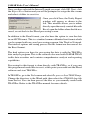
In TRAXPro, go to the Tools menu and select Re-process Last TRAX Dump.
Change the directory to the JRead path, then select the JPDA000.dmp file
from the list. You can then process the files as you normally would with
TRAXPro. Refer to the TRAXPro manual for more details.
2-16
Chapter 3 — Installing the JAMAR Echo
Chapter 3
Installing
the JAMAR
Echo
3-1
JAMAR Echo User's Manual
The JAMAR Echo is designed to be mounted to a tree,
sign post or pole. For ease of installation, we recommend using the mounting bracket included with the
Echo's installation kit. This kit contains all the equipment needed to install the Echo in the field.
Installing the Mounting Bracket
The mounting bracket included with the Echo is designed to help make the
installation of the unit as easy as possible. This bracket can be attached to
the back of the Echo using the steps described below.
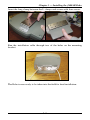
Insert a long screw through one of the screw holes in the front of the Echo.
Using the screwdriver included with the kit, attached one of the L clamps
to the back of the unit, facing inward.
Repeat the process to attach the second L clamp to the back of the unit.
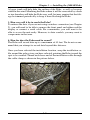
3-2
Chapter 3 — Installing the JAMAR Echo
Insert the long clamp between the L clamps and secure with four screws.
Run the installation cable through two of the holes on the mounting
bracket.
The Echo is now ready to be taken into the field for final installation.
3-3
JAMAR Echo User's Manual
Installing the JAMAR Echo in the Field
The JAMAR Echo is designed to be mounted to a tree or pole about 4
to 5 feet from the ground. It should be set about 5-12 feet back from the
roadway to be monitored, with the front of the Echo facing the roadway. It
should be parallel to the road so that the acoustic sensor is aimed directly
across the road.
What makes for a good location?
There are a few question you should ask when choosing a location to install the Echo.
1. Is the area chosen particularly noisy?
To record the most accurate data, the Echo needs to be mounted so that it
is not in an overly noisy environment. Do not place the Echo near a playground, near an airport or close to construction zones. All these types of
sounds could possibly trigger the Echo to count.
2. Is there anything at the location that will help hide the Echo?
The less visible the Echo is, the less likely it is to be vandalized. If you are
planning on mounting the Echo to a tree, look for a tree with a large trunk.
3-4
Chapter 3 — Installing the JAMAR Echo
A larger trunk will help hide the outline of the Echo, as well as be more
stable in the wind. Mounting the Echo where it will be concealed by a bush
or tree branches will hide the Echo very well, but may require that the foliage be trimmed periodically to keep it from blocking the Echo.
3. How easy will it be to reach the Echo?
To retrieve the data, if you are not using a wireless connection (see Chapter
2), you will need to be able to remove the front panel and either read the
display or connect a serial cable. For convenience, you will want to be
able to access the unit easily. However, to deter vandals, you may want to
compromise in that area.
4. How far does the Echo need to record?
The Echo will record data up to a maximum of 45 feet. We do not recommend that you attempt to record data beyond this distance.
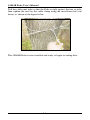
Once you have selected the installation location, wrap the installation cable around the pole or tree you have selected, pointing the Echo toward the
spot to be counted. Thread each loose end of the installation cable through
the cable clamp as shown in the picture below.
3-5
JAMAR Echo User's Manual
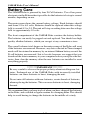
Pull the cable ends tight so that the Echo is tight against the tree or pole,
then tighten the nuts on the cable clamp using the installation kit's nut
driver, as shown in the figure below.
The JAMAR Echo is now installed and ready to begin recording data.
3-6
Chapter 4 — Battery Care
Chapter 4
Battery Care
4-1
JAMAR Echo User's Manual
Battery Care
The JAMAR Echo is powered by four D-Cell batteries. Use of low power
electronics in the Echo makes it possible for the batteries to last up to several
months, depending on use.
The main screen shows the current battery voltage. Fresh batteries should
read from 5.8 to 6.0 volts. Batteries should be replaced when this voltage
falls to around 4.5 to 5.0. The unit will stop recording data once the voltage
falls to approximately 4.0 volts.
The front compartment of the JAMAR Echo contains the battery holder.
The batteries can easily be popped out and replaced. You should use high
quality alkaline batteries, which you can get at any convenience store.
The overall volume total shown on the main screen of the Echo will reset
if the batteries are removed. However, any data collected in Time-stamped
mode will be retained in memory by an internal lithium battery even if the
D-cell batteries are removed. Just to be safe, however, we suggest that you
download the data in memory to your computer before you replace the batteries, then clear the memory after the new batteries are installed to reset
everything properly.
********IMPORTANT********
Be very careful to observe the proper polarity when installing new batteries. Prolonged use of the JAMAR Echo with incorrectly installed
batteries can cause batteries to burst, damaging the unit.
Do not mix old batteries with new batteries, or mix brands of batteries,
when replacing the batteries. This can cause batteries to burst, damaging
the unit.
We recommend that you keep track of when you have changed the batteries
in the Echo, and establish a regular routine for changing them. This should
help to avoid having to change the batteries in the middle of a study.
4-2
Chapter 5 — Troubleshooting
Chapter 5
Trouble
shooting
5-1
JAMAR Echo User's Manual
Troubleshooting
The following are some common questions/problems that can be encountered when using the JAMAR Echo. The possible answers that are stated
with them are not necessarily the only answer, but should be checked first
before contacting us. If you cannot find the answer to your problem/question, do not hesitate to contact us. Contact information is listed on the first
page of this manual.
There is no display visible on the JAMAR Echo.
Check that the unit is not in its power-saving mode. The display automatically goes out when the Echo has not been disturbed for several minutes.
To bring the display back up, hit the 'DO' or 'TAB' key.
The display on the JAMAR Echo will not come on.
The battery voltage may have gone too low to power the display. Replace
the batteries, then see if the display comes up. Note that this will reset the
total to zero on the Echo's display.
The data is not being collected in the format desired.
When turned on, the Echo collects overall volume data, which is shown
on the right side of the display. To start the time-stamped data collection
format, where each activation is stored in memory with a time stamp, press
the 'TAB' key until "Start?" is displayed, then press the 'DO' key.
The data produced is not accurate.
Make sure that you have not installed the Echo in an overly noisey environment. Since the Echo counts by 'listening' to vehicles passing, loud ambient
noises can cause it to mis-count. Refer to page 3-4 for more tips to selecting
a good location.
A number of settings on the Echo can also be adjusted to improve accuracy,
depending on your counting location. The first to check is the Sensitivity
Setting, which can be adjusted from the default setting to High or Very
High if the Echo appears to be undercounting, or Low or Very Low if the
Echo appears to be overcounting. Refer to page 1-8 for more information
on the Sensitvity setting.
Other adjustment settings include the Repeat Time and Dead Time, which
are discussed on page 1-12.
5-2
Chapter 5 — Troubleshooting
GPS coordinates will not load from a GPS receiver.
Check that the GPS receiver has been configured to transmit in the format
required by the Echo. The GPS receiver must be set to transmit one of the
following NMEA messages: GPRMC, GPGLL or GPGGA.
Cannot connect to the Echo for upload or download.
First, check your connection between the JAMAR Echo and the computer.
A serial cable should be plugged firmly into the serial port of the JAMAR
Echo and a serial port on the computer. The following tips should help you
to avoid problems when download through a computer’s serial port.
1) You must correctly identify what port you are plugging the cable into.
The 9 pin connectors used for serial ports are also used for serial or parallel
printers, mice, plotters, video cards and other devices. Just because your
cable fits into a connector on your computer does not mean it is a serial
port. Consult your computer instruction manual if you have any questions
on which ports are serial ports on your computer.
2) Many computers have more than one Comm port. You will need to know
which Comm port you are configured to use. Comm ports are designated
as COMx where x is a number from 1 to 16. You will need to know this
number to download the unit.
3) Some devices that are plugged into a computer’s Comm port will not allow the Echo to download its data properly. These are devices that require a
program (called a device driver) to be running in the computer at all times.
These device drivers are very self-centered, and think that all the data coming into the Comm port is for them. Digital cameras, mice, digitizer boards,
PDAs and light pens are all devices that require these device drivers to be
running. If you have to unplug a device from the serial port to plug the Echo
in, or if you are using a switch box, be sure that the device does not have a
driver running in memory.
4) If you have a conflict with another device on a Comm port, or if your
computer does not have a serial port, you can use a USB port by using a
USB to Serial Converter. These devices allow serial peripherals, like JAMAR
equipment, to interface with a USB port. There are several of these devices
available on-line and at computer stores. Go to the hardware support section of our web site for a link to one of these devices that we have tested
and found to work well.
5-3
JAMAR Echo User's Manual
Additional support information can also be found on our web site
at www.jamartech.com. If you are unable to find a solution to your
problem, contact us using the information located on the first page of
this manual.
5-4
Appendix
Appendix
A-1
JAMAR Echo User's Manual
Specifications
Size: 6.5" x 4.7" x 3.2"
Weight: Approximately 3.5 pounds
Power: Four D-Cell alkaline batteries
Interface: RS-232 serial communications port, 9 pin DBS socket or
Bluetooth wireless connection
Download Speed: Up to 115200 bps
Memory: 256 KB Internal Memory, capable of recording approximately
80,000 vehicles in time-stamped mode.
Clock: Always active real-time clock
Data Collection Formats: Total Volume, Time-stamped raw data
Input: Acoustic Detector
Temperature Range: Minus 4F (-40C) to 131F (55C)
Display: Wide Temperature, 16-character LCD display
Output: Binary file capable of being read by JAMAR TRAXPro software and JAMAR JPDA software
A-2
We are pleased that you have chosen the JAMAR Echo for your data collection needs. We have strived to develop a unit that is easy to use, yet highly
accurate. The Echo has undergone extensive testing to verify the accuracy of
its operations, and each unit is tested before it leaves our facility. However,
just like other complex electronic devices, problems can occur. We always
suggest that users verify the continuing accuracy of any device they use.
Verification against manual counts should be performed on an annual basis
to assure proper operations and results.
Should you detect any problems with any of our products, please notify
JAMAR Technologies immediately and discontinue use of the unit until we
have verified its operation.
A-3
JAMAR Echo User's Manual
A-4