1
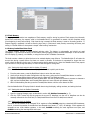
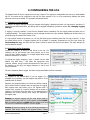
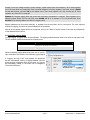
1. INTRODUCTION 1.1. Features The WattsOn-Mark II models containing the logging module (models containing the “–DL” or “–L” suffix, i.e., “W2-M1mA-DL”) can record historical data from any of its registers onto built-in Flash memory. The logging module features: Programmable battery-backed real-time clock for timestamps Freely configurable parameter selection for logging Logging frequency from 1 second to 18 hours Log downloadable via Modbus 2MB of storage space available for storing log entries 1.2. Modbus Commander Logging features of the WattsOn-Mark II may be configured with a Windows PC connected to the WattsOn-Mark II, either via a USB-to-RS485 cable or an Ethernet gateway device. Logging configuration can be done using the free version of the Modbus Commander application, available from Elkor’s website at http://www.elkor.net. To connect to the WattsOn-Mark II via Modbus Commander, follow the procedure outlined below. The procedure assumes that the WattsOn-Mark II is connected to a PC via a USB-to-RS485 converter using default settings, but it is possible to connect using serial or Ethernet with a variety of settings. 1. 2. 3. 4. Download Modbus Commander from Elkor’s website, http://www.elkor.net. Run the installer for Modbus Commander to install the program onto your computer. Run the application from the desktop shortcut created by the installer. Select the serial port on which the WattsOn is connected by selecting Setup → Serial Settings → Port, and clicking on the appropriate port (see screenshot below). If the appropriate serial port is not obvious from its name, the Windows Device Manager should be used to determine the correct port. 5. Open the WattsOn-Mark II Display Page Editor by clicking on Devices → Elkor WattsOn-Mark II → Logging Manager (see screenshot below). ELKOR TECHNOLOGIES INC. - Page 3 - WattsOn-Mark II – LOGGING GUIDE