1
2. CONFIGURING THE LOG
The WattsOn-Mark II can be configured to save any number of its registers at configurable intervals into a downloadable
log file. The device can be configured to log until the Flash memory is full, or to log continuously, deleting the oldest
entries as new ones are added. The procedure is described below.
2.1. Changing Logging Settings
The majority of logging settings can only be changed while logging is disabled and there is no log saved on the device. If
logging has not been used before, the settings can be changed immediately (proceed to section 2.1, Changing Logging
Settings).
If logging is currently enabled, it must first be disabled before proceeding. Set the Logging Mode drop-down box to
“Logging Disabled.” The logging frequency can be changed whenever the log is disabled, regardless of whether there is a
pre-existing log file saved on the device or not.
If a log has been saved on the device (i.e., the Log Size field reports something other than “No log on device”), it must
be erased before the list of logged registers can be changed. If necessary, download the log first (see section 3,
Downloading the Log), and then click the “Erase” button to remove the log from the device. The other settings can
now be edited as desired.
2.2. Selecting Logging Frequency
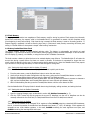
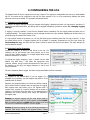
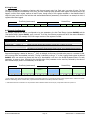
Choose the frequency at which to add entries to the log. The
frequency can be set between once every second, up to once
every 18 hours (64800 seconds). For a single register block, these
times are accurate to ±1 second.
To choose the logging frequency, enter a number into the field
labeled “Log data every…” and select the appropriate units
(seconds, minutes, hours) from the drop-down box to the right. In
the example on the right, the logging frequency is set to once
every 30 seconds.
The more frequently data is logged, the faster the space available to will be consumed.
2.3. Selecting Registers
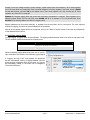
Any register on the WattsOn-Mark II can be logged. For a
complete list of registers, see the Register Map section of the
WattsOn-Mark II manual.
Registers are grouped together into blocks for efficient reading.
Up to sixteen blocks of registers may be configured for logging.
Each register block may contain up to 125 registers each. A
register block consists of a starting address and a number of
registers in that block. Note that many of the WattsOn-Mark II
parameters are 32-bits, meaning they occupy two registers in
the register map.
Example 1: Suppose logging only the total active power is
required. Total active power is a 32-bit register at offset 0x200.
Enter the starting address as 0x200 and the register count as 2.
The count is 2 because the register is a 32-bit register.
Example 2: Suppose logging all of the following parameters is
required: Total active, reactive, and apparent power, voltage
ELKOR TECHNOLOGIES INC.
- Page 6 -
WattsOn-Mark II – LOGGING GUIDE