1
2 Introduction to RapidSSH
2.1 What is the RapidSSH™ App?
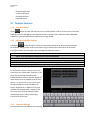
RapidSSH is a full featured terminal application for Apple iPad’s and iPhone’s that allows IT engineers to
connect and administer remote servers and other devices using SSH, Telnet or Raw protocols via WIFI
and 3G.
-
-
The most complete SSH implementation available for Apple iOS – while others support only
SSHv2, RapidSSH supports SSH version 1, version 2, SSH Agent, and complete key
management using either OpenSSH or Putty formatted keys.
Full Telnet, and RAW connectivity over WIFI/3G
VT100, xterm and many other common Terminal emulations
Encoding support for ASCII, UTF-8 and 17 other major encoding formats, including multibyte
characters for non-latin text terminals
Multiple sessions run concurrently in tabs, including when the App is in the background for
upto 10 minutes.
Saved session import from SecureCRT® and PuTTY via Windows tool and iTunes
Full Session Scripting using simple yet powerful “Expect X, then Send Y” type scripting.
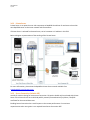
One Tap Secure Screen Sharing allows a remote web user to view and interact with the
iPad/iPhones terminal window
Cloud connectivity to both RapidSSH.com and Dropbox.com for dynamically downloading
configuration files and scripts and uploading session log files
Tight integration with iPhone/iPad clipboard and cut/copy/paste directly from the terminal
window
Comprehensive logging support, Command Shortcuts, Stored Passwords, Bluetooth
Keyboard and many other features.
And all for a price less than iSSH or Prompt!
With the RapidSSH app, IT engineers can perform IT equipment maintenance, troubleshooting and
disaster recovery operations on remote servers over Wifi/3G using the instant on, portable iPad, iPhone
or iPod Touch.
2.2 RapidSSH App Requirement
-
iPhone3 + (iOS version 4.2 or later is required)
iPad1 onwards
Wifi/3G connection for terminal connection and for sharing sessions