1
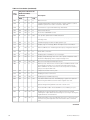
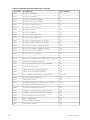
4 Configuration Software and Utilities..................................................29
Server Configuration Wizard .................................................................................................. 29
Direct Platform Control (DPC) Console .................................................................................. 30
DPC Console Modes of Operation.................................................................................... 30
Running the DPC Console................................................................................................. 31
Using the System Setup Utility ......................................................................................... 31
Creating SSU Diskettes..................................................................................................... 31
Running the SSU............................................................................................................... 31
Working with the SSU Interface ....................................................................................... 32
Customizing the SSU Interface ......................................................................................... 32
Setting Boot Device Priority .............................................................................................. 33
Setting Passwords and Security Options............................................................................... 33
Setting the Administrator Password ................................................................................. 33
Setting the User Password ............................................................................................... 33
Setting Security Options ................................................................................................... 34
Viewing the System Event Log......................................................................................... 34
Viewing FRU Information .................................................................................................. 35
Viewing Sensor Data Records........................................................................................... 35
Managing the Server Remotely ............................................................................................. 36
How to Set Up Remote LAN Access ................................................................................ 36
How to Set Up Remote Modem or Serial Access ............................................................ 38
How to Set Up Paging Alerts ............................................................................................ 39
How to Set Up LAN Alerts ................................................................................................ 41
Installing a Service Partition (Optional) .............................................................................. 43
Saving and Restoring the System Configuration ................................................................... 44
Saving a Configuration ...................................................................................................... 44
Loading a Saved Configuration.......................................................................................... 45
Using the Intel® Server Management ................................................................................... 46
Installing Intel® Server Management................................................................................. 46
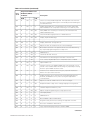
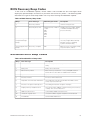
5 Solving Problems..................................................................................47
Resetting the System ............................................................................................................ 47
Initial System Startup............................................................................................................. 47
Checklist............................................................................................................................ 47
Running New Application Software ....................................................................................... 48
Checklist............................................................................................................................ 48
After the System Has Been Running Correctly ..................................................................... 48
Checklist............................................................................................................................ 48
More Problem Solving Procedures ........................................................................................ 49
Verifying Proper Operation of Key System Lights............................................................. 49
Confirming Loading of the Operating System................................................................... 49
Specific Problems and Corrective Actions ............................................................................. 49
Power Light Does Not Light.............................................................................................. 50
No Characters Appear on Screen...................................................................................... 50
Characters Are Distorted or Incorrect ............................................................................... 50
System Cooling Fans Do Not Rotate Properly .................................................................. 50
Diskette Drive Activity Light Does Not Light .................................................................... 51
CD-ROM Drive Activity Light Does Not Light ................................................................... 51
Problems with Application Software ................................................................................. 51
Bootable CD-ROM Is Not Detected .................................................................................. 52
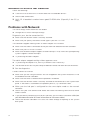
Problems with Network ......................................................................................................... 52
4
Contents