1
1
STRUCTURE SENSOR & DEMO APPS TUTORIAL WELCOME TO YOUR NEW STRUCTURE SENSOR
Congrats on your new Structure Sensor! We’re sure you’re eager to start
exploring your Structure Sensor’s capabilities. And to help you get the most out
of your experience, we’ve put together this quick start guide to help familiarize
you with this advanced accessory.
WHAT’S INCLUDED IN THE BOX
Your Structure Sensor should arrive with the following:
• One Structure Sensor
• One data cable with Apple Lightning connector
• One AC battery charger
• One screwdriver
• Four M1.6 screws
• One user manual
Your iPad attachment bracket will arrive in a separate box/package.
CHARGING YOUR STRUCTURE SENSOR
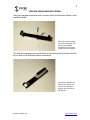
Charging your Structure Sensor’s internal battery is simple. Simply connect the
supplied AC charger to the round port on the side of the Structure Sensor, and
then plug the other end into any standard 2-pronged wall outlet as found in the
United States (if you’re outside of the US or Canada, you will need to use an
appropriate adaptor).
© 2014 Occipital, Inc.
http://structure.io