1
2
STRUCTURE SENSOR & DEMO APPS TUTORIAL An LED indicator on the Structure Sensor’s glass face will pulse when your
Structure Sensor’s battery is charging. As soon as your battery is completely
charged, the LED indicator will stop pulsing and instead will stay on until you
disconnect the AC charger.
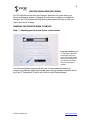
CONNECTING YOUR STRUCTURE SENSOR TO YOUR IPAD
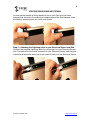
Step 1 – Attaching your Structure Sensor to the bracket
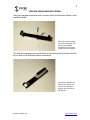
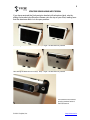
From top to bottom: iPad
(4th Generation) precision
bracket with aluminum
latch; iPad Air 3D printed
temporary bracket; iPad
mini with Retina display
3D printed temporary
bracket
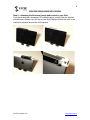
Your Structure Sensor has arrived with one of three available brackets to
connect it to different Apple iPad models (the currently available brackets are for
the iPad [4th Generation], iPad Air and iPad mini with Retina display).
© 2014 Occipital, Inc.
http://structure.io