1
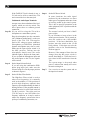
Figure 8: Using The Optional CHG 200A Battery Charger
Step 1:
Plug the CHG 200’s power supply into
the Power Jack on the back of the unit
and a standard AC wall outlet.
Step 2:
Wrap the power cord around the Cord
Hook (See figure at right.) This will
minimize strain on the cord and jack and
insure that the power cord is not detached
during charging.
Step 3:
Make sure the receivers to be charged are
turned OFF.
Step 4:
Place the receivers in the slots so that the
CHG 200’s Charging Pins and receiver’s
side panel contacts are coupled. Make
sure that the charging contact holes line
up with the charging pins. The receivers
should drop easily into the slots. DO
NOT FORCE THEM IN BACKWARDS.
Step 5:
Charging
Contact Holes
Charging
Indicators
Charging
Pins
The Charging Indicators will light,
indicating that charging is in process.
It takes about 14 hours to fully charge
the batteries. Remove the receivers
when charging is completed.
Further Suggestions
Receivers SHOULD NOT be left charging
continuously when not in use. Receivers should
always be turned OFF while charging.
Cord Hook
Power Input
It’s best to allow the batteries to fully discharge
before charging.
If the batteries are near end of life and the LED
turns off while the receiver is operating, this is an
indication to change or recharge your batteries.
Approximately one hour of battery life remains.
Repeatedly charging the batteries after short periods
of use (1-2 hours) will shorten battery life.
Rechargeable batteries will need to be replaced
after 1–2 years of use.
Williams
Sound ®
Helping People Hear
!! WARNING !!
DO NOT ATTEMPT TO RECHARGE
DISPOSABLE BATTERIES!
The batteries may heat up and burst, causing
possible injury and damage to the equipment.
‘terminals together with metal objects. Battery
damage and burns can result!
Use only Williams Sound supplied chargers and
batteries!
13