1
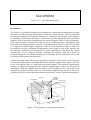
The MAGPRISM program computes the static magnetic field on a profile above an isolated,
dipping magnetized prism-like body. The parameters of the prism model are shown in Figure
1. In addition to the susceptibility, the Q-ratio and the inclination and declination of the
remanent magnetization of the prism as well as the demagnetization effect of a highly
magnetized target can be taken into account. Only one body and one profile can be used. The
forward computation is based on the analytical solution and the original algorithm of S.-E.
Hjelt (1972). The MAGPRISM program is intended primarily for educational purposes.
Installing the program:
The MAGPRISM program requires a PC with 32-bit Windows 9x/NT4/2000/XP operating
system and a graphics display capable for at least 1024×768 resolution. Memory requirements
and processor speed and are not critical, since the program uses dynamic memory allocation
and the analytical solution allows very fast computation even on slow computers. The
MAGPRISM program has a simple graphical user interface (GUI) that can be used to change
the parameter values, to handle file input and output, and to visualize the magnetic field
response and the model. The user interface and the data visualization are based on the
DISLIN graphics library.
The program requires following files:
MAGPRISM.EXE the executable file
DISLIN.DLL
dynamic link library for the graphics routines
The distribution file (MAGPRISM.ZIP) contains also a short description file
(_README.TXT), this user's manual (MAGPRISM_MANU.PDF), and an example input file
(EXAMPLE.INP). To install the program, create a new directory and copy or unzip (e.g.,
Pkunzip/Winzip) the distribution files there. To be able to start the program from a shortcut
that locates in a different directory one should move or copy the DISLIN.DLL file into the
WINDOWS\ SYSTEM (or SYSTEM32) folder or somewhere where a path always exists.
Getting started:
On startup the program reads the parameters of the model parameters from the MPRISM.INP
file and the graph parameters from the MPRISM.DIS file. If these files do not exist, default
parameters are used and the files are created automatically.
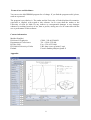
The program then computes the magnetic field response and builds up the user interface
shown in the Appendix. The response is plotted in the graph area along with a 3-D view of the
model and a description of the model parameters. All model parameters can be altered using
the controls on the left side of the MAGPRISM program window.
As shown in Appendix the main window of the MAGPRISM application contains two menus.
The "File" menu contains the following nine options:
Open Model
Read Data
Save Model
to open an existing model file.
to read in data for comparison (total field only).
to save the model into a file.
2