1
Save Data
Read disp.
Save Graph as PS
Save Graph as EPS
Save Graph as PDF
Save Graph as WMF
to save the results (description + response) into a file.
to read in new graph parameters from a *.DIS file.
to save the graph in Adobe's Postscript format.
to save the graph in Adobe's Encapsulated Postscript format.
to save the graph in Adobe's Acrobat PDF format.
to save the graph in Windows metafile format.
Selecting these menu options brings up a standard (Windows) file selection dialog that can be
used to provide the name of the file for open/save operation. Model and data (including other
information) files are saved in standard ASCII text format. The graphs are saved in landscape
A4 size (cf. Appendix).
The "Edit" menu contains four items:
Comp → Meas
Remove measured
Demagnet. on/off
Remanence on/off
Total/Anom field
to put current data as "measured" data for comparison.
to discard all information about "measured" data.
to include/exclude the demagnetization effect.
to include/exclude information about remanent magnetization.
to include/exclude the external magnetic field from total field.
The "Exit" menu has only one item, which is used to confirm the exit operation. On exit the
latest model and results are automatically saved in MPRISM.INP and MPRISM.OUT files
replacing the original ones. Errors that are encountered before the GUI starts up can be found
from the MPRISM.ERR file. When operating in GUI mode, run-time errors arising from
illegal parameter values are displayed on the screen.
Using program controls:
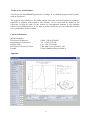
The "Change component" push button at the top of the control pane on the left side of the
MAGPRISM window can be used to change the field component that is shown in the graph.
The magnetic field components are shown in the following order:
1.
2.
3.
4.
5.
6.
7.
Total field anomaly (the magnetic field of the prism without earth's magnetic field).
Z-component (vertical field) anomaly.
X-component (horizontal field in NS direction) anomaly.
Y-component (horizontal field in EW direction) anomaly.
Horizontal field anomaly.
Total field (earth's magnetic field added)
All anomalous field components: (total, z, x, y, horis.)
The "Update parameters" button is used to read and update the model parameters and to
perform a new forward computation.
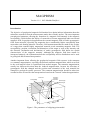
The following nine text fields define the parameters of the prism model (see Fig 1.), these are:
1.
2.
3.
4.
Thickness (m).
Length (along strike) (m).
Depth extent (vertical height) (m).
Dip angle (from horizontal plane) (degrees).
3