1
HR-1™ Instrument
19 ::: Instrument Specifications and Installation ::: Chapter 2
Software Installation
The HR-1 Software Package is designed specifically for Microsoft Windows
2000 or XP Operating Systems. Administrative rights to the computer are
required to install and run the software package on other computers. The
software installation will require up to 19 MB of disk space. All HR-1 software must be run at a screen resolution of 1024 x 768.
HR-1 software package - All software for running the HR-1 and analyzing data
is pre-installed on the HR-1 laptop. The software is located under the Idaho
Technology folder in the Programs directory. An installation CD is provided
for re-installation or installation of the analysis software package on multiple
computers. Be sure to back-up data before re-installation of software.
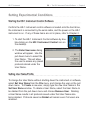
To Install the Software
Insert the HR-1 CD into the CD drive. The installation wizard will automatically start up. If the installation wizard does not prompt, browse to the CD
drive, select the HR-1 software file and choose the setup.exe file.
After selecting the installation location, the Installer will present three
options: Typical, Compact, and Custom.
Typical Installation - This will install all the software needed to run
the HR-1 Instrument and analyze the data it produces.
Compact Installation - This option will only install the HR-1 Instrument
Control software. This option is for users where HR-1 data analysis is
to take place on a different computer than the one controlling the HR1 Instrument.
Custom Installation - Allows the user to choose individual components
of the HR-1 software to install on the system.