1
Using WFS-T in combination with geolocation for online transactional editing of geographic features through mobile browsers
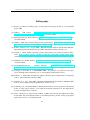
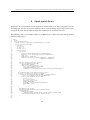
for debugging. The second- OpenLayers.Map called an object, tells the OpenLayers Javascript
that we are using the Map class, which means that all of the built-in parameters and options can
be accessed. The third is the name or identifier of the div that we are putting the map in, so
OpenLayers knows where to draw the map on the page. So this section basically creates a new
OpenLayers.Map object and gives it the variable name map.
4. Create Layers
22:
23:
24:
25:
26:
27:
28:
29:
30:
31:
32:
33:
34:
35:
36:
37:
38:
39:
40:
41:
42:
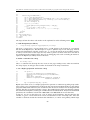
var osm = new OpenLayers.Layer.TMS(
"OpenStreetMap (Mapnik)",
"http://tile.openstreetmap.org/", {
type: ’png’, getURL: osm_getTileURL,
displayOutsideMaxExtent: true,
attribution: ’<a href="http://www.openstreetmap.org/">OpenStreetMap</a>’
}
);
var saveStrategyPoint = new OpenLayers.Strategy.Save();
var shops = new OpenLayers.Layer.Vector("Shops", {
strategies: [new OpenLayers.Strategy.BBOX(), saveStrategyPoint],
projection: new OpenLayers.Projection("EPSG:4326"),
protocol: new OpenLayers.Protocol.WFS({
version: "1.1.0",
url: "/geoserver/wfs",
featureType: "shop_point",
srsName: "EPSG:4326",
featureNS : "http://www.hig.no/imt4901/osm",
geometryName: "geom"
})
});
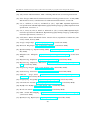
OpenLayers organizes a single map into several layers. This part of code tells OpenLayers that
we want to create two new layers, in this case, including a map layer (osm) and a geographic
feature layer (shops), which they can be referred to elsewhere as osm and shops.
5. Add layers to the map
44:
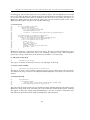
map.addLayers([osm, shops]);
This step is to add the created layers in no.4, osm and shops, to the map.
6. Create a layer switcher
45:
map.addControl(new OpenLayers.Control.LayerSwitcher());
This step is to create a layer switcher control to the map. Since earlier in the code, two layers
are added to the map, we will see that "OpenStreetMap (Mapnik)" and "Shops" are listed in the
control.
7. Position the map
46:
47:
48:
49:
50:
map.zoomToExtent(
new OpenLayers.Bounds(
-12941319.173424, -4110122.686702, 18367287.606576, 11544180.703298
).transform(map.displayProjection, map.projection)
);
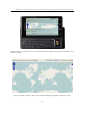
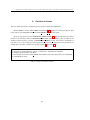
This code tells the map to zoom out to its maximum extent, which by default is the entire world.
OpenLayers maps need to be told what part of the world they should display before anything
will appear on the page. Calling map.zoomToExtent() is one way to do this. Alternative ways
that offer more precision include using zoomToExtent() and setCenter().
59