1
• Listen to the effect by playing or previewing, depending on if you have a real-time application or a preview/
process [file-based] application.
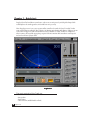
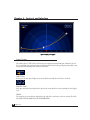
• Now, to make the sound approach with a faster speed, set the Center Time to less than half the Track Time.
• Adjust the Start, End and Center points to tweak the pitch shift. Changing the Center Time will make the
peak of the effect happen at the indicated time after the trigger occurs.
• Use the Gain to achieve the expected volume shift (or you can do it with automation for precise control).
• Using the Pitch can help you tweak the intensity of the pitch shift for a better match to the screen action.
Finally, if the effect still isn’t strong enough, make the Start and End points closer to the center line so that the
curve is sharper. Warp the path toward you very strongly. Then the sound will be making literally a U-turn in
front of you, producing the strongest possible pitch shift effect. The fact that this doesn’t actually match the
movement on the screen has nothing to do with it: powerful effects are purely subjective. If they match the
observed action, then they are correct, from the listeners perceptual viewpoint.
Tweaking the effect
Now that you have the pitch shift and timing adjusted, enhance the effect by changing the “amount of reality”, or
by exaggerating one or more aspects of reality.
In real life, a doppler-effect sound will be softer when it is farther away, and will have some loss of high frequencies due to damping of those frequencies by the air (“Air Damping”). Low frequencies are actually transmitted
very well at long distances. In addition, reflections from the surroundings, such as buildings, hills, trees, and other
objects produce a reverberation. Of course, if the object is passing from left to right, then the panning (spatial
placement) also changes with pitch.
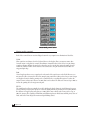
Each of these controls is provided with a range from 0% (off) to 200% (exaggerated), with 100% representing a
reasonable form of realistic behavior according to the observed laws of nature. Each control also has a Bypass
button.
The 4 secondary controls:
1. Gain
2. Pan
3. Air Damp
4. Reverb (amount, time, brightness)
6
Doppler Manual