1
30
Gramma: Software for Learning Greek
Some Greek words change their
meaning depending on the grammatical
form of the word following them. So
“meta” means “with” when followed by
a noun in the genitive, but it means “after” when followed by a noun in
the accusative.
Other Greek words are followed by specific grammatical forms that you
should know. So, “meketi”, meaning “no longer”, is regularly followed by
an infinitive.
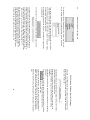
The popup menu on the right allows you to specify these forms.
You can use that menu to specify “in Plural”, “+ Accusative”, “+
Genitive”, “+ Dative”, “+ Indicative”, “+ Subjunctive”, “+ Optative”, “+
Infinitive”, or “+ Participle”.
You can also choose “None”, meaning that the word is not dependent on
any special following form; this is the default.
When you choose something from the
popup menu, the appropriate
abbreviation will appear in the field to
the left of the menu: “+ Acc.”, “+ Part.”, etc.
When you are working with Gramma, you will find that it is quicker to use
the keyboard to make these selections.
If you type your answer in the “Your Answer:” field, then hit the Tab key,
the cursor will move to the field to the left of the popup menu.
If you type the first few letters of the following form, Gramma will fill in
the rest for you. You do not need to type a “+” sign (although you can).
So, if you type “acc” in the field, Gramma will replace your typing with “+
Acc.”.
Ent ering Your A nswers
After you have typed your answer in the “Your Answer:” field, and have
selected (or typed) any supplementary grammatical information (“+Acc.”,
“+Par.”, etc.), hit the “Return” key on the keyboard to enter your answer.
(Instead of hitting “Return”, you could also click the “Okay” button).
Setting Up the Verb Drill
You begin a Verb drill from the “Welcome” window, the first window you
see after you start Gramma and log in with your user name.
In the “Welcome” window, click on the “Verbs” tab to bring it to the front.
Sel ecting Verbs to Dr ill
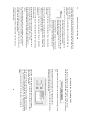
On the left side of the tab-panel you will see a scrolling list of Verbs.
If these verbs do not appear in Greek
characters, the Athenian font is not installed
correctly on your computer; see the chapter
on installing Gramma (above, page 11).
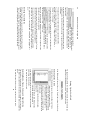
In this picture, one verb is selected from the
list. This is marked by the “>“ character to the
left of the verb.
You can select another verb by doubleclicking on it.
You can de-select a verb that is already
selected by double-clicking on it.
To de-select all verbs and start over, click the “Uncheck All Verbs”
button below the list of verbs.
You must select at least one verb.
Sel ecting Moods , Tens es, Voices, and Special Forms
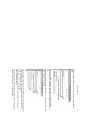
The right side of the tab panel is devoted to a number of check boxes.
Use these to choose which forms of your selected verbs you would like
to drill.
35
You must choose at least one mood, one tense, and one voice.