1
Verb Drill
41
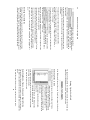
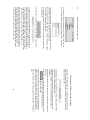
Click on one of the buttons in the box labeled “Number” to identify the
verb’s number.
If you did not ask to be drilled on dual forms (by checking that box in the
“Welcome” window), the “Dual” button will not be available.
Infinitives do not have number, so if you have identified the verb form as
an infinitive, click on “N/A” (“Not Applicable”).
If you did not ask to be drilled on infinitive forms, “N/A” will not be
available as an option.
If you identified the verb form as a participle, click on “Singular”, since
only nominative singular participle forms are included in Gramma’s
database of verb forms.
When you have made all of your selections, click “Enter” (or hit the
“Return” key).
If you have parsed the form incorrectly, Gramma will
try to give you a hint, for example, “Select another
Mood and try again.” You will then be able to correct your parsing.
Click “Enter” after you have corrected your parsing, to enter your new
answer.
You can always see the correct answer by clicking “Give Up”. If you do,
Gramma will display the correct answer. Click “Again” to move on to the
next form.
If you parsed the form correctly, Gramma will tell you so, and will move
on.
If the verb form in question has more than one possible identification,
Gramma will re-display it and ask you to parse it again.
You must parse it differently this time. If you give the same identification
a second time, Gramma will consider that incorrect.
Ver b Dril l: Conjugate a Ve rb
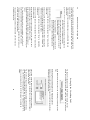
To drill your active knowledge of verb forms, Gramma will bring the
“Conjugate a Form” tab to the front, exposing a set of controls that will
let you type a specific form of a verb.