1
28
Gramma: Software for Learning Greek
If the Greek word is a verb, the English answer will be in the form “I run”,
“I eat”, etc. You do not, however, need to type the “I” (although you can).
Gramma generally disregards punctuation in English answers, so “on
the one hand... on the other” and “on the one hand on the other” are
equally correct answers, as far as Gramma is concerned.
Typing Answers in Gre ek
If Gramma displays an English word at the top of the Vocabulary
window, type your answer in Greek.
In order for Gramma to drill your active knowledge of Greek, you have to
be able to type Greek words, complete with breathings and accents.
There is, currently, no universally accepted way to type diatonic Greek
(i.e. Greek with accents and breathings) into a computer. For this
version of Gramma, we have chosen the closest thing to a universal
standard: Beta Code.
Beta Code is a way of representing diatonic Greek using the regular
characters available on your keyboard.
As you type Gramma will automatically translate your beta-code into
“real” Greek, using the Athenian font. This will help you get used to
working with Beta-code very quickly.
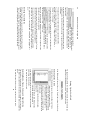
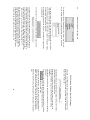
In the screen-shot below, Gramma displayed “lazy” at the top of the
Vocabulary window. The user typed her answer in beta-code, and
Gramma displayed the transliterated Greek in the field below:
For a complete discussion of Beta-code, see the Appendix, “Typing
Greek using Beta-Code”. What follows is a short introduction to get you
started.
Verb Drill
Ver b Dril l: Par sing v s. Conjugati ng
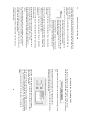
When you drill verb forms, you will work in the “Verb Drill” Window.
The appearance of this window will change during the course of a verb
drill session, depending on whether Gramma is testing your active
knowledge or your passive knowledge.
You can determine whether Gramma drills you on active knowledge or
passive knowledge or both by changing a setting in the “Welcome”
window (see the chapter “The Welcome Window: Universal Settings”
above).
At the top of the “Verb Drill” window, you will see two tabs: “Parse a
Verb” and “Conjugate a Verb”. Gramma will switch between these two to
drill passive knowledge or active knowledge, respectively.
When you are drilling passive knowledge, the “Parse a Verb Form” tab
will be foremost. Gramma will present you with a specific form of a verb,
and display a set of buttons that you will use to identify the verb’s mood,
tense, voice, person, and number.
This process of identification is called “parsing”.
When you are drilling active knowledge, the “Conjugate a Verb” tab will
be foremost. Gramma will present you with verb in its “lexicon form”
(usually the indicative, present, active, first person, singular), and ask
you to conjugate that verb into a specified mood, tense, voice, person,
and number.
Because these processes are different, this manual will describe them in
separate sections (see following sections).
37