1
LIGHT BUTTONS
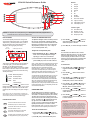
PUMP BUTTONS
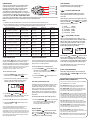
There are four pump buttons on the right hand side
Pump Button A
of the touch pad: Pump A, Pump B, Pump C and
Pump D. The functions of the four buttons change
Pump Button B
depending on pump / controller configuration.
OK
I
Pump Button C
The intention is to make best possible use of these
buttons for all possible configurations. For every press
Pump Button D
of a pump button, the display will temporarily show the
selected pump state: ON / OFF / LOW / HIGH / AUTO
then revert to the default display mode. Possible pump configurations & button sequences are referenced in the
table below (Please tick your spa configuration for ease of future reference).
I
Two light buttons are used to control the many
features of the multi colour LED spa light.
I
I
Notes:
1) If left ON pumps will automatically time-out and turn off 30 minutes after the last sensed button press.
2) In some configurations if heater is ON activating multiple pumps OR turning the blower ON may cause the spa control to
load shed and turn the heater OFF. This is to keep the system within its maximum power load.
(
I
) LIGHT ON / MODE BUTTON
Press to toggle light ON and OFF. The button is
backlit green to indicate when the light has been
turned ON.
When the light is first turned on the light mode menu
will be displayed. The current light mode in use will be
shown. Use the UP (
) or DOWN (
) button to
step through the five colour modes:
(1)
(2)
(3)
(4)
(5)
Button D
White
User Colour
Fade Effect
Step Effect
Party Effect
[WHTE]
[U.CLR]
[FADE]
[STEP]
[PRTY]
Spa Configuration
No small circ pump
P1, P2 & P3 = 1 speed
Button A
Jet pump 1:
On / Off / Auto
Button B
Jet pump 2:
On / Off
Button C
Jet pump 3:
On / Off
No small circ pump
P1, P2, P3 & P4 = 1 speed
Jet pump 1:
On / Off / Auto
Jet pump 2:
On / Off
Jet pump 3:
On / Off
Jet pump 4:
On / Off
No small circ pump
P1 = 2 spd, P2 & P3 = 1 spd
Jet pump 1:
Low / Off / Auto
Jet pump 1:
High / Low
Jet pump 2:
On / Off
Jet pump 3:
On / Off
(
No small circ pump
P1 = 2 speed, P2 = 2 speed
Jet pump 1:
Low / Off / Auto
Jet pump 1:
High / Low
Jet pump 2:
Low / Off
Jet pump 2:
High / Low
Small circ pump fitted
P1, P2 & P3 = 1 speed
Small circ pump:
On / Off / Auto
Jet pump 1:
On / Off
Jet pump 2:
On / Off
Jet pump 3:
On / Off
Small circ pump fitted
P1, P2, P3 & P4 = 1 speed
Jet pump 1:
On / Off
Jet pump 2:
On / Off
Jet pump 3:
On / Off
Jet pump 4:
On / Off
Press to activate the light speed [L.SPD] or user
colour [CL:xx] adjustment screens. If FADE / STEP or
PARTY effect modes are selected the current light
speed [L.SPD] will be displayed. If the user colour
[U.CLR] light mode is selected the current colour
number will be displayed (refer below).
Small circ pump fitted
P1 = 2 spd, P1 = 1 spd
Small circ pump:
On / Off / Auto
Jet pump 1:
Low / Off
Jet pump 1:
High / Low
Jet pump 2:
On / Off
Small circ pump fitted
P1 = 2 spd, P2 & P3 = 1 spd
Small circ pump:
On / Off / Auto
Jet pump 1:
Low / High / Off
Jet pump 2:
On / Off
Jet pump 3:
On / Off
Small circ pump fitted
P1 = 2 speed, P2 = 2 speed
Small circ pump:
On / Off / Auto
Jet pump 1:
Low / High / Off
Jet pump 2:
Low / High / Off
No Function
No Function
AIR BLOWER BUTTON
RAMPING BLOWER MODE
The BLOWER (
) button is used to control the air
blower and allow adjustment of the blower speed.
The last used speed is saved and will be restored the
next time the blower is turned on, for future ON/OFF
use. Note: that when the blower is first turned on it will run
The spa controller features a ramping blower mode,
were the blower speed gradually fluctuates between
high and low in a ramping manner.
at maximum speed for approx three seconds before
changing to your preset speed; this is normal.
To turn the blower on/off:
2) The blower will turn ON (at the last used speed)
and the screen will display the blower speed
[B.SPD] adjustment screen (refer below).
6.S PD
MODE
SPD
BRT
SPD
°C
°F
Bargraph indicates blower speed
3) Use the UP (
) or DOWN (
) buttons to
adjust the blower speed. Note: the bar graph will
change indicating current blower speed.
4) Press the OK ( OK ) button to confirm selection.
5) Press the BLOWER (
the blower OFF.
1) Press the BLOWER (
) button twice to start
the blower in ramping mode. The blower will turn
ON and the screen will display [RAMP] to indicate
ramping mode.
1) Press the BLOWER (
) button once to turn
the blower ON in variable speed mode.
OFF
ON
To turn the blower on in ramping mode:
) button again to turn
Note: The B.SPD adjustment screen is displayed for 10
seconds when the blower is first turned ON. If no
adjustment is made the blower will run at the last used
speed setting, and the screen will time-out and revert to the
default display mode. If you wish to adjust the blower speed
once the blower has been running for a period of time, the
blower must be turned OFF and back ON again to restore
the B.SPD adjustment screen.
2) Press the BLOWER (
the blower OFF.
) button again to turn
SPD/
CLR
OFF
ON
) LIGHT SPEED / COLOUR
L.SPD
°C AM
°F PM
MODE
SPD
BRT
SAT SUN MON TUE WED THU FRI
Light speed screen
OFF
ON
CL:01
°C AM
°F PM
MODE
SPD
BRT
SAT SUN MON TUE WED THU FRI
User colour screen
Press the UP (
) or DOWN (
) button to adjust
the light effect transition speed OR select from 30
colour choices. Press OK ( OK ) to confirm selection
or wait for the 10 second idle menu timeout where the
screen steps to the light brightness [L.BRT] screen.
Note: If White [WHTE] colour mode is selected the Light
Speed/Colour button has NO function.
[L.BRT] LIGHT BRIGHTNESS
When the [L.BRT] adjustment screen is displayed
press the UP (
) or DOWN (
) button to adjust
the light brightness.
ERROR CODES / DIAGNOSTICS
ONE-TOUCH SANITISE BUTTON
A sanitise cycle runs the filtration pump and ozone /
uv (if fitted) to filter the spa water to restore and
refresh water quality after use. In addition, at the
start and end of the cycle, the controller will
sequentially run any additional pumps and the
blower (if fitted) for one minute each to purge the
plumbing and clear any unfiltered water trapped in
those lines.
To activate a 20 minute water clean-up cycle:
1) Press the SANITISE (
) button once after spa
use to activate the water clean [W.CLN] cycle.
Note: If cycle running, cycle can be cancelled by
pressing the SANITISE button again.
INVERT BUTTON
Press the INVERT (
) button to flip the screen
o
180 for ease of viewing when spa in use. The
UP (
) and DOWN (
) button functions also
change (invert) to match the new display.
Note: most error conditions require mains power to be turned OFF
and back ON before the error is cleared.
ER2 - HEATER PLUG: Heater sensor cable fault. Check the
"Heater" sensor lead is plugged firmly into the spa control.
ER3 - WATER PRIME: Heater tube failed to fill with water. Press
Pump A button to retry water prime. Check spa water level, clean
and soak filters, bleed potential air locks from pipework.
ER4 - THERMAL TRIP: Low or NO water flow over element whilst
heating has activated thermal cut-out device on heater. Turn mains
power OFF and wait 20~30 minutes for heater to cool and thermal
cut-out to reset. Check spa water level, clean & soak filters, check
all shut-off valves are open, bleed potential air locks from pipework.
ER5 - POOL TOO HOT: Temperature sensor has reported a
temperature reading in excess of 45oC. Remove spa cover & allow
spa to cool. Check daily filtration time & reduce setting if required.
ER6 - HEATER SENSOR: Communication between spa control
and heater has been lost. Turn mains power OFF and unplug and
reconnect "Heater" sensor lead from spa control.
ER7 - IN POOL SENSOR: In Pool Temperature Sensor has
faulted. Contact your local dealer. Disconnect "In Pool Sensor" lead
from spa control to continue spa operation.
ER8 - CTRL FAULT: An internal controller fault has been detected.
Reset mains power. Contact your local dealer if problem persists.