1
2 NVR Appearance
2.1 The Front Panel
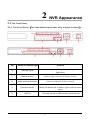
2.1.1 The Front Panel(For informational purposes only, subject to object)
No.
Button or indicator light
Function
1
Indicator light
Normal working hours, the corresponding indicator
light turns
2
Channel button
Select single channel full screen display
3
Multi-channel preview
Switch and display 4,9,16 channel
4
Direction button
Move the button up or down, right or left to select
menu
5
USB2.0
Connect mouse or USB memory stick backup
2