1
StarKeeper II NMS
Core System Guide
255-114-763
Issue 1
Release 10.0
Copyright © 1998 Lucent Technologies
All Rights Reserved
Printed in USA
CommKit, Datakit and StarKeeper are registered trademarks of Lucent Technologies.
HP, HP-UX, HP VUE, DeskJet, LaserJet, and PaintJet are registered trademarks of
Hewlett-Packard Systems Division.
Hydralube Blue is a registered trademark of ARNCO Equipment Co.
INFORMIX is a registered trademark of Informix Software, Inc.
INFORMIX-4GL and INFORMIX-SQL are registered trademarks of Relational Database
Systems, Inc.
MS-DOS is a registered trademark of Microsoft Corporation.
Polywater is a registered trademark of American Polywater Corporation
Postscript is a registered trademark of Adobe, Inc.
UNIX is a registered trademark in the United States and other countries licensed exclusively
through X/Open Company, Ltd.
The information in this document is subject to change without notice.
Lucent Technologies assumes no responsibility for any errors that may appear in this document.
This document was produced by Customer Training and Information Products (CTIP).
Contents
Preface
■
What’s New in This Document for Release 10.0
■
Purpose of the Document
xxxix
■
Organization
xxxix
■
Document Conventions
xli
■
Supported Products
xli
■
Related Documentation
xlii
■
1
xxxvii
xxxviii
StarKeeper® II NMS Documents
xlii
BNS-2000, BNS-2000 VCS, and
Data Networking Products Documents
xlii
Hewlett-Packard Documents
xlii
INFORMIX Documents
xliii
4GL Documents
SQL Documents
SE Documents
xliii
xliii
xliii
UNIX® System Documents
xliii
Additional Copies
xliv
Training
Using the StarKeeper II NMS Core System
xliv
1-1
■
Year 2000 Compliance
1-1
■
The StarKeeper II NMS Administrator
1-2
■
Qualifications
1-2
Typical OS/StarKeeper II NMS Administrator’s
Responsibilities
1-3
For New StarKeeper II NMS Users
1-4
Establish and Administer Connections
1-4
Configure the Database
1-4
Define Thresholds and Filters for Alarms
1-4
Obtain and Interpret Reports
1-5
Diagnose Network Problems
1-5
Maintain StarKeeper II NMS
1-5
StarKeeper II NMS Core System Guide R10.0, Issue 1
iii
Contents
■
The HP Visual User Environment
Logging In
1-6
No Windows Option
Printing
1-6
1-6
Capturing Images
Printing Files
1-7
1-7
Accessing Your Directory
1-8
Logging Off
1-8
Special HP VUE Capabilities
1-8
Style Manager
Workspaces
Keyboard Shortcuts
1-8
1-9
1-9
■
Commands
1-10
■
Network Commands
1-10
■
Sample Network
1-12
■
Addressing
1-13
■
iv
1-6
Four-level Mnemonic Addressing
1-13
X.121 Addressing
1-13
Network Addressing
1-14
Illustrating the Network Addressing Scheme
1-15
Further Examples
1-16
Wild Cards
1-17
Anchors
1-18
Node Name Expansion
1-18
Backup/Recovery Hardware Options
1-19
Regular Tape Drive (R Option)
1-19
Fast Tape Drive (F Option)
1-20
2-GB External Hard Disk (D Option)
1-20
StarKeeper II NMS Core System Guide R10.0, Issue 1
Contents
2
Using Core System Commands
■
Commands
2-1
Keyboard Idiosyncrasies
2-3
Command Format
2-3
Command Conventions
2-3
Types of Menus
2-4
Ring Menu
Vertical Choice Menu
General Menu Characteristics
2-4
2-5
2-5
The Menu Hierarchy
2-7
Issuing Commands Using Vertical Choice Menus
2-9
Issuing Commands at the Ring Menus
Entering Data on Database Records
Issuing Commands from the Command Line
One-line Commands
Prompted Entry Commands
Issuing Node Commands
Pass-through of Node Commands
Session Maintenance Commands
SMDS Measurements Command
Issuing a Series of Network Commands to a Node
Editing Command Lines
■
2-1
Getting Help
On-line Help While at a System Prompt
For Full-Screen Help on a Command
For Full-Screen Help on an Alarm or Message
For Help on Node Commands
On-line Help for Menus and Records
For Choice Menus
For Ring Menus
For Records
2-10
2-11
2-12
2-12
2-13
2-13
2-14
2-15
2-15
2-15
2-16
2-17
2-17
2-17
2-19
2-19
2-19
2-19
2-20
2-20
■
System Responses
2-20
■
Alarm Messages
2-21
StarKeeper II NMS Core System Guide R10.0, Issue 1
v
Contents
3
System Administration
■
■
■
vi
Establishing Physical Connections
3-1
3-2
Host Connections (Console, Billing, MRC,
Administration, and Performance)
3-3
Connecting a Master StarKeeper II NMS HP to
a Remote StarKeeper II NMS
3-4
StarKeeper II NMS Connectivity
3-5
Choosing Connection Classes for a
Core StarKeeper II NMS
3-6
Choosing Connection Classes for Graphics
and Co-resident Systems
3-7
Choosing Connection Classes for StarKeeper II NMS
3-8
Connections to the MRC
3-8
Connection Classes and System Synchronization
3-9
Administration Procedures for Host Connections
3-10
Console Connection Administration - Host Connection
3-10
Performance and Administration Connection
Administration- Host Connection
3-10
Billing Connection Administration - Host Connection
3-11
Multiple Nodes Within the Same Exchange
3-11
■
Using the Sysadm Menu
3-13
■
Starting Up StarKeeper II NMS (STARTSK)
3-15
■
Shutting Down StarKeeper II NMS (SHUTSK)
3-15
■
Billing Management (BILLMGMT)
3-16
■
Alarm Management (ALRMMGMT)
3-18
■
Database Utilities (DBUTILS)
3-19
■
Performance Measurements Management (PERFMGMT)
3-19
■
StarKeeper II to StarKeeper II Connections (SKIICONN)
3-23
StarKeeper II NMS Core System Guide R10.0, Issue 1
Contents
■
■
Node Software Management
3-26
Prerequisites
3-27
Summary of Node Software Management Commands
3-28
Loading Node Software to the StarKeeper II NMS Host
3-28
Downloading Node Software to a Node
3-30
Scheduling Node Software Downloads
3-33
Changing Scheduled Downloads
Deleting Scheduled Downloads
Scheduled Download Reports
3-36
3-37
3-38
Activating New Node Software
3-39
Displaying Download Status and Records
3-40
Report of Available Node Software and Disk Space Usage
3-42
Upgrading the Node Configuration Database
3-42
Node Database Management
3-43
Prerequisites
3-44
Summary of Upload/Download Commands
3-45
Upload Management
3-45
Uploading a Node's Database
3-47
Uploading a File from a Node to
StarKeeper II NMS
3-48
Downloading a Node's Database
3-49
Downloading a File from StarKeeper II NMS to a Node
3-50
Getting Upload/Download Status Reports
3-50
The STATUD Report
The REPUD Report
3-51
3-51
Error Messages
3-52
Scheduling Database Uploads
3-53
Canceling a Database Upload
3-54
Example Database Upload Scenario
3-54
StarKeeper II NMS Core System Guide R10.0, Issue 1
vii
Contents
■
Security
3-57
Console Password
3-57
Command Partitioning
3-57
Command Partitioning Administrative Commands
Command Partitioning User Commands
Creating Partitioned Users and Configuring
Their Printers
Reports for the Partitioned User
■
Automating Routine Tasks (the sequence Command)
The Patterns File
Regular Expressions
Environment Variables
3-63
3-64
3-64
3-65
3-65
First sequence Command Example
3-66
Select Node Command
Identify Prompts
Identify Unique Prompt Strings
Creating a Patterns File
Testing the Patterns File
Executing the Sequence Command
3-66
3-66
3-66
3-67
3-67
3-67
Second sequence Command Example
3-68
Using the sequence Command from the OS Shell
3-68
3-69
3-69
3-70
Patterns File
Shell Program
Running the Shell Program
Program Output
Other Applications
3-70
3-71
3-71
3-72
3-73
Using the Programmer's Interface
3-73
Procedure for Using the Programmer's Interface
3-73
Programmer's Interface Application Example
3-74
Determining the Program Function and Message Type
Determining Message Fields
Selecting Fields
Writing the Program
Executing the pi Script
viii
3-60
3-61
sequence Command Procedure
Duplicate Prompts
Error Handling
Looping
■
3-58
3-60
3-74
3-75
3-75
3-75
3-76
StarKeeper II NMS Core System Guide R10.0, Issue 1
Contents
Sample Program
Capturing Alarms for Trunk Administration
4
Database Management
■
Database Tables
3-76
3-76
4-1
4-2
Configuration Tables
4-2
Alarm Tables
4-2
Performance Tables
4-3
Billing Tables
4-3
Backing Up and Restoring Database Tables
4-3
■
Initializing the Database
4-3
■
Building the Network Configuration Database
4-4
StarKeeper II NMS Database Configuration Methods
4-4
StarKeeper II NMS Database Configuration Commands
4-6
Synchronization of Node Data
4-7
Prompted Entry Method
One-line Command Method
Delayed Loading of Node Databases
Synchronizing Network Elements and
StarKeeper II NMS Databases
Synchronizing Databases (One-line Command)
Scheduled Synchronizing of Node Databases
Automated (Nightly) Synchronizing of Node Databases
4-8
4-10
4-11
4-11
4-13
4-14
4-14
Synchronization of StarKeeper II NMS Machines
4-14
Synchronizing Node/Connection Data
4-15
Moving Nodes Between Core Systems
4-16
Using Configuration Forms
4-18
The System/Node and Connections Form
The Trunk Form
The Concentrator Form
Adding Configuration Records
Changing Data in the Configuration Records
Deleting Configuration Records
Verifying Data in Configuration Records
StarKeeper II NMS Core System Guide R10.0, Issue 1
4-21
4-26
4-27
4-28
4-29
4-32
4-34
ix
Contents
■
Using the One-line Entry Method
4-37
Backing up (and Restoring) the Configuration Database
4-38
Configuring Bridges
4-38
Changing Concentrator Links
4-40
Building the Billing Day/Year Tables Database
The Billing Day Table
4-41
The Concept of Billing Year Table
4-43
How to Build a Billing Day/Year Table Database
4-47
The DAYS Form
The BDT Form
The BYT Form
The BYT-TO-NODE Form
■
4-51
Setting Up the Billing Day/Year Tables Database
4-53
Converting Your Database
4-67
Local Database Conversion
Remote Database Conversion
4-68
4-69
Alarms
4-73
5-1
5-1
Receiving Alarms at Your Screen
5-5
Clearing the Alarms
5-6
Manual Clearing of Node and StarKeeper Alarms
Manual Clearing of Remote NMS Alarms
Automatic Clearing of Alarms
Getting a History of Alarms
x
4-67
Database Conversion Procedures
Monitoring the Network
■
4-49
4-49
4-50
4-51
Sample Billing Data Configuration
Using Conversion Log Files
5
4-40
5-7
5-7
5-8
5-9
Getting a Status Report of Alarms
5-11
Viewing Alarms in the Network Display Mode
5-13
Network Display Internal Commands
Entering System Commands While in
the Network Display Program
Using Color Terminals
5-15
5-16
5-17
StarKeeper II NMS Core System Guide R10.0, Issue 1
Contents
Alarm Conditioning
Using the Alarm Conditioning Ring Menus
Defining Alarm Filters
Redefining Alarm Severities
Defining Alarm Thresholds
Redefining Alarm Text
Redefining Text Using Field Identifiers
Changing Alarm Conditioning Records
Deleting Alarm Conditioning Records
Verifying Alarm Conditioning Records
Master Alarm Collection
Exporting Alarms
Importing Alarms
Alarm Conditioning for MAC Configurations
■
Graphical Displays
Network Monitor
■
■
6
Log Files
5-21
5-22
5-26
5-28
5-31
5-34
5-35
5-37
5-39
5-41
5-41
5-41
5-42
5-44
5-44
5-44
Reading Console Log Files
5-45
Reading Event Log Files
5-46
Reading Message Log Files
5-47
Reading Session Maintenance Log Files
5-49
Reading Administration Log Files
5-52
Tracing Calls
Reports
■
5-18
Performance Reports
5-54
6-1
6-2
Performance Reporter
6-5
Getting Performance Reports
6-5
Performance Report Entries Description
6-6
Example of Report Prompting/Entry Sequences
6-10
Field Descriptions for Performance Report
Column Headings
6-10
Getting FRM and FRM-M2 Performance Reports Using
sched_report
6-20
StarKeeper II NMS Core System Guide R10.0, Issue 1
xi
Contents
Bisynchronous Device Usage Report
Report Interpretation
Bisynchronous Module Performance Report
6-21
6-22
Report Interpretation
6-22
Concentrator Usage Report
6-24
Report Interpretation
6-24
CPMML Module Performance Report
Report Interpretation
CPMML Port Performance Report
Report Interpretation
DKAP Channel Performance Report
Report Interpretation
DKAP Module Performance Report
Report Interpretation
6-25
6-25
6-27
6-27
6-28
6-28
6-29
6-29
FRM and FRM-M2 Performance Reports
6-30
FRM Module Performance Report
6-31
Report Interpretation
FRM Facility Performance Report
Report Interpretation
FRM Port Performance Report
Report Interpretation
FRM DLCI Utilization Report
Report Interpretation
FRM DLCI Congestion Report
Report Interpretation
FRM-M2 Module Performance Report
Report Interpretation
FRM-M2 Port Performance Report
Report Interpretation
FRM-M2 Virtual Port Performance Report
Report Interpretation
FRM-M2 DLCI Utilization Report
Report Interpretation
FRM-M2 DLCI Congestion Report
xii
6-21
6-31
6-32
6-32
6-33
6-33
6-35
6-35
6-36
6-36
6-37
6-37
6-38
6-38
6-39
6-39
6-41
6-41
6-42
StarKeeper II NMS Core System Guide R10.0, Issue 1
Contents
Report Interpretation
Host Access Report
Report Interpretation
Multiplexer Module Usage Report
Report Interpretation
Multiplexer Port Usage Report (Daily)
6-42
6-43
6-44
6-45
6-45
6-46
Report Interpretation
6-46
Network Availability Report
6-48
Report Interpretation
6-49
Node Usage Report
Report Interpretation
SAMML Module Performance Report
Report Interpretation
SAMML Port Performance Report
Report Interpretation
SDLC8 Module Performance Report
Report Interpretation
SDLC8 Port Performance Report
Report Interpretation
Trunk Group Availability Report
Report Interpretation
Trunk Usage (DDS/64)
Report Interpretation
Trunk Usage Report (non-DDS)
Report Interpretation
TSM8 Module Performance Report
Report Interpretation
TSM8 Port Performance Report
Report Interpretation
X.25 Module Performance Report
Report Interpretation
X.25 PDN Usage Report
Report Interpretation
X.25 Usage Report
StarKeeper II NMS Core System Guide R10.0, Issue 1
6-50
6-50
6-51
6-51
6-52
6-53
6-54
6-54
6-56
6-56
6-58
6-58
6-59
6-59
6-60
6-60
6-62
6-62
6-64
6-64
6-66
6-66
6-67
6-67
6-68
xiii
Contents
Report Interpretation
X.75 Module Performance Report
Report Interpretation
X.75 Port Performance Report
■
6-72
Report Interpretation
6-72
Billing Reports
6-73
Getting Billing Reports
6-74
Billing Report Entries Description
6-76
Administered Call Setup Report
6-79
Call Hold Detail Report
Report Interpretation
Call Summary Report
Report Interpretation
Error Report
6-79
6-80
6-80
6-81
6-81
6-82
6-82
6-83
Report Interpretation
PDN/X.25 Host Call Activity Report
xiv
6-70
X.75 Port Utilization Report
Report Interpretation
■
6-69
6-70
Call Activity Report
■
6-69
Report Interpretation
Report Interpretation
■
6-68
6-83
6-84
Report Interpretation
6-84
X.75 Call Activity Report
6-85
Report Interpretation
6-85
Performance and Billing Data Archiving
6-86
Retrieving Archived Data for Reports
6-86
Removing Restored Data for Reports
6-87
Alarm Reports
6-88
Getting Alarm Reports
6-88
Alarm Summary Report
6-89
Field Descriptions
Report Interpretation
6-90
6-90
Producing Custom Reports
6-91
Before You Begin
6-91
Producing Default Reports
6-91
StarKeeper II NMS Core System Guide R10.0, Issue 1
Contents
Alarm Status Table Report
6-93
Creating An Original Report
6-96
Example Original Report
6-97
Connection Status Report
Connection Status Specification File
Running the conn_stat Report
Connection Status Report Output
Creating Your Own Reports
7
Maintenance
■
Periodic Checks
7-1
7-1
7-2
Clearing Alarms
7-2
Database Maintenance
7-3
Conserving Disk Space
The Disk Monitor
Disk Monitor Messages
Disk Cleaner
Manual Monitoring of Disk Space
Directories that Grow
Backup and Recovery of Your StarKeeper II NMS Data Files
Data Transfer Rates
■
6-98
6-99
6-99
6-99
Checking Event Log Files
Monitoring the Growth of Database Tables
Cleaning up Database Tables
Cleanup Diagnostics
Regaining Disk Space (The RSPACE Utility)
■
6-98
7-3
7-3
7-5
7-6
7-10
7-10
7-11
7-12
7-12
7-12
7-13
7-13
Calculation Examples
7-13
Data File Backup Procedures
7-16
Data File Restore Procedures
7-18
Backup and Recovery of Your StarKeeper II NMS System
In Case of Emergency Recovery
File(s) Corrupted or Removed by Accident
Disk or System Failure
StarKeeper II NMS Core System Guide R10.0, Issue 1
7-20
7-20
7-20
7-20
xv
Contents
Backing Up Your System
Recommended Backup Strategy
Backup Levels
Graph Files
Full Backups versus Incremental Backups
Before Starting fbackup or make_recovery
Monthly Root Disk Backup Using make_recovery
Using fbackup to Back Up Your System
Scheduling Automated Backups
Restoring Your Data
Before Starting frecover or cpio
Booting Up and Recovering From
the Root Disk Backup Tape
Restoring Individual Files Using frecover
Recovering Selected Files to a
New Location Using frecover
Restoring All Files Using frecover
Installing HP-UX 10.20 On a New Disk
Overview of an HP-UX Installation
Obtain and Organize Everything You Need
Installing HP-UX 10.20
Second Disk Configurations
StarKeeper II NMS Core or Co-resident System
Restoration
■
7-31
7-32
7-35
7-35
7-35
7-35
7-36
7-36
7-37
7-38
7-40
Installation Problems
7-42
Connection Problems
7-42
Troubleshooting
7-44
7-44
7-45
7-45
Checking the Active Processes
7-45
Database Corruption
7-46
Checking Directory and File Structure
Reinitializing the Database
Examining Message Queues
Automatic Monitoring of Message Queues
Manual Monitoring of Message Queues
Message Queue Overflow
xvi
7-31
7-42
Recovering from a System Crash
■
7-21
7-22
7-24
7-26
7-26
7-26
7-27
7-28
Corrective Maintenance
StarKeeper II NMS to StarKeeper II NMS Connections
Host Interface Connections
■
7-21
Other Problems
7-46
7-47
7-48
7-49
7-49
7-52
7-53
StarKeeper II NMS Core System Guide R10.0, Issue 1
Contents
A
Installing StarKeeper II NMS
A-1
■
Overview
A-1
■
Staged Systems
A-1
■
Upgrade Software Packages
A-1
■
StarKeeper II NMS Installation Process
A-2
■
Where Do You Go From Here?
A-3
B
Configuring an Additional Disk
B-1
C
Reconfiguring HP-UX System Parameters
C-1
D
Connecting a Printer
D-1
Printer Connections
D-1
■
Printer Configuration Recommendations
D-2
Printer Hardware Installation
D-2
Printer Administration
D-3
Default Printer
D-7
Removing the Remote Host
Verifying the Printer Connection
■
Troubleshooting Guidelines
StarKeeper II NMS Core System Guide R10.0, Issue 1
D-8
D-10
D-11
xvii
Contents
E
Host and HP Administration
E-1
System Administration Tasks
E-1
■
Setting the Root Password
E-1
Modifying the System IP Address and/or Hostname
E-1
Modifying the IP Address
Modifying the System Hostname
■
Establishing a Host Interface Connection
Routing the Fiber Optic Cable from CommKit
to the CPM-HS Module
Fiber Optic Cable
Conduit Installation
Installation Tools and Hardware
Connecting the Optical Fiber Cable to the
Host Machine
E-6
E-7
Commands Summary
StarKeeper II NMS Commands
Help Commands
StarKeeper II NMS Menu Interface (SKsh)
Partitioned User Administration
Partitioned User Commands
Node Commands
Node Administration
MRC Commands
Utility Commands
xviii
E-4
E-5
E-6
Administering the Network Node
Check Communication Path
Verifying HP Host Interface Hardware and Software
■
E-4
E-6
Problems Establishing a Host Interface Connection
■
E-3
Installing the CPM-HS Module in the Node
Administering the CPM-HS in the Node Database
Entering the Group Name
Defining the DK Server Address
Defining the Service Address for the Listener
Configuring the CPM-HS
F
E-2
E-2
E-7
E-7
E-8
E-8
E-8
E-9
E-9
E-9
F-1
F-1
F-2
F-3
F-3
F-3
F-4
F-4
F-5
F-6
StarKeeper II NMS Core System Guide R10.0, Issue 1
Contents
G
Re-initializing the Database
G-1
H
Node and StarKeeper II NMS Messages
H-1
■
Node Messages
Message Types
H-2
Message Severity
H-2
*C Critical
** Major
* Minor
Informational
■
J
H-3
H-3
H-3
H-4
Node Message Format
H-4
Report <Type> <msgid>
H-4
Node Report Message Fields
H-5
StarKeeper II NMS Messages
Common StarKeeper II NMS Message Fields
I
H-1
Upload/Download
Error Messages
H-7
H-7
I-1
■
StarKeeper II NMS Upload/Download Error Messages
I-1
■
Node Upload/Download
Error Messages
I-5
SCP Error Codes
StarKeeper II NMS Core System Guide R10.0, Issue 1
J-1
xix
Contents
K
Special Considerations for Customers with
Large Frame Relay Performance Databases
■
Performance Data Collection
K-1
■
Performance Data
Post-processing Features
K-1
Thresholding
K-2
Summarization
K-2
Data Deletion
K-2
Post-Processing Guidelines
K-2
Trade-offs Between Collecting and
Post-Processing FRM-M2 Performance Data
■
Tools to Manage Data Growth
K-3
K-4
The Configurator Tool
K-4
MEASMGMT
K-4
RETNMGMT
K-4
Summarization Management
K-5
Threshold Administration
K-5
Off-loading Data
K-5
Mirror Core System
Independent Informix Database
Import to Excel on a PC
Off-loading Scenarios
Network File System
SELECT Statement Examples
Shell Script Examples
GL
Glossary
IN
Index
xx
K-1
K-6
K-6
K-6
K-6
K-7
K-7
K-9
GL-1
IN-1
StarKeeper II NMS Core System Guide R10.0, Issue 1
Figures
1
Using the StarKeeper II NMS Core System
Figure 1-1.
A Sample Network (called national)
1-12
Figure 1-2.
Illustrating the Network Addressing Scheme
1-15
2
Using Core System Commands
Figure 2-1.
The Menu Hierarchy
3
System Administration
Figure 3-1.
HP Host Connection to Network Node
3-3
Figure 3-2.
Master StarKeeper II NMS to Remote StarKeeper II NMS Host Connection
3-4
2-8
Figure 3-3.
Example of an Alias Exchange
3-12
Figure 3-4.
The StarKeeper II NMS Upload/Download Feature
3-43
4
Database Management
Figure 4-1.
The INFORMIX Database Management System
4-1
Figure 4-2.
A Conceptual View of skload and cfg_sync
4-8
Figure 4-3.
The Billing Day Tables
4-45
Figure 4-4.
The Billing Year Tables
4-46
5
Monitoring the Network
Figure 5-1.
Distribution and Retrieval of Alarms
Figure 5-2.
Relationship of Alarm Conditioning to the Alarm Database
5-18
Figure 5-3.
Illustrating a Traced Call
5-55
StarKeeper II NMS Core System Guide R10.0, Issue 1
5-2
xxi
Figures
xxii
StarKeeper II NMS Core System Guide R10.0, Issue 1
Tables
2
Using Core System Commands
Table 2-1.
Special Keys for Use with Ring Menus
2-10
Table 2-2.
Special Keys for Use with Database Records
2-11
Table 2-3.
Editing Key Functions
2-16
3
System Administration
Table 3-1.
StarKeeper II NMS Connection Classes
Table 3-2.
Description and Reference for SYSADM Choices
3-14
Table 3-3.
Command Partitioning Commands (Administrative)
3-58
Table 3-4.
Command Partitioning Commands (Partitioned User)
3-60
Table 3-5.
Partitioned User Report Commands
3-62
Table 3-6.
Key Fields for the Programmer's Interface
3-75
4
Database Management
Table 4-1.
StarKeeper II NMS Configuration Methods
4-5
Table 4-2.
Summary of StarKeeper II NMS Configuration Commands
4-6
Table 4-3.
skload Command Options
4-10
Table 4-4.
cfg_sync Command Options
4-13
Table 4-5.
Summary of Configuration Operations
4-36
5
Monitoring the Network
Table 5-1.
Alarm Severities
5-3
Table 5-2.
Summary of StarKeeper II NMS Alarm Commands
5-4
Table 5-3.
alarmhistory Command Options
5-9
Table 5-4.
alarmstatus Command Options
5-12
Table 5-5.
netdisp Command Options
5-14
Table 5-6.
Network Display (netdisp) Internal Commands
5-15
StarKeeper II NMS Core System Guide R10.0, Issue 1
3-5
xxiii
Tables
6
Reports
Table 6-1.
Performance Reports
6-2
Table 6-2.
Performance Data Reports for BNS-2000 and
BNS-2000 VCS Nodes
6-4
7
Maintenance
Table 7-1.
Data Retention and Cleanup Parameters
7-4
Table 7-2.
Cleanup Diagnostic Files
7-5
Table 7-3.
skbackup Command Options
7-17
Table 7-4.
skrestore Command Options
7-19
Table 7-6.
Connection Classes and Tracefiles
7-43
Table 7-7.
Hex Code and Decimal Code to Process Name Correlation
7-50
J
SCP Error Codes
Table J-1.
SCP Error Codes in Event Logs
xxiv
J-1
StarKeeper II NMS Core System Guide R10.0, Issue 1
Procedures
1
Using the StarKeeper II NMS Core System
Procedure 1-1.
Procedure 1-2.
Using the Capture Screen Utility
Using the Printers Sub-Panel
3
System Administration
Procedure 3-1.
Procedure 3-2.
HP Host Connection
Master Starkeeper II NMS to Remote
Starkeeper II NMS -Host Connection
Console Connection Administration - Host Connection
Performance and Administration Connection Administration
Performance Connection Administration FRM-M2 Measurement Collection
Billing Connection Administration - Host Connection
Working with Multiple Nodes within the same Exchange
How to Start (or Restart) StarKeeper II NMS
How to Shut Down StarKeeper II NMS
How to Use the Billing Management Utility
How to Use the Alarm Management Utility
How to Use the Performance Measurements
Management Utility
Administering the Machine ID and Server/Listener Address
Loading the Node Software
Downloading the Node Software
Scheduling a Download
Changing a Scheduled Download
Deleting a Scheduled Download
Obtaining a Scheduled Download Report
How to Run Upload Management
How to Upload a Node’s Database
How to Upload a Node’s File
How to Download a Node’s Database
How to Download a StarKeeper II NMS File
How to Get Upload/Download Reports on a Specified Node
How to Schedule an Upload of a Node(s) Database
Procedure 3-3.
Procedure 3-4.
Procedure 3-5.
Procedure 3-6.
Procedure 3-7.
Procedure 3-8.
Procedure 3-9.
Procedure 3-10.
Procedure 3-11.
Procedure 3-12.
Procedure 3-13.
Procedure 3-14.
Procedure 3-15.
Procedure 3-16.
Procedure 3-17.
Procedure 3-18.
Procedure 3-19.
Procedure 3-20.
Procedure 3-21.
Procedure 3-22.
Procedure 3-23.
Procedure 3-24.
Procedure 3-25.
Procedure 3-26.
StarKeeper II NMS Core System Guide R10.0, Issue 1
1-7
1-7
3-3
3-4
3-10
3-11
3-11
3-11
3-12
3-15
3-15
3-16
3-18
3-20
3-24
3-29
3-30
3-33
3-36
3-37
3-38
3-45
3-47
3-48
3-49
3-50
3-51
3-53
xxv
Procedures
Procedure 3-27.
Procedure 3-28.
Procedure 3-29.
Procedure 3-30.
Procedure 3-31.
Procedure 3-32.
How to Cancel a Scheduled Upload of a Node(s) Database
Database Upload Example
How to Create a Partitioned User
How to Assign Reports and Printers to a Partitioned User
Sequence Command Procedure
Creating a Programmer’s Application
4
Database Management
Procedure 4-1.
Procedure 4-2.
Procedure 4-3.
Procedure 4-4.
Procedure 4-5.
Procedure 4-6.
Procedure 4-7.
Procedure 4-8.
Procedure 4-9.
Procedure 4-10.
Procedure 4-11.
How to Load Configuration Data from a Network Node
How to Synchronize a Database with a Network Node
How to Enter cf Commands Using the Form Entry Method
How to Add (Enter) Configuration Records
How to Change Data in Configuration Records
How to Delete Configuration Records
How to Verify Data in a Configuration Record
How to Change Concentrator Links
How to Enter and Use the cfbdt Command
Local Database Conversion
Remote Database Conversion
5
Monitoring the Network
Procedure 5-1.
Procedure 5-2.
Procedure 5-3.
Procedure 5-4.
Procedure 5-5.
Procedure 5-6.
Procedure 5-7.
Procedure 5-8.
Procedure 5-9.
Procedure 5-10.
Procedure 5-11.
How to Enter the Network Display Mode
How to Access the Chosen Alarm Conditioning Table (Record)
How to Define the Filters for an Alarm
How to Redefine the Severity of an Alarm
How to Define (Redefine) the Threshold of an Alarm
How to Redefine the Text of an Alarm
How to Change an Alarm Conditioning Record
How to Delete an Alarm Conditioning Record
How to Verify an Alarm Conditioning Record
How to Access Console Log Files
How to Access Event Log Files
xxvi
3-54
3-54
3-61
3-62
3-65
3-73
4-8
4-12
4-19
4-28
4-30
4-32
4-34
4-40
4-48
4-68
4-69
5-13
5-21
5-24
5-26
5-29
5-32
5-35
5-37
5-39
5-45
5-46
StarKeeper II NMS Core System Guide R10.0, Issue 1
Procedures
Procedure 5-12.
Procedure 5-13.
Procedure 5-14.
How to Access Message Log Files
How to Access Session Maintenance Log Files
How to Access Administration Log Files
6
Reports
Procedure 6-1.
Procedure 6-2.
Procedure 6-3.
Procedure 6-4.
Procedure 6-5.
Procedure 6-6.
Procedure 6-7.
Procedure 6-8.
Procedure 6-9.
How to Get Reports (General Procedure)
How to Get Performance Reports
How to Get Billing Reports
How to Restore Archived Data for Reports
How to Remove Restored Data
How to Get Alarm Reports
General Procedure for Producing a Default Report
Producing an Alarm Status Table Report
General Procedure for Creating An Original Report
7
Maintenance
Procedure 7-1.
Procedure 7-2.
Procedure 7-3.
Procedure 7-4.
Procedure 7-5.
Procedure 7-6.
Procedure 7-7.
Procedure 7-8.
Procedure 7-9.
How to Regain Disk Space
How to Backup StarKeeper II NMS Data Files
How to Restore StarKeeper II NMS Data Files
Performing a Root Disk Backup
Configuring a Standard Whole Disk
Configuring a Standard LVM Disk
Restoring a StarKeeper II NMS Core or Co-resident System
How to Debug a Host Interface Connection Problem
How to Delete and Reinitialize a Database Table
StarKeeper II NMS Core System Guide R10.0, Issue 1
5-47
5-49
5-52
6-2
6-5
6-74
6-86
6-87
6-88
6-92
6-93
6-96
7-7
7-16
7-18
7-27
7-38
7-40
7-40
7-44
7-47
xxvii
Procedures
B
Configuring an Additional Disk
Procedure B-1.
Procedure B-2.
Procedure B-3.
Configuring an External 2-GB Disk for StarKeeper II NMS
Database Backup
Backing Up the SK_DBBK Disk Using cpio
Configuring the Fast Tape Drive
C
Reconfiguring HP-UX System Parameters
Procedure C-1.
Reconfiguring Tunable HP-UX System Parameters for
Core or Co-resident Systems
Reconfiguring Tunable HP-UX System Parameters for
Graphics Systems
Procedure C-2.
D
Connecting a Printer
Procedure D-1.
Procedure D-2.
Procedure D-3.
Procedure D-4.
Procedure D-5.
Procedure D-6.
Procedure D-7.
Procedure D-8.
Procedure D-9.
Procedure D-10.
Procedure D-11.
Removing Printers Administered via lpadmin Command
Installing an HP DeskJet 870C or LaserJet 6P Printer
Configuring a Local Printer
Configuring Remote Access via the LAN
SharedPrint Known Problem
Printing Banner Pages
Verifying and/or Changing the Default Printer
Print the Whole Page, not Just in the Corner
Removing the Remote Host
Sending Test Output to the Printer
Troubleshooting the Printer
xxviii
B-2
B-3
B-4
C-2
C-2
D-1
D-2
D-3
D-5
D-6
D-6
D-7
D-7
D-8
D-10
D-11
StarKeeper II NMS Core System Guide R10.0, Issue 1
Procedures
E
Host and HP Administration
Procedure E-1.
Procedure E-2.
Procedure E-3.
Procedure E-4.
Procedure E-5.
Procedure E-6.
Procedure E-7.
Set the Root Password
Modifying the IP Address
Modifying the System Hostname
Connecting the Cable to CommKit
Installing and Connecting the CPM-HS Module
Starting the Server
Verifying Host Interface Data Transfer
G
Re-initializing the Database
Procedure G-1.
Re-initializing the Database after StarKeeper II NMS Installation
StarKeeper II NMS Core System Guide R10.0, Issue 1
E-1
E-2
E-2
E-6
E-6
E-10
E-12
G-1
xxix
Procedures
xxx
StarKeeper II NMS Core System Guide R10.0, Issue 1
Screens
2
Using Core System Commands
Screen 2-1.
Screen 2-2.
Screen 2-3.
Screen 2-4.
Screen 2-5.
StarKeeper II NMS Main (Begin) Menu
Sample Ring Menu
Sample One-line Command with Arguments
Command Specification, Prompted Mode
Example of Full-Screen Help
3
System Administration
Screen 3-1.
Screen 3-2.
Screen 3-3.
Screen 3-4.
Screen 3-5.
Screen 3-6.
Screen 3-7.
Screen 3-8.
Screen 3-9.
Screen 3-10.
Screen 3-11.
Screen 3-12.
Screen 3-13.
Screen 3-14.
Sysadm Menu
Sample Billing Control File Parameters
Perf Menu
Define Performance Measurements Ring Menu
Performance Measurement Record
The Verify Ring Menu
The Change Ring Menu
SKsh NDSWMGMT Menu
UPDNLD Menu
Typical STATUD Report
Typical REPUD Report
Scheduling Database Upload Operations
Example STATUD Report
Example REPUD Report
4
Database Management
Screen 4-1.
Screen 4-2.
Screen 4-3.
Screen 4-4.
Screen 4-5.
Screen 4-6.
Screen 4-7.
The Network Elements Ring Menu
The Operations Ring Menu
System/Node and Connections Form
Service Address Data Display
Connection Class Details Form
Connection Class Details Form for Dial Backup
The Trunk Form
StarKeeper II NMS Core System Guide R10.0, Issue 1
2-9
2-10
2-12
2-13
2-18
3-14
3-16
3-20
3-20
3-21
3-21
3-22
3-28
3-45
3-51
3-52
3-53
3-56
3-56
4-19
4-19
4-21
4-22
4-23
4-25
4-26
xxxi
Screens
Screen 4-8.
Screen 4-9.
Screen 4-10.
Screen 4-11.
Screen 4-12.
Screen 4-13.
Screen 4-14.
Screen 4-15.
Screen 4-16.
Screen 4-17.
Screen 4-18.
Screen 4-19.
Screen 4-20.
Screen 4-21.
Screen 4-22.
Screen 4-23.
Screen 4-24.
Screen 4-25.
Screen 4-26.
Screen 4-27.
Screen 4-28.
Screen 4-29.
Screen 4-30.
Screen 4-31.
Screen 4-32.
Screen 4-33.
Screen 4-34.
Screen 4-35.
Screen 4-36.
Screen 4-37.
Screen 4-38.
Screen 4-39.
Screen 4-40.
Screen 4-41.
Screen 4-42.
Screen 4-43.
Screen 4-44.
xxxii
The Concentrator Form
The Change Ring Menu
The Delete Ring Menu
The Verify Ring Menu
Sample Bridge Setup Form for 2 Bridge Modules
The BDTMGMT Ring Menu
The Operations Ring Menu
The DAYS Ring Menu
The BDT Ring Menu
The BYT Ring Menu
The BYT-TO-NODE Ring Menu
DAYS Form for Weekdays
DAYS Form for Saturdays
DAYS Form for Sundays
BDT Form for Weekdays, for AreaA
BDT Form for Weekdays, for AreaB
BDT Form for Saturdays, for AreaA
BDT Form for Saturdays, for AreaB
BDT Form for Sundays, for AreaA
BDT Form for Sundays, for AreaB
BYT Form for AreaA, 1996, Weekdays
BYT Form for AreaB, 1996, Weekdays
BYT Form for AreaA, 1996, Saturdays
BYT Form for AreaB, 1996, Saturdays
BYT From for AreaA, 1996, Sundays and Holidays
BYT From for AreaB, 1996, Sundays and Holiday
BYT Form for AreaA, December 25, 1996
BYT Form for AreaB, December 25, 1996
BYT Form for AreaA, November 25, 1996
BYT Form for AreaB, November 25, 1996
BYT Form for AreaA, November 26, 1996
BYT Form for AreaB, November 26, 1996
BYT Form for AreaA, 1996, Weekdays
BYT Form for AreaB, 1996, Weekdays
BYT Form for AreaA, 1997 Saturdays
BYT Form for AreaB, 1997, Saturdays
BYT From for AreaA, 1997, Sundays and Holidays
4-27
4-30
4-33
4-35
4-39
4-48
4-48
4-49
4-49
4-50
4-51
4-53
4-53
4-53
4-54
4-55
4-56
4-57
4-58
4-59
4-59
4-60
4-60
4-60
4-60
4-61
4-61
4-61
4-61
4-62
4-62
4-62
4-62
4-63
4-63
4-63
4-63
StarKeeper II NMS Core System Guide R10.0, Issue 1
Screens
Screen 4-45.
Screen 4-46.
Screen 4-47.
Screen 4-48.
Screen 4-49.
Screen 4-50.
Screen 4-51.
Screen 4-52.
Screen 4-53.
Screen 4-54.
Screen 4-55.
Screen 4-56.
Screen 4-57.
BYT From for AreaB, 1997, Sundays and Holidays
BYT Form for AreaA, December 25, 1997
BYT Form for AreaB, December 25, 1997
BYT Form for AreaA, November 24, 1997
BYT Form for AreaB, November 24, 1997
BYT Form for AreaA, November 25, 1997
BYT Form for AreaB, November 25, 1997
BYT Form for AreaA, May 30, 1996
BYT Form for AreaA, May 30, 1996
BYT-TO-NODE Form nodea, 1996
BYT-TO-NODE Form nodea, 1997
BYT-TO-NODE Form nodeb, 1996
BYT-TO-NODE Form nodeb, 1997
5
Monitoring the Network
Screen 5-1.
Screen 5-2.
Screen 5-3.
Screen 5-4.
Screen 5-5.
Screen 5-6.
Screen 5-7.
Screen 5-8.
Screen 5-9.
Screen 5-10.
Screen 5-11.
Screen 5-12.
Screen 5-13.
Screen 5-14.
Screen 5-15.
Screen 5-16.
Screen 5-17.
Screen 5-18.
Screen 5-19.
Typical Alarm Screen Display
Help Screen for Alarm 8005
Sample alhist Response
Sample alstat Response
Example Netdisp Alarm Messages
Alarm Conditioning Ring Menu
Display Help Information Operations Ring Menu and Record
Define Alarm Filter Operation Ring Menu and Record
Add Filter Record
Redefine Severity of Alarms Operation Ring Menu and Report
Add Alarm Severity Record
Define Threshold of Alarms Operation Ring Menu and Record
Add Threshold Record
Redefine Text of Alarms Operation Ring Menu and Record
Add Text Redefinition Record
Sample Add Text Redefinition Record
The Change Ring Menu
The Verify Ring Menu
The Verify Ring Menu
StarKeeper II NMS Core System Guide R10.0, Issue 1
4-64
4-64
4-64
4-64
4-65
4-65
4-65
4-65
4-66
4-66
4-66
4-66
4-66
5-5
5-6
5-11
5-13
5-14
5-21
5-21
5-24
5-25
5-26
5-27
5-29
5-30
5-32
5-32
5-35
5-36
5-38
5-40
xxxiii
Screens
Screen 5-20.
Screen 5-21.
Screen 5-22.
Screen 5-23.
Screen 5-24.
Screen 5-25.
Screen 5-26.
Screen 5-27.
Screen 5-28.
Screen 5-29.
Screen 5-30.
Screen 5-31.
Screen 5-32.
Screen 5-33.
Screen 5-34.
Screen 5-35.
Listing of Files in a Console Log Directory
Sample CONSLOG File
Listing of Files in an Event Log Directory
Sample EVENTLOG File
Listing of Subdirectories in a Message Log Directory
Listing of Files in a Message Log Directory
Sample MSLOF File
Listing of Subdirectories in a Session Maintenance
Log Directory
Listing of Files in a Session Maintenance Log Directory
Sample SMLOG File (with smstat messages)
Sample SMLOG File with smverify messages
Listing of Subdirectories in an Administration Log Directory
Listing of Files in an Administration Log Directory
Sample ADMIN File
An Example of tracec Output Display
An Example tracec Output Display with Session Maintenance
6
Reports
Screen 6-1.
Screen 6-2.
Screen 6-3.
Screen 6-4.
Screen 6-5.
Screen 6-6.
Screen 6-7.
Screen 6-8.
Screen 6-9.
Screen 6-10.
Screen 6-11.
Screen 6-12.
Screen 6-13.
Screen 6-14.
Screen 6-15.
Screen 6-16.
Prompting Sequence for Trunk Group Availability Report
Sample Bisynchronous Device Usage Report
Sample Bisynchronous Module Performance Report
Sample Concentrator Usage Report
Sample Daily CPMML Module Performance Report
Sample CPMML Port Performance Report (Module Address)
Sample DKAP Channel Performance Report (Channel Address)
Sample Daily DKAP Module Performance Report
Sample FRM Module Performance Report
Sample FRM Facility Performance Report
Sample FRM Port Performance Report
Sample FRM DLCI Utilization Report
Sample FRM DLCI Congestion Report
Sample FRM-M2 Module Performance Report
Sample FRM-M2 Port Performance Report
Sample FRM-M2 Virtual Port Performance Report
xxxiv
5-45
5-45
5-46
5-46
5-47
5-47
5-48
5-49
5-49
5-50
5-51
5-52
5-52
5-53
5-54
5-55
6-10
6-21
6-22
6-24
6-25
6-27
6-28
6-29
6-31
6-32
6-33
6-35
6-36
6-37
6-38
6-39
StarKeeper II NMS Core System Guide R10.0, Issue 1
Screens
Screen 6-17.
Screen 6-18.
Screen 6-19.
Screen 6-20.
Screen 6-21.
Screen 6-22.
Screen 6-23.
Screen 6-24.
Screen 6-25.
Screen 6-26.
Screen 6-27.
Screen 6-28.
Screen 6-29.
Screen 6-30.
Screen 6-31.
Screen 6-32.
Screen 6-33.
Screen 6-34.
Screen 6-35.
Screen 6-36.
Screen 6-37.
Screen 6-38.
Screen 6-39.
Screen 6-40.
Screen 6-41.
Screen 6-42.
Screen 6-43.
Screen 6-44.
Screen 6-45.
Screen 6-46.
Screen 6-47.
Screen 6-48.
Screen 6-49.
Screen 6-50.
Sample FRM-M2 DLCI Utilization Report
Sample FRM-M2 DLCI Congestion Report
Sample Host Access Report (Monthly)
Sample SAM Multiplexer Module Usage Report
Sample Daily SAM Multiplexer Port Usage Report
Sample Node Availability Report
Sample Trunk Availability Report
Sample Node Usage Report (Daily)
Sample Daily SAMML Module Performance Report
Sample SAMML Port Performance Report (Module Address)
Sample SAMML Port Performance Report (Report Interval)
Sample Daily SDLC8 Module Performance Report
Sample SDLC8 Port Performance Report (Port Address)
Sample Trunk Group Availability Report
Sample Trunk Usage Report
Sample Trunk Usage Report
Sample Daily TSM8 Module Performance Report
Sample TSM8 Port Performance Report (Module Address)
Sample X.25 Module Performance Report
Sample X.25 PDN Usage Report
Sample X.25 Usage Report
Sample X.75 Module Performance Report
Sample X.75 Port Performance Report
Sample X.75 Port Utilization Report
Sample Billing Report Queries
Sample Administered Call Setup Report
Sample Call Activity Report
Sample Call Hold Detail Report
Sample Call Summary Report
Sample Billing Error
Sample PDN/X.25 Host Call Activity Report
Sample X.75 Call Activity
Prompting Sequence for the Alarm Summary Report
Sample Alarm Summary Report
StarKeeper II NMS Core System Guide R10.0, Issue 1
6-41
6-42
6-43
6-45
6-46
6-48
6-48
6-50
6-51
6-52
6-52
6-54
6-56
6-58
6-59
6-60
6-62
6-64
6-66
6-67
6-68
6-69
6-70
6-72
6-75
6-79
6-80
6-81
6-82
6-83
6-84
6-85
6-89
6-89
xxxv
Screens
7
Maintenance
Screen 7-1.
Screen 7-2.
Screen 7-3.
Screen 7-4.
Screen 7-5.
Screen 7-6.
Screen 7-7.
Screen 7-8.
Screen 7-9.
Screen 7-10.
Screen 7-11.
DBUTILS Menu
RSPACE Message
RSPACE Utility Menu
RSPACE Disk Space Message
RSPACE Confirmation Message
Low Disk Space Alarm Screen
Recommended Backup Schedule
Sample Response to connections Command
DBUTILS Menu
Database Status Display (INITDB)
Sample Display for the ipcs command
xxxvi
7-7
7-8
7-8
7-8
7-9
7-12
7-23
7-43
7-47
7-48
7-50
StarKeeper II NMS Core System Guide R10.0, Issue 1
Preface
StarKeeper® II NMS manages, controls, and diagnoses the complete line of
BNS-2000 and BNS-2000 VCS (formerly Datakit® II Virtual Circuit Switch (VCS))
nodes as well as concentrators, servers, bridges, routers, gateways, and other
network elements. StarKeeper II NMS collects alarm information, billing data, and
performance measurements from the network and generates reports on request.
Two-way communication between StarKeeper II NMS and the network allows one
centrally located administrator to manage equipment at many locations.
StarKeeper II NMS architecture consists of one or more Core Systems optionally
connected to one or more Graphics Systems running various graphics
applications. The Core Systems maintain network connectivity and databases,
and perform basic network management functions.
The StarKeeper II NMS SNMP Proxy Agent is an optional Core System
application. This application is provided with a Core System, but its installation is
optional.
The StarKeeper II NMS Graphic System is an 8-user system. It provides
configuration management and analysis, enhanced alarms and diagnostics
capabilities, and graphical displays of performance and traffic information. The
following graphics applications are included with a Graphics System:
■
StarKeeper II NMS Graphics System Platform, including
— Bulletin Board
— Cut-Through
— Workstation Administration
■
StarKeeper II NMS Network Builder
■
StarKeeper II NMS Network Monitor
■
StarKeeper II NMS Performance Reporter
StarKeeper II NMS Core System Guide R10.0, Issue 1
xxxvii
Preface
Local Area Network Netstations can also be connected to the host machine,
allowing multiple users to access the Graphics System software. For small
networks, the Graphics System software can reside on the same host machine as
the Core System. This configuration is referred to as the Co-resident System. For
large networks, multiple Core Systems can divide the load either geographically
or functionally.
What’s New in This Document for
Release 10.0
0
This document is reissued because of changes and additions made since
Release 8.0 of StarKeeper II NMS. The following list details these changes:
■
Support for BNS-2000 Release 5.0
■
Support for BNS-2000 VCS Release 6.0
■
Changes in software packaging
— The StarKeeper II NMS Core System Support for SMDS software is
automatically installed with the StarKeeper II NMS Core System
software package.
— The StarKeeper II NMS SNMP Proxy Agent for SMDS and
StarKeeper II NMS SNMP Proxy Agent for Frame Relay software
packages are combined into one, called the StarKeeper II NMS
SNMP Proxy Agent.
— The StarKeeper II NMS SNMP Proxy Agent software is optionally
installed with the StarKeeper II NMS Core System software
package. The StarKeeper II NMS Core System software package
includes the license required to install the StarKeeper II NMS SNMP
Proxy Agent software.
— The StarKeeper II NMS Network Builder Support for Frame Relay
and StarKeeper II NMS Network Builder Support for SMDS software
packages are included as part of the StarKeeper II NMS Network
Builder software package.
— The StarKeeper II NMS Graphics System software package comes
with an eight-user license. The single-user version of this software
package is no longer available.
■
xxxviii
Year 2000 Compliance: StarKeeper II NMS R10.0 provides Year 2000
Compliance through the support of four-digit years in most Date fields; twodigit years are also supported in an unambiguous way. (See Chapter 1 for
more details.)
StarKeeper II NMS Core System Guide R10.0, Issue 1
Preface
Purpose of the Document
0
This guide provides complete, step-by-step instructions for performing the tasks of
a network administrator on a StarKeeper II NMS Core machine. This guide gives
instructions on how to set up the database, handle alarms, administer the system
on a daily basis, generate and interpret reports, and maintain StarKeeper II NMS.
Refer to the StarKeeper II NMS Graphics System Guide for coverage of the
Graphics System-based packages.
This guide also provides an overview of the format and syntax of StarKeeper II
NMS commands and alarm messages.
Refer to the Getting Started with StarKeeper II NMS R10.0 guide that is shipped
with your order to facilitate initial installation and start-up procedures.
Organization
0
This guide is divided into the following chapters.
Chapter 1
presents preparatory material for using the StarKeeper II NMS,
including a discussion of the StarKeeper II NMS administrator's
qualifications and responsibilities, a general discussion of the
StarKeeper II NMS commands, a sample network, and an
explanation of the network addressing scheme.
Chapter 2
includes an overview of the format and syntax of
StarKeeper II NMS commands and alarm messages, and
describes addressing, network addresses, wild cards, anchors,
and node name expansion.
Chapter 3
provides a tutorial on the functions performed at the System
Administration Menu plus administration of uploads and
downloads of node databases, security, the assigning of
commands to certain users (command partitioning), automating
routine tasks, and use of the Programmer's Interface.
Chapter 4
briefly introduces the INFORMIX® database and provides
complete instructions on how to build and make changes to the
network configuration database tables. This chapter also provides
instructions on converting an existing StarKeeper II NMS database
when installing a new system.
Chapter 5
provides complete instructions for monitoring external alarms
(from the network) and internal alarms (from StarKeeper II NMS).
This chapter also includes complete instructions on how to manipulate the way the alarms are displayed (alarm conditioning) and
how to browse through log files that contain network messages.
StarKeeper II NMS Core System Guide R10.0, Issue 1
xxxix
Preface
Chapter 6
provides a description of the performance, billing, and alarm
reports, with complete instructions on how to retrieve and interpret
the reports. This chapter also includes instructions for producing
custom reports.
Chapter 7
describes how to maintain StarKeeper II NMS, and provides
procedures to recover from system problems, to prevent problems
from occurring, and to backup the system.
Appendix A includes an overview of the installation task.
Appendix B describes how to configure a second disk on an HP.
Appendix C provides procedures for reconfiguring HP-UX® system
parameters.
Appendix D provides procedures to configure a printer and troubleshooting
guidelines.
Appendix E furnishes hardware assembly instructions for the host machine (for
software package systems only), and procedures for establishing
a host connection to the hub node.
Appendix F provides a summary of all commands—in a tabular form—by type
of command, and provides a summary of all configuration
commands for quick reference.
Appendix G provides instructions for reinitializing the StarKeeper II NMS
database.
Appendix H lists node and StarKeeper II NMS messages (for use with the
programmers interface feature described in Chapter 3).
Appendix I
lists error messages associated with the node upload/download
feature (each error message has a description and a
recommended course of corrective action).
Appendix J
describes the SCP Error Codes that can appear in the Event Log.
Appendix K furnishes the special considerations for customers who have large
frame relay performance database.
xl
StarKeeper II NMS Core System Guide R10.0, Issue 1
Preface
Document Conventions
0
Certain conventions are used in this document to help make it more usable.
■
Some screen displays are boxed:
This is a screen display
■
Messages that appear on the screen (for example, system responses,
alarms, prompts, and so forth) are printed as follows:
device for printer_name: io_port
■
User input instructions appear in bold italic font: Type /usr/bin.
■
Command names are shown in bold font: help.
■
Directory and file names are shown in italic font:
$CNMS_DBS/ahp/alarm_log.
■
Variable information, either entered from the keyboard or displayed on the
screen, is enclosed in angle brackets: <name>.
■
Keys that you press are shown in a box:
Enter
.
If two keys are shown, press them together. For example, Ctrl q means
to press (and hold) the Ctrl key and then enter a q; once both keys are
depressed, you release them both.
■
Procedural steps are marked by consecutive step numbers.
■
Unless otherwise specified, references to other chapters that appear in
bold refer to chapters in this guide: Chapter 1.
Supported Products
0
For a complete listing of supported products, see the StarKeeper II NMS Planning
Guide.
NOTE:
Beginning with StarKeeper II NMS Release 7.0, support for a number of
systems has been dropped including ISN, old nodes, and so forth. When
prompts for unsupported equipment appear on the screen, disregard these
prompts. If used, the results will be undefined.
StarKeeper II NMS Core System Guide R10.0, Issue 1
xli
Preface
0
Related Documentation
In conjunction with this guide, you may need to refer to the following documents:
StarKeeper® II NMS Documents
■
StarKeeper® II NMS Planning Guide
■
StarKeeper® II NMS Graphics System Guide
■
StarKeeper® II NMS SNMP Proxy Agent Guide
BNS-2000, BNS-2000 VCS, and Data Networking
Products Documents
Refer to the Publications brochure for information on BNS-2000, BNS-2000 VCS,
and Data Networking Products documentation.
Hewlett-Packard Documents
xlii
■
Hewlett-Packard DeskJet 560C Printer User's Guide
■
Hewlett-Packard DeskJet Cxi/870 Cse User's Guide
■
Hewlett-Packard LaserJet IIP Printer User's Manual
■
Hewlett-Packard LaserJet IIIP Printer User's Manual
■
Hewlett-Packard LaserJet 4 and 4M Printer User's Manual
■
Hewlett-Packard LaserJet 6P/6MP Printer User's Manual
■
Hewlett-Packard PaintJet Color Graphics Printer User's Guide
■
HP Visual User Environment 3.0 Quick Start
■
HP-UX References Manuals, Volumes 1 through 3
■
Installing HP-UX 10.20 and Updating from HP-UX 10.0x to 10.20
■
Upgrading from HP-UX 9.x to 10.0
■
Using Your HP Workstation
StarKeeper II NMS Core System Guide R10.0, Issue 1
Preface
INFORMIX Documents
4GL Documents
■
4GL User Guide
■
4GL Reference Manual (Volumes 1, 2)
■
4GL Supplement
■
4GL by Example
■
Guide to SQL: Tutorial
■
Guide to SQL: Reference
SQL Documents
■
SQL User Guide
■
SQL Reference Manual
■
Quick Reference Guide
■
SQL Quick Syntax Guide
■
SQL Supplement
■
Guide to SQL: Tutorial
■
Guide to SQL: Reference
SE Documents
■
DB-Access User Manual
■
Error Messages
■
SE Administrator's Guide
■
SQL Quick Syntax Guide
■
Guide to SQL: Tutorial
■
Guide to SQL: Reference
UNIX® System Documents
■
UNIX® User Reference Manual
StarKeeper II NMS Core System Guide R10.0, Issue 1
xliii
Preface
Additional Copies
If you need to order additional copies of documentation
■
contact your Lucent Technologies account representative
■
call the Customer Information Center at 1-888-LUCENT8, or
■
write to the Customer Information Center, Commercial Sales, P.O. Box
19901, Indianapolis, IN 46219-1344
Training
To get information about training courses and schedules
■
In the U.S.A., call the Customer Information Center at 1-888-LUCENT8,
Option 2.
■
In Europe, contact the Customer Assistance Contact in your country
■
In other global locations, contact an International Enrollment Coordinator at
+1-407-767-2798.
Customers may also obtain training information by accessing the World Wide Web
at:
www.lucent.product-training.com/catalog
xliv
StarKeeper II NMS Core System Guide R10.0, Issue 1
1
Using the StarKeeper II NMS
Core System
StarKeeper II Network Management System (NMS) is a system of programs that
manages a network of BNS-2000 or BNS-2000 VCS packet-switching nodes. The
system is comprised of "C" language, UNIX or HP-UX shell, and INFORMIX 4GL,
ESQL/C, and ACE programs. Using StarKeeper II NMS, an administrator can
monitor the operation of the network, issue commands to maintain the network,
collect data, and generate performance, billing, and alarm reports.
StarKeeper II NMS runs on a supported host computer under the host’s operating
system (OS) and uses INFORMIX for its database management. Lucent
Technologies offers training courses to teach all the necessary skills for effective
management of your network using StarKeeper II NMS. Refer to the Preface for
training information.
☞ IMPORTANT:
Support for a number of systems—including BNS-1000, ISN, and other
previously supported nodes—has been discontinued. Prompts for
unsupported node equipment might appear on the console screen and in
screen captures that appear in this document. They are to be disregarded. If
they are used, the results will be undefined. In addition, text references to
BNS-2000 VCS refer to Datakit II VCS, unless Datakit II VCS is specifically
mentioned in instances of interworking. Screen captures that refer to
Datakit II VCS refer to BNS-2000 VCS and/or Datakit II VCS, depending on the
product that reflects that particular software release.
Year 2000 Compliance
0
StarKeeper II NMS R10.0 supports use of four-digit years in most user-specified
date fields. Two-digit years are also supported, with the following assumptions:
■
If a two-digit year, XX, is entered that is between 00 and 70 (inclusive), the
four-digit year 20XX will be used
■
If a two-digit year, YY, is entered that is greater than 70, the four-digit year
19YY will be used
StarKeeper II NMS Core System Guide R10.0, Issue 1
1-1
Using the StarKeeper II NMS Core System
Billing (call accounting) dates will be correct only when data is received from a
Year-2000 Compliant node (BNS-2000 R4 and BNS-2000 VCS/Datakit II VCS R6
and later). StarKeeper II NMS relies on the dates provided when the node delivers
call accounting data; non-compliant nodes will not send accurate dates starting in
the year 2000.
Some report headings will continue to use two-digit years in the Date field. These
will represent the appropriate year and should not be ambiguous to you.
The StarKeeper II NMS Administrator 0
The StarKeeper II NMS administrator is the person responsible for the operation
and effective usage of StarKeeper II NMS. Administrator qualifications and
responsibilities are described below.
Qualifications
A StarKeeper II NMS administrator should have enough knowledge of the
operating system (OS) and the host computer to understand the relationship
between StarKeeper II NMS and the host system. The administrator must set up
and maintain StarKeeper II NMS and be able to diagnose OS-related problems
without calling an OS administrator (unless the problems are complex or subtle).
To be effective, a StarKeeper II NMS administrator should have knowledge of an
OS editor (preferably vi) and shell programming. The administrator also needs a
basic knowledge of data communications, BNS-2000 or BNS-2000 VCS, the OS,
INFORMIX database management system, StarKeeper II NMS, and
administration practices for the host computer.
Additional knowledge is required for administrators who want to take advantage of
some of the powerful options of StarKeeper II NMS. Examples are writing shell
scripts or programs in the C Programming Language for the StarKeeper
Programmer’s Interface (pi command) or writing customized reports based on the
INFORMIX database. Refer to the section titled Producing Custom Reports in
Chapter 6 for instructions.
1-2
StarKeeper II NMS Core System Guide R10.0, Issue 1
Using the StarKeeper II NMS Core System
Typical OS/StarKeeper II NMS
Administrator’s Responsibilities
The administrator is responsible for setting up OS administrative procedures for
the StarKeeper II NMS host computer, for maintaining and updating these procedures, and for ensuring that they are followed by StarKeeper II NMS users. The
administrator is responsible for analyzing system performance (both StarKeeper II
NMS and the host computer), investigating trends and abnormalities in how the
network is functioning, planning for growth, and installing new StarKeeper II NMS
Releases. The administrator oversees the entire StarKeeper II NMS system,
including OS administration.
The following list represents some of the typical responsibilities of a StarKeeper II
NMS administrator. It is not a definitive list, but it does illustrate the overall level of
experience required:
1.
Shut down and reboot the system.
2.
Do daily, weekly, and monthly file system saves.
3.
Recover from system crashes.
4.
Monitor system performance. This includes monitoring the placement of file
systems to create strategies for better performance and the monitoring of
the OS parameters to ensure they are set properly.
5.
Configure the network by building and maintaining the network database.
6.
Set up procedures for new login requests and system security, especially
for dial-ins.
7.
Maintain communication interfaces to the StarKeeper II NMS hosts,
including security.
8.
Monitor the size of database files to ensure that they do not exceed normal
size limitations.
StarKeeper II NMS Core System Guide R10.0, Issue 1
1-3
Using the StarKeeper II NMS Core System
For New StarKeeper II NMS Users
0
If you are using StarKeeper II NMS for the first time, this list will help you find the
appropriate tasks in the documentation as you begin to operate and administer
StarKeeper II NMS.
a.
Establish and administer connections.
b.
Configure the database.
c.
Define thresholds and filters for alarms.
d.
Obtain and interpret reports.
e.
Diagnose and correct network problems.
f.
Maintain StarKeeper II NMS system on the host computer.
Each task is discussed below with pointers to the appropriate StarKeeper II NMS
documentation.
Establish and Administer Connections
Once StarKeeper II NMS is installed and operational, you can establish the
physical connections from the host machine to the network hub node. At each
node you must administer the database information for each connection class that
you intend to use. Refer to Chapter 3 for complete instructions.
Configure the Database
After the StarKeeper II NMS connections are set, you can configure the database.
Refer to Chapter 4 for procedures required to build the configuration database.
Database configuration is made easier with the optional Network Builder
application. This is a forms-driven interface that populates network element
databases at the node and at the StarKeeper II NMS database in one operation.
The application also performs analysis and "what if?" scenarios to help optimize
your network.
Define Thresholds and Filters for Alarms
You can choose to receive all alarms from your connected products, or you can
select certain alarms (filtering) or set the conditions for receiving alarms. For
example, you may opt to see an alarm only after it has occurred three times in a
specified time interval (thresholding). Another common activity is changing the
severity of an alarm. Refer to Chapter 5 for procedures required to configure the
alarms database.
1-4
StarKeeper II NMS Core System Guide R10.0, Issue 1
Using the StarKeeper II NMS Core System
Configuration and isolation of alarms is easy and robust using the optional
Network Monitor application. Visual displays show the status of the network and
allow you to do diagnostics.
Obtain and Interpret Reports
As the StarKeeper II NMS administrator, you will periodically want to generate
reports that show the health of your network. There are several types of reports
available: performance, billing, and alarm. Chapter 6 describes the standard
reports available. Run help for complete coverage of the report command entry.
You can also develop your own customized reports with StarKeeper II NMS. Refer
to the section titled Producing Custom Reports in Chapter 6 for complete
instructions.
Using the optional Performance Reporter application, you can obtain reports that
are visual presentations of numerical statistics, to aid in the interpretation of the
gathered data. Performance reports for newer modules added since
StarKeeper II NMS Release 3.0 are only available on Performance Reporter.
Diagnose Network Problems
You can use the reports and alarms of StarKeeper II NMS to diagnose network
problems. The optional smdsmeas command, in particular, produces on-demand
reports for AI modules and SMDS trunks. Refer to Chapter 5, Chapter 6, and the
BNS-2000 Data Networking Products documentation for additional information.
You may also find the individual maintenance guides for the products in your
network helpful. For example, if you are receiving alarms from a node, you may
want to refer to the applicable messages reference for more information about the
particular message, and the applicable maintenance guide for diagnostic
procedures to correct the problem.
Maintain StarKeeper II NMS
Chapter 7 provides information to help diagnose StarKeeper II NMS problems as
well as preventive maintenance procedures to prevent problems from occurring.
StarKeeper II NMS Core System Guide R10.0, Issue 1
1-5
Using the StarKeeper II NMS Core System
The HP Visual User Environment
0
The StarKeeper II NMS Core System facilities are accessed via the HP Visual
User Environment (HP VUE). This section provides a brief description of how you
can access Core System commands and other facilities of HP VUE. For more
information on how to use the Core System workstation, see the HP document
titled Using Your HP Workstation that came with your system. In addition,
extensive on-line help is available in support of HP VUE. To access the HP VUE
Help Manager, choose the “?” icon on the front panel.
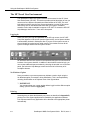
Logging In
When you enter your login and password on the HP login screen, the HP VUE
front panel appears on the screen (see the figure below), and an hpterm window
is automatically invoked in Workspace One. If you are on the system console, a
second window is invoked at login titled console. This window receives all the
system messages destined for the system console.
All interaction with the Core System is accomplished using the OS command-line
interface of the hpterm windows. In addition to the windows invoked at login, you
can request additional hpterm windows by choosing the terminal icon on the front
panel, just below the Help Manager control and to the left of the array of six
workspace buttons.
No Windows Option
Some procedures or process requests may indicate a need to login using the
No Windows option (for example, during installation). This is accomplished by
choosing No Windows on the Options menu of the login window.
☞ IMPORTANT:
You must terminate your current session before loggin in with a different option
setting. (See the section Logging Off.)
Printing
Assuming that you have administered your printers as described in Appendix D,
printing from Core System applications is handled by the application software.
Print requests made for any application will be directed to the appropriate printer
automatically.
1-6
StarKeeper II NMS Core System Guide R10.0, Issue 1
Using the StarKeeper II NMS Core System
Printing of other items is accomplished using drag-and-drop of files onto printer
icons accessed via the printers subpanel, located just to the left of the Workspace
controls on the front panel.
Capturing Images
To capture screen images for later printing, use the following procedure:
Procedure 1-1.
Using the Capture Screen Utility
1.
Open the General Toolbox from the Toolbox subpanel accessed via the
Toolbox icon on the HP VUE front panel (just to the left of the Trash Can).
2.
Open the Utilities folder (double-click on its icon).
3.
Start the XwdCapture application (double-click on its icon).
4.
Enter the output filename and click
OK
.
NOTE:
The filename you type must end with .xwd.
5.
If you requested a window capture, click the mouse anywhere within the
window you want to capture. The screen will be saved.
Printing Files
To print any file, including captured screen images, use the following procedure:
Procedure 1-2.
Using the Printers Sub-Panel
1.
Locate the desired file via the File Manager. See the next section,
Accessing Your Directory, for details.
2.
To access all the printers configured for this workstation, open the Printers
sub-panel by choosing the Printers control on the HP VUE front panel. You
do not need to open the sub-panel if there is only one printer configured, or
if you want to send the file to the default printer (the one at the top of the
sub-panel).
3.
Drag the file located in step 1 and drop it onto the desired printer icon. If
there is only one printer or you want to use the default printer, you may
simply drop the file onto the Printers control on the front panel. To
determine printing status, click on a printer icon to bring up the
SharedPrint/UX®-Manager. Refer to your HP VUE documentation for more
information on printing.
StarKeeper II NMS Core System Guide R10.0, Issue 1
1-7
Using the StarKeeper II NMS Core System
Accessing Your Directory
Click on the File Manager control (the file cabinet icon) on the front panel to
access a window containing a graphical representation of your home directory.
You can use this window to traverse your subdirectories and manipulate files and
folders. Files saved by Core System applications will usually be found somewhere
within your own directory structure.
Logging Off
To log off the system, use the Exit control located at the lower right of the front
panel. You will be asked to confirm your request.
NOTE:
Any windows or applications left up at log-off time may be retained,
depending upon the settings you choose via the Startup control on the
Style Manager sub-panel.
Special HP VUE Capabilities
Although the intent of this section is not to provide a comprehensive presentation
of HP VUE capabilities, some of these will be highlighted below due to their
extensive use in this product or because they provide enhanced functionality
worthy of special mention.
Style Manager
The Style Manager is a set of utilities that controls the way your system looks and
operates. The Style Manager control is located just to the left of the Help Manager
icon. Clicking on this icon displays a sub-panel providing access to these utilities
(see the figure below). All settings are maintained on a per-user basis, so you can
feel free to customize your workspace as desired.
1-8
StarKeeper II NMS Core System Guide R10.0, Issue 1
Using the StarKeeper II NMS Core System
Workspaces
The array of six buttons in the middle of the front panel controls which workspace
you want to use at any given time. Each workspace can be considered as an
independent work area that you may move between at any time without affecting
the contents of any of the workspaces. Workspaces may be named using the
control located just below the Style Manager icon. Windows can populate one or
more workspaces by using the appropriate item on the window menu (accessed
via the — icon in the upper left corner of every window).
Keyboard Shortcuts
All interaction with HP VUE can be accomplished via the keyboard, without use of
the mouse. For example, menus and menu items can be accessed by using the
mnemonic identified as the underlined character in the menu or item name.
Holding ALT while pressing the desired mnemonic displays the associated
menu; you can then use the menu item mnemonic (without ALT ) to execute the
associated command. Also, within forms Tab will traverse the controls on the
form; arrow keys will traverse buttons within a control; Space will set a button.
Hitting ESC while holding ALT will bring keyboard focus to the front panel. You
can then use the arrow keys to traverse the front panel controls; Return will open a
sub-panel and Space will emulate a mouse click on the highlighted control or icon.
There are many other keyboard equivalents that you may find useful. Refer to the
HP documentation for full details on keyboard equivalents.
StarKeeper II NMS Core System Guide R10.0, Issue 1
1-9
Using the StarKeeper II NMS Core System
Commands
0
The StarKeeper II NMS administrator logs onto the system using the cnmsadm
login; this produces the SK: prompt. Other logins produce a $ prompt. Most of the
commands discussed in this guide are available to the cnmsadm login from the
SK: prompt (some require you to change to the root directory and become the
superuser); other logins have access only to those commands granted to the user
(see the Command Partitioning section in Chapter 3).
The StarKeeper II NMS administrator/user has access to commands to control
and manage network functions. The commands at your disposal include the
commands that are part of StarKeeper II NMS, as well as the commands
developed for your node and OS commands.
StarKeeper II NMS commands can be issued in a variety of ways: one-line,
prompted-entry, and menu-selected. Refer to Chapter 2 for a complete discussion
of how to issue these commands. You must be familiar with this topic to perform
the procedures and instructions of a StarKeeper II NMS administrator/user.
Chapter 2 also discusses how to get on-line help for all StarKeeper II NMS
commands. Appendix F provides a brief description of each StarKeeper II NMS
command, listed in alphabetical order.
Network Commands
0
The StarKeeper II NMS administrator can send network commands to any
monitored node from the StarKeeper II NMS via the pass-through feature.
Network commands are defined as the regular node commands; the pass-through
feature provides the capability to send and execute the network commands. The
pass-through feature is exercised by using a -n <nodename> option to the
regular node command. For a detailed discussion, refer to the section titled
Pass-through of Network Commands in Chapter 2.
The subsequent StarKeeper II NMS setnode command, once entered, allows all
commands to be directed to the specified node until an exit command is entered.
Also refer to Issuing Network Commands section in Chapter 2. In addition, the
console command provides less restrictive access to the console port than passthrough for more extensive diagnostic capabilities. Refer to the discussion of the
console command in the Connections to the MRC section in Chapter 3.
There are two StarKeeper II NMS commands to support the node’s Session
Maintenance feature: smverify and smstat. For complete coverage of the
Session Maintenance feature, refer to the node manuals.
1-10
StarKeeper II NMS Core System Guide R10.0, Issue 1
Using the StarKeeper II NMS Core System
In addition, the StarKeeper II NMS smdsmeas command accesses node AI and
trunk data for SMDS measurement reports. For complete coverage of the SMDS
feature, refer to the node manuals.
For a list of node commands and their valid abbreviations, refer to Appendix F.
NOTE:
When using the Hewlett-Packard C1429A PC-101 Enhanced Vectra
ESC
Keyboard, you must use Shift
in place of Delete wherever it says
to use Delete in this document. If you are using this keyboard and running
Del
the HP VUE, you must use Shift
in place of Delete .
StarKeeper II NMS Core System Guide R10.0, Issue 1
1-11
Using the StarKeeper II NMS Core System
0
Sample Network
The following figure shows a sample network that provides a reference for
examples used in this guide. It is not intended to be a guide to designing or
naming networks and their elements. The network shown is fictitious and any
similarity to an existing network is coincidental.
The sample network is named national. The equipment is located in two areas;
one called west and one called east. Each area has two exchanges. The west
area has an exchange called garden and another called 957; while the east area
has an exchange called band and another called forest. System services, such as
host computers, have service addresses that usually reflect the exchange
designation; like tuba and drum in the band exchange. Network nodes also are
named and their naming often has a pattern but is not necessarily linked to the
exchange name.
StarKeeper
Host
StarKeeper
Host
star1
star2
drum
beans
west
silver
garden
tuba
east
band
957 forest
node1
lettuce
node2
gold
SAM
platinum
CONC
broccoli
rm128
PDN
oak
Figure 1-1.
1-12
A Sample Network (called national)
StarKeeper II NMS Core System Guide R10.0, Issue 1
Using the StarKeeper II NMS Core System
0
Addressing
Addressing in data communications is similar to addressing for postal mailings.
Any destination to which you send a message has an address and any originator
that sends a message has an address. While each destination has an address,
there can be any number of routing paths to deliver a message. Also, the routing
standards may be different for your local environment than they are externally.
Within the network, StarKeeper II NMS recognizes a four-level, alphanumeric,
addressing scheme. Some node destinations may also have X.121 addressing,
which is a numeric addressing scheme usually associated with X.25 data
services. Elements in the network, but not within the physical confines of the
node, are further identified (addressed) with a network address called netaddr.
These addressing methods are discussed in the following subsections.
Four-level Mnemonic Addressing
The network administrator has assigned addresses to every callable destination
(for example, a host). The address for each destination (and origin) may contain
up to four parts. The addressing scheme is as follows:
network/area/exchange/local_name
The "/" (slash) character separates the parts of an address. Each part can consist
of up to eight alphanumeric characters, such as:
national/east/band/tuba
X.121 Addressing
X.121 is the international numbering scheme for Public Data Networks (PDNs)
that allows a terminal connected to one PDN to address a destination located on
another PDN. Asynchronous endpoints that have access to, or will be accessed
by, endpoints on a 5ESS® Switch, an X.25 host, or an X.25 PDN must have X.121
numeric addresses. The address for each destination (and origin) has four parts.
The addressing scheme is as follows:
DNIC/SR/SA/EPN
Where
■
DNIC - Data Network Identification Code (4 digits)
■
SR - Service Region (3 digits)
■
SA - Service Area (3 digits)
■
EPN - End-point Number (4 digits)
For example: 1111/444/333/2222
StarKeeper II NMS Core System Guide R10.0, Issue 1
1-13
Using the StarKeeper II NMS Core System
Network Addressing
A network address (also called netaddr) is a representation used to locate a
specified network element. It applies to all node types supported by
StarKeeper II NMS. A network address answers the question, "Where did an
alarm come from?"
The network address specifies an element in the network using node, module,
and module component identifiers. When an element to be addressed is not
within the physical confines of the node, the network address uses the path of
connectivity to locate it. Nodes send address information embedded in alarms
and they receive address information in commands from StarKeeper II NMS.
A network address is different from routing information. There may be many paths
traceable to an element in the network, but that element has only one network
address. An analogy would be an address of a building; while there are many
ways to get to the building, it has only one address.
The addressing scheme uses the following convention:
node_name:component1/component2/component3
Where
■
node_name represents the node name. When BNS-2000 or
BNS-2000 VCS nodes are involved, the node name can contain slashes.
An example would be:
area1/exchange1/node1:component1/component2/component3
1-14
■
colons are used to separate the node identification from the components.
Therefore, the node is always shown to the left of the colon, and the
network components to the right.
■
slashes (/) to the left of the colon are part of the node addressing scheme
to identify the node; slashes to the right of the colon separate addressable
components connected to the node. Typically, a “/” appears where
components are connected to each other by cables or fiber trunks.
■
component1 specifies the path of the network element in the node
node_name. An example of component1 is a module such as TY12.
component2 is usually a concentrator or a multiplexer. component3
would be used for something such as a BSC3270 control unit (see the
example below). A component is in the x.y.z form, where
x
is the slot number where the module is inserted.
y
is typically a physical component of the module. An example would be
a port.
z
is typically a logical component of the module or port. An example
would be a channel or a Frame Relay Data Link Control Identifier
(DLCI).
StarKeeper II NMS Core System Guide R10.0, Issue 1
Using the StarKeeper II NMS Core System
Not all modules have logical or even physical components. In that case, the
full identification for the address within the given component is x. Since x
provides sufficient identification, y and z are not necessary. When a
module has physical, but no logical components (for example, a TY12
module), the address is x.y. However, when a module has logical
components on a single physical port, it cannot omit y and use x.z only.
The component y should be represented, even when it is not needed, by
the default value of 1. Hence, the address would be x.1.z, not x.z.
The network address representation of the M1 Frame Relay module
includes both physical (port) and logical (DLCI) components. The slot, port,
and DLCI are stored in component1 as x.y.z.
The network address representation of the M2 Frame Relay module
includes a multilevel logical component (DLCI on a virtual port). In this type
of network address, the slot and port are stored in component1 as x.y, and
the virtual port and DLCI are stored in component2 as 0.y.z, where 0 is a
place holder (indicating a multilevel logical component), y represents the
virtual port, and z represents the DLCI.
Illustrating the Network Addressing Scheme
An example of a network address for a control unit connected to a node through a
concentrator is shown below. Notice that the network address can best be
deciphered by reading it from right to left.
mynode:5/4.1/2.4
(nodename:module_in_node/concentrator_slot.slot_port/control_unit.terminal)
This is the address of a terminal connected via port 4, control unit 2, that is
connected to port 1, module 4 of a concentrator that is linked to an interface
module in slot 5 of mynode.
The following figure illustrates the relationship between the node and elements in
this example.
module 5
mynode
Figure 1-2.
module 4
port 1
concentrator
port 4
control unit 2
Illustrating the Network Addressing Scheme
StarKeeper II NMS Core System Guide R10.0, Issue 1
1-15
Using the StarKeeper II NMS Core System
Further Examples
1.
2.
Examples of network addressing for an asynchronous module, such as a
TY12 in a node are shown below:
platinum:5
is the address of the module in slot 5 of the
platinum node.
platinum:5.4
is the address of port 4 on the module in slot 5 of
the platinum node.
platinum:5/4.3
is the address of port 3 on the module in slot 4 of
the concentrator that is linked to the interface
module in slot 5 of the platinum node.
An example of network addressing for a synchronous module (such as
BSC3270) is shown below:
platinum:5.4/2.1
3.
is the address of terminal 1 on control unit 2 on port
4 on the module in slot 5 of the platinum node.
An example of addressing for a SAMML module is shown below:
platinum:5.4/1.3
4.
is the address of port 3 on board 1 of a SAM that is
connected to link port 4 of a SAMML in slot 5 of the
platinum node.
An example of addressing for an M1 Frame Relay module is shown below:
platinum:5.2.16
5.
1-16
is the address of DLCI 16 of port 2 on the module
in slot 5 of the platinum node.
Examples of addressing for an M2 Frame Relay module are shown below:
platinum:6.1
is the address of port 1on the module on the
module in slot 6 of the platinum node.
platinum:6.1/0.20
is the address of virtual port 20 on port 1 on the
module in slot 6 of the platinum node.
platinum:6.1/0.20.35
is the address of DLCI 35 of virtual port 20 on port 1
on the module in slot 6 of the platinum node.
StarKeeper II NMS Core System Guide R10.0, Issue 1
Using the StarKeeper II NMS Core System
Wild Cards
You can use the database’s ability to do pattern matching with special characters
called wild cards or character substitution.
The following wild card characters can be used to simplify network addressing
used in the alarm system. Note that the characters used with wild carding must be
enclosed in double quotation marks if entered on the command line.
"*"
"?"
matches zero or more characters. Suppose there are six nodes named:
yours, yournode1, yournode2, yournode3, yourdkn1, and yourdkn2.
"your*”
matches all six nodes.
“yours*"
only matches the node named yours.
"yournode*"
matches yournode1, yournode2, and yournode3.
matches any single character
"[...]"
matches any enclosed character, including character ranges as in [a-z].
For example, yournode[1-3] matches yournode1, yournode2, and yournode3. A
caret (^) as the first character in the brackets, matches any character not listed.
For example, [^y]* will not match yours or any other node starting with y.
" \"
escapes or protects the special character that follows it. For example, \$
is used to match a literal Dollar sign.
For example: alhist -l c,ma "east/band/*"
The example above specifies an alarm history report for critical and major alarms
with a netaddr that begins with east/band.
StarKeeper II NMS Core System Guide R10.0, Issue 1
1-17
Using the StarKeeper II NMS Core System
Anchors
The alarm system further simplifies the search for alarms with wild cards by
permitting an anchor to be added to the right of the network address. Anchors use
the characters ":" and "/" to limit the search string. Use an anchor when you want
to prevent the address from meaning and all the addressable components beyond
this point in the path. Without an anchor, the expression yournode1 is the address
of all components reached via yournode1. However, yournode1: limits the
address to the node yournode1 without the node’s elements.
In another example, yournode:5 reaches all the components whose address
begins with yournode:5 while yournode:5/ reaches only the module in slot 5 of
yournode and not beyond.
This concept is illustrated in the following two examples.
alhist -l cr,ma east/band/yournode:5
alhist -l cr,ma east/band/yournode:5/
Anchors become even more versatile when they are used jointly with wild cards.
For instance, yournode* is the address of all elements reached via the nodes
whose names start with yournode. Therefore, yournode* addresses all the
elements connected to the nodes yournode1, yournode2 and yournode3 and so
on. However, yournode*: limits the address to the nodes without their elements. In
our example, this means the nodes yournode1, yournode2, and yournode3,
without their elements. Limiting the addressing to node level permits you to
address alarms occurring at node level, such as cabinet and shelf-related alarms.
Node Name Expansion
Some of the commands in this document such as alarmhistory, alarmstatus,
and clear use a feature called node name expansion. This means that a portion of
an address can be entered instead of the entire four level address as long as that
portion is unique to the network. For example, if the address of a node is national/
east/garden/gold a user would just be required to enter gold, as long as another
network/area/exchange does not have a node named gold.
1-18
StarKeeper II NMS Core System Guide R10.0, Issue 1
Using the StarKeeper II NMS Core System
Backup/Recovery Hardware Options
0
Beginning with R8.0, StarKeeper II NMS can be configured on a 2-GB disk. This
lets you collect and store much more data than in previous releases. Three
different hardware options are available with the skbackup/skrestore commands:
regular tape drive (R), fast tape drive (F), and disk-to-disk (D).
Data back-up is an essential element of network management operations,
therefore, you should be aware of the implications of the increased data capacity
on your backup strategies. The major implication is on the time it takes to do the
backup, which depends on the amount of data to be backed-up and the speed of
the devices used for backup.
Unless you are using the -e option, the -n option, or the -c and -f options together,
StarKeeper II NMS must be shut down during backup operations. (See Chapter 7
for additional information about these options.) During shut down, StarKeeper II
NMS does not collect data from the nodes it is monitoring; that is, no alarms, or
billing or performance data are collected. With the new hardware options for
skbackup, control of this downtime is available
NOTE:
The skbackup command enables you to back up the configuration
database while StarKeeper II NMS is up and running. However, skbackup
should not be run with the -c and -f (force) options when updates to the
configuration database are being applied via cfg_sync, the cf commands,
or Network Builder application configuration forms.
Data usage varies, so you must determine what kind of backup interval your
configuration requires. If you are planning to acquire a new StarKeeper II NMS
Core System, you must estimate the backup interval for the new system as well.
The paragraphs below discuss methods which can help you assess which backup
approach is best for your situation.
The choice of data transfer rate is dependent on hardware. If you do not need a
higher speed option, you can continue to use skbackup as in the past.
Regular Tape Drive (R Option)
The standard operating environment for a StarKeeper II NMS Core System has a
regular tape drive rated by HP at a typical transfer rate of approximately
660 MB/hour under steady-state conditions. This means, for example, to back up
1-GB of data, your StarKeeper II NMS would be shut down for about an 1-1/2
hours. If the entire 2-GB /usr2 disk is filled, it would take between 2-1/2 and 3
hours.
StarKeeper II NMS Core System Guide R10.0, Issue 1
1-19
Using the StarKeeper II NMS Core System
Fast Tape Drive (F Option)
The fast tape drive option offers a significant increase in the speed of data
transfer. This option uses a tape drive that operates at a rated speed of
2.45 GB/hour. This new tape drive is an 8.0-GB 4mm DDS-2 format tape drive
(HP product number C2983A).
If you are using a C200 system, it is equipped with an internal 12-24 GB 4mm
DDS-3 format tape drive, so an additional tape drive is not needed.
2-GB External Hard Disk (D Option)
The disk-to-disk (D) option uses a 2-GB external hard disk; if you choose to
acquire and configure this external hard disk, you can first execute the backup to
the hard disk from your StarKeeper II NMS Core System database and then
transfer the data from the external hard disk to removable media. The second
transfer step does not involve any StarKeeper II NMS downtime, you can use
either the standard tape drive or the higher speed tape drive. The transfer rate for
disk-to-disk copying is approximately twice as fast as the fast tape option.
1-20
StarKeeper II NMS Core System Guide R10.0, Issue 1
2
Using Core System Commands
This chapter provides an overview of how to use StarKeeper II NMS commands.
In addition, it discusses StarKeeper II NMS menus and how to issue commands
using these menus. It explains how to get help, and briefly touches on alarm
messages and addressing.
0
Commands
StarKeeper II NMS commands allow the System Administrator to monitor network
operation, maintain the network, collect data, and generate performance, billing,
and alarm reports. Commands are the vehicles by which the Administrator
manages the network.
The StarKeeper II NMS Administrator/user can access commands to control and
manage network functions. The commands at your disposal include the commands that are part of StarKeeper II NMS, as well as the commands developed
for your node and Operating System (OS) commands. A command overview is
presented in Appendix F for quick reference. For a detailed description of each
command, refer to the list of sources outlined in the table below:
Command Set
Applicable Source
StarKeeper II NMS Commands
On-Line Help (help [-r] <command>)
BNS-2000 Commands
DNP Commands Reference
BNS-2000 VCS Commands
DNP Commands Reference
UNIX System Commands
UNIX User Reference Manual
HP-UX Commands
HP-UX Reference, Volumes 1 through 3
StarKeeper II NMS Core System Guide R10.0, Issue 1
2-1
Using Core System Commands
In addition to existing commands, you can write your own customized commands
using OS shell scripts, which are files created using an editor (ed, vi). These files
consist of commands normally entered on the command line. You must be familiar
with OS shell programming to write scripts. When creating customized
commands, do not give them the same name as an OS, StarKeeper II NMS, or
network command. To verify if a command name already exists, use the OS type
command on the command line:
type <commandname>
Enter
The system informs you if a command by that name already exists.
StarKeeper II NMS commands are issued using vertical choice menus, ring
menus, prompted-line, or one-line methods, as discussed later in this chapter.
Some commands can only be issued one way while others are accessible by
more than one way.
NOTE:
Some terminals use a Return key instead of the Enter key to execute
an entry. Use whichever key is appropriate to the workstation.
Most commands produce system responses. System responses are messages
returned to the terminal to provide the user with information requested by the
command, or a prompting sequence, or reporting an error in user input. System
responses can be from one line of text to many pages. If the command you enter
produces a system response with more lines of text than can fit on the screen,
“pipe” the command output to the OS pg command and page through the system
response, one page at a time, by pressing Enter . For example, enter
connections | pg to view the output of the connections command one page at a
time.
The StarKeeper II NMS Administrator logs onto the system using the cnmsadm
login; this produces the SK: prompt. Most of the commands discussed in this
guide are available to the cnmsadm login from the SK: prompt (some require you
to change to the root directory and become the superuser); other logins have
access only to those commands granted to the user.
2-2
StarKeeper II NMS Core System Guide R10.0, Issue 1
Using Core System Commands
Keyboard Idiosyncrasies
In some situations, the Delete or Del key will not interrupt an application. If your
keyboard has a Delete key or a Del key, you can press Shift Delete or
Shift
Del to interrupt an application. Regardless of the situation or the
keyboard you are using, you will always be able to interrupt an application by
pressing Shift Esc .
Command Format
The following shows the format of a typical StarKeeper II NMS one-line command.
Explanations of the format variations follow.
command_name
[-l]
<netaddr>
-n <node_name>
[-s <system_type>]
Where:
■
Items enclosed within brackets such as [-l] are optional fields.
■
Items within greater/less-than symbols, such as <netaddr> are mandatory
fields in which you enter a variable.
■
Fields such as -n <node_name> are mandatory fields that require an
argument.
For example, -n node1
■
Fields such as [-s <system_type>] are optional fields that require a
variable.
For example, -s dkii
■
For prompted entry commands, default values are indicated by a plus sign
(+) before the value that is the default.
For example, REPORT OUTPUT [printer, screen: +(screen)]:
Command Conventions
The following conventions apply when entering StarKeeper II NMS commands:
1.
Some commands can be abbreviated by the first letter of the command,
followed by the minimal set of letters necessary to distinguish it from
another command.
For example, for the cfverify command you can enter cfv.
StarKeeper II NMS Core System Guide R10.0, Issue 1
2-3
Using Core System Commands
2.
When arguments are used with commands, for example, -n <node_name>,
the following are true:
■
The space between the option and the value may be omitted. Either
one of the following formats are acceptable:
For example, -n node1 or -nnode1
NOTE:
When using cf commands, the space between the option and
the value is required.
■
A "-" within the option indicates a range of values. The following
illustrates a time interval from 10:15 am to 2:30 pm.
For example, 10:15-14:30
■
A "," indicates a series of values. The following illustrates how
critical, major, and minor alarms are entered on a command line.
For example, c,ma,mi
A space cannot follow a comma in a series of values.
3.
Some commands have one-line and prompted modes of entry. Some
commands such as alarm_ui, cf and SKsh have a menu-driven forms type
of entry complete with help screens and help windows for ease of use.
Types of Menus
The following sections discuss menu types and characteristics.
Ring Menu
A ring menu is a horizontal display of choices the screen, with an associated text
line below the choices that describes each choice. To make a selection, either
enter the first letter of any choice or move the highlight bar from choice to choice.
This is done by pressing Space , Backspace , or directional keys (that is, arrows,
Ctrl
j, or Ctrl k). Once the highlight bar is positioned on the desired choice,
press Enter to activate the selection. To exit from a ring menu, press Delete .
This causes the previous ring menu to be displayed. If the first ring menu is
displayed, press Delete to display the Confirmation Ring Menu. This is illustrated
in the following screen.
CONFIRM EXIT: Yes No
Choosing yes causes an exit from the application. Choosing no displays the
previous ring menu.
2-4
StarKeeper II NMS Core System Guide R10.0, Issue 1
Using Core System Commands
Vertical Choice Menu
A choice menu is a window area where a list of choice menu items is presented
on multiple lines. If a field has a choice menu, the menu is invoked by pressing
Ctrl
v. A highlight bar is positioned on the current choice. A choice menu can
list up to 10 items at one time. When there are more than 10 items in a choice
menu, you see the message -More- in reverse video on the last line of the list,
indicating that there are more choices available. Pressing any key moves down
through the list while pressing Ctrl k or ↑ moves backwards through the
list. When the highlight bar is on the last choice of the window, pressing any key
causes the entire list to scroll up one line. If this was the last choice item of the list,
the list is displayed again and the highlight bar is placed on the first choice item of
the list. Similarly, if the highlight bar is at the top of the window and ↑ is
pressed, the entire list is scrolled down one line. If the highlight bar is positioned
on the first choice item, an error message indicating this is displayed. To select a
choice item, press Ctrl t when the highlight bar is under the item you desire.
This selects the item, clears the choice menu window, and displays the form
again. The selected choice item is then entered into the current field on the form.
When you press Delete , you exit from the choice menu without selecting an item.
General Menu Characteristics
■
Reverse Video. All fields are displayed in reverse video without delimiters
around them. When a menu choice (see previous sections on ring menus
and vertical choice menus) is in reverse video, it is the current choice. The
reverse video area is then referred to as the highlight bar.
■
Status Message. A status message indicates the status of an operation.
For example, when a node is added to the database, the message Node
has been added is displayed. If a trunk or a concentrator was added, the
word Node would be replaced by Trunk or Concentrator respectively. A
status message is displayed in reverse video on line 24 of the screen
accompanied by the sound of a bell.
■
Error Message. An error message indicates either an invalid entry, an
illegal action, or a system failure. The error message is displayed in reverse
video on line 24 of the screen and is accompanied by the sound of a bell. If
you aborted the form or there was a system failure, the cursor exits the
form and returns to the most recent menu. However, if there was an illegal
action or a validity check failed, the cursor remains in the form.
■
Dynamic Field Labels. Some fields do not have labels at the time the form
is first displayed. These labels are variable and are dependent on the
contents of other fields. Based on the contents of the labeled fields, the
appropriate dynamic label is generated and displayed. If a dynamic label is
not displayed, the cursor does not enter its corresponding field. However,
when certain specific fields are entered, it is determined which dynamic
labels appear. The field corresponding to a dynamic label is called a
dynamic field.
StarKeeper II NMS Core System Guide R10.0, Issue 1
2-5
Using Core System Commands
■
Exit Key. When Delete is pressed while in a form, the operation is
aborted. An operation is one of the following: add, change, delete or verify.
If Delete is pressed while the cursor is on a ring menu, the previous ring
menu is displayed. If this was the first ring menu of the application, the
application is exited after the intention to exit is confirmed. Pressing
Ctrl
z anywhere in the application causes an exit from the application,
except in the connection class window and in the connection class section
of the node form.
NOTE:
Refer to the section Keyboard Idiosyncrasies earlier in this chapter
for more information on the Delete key.
■
2-6
Validation. When you press Ctrl g, at the conclusion of data entry, full
screen or record validation is performed. When an error condition is found,
a message is displayed and the cursor placed in the offending field. This
form of validation permits you to enter invalid data in a field during the
screen fill-up phase. However, after all the data is entered, you are notified
of any errors.
StarKeeper II NMS Core System Guide R10.0, Issue 1
Using Core System Commands
The Menu Hierarchy
Many, but not all, StarKeeper II NMS commands are available through the
StarKeeper II NMS menu system. To use the menu system you start at the Main
Menu (Level 1), which you access by entering SKsh at the SK: prompt. (For this
reason, the menu system is often referred to as the SKsh menu system.) The
Main Menu (also know as the Begin Menu) gives you access to five major areas of
the StarKeeper II NMS. (Instructions for making choices and entering commands
from menus are covered later in this chapter.)
The five choices on the Main Menu are:
SYSADM
System Management
(calls a vertical choice menu)
ALRMADM
Alarm Conditioning
(calls a ring menu)
CFCOMMAN
Network Configuration
(calls a ring menu)
UPDNLD
Node Upload and Download
(calls a vertical choice menu)
BDTMGMT
Billing Day/Year Table Management (calls a ring menu)
NDSWMGMT
Node Software Management
(calls a vertical choice menu)
After making your choice, the next menu is invoked. If the next menu is a Level 2
menu, you choose the command to enter, which puts you into an interactive mode
in which the system will ask you for information to execute the command properly;
or, you invoke a Level 3 menu where you choose the command to enter. If the next
menu is a ring menu, you choose a category and an operation before being put
into the interactive mode. This relationship of menus is called the menu hierarchy,
and is illustrated in Figure 2-1.
On vertical choice menus, if you press Enter without making a selection, line 23
of the display will ask if you want to return to the previous menu (level). Press
Enter
again if you want to return, or press any other key if you want to remain in
the menu to make a selection. To exit ring menus and return to the previous level,
press Delete , or press Ctrl z to return to the Main Menu.
StarKeeper II NMS Core System Guide R10.0, Issue 1
2-7
Using Core System Commands
Level 1
Level 2
Level 3 or
interactive mode
SYSADM Menu
PORTMGMT
BILLMGMT
ALRMMGMT
DBUTILS
PERFMGMT
STARTSK
SHUTSK
SKIICONN
SK:
Enter
SKsh
Main Menu
SYSADM
ALRMADM
CFCOMMAN
UPDNLD
BDTMGMT
NDSWMGMT
First Ring Menu
ALARMS
filter, severity
threshold
redefine_text
First Ring Menu
ELEMENT:
system/node,
trunk,
Concentrator
root password, prompts, screen
prompts, specify charges, retention periods
prompts, specify retention period
Level 3 menu; init, RSPACE, start, stop
Level 3 menu, CLKMGMT or MEASMGMT
starts up StarKeeper II NMS
shuts down StarKeeper II NMS
Level 3 menu, specify connection parameters
Second Ring Menu
OPERATION:
add, change,
delete, verify
Supply
data
Second Ring Menu
OPERATION:
add, change,
delete, verify
Supply
data
UPDNLD Menu
SET UP
DISPLAY
UPLOAD
DOWNLOAD
STATUD
REPUD
CRON
First Ring Menu
ELEMENT:
days, bdt, byt
byt-to-node
specify parameters
no input, displays ul/dl environment
specify parameters
specify parameters
no input, produces report
specify parameters for report
schedule db upload
Second Ring Menu
OPERATION:
add, change,
delete, verify
Supply
data
NDSWMGMT Menu
LOAD
DOWNLOAD
VALIDATE
STATUS
REPORT
SCHEDULE
Figure 2-1.
2-8
load node software to this host
download node software to a node
validate downloaded node release
display download status and records
report available node software and disk
space usage on the host
schedule node software downloads
The Menu Hierarchy
StarKeeper II NMS Core System Guide R10.0, Issue 1
Using Core System Commands
Issuing Commands Using Vertical Choice Menus
To access the Main Menu, enter SKsh at the SK: prompt and the menu shown in
Screen 2-1 appears.
StarKeeper (R) II Network Management System - Selection Menu
-------------------------------------------------------------------| Select
| Description
Menu: Begin
Level: 1
|
|-----------|------------------------------------------------------|
|
| ***** Welcome to the StarKeeper II NMS Menu System **|
|
| -----------------------------------------------------|
|
SYSADM | StarKeeper II NMS Management Utilities Menu
|
| ALRMADM | Alarm Conditioning Utilities Menu
|
| CFCOMMAN | Configuration Commands
|
|
UPDNLD | Node Upload and Download
|
| BDTMGMT | Billing Day/Year Table Management
|
| NDSWMGMT | Node Software Management
|
-------------------------------------------------------------------Enter a selection (or ?selection for help) and press RETURN
Screen 2-1.
StarKeeper II NMS Main (Begin) Menu
To choose a menu selection, you must give enough information to establish and
move a highlight bar to your menu choice. ("Highlight bar" is the reverse video
technique that some terminals offer for the underbar.) You could type the entire
name; for example, you could enter alrmadm at the Main Menu to choose
ALRMADM. However, StarKeeper II NMS menus recognize a minimum entry for
positioning the highlight bar. As soon as you type the a in alrmadm the highlight
bar appears on the ALRMADM selection. If there is more than one choice on a
menu having the same first letter, the highlight bar goes to the first choice with the
common letter when you enter it. For example, on the SYSADM Menu, three
choices start with the letter "s": STARTSK, SHUTSK, and SKIICONN. When you
type an s, the highlight bar goes to the first word starting with s, which is
STARTSK. If you want to move the cursor from STARTSK to SHUTSK, type in the
second letter in the word, which is h. As you can see, the menu system uses the
minimum amount of keystrokes to move the cursor and identify your choice for
entry. Remember, the entry does not take effect until you press Enter .
When you first enter a vertical choice menu, there is no highlight bar; if you press
Enter without specifying a choice, the menu system will ask if you would like to
return to the previous menu. The default choice is yes for all choice entry menus.
Press Enter again for yes, or press n for no.
StarKeeper II NMS Core System Guide R10.0, Issue 1
2-9
Using Core System Commands
Issuing Commands at the Ring Menus
Where appropriate, categories of objects and the operations that are to be done
on them are chosen at ring menus. Choices are made by moving the highlight bar
to the item you want and pressing Enter . Use the spacebar to move the highlight
bar to the right, use Backspace to move the highlight bar to the left, or enter the
first letter of the choice you want to make. A sample ring menu is shown in
Screen 2-2.
NETWORK ELEMENTS: System/Node
Trunk
** one-line message appears here **
Screen 2-2.
Concentrator
Help
Sample Ring Menu
Use the special keys listed in Table 2-1 to move around ring menus, make or
change choices, enter choices, and exit the menu.
Table 2-1.
Special Keys for Use with Ring Menus
Key
Operation
Ctrl-j
Ctrl-l
Down Arrow
Right Arrow
Spacebar
Next menu choice
Backspace
Ctrl-h
Ctrl-k
Left Arrow
Up Arrow
Previous menu choice
Ctrl-o
Request help
Ctrl-t
Select help type (application or key)
Ctrl-z
Exit the application from any point
Delete
Exit current activity (and return to previous ring menu)
Enter
Make choice at highlight bar
NOTE:
Refer to the section Keyboard Idiosyncrasies earlier in this chapter for
more information on the Delete key.
2-10
StarKeeper II NMS Core System Guide R10.0, Issue 1
Using Core System Commands
Entering Data on Database Records
When you enter a record, the cursor appears at the first field in which entry is
required. If you make an error, use Backspace and re-enter. When you are
finished with the field, press Enter to advance to the next field. If you want to
quit the session before finishing and not have the database receive the data,
press Delete . When you are finished entering data, press Ctrl g to add the
data to the database or to start the search and verify process.
Use the special keys shown in Table 2-2 to move around database records, make
or change choices, enter choices, and exit the menu.
Table 2-2.
Special Keys for Use with Database Records
Key
Operation
Ctrl-l Spacebar
One space to the right within a field
Right Arrow
One space to the right within a field, then to next field when at the
extreme right position of a field
Backspace
Ctrl-h
One space to the left within a field
Left Arrow
One space to the left within a field, then to previous field when at the
extreme left position of a field
Ctrl-j
Down Arrow
Return
Next field
Ctrl-k
Up Arrow
Previous field
Ctrl-o
Request help
Ctrl-t
Select help type (application or key),
Call up Connection Class details form (configuration records)
Delete
Exit current activity (and return to previous ring menu)
Ctrl-z
Exit the application from any point
Ctrl-g
Initiate search for data,
Activate addition/changes,
Move to Connection Class form (configuration records)
NOTE:
Refer to the section Keyboard Idiosyncrasies earlier in this chapter for
more information on the Delete key.
StarKeeper II NMS Core System Guide R10.0, Issue 1
2-11
Using Core System Commands
Issuing Commands from the Command Line
Where available, the one-line and prompted-entry methods of entering commands
are often preferred by experienced administrators/operators. Using either method
bypasses all menus, as the entire command, complete with all necessary information, is entered at the shell prompt and executed by pressing Enter .
One-line Commands
In using the one-line command entry method, all command information is entered
at once, typically with no further interaction needed to execute the command.
One-line commands include an action verb, like enter, change, delete; an object
of the action, like node or trunk; and any arguments (options) that may be
required; for example:
cfverify trunk -T all
skrestore -l
If you are at the SK: prompt (the cnmsadm login), you have access to all
StarKeeper II NMS commands, although some commands also require that you
log in as root. If you are at a login other than cnmsadm you have access to those
commands that the Administrator permitted (through use of the Permit
command). See the Command Partitioning section in Chapter 3 for a complete
discussion. You can then enter a standard command (or, in some instances, an
acceptable abbreviation) at the keyboard. The command is echoed to the screen.
An example is shown in Screen 2-3.
SK: cfenter node -n west/garden/gold -s DKII -r 3.0 -cm h -cd goldb -cs a
Screen 2-3.
-cp 0
Sample One-line Command with Arguments
When you enter commands, keep in mind the following rules and suggestions:
2-12
■
Be careful with uppercase and lowercase letters. The system distinguishes
between uppercase and lowercase letters; they are not interchangeable.
Enter command lines exactly as shown in the supporting documentation.
■
Use abbreviations to speed your tasks. For some commands, the system
accepts a unique truncation for the command. It accepts, for example, cfe,
cfen, cfent, or cfente for cfenter.
■
Separate elements of a command entry with spaces. For example,
enter<spacebar>group. (The system ignores extra spaces.)
■
Press Enter
command.
after typing each command. An
Enter
executes the
StarKeeper II NMS Core System Guide R10.0, Issue 1
Using Core System Commands
Prompted Entry Commands
For some commands (like report) the system requires more information, so it
supplies a secondary prompt or series of secondary prompts requesting that you
set values for the command's parameters. You must then enter these values,
responding to each parameter prompt before going on to the next prompt.
Screen 2-4 gives an example of secondary prompts and an Administrator's
entries. The secondary prompts vary according to the command and how you
responded to previous secondary prompts.
Most secondary prompts include [ ] (brackets) that contain your possible
responses, a range of possible responses, or the format your response must take.
Some possible responses are system defaults; these appear in parentheses
preceded by a plus sign.
SK: report
REPORT TYPE [ alarm, billing, performance ]: p
NODE TYPE [ BNS-1000, BNS-2000, Datakit, DKII, ISN, network ]: dkii
REPORT NAME [ bisync, concentrator, cpmml, dkap, host, node, sam, samml,
sdlc8, trkgrp, trunk, tsm8, x25, x75: +(bisync) ]:
Screen 2-4.
Command Specification, Prompted Mode
When you specify command parameters, keep in mind the following:
■
Select defaults by pressing
■
Use the special editing keys on the keyboard. See Editing Command
Lines, including Table 2-3.
Enter
.
Issuing Node Commands
The StarKeeper II NMS Administrator can send operational node commands to
any monitored node from the StarKeeper II NMS console. The pass-through
feature provides the capability to send and execute the commands. Also, the
subsequent StarKeeper II NMS setnode command, once entered, allows all
commands to be directed to the specified node until an exit command is entered.
StarKeeper II NMS Core System Guide R10.0, Issue 1
2-13
Using Core System Commands
Pass-through of Node Commands
Pass-through commands access a monitored node and the commands are
executed just as though the Administrator had direct access to the node. They are
executed by specifying the node name (-n option) on the command line with the
regular command or by specifying the node via setnode. To terminate a passthrough command before it completes, press Delete .
For example, if you were the node Administrator and your node console was
connected directly to a node called platinum, and you wanted to verify the module
in slot 25, you would enter the node command verify module 25 on the command
line (at the node prompt). You can accomplish the same from the
StarKeeper II NMS console by entering the following:
verify -n national/west/957/platinum module 25
The default timeout interval for pass-through commands is 120 seconds. Some
pass-through commands may take longer to execute and will get timed out. When
this happens, the following message is displayed:
SCP has detected an error in communication with doorway. Could not
send the disconnect requests.
Change the timeout interval. To change it, use the -l option on the command line
to select 400 seconds or use the -L option to specify (in seconds) your own
timeout interval (up to 600 seconds). The following example shows a passthrough command with a timeout interval specified as 600 seconds:
dkbackup -L 600 -n silver tape 0
NOTE:
MRC commands cannot be issued using the pass-through feature; use the
console command (see Chapter 3).
The following two special StarKeeper II NMS commands are also node passthrough commands:
dkhelp
displays the node versions of help for commands accessed through
StarKeeper II NMS
dkset
allows the StarKeeper Administrator to access the node's set command
A special case of the diagnose command for FRM is available for
StarKeeper II NMS. The nping command (based on StarKeeper sequence
command) formulates a dialog with the node to perform the nping option of the
node’s diagnose command. Run help for a brief description of this command.
Output from pass-through commands are stored in the $CONSLOG.
2-14
StarKeeper II NMS Core System Guide R10.0, Issue 1
Using Core System Commands
Session Maintenance Commands
The node Session Maintenance feature is supported by two StarKeeper II NMS
commands that communicate with the node:
smverify
displays the Session Maintenance reroute data for a node associated
with a particular neighbor node or all the neighbor nodes.
smstat
displays the status for Session Maintenance operations with all
current reroutes in which a specified node is participating.
The format for the smverify and smstat commands is shown in the examples
below. The -n option specifies the node name for both commands. The -a option
is required for the smverify command to specify the neighbor node name:
smverify -n silver -a gold
smstat -n silver
Displays for smverify and smstat are also stored in Log Files (the $SMLOG).
SMDS Measurements Command
The smdsmeas (also called smeas) command displays measurements
information for T3 trunks, AI and GAR modules. The output from the command is
stored in the directory $ADMINLOG. Refer to the BNS-2000 or Data Networking
Products documents for more information on this command.
The tmeas command is used to display measurement data for high speed trunk
modules.
Issuing a Series of Network Commands to a Node
If you are going to issue a series of commands to a network node, you can use
the setnode command to specify the node that is to receive all subsequent
network commands until you enter an exit command or press Ctrl d.
Use setnode <nodename> to direct all further commands to the specified node.
For example, if you enter setnode national/west/garden/gold, the gold node
returns its prompt and all further commands are sent to national/west/garden/
gold. setnode also supports X.121 four-level addressing. Refer to the X.121
Addressing section in Chapter 1 for a description.
StarKeeper II NMS Core System Guide R10.0, Issue 1
2-15
Using Core System Commands
Editing Command Lines
As shown in the table below, special keys on your keyboard can be used during
command entry. These keys work in any entry mode.
Table 2-3.
Editing Key Functions
Editing
Key
Function
2-16
Erase a character
Backspace
Delete an entry, abort a command, exit a command mode, or quit a long
report. Refer to the section Keyboard Idiosyncrasies earlier in this
chapter for more information on the Delete key.
Delete
Execute a command; in prompted entry mode, enter a line
Return
To break a long character string across more than one line use the
backslash to ignore a line end; it also removes special significance of any
editing character it precedes
\
Words typed between quotation marks are to be treated as one string of
characters
""
A comma is placed after each item in a sequence; for example, 1,3,8,9
,
A hyphen shows a range; for example, 1-9
-
StarKeeper II NMS Core System Guide R10.0, Issue 1
Using Core System Commands
Getting Help
0
Help is available right at your fingertips. You can get help at your system prompt
by entering help commands. Help is also built into menus to assist in making
selections, and is available from your phone by calling your appropriate support
organization.
On-line Help While at a System Prompt
The on-line help facility can provide you with a full-screen detailed explanation of
all StarKeeper II NMS commands, alarms, and messages. On-line help is
available for the following:
■
alarms and error messages
■
available commands
■
node commands
■
StarKeeper II NMS Core System commands
■
Partitioned User commands
To get help, enter the help command at the system prompt. To print out all the
command files enter the following command:
help -p cmds_ref
For Full-Screen Help on a Command
As an example, if you want full-screen help on the help command, enter
help help.
SK:
help help
StarKeeper II NMS Core System Guide R10.0, Issue 1
2-17
Using Core System Commands
The system displays the following full-screen message (Screen 2-5):
--help-The help command is used to provide user information on a particular
StarKeeper II NMS or node command, alarm, or message. The options are
as follows:
help
help [command_name]
help -r [command_name]
help -R [command_name]
help [alarm/message_ID]
displays a list of the available commands
displays complete information for a specific command
displays system responses for a specific command
displays complete information and corresponding
system responses for a specific command
displays information about the specified alarm or
message
Additionally, a -p option can be added to the above commands to print out
the help information on a printer. A printer name will be prompted. When the
-p option is used with the keyword ‘cmds_ref’, instead of a specific command
name, help information for all the StarKeeper II NMS network administration
commands will be printed out on the printer specified.
-FORMAT------------------------------------------------------------------------help [-p] [-r command_name] | -R command_name | command_name |
alarm/message_ID |cmds_ref]
-VARIABLE FIELDS----------------------------------------------------------------p: Prints the information on a printer instead.
-r: Displays a listing and explanation of the system responses associated
with a command.
-R: Displays complete information associated with a command including
a listing and explanation of system responses.
cmds_ref: Prints out help information for all the StarKeeper II NMS
network administration commands.
[command_name]: The name of the command for which information is to be
displayed.
[alarm/message_ID]: An alphanumeric string identifying the alarm or message
id for which information is to be displayed.
-EXAMPLES----------------------------------------------------------------------help
help alstat
help -p cfg_sync
help -r cf
help -R sni_sync
help -p -R sni_sync
help 1001
help -p 30039
Screen 2-5.
Example of Full-Screen Help
NOTE:
If the help message is more than the full screen, there is a colon at the
bottom of the screen next to your cursor. When you are ready to read more,
just press Enter . If you have read enough and do not want to continue,
press q (quit).
2-18
StarKeeper II NMS Core System Guide R10.0, Issue 1
Using Core System Commands
For Full-Screen Help on an Alarm or Message
As an example, if you want full screen help on alarm 1023, enter the following at
the SK: prompt:
SK:
help 1023
The system responds with a full-page display, such as the following:
--ALARM INFORMATION--ID------ALARM/MESSAGE--------------------------------------------------------1023
REPORT ALARM: More than 1 active controller
Rec act: Disable all but one of them and reboot that one
-EXPLANATION------------------------------------------------------------------Both Control Computers with which this node is equipped are currently enabled.
Only one Control Computer should be enabled at any one time; the other is a
standby.
-RECOMMENDED ACTION-----------------------------------------------------------Set the MODE switch on the standby Control Computer to Disab and check to
make sure that the active Control Computer mode switch is set to Enabl.
Enter "initialize controller" to reboot the Control Computer.
The Node Reference provides additional Control Computer switchover information.
For Help on Node Commands
Use dkhelp to get help on node commands. Enter help dkhelp for instructions on
using this command. The format is:
dkhelp -n <nodename> <commandname> <object>
On-line Help for Menus and Records
On-line help is available for choice menus, ring menus, and database forms, as
described in the following subsections.
For Choice Menus
Line 23 on choice menus instructs you to enter?<selection> for help on a
possible menu selection. For example, if you are at the Main Menu and you want
information on the CFCOMMAN selection, you would enter?c. The c in this
instance is enough to identify the CFCOMMAN entry. The screen then displays a
full page (or more) of help information. Press Enter to page through the help
and return to the menu, or press Delete at any time to return to the menu.
StarKeeper II NMS Core System Guide R10.0, Issue 1
2-19
Using Core System Commands
For Ring Menus
The second line of a ring menu is a help message that describes the current
choice as shown by the highlight bar. Also, a choice on each ring menu is Help. If
you use the space bar to move to Help and press Enter , a help window
appears in the upper right-hand corner of the screen specifying Application
help and Key help. Press Enter
to toggle between the two choices; when
the highlight bar is on the type of help you want, press Ctrl t to get a full screen
of help. Press Enter to page through the help and return to the ring menu.
You also can call the help window by pressing Ctrl o at any time the ring menu
sits atop the record that was called to the screen. If Ctrl o does not work, you
must exit the record to obtain the desired help information.
For Records
On some forms, there is not enough room to display the full set of valid entries on
the help line. A message appears on line 23 of the record stating: To display a
choice menu, type Ctrl-v. Follow those instructions if you want help. If
pressing Ctrl v does not work, you must exit the record to obtain the desired
help information.
System Responses
0
System responses are messages returned to the terminal to provide the user with
information regarding a particular situation. These messages are either of an
informational nature, or are in response to an error in user input. A list of SYSTEM
RESPONSES for a command can be obtained by executing the help command
with the -r or -R options on the command line.
2-20
StarKeeper II NMS Core System Guide R10.0, Issue 1
Using Core System Commands
0
Alarm Messages
Alarm messages are messages sent to the user's terminal by the system in
response to a user turning on alarms via the alarms command or the netdisp
command. Detailed information about alarms is presented in Chapter 5.
To obtain more information regarding an alarm message, use the help command
in the following manner:
SK: help <message_number>
NOTE:
If the user requests a help file with a message number that contains a B
suffix (for example, 1001B) and it does not exist, the user will be shown the
contents of the help file without the B suffix (for example, 1001) if the file
exists. The information pertains to the alarm number with a B suffix as well
as the number without it.
The following is an example of the output that is displayed for a typical help
command:
SK: help 1053
--ALARM INFORMATION--ID------ALARM/MESSAGE---------------------------------------------------------1053
REPORT ALARM: Phase Lock Synchronization error CAB=<cab> SLOT=<slot>
-EXPLANATION-------------------------------------------------------------------The receiver on the TRKHS or T1 Trunk module is having difficulty synchronizing
itself with the transmitter on the other side of the trunk line. When
synchronization is lost, the module continually tries to reset itself (phase lock
loop).
If the node was configured with "AUTOMATICALLY REMOVE TRUNK WITH ERRORS?" set to
`yes', then when the requested number of error packets has been reached, this
alarm will be followed by REPORT STATUS: config: remove module <slot>
CAB <cab> is a decimal number that identifies the cabinet number involved. <cab>
ranges from 0 to the number of cabinets in the configuration minus 1. Cabinet 0
always contains the SWITCH module.
SLOT <slot> is a decimal number that identifies the shelf slot occupied by the
affected module.
-RECOMMENDED ACTION------------------------------------------------------------1. Check the SYNCHRO PROBLEM field of the 'dstat' command to see how many status
packets have indicated a synchronization problem.
2. Check the connection between the fiber and the local TRKHS module's paddle
board, or the T1 connector cable and the local T1 module's paddle board.
3. Try replacing the local trunk module, the remote trunk module and the fiber or
the T1 connector cable, each in succession, until the problem is resolved.
For detailed information about alarms, see Chapter 5.
StarKeeper II NMS Core System Guide R10.0, Issue 1
2-21
Using Core System Commands
2-22
StarKeeper II NMS Core System Guide R10.0, Issue 1
System Administration
3
The system administrator has duties to perform at all times; some are done at
installation, some during the on-going operation of the StarKeeper II NMS, and
some during maintenance procedures. Also, some tasks are done only once and
others are done on a continuing basis.
The first system administration duty, after installation is complete, is to establish
and administer connections from StarKeeper II NMS to each node in your
network. Network nodes can be connected to StarKeeper II NMS via a host
connection. Connections can be of eight different classes: console, billing,
performance, administration, Maintenance Redundancy & Control (MRC), dial
backup, alarms, and StarKeeper II NMS. These connections are summarized in
Table 3-1.
NOTE:
BNS-2000 and BNS-2000 VCS systems function with Maintenance and
Redundancy Control (MRC). CCM and ECPU systems perform this function
with different modules. CCM systems function with an MRC. ECPU
systems function with an MRCM. Both modules and the function they
perform are collectively referred to as the MRC or MRC function.
Administration procedures vary for each class. The following sections describe the
administration procedures required for host connections, which includes collecting
billing data from multiple nodes in the same exchange, and setting the active
alarm variable for nodes having an Alarm Activator Unit.
Once the connections are established, many of the system administration duties
are performed using the SYSADM menu of SKsh; these tasks are listed below.
Refer to the section titled Using the Sysadm Menu later in this chapter for
instructions on using this menu.
■
starting up StarKeeper II NMS
■
shutting down StarKeeper II NMS
■
port management
■
database utilities
StarKeeper II NMS Core System Guide R10.0, Issue 1
3-1
System Administration
■
billing management
■
alarm management
■
performance measurements management
■
StarKeeper II NMS connections
Additional system administration tasks fill out this chapter:
■
node software management
■
node database management
■
security
■
command partitioning
■
automating routine tasks
■
using the programmer's interface
Establishing Physical Connections
0
This section explains how to set up a host connection to a node for the purpose of
monitoring the node via the connection classes available from StarKeeper II NMS.
These connection classes are explained in the next section of this guide.
StarKeeper II NMS can manage various networks and collect different types of
data. The result is that proper StarKeeper II NMS hardware installation and
cabling varies with the situation. This chapter assists you in selecting the right
cables and guides you through the steps required to connect StarKeeper II NMS
to a network node.
NOTE:
It is extremely important that you obtain the connections worksheets that
were completed during the planning phase of network configuration. You
will need to reference the connections worksheets for specific information
as you complete the instructions in the procedures that follow. These
worksheets are provided in the StarKeeper II NMS Planning Guide.
Connection information is given in the following sections.
3-2
StarKeeper II NMS Core System Guide R10.0, Issue 1
System Administration
Host Connections (Console, Billing, MRC,
Administration, and Performance)
The following discusses procedures for host connections for BNS-2000 and
BNS-2000 VCS nodes. One D8AG cable for each console and MRC connection
on each node is needed (see Figure 3-1).
Procedure 3-1.
HP Host Connection
1.
Connect the remote nodes to the hub node via a trunk line.
2.
For each console connection on each node, connect a D8AG cable from
Port B to a TY module port on the node side.
3.
Indicate the TY module and port number on the connections worksheet.
4.
For each MRC connection on each node, connect a D8AG cable from Port
M of the maintenance board to a TY module port on the node side.
5.
Indicate the TY port and module number on the connections worksheet.
6.
No additional cabling is necessary for billing, administration, or
performance connections.
HP
StarKeeper II
NMS
Port M
TY Module
Port B
TY Module
D8AG
D8AG
CPM-HS Module
Fiber
Trunk Module
Trunks
Node
D8AG
D8AG
Trunk
Port B
TY Module
Trunk
Module
Node
Node
Figure 3-1.
Port B
TY Module
Trunk
Module
HP Host Connection to Network Node
StarKeeper II NMS Core System Guide R10.0, Issue 1
3-3
System Administration
Connecting a Master StarKeeper II NMS HP to a
Remote StarKeeper II NMS
The following sections contain procedures for master/remote StarKeeper II NMS
host connections. Fiber cables are needed (see Figure 3-2).
Procedure 3-2.
Master Starkeeper II NMS to Remote Starkeeper II NMS Host Connection
1.
For a host connection between a master StarKeeper II NMS and remote
StarKeeper II NMS, connect a fiber optic cable from the multiplexed host
interface on the master HP computer to the CPM-HS board on the node.
2.
Connect a fiber optic cable from the multiplexed host interface on the
remote computer to the CPM-HS board on the node.
StarKeeper II NMS
(Remote)
Fiber
HP
StarKeeper II
NMS (Master)
Multiplexed
Host Interface
CPM-HS
CPM-HS
CPM-HS
StarKeeper II NMS
(Remote)
Fiber
Node
Fiber
Multiplexed
Host Interface
Figure 3-2.
3-4
Master StarKeeper II NMS to Remote StarKeeper II NMS - Host
Connection
StarKeeper II NMS Core System Guide R10.0, Issue 1
System Administration
0
StarKeeper II NMS Connectivity
StarKeeper II NMS has eight possible types of connections, called Connection
Classes (see Table 3-1). Each connection is logical and is configured using the
methods described in Chapter 4; refer to the Connection Classes description of
the System/Node and Connections Form.
Table 3-1.
StarKeeper II NMS Connection Classes
Type
Description
console
Usage of this connection type depends on the entity that is connected to
StarKeeper II NMS. The nodes use this connection more extensively than do
other entities for gathering alarms. To collect alarms, the connection status must
be set to active. For all system types other than BNS-2000 and BNS-2000 VCS,
this connection cannot be made active.
billing
There is one connection to StarKeeper II NMS for each node that reports billing
data. See the Billing Management section of this chapter for instructions on
entering required billing parameters.
performance
Collects performance measurement data from the nodes. See the Performance
Measurements Management section of this chapter for instructions on entering
the required data.
administration
(1) Permits the transfer of data from the node to the StarKeeper II NMS database,
using Network Builder, skload, and cfg_sync commands. (2) Accommodates
the smverify and smstat commands to monitor the Session Maintenance feature
available on the nodes. (3) Provides "on demand" measurements for certain
modules when requested by the smdsmeas command. (4) Permits the transfer
of the Billing Day Tables from StarKeeper II NMS to Datakit II VCS R4.0 (or later)
nodes and the clock synchronization of these nodes through the ncsbdt process.
The administration connection must be from the same StarKeeper II NMS Core
System as the console connection.
MRC
Connects to the M port of the node’s MRC. See the MRC Connections section in
this chapter.
dial backup
Supports node connections with modems, as a backup to a standard console
connection.
alarms
Collects alarms from system elements other than the nodes.
StarKeeper II
NMS
Permits the transfer of configuration information between StarKeeper II NMS
machines.
Table 3-1 briefly describes the connection types that are available with your
StarKeeper II NMS. Use the descriptions in this table to help you determine which
connections you need to configure to manage your network. These connections
may be configured on your Core StarKeeper II NMS via the cf commands after
you have decided which StarKeeper II NMS features and graphics application
packages you will be using.
StarKeeper II NMS Core System Guide R10.0, Issue 1
3-5
System Administration
The following sections will help you determine which connection classes you will
need to support your situation. For a list of all the connections that should be set
up for each node, see the Connections Worksheet (provided in the StarKeeper II
NMS Planning Guide) used during the planning phase of your network installation.
For more information about the nodes in your network, see the applicable node
manuals.
Choosing Connection Classes for a
Core StarKeeper II NMS
This section will help you determine which connections you will need to support
your Core StarKeeper II NMS.
■
Node connections - The Console connection must be configured on Core
StarKeeper II NMS to connect to the node in order to receive alarms. Also,
StarKeeper II NMS uses the Console connection for the pass-through
feature.
An Administration connection must also be configured from the same
Core StarKeeper II NMS having the Console connection to the node to
transfer configuration data between StarKeeper II NMS and the node. The
Administration connection in Starkeeper II NMS is used for many different
purposes: (a) transferring configuration data to and from the nodes; (b)
smstat and smverify commands for Session Maintenance feature; (c)
smdsmeas (also known as smeas) command for the SMDS measurements feature, (d) the tmeas command for the trunk measurement feature;
and (e) node clock synchronization and transferring of Billing Day Tables
data to Datakit II VCS R4.0 (or later) nodes through the ncsbdt process.
This connection must be configured on a Starkeeper II NMS core machine
in order to synchronize the clock of Datakit II VCS nodes and to be able to
send Billing Day Tables data to these nodes.
If Starkeeper II NMS is monitoring BNS-2000 VCS, it is mandatory to
configure the Administration connection in order to synchronize the clocks
of these nodes.
StarKeeper II NMS provides an MRC connection to the MRC. The MRC
connection is used as a backup connection to the B port when the usual
Console connection to the B port cannot be established. For this reason,
the Console and MRC connections can not be active at the same time
since they can not be used to access the same B port.
■
Dial Backup connections - The Dial Backup connection is used to
establish connectivity, using a modem, to nodes when the standard
console connections are not functioning properly.
☞ IMPORTANT
This connection is for emergency purposes only; do not run database
load and synchronization commands over this connection.
3-6
StarKeeper II NMS Core System Guide R10.0, Issue 1
System Administration
■
Billing connections - The Billing connection in StarKeeper II NMS is
used to collect the call accounting data from the nodes. This data is stored
in the StarKeeper II NMS database and is used for the billing reports
provided in StarKeeper II NMS. The Billing connection must be configured
if you plan to run any billing reports from StarKeeper II NMS.
■
Other Element Management Systems connections - Core StarKeeper II
NMS also uses the Console connection to cut-through to other element
management systems it supports. StarKeeper II NMS offers a separate
Alarms connection, which must be configured for collecting alarms from
these other element management systems.
Choosing Connection Classes for
Graphics and Co-resident Systems
This section will help you determine which connections you will need to support
the Graphics System applications offered with StarKeeper II NMS.
The StarKeeper II NMS Graphics System applications can reside on a Coresident System or on a Graphics System. A Graphics System must be connected
to one or more Core or Co-resident Systems. The following describes the
connections needed between the Core System or Co-resident System and the
node for each of the Graphics System applications.
■
Network Monitor - Network Monitor uses the alarm data collected by
StarKeeper- II NMS via the Console connection for nodes and the Alarms
connection for other element management systems. The node and
StarKeeper II NMS database must also be in synchronization; this is done
over the Administration connection.
■
Network Builder - Network Builder uses the Administration connection
for configuration data transfer between StarKeeper II NMS and the node.
■
Performance Reporter - Performance Reporter uses the performance
measurements data collected by StarKeeper II NMS via the Performance
connection. The node and StarKeeper II NMS database must also be in
synchronization; this is done over the Administration connection.
StarKeeper II NMS Core System Guide R10.0, Issue 1
3-7
System Administration
Choosing Connection Classes for
StarKeeper II NMS
This section will help you determine which connections you will need to support
the distributed architecture used with multiple StarKeeper II NMSs. StarKeeper II
NMS offers a distributed architecture that allows you to split your connections
either functionally or geographically.
One of these functional splits allows you to have your Performance connection to
a node on a different Core System than its corresponding Administrative/
Console connections. When these types of connections to a particular node span
more than one Core machine, these machines must be able to communicate with
one another. For this reason, you must administer a StarKeeper II NMS
connection between the two Core machines. This connection class can be
configured using the cf command and should only be configured from one Core
machine. This connection is necessary to run the sk_sync command, which
updates the Core System monitoring the Performance connections with
configuration data needed to run performance reports.
Connections to the MRC
An optional Maintenance and Redundancy Control (MRC) function provides a
multiport interface for maintenance access to the Control Computer of the node.
The MRC has three communications ports: A, B, and M. The A and B ports
correspond to the A and B ports on the CPU module, to which they are connected.
The M (for Maintenance) port provides a third independent port for remote
maintenance access to the active or standby Control Computer. StarKeeper II
NMS typically does not use the A port of a Control Computer; it is left available for
use by a local console. StarKeeper II NMS provides access to the B and M ports
using the console command, and provides access to port B using a console
connection and the pass-through command (see the Issuing Network
Commands section of Chapter 2).
☞ IMPORTANT:
There is a distinction between gaining access to a node through the console
command and gaining access to a node through pass-through. The console
command provides greater flexibility in the type of node commands that can be
used at the expense of reduced functionality from StarKeeper II NMS.
The following list identifies the major differences between a console session and
pass-through:
3-8
■
A console session interaction is not logged; pass-through sessions are
logged in $CONSLOG.
■
A console session prevents StarKeeper II NMS from collecting alarms from
the connected node.
StarKeeper II NMS Core System Guide R10.0, Issue 1
System Administration
■
A console session establishes exclusive access to the connected port,
which means only one console session can exist on a communication port
at a time. The -k option for the console command is used to terminate an
existing console session so that a port can be accessed; be careful when
using this option since it kills the outstanding console session.
■
The console command can only be run as the user cnmsadm; passthrough can be run by any StarKeeper II NMS user.
■
A console session is terminated by entering a ~. (tilde dot).
When the console command is invoked, you have the option of selecting a port
connection by using the -p option. This option takes a single argument, either c or
m. The c indicates the B port is to be used, m indicates the M port is to be used.
The only way to gain direct access to the M port is through the console
command. Pass-through is not supported for the M port due to the type and
format of commands and messages associated with the M port. However, the M
port can be used to provide access to the B port for use by pass-through. This is
done by making the DKII-MAINT connection active (this is not the console
command, this connection is made active by using the cf commands).
Messages from the console command can be viewed in the Event Log. Refer to
Chapter 7 for a discussion of the Event Log. If you lose a connection to the MRC
you will receive a message stating: 10039 REPORT CNMSMSG monitor:
Process <procname> for node <name> died due to loss of line.
To determine if the loss of line was the M port or the B port, enter the
connections command and observe which connection is reported as Disconn.
For a discussion of the connections command, refer to the Connection
Problems section in Chapter 7.
Connection Classes and System Synchronization
Once you have configured your connections, administration becomes more
routine. In order to keep your Core StarKeeper II NMS informed of changes in
your network, various synchronization commands must be run at the appropriate
times to update the StarKeeper II NMS database with accurate network
information. These commands, sk_sync, cfg_sync and conn_sync, are
discussed in detail in Chapter 4.
StarKeeper II NMS Core System Guide R10.0, Issue 1
3-9
System Administration
Administration Procedures for
Host Connections
0
The following sections provide host connection procedures for console,
performance and administration, and billing connections.
Console Connection Administration Host Connection
At the console of each node from which you intend to establish a console
connection, complete the following steps.
Procedure 3-3.
Console Connection Administration - Host Connection
1.
To create a unique node name, type enter node/change node at the
prompt. Configure Port B as both a console and a printer. At the PORT B
USED FOR prompt, enter both.
2.
To create a console service address, type enter group and enter address
at the console of each node in your network. Port B will be made part of a
receiving group to receive calls. At the DIRECTION prompt, enter receive.
At the GROUP prompt, enter the name of the group just created using the
enter group command.
3.
Be sure to record the service address on the worksheet provided in the
StarKeeper II NMS Planning Guide.
4.
Configure the node's TY module that connects to Port B via the D8AG
cable. Configure the module as a console using the enter ty/change ty
command. When the enter ty command prompts you for SERVICE TYPE,
enter console. At the GROUP prompt, enter the group name just created
using the enter group command.
5.
Activate the TY port using the restore ty command.
6.
The CPM-HS must now be configured using the enter group and enter
cpm commands. To configure the CPM-HS, complete the steps in the
following procedure.
Performance and Administration Connection
Administration- Host Connection
For each performance and administration connection indicated on the worksheet
provided in the StarKeeper II NMS Planning Guide, enter a service address on the
corresponding network node (Procedure 3-4). These service addresses must
belong to the group ?skimiep. Once you have finished entering each service
address, record the dial string for use when configuring System/Node connection
in Chapter 4.
3-10
StarKeeper II NMS Core System Guide R10.0, Issue 1
System Administration
Procedure 3-4.
1.
Performance and Administration
Connection Administration
You must enter two addresses: one for performance and one for
administration.
At the CC0> prompt, type enter address and press
2.
.
Return
The address should belong to the group ?skimiep.
If FRM-M2 performance measurements are to be collected from this node, an
additional service address (belonging to the group ?nmsiep) must be entered
(Procedure 3-5). This address must also be entered as the NM Server Dialstring
on the Network Builder node form (refer to Node Parameters in Chapter 8 of the
StarKeeper II NMS Graphics System Guide).
Procedure 3-5.
Performance Connection Administration FRM-M2 Measurement Collection
1.
At the CC0> prompt, type enter address and press
2.
The address should belong to the group ?nmsiep.
.
Return
Billing Connection Administration Host Connection
At the console of each node from which you intend to collect billing data, create
the service address billing by completing the steps in the following procedure.
Procedure 3-6.
Billing Connection Administration - Host Connection
1.
Enter the service address by typing enter address and pressing
Return
.
2.
At the TYPE prompt, enter mnemonic and press
3.
Enter the mnemonic address as billing and press
4.
At the RESTORE NAME TO SERVICE? prompt enter yes and press
Return
.
5.
Be sure to record the full dial string in the appropriate box on the
worksheet.
Return
Return
.
.
Multiple Nodes Within the Same Exchange
If you have multiple nodes within the same area and exchange and want to collect
billing data from more than one node, you must use the alias feature. Since the
service address for collecting billing data is billing, the other names in the
exchange must be unique. Use of the alias feature eliminates confusion when
working with multiple nodes.
StarKeeper II NMS Core System Guide R10.0, Issue 1
3-11
System Administration
The other nodes within an exchange must know about the aliases. To accomplish
this, use the enter address command on the node and follow the prompts. Figure
3-3 is an example of an exchange where the alias feature is necessary to make all
the billing service addresses unique.
NODE D
gD TRUNK
NODE A
NODE B
gA TRUNK
gB TRUNK
NODE C
StarKeeper II
NMS
Figure 3-3.
Example of an Alias Exchange
Procedure 3-7.
1.
Working with Multiple Nodes within the same Exchange
Assume that an exchange called "sloop" has four nodes named node A,
node B, node C, and node D as shown in Figure 3-3. Also assume the
following:
— the host computer connects to node C
— node A and node B each trunk to node C
— node D trunks to node B
3-12
2.
Next, let gAtrunk be the trunk group for the connection between node A
and node C, and let gBtrunk be the trunk group between node B and node
C. Finally, let gDtrunk be the trunk group between node B and node D.
3.
Use the enter address command to establish the alias (?lcl) for node A.
StarKeeper II NMS Core System Guide R10.0, Issue 1
System Administration
4.
Similarly, you must establish an alias for the "sloop" exchange at node B,
node C, and node D. At this point each node has an alias, but for the alias
feature to succeed, the other nodes in the exchange must know all the
other aliases.
5.
Next, use the enter address command with al_nodeB and gBtrunk to tell
node C of the alias exchange for node B.
6.
Next, use the enter address with al_nodeD and gBtrunk at node C to tell
node C of the alias exchange for node D. The trunk group name is the first
trunk on the path from node C to node D.
7.
Next, use the enter address command with ADDRESS of al_nodeD and
the GROUP of gDtrunk at node B.
The following rules sum up the alias feature:
■
If you have x nodes in an exchange that will all be collecting billing data,
then at the console of each x node, use the enter address command to
establish a unique alias for the exchange.
■
If the path from StarKeeper II NMS to node 1 uses node 2, then node 2
must have information about the alias for node 1. The enter address
command must be entered at node 2 to inform node 2 about the alias for
node 1. The trunk group used is the first trunk on the path from node 2 to
node 1.
Refer to the node’s reference documentation for more information.
Using the Sysadm Menu
0
The following sections discuss the system administrative tasks performed from
the SYSADM Menu, which you access by entering SKsh at the SK: prompt and
choosing SYSADM at the Main Menu. Refer to Chapter 2 for a discussion of the
menu hierarchy.
☞ IMPORTANT:
To execute the SKsh command, set Environment variable rows to greater than
or equal to 24, and the Columns to greater than or equal to 80. If “Columns” is
set to a smaller size, the SKsh command will not execute, but instead will exit
with an error message indicating the problem.
StarKeeper II NMS Core System Guide R10.0, Issue 1
3-13
System Administration
The Sysadm Menu is illustrated in Screen 3-1 and the choices are briefly
described in Table 3-2.
StarKeeper (R) II Network Management System - Selection Menu
----------------------------------------------------------------Select
| Description
Menu: Sysadm.
Level: 2
----------------------------------------------------------------PORTMGMT | Port Management
BILLMGMT | Bill Management
ALRMMGMT | Alarm Management
DBUTILS | Initialize or Regain space from Database and Tables
PERFMGMT | Performance Measurements Management
STARTSK | Startup StarKeeper II NMS
SHUTSK
| Shutdown StarKeeper II NMS
SKIICONN | Modify StarKeeper II NMS connection parameters
----------------------------------------------------------------Enter a selection (or ?selection for help) and press RETURN
Screen 3-1.
Table 3-2.
Choice
Sysadm Menu
Description and Reference for SYSADM Choices
Description
Reference
PORTMGMT
Specifies how the host computer tty ports are connected
to the network.
BILLMGMT
Specifies the parameters needed for the billing period: the
number of days billing records should remain in the
database and cost factors for calls.
Billing Management
in this chapter.
ALRMMGMT
Specifies how many days critical and major alarms are
kept in the active alarm table before a cleanup deletes
them.
Alarm Management
in this chapter.
DBUTILS
Reinitializes an existing database and regains space from
the database tables.
Database
Maintenance in
Chapter 7
PERFMGMT
Specifies the node measurements to be polled, facilitates
node clock synchronization, and sets database retention
time.
Performance
Measurements
Management in this
chapter.
STARTSK
Starts the StarKeeper II NMS software.
Starting Up
StarKeeper II NMS in
this chapter.
SHUTSK
Shuts down the StarKeeper II NMS software (but leaves
the Operating System running).
Shutting Down
StarKeeper II NMS in
this chapter.
SKIICONN
Specifies the connection parameters for StarKeeper II
NMS to StarKeeper II NMS connections. A unique local
machine ID, service address, and listener address is
established for StarKeeper II NMS.
StarKeeper II to
StarKeeper II
Connections in this
chapter.
3-14
-
StarKeeper II NMS Core System Guide R10.0, Issue 1
System Administration
Each SYSADM selection is explained in the sections that follow. The sections are
presented in the same order as they appear on the Sysadm Menu, except
STARTSK and SHUTSK are discussed first because these operations are
performed as part of the other SYSADM procedures.
Starting Up StarKeeper II NMS
(STARTSK)
0
You have to restart StarKeeper II NMS, after a shutdown, to restart the processes.
Startup, after Shutdown, allows the StarKeeper II NMS software to recognize the
new configuration. To start up (or restart) the StarKeeper II NMS processes, follow
the steps of Procedure 3-8.
Procedure 3-8.
How to Start (or Restart) StarKeeper II NMS
1.
At the SK: prompt, enter SKsh to call the Main Menu.
2.
From the Main Menu, choose SYSADM by entering s. You will enter the
Sysadm Menu.
3.
From the Sysadm Menu, choose STARTSK by entering st.
Even when StarKeeper II NMS is shut down, you can still access the menu
system.
Shutting Down StarKeeper II NMS
(SHUTSK)
0
There are times when StarKeeper II NMS has to be shut down (and then
restarted). Some examples are when initializing the database, or when
troubleshooting hardware or software. To shut down the StarKeeper II NMS
processes follow the steps of Procedure 3-9.
Procedure 3-9.
How to Shut Down StarKeeper II NMS
1.
At the SK: prompt, enter SKsh to call the Main Menu.
2.
From the Main Menu, choose SYSADM by entering s. You will enter the
Sysadm Menu.
3.
From the Sysadm Menu, choose SHUTSK by entering sh.
StarKeeper II NMS can be brought down alone or with the operating system (OS).
Always shut down the StarKeeper II NMS before shutting down the OS. Wait at
least 70 seconds between a shutdown and a startup; complete this procedure,
wait 70 seconds, and then complete Procedure 3-8.
StarKeeper II NMS Core System Guide R10.0, Issue 1
3-15
System Administration
Billing Management (BILLMGMT)
0
Billing Management is the process of setting billing data retention parameters and
billing charge factors to users of the network. Data collected from billing records
can be used as a network management aid, even if charges are not applicable.
You can view the current billing parameters by entering billing -v at the SK:
prompt. The screen below shows a sample presentation. Message Units is a
generic term for packets or segments.
--Billing Control File Parameters-SWITCHED DATA RETENTION PERIOD:
3 days
PERIODIC DATA RETENTION PERIOD:
4 days
DURATION CHARGE PER HOUR:
$4.50
CHARGE PER MESSAGE UNIT:
0.0025 cents
Screen 3-2.
Sample Billing Control File Parameters
NOTE:
All monetary amounts shown in this guide are only for illustration purposes.
They are not, in any way, meant to be representative charges.
Procedure 3-10.
How to Use the Billing Management Utility
1.
To access the Billing Management utility, enter SKsh at the SK: prompt,
choose SYSADM at the Main Menu, and then choose BILLMGMT from the
Sysadm Menu (Screen 3-1). Or, you can enter billing at the SK: prompt
and skip to Step 5.
2.
You are prompted for the pathname of the SK base directory. Enter the
default.
3.
You are prompted for the StarKeeper II NMS release number. Enter the
release of your StarKeeper II NMS software by choosing the default.
4.
The following appears on the screen:
Enter the following billing parameter
If a default appears in the question, type <RETURN> for the default
5.
You are prompted, line by line, to specify the billing parameters. The
prompting is reproduced in the following screen and each prompt is
discussed after the screen presentation.
BILLING DATA (SWITCHED CALLS) RETENTION PERIOD [no of days: +(3)]:
BILLING DATA (PERIODIC) RETENTION PERIOD [no of days: +(4)]:
DURATION CHARGE PER HOUR [dd.cc : +(3.25)]:
CHARGE (CENTS) PER MESSAGE UNIT [c.xxxx : +(3.0250)]:
3-16
StarKeeper II NMS Core System Guide R10.0, Issue 1
System Administration
BILLING DATA (SWITCHED CALLS) RETENTION PERIOD
Specify how many days the billing data for switched calls is to remain in the
database. The default value, as supplied with an initial installation, is 3 days.
BILLING DATA (PERIODIC) RETENTION PERIOD
Specify how many days the billing data for direct calls is to remain in the database.
Default value, as supplied with an initial installation, is 4 days.
DURATION CHARGE PER HOUR
Specify the charge per hour for a network connection in a dollar and cents format.
For example, 3.25 is a $3.25 charge per hour for a network connection. (See note
below.)
CHARGE (CENTS) PER MESSAGE UNIT
Specify the charge per message unit in a cents and fraction of cents format. For
example, 3.025 is a 3.025 cents charge per message unit.
NOTE:
There are no set monetary default values (the default at initial installation is
$0.00). The default values that you will see are those values from the last
change. Therefore, if you change the monetary amount, that new charge
becomes the default value. An example is shown in the previous screen.
Message Units is a generic term for packets or segments.
6.
When you make your last entry, the newly specified billing data takes effect
and you are returned to the Sysadm Menu. If there are monetary values
specified for both the "duration charge" and "cents per message unit," they
will both be applied.
StarKeeper II NMS Core System Guide R10.0, Issue 1
3-17
System Administration
Alarm Management (ALRMMGMT)
0
Alarm Management is the process of specifying how many days critical and major
alarms are to be kept in the active alarm database before they are deleted.
NOTE:
All informational alarms are cleared as they are received. Minor and
informational alarms are deleted from the database daily during nightly
cleanup. Critical and major alarms are retained for a specified number of
days before being deleted, as set by the Alarm Management function
(Procedure 3-11).
Procedure 3-11.
How to Use the Alarm Management Utility
1.
To access the Alarm Management utility, enter SKsh at the SK: prompt,
choose SYSADM at the Main Menu, and then choose ALRMMGMT from
the Sysadm Menu (Screen 3-1).
2.
You are prompted for the pathname of the SK base directory. Choose the
default.
3.
You are prompted for the StarKeeper II NMS release number. Enter the
release of your StarKeeper II NMS software by choosing the default.
4.
You are prompted for the active alarm retention period (in days).
The prompting is reproduced in the following screen, and described after
the screen.
ACTIVE ALARM RETENTION PERIOD [no. of days: + (1)]:
ACTIVE ALARM RETENTION PERIOD
Specify how many days critical and major alarms are to be kept in the
active alarm database. The default is one day. Specifying -1 (minus one)
means the alarms will not be cleared during alarm cleanup. Specifying 0
means all alarms received before nightly cleanup on the day it occurs, will
be deleted. Link Down alarms (message ID's beginning with "LD_") are
retained until the condition is cleared, regardless of the retention period
you choose.
5.
3-18
When you make your last entry, the newly specified alarm retention period
takes effect and you are returned to the Sysadm Menu.
StarKeeper II NMS Core System Guide R10.0, Issue 1
System Administration
Database Utilities (DBUTILS)
0
The Level 2 Sysadm Menu gives you access (the DBUTILS choice) to database
utilities that assist in tasks done during installation and maintenance of
StarKeeper II NMS. These tasks are to initialize the database and to recover disk
space. The utilities are selected from the Level 3 DBUTILS Menu. You can also
reinitialize the database as described in Appendix G. Instructions on regaining
space in database tables are also given in Chapter 7.
Since changes to a database must be made while StarKeeper II NMS is shut
down, and they do not take effect until StarKeeper II NMS is restarted, the
DBUTILS Menu also has selections for shutting down and restarting
StarKeeper II NMS.
Performance Measurements
Management (PERFMGMT)
0
NOTE:
Ctrl
z will exit the performance measurements application.
Performance Measurements Management has three objectives: to specify the
measurements to be generated at the node, to turn on/off the automatic
synchronization of clocks, and to specify retention periods for the performance
measurements database. Measurements generated at the node are polled by
StarKeeper II NMS. By default, all measurements are off. If you want to poll
measurements, you must use MEASMGMT to schedule them. Follow the Steps in
Procedure 3-12 for Performance Measurements Management.
StarKeeper II NMS Core System Guide R10.0, Issue 1
3-19
System Administration
Procedure 3-12.
How to Use the Performance Measurements Management
Utility
NOTE:
To access the Performance Measurements Management utility, enter
SKsh at the SK: prompt, choose SYSADM at the Main Menu, and
then select PERFMGMT from the Sysadm Menu (Screen 3-1).
1.
You are presented with a Level 3 submenu (see Screen 3-3).
StarKeeper (R) II Network Management System - Selection Menu
----------------------------------------------------------------Select
| Description
Menu: Sysadm.
Level: 3
----------------------------------------------------------------CLKMGMT | Synchronize node clocks
MEASMGMT | Specify node measurements to poll
RETNMGMT | Specify the performance reports retention date
----------------------------------------------------------------Enter a selection (or ?selection for help) and press RETURN
Screen 3-3.
2.
Perf Menu
Select CLKMGMT if you want to turn on/off the node clock synchronization.
CLKMGMT displays (and can change) who is controlling the node clocks.
For earlier node releases, the clocks can be controlled by StarKeeper II
NMS or locally by each node. The default is StarKeeper II NMS. For BNS2000 (R2.0 and later) and Datakit II VCS (R4.0 and later), StarKeeper II
NMS controls clock management.
NOTE:
If StarKeeper II NMS is monitoring the performance connection to the
nodes, it will reset the time on the nodes to the correct value if the time
drifts by more than 5 minutes.
The system displays a message telling you if the NMS is currently
controlling the node clocks, and asks if you want to change it.
3.
Choose y or n accordingly. You are returned to the Perf Menu (Screen 3-3).
4.
Select MEASMGMT if you want to change or verify the current node measurements. This option brings up a ring menu as shown in Screen 3-4.
(See Chapter 2 for a full discussion.) Observe the help messages on the
top and bottom lines of the forms as you search for records and verify data;
the help messages will assist you each step of the way. Help is also available at the menu level by pressing h or at any level by pressing Ctrl o.
DEFINE PERFORMANCE MEASUREMENTS: Change Verify Help
**one-line help message appears here **
Screen 3-4.
3-20
Define Performance Measurements Ring Menu
StarKeeper II NMS Core System Guide R10.0, Issue 1
System Administration
NOTE:
Not all module types are valid for all releases. If you enable performance
collection for a module that is not supported by the node you are
configuring, you will not receive an error, but no measurements will be
collected for that module for that node.
The ring menu sits on top of a performance measurement record screen
(see the following screen).
Node address
Measurement connection
ai
bisync
concentrator
Connection
cpmml
dkap
Screen 3-5.
5.
frm
frm-m2
gar
lpm
node bp detail
sam
samml
sdlc8
shelf M1
trunk
tsm8
tsmt1
x25
x25.p
x75
Performance Measurement Record
To verify the current performance node measurements, choose press
Ctrl
. The message on the bottom of the screen prompts you to input
search criteria to identify the records to be verified (the node address for
performance measurements). Complete Step a or b.
a.
Enter the address of the node that you want to verify for
performance measurements and press Ctrl g.
b.
To call all records for verification, press
any search criteria.
Ctrl
g without specifying
6.
The process retrieves all records that correspond to the search criteria and
displays the performance measurements form for the first record.
7.
At the top of the form will be the Verify Ring Menu (Screen 3-6).
VERIFY: Next
Screen 3-6.
8.
Previous
Jump
First
Last
Help
The Verify Ring Menu
Choose the record you want to verify, as explained below:
■
Next
...if you want to call the next record to the screen.
■
Previous ...if you want to return to the previously-displayed record.
■
Jump
...if you want to go directly to a numbered record.
■
First
...if you want to return to the first record.
■
Last
...if you want to call the last record to the screen.
■
Help
...if you want screen help on the application or the use of
special keys.
StarKeeper II NMS Core System Guide R10.0, Issue 1
3-21
System Administration
9.
The retrieved records display whether the performance measurements are
generated on the node (Y or N) for the selected measurement. This is
illustrated in the following example.
Node address
Measurement connection
sknodea
inactive
ai
Y
frm
Y
samml
Y
x25
bisync
Y
frm-m2
Y
sdlc8
Y
x25p
concentrator Y
gar
Y
shelf M1 Y
x75
Connection
Y
lpm
Y
trunk
Y
cpmml
Y
node by detail Y
tsm8
Y
dkap
N
sam
Y
tsmt1
Y
________________________________________________________
Records 6 of 9
Y
Y
Y
10.
When you finish verifying the node measurements, press Delete to
return to the Define Performance Measurements Ring Menu. There you
can choose to Change node measurements or exit to the Perf Menu
(Screen 3-3) by pressing Delete .
11.
To Change the node performance measurements, choose Change. The
program prompts you to input the node address for the performance
measurements you want to change. Enter the node address and press
Ctrl
g to initiate the search for the selected record. To call all records,
just press Ctrl g without specifying anything.
12.
The process retrieves all records that correspond to the search criteria and
displays the performance measurements form for the first record.
13.
The Change Ring Menu will appear at the top of the form (Screen 3-7).
CHANGE: Change_this_record Next Previous Jump First Last Help
Screen 3-7.
The Change Ring Menu
14.
Call the record you want to change to the screen (as described in Step 9);
then select Change_this_record.
15.
Press Enter to skip from field to field until you get to the field you want to
change. For node measurements you do not want to generate, change the
Y to N. For measurements you do want to generate, change the N to Y.
NOTE:
The default (as installed) selection is N. It is inefficient to poll (polling
is done every hour) for measurements that do not apply to the node.
This selection is used to change that condition. Only specify those
entities that you want to poll.
16.
3-22
Activate the changes by pressing
Ctrl
g.
StarKeeper II NMS Core System Guide R10.0, Issue 1
System Administration
17.
When the change is entered into the database, you are returned to the
Change Ring Menu. There you can choose to change the performance
measurements for another node or press Delete to begin the exit out of
the menu system.
18.
Select RETNMGMT if you want to modify the performance retention
parameters. This interface simply prompts you for the length of time you
wish to retain the data, the ranges of 1-7 days for daily tables (initial default
= 2), 1-3 weeks for weekly tables (initial default = 3), and 1-3 months for
monthly tables (initial default = 3). If you change any of the default values,
the value you change it to becomes the new default value.
StarKeeper II NMS to
StarKeeper II NMS Connections
(SKIICONN)
0
Each StarKeeper II NMS Core and Graphics System must be assigned a unique
machine ID and must have knowledge of its local service address, such as
west/garden/star1, and knowledge of the listener address. These parameters are
initially administered during installation, but can be changed through SKIICONN.
The procedure to change the current machine ID is accomplished with the
SKIICONN selection of the Sysadm Menu (Screen 3-1). Once set, this information
usually does not change; however, if you do want to change any of these
parameters, complete the instructions in the following procedure. The machine ID
must be an integer between 1 and 100, inclusive, and must be unique among
other StarKeeper II NMS machines within the StarKeeper II NMS network. The
assignment of the local machine ID must be made with consideration of the
machine IDs that are assigned to the other StarKeeper II NMS machines that
comprise the network. This parameter may be changed only when
StarKeeper II NMS is not running, or by running the installation procedures again.
The listener address is the address that the listener process on the local machine
responds to when a remote StarKeeper II NMS attempts to establish a connection
to the local machine. The listener address must be fully qualified (that is, the
complete mnemonic address) and entered as a service address in the node that
provides network connectivity for the local machine. A listener address can
contain up to four levels, with each level containing up to eight characters or digits.
By convention, the lowest level of the listener address is the uname of the local
machine in all capital letters. You must have root permissions to modify the
listener address.
StarKeeper II NMS Core System Guide R10.0, Issue 1
3-23
System Administration
Procedure 3-13.
Administering the Machine ID and Server/Listener Address
Return
1.
Log in as cnmsadm and press
2.
Enter SKsh from the StarKeeper II NMS prompt and press
bring up the StarKeeper II NMS Main Menu.
3.
Enter s and press Return to choose SYSADM from the Main Menu. You
are now in the Sysadm Menu.
4.
From the Sysadm Menu, enter sh and press
SHUTSK.
5.
When StarKeeper II NMS has been brought down, press
return to the Sysadm menu.
6.
Choose SKIICONN from the Sysadm Menu. The following screen appears.
.
Return
to
Return
to choose
Return
to
StarKeeper(R) II NMS Connections -- Main Menu
1) Display connection parameters for <machine name>
2) Modify machine ID
3) Modify service address
4) Modify listener address
5) Help
6) Exit
Please enter selection [ 1-6 +(1) ]:
7.
Enter 2 to modify the machine ID. It is important that this ID be unique with
respect to all StarKeeper II NMS machines in your network. The machine
ID should be recorded on the worksheet provided with the StarKeeper II
NMS Planning Guide. The following screen appears.
Please enter new machine ID for <machine name>, which must be unique
with respect to all the machines in your StarKeeper II NMS network
(or enter ‘return’ for main menu):
8.
Enter the machine ID and press
9.
Enter 3 and press
screen appears.
Return
Return
.
.
to modify the service address. The following
Please enter new service address, which must be fully qualified and unique
with respect to all the machines in your StarKeeper II NMS network
(or enter ‘return’ for main menu):
10.
3-24
Enter the service address and press Return The address should also be
recorded on the worksheet provided with the StarKeeper II NMS Planning
Guide.
StarKeeper II NMS Core System Guide R10.0, Issue 1
System Administration
11.
Enter 4 and press
screen appears.
Return
to modify the listener address. The following
You must be root to modify the listener address.
Please enter root password.
Password:
12.
Enter the root password and press
Return
The following screen appears.
Please enter new listener address for <machine name>, which
must be fully qualified and unique with respect to all
the machines in your StarKeeper II NMS network.
By convention, the lowest level of a listener address is the
local machine's uname in all capital letters <MACHINE NAME>.
Enter new listener address, or ‘+’ for default of <service address>
or enter `return' for main menu:
13.
Enter the listener address and press
14.
You can check the values you entered by entering 1 at the
StarKeeper® II NMS Connections Main Menu.
15.
If everything is correct, enter 6 to exit from the StarKeeper® II NMS
Connections Main Menu.
16.
From the Sysadm Menu, choose STARTSK by entering s and pressing
Return .
Return
.
StarKeeper II NMS will be started shortly.
StarKeeper II NMS Core System Guide R10.0, Issue 1
3-25
System Administration
Node Software Management
0
Node software management is a new approach to performing node software
upgrades. With this approach, the Network Administrator is not required to be
physically present at the node site when upgrading node software. A node
software download and upgrade can be performed through the network at a
centralized site on a StarKeeper II NMS.
The Node Software Download and Upgrade feature supports the downloading of
node release software or patches for controller or module software. The
downloaded software is a file system or "image" to upgrade a node. In most cases
the node "image" and "patches" are handled as one and are collectively referred
to as the node software. When it is necessary to distinguish between the two, the
former will be termed the node release and the latter referred to as the patch.
The Node Software Download and Upgrade feature in Datakit II VCS Release 5.0
(or later) and BNS-2000 Release 3.0 (or later) supports the following:
■
Loading node software to a StarKeeper II NMS host
■
Downloading node software to a node
■
Activating the new node software
■
Performing a database upgrade on the current node configuration data, if
necessary
You will have the choice to use existing node software upgrade procedures
provided in the related node user documentation (executed locally on the node
console) or to use the Node Software Download and Upgrade feature available
through StarKeeper II NMS.
A user interface is provided by StarKeeper II NMS to handle the loading and
downloading of node software and the related functions such as status and
reports. This user interface is available through SKsh. Other processes, such as
activating the new node software and upgrading the node configuration database
require human intervention and have to be carried out either on the node console
or through the console command provided by StarKeeper II NMS.
3-26
StarKeeper II NMS Core System Guide R10.0, Issue 1
System Administration
Prerequisites
■
You must have a 1GB file system dedicated to the node software download
and upgrade feature. This will minimize the disk usage impact on existing
StarKeeper II NMS operations.
■
The StarKeeper II NMS installation process will automatically create a user
login ndswadm for the Node Software Download and Upgrade feature.
During installation, you will be prompted to enter a password for this login.
■
You are required to login as ndswadm in order to use certain Node
Software Management commands. If you are not logged in as ndswadm
the process will prompt you for the ndswadm password.
■
When creating the ndswadm login, the StarKeeper II NMS installation
process also creates an environmental variable called $SWDL_BASE in
the .profile of ndswadm. $SWDL_BASE is the base directory for all
software download activities. By default, $SWDL_BASE is created to point
to /swdl, which is the recommended mount point for the 1GB file system
dedicated to the Node Software Download and Upgrade feature. Refer to
Appendix B for details on creating a file system.
■
By default, the tape device name on the StarKeeper II NMS machine is
/dev/rmt/0m. If you use a tape drive that is configured with a different
device name, an environmental variable $TAPE_DEVICE should be set up
and exported (in the .profile of ndswadm) before using the Node Software
Download and Upgrade feature.
■
Before using the Node Software Download feature, a local service address
must be configured and assigned to the group ?nmsiep on the node
receiving the download. This dialstring should be in service and reachable
from the node where the StarKeeper II NMS host is connected. The multilevel addressing scheme is a node standard, with which network users
should be familiar. If you consider this addressing scheme cumbersome or
cannot clearly identify the node receiving the download, an alternative is to
use the "speedcall" feature available on the node. For example, instead of
using usa/nj/oak/oakiep to address the nmsiep endpoint on the node oak
you can administer a speedcall oakiep on the node where
StarKeeper II NMS is connected.
StarKeeper II NMS Core System Guide R10.0, Issue 1
3-27
System Administration
Summary of Node Software Management
Commands
The Node Software Management commands are only accessible using the SKsh
menu system. To access these commands, enter SKsh at the SK: prompt, and
choose NDSWMGMT at the Main Menu. The following screen is a reproduction of
the NDSWMGMT Menu.
StarKeeper (R) II Network Management System - Selection Menu
Select
Description
LOAD
Menu: Ndswmgmt
Level: 2
Load node software to this host
DOWNLOAD
Download node software to a node
VALIDATE
Validate downloaded node release
STATUS
Display download status and records
REPORT
Report available node software and disk space usage on this host
SCHEDULE
Schedule node software downloads
Enter a selection (or ?selection for help) and press RETURN
Screen 3-8.
SKsh NDSWMGMT Menu
The NDSWMGMT options are described in the following paragraphs.
Loading Node Software to the
StarKeeper II NMS Host
Loading node software to the StarKeeper II NMS host refers to the process that
creates a copy of node software on the StarKeeper II NMS host so that the
software can be downloaded to nodes in the network.
Node software is distributed on a DDS tape that is readable by
StarKeeper II NMS. The DDS tape is made with a directory structure that
identifies the node software to be distributed so that you do not need to know
where on the StarKeeper II NMS host the node software should be stored.
3-28
StarKeeper II NMS Core System Guide R10.0, Issue 1
System Administration
Procedure 3-14.
1.
Loading the Node Software
At the SK: prompt enter SKsh, choose NDSWMGMT at the Main Menu
and then choose LOAD from the NDSWMGMT Menu.
If the process determines that there is not enough file space on the file
system where the node software is to be stored (that is, less than 60MB),
the following message is displayed:
WARNING! Available disk space is running low: <actual free space> KB.
Please clean up <$SWDL_BASE>.
Disk usage by node software loaded on the StarKeeper II NMS host will not
grow beyond 1GB. This process will not load any node software if the disk
usage of $SWDL_BASE or its mounted filesystem (as reported by the bdf
command) is greater than 999950 KB. When this occurs, the following is
displayed and the process exits.
LOAD TERMINATED! Disk usage has exceeded 999950 KB.
Cannot proceed with the LOAD process.
Please clean up <$SWDL_BASE> to recover free disk space before
proceeding with LOAD.
When the process is ready to load the node software, the following
message is displayed:
Please ensure the correct tape is inserted in the DDS tape drive.
When the tape drive is ready, press RETURN to start or 'q' to quit:
2.
Press Return . If the tape is not inserted or the tape drive is not ready, the
following message is displayed:
<tape device name>: cannot open
Failure in reading tape.
Please ensure the correct tape is inserted in the DDS tape drive.
When the tape drive is ready, press RETURN to start or 'q' to quit:
3.
When ready, press
minutes to complete.
Return
and the loading will begin. This will take a few
StarKeeper II NMS Core System Guide R10.0, Issue 1
3-29
System Administration
When loading is complete, a list of the node software loaded is displayed
on the screen. A record is stored in the log file in the following format:
Thu Jan 1 16:00:39 EDT 1998: LOAD node software from <source> to <target>
started.
<node software file name(s)>
<no. of blocks>
Thu Jan 1 16:01:29 EDT 1998: LOAD node software completed.
In the screen above, source is $TAPE_DEVICE and target is $SWDL_BASE.
4.
Press
5.
If desired, proceed to Downloading Node Software to a Node.
Return
to return to the NDSWMGMT menu.
Downloading Node Software to a Node
Downloading node software to a node refers to the process that delivers a copy of
node software that has been loaded to a StarKeeper II NMS host to a node in the
network. The download is handled on a per-node basis and can be run as a
background process. You can also schedule downloads to occur at a later time
(see the Scheduling Node Software Download section). If the download fails
because the node is busy or out of service, the process will retry two more times.
The first retry will take place one minute after the initial failure, and the second
retry will be two minutes after the first retry.
After a node release is downloaded to a node, the node release must be validated
before it is used to boot up the node. The release must be validated to ensure
data was not corrupted during the file transfer. This validation must be done as a
separate step under the NDSWMGMT menu.
Procedure 3-15.
1.
Downloading the Node Software
At the SK: prompt enter SKsh, choose NDSWMGMT at the Main Menu
and then choose DOWNLOAD from the NDSWMGMT Menu.
You will be prompted for an nmsiep dialstring, as described in the
prerequisites section.
3-30
2.
Enter the nmsiep dialstring for the desired node.
3.
If a problem arises during dialstring validation an error message is
displayed. Contact your System Administrator if you cannot rectify the error
situation, and provide any error codes included in the message.
StarKeeper II NMS Core System Guide R10.0, Issue 1
System Administration
If the nmsiep dialstring validation is successful, the following is displayed:
Retrieving node information ...
The node is running <node type> Release <rel number>, Build <bld number>
Please enter the file name or directory name to be downloaded:
4.
Enter the file or directory name.
The file/directory name can be found from the tape label or from
instructions that come with the tape. It is in the form of r.x.x.xx or p.x.x.yy. It
can also be identified by selecting "NDSWMGMT - REPORT" through
SKsh.
If the file name entered is in the form of r.x.x.xx, where x ranges from 0-9,
the node software to be downloaded is an image of a node release. For
example, r.5.1.34 represents an image of release 5.1, build 34.
If the file name or directory name entered is in the form of p.x.x.yy, the
software to be downloaded is considered to be a patch for controller or
module software. The x.x represents the release number of the patch and
yy represents the patch ID. For example, p.5.1.frm4 represents a patch to
release 5.1, whose patch ID is frm4.
After a valid file/directory name is accepted, the prompting sequence for
download is complete. The following message is displayed:
Download is being processed in the background.
Select "NDSWMGMT - STATUS" through SKsh to check the status.
Press RETURN to return to the Ndswmgmt menu:
5.
Depending on the load on the network and the size of the release, a
download may take anywhere from 30 to 60 minutes to complete. You can
monitor the status using the STATUS option on the NDSWMGMT Menu.
See the Displaying Download Status and Records section.
6.
After a software release has been downloaded, begin the validation
process by choosing VALIDATE from the NDSWMGMT Menu.
NOTE:
You will not be permitted to activate the downloaded software until
after it has been validated. Patch downloads do NOT need to be
validated.
7.
You are prompted for an nmsiep dialstring. Enter the dialstring for the
desired node.
StarKeeper II NMS Core System Guide R10.0, Issue 1
3-31
System Administration
The following is displayed:
Retrieving the most recent download record for this address ...
<time>: Download <node type> Release <rel number>, Build <bld number>
to <dialstring>
Retrieving downloaded node software information ...
The downloaded node release is <node type> Release <rel number>, Build
<bld number>
Is this the node release you want to validate [(y)es, (n)o: (+y)]:
8.
Check the information displayed and respond with y or n as appropriate.
If you respond with a y, the validation begins and the following is displayed:
Validating the downloaded node release, please do not interrupt.
Starting time: 10:30
This may take up to 5 minutes, please wait ...
If the validation is successful, the following is displayed:
<node type> release <rel number>, build <bld number> download to
<dialstring> has been validated.
You can proceed to install the node release.
Press RETURN to return to the NDSWMGMT menu:
If the validation failed, the following is displayed:
<node type> release <rel number>, build <bld number> download to
<dialstring> failed the validation.
Please restart the download process.
Press RETURN to return to the NDSWMGMT menu:
In both cases, the first two lines of the message will also be logged into the
log file, with a timestamp added to the beginning to make a 3-line entry as
a record for this validation.
9.
10.
3-32
Press
Return
to return to the NDSWMGMT Menu.
Activate the new node software. See the Activating New Node Software
section.
StarKeeper II NMS Core System Guide R10.0, Issue 1
System Administration
Scheduling Node Software Downloads
As an alternate to executing a download immediately, you can schedule a Node
Software Download to start at a time that is more convenient or results in less
impact on StarKeeper II NMS and node operations.
The following procedure details the steps for doing a Node Software Download.
Procedure 3-16.
1.
Scheduling a Download
At the SK: prompt enter SKsh, choose NDSWMGMT at the Main Menu
and then choose SCHEDULE from the NDSWMGMT Menu.
The following Schedule Menu is displayed:
SCHEDULE MENU
1. Schedule node software downloads
2. Report scheduled downloads
3. Change scheduled downloads
4. Delete scheduled downloads q. Quit this menu
Please enter your selection:
2.
Choose 1 from the Schedule Menu.
You will then be prompted for the same information required for an
immediate download.
3.
Enter a valid nmsiep address and the file or directory name to be
downloaded, which was described in Procedure 3-15, Steps 2 through 4.
You are prompted for the download start time:
Current system time is: Thu Jan 1 13:19 EDT 1998 [ 01/01, 13:19 ] Please
enter the date and time the download should start [ MM/DD, HH:MM ]:
4.
Enter download start time.
The date and time the download should start is in the form of month[1-12]/
day[1-31], hour[0-23]:minute[0-59].
StarKeeper II NMS Core System Guide R10.0, Issue 1
3-33
System Administration
NOTE:
SCHEDULE does not require a year to be entered as part of a
schedule. If the date and time entered is later than the current
system date and time, the schedule will be the date and time of the
current year. If the month entered is the current system month, and
the day or time entered is before the current system day or time, the
user will be warned that this schedule is for the next year. For
example, on January 1, 1998 at 7:30 a.m. the user schedules a
download for 01/02, 03:00, this download will take place at 3 a.m.,
January 2, 1998; if the schedule is 01/03, 03:00, the download will
not take place until 3 a.m., January 3, 1998. If the schedule is 01/04,
02:00, you will be prompted to confirm the 2 a.m., January 4, 1998
schedule or re-enter the date and time.
Once the schedule is validated, the following message is displayed:
Download scheduled.
Do you want to schedule another download [(y)es, (n)o: (+y)]?
5.
Responding with y will return you to Step 3 of this procedure; responding
with n will result in the display of the download schedule:
The new schedule in effect:
1. Thu Jan 2 09:02:00 1998 Download /usr2/swdl/DK/r5.1/p.5.1.2 to oakiep
2. Thu Jan 2 09:02:01 1998 Download Datakit II VCS Release 5.1, Build 27 to
oreoiep
Press RETURN to return to the SCHEDULE MENU:
Depending on the load on your network and the size of the release, a
scheduled download may take anywhere from 30 to about 60 minutes to
complete.
6.
You can determine if the download is complete by using the STATUS option
of the NDSWMGMT Menu. See the Displaying Download Status and
Records section.
7.
After a scheduled download of a software release is complete, begin the
validation process by choosing VALIDATE from the NDSWMGMT Menu.
NOTE:
You will not be permitted to activate the downloaded software until
after it has been validated. Patch downloads do NOT need to be
validated.
8.
3-34
You will be prompted for an nmsiep dialstring. Enter the dialstring for the
desired node.
StarKeeper II NMS Core System Guide R10.0, Issue 1
System Administration
The following is displayed:
Retrieving the most recent download record for this address ...
<time>: Download <node type> Release <rel number>, Build <bld number> to
<dialstring>
Retrieving downloaded node software information ...
The downloaded node release is <node type> Release <rel number>, Build <bld
number>
Is this the node release you want to validate [(y)es, (n)o: (+y)]:
9.
Check the information displayed and respond with y or n as appropriate.
If you respond with a y, the validation begins and the following is displayed:
Validating the downloaded node release, please do not interrupt.
Starting time: 10:30
This may take up to 5 minutes, please wait ...
If the validation is successful, the following is displayed:
<node type> release <rel number>, build <bld number> download to
<dialstring> has been validated.
You can proceed to install the node release.
Press RETURN to return to the NDSWMGMT menu:
If the validation fails, the following is displayed:
<node type> release <rel number>, build <bld number> download to
<dialstring> failed the validation.
Please restart the download process.
Press RETURN to return to the NDSWMGMT menu:
In both cases, the first two lines of the message will also be logged into the
log file, with a timestamp added to the beginning to make a 3-line entry as
a record for this validation.
10.
Press
11.
Activate the new node software. See the Activating New Node Software
section.
Return
to return to the NDSWMGMT Menu.
StarKeeper II NMS Core System Guide R10.0, Issue 1
3-35
System Administration
Changing Scheduled Downloads
The only changes to a scheduled download that are supported are to the date and
time of the download. If you wish to change the download itself (for example, new
dialstring, source, destination, and so forth) a new download should be
scheduled. Delete the old one and schedule a new one.
Procedure 3-17.
Changing a Scheduled Download
1.
At the SK: prompt enter SKsh, choose NDSWMGMT at the Main Menu
and then choose SCHEDULE from the NDSWMGMT Menu.
2.
Choose 3 from the Schedule Menu.
A list of scheduled downloads is displayed:
1. Thu Jan 1 00:02:00 1998 Download /usr2/swdl/DK/r5.1/p.5.1.2 to oakiep
2. Thu Jan 1 02:02:01 1998 Download Datakit II VCS Release 5.1, Build 27 to
oreoiep
Please select the schedule you want to change [1-2, (q)uit]:
3.
Enter the number of the desired schedule.
The date and time of the download is displayed and you are prompted for a
new date and time.
Current system time is: Thu Jan 1 15:36 EDT 1996 [ 01/01, 15:36 ]
Please enter the date and time the download should start [ MM/DD, HH:MM ]:
4.
Enter the new date and time.
The complete new schedule is displayed:
The new schedule in effect:
< new schedule>
Please select the schedule you want to change [<range>, (q)uit]:
5.
3-36
Select another item from the list or enter q to quit.
StarKeeper II NMS Core System Guide R10.0, Issue 1
System Administration
Deleting Scheduled Downloads
The following procedure details the steps for deleting a scheduled download.
Procedure 3-18.
Deleting a Scheduled Download
1.
At the SK: prompt enter SKsh, choose NDSWMGMT at the Main Menu
and then choose SCHEDULE from the NDSWMGMT Menu.
2.
Choose 4 from the Schedule Menu.
A list of scheduled downloads is displayed:
1. Thu Jan 1 00:02:00 1998 Download /usr2/swdl/DK/r5.1/p.5.1.2 to oakiep
2. Thu Jan 1 02:02:01 1998 Download Datakit II VCS Release 5.1, Build 27 to
oreoiep
Please select the schedule you want to delete [1-2, (a)ll, (q)uit]:
3.
Enter the number of the desired schedule.
Either a message indicating that all scheduled downloads were deleted is
displayed, or a complete new schedule is displayed:
The new schedule in effect:
< new schedule>
Please select the schedule you want to delete [<range>, (q)uit]:
StarKeeper II NMS Core System Guide R10.0, Issue 1
3-37
System Administration
Scheduled Download Reports
The following procedure details the steps for obtaining a scheduled download
report.
Procedure 3-19.
Obtaining a Scheduled Download Report
1.
At the SK: prompt enter SKsh, choose NDSWMGMT at the Main Menu
and then choose SCHEDULE from the NDSWMGMT Menu.
2.
Choose 2 from the Schedule Menu.
A report of scheduled downloads is displayed:
Scheduled Download Report:
1. Thu Jan 1 09:02:00 1998 Download /usr2/swdl/DK/r5.1/p.5.1.2 to oakiep
2. Thu Jan 1 09:02:01 1998 Download Datakit II VCS Release 5.1, Build 27 to
oreoiep
3. Fri Jan 2 09:00:00 1998 /usr/spool/cron/atjobs/776091600.a
(may not be download related)
Press RETURN to return to the SCHEDULE MENU:
NOTE:
Line 3 of the report shows a scheduled task that may not be node
software download related. This entry is possible if the user has
scheduled some other task through a different schedule user
interface. To check if this is a valid scheduled task, you need to
examine the contents of the file listed. The file should be a script file
that is to be executed at the time displayed. If this is indeed a valid
scheduled task and not related to the node software download, no
further actions are needed. If it is a scheduled node software
download, then the download schedule may have been corrupted,
which makes it unrecognizable to the process that reports scheduled
downloads. If this happens, it is recommended to delete this
schedule by deleting and rescheduling the download.
3-38
StarKeeper II NMS Core System Guide R10.0, Issue 1
System Administration
Activating New Node Software
Once the software download for a release has been done, it must be activated.
Activating a new release is done by connecting to the node and executing a series
of steps. Refer to the node documentation for details on activating your node
software.
In order to upgrade to the new release software, you have to connect to the
controller console. There is a command called console which is run on the
StarKeeper II NMS host and connects to the B port of the controller. Additionally,
the console command can be used to connect to the M port of the controller if it
has MRC. It is necessary to connect to the MRC if you have dual controllers
because automatic recovery must be disabled during the upgrade process.
Activating the new node software refers to the process that brings the newly
downloaded node software into service. Depending on the nature of the node
software downloaded, the process differs.
If the downloaded node software is a patch that may include one or more files, the
process involves moving the downloaded files to the appropriate working
directory, and, depending on the nature of the files, there may be a need to disrupt
services of a module (for example, FRM), to reboot the node (for example, a call
process or other special processes), or to simply overwrite an existing file (for
example, OA&M and other on-demand processes.) Instructions specific to each
patch download and upgrade will be provided with the software distribution media.
If the downloaded node software is a node release, the process involves a node
reboot to bring up the new release. The command install release is provided by
the node to perform this process. If it is necessary, a node configuration database
upgrade, will be performed by the user. After the node configuration database is
upgraded successfully, another node reboot is necessary to bring up the node
with the new release, along with the upgraded node configuration database. The
two reboots can be performed by using the console command to the node's port
B from StarKeeper II NMS. When the node is rebooted on the new release, all the
module software that has changed will be downloaded to each module that is in
service. This will temporarily take down all existing calls.
After the node is rebooted successfully, you can continue with install registration
and other administrative procedures to bring the node to the fully functional mode.
After the reboot these steps can also be performed on the node console or
through StarKeeper II NMS's console command to the node's port B.
StarKeeper II NMS Core System Guide R10.0, Issue 1
3-39
System Administration
Displaying Download Status and Records
The STATUS item on the NDSWMGMT Menu is used to report the status of inprogress downloads. The report will first summarize the number of in-progress
downloads. Following the summary are entries, separated by a line of "====", of
in-progress downloads. Each entry contains at least two lines. The first line
reports the timestamp when the download started. The second line contains a
brief description of the download that includes the source directory name or
release identification, and the dialstring of the node's nmsiep endpoint. If a
download fails at the first or the second attempt, the status information will
contain, in addition to the two lines described above, the time the failure took
place, the error message generated by push, and the error code.
Additionally, after the status is displayed, you will be presented with the
opportunity to see all the records in the log file. A successful download record
contains at least four lines of information. The first two lines are the same as the
status report described earlier. The third line is the actual download command
which is enclosed in parenthesis and is provided mainly for troubleshooting
purposes. The fourth line is the timestamp when the download completed. For an
unsuccessful download, the record contains at least six lines of information that
differs from the successful one from the fourth line down. If the push command
fails with its own error message, it will be included in the fourth line. The fifth line is
the timestamp when the download failed. The sixth line is the error code returned
by the push command, along with a simple explanation. Note that information in
the third line, and the sixth line in case there is an error in download, is provided
for support organization's troubleshooting use for cases that messages generated
by push are not sufficient to pin-point the problems.
The DOWNLOAD process is implemented to retry twice after the first download
attempt fails. The record for a failed download, or a successful download after the
first or the second attempt fails, contains information about each retry.
After STATUS is selected, the following is displayed if there are no downloads in
progress:
There are no downloads in progress.
3-40
StarKeeper II NMS Core System Guide R10.0, Issue 1
System Administration
If there are downloads in progress:
2 downloads in progress ...
Thu Jan 1 15:15:00 EDT 1998: download started
Download Datakit II VCS Release 5.0, Build 53 to nj/blab/oreo/swdliep
====
Thu Jan 1 15:20:00 EDT 1998: download started
Download /usr2/swdl/DK/r5.0/p.5.0.02 to oak/nmsiep,
Can't connect to oak/nmsiep.pupu: Server not answering
Thu Jan 1 15:20:05 EDT 1998: ERROR !!!
Error code: 75 (temp failure; user is invited to retry)
Thu Jan 1 15:21:06 EDT 1998: download restarted
Can't connect to oak/nmsiep.pupu: Server not answering
Thu Jan 1 15:21:07 EDT 1998: ERROR !!!
Error code: 75 (temp failure; user is invited to retry)
Thu Jan 1 15:22:00 EDT 1998: download restarted
====
After the status, is presented, the following is displayed:
Do you want to see records in the log file [(y)es, (n)o: (+y)]?
If the response is "n", the process exits. If the response is "y", all records in the
software download log file are displayed. For example:
Thu Jan 1 13:11:46 EDT 1998: download started.
Download Datakit II VCS Release 5.0, Build 53 to nj/blab/oreo/swdliep
(push nj/blab/oreo/swdliep /usr2/swdl/tmp/24997/stage /dev)
Thu Jan 1 13:41:56 EDT 1998: download completed.
====
Thu Jan 1 13:15:12 EDT 1998: download started.
Download /usr2/swdl/DK/r5.0/p.5.0.33 to oak/nmsiep
(push oak/nmsiep /usr2/swdl/DK/r5.0/p.5.0.33 /fsaux)
Thu Jan 1 13:16:22 EDT 1998: download completed.
====
Thu Jan 1 13:19:46 EDT 1998: download started.
Download Datakit II VCS Release 5.0 Build 53 to nj/blab/chip/swdliep
(push nj/blab/chip/swdliep /usr2/swdl/tmp/24997/stage /dev)
Can't connect to nj/blab/chip/swdliep.pupu: Server not answering
Thu Jan 1 13:19:47 EDT 1998: ERROR !!!
Error code: 75 (temp failure; user is invited to retry)
Thu Jan 1 13:20:47 EDT 1998: download restarted
Can't connect to nj/blab/chip/swdliep.pupu: Server not answering
Thu Jan 1 13:20:48 EDT 1998: ERROR !!!
Error code: 75 (temp failure; user is invited to retry)
Thu Jan 1 13:22:49 EDT 1998: download restarted.
Thu Jan 1 13:55:46 EDT 1998: download completed.
====
If $PAGER is not defined in the user's environment, pg is configured to display the
last screen, hence the latest records of the logfile first.
StarKeeper II NMS Core System Guide R10.0, Issue 1
3-41
System Administration
Refer to the HP-UX manuals for more information on using the pg command.
The STATUS process will report all the downloads, which includes those
scheduled downloads, as discussed in Scheduling Node Software Downloads,
that happen to take place at the time the process is collecting download status.
Report of Available Node Software and
Disk Space Usage
The REPORT item on the NDSWMGMT Menu is used to report node software
that has been loaded to the StarKeeper II NMS host and is available for download.
In addition, it reports disk space usage.
Node Software Available to Download:
drwxr-xr-x
drwxr-xr-x
drwxr-xr-x
drwxr-xr-x
2
2
2
2
ndswadm
ndswadm
ndswadm
ndswadm
10
10
10
10
1024
1024
1024
1024
Jan
Jan
Jan
Jan
1
1
1
1
11:29
11:29
11:22
11:20
/swdl/DK/r5.0/p.5.0.frm4/
/swdl/DK/r5.0/r.5.0.68/
/swdl/DK/r6.0/p.6.0.4/
/swdl/DK/r6.0/r.6.0.49/
Disk Usage Report:
Filesystem
/dev/dsk/c201d5s0
kbytes
1007351
used
105986
avail capacity Mounted on
800629
12%
/swdl
Press RETURN to return to the Ndswmgmt menu:
If you are using REPORT to get the file/directory name information for
DOWNLOAD, use the last part, which is contained in the last pair of slashes (/), of
the listing in the Node Software Available to Download section of the report.
If the free disk space is less than 60 MB, the following warning is displayed:
WARNING! Available disk space is running low: <available disk space>
Please clean up the file system.
Upgrading the Node Configuration Database
Upgrading the node configuration database refers to the process that converts the
current node configuration database to the new format that is recognized by the
new release. Upgrading to a new release entails both a software change and a
database change. The current dbupgrd utility available on the node requires the
node be rebooted to the stand alone mode. While in the stand-alone shell,
existing calls and modules remain active, but new services are unavailable.
You will need to use the node console or StarKeeper II NMS's console command
to reboot the node to the stand-alone mode and to initiate the dbupgrd utility.
Refer to the node documentation for details.
3-42
StarKeeper II NMS Core System Guide R10.0, Issue 1
System Administration
0
Node Database Management
The StarKeeper II NMS upload/download feature allows you to transfer data
between the nodes and the StarKeeper II NMS host computer, for backup
purposes only. Databases and files can be uploaded from the control computer in
a network node to the StarKeeper II NMS host; and they can be downloaded from
the StarKeeper II NMS host to a network node. You can request reports to see if
the most recent transfer (or previous transfers) was successful.
NOTE:
The terms upload and download can best be visualized by picturing the
StarKeeper II NMS host above the network's nodes (see Figure 3-4).
Regardless of the illustration, upload is always from the node to
StarKeeper II NMS, and download is always from StarKeeper II NMS to the
node.
StarKeeper II NMS
Host
upload
download
node
node
node
network
Figure 3-4.
The StarKeeper II NMS Upload/Download Feature
By uploading a node's database for storage on the StarKeeper II NMS disk, you
can have an off-network backup copy of this important data, a valuable resource if
there is loss or corruption of the database at the node. Also, to ensure that the
latest changes to the database of each node managed by the StarKeeper II NMS
are stored in this backup area, you can schedule regular, automatic database
uploads. The other transfers (upload and download of files, and download of a
database) are rare occurrences, so there is no reason to schedule them.
StarKeeper II NMS Core System Guide R10.0, Issue 1
3-43
System Administration
A database upload takes several minutes to complete; file uploads take less time.
Keep this in mind before asking for status reports (as described in the Getting
Status Reports section). In the meantime, you can run other tasks since the
database upload runs as a background process. Refer to your OS documentation
if you are not familiar with the definition of a background process. You must wait
until any upload or download command has completed its run before specifying
another upload or download operation.
Before the upload/download utility can be used, certain information identifying the
StarKeeper II NMS host to all the nodes must be entered. This is called upload
management (Procedure 3-20). Also, you have to do some prerequisite tasks
before executing the upload/download commands as described in the following
section.
Prerequisites
To run the upload/download commands successfully, you must run skload or
cfg_sync (see Chapter 4, the section titled Automated Entry and
Synchronization) to populate or synchronize the node configuration information,
particularly the node name, in the StarKeeper II NMS database. To verify that this
has been successfully completed, enter: cfv node -N <nodename> and verify
that the fields for local name, local network, local area, and local exchange are
populated as they appear in the node database.
Nodes subjected to upload/download must complete a call to the service address
of the node's multiplexed host interface board on the StarKeeper II NMS host
(since the node calls back the host to do the database file transfer). This means
that the dkserver process must be running on the StarKeeper II NMS host, and
the status of the CPM board on the node connected to the StarKeeper II NMS
must show ACTIVE and SERVING. To verify this on the node, run the node
display connections command for the CPM board connected to the
StarKeeper II NMS host and verify that the status is active and serving (using the
pass-through feature from StarKeeper II NMS). Also, on the StarKeeper II NMS
host, enter ps -ef and determine if the dkserver process is running. In addition,
you can check the file /var/opt/dk/log/dksrvlog to determine if the state of the
dkserver process. For more details on the verification of the interface, see the
section titled Verify Operation of the Host Interface Hardware and Software in
the node's Host Interface Installation and Administration Guide for the applicable
host machine.
If you are using originating group security on the StarKeeper II NMS host and/or
the trunks that connect the nodes monitored by the StarKeeper II NMS network,
you must add the pattern: ?dwnld to their existing security string, if it is not
already defined in the node. If the ?dwnld pattern is not added, the upload/
download process will fail because it cannot make a call from the node to the
StarKeeper II NMS host. (Refer to the Node Reference for details of the
enter address command.)
3-44
StarKeeper II NMS Core System Guide R10.0, Issue 1
System Administration
Summary of Upload/Download Commands
The upload/download commands are only accessible using the SKsh menu
system. To access upload/download commands, enter SKsh at the SK: prompt,
and choose UPDNLD at the Main Menu to call the UPDNLD Menu, which has the
commands as menu selections. A reproduction of the UPDNLD Menu appears in
Screen 3-9.
StarKeeper (R) II Network Management System - Selection Menu
----------------------------------------------------------------Select
| Description
Menu: Updnld.
Level: 2
----------------------------------------------------------------SETUP
| Set up or change upload and download environment
DISPLAY | Display upload and download environment
UPLOAD
| Upload a file or databse from a node
DOWNLOAD | Download a file or database to a node
STATUD
| Status of most recent upload or download
REPUD
| Reports on uploaded files and databases
CRON
| Schedule node database uploads
----------------------------------------------------------------Enter a selection (or ?selection for help) and press RETURN
Screen 3-9.
UPDNLD Menu
All the upload/download operations are described in the following paragraphs.
Upload Management
Upload management allows you to enter information necessary for the operation
of the upload/download feature. Therefore, this operation (Procedure 3-20) must
be run before any uploading or downloading is attempted. Do not enter shell meta
characters (such as slashes or asterisks) or wild cards in response to any of the
prompts.
Procedure 3-20.
1.
How to Run Upload Management
At the SK: prompt enter SKsh choose UPDNLD at the Main Menu, and
then choose SETUP from the UPDNLD Menu. (If upload/downloads were
run previously, choose DISPLAY for a presentation of the entries used for
the previous upload/download; they became the default values for the
SETUP operation.)
NOTE:
When setting up base directories for uploaded or restored files, the
directory must either exist, or be created in a directory that is writable by the
group "sk".
StarKeeper II NMS Core System Guide R10.0, Issue 1
3-45
System Administration
2.
You are prompted for the following parameters. If SETUP was run
previously, each prompt will contain defaults which can be selected by
using the Enter .
■
The base directory for the uploaded files. Enter the full pathname
of the base directory where the node database(s), or selected file(s),
will reside.
■
The directory for restoring files from tape. Enter the full
pathname of the default base directory where uploaded databases,
or selected files, can be restored by the StarKeeper II NMS backup
and restore utilities. StarKeeper II NMS has skbackup and
skrestore commands to expedite these operations; the -n option
specifies the node name of the uploaded database. Procedures for
backing up and restoring the uploaded node database (and other
software) are provided in Chapter 7, the sections titled Backing Up
Your System and Restoring Your Data.
NOTE:
The upload/download feature will not do anything with this
default restore directory. It is up to the StarKeeper II NMS
administrator to rerun SETUP and change the active restore
directory if upload/download is to act on a new directory.
■
3.
3-46
The service address of the StarKeeper II NMS host. Enter the
service address by which all nodes will know the StarKeeper II NMS
host.
The system gives a two-line prompt for the root password. Enter the root
password. If SETUP has been run in the past, it will output the names of
any previous base directories for uploaded files.
StarKeeper II NMS Core System Guide R10.0, Issue 1
System Administration
Uploading a Node's Database
Uploading a node's database makes a copy of the requested node's database (or
the databases of all nodes, if specified) and stores it under the specified base
directory of the StarKeeper II NMS. This provides a backup copy of the database
that could then be downloaded to the node if there is a database failure at the
node. We recommend you do an upload database whenever a change is made to
a node's database.
Procedure 3-21.
How to Upload a Node’s Database
1.
At the SK: prompt enter SKsh, choose UPDNLD at the Main Menu, and
then choose UPLOAD from the UPDNLD Menu (Screen 3-9).
2.
You are prompted for the following parameters:
■
Node Name. Enter the name for the node that is to upload its
database, or enter all if all nodes are to upload their database.
■
Type of upload. Specify database (or d or choose the default.)
After all parameters are input, the upload process responds with the following:
Command running in background. Check status with "STATUD"
from SKsh.
NOTE:
The STATUD command allows you to query the status of the most recent
upload or download, and is described later in the Getting Status Reports
section.
StarKeeper II NMS Core System Guide R10.0, Issue 1
3-47
System Administration
Uploading a File from a Node to
StarKeeper II NMS
Choosing to upload a node's file makes a copy of the requested node's file and
stores it in the specified directory of the StarKeeper II NMS. This provides a
backup copy of the file that could then be downloaded to the node if desired.
Procedure 3-22.
How to Upload a Node’s File
1.
At the SK: prompt enter SKsh, choose UPDNLD at the Main Menu, and
then choose UPLOAD from the UPDNLD Menu (Screen 3-9).
2.
You are prompted for the following parameters:
■
Node Name. Enter the name of the node that is to upload a file, or
enter all if all nodes are to upload a file having the same name.
■
Type of upload. Specify file (or f)
■
File name. Enter the complete pathname of the node file that you
wish to upload.
After all parameters are input, the upload process responds with the following:
Command running in background. Check status with "STATUD"
from SKsh.
NOTE:
The STATUD command allows you to query the status of the most recent
upload or download, and is described later in the Getting Status Reports
section.
3-48
StarKeeper II NMS Core System Guide R10.0, Issue 1
System Administration
Downloading a Node's Database
Downloading a node's database takes a saved copy of the specified node's
database and installs it on the specified node. The operation is used in
emergency conditions to restore a corrupted database. An optional warm reboot
of the node then initializes the restored database.
Procedure 3-23.
How to Download a Node’s Database
1.
At the SK: prompt enter SKsh, choose UPDNLD at the Main Menu, and
then choose DOWNLOAD from the UPDNLD Menu (Screen 3-9).
2.
You are prompted for the following parameters:
■
Node Name. Enter the name for the node that is to receive the
download of the database or enter all if all nodes are to receive the
database.
■
Type of download. Specify database (or d) or choose the default.
■
Reboot query. A query on whether to reboot the node after a
successful download. (A reboot is required to make the database
active.) See the following note.
NOTE:
You may want to download but not reboot; for instance, you may want to do
a Release conversion of the database on the node but not make it active
until you do some other task on the node. Once you and the node are
ready, do a warm reboot. See the node manuals for details.
After all parameters are input, the download process responds with the following:
Command running in background. Check status with "STATUD"
from SKsh.
StarKeeper II NMS Core System Guide R10.0, Issue 1
3-49
System Administration
Downloading a File from
StarKeeper II NMS to a Node
Downloading a file takes a saved copy of the specified file and installs it on the
specified node.
Procedure 3-24.
How to Download a StarKeeper II NMS File
1.
At the SK: prompt enter SKsh, choose UPDNLD at the Main Menu, and
then choose DOWNLOAD from the UPDNLD Menu (Screen 3-9).
2.
You are prompted for the following parameters:
■
Node Name. Enter the name for the node that is to receive the
downloaded file. Enter all if all nodes are to receive the file.
■
Type of download. Specify file (or f).
■
SK file name. Give the complete path of the StarKeeper II NMS file
that is to be downloaded.
■
Target file name. Give the complete path where the file is to go to
(on the node). The number of characters in the complete path for the
StarKeeper II NMS file name plus the path of the target file name
added together should not exceed 65 characters. If it does, copy the
StarKeeper II NMS file to another directory; (for example, /tmp) so
that the new pathname (/tmp/filename) together with the target file
pathname will not exceed 65 characters.
After all parameters are input, the download process responds with the following:
Command running in background. Check status with "STATUD"
from SKsh.
Getting Upload/Download Status Reports
You have access to the various upload/download status files by choosing STATUD
and REPUD from the UPDNLD Menu (Screen 3-9). STATUD produces a report on
the most recent execution of the upload or download command. The report
specifies what nodes were involved and whether the transfer was successful.
REPUD produces an historical report on upload and download transfers to a
specified node. If the last transfer was successful, it is the only transfer you will
see; however, if the last transfer was unsuccessful, all unsuccessful transfers are
shown.
3-50
StarKeeper II NMS Core System Guide R10.0, Issue 1
System Administration
The STATUD Report
To retrieve information about the most recent execution of UPLOAD or
DOWNLOAD, enter SKsh at the SK: prompt and choose UPDNLD from the Main
Menu, then choose STATUD from the UPDNLD Menu (Screen 3-9). A typical
response is shown in the following screen, where the status of an upload from two
nodes (the "all" option to the UPLOAD choice) was attempted. The report shows
one node successfully completed the upload and the other did not.
STATUS FOR UPLOAD DATABASE
------------------------------------------------------NODE:
west/garden/gold
DATE/TIME 01/01/98
20:01:05
STATUS
SUCCEEDED
------------------------------------------------------NODE:
national/east/forest/model
DATE/TIME 01/01/98
20:08:17
STATUS
FAILED-node does not know the SK service address
Screen 3-10.
Typical STATUD Report
NOTE:
If you choose STATUD while the upload or download is still running, you will
receive a message to that effect.
The REPUD Report
To retrieve historical information about the upload and download status for
specified nodes, choose REPUD from the UPDNLD Menu (Screen 3-9). Choosing
REPUD only reports on transfers to/from the selected node. See the following
procedure. When a transfer is unsuccessful, it appends to the report; when the
transfer is successful, it deletes all previous entries.
Procedure 3-25.
How to Get Upload/Download Reports on a Specified Node
1.
Enter SKsh at the SK: prompt, choose UPDNLD at the Main Menu, and
then choose REPUD from the UPDNLD Menu (Screen 3-9).
2.
You are prompted for the following parameters:
■
Node Name. Enter the name to identify the node that you want to
access for a report (or enter all).
■
Upload or download. Specify whether you want a report on the
node's uploads or downloads.
■
Object type. Specify whether you want a report for databases or
individual files.
StarKeeper II NMS Core System Guide R10.0, Issue 1
3-51
System Administration
A typical response is shown in the following screen, where the status of two
database uploads from the node "silver" are reported. The results show one
upload was successfully completed and the other was not.
STATUS FOR UPLOAD DATABASE
------------------------------------------------------NODE:
west/garden/silver
DATE/TIME 01/01/98
09:01:05
STATUS
SUCCEEDED
------------------------------------------------------NODE:
west/garden/silver
DATE/TIME 01/01/98
20:02:17
STATUS
FAILED-node does not know the SK service address
Screen 3-11.
Typical REPUD Report
If the last operation (that is, upload database) was successful, only that success is
shown. If the last operation was unsuccessful, then all unsuccessful attempts are
shown. Every successful attempt for a particular operation on a particular node
erases all previous successful and unsuccessful attempts. If an attempt fails,
nothing is erased.
Error Messages
Error messages that the upload/download process can recognize go to the user's
screen. Other error messages, which occur when the process is running in the
background, go to the status files; they are accessed through the STATUD and
REPUD choices on the UPDNLD Menu (Screen 3-9).
The error messages associated with the upload/download process, and an
analysis of each message, are provided in Appendix I.
3-52
StarKeeper II NMS Core System Guide R10.0, Issue 1
System Administration
Scheduling Database Uploads
You can schedule the upload of node databases for execution on a regular basis.
NOTE:
Upload and download of single files are for node software transfers; as
such, they are exceptional events that you will not schedule. Database
download also is an exceptional event, used only to replace lost data or to
execute a software upgrade, and so it too is not scheduled.
Procedure 3-26.
How to Schedule an Upload of a Node(s) Database
1.
Enter SKsh at the SK: prompt, choose UPDNLD at the Main Menu, and
then choose CRON from the UPDNLD Menu (Screen 3-9).
2.
Follow the prompts for the pathname to the SK base directory and the
StarKeeper II NMS release number. The screen will show a list of
operations (Screen 3-12). Operation 1 is defined as "upload node
database." Enter 1.
Enter the Operation you want to perform:
1 upload node database
2 cancel upload of node database
3 make crons
4 verify crons
Screen 3-12.
3.
Scheduling Database Upload Operations
You are prompted for the following parameters:
■
Node Name or "all". Enter the complete pathname for the node. To
upload the configuration database from all nodes, enter all.
■
Hour of day. Enter the hour of the day (0-23) for the scheduled
upload.
■
Minute of hour. Enter the minute (0-59) of the specified hour for the
scheduled upload.
■
Day of month. Enter the day of the month (1-31) for the scheduled
upload. Enter all for every day.
■
Month of year. Enter the month of the year (1-12) for the scheduled
upload. Enter all for every month.
■
Day of week. Enter the day of the week (0-6, where 0=Sunday) for
the scheduled upload. Enter all for every day.
4.
After completing the scheduling information you are returned to the
Operations screen (Screen 3-12).
5.
Choose make crons, operation 3.
StarKeeper II NMS Core System Guide R10.0, Issue 1
3-53
System Administration
NOTE:
"Cron" is an abbreviated form of chronological. The term is related to the
OS cron command that allows for scheduled command execution. Refer to
the cron(1) and crontab(1) entries in the OS manuals for complete
coverage.
Canceling a Database Upload
If you just want to remove (cancel) the automatic, scheduled upload, complete the
following procedure. If you want to change the schedule for database uploads, you
must cancel them first (Procedure 3-27) and then reschedule (Procedure
3-28).
Procedure 3-27.
How to Cancel a Scheduled Upload of a Node(s) Database
1.
Enter SKsh at the SK: prompt, choose UPDNLD at the Main Menu, and
then choose CRON from the UPDNLD Menu (Screen 3-9).
2.
Follow the prompts for the pathname to the SK base directory and the
StarKeeper II NMS release number. The screen will show a list of
operations (see Screen 3-12). Choose operation 2, cancel upload of node
database.
3.
You are prompted for the following parameters:
Node Name or "all". Enter the complete pathname for the node or
enter all to remove scheduled database uploads that were scheduled using
the "all" option.
If a cron entry exists for the given node, it is deleted and you are instructed to run
make crons (operation 3) once again.
NOTE:
You need to know the password for root to make or verify crons.
Example Database Upload Scenario
For illustration purposes, we will go through a sample database upload using the
facilities of the StarKeeper II NMS Upload and Download Utility.
Procedure 3-28.
3-54
Database Upload Example
1.
Ensure all steps in the Prerequisites section were accomplished.
2.
Log into the StarKeeper II NMS host as cnmsadm.
3.
Using OS commands, at the host prompt, make a base directory to receive
the uploaded database(s), for example, /usr2/cnmsadm/dkdbs.
StarKeeper II NMS Core System Guide R10.0, Issue 1
System Administration
4.
Make a default base directory for restoring files, such as /usr2/cnmsadm/
dkdbs.rest.
5.
From the StarKeeper II NMS shell, use the cfenter command or the SKsh
menu system to specify the correct node names (full pathnames) and the
node software Release number. Verify the entries with the cfverify
command. Refer to Chapter 4. For our example, we have two nodes; one
is west/garden/gold and the other is west/garden/silver. The
StarKeeper II NMS for this example is west/garden/star1.
To run the upload/download commands successfully, you must run skload
or cfg_sync (see Chapter 4, the section titled Automated Entry and
Synchronization) to populate or synchronize the node configuration
information, particularly the node name, in the StarKeeper II NMS
database.
6.
Run upload management (Steps 6a through 6d). This operation is only
done once; later uploads and downloads may skip this step.
a.
At the SK: prompt enter SKsh, choose UPDNLD at the Main Menu
and choose SETUP at the UPDNLD menu (see Screen 3-9).
b.
At the prompts, provide the directory data for the uploaded files, for
example:
base directory for files: /usr2/cnsmadm/dkdbs
default directory for restoring files: /usr2/cnmsadm/dkdbs.rest
service address for SK host: west/garden/star1
7.
c.
Enter the root password.
d.
Choose DISPLAY from the UPDNLD menu to verify the parameters
entered in Step c.
Run the UPLOAD database command.
a.
Choose UPLOAD at the UPDNLD Menu (Screen 3-8).
b.
At the prompts, provide the addressing data for the specified
databases, such as:
node name: all
type of upload: d
8.
You will receive the following message after making the last entry:
Command running in background. Check status with
"STATUD" from SKsh.
9.
After running other tasks for a minute or so, check the success of the
database upload, by choosing STATUD from the UPDNLD Menu.
StarKeeper II NMS Core System Guide R10.0, Issue 1
3-55
System Administration
10.
A report similar to the one in the next screen appears:
STATUS FOR UPLOAD DATABASE
------------------------------------------------------NODE:
west/garden/gold
DATE/TIME 01/01/98
20:01:05
STATUS
SUCCEEDED
------------------------------------------------------NODE:
west/garden/silver
DATE/TIME 01/01/98
20:02:17
STATUS
FAILED-node does not know the SK service address
Screen 3-13.
Example STATUD Report
11.
Analyzing the report, the database upload from the node gold was
successful, but the one from the node silver failed because the node did
not know the StarKeeper II NMS service address. Make sure the proper
service addresses are entered into the nodes so that they can reach the
StarKeeper II NMS host.
12.
For some more data you can run a report on the node silver by using the
REPUD choice from the UPDNLD Menu.
a.
Choose REPUD from the UPDNLD Menu.
b.
At the prompts, provide the data for the specified node, for example,
node name: silver
upload or download: upload
Object type: database
13.
A report from the specified node appears, such as in the following screen.
STATUS FOR UPLOAD DATABASE
------------------------------------------------------NODE:
west/garden/silver
DATE/TIME 01/01/98
09:08:19
STATUS
SUCCEEDED
------------------------------------------------------NODE:
west/garden/silver
DATE/TIME 01/01/98
20:02:17
STATUS
FAILED-node does not know the SK service address
Screen 3-14.
14.
3-56
Example REPUD Report
Analyzing the report, you can see a confirmation that the database upload
from the node silver failed; however, a month previously (in January) a
database upload from the same node was successful. The error message:
FAILED - node does not know the SK service address perhaps indicates the node silver no longer has the StarKeeper II NMS service
address in the database. The StarKeeper II NMS service address must be
reentered into the node database; use the node enter address command.
StarKeeper II NMS Core System Guide R10.0, Issue 1
System Administration
0
Security
The subject of security is, primarily, an OS issue. It includes password security,
writing secure programs, file and directory permissions, methods of data
encryption, security auditing, and network security. Refer to documentation on the
OS.
The next subsection discusses setting and changing the Console Security
Password for the nodes. Also, StarKeeper II NMS allows you to limit the
commands that users can access. See the subsection, Command Partitioning,
for complete instructions on partitioning commands for users.
Console Password
The network administrator establishes a security password for the console
connection and the alarms connection (if used) on all nodes; the same password
also must be entered into the StarKeeper II NMS database using cf commands
(the enter operation for a System/Node). To change the console password, follow
these steps:
1.
Make the console connection inactive using the cf commands (cfchange).
2.
Change the password at the node using the change node command.
3.
Change the password in the StarKeeper II NMS database using the cf
commands (cfchange).
4.
Make the console connection active for that node using the cf commands
(cfchange).
Command Partitioning
The Command Partitioning feature gives the administrator the ability to allow (and
deny) other users (or customers) access to certain StarKeeper II NMS and node
commands. Each customer is known as a Partitioned User. When Partitioned
Users log onto the system they can access only those commands that you
assigned to them.
NOTE:
Partitioned users are created to run under the restricted shell, which is not
supported under HP-VUE. It is therefore not possible for partitioned users
to login through HP-VUE.
If a partitioned user is to login on a console with a HP-VUE login screen in
display, he or she must first click on the Options button to select the "no
windows" option. After that option is confirmed, the user will see a regular
UNIX login prompt replacing the HP-VUE login screen. The user can then
login to perform the authorized tasks. This also implies that partitioned
StarKeeper II NMS Core System Guide R10.0, Issue 1
3-57
System Administration
users will not be able to use all the HP-VUE related graphics capabilities on
the console. Partitioned users can still login through "cut-through" or
through a non-graphics terminal.
The Command Partitioning feature is designed to be a convenient tool for the
network administrator to grant limited access to other users on the system.
However, it is important to note that it is neither designed nor intended to be a
secure tool. For example, special checks are not implemented to prevent the
users from circumventing the imposed restrictions.
The commands you allow (and those you deny) are as you deem appropriate for
the users and the network. The usual procedure is to deny a Partitioned User the
commands that allow them to change the database or other sensitive areas of
StarKeeper II NMS. This includes the SKsh, pi, skbackup, skrestore, skload,
cfg_sync, cfscript, cfgload, sk_sync, conn_sync, and cf commands (except
for cfverify).
NOTE:
A Partitioned User cannot be a Graphics System user, and therefore,
cannot access any system application.
Command Partitioning
Administrative Commands
To create a Partitioned User, you must use a set of commands known as
Administrative Command Partitioning Commands; they are listed in Table 3-3.
Enter the commands at the prompt and you will be prompted for the root password
for the first command. Refer to Table 3-3 for a list of the commands that require
root access and those that do not.
The Command Partitioning Commands are listed in the following sections.
Observe the use of capital and lowercase letters in the command names. Run the
on-line help for complete coverage.
Table 3-3.
Command Partitioning Commands (Administrative)
The following six commands require that you enter the root password.
Command
3-58
Description
DefineUser
Creates a Partitioned User login. This command is the first one used in
the Command Partitioning process. Once defined, the user has a login,
but no access to any commands yet.
Permit
Specifies the StarKeeper II NMS and network node commands that the
user is allowed to use. The command function prompts you first for the
user login, and then for the commands you will allow the user to use.
StarKeeper II NMS Core System Guide R10.0, Issue 1
System Administration
Command
Description
Deny
Removes a StarKeeper II NMS or network node command that was
previously assigned to a Partitioned User. The Deny command undoes
what the Permit command previously did. (If you never granted a user
explicit permission for a particular command, you do not have to Deny
it to them—they simply do not have it.)
Custreports
Allows a Partitioned User access to a subset of performance
measurements and billing reports; they are listed below. Also see the
Reports for the Partitioned User section.
1.
billing: activity, admin_call, call_hold, summary, x25,
x25p, x75
2.
performance: bisync, concentrator, cpmml, dkap, frm, frm-m2,
host, node, sam, samml, sdlc8, trkgrp, trunk, tsm8, x25, x75
PrntOpt
Allows the Partitioned User to print performance and billing reports
either directly to a local printer or sent to the user's site and saved online. See the Reports for the Partitioned User section.
RemoveUser
Removes a Partitioned User's login previously created by the
DefineUser command.
The following three commands do not require the root password. They are
available from the shell for any user.
Command
Description
User
Lists all Partitioned User logins created by the DefineUser command.
Printall
Lists all available StarKeeper II NMS and network node commands that
can be assigned to the Partitioned User.
Print
Lists all StarKeeper II NMS and network commands assigned to a
Partitioned User.
If the Partitioned User’s reports were saved on-line, the administrator and
Partitioned User should monitor the disk space on the StarKeeper II NMS host.
Reports tend to be large. If they are not cleaned up occasionally, disk space on
the StarKeeper II NMS host will diminish considerably. The Partitioned User may
use the command called pr.remove to delete old reports.
StarKeeper II NMS Core System Guide R10.0, Issue 1
3-59
System Administration
Command Partitioning User Commands
The following table lists the Command Partitioning user commands that may be
assigned to the user through the Permit command in addition to the regular
StarKeeper II NMS and node commands.
The network administrator will not always be available to handle customer
problems or requests. The command partitioning commands, shown in the table
below, are designed to shift some responsibility to the end user. They can be
assigned to the end user through the Permit command.
Table 3-4.
Command Partitioning Commands (Partitioned User)
Command
Description
Motd
Changing the message of the day (Motd) on a node is simple and need not
be the sole responsibility of the administrator. Through this command,
customers can alter the daily message to suit their own needs without
taking any more of the administrator's time.
Diagvdm
Diagnoses Integrated Voice/Data Multiplexers. In this way, if the
administrator must be called in, the end user will already have valuable
diagnostic data from which to proceed, thereby saving more of the
Administrator's time.
Rmres
Removes and restores a TY module and channel.
Print
Lists all StarKeeper II NMS and network commands assigned to a
Partitioned User.
Run help for a description of these commands.
Creating Partitioned Users and
Configuring Their Printers
The Partitioned User is identified with the DefineUser command and the
commands at their disposal are assigned using the Permit command. Refer to
Procedure 3-29 for instructions on creating a login account for the typical
Partitioned User.
If a user is allowed to generate reports, PrntOpt must be used to assign either the
default line printer configuration, or the "remote" configuration. With the default
line printer configuration (option 1), the user will route generated reports directly to
a screen or the local line printer. With the "remote" configuration (option 2), users
will have their generated reports stored directly on line. These can be retrieved at
any time.
If a user is allowed to generate reports, and the reports are restricted, the
Custreports command will assign all restricted billing and performance reports to
the Partitioned User.
3-60
StarKeeper II NMS Core System Guide R10.0, Issue 1
System Administration
Refer to Procedure 3-30 for instructions on assigning reports and printers to a
Partitioned User.
Procedure 3-29.
How to Create a Partitioned User
1.
Enter DefineUser at the prompt.
2.
You are prompted for the user's login name. Enter it.
3.
You are prompted for the base directory for the user's login name. Enter it.
For example, if you enter /usr2 at this prompt, the Partitioned User's home
directory will be /usr2/<login>.
4.
You are prompted for the user's password. Enter it. You will be prompted to
reenter the password. Enter it again.
5.
You are prompted for the user's numeric identifier. Enter the identifier using
a number between 100 and 50000.
6.
Enter Permit.
7.
Follow the prompts and specify the StarKeeper II NMS and/or node
commands you wish to assign to the Partitioned User. Refer to Procedure
3-30 to assign report accessibility for a Partitioned User.
8.
When you are finished, press
Enter
without specifying a command.
■
If you want the identity of the Partitioned Users, enter User and
follow the prompts.
■
To remove a Partitioned User from the system, enter RemoveUser
and follow the prompts.
■
To remove a certain command from a Partitioned User's list of
assigned commands, enter Deny and follow the prompts.
Reports for the Partitioned User
The administrator can allow the Partitioned User to access reports. If you want the
User to have access to all the reports, then use the Permit command to grant the
Partitioned User access to the report command. However, if you want the
Partitioned User to be able to access only a certain set of restricted reports, you
must use the Custreports command (see Procedure 3-30 for instructions).
The administrator also must assign to the Partitioned User the method of printing
out reports. There are two ways that a Partitioned User can print out reports:
directly to a local screen or printer or have the reports saved on-line (to be viewed
later on the terminal screen or sent to a printer). Nonrestricted reports can be sent
directly to a screen or printer that is local to the StarKeeper II NMS host.
Restricted reports can be sent to the screen or a local printer, or they can be
saved on-line. If the reports are saved on-line, the Partitioned User can print them
out on the terminal screen or on a line printer at a later time.
StarKeeper II NMS Core System Guide R10.0, Issue 1
3-61
System Administration
Use the PrntOpt command to choose a printout method for the Partitioned User.
The PrntOpt command will query you for the printout option. Option 1 is for the
direct printout and Option 2 directs the report to the user's terminal.
When an on-line report is generated, the report is labeled as “r.<sequential
number>.” The numbers grow in sequential order as each report is processed.
These reports are stored in the Partitioned User's $HOME/.report directory. To
manipulate these reports, the Partitioned User has access to three commands:
pr.report, pr.list, and pr.remove. Refer to Table 3-5 for a brief description of the
commands. These commands are automatically assigned to the Partitioned User
once the administrator executes PrntOpt and assigns option 2 to the Partitioned
User.
Table 3-5.
Partitioned User Report Commands
Command
Description
pr.list
Lists the report number and the first few lines of each available report
found in the Partitioned User's $HOME/.report directory.
pr.report [-d]
<report_number>
Prints the selected report on the user's terminal.
pr.remove
<report_number>
Removes a specified report from the Partitioned User's .report directory.
The -d argument is optional. It means "store the report on the disk." If you
do not specify -d, the report is presented on the screen but it is not saved
on-line.
Procedure 3-30.
1.
Enter PrntOpt.
2.
You are prompted for the Partitioned User's login name; enter it. If the
Partitioned User has access to all reports complete Step a; however, if the
Partitioned User has access only to selected reports (as assigned by the
Custreports command) complete Step b.
3.
3-62
How to Assign Reports and Printers to a Partitioned User
a.
For all reports (nonrestricted): you will be queried for the type of
printer configuration. You can only enter a 1 which sends generated
reports to the screen or local printer.
b.
For selected reports (restricted): you will be queried for the type of
printer configuration. Choose 1 to send generated reports to the
screen or local printer; or choose 2 for on-line storage of the reports.
Choose if the Partitioned User will have access to all reports (complete
Step 4) or selected reports (complete Step 5).
StarKeeper II NMS Core System Guide R10.0, Issue 1
System Administration
4.
5.
If the Partitioned User is to have access to all reports:
a.
Enter Permit.
b.
You are prompted for the Partitioned User's login name; enter it.
c.
You are prompted for the allowed command; enter report.
d.
To exit entry mode, press
command.
without specifying the allowed
Enter
If the Partitioned User is to have access to selected reports:
a.
Enter Custreports.
b.
You are prompted for the Partitioned User's login name; enter it.
c.
The system confirms that the specified user has access to
customized reports.
Automating Routine Tasks
(the sequence Command)
0
Many network commands (for example, those in the BNS-2000 or BNS-2000 VCS
command set) are only available in prompted-entry mode. Normally, this is not a
problem; however, it can become tedious when you have many repetitive entries
to make using one command. An example would be when an enter ty command
would have to be done 12 times (for 12 ports) on one module. However, to
automate responses to repetitive, prompted-entry commands StarKeeper II NMS
provides a command called sequence. Using the sequence command, you write
predefined scripts (patterns files) that automatically answer queries coming from
the node. (For example, FRM’s nping command uses the StarKeeper II NMS
sequence command to run diagnostics.) To use the sequence command,
precede a node command with the sequence command, a node name, and a
patterns file name. The specified command fields, or prompts, are filled in
automatically with the data you place in the patterns file.
In order to create a patterns file–the file that contains the command routines you
need–you must identify the following:
■
the prompts for the node command you are using.
■
a unique substring of characters for each prompt in the node command.
This information can be located in the node documentation for your network, or by
entering the node command and viewing its prompts on your screen.
Before you begin, you will need to know the syntax for the sequence command,
and how to create a patterns file. Run help for a detailed description of the
sequence command. Refer to the following paragraph for instructions on creating
a patterns file.
StarKeeper II NMS Core System Guide R10.0, Issue 1
3-63
System Administration
NOTE:
Some node commands can be fully defined as one-line commands; and
therefore, do not involve answering prompts. Use the pass-through feature
to identify the node.
The Patterns File
A patterns file consists of up to 500 lines. Each line contains three entries
separated by TAB characters (>):
string
(>) instruction
(>) iteration
where:
string
is a unique substring for the prompt. The first entry in the patterns file would
be a substring that is unique to the first prompt of the command. Selecting
a unique pattern is explained further in the sequence example in the next
section.
instruction
is the instruction that you want as input at that prompt. It is what you would
enter after the prompt if you were manually executing the node command.
iteration
is the number of times you want the pattern to perform the same
instruction. The default is 1 and requires no entry in the iteration position.
If another number is in that position, the command will step though the
particular instruction that number of times.
NOTE:
There are three reserved words with special meanings in a patterns file:
ABORT
If the pattern in column 2 of the patterns file is ABORT, the sequence command terminates its conversation with the node.
CR_RETURN
CR_RETURN is used for node prompts to choose the node
command default option for that prompt. This reserved word
may be used in the second column of the patterns file. You can
also use a plus sign (+) to select the default option.
DELETE
DELETE is used for node command prompts to issue a
Delete
character to the node to display the next prompt.
Regular Expressions
The Operating System's (OS) shell regular expressions can be used for the
instructions in the patterns file; however, you must precede them with
backslashes. The regular expression characters are:
[] * . ^ + {} ()
3-64
StarKeeper II NMS Core System Guide R10.0, Issue 1
System Administration
Environment Variables
In many cases you will want your patterns files to be flexible enough to be used for
more than one specific task. You can do this by using environment variables in the
patterns file. To make an environment variable, precede it with a $ in the patterns
file, as shown below:
string
$ADDRESS
iteration
In addition, precede the sequence command with a variable declaration on the
command line, for example,
ADDRESS=20 sequence -f <pattern_file> -v -n <node_name> <node_command>
NOTE:
The "underscore" character ( _ ), cannot be used in environment variable
names that appear in the patterns file. For example, the following entry in a
patterns file is incorrect:
NAME
$NAME_STRING
1
The correct entry of environment variable usage is
NAME
$NAMESTRING
1
sequence Command Procedure
The Steps for correctly using the sequence command are in Procedure 3-31.
Following this procedure are two examples. The first uses a simple node
command to teach the basics of the sequence command and is presented in
paragraphs with sub-headings that key you to the Steps in Procedure 3-31. The
second example is more complex and teaches some of the intricacies of the
command.
Procedure 3-31.
Sequence Command Procedure
1.
Select the node command you want to execute.
2.
Identify all the prompts that appear when the command is executed. You
may wish to execute the command, or consult the node documentation.
3.
For each prompt, identify a unique substring of characters for each prompt
in the command. Write these down, as they will be needed when you
create the patterns file.
4.
Create a patterns file using either of the OS text editors, ed or vi.
5.
Test the patterns file by executing the sequence command with the
selected node command and patterns file.
StarKeeper II NMS Core System Guide R10.0, Issue 1
3-65
System Administration
When executing a sequence and you see the following message:
SCP has detected an error in communication with doorway.
Could not send the disconnect requests.
This message is displayed if the sequence command is not responding to the
node queries correctly, or the timeout interval is too short. Check the command
file against the execution output to ensure every node query response is correct.
Usually, the sequence command responds incorrectly to the node query right
before this message is displayed. Modify the command file with appropriate
responses to the node queries. If the timeout interval is too short, use the -l or -L
option to increase the timeout interval.
First sequence Command Example
The following example shows the use of the sequence command with the node
command dstat. (Automating the dstat node command would be used to
interrogate the node to determine the status of a module; the module would be
specified in $MOD.) System responses will vary slightly depending on the node
and release you are using. The same procedure can be used for any node
command.
Select Node Command
Select the node command you wish to automate using the sequence command.
As stated, the node command used in this example is the dstat command.
Identify Prompts
Identify all the prompts issued by the node command. You can reference the
command in the node documentation, or enter it at the terminal as follows:
<node_command_name>
The node display for the dstat command is as follows:
CC0> dstat
OBJECTS [ai, ..., x75]:
MODULE ADDRESS:
DETAIL [low, high: (+low)]:
Identify Unique Prompt Strings
The sequence command will try to match user-defined strings with the data
received from the node. In the above example, the strings OBJ, MOD, and DET
would uniquely identify each line.
3-66
StarKeeper II NMS Core System Guide R10.0, Issue 1
System Administration
Creating a Patterns File
The patterns file for the command is a text file that contains a line for each prompt.
Each line contains the string, instruction, and iteration data, separated by tabs.
The strings were identified in the previous step. The names of the applicable
pattern file is dispstat.patt.
The sequence pattern file for the dstat (dispstat.patt) command is shown below.
OBJ
MOD
DET
mod
$MOD
low
The above tells the sequence command to look for a prompt that has the string
OBJ and respond with the string mod. The second line will respond with the
current value of $MOD. Tab characters separate the two columns.
Testing the Patterns File
To test the patterns file (dispstat.patt file), you must set MOD to a value, export it,
and enter the sequence command, as shown below:
MOD=5 export MOD; sequence -nmynode -fdispstat.patt -v dstat
The -v (for verbose) option will display the prompting session as it happens.
NOTE:
Always provide as many options on the command line as possible. In the
above example, if you know you want to do a dstat mod, remove the
OBJ mod line from the patterns file dispstat.patt, assure MOD is set to a
specified value, and add mod to the command line; for example, enter.
sequence -nmynode -fdispstat.patt -v dstat mod
Executing the Sequence Command
To execute the sequence command for the dstat node command, assure MOD is
set to a specified value and enter:
sequence -f <filename> -v -n <nodename> dstat
where:
<filename>
is the file name of the sequence pattern file for the dstat command.
<nodename>
is any node name designated.
StarKeeper II NMS Core System Guide R10.0, Issue 1
3-67
System Administration
An example command output for the dstat command is as follows.
CC0> dstat
OBJECTS [ai, ..., x.75]: module
MODULE ADDRESS: 5
DETAIL [low, high: (+low)]: h
Second sequence Command Example
The dstat discussion was an example of a simple prompting sequence. The
following examples illustrate more complicated prompting sequences, and
illustrate error handling and looping techniques.
Duplicate Prompts
Consider the node prompts for the enter group command:
CC0> enter group
GROUP [up to 8 chars]: newgrp
TYPE [local, trunk: +(local)]:
DIRECTION [originate, receive, 2way]: 2
DEVICE OR HOST [up to 8 chars]: host123
PASSWORD [up to 8 chars, none: +(none)]:
ROUND ROBIN SERVICE [per_port, per_module, none: +(none)]:
GROUP [up to 8 chars]:
Note that GROUP is repeated. There is nothing unique about these lines.
Therefore, if the patterns file had a line such as
GROUP
$GROUP
it would cause the system to hang since the node would be waiting for a response
to the second GROUP prompt. Note that the sequence command, unless told
otherwise, will use a prompt response only once. In the above example, it would
be desirable to exit the sequence command when the second GROUP prompt is
received. The mechanism to use here is the ABORT response as shown in the
following patterns file for the above enter group command. Also note the use of
the plus sign (+), which selects the default option presented in the node prompts.
3-68
GROUP
TYPE
DIRECT
DEVICE
PASS
ROUND
$GROUP
local
2way
device1
+
+
GROUP
ABORT
StarKeeper II NMS Core System Guide R10.0, Issue 1
System Administration
The above ABORT response is a controlled exit from the sequence command.
Error Handling
So far we have been assuming that the node does not produce any error
messages. In the above example if the group name in $GROUP was newgrp and
newgrp was already defined, the node would respond with
GROUP [up to 8 chars]: newgrp
INPUT ERROR: Group Already Exisits: newgrp
GROUP [up to 8 chars]:
The node is now waiting for a second entry of the group name. In the above
example, the GROUP ABORT will be used. Therefore, the sequence command
would have exited the same way for both normal and abnormal conditions. It
would be preferred in this case to exit with an error indication. (The error message
from the node would only be seen if the -v option is set.) The way to generate an
error return from the sequence command is via the ABORT instruction as follows:
GROUP
ERROR
TYPE
DIRECT
DEVICE
PASS
ROUND
GROUP
$GROUP
ABORT
local
2way
device1
+
+
ABORT
Looping
The above example shows how a duplicate prompt (GROUP) can be used to
terminate the sequence command (via the ABORT). There are cases, however,
when it is desirable to respond to duplicate prompts with the same or different
data. The above patterns file can be modified to enter two groups into GROUP1
and GROUP2. In both cases, however, the remaining data will be the same for
both groups since the iteration is specified as 2 for the prompts. The patterns file
is as follows:
GROUP
GROUP
ERROR
TYPE
DIRECT
DEVICE
PASS
ROUND
GROUP
$GROUP1
$GROUP2
ABORT
local
2way
device1
+
+
ABORT
2
2
2
2
2
StarKeeper II NMS Core System Guide R10.0, Issue 1
3-69
System Administration
Using the sequence Command from the OS Shell
You can use the StarKeeper II NMS sequence command from a shell program to
further automate interaction with the node. The basic procedure is the same,
except that you must create a shell program to define variable names, or prompt
you for them, and execute the sequence command.
This section provides an example of using the sequence command from a shell
program. Once again, the enter group command is used to enter group names in
the NODE1 database. This time however, the group name field of the prompts is
made variable by defining it as a shell variable in the code. Variables defined in
the shell program must have a $ before them in the patterns file. This example
defines the NODE name in the shell program. Using shell variables makes it
easier to reuse the patterns file so it can be used again to enter groups into the
database.
For example, this program can be changed to define groups on another node by
changing the line that says: NODE=NODE1 and the line that says:
GROUPS="group1 group2 group3" to the desired node and group names.
NOTE:
The shell variables used with the sequence script must be exported in the
shell.
Patterns File
The patterns file used in this example is called grp.patt:. Refer to the prompting
sequence for the enter group command just discussed in the heading titled
Duplicate Prompts.
3-70
GROUP
$GROUP
ERROR
ABORT
TYPE
local
DIRECT
2way
DEVICE
device1
PASS
+
ROUND
+
GROUP
ABORT
StarKeeper II NMS Core System Guide R10.0, Issue 1
System Administration
Shell Program
The name of the shell program in this example is group.sh:
# Group variables
export GROUP GROUPS
# Name of the node to enter the groups on
NODE=silver
# The group names
GROUPS=”group1 group2 group3”
for GROUP in ‘echo $GROUPS’
do
echo “0**************************************”
echo “>>>>> Entering group $GROUP...”
sequence -f grp.patt -v -n $NODE enter group
echo “***************************************0
sleep 4
done
Running the Shell Program
The shell program must be in an executable file. You can run it by typing its name
following the shell prompt:
group.sh
StarKeeper II NMS Core System Guide R10.0, Issue 1
3-71
System Administration
Program Output
The shell program invoked the sequence command with the -v (verbose) option.
The option displays all the output from the command as it is executed at the node:
SK: group.sh
*********************************************
>>>>> Entering group group1...
> enter group
GROUP [up to 8 chars]: group1
TYPE [local, trunk: +(local)]: local
DIRECTION [originate, receive, 2way]: 2way
DEVICE OR HOST [up to 8 chars]: device1
PASSWORD [up to 8 chars, none: +(none)]: +
ROUND ROBIN SERVICE [per_port, per_module, none: +(none)]: +
Creating New Host: device1
GROUP [up to 8 chars]:
ABORT
*********************************************
*********************************************
>>>>> Entering group group2... > enter group
GROUP [up to 8 chars]: group2
TYPE [local, trunk: +(local)]: local
DIRECTION [originate, receive, 2way]: 2way
DEVICE OR HOST [up to 8 chars]: device1
PASSWORD [up to 8 chars, none: +(none)]: +
ROUND ROBIN SERVICE [per_port, per_module, none: +(none)]: +
GROUP [up to 8 chars]:
ABORT
********************************************
********************************************
>>>>> Entering group group3...
> enter group
GROUP [up to 8 chars]: group3
TYPE [local, trunk: +(local)]: local
DIRECTION [originate, receive, 2way]: 2way
DEVICE OR HOST [up to 8 chars]: device1
PASSWORD [up to 8 chars, none: +(none)]: +
ROUND ROBIN SERVICE [per_port, per_module, none: +(none)]: +
GROUP [up to 8 chars]:
ABORT
********************************************
SK:
3-72
StarKeeper II NMS Core System Guide R10.0, Issue 1
System Administration
Other Applications
The example in the previous sections show how you can use sequence with the
enter group node command. Any node command can be used from the shell
program that calls the sequence command, and any of the prompts can be made
variable in the patterns file.
Another node command that can be used from the shell program and calls the
sequence command is the nping command. This command executes the
diagnose node command with the diagnostic test option nping. The nping
command sends a ping on any Frame Relay PVC in the network to measure
network round trip delay. Run help for a full description of this command.
Using the Programmer's Interface
0
The Programmer's Interface provides a command, pi, to create programs that act
on alarm messages.This section describes how application programs in the OS
shell or C language can be activated when StarKeeper II NMS receives messages
you specify using the Programmer's Interface capability. These programs can
display or manipulate the fields contained in a message and perform a wide
variety of functions. A detailed example illustrates the procedure for using the
Programmer's Interface. In addition, useful programs with explanations are
provided. Appendix H describes the fields contained in node and StarKeeper II
NMS messages. These fields contain information that can be manipulated by
Programmer Interface programs.
Procedure for Using the Programmer's Interface
The following procedure outlines the steps involved in creating applications that
can be executed automatically when StarKeeper II NMS receives incoming
messages.
Procedure 3-32.
Creating a Programmer’s Application
1.
Identify the function of your program. Be specific. Make a list of objectives
on paper, and/or a flow chart.
2.
Select the type of message that will trigger your program's execution. For
example, if you suspect a problem with a node, you may want to track
Report Failure alarms from that node.
3.
Determine the numeric code (msgid) that uniquely identifies the alarm
message. See the node's Messages Reference for details. Save the msgid
of the message as you will need the number when the Programmer's
Interface is run.
StarKeeper II NMS Core System Guide R10.0, Issue 1
3-73
System Administration
4.
The message format, which shows the fields contained in the alarm
message, is in Appendix H. The fields may be accessed by your program
or can be manipulated.
5.
Determine what fields you need from the message you located in Step 4 of
this procedure.
6.
Write a program in the OS shell or C language to perform the function you
selected in Step 1 of this procedure.
NOTE:
In a shell program, to echo any message field using $variable, your
program must have double quotes around the variable. For example, to
echo the MSGCATEGORY field, include a line of the form:
echo "$MSGCATEGORY"
7.
Run the Programmer's Interface with the final working program using the pi
command.
The message application procedure is illustrated in the following example.
Programmer's Interface Application Example
This example follows the steps outlined in Procedure 3-32 to execute a shell
program when any alarm occurs on the node located in Philadelphia called
PHILA1. The program writes one-line message summaries to a file named pilog in
the administrator's $HOME directory. The administrator can monitor the file's
contents, or simply count the number of alarms using the OS wc -l utility. The
program may be run for any length of time needed to determine the nature and
severity of node failure problems. The resulting file should be deleted when it is no
longer needed so that it does not become too large and possibly create problems
on your system.
Determining the Program Function and
Message Type
The function of the program is to log all alarms from the node called PHILA1, to a
text file in the administrator's $HOME directory. The program should run each time
StarKeeper II NMS receives a Report Failure alarm from PHILA1 node located in
Philadelphia.
3-74
StarKeeper II NMS Core System Guide R10.0, Issue 1
System Administration
Determining Message Fields
Appendix H lists message fields and definitions for each category of node and
StarKeeper II NMS alarm and status messages.
Find the category of alarm or status message you want to monitor. The following
example illustrates the format used throughout Appendix H to document
message categories and their associated fields.
Table 3-6.
Key Fields for the Programmer's Interface
Field Name
Description
MESSAGE
Contains the text of the REPORT FAILURE message.
MSGCATEGORY
The alarm severity levels are *C (critical alarm), ** (major alarm),
and * (minor alarm). An AUTO A (automatic response) is issued if
the message is not an alarm.
CAB
Provides the cabinet number of the entity causing the failure.
LINK
If an alarm originated on a module in a concentrator the LINK field
is issued. It specifies the slot number of the trunk module that links
the node and the concentrator.
SLOT1
This is the slot number of the entity causing the failure.
PORT1
This is the port number that has failed.
MESSAGE ID
This is the message ID number.
NODE_ID
The number assigned by StarKeeper II NMS of the node that is
the source of the message.
Selecting Fields
In this example, the NODE_ID, MESSAGE ID, and MESSAGE fields of the alarms
are appended to the log file created by the program. In addition, the program
includes the system date in the file entry, and a blank line to separate the
messages.
Writing the Program
The shell program is written and saved in a file called PHfail.sh: This file must be
set to have executable permissions via the chmod command.
# Log message in the log file
echo “$NODE_ID Alarm $MSGID generated.” >> $HOME/pilog
echo “$MESSAGE”>> $HOME/pilog
echo “Received at `date`” >> $HOME/pilog
echo “” >> $HOME/pilog
StarKeeper II NMS Core System Guide R10.0, Issue 1
3-75
System Administration
Executing the pi Script
The pi command used to initiate the program request is as follows:
pi -nPHILA1 -r PHfail.sh.
Sample Program
The shell program that follows is provided for your convenience. You can modify it
for your own network or create your own. In addition, the following program can be
used as a template for messages and fields you select.
Capturing Alarms for Trunk Administration
The program listed below is useful for tracking trunk failures. The text of trunk
failure messages is routed to the trunk administrator, whose login is trkadmin.
The following program sends mail to the user named trkadmin on trunk failures on
any of the nodes that StarKeeper II NMS monitors. It also writes to the user's
terminal if the user is logged on. The program should be entered into a file named
Trk_fail and the file should be made executable.
# This program will send mail to the user trkadm and write to
# the user's terminal if (s)he is logged on to the system.
TRKADM=trkadmin
# Inform user named trkadmin on trunk failures
TMPFILE=/tmp/$TRKADM.$$
# Temporary file
# Try to determine whether the user is logged on to the system
who | fgrep $TRKADM > $TMPFILE
if [ -s $TMPFILE ]
then
DEVF=/dev/`sed -n 1p $TMPFILE | awk '{ print $2 }'`
else
DEVF=/dev/null
fi
DATE=`date`
# Formulate the message
cat <<! > $TMPFILE
******TRUNK FAILURE in SLOT $SLOT1 on NODE $NODE_ID******
Trunk failure message received by StarKeeper II NMS at $DATE
Message id.: $MSGID
Message category: "$MSGCATEGORY"
Error code: "$ERR_CODE"
Message text:
$MESSAGE
!
echo "" > $DEVF
# Send the bell character to the user's screen
cat $TMPFILE > $DEVF
# Write the message to the user's screen
mail $TRKADM < $TMPFILE
# Send the mail
rm $TMPFILE
# Remove the temp. file
3-76
StarKeeper II NMS Core System Guide R10.0, Issue 1
System Administration
The pi command used to initiate the program request is as follows:
pi -nPHILA1 -r PHfail.sh.
The pi command option -r initiates the Programmer's Interface request.
Alternatively, this option could specify a shell command like cat or echo. That is,
instead of executing the Trk_fail shell program to write to the user's terminal and
send mail, the cat command writes the message directly to the user's terminal as
long as the user is logged in. The -n ".* option on the command line means match
all nodes. This option means that the selected message coming in from any node
causes the execution of the program. The -m option (not shown) and message
identifier 8328 is located by referring to the node's reference manuals.
StarKeeper II NMS Core System Guide R10.0, Issue 1
3-77
System Administration
3-78
StarKeeper II NMS Core System Guide R10.0, Issue 1
4
Database Management
The StarKeeper II Network Management System (NMS) uses INFORMIX as its
database management system. INFORMIX provides an administrator with
considerable flexibility in accessing information stored within the StarKeeper II
NMS databases. All StarKeeper II NMS data on network configuration, alarms,
performance measurements, and billing are contained in tables within INFORMIX
databases; therefore, all the data collected by the StarKeeper II NMS are available
to the network administrator. Some of the data can be accessed in report form
using the StarKeeper II NMS report command. Other data items can be accessed
by other StarKeeper II NMS commands, such as cf, cfbdt, or alarm_ui (or options
of SKsh). The administrator can also customize the database tables or output
reports using the interfaces to INFORMIX, as described in detail in the section
titled Producing Custom Reports in Chapter 6.
The following figure shows a block diagram of the INFORMIX relational database
management system. The DBMS has five interfaces to the Data Manager that
access the database tables.
SQL
Perform
ACE
Menu
4GL
INFORMIX
Data
Manager
Database
Figure 4-1.
The INFORMIX Database Management System
StarKeeper II NMS Core System Guide R10.0, Issue 1
4-1
Database Management
0
Database Tables
The administrator enters data into database tables that are used to control the
overall network. StarKeeper II NMS provides the means to populate databases
and keep them current during real-time network operations. The database tables
reside as files in the following directories:
$CNMS_DBS/cfg
for configuration data
$CNMS_DBS/ahp
for alarm data
$CNMS_DBS/per
for performance data
$CNMS_DBS/per2
for performance data
$CNMS_DBS/bill
for billing data
Due to the large number of performance tables, they are kept in two separate
directories: per and per2. The format (database schema) of each table is
described in the section titled Producing Custom Reports of Chapter 6 and the
database tables are briefly discussed in the following sections.
Configuration Tables
The configuration tables define the network to the StarKeeper II NMS. The tables
contain the configuration information on equipment entities (such as nodes, other
NMSs, trunks, and concentrators) and logical resources (such as group name and
service address) in the network. The Billing Day/Year Tables are also stored in this
portion of the database.
The adding, changing, deleting, and verifying of configuration tables is covered
later in this chapter, in the section titled Building the Network Configuration
Database.
Alarm Tables
Alarm tables record network alarm information. Network alarm information
includes the occurrence, location, status, and severity of each alarm in the
StarKeeper II NMS network.
The adding, changing, deleting, and verifying of alarm conditioning parameters is
covered in Chapter 5, in the section titled Alarms.
4-2
StarKeeper II NMS Core System Guide R10.0, Issue 1
Database Management
Performance Tables
Performance tables store various types of performance measurements data. The
performance tables reside in two subdirectories. Refer to Chapter 6 for full
coverage of the performance reports.
Billing Tables
Billing tables store the billing data generated by network elements. Refer to
Chapter 6 for full coverage of the billing reports.
Backing Up and Restoring Database Tables
The administrator should back up the database tables after installation and after
making changes to the data. This backup copy will reside on a tape that you keep
in a safe place so that you can restore the tables if they get corrupted. Procedures
for backing up and restoring the database (in whole or separately) are provided in
Chapter 7, in the section titled Backup and Recovery of Your StarKeeper II
NMS System Data Files.
NOTE:
If ICI configuration data is maintained, backing up the database is critical
and should be done after ICI data is updated. Backups are necessary
because StarKeeper II NMS contains the master copy of the ICI
configuration data and the information cannot be retrieved from the node's
database like other configuration data.
Initializing the Database
0
Before the database can be built, it must be initialized. This task is done during
installation and should not be repeated, unless necessary (for example, if the
database is corrupted.) Also, on a node without any database, you must recreate
enough of the database so that StarKeeper II NMS can establish a connection to
the node. Reinitializing the database, using the INITDB choice on the dbutils
menu, erases all collected data. See Chapter 7 for instructions.
StarKeeper II NMS Core System Guide R10.0, Issue 1
4-3
Database Management
Building the
Network Configuration Database
0
Network configuration is the arrangement of equipment and services in a dataswitching network. With StarKeeper II NMS you can add network elements into
the database, delete elements, change data, and view (verify) existing network
element data. The following subsections discuss how to complete these tasks and
how to configure and update the database tables. You must be logged in as
cnmsadm to run configuration commands.
StarKeeper II NMS
Database Configuration Methods
Whenever equipment or services are added, changed, or deleted, the data must
become part of the corresponding database tables. The major entry is when
StarKeeper II NMS is first installed. Also, there may be times when you make
changes to existing network element connections and perhaps add or delete a
node or other equipment; we recommend you verify and backup configuration
data before making changes.
The available methods for configuring and updating the StarKeeper II NMS
database are introduced in the following table.
4-4
StarKeeper II NMS Core System Guide R10.0, Issue 1
Database Management
Table 4-1.
StarKeeper II NMS Configuration Methods
Method
automated
Description
Using the skload command, you can retrieve database configuration data of a
network node and automatically enter the data in your StarKeeper II NMS database.
Complete instructions are in the subsection titled Automated Entry and
Synchronization of Node Data, in this chapter.
At certain times you must run the sk_sync command to synchronize configuration
database tables between StarKeeper II NMS and the performance connection that
have the other StarKeeper II NMSs active console connections. Complete instructions
are in the subsection titled Synchronization of StarKeeper II NMS Machines, in this
chapter.
forms
Using the SKsh menu system, choose CFCOMMAN at the Main Menu and enter,
change, delete, or verify network data in the StarKeeper II NMS database by
populating the fields of forms (records) on your screen, one at a time. Forms entry is
for system elements and nodes (including connection information), trunks, and
concentrators. See the subsection titled Using Configuration Forms, in this chapter.
one-line
Using cfenter, cfchange, cfdelete, and cfverify commands (with required options) at
the SK prompt, you can enter, change, delete, or verify network data in the database
using one line of data entry for each record. One-line entry is for nodes (and other
network elements), trunks, and concentrators. An example is shown in the subsection
titled Using the One-Line Entry Method. Run help for full coverage of the entries for
cfenter, cfchange, cfdelete, and cfverify.
DK Admin
Bridge modules are configured at the applicable network nodes by the network
administrator, using data that you supply. To help gather that data, StarKeeper II NMS
provides a bridge_aid command. Refer to the paragraph titled Configuring Bridges
later in this chapter.
Network
Builder
The Network Builder application is included with the Graphics System. It can be used
to enter data, in one operation, into the node or StarKeeper II NMS database via a
graphics form’s interface. Refer to the StarKeeper II NMS Graphics System Guide or
call your account representative for details.
! CAUTION:
The methods of accessing the database discussed in Table 4-1 are the only
approved methods. Do not use INFORMIX-SQL® commands to modify the
StarKeeper II NMS database. There are internal interdependencies among
various fields in the tables that cannot be reflected when a field is changed
with INFORMIX-SQL. You will corrupt the database and may not be able to
salvage the data if you modify the database using INFORMIX-SQL commands. You can use INFORMIX-SQL to retrieve and view stored data at any
time.
! CAUTION:
Do not run form or one-line cf commands while an skload or cfg_sync
command is running on the same node.
StarKeeper II NMS Core System Guide R10.0, Issue 1
4-5
Database Management
NOTE:
When entering data in a database, do not use special characters to name
network elements or NMS addresses. Only use alphanumeric characters;
that is, uppercase letters, lowercase letters, and digits.
It is important to keep StarKeeper II NMS database in synchronization with the
database at each node. To help ensure that this is the case, we recommend you
put cfg_sync in a cron to run the command each night during off hours.
StarKeeper II NMS
Database Configuration Commands
Table 4-2 briefly describes the StarKeeper II NMS database load and
synchronization commands. Some of the commands must be run after you have
added or updated the configurations of any StarKeeper II NMS connections or
network elements. These commands ensure that StarKeeper II NMS knows about
your network changes and keeps the StarKeeper II NMS database synchronized
with the node database. Run help for a detailed description of each command.
Table 4-2.
Command
Summary of StarKeeper II NMS Configuration Commands
Description
cfenter
cfchange
cfdelete
cfverify
One-line commands to enter, change, delete, or verify systems, nodes, trunks,
concentrators, and so forth, in the StarKeeper II NMS database. One-line
commands are for experienced operators.
SKsh
cf
Command
A menu procedure that displays forms on the screen for entering, changing,
deleting or verifying systems, nodes, trunks, and concentrators in the StarKeeper II
NMS database. This method is more user-friendly than the one-line cf commands.
Help is available for each entry.
skload
Retrieves configuration data from a node for entry into the StarKeeper II NMS
database. Options allow you to load the data or save it for later loading, using
cfgload. Use skload for the initial loading of a node's configuration data to the
StarKeeper II NMS database.
cfg_sync
Use cfg_sync for periodic synchronizing of the StarKeeper II NMS configuration
database; this is best accomplished by putting the command in a cron.
cfgload
Loads node configuration data into the StarKeeper II NMS database when the load
now option (-l) was not used with the skload or cfg_sync commands.
Configuration data includes node, trunk, concentrator, module, group, session
maintenance, and service address data. Use cfgload only after skload or
cfg_sync is run.
sk_sync
Synchronizes a subset of the StarKeeper II NMS configuration data between
StarKeeper II NMS machines. This command is used when the performance
connection for a node is on a different StarKeeper II NMS than the administration/
console connections. You must run sk_sync whenever a change is made to one of
the following database tables: trunk_info, conc, node_mod, mux, or group_name.
4-6
StarKeeper II NMS Core System Guide R10.0, Issue 1
Database Management
Table 4-2.
Summary of StarKeeper II NMS Configuration Commands —Continued
Command
Description
conn_sync
Queries the databases of the local machine and all connected Core Systems for
connection data and synchronizes the local machine's internal connection table with
this data. The conn_sync command must be run on the local machine and any
connected machines whenever a connection is entered, changed or moved.
Keeping this information accurate will assure proper communication between Core/
Co-resident Systems and the Graphics Systems.
sni_sync
Loads SNI comment and group member data into the StarKeeper II NMS database.
Use this command when moving a node having configured SNIs from one Core
System to another. For more information, see the section on Configuring an SNI in
the Configuration chapter of the StarKeeper II NMS Graphics System Guide.
ici_dl
Downloads a network's ICI configuration data to all BNS-2000 nodes in an ICI
network. ici_dl can only be run on a StarKeeper II NMS Core machine that has
been designated as the Primary Core. For more information, see the BNS-2000
SMDS Guide and the sections on Configuring an ICI Carrier, Configuring ICI
Address Prefixes and Configuring an ICI Group Address in the Configuration
chapter of the StarKeeper II NMS Graphics System Guide.
cfbdt
A configuration command that displays forms on the screen for entering, changing,
deleting, or verifying a set of four tables (day, bdt, byt, bytnode) to configure Billing
Day/Year Tables in the StarKeeper II NMS database. Help is available for each
entry.
SKsh
BDTMGMT
A menu procedure that displays forms on the screen for entering, changing,
deleting, or verifying a set of four tables (day, bdt, byt, bytnode) to configure Billing
Day/Year Tables in the StarKeeper II NMS database. Help is available for each
entry.
Synchronization of Node Data
Node configuration data can be retrieved from network nodes and optionally
loaded into the configuration database, using the StarKeeper II NMS skload
command. Also, data differences between nodes and the StarKeeper II NMS can
be collected and used to update the StarKeeper II NMS database, using the
cfg_sync command. The following subsections carry complete instructions.
Use the skload command to populate the initial tables for the StarKeeper II NMS
database following an installation, upgrade, or conversion of StarKeeper II NMS.
The skload command should also be used when adding a node to an existing,
monitored network as shown in Procedure 4-1. Use cfg_sync to perform updates
to the StarKeeper II NMS database tables whenever a change is made to the
database at the node. The operation of the two commands is similar. See Figure
4-2 for a conceptual view.
StarKeeper II NMS Core System Guide R10.0, Issue 1
4-7
Database Management
NOTE:
As a prerequisite to running skload, you must first enter the node
configuration information and be actively monitoring the console and
administration connections. In addition, all trunk and concentrator (name,
type, and backplane slot) data must be configured into the StarKeeper II
NMS database. Refer to Procedure 4-4; use Screen 4-7 for trunks, and
Screen 4-8 for concentrators.
skload/cfg_sync
SKII
NMS
y
SK
Tables
node db
-l
option
database
node
n
<node_id data.out>
use
cfgload
Figure 4-2.
A Conceptual View of skload and cfg_sync
Prompted Entry Method
To retrieve the configuration data from a network node and load it into the
StarKeeper II NMS configuration database, follow the steps in Procedure 4-1, or
use the one-line method explained in the following subsection. Refer to the
skload entry in the help command for complete coverage including a listing of the
possible system responses and error messages.
! CAUTION:
Do not run skload/cfg_sync while you are using Network Builder to
configure data.
Procedure 4-1.
How to Load Configuration Data from a Network Node
1.
At the SK prompt, enter skload.
2.
You are prompted for the NODE and instructed to enter a commaseparated list of node names (without spaces between the names) or a
single node name or all.
Enter the node name(s).
4-8
StarKeeper II NMS Core System Guide R10.0, Issue 1
Database Management
3.
You are asked if you want to load the database when the data is collected.
Enter y or n accordingly. If you choose n, the command still gathers the
configuration data and you can load the database at a later time. Refer to
the subsection titled Delayed Loading of Node Databases for complete
instructions.
4.
You are asked if the program should run in the background.
We recommend you enter y so that the program runs in the background,
allowing you to do other tasks as skload runs. Enter y or n accordingly.
5.
You are asked if the program should run in verbose mode.
We recommend you enter y so that the program sends messages on
intermediate steps describing the progress of the command. If you choose
n, you will not be informed of the intermediate steps. Enter y or n
accordingly.
6.
You are asked for a name of the file that is to receive the error and verbose
messages.
Enter a file name. It cannot have a name of skload.out or <node_id>
data.out and should not have the same name as an existing file name (to
avoid overwriting files).
7.
The command starts its function. It has a lot to do and it takes a while to
complete. To check on the progress of the skload command (assuming
you have chosen to run the command in the background) check the
verbose and error messages in the output file (the name that was chosen
in Step 6) by using the OS cat command. Enter cat <outputfilename>.
8.
After the command completes, check the messages in the output file
(specified in Step 6) for trunks or concentrators that must be entered
manually (using one-line cf commands or forms). The names of the trunks
and concentrators must be supplied by the StarKeeper II NMS
administrator.
StarKeeper II NMS Core System Guide R10.0, Issue 1
4-9
Database Management
One-line Command Method
To run skload as a one-line command, use the following format.
skload -n <nodename> -l <y/n> [-v] [-b] [-f <outputfilename>]
An abbreviated list of arguments and options for skload are described below,
followed by an example entry. The command takes a while to complete; for
instructions on checking the progress of the command, refer to Step 7 in
Procedure 4-1. Run help for complete coverage of the skload command entry.
Table 4-3.
skload Command Options
Option
Description
-n <nodename>
A comma-separated list of node names you are accessing, or all. Do not use
spaces between the node names and commas. If SMDS customers run skload
with the all option, information associated with an inactive node may be deleted.
To avoid this problem, SMDS customers should not run skload -n all right after
an upgrade; rather, they should run it on a node by node basis or several nodes
at a time.
-l <y/n>
A required entry to specify if you want to load the data in the database or merely
access it and save it for later loading. If you choose n, you can load the
database at a later time. Refer to the subsection titled Delayed Loading of
Node Databases for complete instructions.
[-v]
An optional entry to specify if you want to use the verbose mode to inform you of
intermediate actions or not. We recommend you use this option.
[-b]
An optional entry to specify that you want the command to run in the
background; otherwise the command runs in the foreground. We recommend
you use this option.
[-f <outputfile>]
An optional entry to specify the name of the file that is to collect error and
verbose messages. It is always a good idea to collect messages, especially if
you specify the -b option. Do not use skload.out or <node_id data.out> as the
output file name.
An example one-line entry is:
skload -n silver,gold -l y -v -f loading
In the above example, the skload command is getting database configuration
data from nodes named silver and gold, and loading the data into the StarKeeper
II NMS database; verbose mode is specified, so messages reporting intermediate
steps will be displayed on the screen (because the background -b option is not
specified) and collected in an output file named loading.
If StarKeeper II NMS is monitoring the node console connection and if an alarm
relay unit (ARU) is configured on the node, the console connections will
automatically disconnect and reconnect when the administrator uses the skload
command to load data on the node.
4-10
StarKeeper II NMS Core System Guide R10.0, Issue 1
Database Management
Delayed Loading of Node Databases
If you chose no for the -l option to skload, you have chosen to load the data at a
time that is more convenient. When you are ready, load databases from BNS2000 or BNS-2000 VCS nodes using the cfgload command. Enter cfgload and
use the -v option if you want to receive verbose messages. Run help for more
details on the cfgload command.
Once skload has been run for each node, it is important to keep the StarKeeper II
NMS database in synchronization with the node database. To help ensure that
this is the case, we recommend you put cfg_sync in a cron to run the command
each night during off hours.
Synchronizing Network Elements and
StarKeeper II NMS Databases
Node configuration data can be retrieved from the network and compared to the
tables in the StarKeeper II NMS databases using the cfg_sync command.
Differences (additions and deletions) can be optionally loaded (now or later) into
the configuration database. The operation of cfg_sync is similar to skload; see
Figure 4-2 for a conceptual view.
The cfg_sync command synchronizes data in the StarKeeper II NMS database
with the database on the nodes that StarKeeper II NMS monitors. It is very
important to run this command whenever changes to the node database have
been made to node, trunk, service address, module, or group information at the
node console or on StarKeeper II NMS via cut-through to the node. The
applications packages rely on the Core StarKeeper II NMS being up-to-date.
To synchronize the database from a node, follow the steps in Procedure 4-2, or
use the one-line method explained in the following subsection. If you run
cfg_sync (either prompted-entry or one-line) in the background, the command
continues to run even if you log off.
If StarKeeper II NMS is monitoring the node’s console connection and if an alarm
relay unit (ARU) is configured on the node, the console connections will
automatically disconnect and reconnect when the administrator uses the
cfg_sync command to load data on the node.
The cfg_sync command populates certain table information based on ICI
information. When cfg_sync is executed on a non-primary core machine that is
configured in a multicore ICI environment, the core should be connected to the
primary core and the primary core should be up and running.
StarKeeper II NMS Core System Guide R10.0, Issue 1
4-11
Database Management
Procedure 4-2.
How to Synchronize a Database with a Network Node
1.
At the SK: prompt, enter cfg_sync.
2.
You are prompted for a list of nodes from which you will retrieve data. This
data will be used to synchronize the StarKeeper II NMS database for these
nodes.
Enter a comma-separated list of node names (without spaces between the
names), or a single name, or all.
3.
You are asked if you want to do the database synchronization changes
automatically after collecting the data.
Enter y or n. If you choose n, you can synchronize the database later using
the cfgload command (whichever command is applicable for your node
type). Refer to the section titled Delayed Synchronizing of Node
Databases, which follows.
4.
You are asked if the program should run in the background.
We recommend you enter y if you specified all in Step 2 so you can do
other tasks while cfg_sync runs. Otherwise, enter n so that the program
runs in the foreground, and you can view the progress of the command.
Enter y or n. You are asked if the program should run in verbose mode.
We recommend you enter y so that the program displays information on
intermediate steps describing the progress of the command. If you choose
n, you will not be informed of the intermediate steps. Enter y or n.
5.
You are asked for a name of the file that is to receive the error and verbose
messages.
Enter a file name, or just press Enter if you do not want one. We
recommend you do choose a file name; however, it cannot have a name of
sync.add or sync.del or <node_id data.out> and should not have the same
name as an existing file name (to avoid overwriting files).
6.
4-12
To check on the progress of cfg_sync, if you decided to run it in the
background, use the OS tail -f command on the files as described in Step
7 of Procedure 4-1.
StarKeeper II NMS Core System Guide R10.0, Issue 1
Database Management
Synchronizing Databases (One-line Command)
To run cfg_sync as a one-line command, use the following format.
cfg_sync -n <nodename> -l <y/n> [-v] [-b] [-f <outputfile>]
An abbreviated list of arguments and options are described below, followed by an
example entry. The -l and -n options are mandatory. Run help for complete
coverage of the cfg_sync command entry.
Table 4-4.
cfg_sync Command Options
Option
Description
-n <nodename>
A comma-separated list of node names you are accessing, or all. Do not use
spaces between the node names and commas. If SMDS customers run
cfg_sync with the all option, information associated with an inactive node
may be deleted. To avoid this problem, SMDS customers should not run
cfg_sync -n all right after an upgrade; rather, they should run it on a node by
node basis or several nodes at a time.
-l <y/n>
A required entry to specify if you want to synchronize the data with the
collected database automatically or not. If you choose n, you can
synchronize the database later using cfgload. Refer to the subsection titled
Delayed Synchronizing of Node Databases for complete instructions.
[-v]
An optional entry to specify if you want to use the verbose mode to inform
you of intermediate actions or not. We recommend you choose this option.
[-b]
An optional entry to specify that you want the command to run in the
background; otherwise the command runs in the foreground. We
recommend you choose this option.
[-f <outputfile>]
An optional entry to specify the name of the file that is to collect error and
verbose messages. It is always a good idea to collect messages, especially
if you specify the -b option. Do not use sync.add or sync.del or <node_id
data.out> as the file name.
An example one-line entry is:
cfg_sync -n silver,gold -l y -f synchro
In the above example, cfg_sync gets database configuration data from local
nodes named silver and gold and automatically loads the collected data into the
StarKeeper II NMS database. Messages will be displayed on the screen because
the background (-b) option is not specified and collected in an output file named
synchro.
StarKeeper II NMS Core System Guide R10.0, Issue 1
4-13
Database Management
Scheduled Synchronizing of Node Databases
If you chose no for the -l option to cfg_sync, you have chosen to synchronize the
data at a more convenient time. When you are ready, synchronize databases from
the nodes, using the cfgload command. Enter cfgload and use the -v option if
you want to receive verbose messages. Run help for more details on the cfgload
command.
Automated (Nightly) Synchronizing of
Node Databases
It is important to keep the StarKeeper II NMS database in synchronization with the
database at each node. To help ensure that this is the case, we recommend you
put cfg_sync in a cron to run the command each night during off hours. (Refer to
the cron entry in the OS System Administrator Reference Manual for instructions
on how to manually set up the crons). The cfg_sync entry belongs to the
cnmsadm cron file; shown below is a sample line that would run the cfg_sync
command every day at 4:00 a.m.
0 4 * * * CNMS_ROOT= /usr2/SK/r10.0 /usr2/SK/r10.0/bin/daemon/Cnmsenv
cfg_sync -n <nodename> -b -l y -v -f /tmp/cfg_sync.$$
Synchronization of StarKeeper II NMS Machines
For networks using the distributed processing feature of multiple StarKeeper II
NMS Core Systems, it is important to keep configuration data synchronized
between Core System machines. This synchronization is necessary when the
network is partitioned functionally and the node performance and administration/
console connections are not monitored by the same StarKeeper II NMS.
The sk_sync command is used to synchronize part of the StarKeeper II NMS
INFORMIX database between two Core Systems. You will want to sync this
database information so you can run performance reports that need access to
configuration information. Synchronization can be performed each night by using
the OS cron utility, or on-demand using the StarKeeper II NMS sk_sync
command. Before running sk_sync, confirm that the administration/console
connections have been entered on the remote StarKeeper II NMS with a
StarKeeper II NMS name of the remote machine, and the skload command has
been run on the remote machine. Note that only configuration data for the nodes
with performance connections will be transferred to the local StarKeeper II NMS.
Prior to running sk_sync, the two Core Systems must first be connected together
via a StarKeeper II NMS connection. Run sk_sync on the machine that has the
active performance connection any time you modify trunk or concentrator
configuration information. In addition, you should run sk_sync whenever you run
cfg_sync to update group names and module slot information.
4-14
StarKeeper II NMS Core System Guide R10.0, Issue 1
Database Management
If errors are encountered when running the sk_sync command, the system
displays the error messages and continues with the synchronization. You then
have the option of updating the table where an error was encountered by using
the sk_sync command with the -t option to specify the table name. If the -t option
is not specified, all configuration tables listed below will be synchronized. Another
option is -v to receive verbose messages regarding the progress of the command.
The format for sk_sync is: sk_sync [-t <tablename>] [-v]. The following tables
are updated (synchronized) using sk_sync. The listing shows the table name and
the configuration operation that causes changes to each table. If you run any of
these cf commands, you must run sk_sync to synchronize configuration data.
(Run help for detailed coverage of the options to one-line cf commands.)
trunk_info
conc
cf commands on the trunk form
cf commands on the concentrator form
Synchronizing Node/Connection Data
Whenever node connection data is changed, the data must be synchronized
between the network-wide node connection data and the configuration databases.
The Graphics System applications communicate with each other by accessing
local network wide node connection data. This information is based on the
configuration databases of connected StarKeeper II NMSs. Therefore, to maintain
consistency between the local network wide node connection data and
configuration databases, you must run the conn_sync command.
The conn_sync command queries the databases of the local machine and all
connected Core Systems for connection information and synchronizes the local
machine's internal connection table with this data. This command must be run on
the local machine and any connected machines any time a connection is entered,
changed, or moved. It is important that conn_sync is run on all Core Systems
and inter-connected Graphics Systems whenever there is a change to connection
information data, since this command only synchronizes the connection data on
the machine where the command was invoked. This is necessary in order to
create a consistent view of the StarKeeper II NMS/node network on all StarKeeper
II NMS Core, Co-resident and Graphics Systems. The conn_sync command
must also be run in a similar fashion when new nodes or StarKeeper II NMS
machines are added via cf or Network Builder and when upgrading a node
release. Keeping this information accurate will assure proper communication
between all of your StarKeeper II NMS host machines.
You must be logged on as cnmsadm to run conn_sync.
! CAUTION:
Failure to synchronize the data will result in a failure of communications
between the Core Systems and the Graphics Systems.
StarKeeper II NMS Core System Guide R10.0, Issue 1
4-15
Database Management
After adding or changing any node connection data, run the conn_sync
command by entering conn_sync.
System messages will keep you informed of the progress of the command. Run
the help command for complete coverage of the conn_sync command including
a list of system responses.
As an example scenario, there are two Core StarKeeper II NMSs, star1 and star2,
connected to each other via the network. A StarKeeper II NMS workstation, ws1,
also is connected to both of the Core StarKeeper II NMSs, star1 and star2. Star1
has the Console and Administration connections to a node, node1, configured. If
ownership of the Console and Administration connections to node1 is moved from
star1 to star2, then the conn_sync command must be run on star1, star2, and
ws1. This synchronizes the connection data residing on each of the three
machines and allows applications on these machines to take the proper path
when accessing the Console or Administration connections to node1.
Moving Nodes Between Core Systems
This section describes how to move StarKeeper II NMS connections to a node
from one StarKeeper II NMS Core System to another. We assume all connections
to the node (for example, console, billing, and or iep connections) are currently on
the same Core System.
In this example, the primary Core System is named "core1", and the new Core
System to which the connections will be moved is named "core2".
1.
2.
4-16
Configure the node and its connections on the new Core System "core2" (if
not yet configured). If the connections are already configured go to step 2.
a.
If using Network Builder, load the existing connection information for
that node on StarKeeper II NMS "core1". This can be done by
selecting Configure/NMS Connections/Load. Then choose
Configure NMS Connections - New, and change the StarKeeper II
NMS name to "core2". Select the option "Current Data" and then
click OK . This will bring up the node and its connection
information for the new Core System. Modify the connection
information so that the status of each is inactive and the StarKeeper
II NMS name is "core1". Submit the update for immediate execution.
b.
For users without Network Builder, use the cfenter command on
"core2" to enter the node and its connections; set the status of each
connection as "inactive" with the StarKeeper II NMS name to that of
the active Core System, "core1".
Inactivate the node connections on "core1".
StarKeeper II NMS Core System Guide R10.0, Issue 1
Database Management
3.
a.
If using Network Builder, load the nodes connection information for
"core1", and change the status of each connection to "inactive".
Change the StarKeeper II NMS name for each connection to point to
the new Core System "core2".
b.
For users without Network Builder, use the cfchange command on
"core1" to inactivate the connections for the node, and change the
StarKeeper II NMS name for each connection to "core2". If you plan
to never again have "core1" connected to the node, use the cfdelete
command to delete the node.
Activate the node connections on "core2".
a.
If using Network Builder, load the node connection information for
"core2", and change the status of each connection to "active".
Change the StarKeeper II NMS name for each connection to
"core2".
b.
For those users without Network Builder, use the cfchange
command on "core2" to activate the connections for the node, and
change the StarKeeper II NMS name for each connection to "core2".
4.
Use the connections command on "core2" to verify that all connections
are active, and then run skload to acquire node data.
5.
If necessary, enter any trunk and/or concentrator information on "core2" as
instructed by the output of skload. This can be accomplished by executing
the cfenter command on "core2".
6.
Synchronize the connection information.
7.
a.
Run conn_sync on both "core1" and "core2".
b.
On any Graphics Systems connected to either "core1" or "core2",
run the Synchronize command via the Workstation
Administration/SKII Connections Administration menu. This can
also be done via the conn_sync command.
If this node is an SMDS node, you will need to synchronize the StarKeeper
II NMS-only SNI data between "core1" and "core2". Do this by running the
command sni_sync on "core2" as follows.
sni_sync -n “all” -c core1
There must be a StarKeeper II NMS connection established between the
two Core Systems. This can be administered by using cfenter on "core2"
with the dialstring associated with to "core1".
8.
Synchronizing Performance Reporter.
On each Graphics System running Performance Reporter, you will need to
synchronize the configuration information by running the Update
Administer
Configuration Data process found under the
button.
9.
Synchronizing Network Monitor.
StarKeeper II NMS Core System Guide R10.0, Issue 1
4-17
Database Management
On each workstation connected to "core2", you will need to stop the
Network Monitor process and restart it. Bring up the map editor and edit all
references to the moved node to show the network address as "core2".
These will be the StarKeeper II NMS name associated with the actual
node, trunk and concentrators. Generate new shelf maps for this node.
After that you can bring up the Network Status Display. You will also need
to edit any references to that node in the scratch pad or User Defined
Notices.
Using Configuration Forms
You can enter configuration data using the forms interface, which provides an
easy-to-use interface to the database. Different forms are used for different pieces
of equipment: node (or system), trunk, and concentrator. However, once chosen,
the form does not change for the specified operation (add, delete, change, or
verify).
NOTE:
The first time you use configuration commands, you will undoubtedly need
to use the form entry method as supported in detail in the Procedures
provided in this section. After awhile, you can skip the details of the
Procedures and use the form entry method as summarized in Table 4-5,
Summary of Configuration Operations. (The table can be used as a "crib
sheet.") Later, as you become proficient with configuration operations, you
may wish to use the one-line method to enter the commands.
To bring the proper form to your screen, you must make the proper choices at the
Main Menu and subsequent Configuration Ring Menus. If necessary, refer to the
on-line for instructions on making choices and issuing commands while at these
menus. The same section also has instructions on how to retrieve data and enter
data in fields on database forms (records). The fields are described as required,
optional, or display: required fields are mandatory; if data is not provided you will
not be permitted to enter the record. Optional entries allow you to enter useful
information. Display fields show information based on previous field entries (no
input is requested). Chapter 2, Figure 2-1, The Menu Hierarchy, will help you
navigate the menu system.
! CAUTION:
Do not run any cf commands while an skload or cfg_sync command is
running on the same node.
4-18
StarKeeper II NMS Core System Guide R10.0, Issue 1
Database Management
NOTE:
As a brief review: while at ring menus, use the space bar to move the
highlight bar to the right and use the BACKSPACE to move the bar to the left;
or, use the arrow keys appropriately; or choose the first letter of any choice.
When the highlight bar is where you want it, press Enter . Also, remember
you can use wild cards (the * symbol) to retrieve records for changing,
deleting, and verifying database records.
Procedure 4-3 presents the first steps for all configuration operations (add,
change, delete, and verify) using the form entry method. After completing
Procedure 4-3, continue with the appropriate configuration procedure as
instructed.
Procedure 4-3.
How to Enter cf Commands Using the Form Entry Method
1.
From the SK: prompt, enter cf (or enter SKsh and choose CFCOMMAN
from the main menu).
2.
The Network Elements ring menu appears, which looks like this:
NETWORK ELEMENTS: System/Node
Trunk
Concentrator
** one line description message appears here **
Screen 4-1.
Help
The Network Elements Ring Menu
3.
Choose System/Node, Trunk, Concentrator or Help.
4.
The Operations ring menu (see below) appears and sits on top of the
chosen form. (This example shows the Node choice.) See Screen 4-3 for a
node and connections form, Screen 4-7 for a trunk form, and Screen 4-8 for
a concentrator form.
CONFIGURE A SYSTEM/NODE:
Add
Change
Delete
** one line description message appears here **
Screen 4-2.
5.
Verify
Help
The Operations Ring Menu
Choose Add, Change, Delete, or Verify (or Help). When one of the four
operational choices is made, the program displays a form to input data (the
enter operation) or identify records to be changed, deleted, or verified.
Follow the instructions that appear on the message line and the one-line
help message that appears underneath the form.
StarKeeper II NMS Core System Guide R10.0, Issue 1
4-19
Database Management
There are three types of configuration records accessible from the SKsh
menu system (System/node, trunk, and concentrator), and four operations
that can be done on any type of record (add, change, delete, and verify). To
add a record, you specify the type of record and then fill in the requested
data in the fields of a new form. The data is added to the database when
you press Ctrl g. To change, delete, or verify a record, you enter search
criteria in any or all of the fields to identify a collection of records that you
will be able to look at (verify), or look at and choose the one or ones that
you want to change or delete. When entering the component address
(shown later in this section), you may use wild cards; if you do, the component address cannot exceed 30 characters. Start the search for the specified record by pressing Ctrl g and perform the desired operation
(change, delete, or verify) after the records are retrieved from the database. For change or delete, you can only operate on a single record at a
time. Since your search criteria may have retrieved more than one record
matching the search criteria, you will have to find the record that you want
to change or delete by navigating through the set of records.
! CAUTION:
Before attempting to change the name of a System/node, concentrator, or
trunk make sure all alarms for the entity being changed have been cleared.
The tables below refer you to the proper form (Screen #) and Procedure for
your chosen operation. For example, if you choose to Change a Trunk, the
tables specify Screen 4-7 and Procedure 4-5. Procedures apply to all
elements.
Entry Form
Element
Screen
Configuration Operation
Operation
Procedure
System/Node
4-3
Add
4-4
Trunk
4-7
Change
4-5
Concentrator
4-8
Delete
4-6
Verify
4-7
NOTE:
The node name is used in several areas of StarKeeper II NMS processing.
If the node name is changed, it must also be changed for the appropriate
trunks, using the cf Trunk form. The node name must also be changed for
the appropriate concentrators, using the cf Concentrator form. Finally, the
node name must be changed in the network address for alarms in the
Network Monitor application maps, using the map editor.
4-20
StarKeeper II NMS Core System Guide R10.0, Issue 1
Database Management
The System/Node and Connections Form
If you chose to add, change, delete, or verify a System, or Node, the following
form appears.
System/Node name [
]
(See note below)
Type [ ]
MRCM? [ ]
Release [ ]
Redundant CC? [ ]
Small window? [ ]
Redundant switch? [ ] Enhanced switch? [ ]
]
Time zone [
Location [
]
Comment [
]
--------------------------------------------------------------CONNECTION
Console [ ][ ]
CLASSES: Administration [ ][ ]
Alarms [ ][ ]
Screen 4-3.
Billing [ ][ ]
MRCM Maintenance [ ][
StarKeeper II NMS [ ][ ]
Performance [ ][ ]
Dial Backup [ ][ ]
System/Node and Connections Form
0
SYSTEM/NODE DATA
■
System/Node name - The identification of the system or node. For
example: national/west/garden/silver. StarKeeper II NMS recognizes
four-level addressing; be sure there are no additional slashes (/) in the
network, area, exchange, or node name. Each level cannot exceed 8
characters, except the node name, which may require up to 18 characters
for certain systems.
■
Type - The type of system or node. Enter
■
Release - The software release number of the node: For example, 3.0.
■
MRCM? - Does the node have an MRC?: (y or n).
■
Redundant CC? - Does the node have a redundant control computer?: (y
or n).
■
Small window? - (y or n). This field relates to the number of packets that a
port sends across the backplane before it returns an acknowledgment. This
option should be set to y for nodes in which TY modules are to
communicate with AIM modules. If this option is set to y, TYs will transmit
64 envelopes at a time, if set to n, TYs will transmit 256 envelopes at a
time; the size may overload AIM buffers and cause loss of data during
transmission.
■
Redundant switch? - Does the node have a redundant switch module?: (y
or n).
■
Enhanced switch? - Does the node have an enhanced switch module?: (y
or n).
■
Location - The location of the equipment (an optional entry), such as: 202
Lincoln Dr.
StarKeeper II NMS Core System Guide R10.0, Issue 1
Ctrl
v for a list of valid types.
4-21
Database Management
■
Time zone - Enter the time zone that the system/node is in: For example,
EST5EDT means the node is in the Eastern Standard Time zone, which is
5 hours before Greenwich mean time, and Eastern Daylight Time (optional
entry) will be used when appropriate. For a list of time zone formats, press
Ctrl
v when you are in this field.
■
Comment - A comment (optional entry) that may be helpful for later
operations (add, change, delete, verify), such as: running SK II.
The space between "System/Node Name" and "Type" on the form is reserved for
service address data that is displayed for change, delete, and verify operations if
skload or cfg_sync were previously run. It is not present during the initial add
operation. The service address data is presented in Mnemonic four-level format
and in X.121 format, as shown in the following screen.
Local node name: [ ]
MNEMONIC ADDRESS: Network [ ] X.121/NUMERIC ADDRESS: DNIC [ ]
Area [ ]
SR [ ]
Exchange [ ]
SA [ ]
Screen 4-4.
Service Address Data Display
CONNECTION CLASSES
0
This portion of the form identifies the type of connections used for the system/
node. Adding, changing, or verifying data in this portion displays a detailed form
for each class of connection. (Deleting records removes the entire node and
connection class entries; use the "Change" operation to delete connection class
data.)
Note that two fields exist for each type of Connection Class (see bottom part of
Screen 4-3). The first field states whether or not (y or n) data has been entered for
this type. The second field is where the cursor resides when you navigate to this
portion of the form.
Some connection classes are not applicable according to the entry in the Type
field for the system/node. When this is the case, the field is marked with an n and
you cannot navigate to the field (a lockout).
Refer to Chapter 3 for a description of each connection class.
4-22
StarKeeper II NMS Core System Guide R10.0, Issue 1
Database Management
■
Console Connection - Starkeeper II NMS console connections are
supported by the following form, which is displayed on the screen by
pressing Ctrl t, when adding, changing, or verifying this data.
Console Connection:
Status [ ]
Method [ ]
Dial string [ ] Password [
<dynamic field> [
StarKeeper II NMS name [
Screen 4-5.
]
]
]
Connection Class Details Form
0
<class of> Connection
— Status - The activity status for the connection: a for active, i for
inactive. Console connections to Systems other than BNS-2000 or
BNS-2000 VCS cannot be made active; this connection must be
entered so that the console command can be used with other
network elements. You can make a connection active only if the
connection is owned by the local StarKeeper II NMS, as defined in
the StarKeeper II NMS name field.
— Method - The connection method: d (for direct), h (for host), or n
(for network).
— Dial string - The dial string (full path name) to the console port,
such as: national/west/garden/gold.cons.
— Password - The console security password, as assigned in the
node's database for Port B. There cannot be the word "delete" in the
password. To delete an existing password, enter: delete. It is your
responsibility to keep the password current, matching the password
at the network element.
NOTE:
The password field does not apply to all the other Connection
Classes; it does apply to the alarms connection and the dial
backup connection.
— <dynamic field> - A dynamic field is identified (host number) after
the information is entered in the "Method" field. See the description
that follows.
host number
The host interface fiber connection number (0 or 1). “Host
number” is a required entry for host connections.
StarKeeper II NMS Core System Guide R10.0, Issue 1
4-23
Database Management
— StarKeeper II NMS name - The name of the StarKeeper II NMS
owning the connection. The default selection is the name of the
StarKeeper II NMS that you are on. If you have multiple Core
machines and the system/node connection data is entered in all the
databases, each connection must be assigned the same owner
across all machines; in other words, two (or more) StarKeeper II
NMSs cannot own the same connection. If this is not done,
Performance Reporter reports will sometimes show that "no data is
available" when in fact data is available.
■
Billing - Billing connections are supported by the same details form as for
Console connections. The Billing Connections Details Form is displayed on
the screen by pressing Ctrl t, when adding, changing, or verifying this
information. Valid entries for Method are h (host) or n (network).
Add a ". m" (dot m) suffix to the dialstring for the nodes. For example,
billing.m would be a billing dialstring. If there is more than one node in the
exchange, then you should use an alias for billing.m to specify which
node's billing you want. Refer to Chapter 3 and the accompanying text for
complete instructions on assigning aliases for billing connections to
multiple nodes in the same exchange.
■
Performance - Performance connections are supported by the same
details form as for Console connections. The Performance Connections
Details Form is displayed on the screen by pressing Ctrl t, when adding,
changing, or verifying this information. Valid entry for Method is h (host).
■
Administration - Administration connections are supported by the same
details form as for Console connections. The Administration Connections
Details Form is displayed on the screen by pressing Ctrl t, when adding,
changing, or verifying this information. Valid entry for Method is h (host).
Administration connections must be established between the same
StarKeeper II NMS and the node as was done for the console connection.
■
MRCM Maintenance - MRC Maintenance connections are supported by
the same details form as for Console connections. The MRCM
Maintenance Connections Details Form is displayed on the screen by
pressing Ctrl t, when adding, changing, or verifying this information.
Valid entries for Method are h (host), d (direct), or n (network).
By making this connection active, you are actually establishing a connection to the
Port B console through the M port. To establish a console session to the M port
you must run the console command. The Port B Console connection and the port
M MRC connection cannot both be active at the same time. Also, do not make the
M port connection active when there is a console session active for the M port.
The console command can also force a disconnect with an M port connection.
Run help for more information on the console entry and refer to the section titled
Connections to the MRC in Chapter 3.
4-24
StarKeeper II NMS Core System Guide R10.0, Issue 1
Database Management
■
Dial Backup - The Dial Backup Connections Details form is different than
the previously described forms. The form is shown in the screen below.
Display the form on the screen by pressing Ctrl t, when adding,
changing, or verifying this information.
Dial Backup Connection:
Network Telephone Number [
Network Access password [
Dial string [
Port Groups [
StarKeeper II NMS name [
Screen 4-6.
Status [
]
]
]
]
Password [
]
]
]
Connection Class Details Form for Dial Backup
— Status - The activity status for the connection: a for active, i for
inactive.
— Network Telephone Number - The telephone number of the
network being accessed. This is the network telephone number for
modem access.
— Network Access Password - The password required for accessing
the network from the modem connection.
— Dial string - The dial string (full path name) to the equipment, such
as: national/west/garden/gold. This is a required entry.
— Password - The console security password, as assigned in the
node's database for Port B. There cannot be the word "delete" in the
password. To delete an existing password, enter: delete. It is your
responsibility to keep the password current, matching the password
at the node.
— Port Group(s) - The name of the port group used to connect to the
node. This is a required entry.
— StarKeeper II NMS name - The name of the StarKeeper II NMS
owning the connection. The default selection is the name of the
StarKeeper II NMS that you are on. If you have multiple Core
machines and the system/node connection data is entered in all the
databases, each connection must be assigned the same owner
across all machines; in other words, two (or more) StarKeeper II
NMSs cannot own the same connection. If this is not done,
Performance Reporter reports will sometimes show that "no data is
available" when in fact data is available.
StarKeeper II NMS Core System Guide R10.0, Issue 1
4-25
Database Management
■
Alarms - Alarm connections are supported by the same details form as for
Console connections. The Alarms Connections Details Form is displayed
on the screen by pressing Ctrl t, when adding, changing, or verifying this
information. Valid entries for Method are h (host), d (direct), or n (network).
Supply the alarms security password, as assigned in the database for the
network element. There cannot be the word "delete" in the password. To
delete an existing password, enter: delete. It is your responsibility to keep
the password current, matching the password at the node. Alarm connections are associated with the transport of alarms to and from network elements other than the nodes.
■
StarKeeper II NMS - The StarKeeper II NMS Connection Class Details
form is similar to the previously described forms. The System/Node name
must be the OS name (uname) of the remote StarKeeper II NMS host. The
Method must be host (h) and the StarKeeper II NMS Name is not
requested. The Dial string must match the listener address on the remote
StarKeeper II NMS. The form is used to configure StarKeeper II NMS to
StarKeeper II NMS connections, and is displayed on the screen by
pressing Ctrl t, when adding, changing, or verifying this information.
Valid entry for Method is h (host). This form is used only on the calling
StarKeeper II NMS. If you encounter problems when setting up a Core to
Core connection, refer to the help file for LD_SCP. Enter help LD_SCP and
follow the recommended actions.
The Trunk Form
If you chose to add, change, delete, or verify a Trunk, the following form appears.
At least one end of a trunk must reside on a node monitored by this StarKeeper II
NMS. Fields for "side 1" must correspond to the "monitored" side.
Trunk name [
]
Node name 1 [
Module address 1 [
] Trunk type 1 [
Node name 2 [ ]
Module address 2 [
] Trunk type 2 [
Comment [
For ISN nodes:
Name 1 [
]
Name 2 [
Screen 4-7.
4-26
]
]
]
]
]
The Trunk Form
■
Trunk name - The name of the trunk (a required entry and unique for each
trunk); for example: silgo. "Trunk name" is a StarKeeper II NMS concept
and does not appear in the node. An entry is required here before any
trunk data can be loaded or synchronized with the node.
■
Node Name 1 - The name of the node at the monitored end of the trunk.
For example, silver.
■
Module address 1 - The node module address at the "Node name 1" end
of the trunk. Acceptable entries are shown on the screen (line 23).
StarKeeper II NMS Core System Guide R10.0, Issue 1
Database Management
■
Trunk type 1 - The type of trunk at the "Node name 1" end. For a list of
valid entries, enter Ctrl v.
■
Node Name 2 - The name of the node at the other end of the trunk. For
example, gold. Note that cf commands allow you to leave this blank,
signifying that the other side of the trunk resides on a node not monitored
by this StarKeeper II NMS.
■
Module address 2 - The node module address at the Node 2 end of the
trunk. Acceptable entries are shown on the screen (line 23). Also, a null
value is allowed if a null was used for the Node Name 2 field.
■
Trunk type 2 - The type of trunk at the Node 2 end. For a list of valid
entries, enter Ctrl v. Also, a null value is allowed if a null was used for the
Node Name 2 field.
■
Comment - A comment (optional entry) that may be helpful for later
changes, verification, and so forth. For example: High speed trunk
connecting silver to gold nodes.
For ISN nodes: - Leave these fields blank.
The Concentrator Form
If you chose to add, change, delete, or verify a Concentrator, the following form
appears. You must define all concentrators in the StarKeeper II NMS database
before skload or cfg_sync can be run.
Conc name [ ]
Conc type [
]
Conc module address
Conc module address
Primary
[
]
Alternate [
]
Link type [
]
Link used [
]
Node name
[
Node module address
Node module address
Primary
[
]
Alternate [
]
Location [
]
Comment [
]
Screen 4-8.
]
The Concentrator Form
Where applicable, press
Ctrl
v for a list of valid entries in a field.
■
Conc name - The name of the concentrator. For example: conc1.
■
Conc type - The type of concentrator. This must be provided, as it is a
StarKeeper II NMS concept exclusively.
■
Conc primary module address - The address of the primary link interface
on the concentrator side.
■
Conc alternate module address - The address of the alternate link on the
concentrator side.
StarKeeper II NMS Core System Guide R10.0, Issue 1
4-27
Database Management
■
Link type - The type of link.
■
Link used - The link is the Primary or Alternate link.
■
Node name - The name (address) of the node connected to the
concentrator. For example: national/west/957/platinum.
■
Node module primary address - The address of the primary link interface
on the node side.
■
Node module alternate address - The address of the alternate link
interface on the node side.
■
Location - The location (optional entry) of the concentrator, for example:
123 Main Street.
■
Comment - A comment (optional entry) that may be helpful for later use.
Adding Configuration Records
To add configuration records to the database, using the form entry method, you
must access the proper ring menus and configuration forms (see Procedure 4-3);
then follow the steps in Procedure 4-4.
If you add a system/node, you must run the conn_sync command to synchronize
the node connection data with the configuration databases. Refer to the previous
section titled Synchronizing Node/Connection Data in this chapter for
instructions.
Observe the help messages (lines 2 and 23) on the forms as you add data; they
will assist you each step of the way. Help also is available at the menu level by
pressing h or at any level by pressing Ctrl o.
Procedure 4-4.
4-28
How to Add (Enter) Configuration Records
1.
Having chosen "add" (in Procedure 4-3), the program highlights the entry
fields on the form. See the field descriptions for each form as described
earlier in this section: Screen 4-3 for the System/Node form, Screen 4-7 for
the Trunk form, or Screen 4-8 for the Concentrator form.
2.
In some cases, the form has default values inserted as an aid. Choose the
default values or enter the data you want. The cursor will start you at the
top of the form. Enter data and progress through the form until you are
finished.
3.
When you finish entering data on the form, press Ctrl g. This action
starts a verification process to assure all your entries are valid.
4.
If you are entering data in the Trunk or Concentrator form, pressing Ctrl
g adds the data to the configuration database (a one-line message verifies
the addition). If there is a problem, you will be prompted to correct your
entry. You can now skip to Step 5 of this Procedure.
StarKeeper II NMS Core System Guide R10.0, Issue 1
Database Management
However, if you are adding data to the System/Node form, pressing Ctrl
g moves you into the CONNECTION CLASSES portion of the form at the
Console field. Press Ctrl t to display the Connection Class Details Form
(Screen 4-5). Fill in the requested data and when you are finished press
Ctrl
g. This will add the data to the database. The cursor returns to the
CONNECTION CLASSES at the Console field.
If there is a billing connection to enter, press Ctrl t to display the Billing
connection form to the screen. It is in the same format as the Connection
Class Details Form (Screen 4-5). Enter data as you did for the Console
connection and when you are done, press Ctrl g to enter the data. The
cursor returns to the CONNECTION CLASSES at the Console field. If
applicable, repeat the procedure for the MRC Maintenance Connection
field using Ctrl t to display the form on the screen and Ctrl g to enter
the data. Similarly for the other types of connection classes.
5.
Once the addition to the database is made, the process returns you to the
top of the form. Then you can add another network element.
6.
When you wish to exit the form, press Delete to return to the Operations
Ring Menu. There you can choose to do a different operation on the same
type of equipment previously chosen on the Network Element Ring Menu.
7.
When you finish with the Operations Ring Menu, press Delete to return
to the Network Element Ring Menu. There you can choose a different piece
of equipment to configure.
8.
When you finish with the Network Element Ring Menu, press Delete .
This will bring a confirmation ring menu to the screen; choose "yes" and
exit to the shell.
Changing Data in the Configuration Records
To change data in the configuration records of the database using the form entry
method, you must access the proper ring menus and configuration forms (see
Procedure 4-3); then follow the steps in Procedure 4-5.
If you change a connection to a system/node, you must run the conn_sync
command to synchronize the node connection data with the configuration
databases. Refer to the previous section titled Synchronizing Node/Connection
Data in this chapter for instructions.
Observe the help messages (lines 2 and 23) on the forms as you search for
records and make changes; they will assist you each step of the way. Help also is
available at the menu level by pressing h or at any level by pressing Ctrl o.
StarKeeper II NMS Core System Guide R10.0, Issue 1
4-29
Database Management
Procedure 4-5.
How to Change Data in Configuration Records
1.
Having chosen "change" (in Procedure 4-3), the program asks you to enter
search criteria to identify the equipment to be changed.
2.
Identify the records to be changed. You can enter data in any field in a
general section. For example, for changing a node record, position the
cursor on the "System/node name" field and enter national/west/garden/*
to specify all node records in the national/west/garden (network/area/
exchange). Leave the form blank to choose all records. Whenever your
search criteria could retrieve more than one specific record, you will have to
navigate among the set of records to choose the record(s) you wish to
change. Refer to Table 2-2 in Chapter 2 for a list of the special navigation
keys.
3.
When you finish entering the search criteria, press Ctrl g. This action
starts a search process for all records that match the search criteria.
4.
The screen displays the configuration form for the first record. At the top of
the record is the Change Ring Menu, which looks like this:
CHANGE: Change_this_record
Next
Previous
Jump
First
Last
Help
or
CHANGE: System/node connection Next
Screen 4-9.
5.
Previous
Jump
First
Last
Help
The Change Ring Menu
Choose the record you want to display (and then change), as explained
below.
NOTE:
For System/node changes, you choose if you want to change the System/
node or the Connection portion of the record. See the second Change Ring
Menu shown in Screen 4-9.
4-30
Change_this_record
to change the currently-displayed record.
Next
to display the next record on the screen.
Previous
to return to view the previously-displayed record.
Jump
to go directly to the record number that you specify.
First
to return to the first record.
Last
to display the last record on the screen.
Help
screen help on the application or use of special keys.
StarKeeper II NMS Core System Guide R10.0, Issue 1
Database Management
6.
When the screen displays the record you want to change, choose Change
this record from the Change Ring Menu. If this is a System/node
record, choose System/node or Connection.
7.
Press Enter to skip from field to field until you get to the field you want to
change. Type the new or corrected data into the appropriate field. If you
chose Connection press Ctrl t to display the Connection Class details
form for the selected Connection Class. If you change connection data, be
sure to run the conn_sync command. See Synchronizing Connection
Data for instructions.
To change the Console password, refer to the Security section of Chapter
3 for complete instructions.
8.
When you finish changing data on the record, press Ctrl g. This action
starts a verification process to assure all your entries are "legitimate." If
they are, the data is changed in the configuration database; if not, you are
prompted to correct your entry.
You are prompted to confirm your change (y or n).
NOTE:
If you change the connection flag (active to inactive or inactive to
active), the data is changed in the configuration database; but, it will
take approximately 40 to 50 seconds to change the actual
connection (active or inactive).
By making the MRC connection active, you are actually establishing
a connection to the Port B console through the M port. To establish a
console session to the M port you must run the console command
(see the MRC discussion in Chapter 3 for more information). The
Port B Console connection and the port M MRC connection cannot
both be active at the same time. Also, do not make the M port
connection active when there is a console session active for the M
port. The console command can also force a disconnect with an M
port connection. Run help for more information on console entry
and refer to the section titled Connections to the MRC in Chapter
3.
9.
When the change is entered into the database, you are returned to the
Change Ring Menu. There you can choose to change another record by
repeating steps 5 thru 8, above.
10.
When you finish making changes to the chosen equipment press Delete
at the Change Ring Menu to return to Operations Ring Menu. There you
can choose to do a different operation on the same type of equipment
previously chosen on the Network Element Ring Menu.
11.
When you finish with the Operations Ring Menu, press Delete to return
to the Network Element Ring Menu. There you can choose a different piece
of equipment to configure.
StarKeeper II NMS Core System Guide R10.0, Issue 1
4-31
Database Management
12.
When you finish with the Network Element Ring Menu, press Delete .
This will bring a confirmation ring menu to the screen; choose “yes” and
exit to the shell.
Deleting Configuration Records
To delete configuration records in the database using the forms method, you must
access the proper ring menus and configuration forms (see Procedure 4-3); then
follow the steps in Procedure 4-6.
If you delete a system/node, you must run the conn_sync command to
synchronize the node connection data with the configuration databases. Refer to
the previous section titled Synchronizing Node/Connection Data in this chapter
for instructions.
NOTE:
The delete operation removes all database report data for the chosen entity.
Deleting a node will remove that record from the node table and conn_info
table. Reports that are run for a deleted node name will not be available
once the node name is deleted. Run all reports and clear all alarms before
deleting a node name.
Observe the help messages (lines 2 and 23) on the forms as you search for
records and make deletions; they will assist you each step of the way. Help also is
available at the menu level by pressing h or at any level by pressing Ctrl o.
Procedure 4-6.
How to Delete Configuration Records
1.
Having chosen "delete" (in Procedure 4-3), the program asks you to enter
search criteria to identify the equipment to be deleted.
2.
Identify the records to be deleted. You can enter data in any field in the
general section. For example, position the cursor on the Node field and
enter national/west/garden/* to specify all records for nodes in the
national/west/garden (network/area/exchange). Leave the form blank to
choose all records. Whenever your search criteria could retrieve more than
one specific record, you will have to navigate among the set of records to
choose the record(s) you wish to delete. Refer to Table 2-2 in Chapter 2 for
a list of the special navigation keys.
If a node with an MRC is being monitored via the M port, then neither the
MRC M port information nor the node itself can be deleted. Also, the node
cannot be deleted if an active console session exists with Port B on the
node.
3.
4-32
When you finish identifying the records to be deleted, enter Ctrl g. This
action starts a search process for all records that match the search criteria.
StarKeeper II NMS Core System Guide R10.0, Issue 1
Database Management
4.
DELETE:
The process displays the configuration form for the first record, and
displays the Delete Ring Menu as shown in Screen 4-10. The top screen
represents an equipment choice other than "System/node," and the bottom
screen represents the "System/node" choice of equipment.
Delete_this_record
Next
Previous
Jump
First
Last
Help
or
DELETE: System/node
Screen 4-10.
5.
Next
Previous
Jump
First
Last
Help
The Delete Ring Menu
Choose the record you want to display (and then delete), as explained
below:
For System/node deletions the associated Connection Classes data also is
deleted. If you wish to delete any Connection Class data, but not the entire
node/system record, use the Change Operation (Procedure 4-5, especially
Step 7).
Delete_ this_record
to delete the currently-displayed record.
Next
to display the next record on the screen.
Previous
to return to view the previously-displayed record.
Jump
to go directly to the record number that you specify.
First
to return to the first record.
Last
to display the last record on the screen.
Help
screen help on the application or use of special keys.
6.
When the screen displays the configuration record to be deleted, choose
Delete this record from the Delete Ring Menu. This displays a
Confirm Ring Menu.
7.
Choose yes (y) or no (n) to confirm your choice. You return to the Delete
Ring Menu.
8.
Use the Delete Ring Menu to choose the next record to be deleted. When
you finish deleting the chosen equipment records, press Delete at the
Delete Ring Menu to return to the Operations Ring Menu. There you can
choose to do a different operation on the same type of equipment
previously chosen on the Network Element Ring Menu.
9.
When you finish with the Operations Ring Menu, use the Delete to
return to the Network Element Ring Menu. There you can choose a
different piece of equipment to configure.
StarKeeper II NMS Core System Guide R10.0, Issue 1
4-33
Database Management
10.
When you finish with the Network Element Ring Menu, press Delete .
This action displays a Confirm Ring Menu; choose “yes” and exit to the
shell.
NOTE:
Ctrl
z will exit the configuration application at any point.
Verifying Data in Configuration Records
To verify (view) configuration records in the database using the forms method, you
must access the proper ring menus and configuration forms (see Procedure 4-3);
then follow the steps in Procedure 4-7.
Observe the help messages (lines 2 and 23) on the forms as you search for
records and verify data; the help messages will assist you each step of the way.
Help also is available at the menu level by pressing h or at any level by pressing
Ctrl
o.
Procedure 4-7.
1.
2.
4-34
How to Verify Data in a Configuration Record
Having chosen "verify" (in Procedure 4-3), the program asks you to input
search criteria to identify the configuration records to be verified.
g.
a.
To retrieve all records for verification, press
b.
Press Enter to position the cursor on the field(s) in which you
want to enter search criteria. For example, if you wanted to verify all
the nodes identified as DKII, you would move to the Type field and
enter DKII and then start the search for all DKII type nodes by
pressing Ctrl g. Leave the form blank to choose all records for
verification.
Ctrl
The process retrieves all records that correspond to the search criteria and
displays the configuration form for the first record. Whenever your search
criteria could retrieve more than one specific record, you will have to
navigate among the set of records to choose the record(s) you wish to
verify. Refer to Table 2-2 in Chapter 2 for a list of the special navigation
keys.
StarKeeper II NMS Core System Guide R10.0, Issue 1
Database Management
3.
At the top of the form will be the Verify Ring Menu, which looks like this:
VERIFY: Next
Previous
Jump
First
Last
Help
or
VERIFY: Next Previous Jump
Screen 4-11.
4.
First
Last
Help
The Verify Ring Menu
Choose the record you want to verify, as explained below:
Connection
to verify data in the Connection Classes portion of the
displayed form (for System/node verifications). Press
Enter
to skip from one connection class to another;
display the selected details form with the Ctrl t.
Next
to display the next record on the screen.
Previous
to return to view the previously-displayed record.
Jump
to go directly to the record number that you specify.
First
to return to the first record.
Last
to display the last record on the screen.
Help
screen help on the application or use of special keys.
5.
When you finish verifying the chosen equipment configuration record,
press Delete to return to the Operations Ring Menu. There you can
choose to do a different operation on the same type of equipment
previously chosen on the Network Element Ring Menu.
6.
When you finish with the Operations Ring Menu, press Delete to return
to the Network Elements Ring Menu. There you can choose a different
piece of equipment to configure.
StarKeeper II NMS Core System Guide R10.0, Issue 1
4-35
Database Management
7.
Table 4-5.
When you finish with the Network Element Ring Menu, press Delete .
This action displays a Confirm Ring Menu; choose "yes" and exit to the
shell.
Summary of Configuration Operations
Add
Change
Delete
Verify
At SK prompt enter cf
At SK prompt enter cf
At SK prompt enter cf
At SK prompt enter cf
Choose System/
Node, Trunk, and so
forth
Choose System/Node,
Trunk, and so forth
Choose System/Node,
Trunk, and so forth
Choose System/
Node, Trunk, and so
forth
Choose "Add"
Choose "Change"
Choose "Delete"
Choose "Verify"
Displays all default
values on form
Clears the form
Clears the form
Clears the form
Enter data for added
equipment
Input search criteria or
leave blank to choose
"all"
Input search criteria or
leave blank to choose
"all"
Input search criteria, or
leave blank to choose
"all"
When finished, press
Ctrl-g
When finished, press
Ctrl-g
When finished, press
Ctrl-g
When finished, press
Ctrl-g
If System/node, add
connection info.
UseCtrl-t to call details
First record is displayed
First record is displayed
First record is
displayed
When finished, press
Ctrl-g
Calls CHANGE Ring
Menu
Calls DELETE Ring
Menu
Calls VERIFY Ring
Menu
Record Validation (If
OK, record is added to
db)
Choose "Delete this
Choose "System/node,
Record” or “System/
Connection, Next,
node” to delete
Previous, Jump, First,
Last” to view forms; Crtlt for conn details
Choose "Connection,
Next, Previous, Jump,
First, Last” to view
forms; enter Ctrl-r for
conn details
Add more equip., or
press DEL to exit Add
mode
Choose "Change This
Record” to enter the
form, then change data
Choose "Delete this
Record” or “System/
node” to delete
Verify data
When finished, press
Ctrl-g
Enter CONFIRM Ring
Menu (choose y or n)
To exit the Verify
mode, press DEL
Record validation takes
place
Re-calls DELETE ring
menu
Enter CONFIRM Ring
Menu (choose y or n)
Delete more equip., or
press DEL to exit Delete
mode
Change more equip., or
press DEL to exit
Change mode
4-36
StarKeeper II NMS Core System Guide R10.0, Issue 1
Database Management
Using the One-line Entry Method
The configuration operations available through ring menus and form entries also
are available through one-line commands. Using one-line commands, you bypass
the ring menus and the forms by entering the entire operation on one line. The
appropriate configuration operations are done using the cfenter, cfdelete,
cfchange, and cfverify commands with the appropriate object and options. Be
sure to verify all changes to ensure they took place as expected. Run help for full
coverage of the command names. The commands can be abbreviated to: cfe,
cfd, cfc, and cfv. For example:
cfe node -n national/west/garden/silver1 -s dkii -r 3.0 -l SK room -m n -rc n -w
n -cm h -cs i -cd star1 -cp 0
enters a record of a node having an address name of national/west/garden/
silver1, the system type is BNS-2000 VCS (dkii), running software release 3.0,
the node is located in the SK room, the mrcm (MRC) is not installed, the
redundant control computer is not installed, and the small window is not used;
also, the console connection method is host, the console status is inactive, the
console dialstring is star1, and the console port is 0. Additional information,
whether conditional or optional, such as a comment, could also be included, using
the proper options.
NOTE:
When using the cf change command, if you change the connection flag
(active to inactive or inactive to active), the data is changed in the configuration database; but, it will take approximately 40 to 50 seconds to change the
actual connection (active or inactive). Use the cfverify command to validate
changes. Use the connection command to see if the connection status
change has been made. Refer to Connection Problems in Chapter 7.
! CAUTION:
Be careful using wild cards (the asterisk) with one-line cf commands. For a
one-line verify command, "*" alone means all records and "*" as part of a
field (for example, "silver*") means records that match the criteria (for
example, silver1 and silver2 and silver3). For one-line change and delete
commands, "*" alone is an invalid option, and "*" as a part of a field means
only the first record matching the criteria. In our example "silver*" means
only silver1 for change and delete one-line commands.
Wild cards are used in verify to allow for such things as: cfv node -N “silver*”
which matches all node names beginning with "silver." This is very useful;
however, be aware of the different response when used with cfchange and
cfdelete. You could use the wild card character and not change or delete
records that you wanted to access. If you used "silver*" in a delete
operation, for example: cfd node -N “silver*” would only delete silver1;
silver2 and silver3 would be unaffected, and you may not know this since
there are no confirmation methods.
StarKeeper II NMS Core System Guide R10.0, Issue 1
4-37
Database Management
Backing up (and Restoring) the
Configuration Database
Back up the configuration database after installation and after making significant
changes to the data. The backup copy is on a cartridge tape and should be kept in
a safe place in the event you need to restore the configuration database.
StarKeeper II NMS has skbackup and skrestore commands to expedite these
operations. The -c option specifies the configuration database. Procedures for
backing up and restoring the configuration database (and other software) are
provided in Chapter 7, the section titled Backup and Recovery of Your
StarKeeper II NMS System Data Files.
Configuring Bridges
Bridges must be configured at the applicable network nodes by the network
administrator, who will rely on you for complete information on the bridges. To help
gather that data, StarKeeper II NMS provides the bridge_aid command.
Entering bridge_aid and its options, generates a form that requests information
the network administrator needs to provision the bridges. The options for the
bridge_aid command are:
4-38
-n
a required entry. Specify the number of modules (2-9) bridged.
-p
an optional entry. If used, the form is sent to your printer for a hard copy that
you fill out and bring to the network administrator. If not used, the form is sent
to your screen for viewing only.
StarKeeper II NMS Core System Guide R10.0, Issue 1
Database Management
A sample form for 2 modules is shown in Screen 4-12. It is the form sent to your
screen or to the printer if you enter: bridge_aid -n2.
PROCEDURE FOR SETTING UP A BRIDGE
1. Identify the following information for this bridge:
a.
b.
c.
d.
Bridge name: ________________________
Bridge type: ________________________
Node address: ________________________
Concentrator address: ______________________
2. a. Identify the originating group name for this bridge:____________
b. At the node, use the "verify group" command to see if this name
has already been entered. If not, enter this group using the
"enter group" command.
3. a. Identify the receiving group name for this bridge: _____________
b. At the node, use the "verify group" command to see if this name
has already been entered. If not, enter this group using the
"enter group" command.
4. a. Identify the service address for this bridge: __________________
b. At the node, use the "verify name" command to see if this name
has already been entered. If not, enter this name using the
"enter name" command.
c. At the GROUP(S) prompt, enter the receiving group name from 3.a.
5. Identify a PDD address for each of the originating groups below.
The PDD
address format is: <service address>.<conc addr>/<mod
addr>.<chn1>
MOD ADDR
1
2
CHNL NO
1
1
GROUP TYPE
recv
orig
GROUP NAME
PDD ADDRESS<ES>
__________
____________
__________
____________
6. At the node, enter the information from 5 using the "enter bridge"
command. At the MODULE ADDRESS prompt, you must enter the <conc
addr>/<mod addr>.
7. At the node, check the configuration with the "verify bridge"
Screen 4-12.
Sample Bridge Setup Form for 2 Bridge Modules
StarKeeper II NMS Core System Guide R10.0, Issue 1
4-39
Database Management
Changing Concentrator Links
When damage is suspected or detected on a concentrator link, the administrator
can switch the slot where the concentrator resides to a spare slot, using the
StarKeeper II NMS chg_link command. Follow the steps in the procedure below
to change concentrator links and run help for complete coverage of the chg_link
command.
! CAUTION:
Running chg_link takes the concentrator out of service.
Procedure 4-8.
1.
How to Change Concentrator Links
Enter the spare link switchover command using the format:
chg_link -n <nodename> -c <concentrator name>.
For example,
chg_link -n west/957/platinum -c conc1
2.
The screen displays a warning that the concentrator will be taken out of
service.
3.
The screen also displays messages regarding the progress of the process
(remove, change, restore).
4.
The process is complete. Service is restored to the new link.
The switchover can be performed periodically to ensure the spare link is
functioning.
Building the Billing Day/Year
Tables Database
0
Using the features to be described below, you can specify billing rates to be
applied to calls originated from the X.75 modules in your network. The objective is
to make sure that rates for every day of the year are specified. You will be able to
indicate days of the year whose rating approaches are identical, and you will also
be able to highlight days of the year which you wish to handle in a special way. In
addition to being able to identify how each day is to be treated, you will also be
able to specify up to three rate periods per day.
To support the flexibility of billing rate treatment, you will interact with some
StarKeeper II NMS Core System forms that will be described, below. The process
of specifying how you want to handle billing for the X.75 calls involves several
steps and data that is stored in several INFORMIX relational database tables.
What you will be doing through these forms is constructing Billing Day Tables
4-40
StarKeeper II NMS Core System Guide R10.0, Issue 1
Database Management
(BDT) and Billing Year Tables (BYT). The BDT and BYT are related to the data
stored in the database, but are at a more conceptual level than the database.
The easiest way to understand the Billing Day Table is to think of it as telling you
what rate should be in effect every hour of a day. The easiest way to understand
the Billing Year Table is to think of it as telling you what rate structure to use for
every day of a year.
The Billing Day Table
Trying to manage twenty-four different billing rates in a single day would be a
daunting task. Therefore, using a model provided by voice billing, three different
hourly rates per day are supported. To allow flexibility, instead of specifying the
rates themselves for each hour, a number representing the level of the rate is used
for each hour when specifying the Billing Day Table. Those three different hourly
rate levels, in the range 1-3, are called Billing Period Indicators (BPI). The value 3
is to be used to indicate the most expensive rate, and the value 1 indicates the
least expensive rate.
This means that in a day you can apply at most three different billing rates even
though the daily rates can vary from day to day.
For example, if you assume that BPI 3 can be associated with the most expensive
hours of the day, you could configure your billing rate structure so that the hours of
8:00AM to 5:00PM (not inclusive) would correspond to that one rate. Further, you
could consider the hours of 5:00PM to 10:00PM as less expensive, but not the
least expensive time of the day, and assign that time interval a BPI value of 2.
Finally, you could assign the remaining time interval (10:00PM to 8:00AM) a BPI
value of 1, which is the BPI number that corresponds to the “least expensive"
billing rate.
StarKeeper II NMS provides an additional level of flexibility in that you can
construct as many as ten different versions of daily rate structures. In other words,
in the example given above:
08:00AM to 05:00PM
BPI=3
05:00PM to 10:00PM
BPI=2
10:00PM to 08:00AM
BPI=1
could apply as one particular billing rate schedule, but another one might be more
stringent for heavy business use, making morning hours more expensive than
afternoon hours, as follows:
08:00AM to 12:00PM (NOON)
BPI=3
12:00PM (NOON) to 05:00PM
BPI=2
05:00PM to 08:00AM
BPI=1
StarKeeper II NMS Core System Guide R10.0, Issue 1
4-41
Database Management
The first one becomes a specific BDT type and the second one becomes a
different BDT type.
To begin to show you how the BDT looks, the following example is a 24-hour
translation of the first of the two tables described above. The first specification, if
expanded on an hour-by-hour basis, would look like this.
Hour 0 (MIDNIGHT through 12:59AM)
BPI=1
Hour 1 (01:00AM through 01:59AM)
BPI=1
Hour 2 (02:00AM through 02:59AM)
BPI=1
Hour 3 (03:00AM through 03:59AM)
BPI=1
Hour 4 (04:00AM through 04:59AM)
BPI=1
Hour 5 (05:00AM through 05:59AM)
BPI=1
Hour 6 (06:00AM through 06:59AM)
BPI=1
Hour 7 (07:00AM through 07:59AM)
BPI=1
Hour 8 (08:00AM through 08:59AM)
BPI=3
Hour 9 (09:00AM through 09:59AM)
BPI=3
Hour 10 (10:00AM through 10:59AM)
BPI=3
Hour 11 (11:00AM through 11:59AM)
BPI=3
Hour 12 (NOON through 12:59PM)
BPI=3
Hour 13 (01:00PM through 01:59PM)
BPI=3
Hour 14 (02:00PM through 02:59PM)
BPI=3
Hour 15 (03:00PM through 03:59PM)
BPI=3
Hour 16 (04:00PM through 04:59PM)
BPI=3
Hour 17 (05:00PM through 05:59PM)
BPI=2
Hour 18 (06:00PM through 06:59PM)
BPI=2
Hour 19 (07:00PM through 07:59PM)
BPI=2
Hour 20 (08:00PM through 08:59PM)
BPI=2
Hour 21 (09:00PM through 09:59PM)
BPI=2
Hour 22 (10:00PM through 10:59PM)
BPI=1
Hour 23 (11:00PM through 11:59PM)
BPI=1
Returning to the examples, a third BDT type might be associated with weekend
activity, where all twenty-four hours are treated with one BPI value, as follows:
12:00AM (MIDNIGHT) to 12:00AM (MIDNIGHT)
BPI=1
StarKeeper II NMS provides further flexibility by allowing you to treat different
geographic areas with different BDT types. In other words, if you were dealing with
traffic from two different states or two different countries, you could have a series
of up to ten BDT types for the first state or country and a different series of up to
ten BDT types for the second state or country.
4-42
StarKeeper II NMS Core System Guide R10.0, Issue 1
Database Management
Returning to our examples, above, you might apply the first and the third BDT
types to activity associated with Kansas and the second and the third BDT types
with Nebraska. Or you might apply two BDT types above with Spain and two
others with France.
In this context, a geographic area can be a country, a region, or a state within a
country where the nodes you want to monitor are located.
The Concept of Billing Year Table
From a conceptual point of view, a Billing Year Table (BYT) tells you what Billing
Day Table to use during every day of the year.
Instead of storing 365 or 366 different entries to specify each and every day of the
year, only as many entries are stored as are needed to reflect differences between
one day and another. In other words, most weekdays are simply not holidays, so
all non-holiday weekdays would only need to have one entry to reflect them all
together. Weekends could be treated as one entry. General holidays could be
specified appropriately.
Therefore once all the possible day categories have been identified and defined, it
is sufficient to associate the day category with the corresponding BDT type to
have a full specification of the way to handle billing every day of the year.
To help make it easier to categorize similar days of the year (that is, days whose
billing rate schedules (BDT type) are the same), you can "tag" a collection of days
of the year with a letter (for example, "w" for "weekdays"). Likewise, you will "tag" a
particular BDT type with a number.
For example, if you want to associate the day type equal to "w" for all the
weekdays of the year and the BDT type equal to "1", you would make an entry in
the BYT that will associate "1" with "w". In the same way if you want to associate
the day type equal to "h" for all the Sundays of the year and the BDT type equal to
"2", you would make an entry in the BYT that will associate "2" with "h". See the
detailed example of billing data configuration at the end of this section for a
clarification of this association mechanism.
There are situations where you have weekdays that are considered holidays and
therefore may need to be billed in a different way. For example, December 25th is
a fixed holiday that can happen to be a weekday. Since December 25th is
normally billed like a Sunday or a general holiday, you have to be able to specify
that this individual, special weekday will be treated like a holiday. Days like this are
treated as special cases in the sense that a special entry will be made in the BYT.
In this case, you would enter 1225 in the BYT (December 25th) with a day type
equal to "w" (weekday) but with a BDT type "tag" equal, for example, to the one
that you might have associated with a Sunday (day type "h").
StarKeeper II NMS Core System Guide R10.0, Issue 1
4-43
Database Management
Another example of a special day (holiday) is Labor Day in the USA. The date of
this holiday changes from year to year, but it is always the first Monday in
September. Thanksgiving in the USA is another example of a holiday whose date
changes from year to year. This illustrates the need to be able to generate BYT
data on a per-year basis. In order to handle this situation, BYT information for at
least the current and the following year would have to be specified, so that when
the year changes, StarKeeper II NMS will have the appropriate BYT information
for the new year. There are no restrictions on the number of BYTs that can be
configured. In principle a StarKeeper II NMS administrator could configure the
BYTs for several years at once.
For both the BDT and the BYT, the geographic flexibility described above has
been provided to accommodate some European customs, where the holidays of
one country or one area inside a country, might differ from those in another area
within the same country or from those in another country. Within the USA, it is
also possible that one state will celebrate a local holiday that a neighboring state
might not celebrate at all or might celebrate on another date. If such variations
implied that billing rates should be adjusted, you could use this feature to capture
that requirement.
Each different BYT configured for the same year is said to represent a "BYT area"
and is identified by a BYT area indicator. For each country at least one BYT has to
be configured for each year, but the same BYT can be associated with a different
area if the two areas have the same holidays and billing rates.
A simple graphical representation of the two concepts of Billing Day/Year Tables is
depicted in the following figures.
4-44
StarKeeper II NMS Core System Guide R10.0, Issue 1
Database Management
BDT AREA 1
Billing Day Table (BDT)
BDT n.1
BDT area
BDT indicator
Comment
Hour 0 BPI
...
Hour 23 BPI
BDT n. 10
BDT AREA 2
Billing Day Table (BDT)
BDT n.1
BDT area
BDT indicator
Comment
Hour 0 BPI
...
Hour 23 BPI
BDT n. 10
BDT AREA <z>
Billing Day Table (BDT)
BDT n.1
BDT area
BDT indicator
Comment
Hour 0 BPI
...
Hour 23 BPI
BDT n. 10
Figure 4-3.
The Billing Day Tables
StarKeeper II NMS Core System Guide R10.0, Issue 1
4-45
Database Management
YEAR 93
Billing Year Table (BYT)
BYT n. 1
Year
BYT area
Day_type
Day
BDT area
BDT indicator
BYT n. <m>
YEAR '94
Billing Year Table (BYT)
BYT n. 1
Year
BYT area
Day_type
Day
BDT area
BDT indicator
BYT n. <m>
YEAR <y>
Billing Year Table (BYT)
BYT n. 1
Year
BYT area
Day_type
Day
BDT area
BYT n. <m>
Figure 4-4.
4-46
BDT indicator
The Billing Year Tables
StarKeeper II NMS Core System Guide R10.0, Issue 1
Database Management
How to Build a Billing Day/Year Table Database
Building the Billing Day/Year Tables database is a four-step process which is
started by entering the command cfbdt at the StarKeeper II NMS prompt or by
choosing the option BDTMGMT from the main menu of the SKsh command. The
process consists of entering data into four INFORMIX tables. The data should be
entered in the following order:
First you need to define how you want to classify days of the week, as far as billing
is concerned. This uses the DAYS form.
Next, you need to define the billing rates on an hour-by-hour basis for each of the
day classifications you entered in the first step. This step uses the BDT form.
The third step is to enter which rate structure applies to every day of the year. This
uses the BYT form.
The last step is to specify which BDT and BYT to associate with a specific node
monitored by your StarKeeper II NMS Core System. This uses the BYT-TO-NODE
form.
All data is entered using a forms interface, regardless of whether you use the
command-line approach or the SKsh approach to begin your configuration
session. Once you choose a form to work with, it will be the same form for any of
the four types of operations that can be performed: add, delete, change or verify.
To bring the proper form to your screen, you must make the proper choices at the
BDT & BYT TABLES Ring Menu. If necessary, refer to Chapter 2 for instructions
on making choices and issuing commands while using these menus. The same
section also has instructions on how to retrieve data and enter data in fields on
these kinds of database forms, with the result of creating, updating, deleting or
viewing specific records in the database.
! CAUTION:
It is suggested not to run the cfbdt command at 4 o'clock in the morning
(node time) in order to avoid entering or updating data when StarKeeper II
NMS is in the process of sending the Billing Day Tables data to the node.
The possible updates might be lost because of timing reasons.
As a brief review: while at ring menus, use the space bar to move the highlight bar
to the right and use the BACKSPACE to move the bar to the left or use the arrow
keys appropriately or choose the first letter of any choice. When the highlight bar
is where you want it, press Enter . Also, remember you can use wild cards (the *
symbol) to retrieve records for changing, deleting and verifying database records.
StarKeeper II NMS Core System Guide R10.0, Issue 1
4-47
Database Management
Procedure 4-9.
How to Enter and Use the cfbdt Command
1.
From the StarKeeper II NMS prompt, enter cfbdt (or enter SKsh and
choose BDTMGMT from the Main Menu).
2.
The BDTMGMT Ring Menu is displayed.
BDT & BYT TABLES: DAYS BDT BYT BYT-TO-NODE Help
**one-line help message appears here**
Screen 4-13.
3.
The BDTMGMT Ring Menu
Choose DAYS, BDT, BYT, BYT-TO-NODE or Help.
The Operations Ring Menu is displayed on top of the chosen form.
CONFIGURE A BILLING DAY TABLE: Add Change Delete Verify Help
**one-line help message appears here**
Screen 4-14.
4.
The Operations Ring Menu
Choose Add, Change, Delete, or Verify (or Help). When one of the four
operational choices is made, the program displays a form to input data (the
enter operation) or identify records to be changed, deleted, or verified.
Follow the instructions that are displayed on the message line and the oneline help message that appears underneath the form.
There are four types of records accessible from the menu system (DAYS, BDT,
BYT and BYT-TO-NODE). To add a record, specify the type of record and then fill
in the requested data in the fields of the new form. The data are added to the
database when you press Ctrl g. To change, delete, or verify a record, enter
search criteria in any or all of the fields to identify a collection of records to be
verified, or look at and choose the one(s) that you want to change or delete. Start
the search for the specified record by pressing Ctrl g and perform the desired
operation (change, delete or verify) after the records are retrieved from the
database. For change or delete, you can only operate on a single record at a time.
Since your search criteria may have retrieved more than one record matching the
search criteria, you will have to find the record that you want to change or delete
by navigating through the set of records.
The first time you enter data in the Billing Day/Year Table database you should
enter records in the following order, as described, above:
4-48
a.
Enter DAYS type records.
b.
Enter BDT type records.
c.
Enter BYT type records.
d.
Enter BYT-TO-NODE type records.
StarKeeper II NMS Core System Guide R10.0, Issue 1
Database Management
The DAYS Form
This form allows you to classify the days of the week from a billing point of view.
This mechanism does not prevent you from billing a certain day of the year, like a
holiday that happens to fall on a weekday, in a different way. You will be able to
associate special billing rates to special days of the year when you enter data with
the BYT form. All the fields within this form are mandatory.
CONFIGURE A DAY TABLE: Add Change Delete Verify Help
**one-line help message appears here**
Screen 4-15.
The DAYS Ring Menu
■
Day Type - The identifier (a letter) of a (range of) day(s). Example: a =
weekday, b = Saturday, c = Sunday/holiday.
■
Comment - A description to be associated with the record being entered.
■
Start day of the week - A number in the range 0-6 (0 = Sunday, 1 =
Monday, ..., 6 = Saturday).
■
End day of the week - A number in the range 0-6 (0 = Sunday, 1 =
Monday, ..., 6 = Saturday).
NOTE:
You cannot define two day types whose ranges intersect. For
example if you define a day type "a" with range 1-3, you cannot
define a day type "b" with range 3-6 because 3 already belongs
within the range of day type "a". This is to avoid ambiguity in the way
a certain day of the week should be treated. On the other hand, it is
possible to define a day type that has only a single day (for example,
Sundays), where the "Start day of the week" (0) would be the same
as the "End day of the week".
The BDT Form
This form allows you to define the billing rates to be subsequently associated with
the day types defined with the DAYS form. You must first identify the billing areas
to be configured then the different types of billing rates within each area. For any
billing area defined by the user it is possible to define at most 10 different types of
rates. Each rate type is identified by a numeric indicator. All the fields within this
form are mandatory.
CONFIGURE A BILLING DAY TABLE: Add Change Delete Verify Help
**one-line help message appears here**
Screen 4-16.
The BDT Ring Menu
StarKeeper II NMS Core System Guide R10.0, Issue 1
4-49
Database Management
0
BDT DATA
■
Billing Day Table Area - The area to which the billing rate types have to be
associated. This is a number that you choose.
■
Billing Day Table Indicator - The identifier of a billing rate type. This is
also a number.
■
Comment - A description to be associated with the record being entered.
■
Hour 0 BPI - The Billing Period Indicator in the range 1-3 for hour 0-1.
■
Hour 23 BPI - The Billing Period Indicator in the range 1-3 for hour 23-24.
■
Hour 0 corresponds to MIDNIGHT through 12:59AM. Hour 23 corresponds
to 11:00PM through 11:59PM.
The BYT Form
This form allows you to associate previously defined billing rate types to every day
of the year. Because of the day classification entered with the DAYS form, it is
possible to treat days that belong to the same category in the same way.
Therefore it is possible to enter the billing rate type for all the days that belong to
the same category. However some days of the year may be treated in a special
way with respect to the days that otherwise would have been in the same
category. Typically this happens when a weekday is considered to be a holiday. In
this case this special day is explicitly entered in the database by entering a record
which is marked with the specific date of the year in order to discriminate between
this day and any regular day belonging to the same category.
CONFIGURE A BILLING YEAR TABLE: Add Change Delete Verify Help
**one-line help message appears here**
Screen 4-17.
The BYT Ring Menu
0
BYT DATA
4-50
■
Year - The year for which the Billing Year Table data are entered. This field
is mandatory.
■
Billing Year Table Area - The identifier of a geographical area to represent
the way its billing is handled. This identifier is a number. An identifier may
cover a geographical area as wide as a country, a region, or a state inside
a country. This field is mandatory.
■
Day Type - A day type or category as defined using the DAYS form. If the
Day field is NULL (see the description of the next field), this field is
mandatory.
■
Day of the month - A precise day of the year. The format is MMDD (two
digit month, concatenated with two digit day within the month). This field
needs to be entered if the specified day needs to be treated differently with
respect to the days that belong to the same category (day type). This field
can be NULL.
StarKeeper II NMS Core System Guide R10.0, Issue 1
Database Management
■
Billing Day Table Area - A BDT area. This field is related to the following
one. A BDT area plus a BDT indicator uniquely identify a billing rate type in
case more than one area is entered in the database. This field is
mandatory.
■
Billing Day Table Indicator - A number in the range 1-10 to identify a
billing rate type within a billing area. This field is mandatory.
The BYT-TO-NODE Form
This form allows you to associate Billing Day/Year Tables data to specific nodes
configured in the StarKeeper II NMS database. All the fields are mandatory.
CONFIGURE A BILLING YEAR TABLE: Add Change Delete Verify Help
**one-line help message appears here**
Screen 4-18.
The BYT-TO-NODE Ring Menu
0
BYT-TO-NODE DATA
■
System/Node name - The name of the node to which a Billing Year Table
must be associated. Enter the same name entered through the cf
command.
■
Year - The year for which the association of a Billing Year Table to a node is
being made.
■
Billing Year Table Area - The actual Billing Year Table to be associated to
the node. This data together with the year uniquely identify a Billing Year
Table.
Sample Billing Data Configuration
To illustrate how the configuration of billing data works, consider the following
sample network and associated information about rates and holidays.
■
There are two geographical areas: AreaA and AreaB. Each area is served
by one node. In AreaA, the name of the node is nodea. In AreaB, the name
of the node is nodeb. Both nodes are managed by the same StarKeeper II
NMS Core System.
■
All weekdays (Monday through Friday) should be treated the same for both
areas. The rates should be:
08:00AM to 05:00PM
BPI=3
05:00PM to 10:00PM
BPI=2
10:00PM to 08:00AM
BPI=1
StarKeeper II NMS Core System Guide R10.0, Issue 1
4-51
Database Management
■
■
All Saturdays should be treated the same for both areas. The rates should
be:
08:00AM to 10:00PM
BPI=2
10:00PM to 08:00AM
BPI=1
All Sundays should be treated the same for both areas. The rates should
be:
12:00AM (MIDNIGHT) to 12:00AM (MIDNIGHT)
4-52
BPI=1
■
December 25, 1996 and December 25, 1997 are holidays, to be treated as
Sundays, for both areas.
■
November 25, 1996 and November 24, 1997 are holidays, to be treated as
Sundays, for both areas.
■
November 26, 1996 and November 25, 1997 are holidays, to be treated as
Saturdays, for both areas.
■
AreaA celebrates a holiday on May 30, 1996 and May 30, 1997, to be
treated as Sundays, but AreaB does not celebrate that holiday.
StarKeeper II NMS Core System Guide R10.0, Issue 1
Database Management
Setting Up the Billing Day/Year Tables Database
There are four steps used when setting up the Billing Day/Year Tables Database.
1.
The first step is to define the DAYS entries. This is done by entering three
records:
The following record corresponds to weekdays. Its "tag" is a "w".
Field
Value
Day Type
w
Comment
Weekday
Start day of the week1
End day of the week 5
Screen 4-19.
Description
1 = Monday
5 = Friday
DAYS Form for Weekdays
The following record corresponds to Saturdays. Its "tag" is an "s".
Field
Value
Day Type
s
Comment
Saturday
Start day of the week6
End day of the week 6
Screen 4-20.
Description
6 = Saturday
6 = Saturday
DAYS Form for Saturdays
The following record corresponds to Sundays. Its "tag" is an "h".
Field
Value
Day Type
h
Comment
Sunday
Start day of the week0
End day of the week 0
Screen 4-21.
2.
Description
0 = Sunday
0 = Sunday
DAYS Form for Sundays
The second step is to enter BDT records. For AreaA, you can use a value
for the BDT area equal to "1", and for AreaB, you can use a value for the
BDT area equal to "2". You will need three records for AreaA and three
records for AreaB.
StarKeeper II NMS Core System Guide R10.0, Issue 1
4-53
Database Management
The following record corresponds to Weekdays for AreaA.
Field
Value
Billing Day Table Area
1
Billing Day Table Indicator1
Comment
Weekday
Hour 0 BPI
1
Hour 1 BPI
1
Hour 2 BPI
1
Hour 3 BPI
1
Hour 4 BPI
1
Hour 5 BPI
1
Hour 6 BPI
1
Hour 7 BPI
1
Hour 8 BPI
3
Hour 9 BPI
3
Hour 10 BPI
3
Hour 11 BPI
3
Hour 12 BPI
3
Hour 13 BPI
3
Hour 14 BPI
3
Hour 15 BPI
3
Hour 16 BPI
3
Hour 17 BPI
2
Hour 18 BPI
2
Hour 19 BPI
2
Hour 20 BPI
2
Hour 21 BPI
2
Hour 22 BPI
1
Hour 23 BPI
1
Screen 4-22.
4-54
Description
AreaA
Descriptor for weekday
Weekdays Billing Day Table
BDT Form for Weekdays, for AreaA
StarKeeper II NMS Core System Guide R10.0, Issue 1
Database Management
The following record corresponds to Weekdays for AreaB.
Field
Value
Billing Day Table Area
2
Billing Day Table Indicator1
Comment
Weekday
Hour 0 BPI
1
Hour 1 BPI
1
Hour 2 BPI
1
Hour 3 BPI
1
Hour 4 BPI
1
Hour 5 BPI
1
Hour 6 BPI
1
Hour 7 BPI
1
Hour 8 BPI
3
Hour 9 BPI
3
Hour 10 BPI
3
Hour 11 BPI
3
Hour 12 BPI
3
Hour 13 BPI
3
Hour 14 BPI
3
Hour 15 BPI
3
Hour 16 BPI
3
Hour 17 BPI
2
Hour 18 BPI
2
Hour 19 BPI
2
Hour 20 BPI
2
Hour 21 BPI
2
Hour 22 BPI
1
Hour 23 BPI
1
Screen 4-23.
Description
AreaB
Descriptor for weekday
Weekdays Billing Day Table
BDT Form for Weekdays, for AreaB
StarKeeper II NMS Core System Guide R10.0, Issue 1
4-55
Database Management
The following record corresponds to Saturdays for AreaA.
Field
Value
Billing Day Table Area
1
Billing Day Table Indicator2
Comment
Saturday
Hour 0 BPI
1
Hour 1 BPI
1
Hour 2 BPI
1
Hour 3 BPI
1
Hour 4 BPI
1
Hour 5 BPI
1
Hour 6 BPI
1
Hour 7 BPI
1
Hour 8 BPI
2
Hour 9 BPI
2
Hour 10 BPI
2
Hour 11 BPI
2
Hour 12 BPI
2
Hour 13 BPI
2
Hour 14 BPI
2
Hour 15 BPI
2
Hour 16 BPI
2
Hour 17 BPI
2
Hour 18 BPI
2
Hour 19 BPI
2
Hour 20 BPI
2
Hour 21 BPI
2
Hour 22 BPI
1
Hour 23 BPI
1
Screen 4-24.
4-56
Description
AreaA
Descriptor for Saturday
Saturdays Billing Day Table
BDT Form for Saturdays, for AreaA
StarKeeper II NMS Core System Guide R10.0, Issue 1
Database Management
The following record corresponds to Saturdays for AreaB.
Field
Value
Billing Day Table Area
2
Billing Day Table Indicator2
Comment
Saturday
Hour 0 BPI
1
Hour 1 BPI
1
Hour 2 BPI
1
Hour 3 BPI
1
Hour 4 BPI
1
Hour 5 BPI
1
Hour 6 BPI
1
Hour 7 BPI
1
Hour 8 BPI
2
Hour 9 BPI
2
Hour 10 BPI
2
Hour 11 BPI
2
Hour 12 BPI
2
Hour 13 BPI
2
Hour 14 BPI
2
Hour 15 BPI
2
Hour 16 BPI
2
Hour 17 BPI
2
Hour 18 BPI
2
Hour 19 BPI
2
Hour 20 BPI
2
Hour 21 BPI
2
Hour 22 BPI
1
Hour 23 BPI
1
Screen 4-25.
Description
AreaB
Descriptor for Saturdays
Saturdays Billing Day Table
BDT Form for Saturdays, for AreaB
StarKeeper II NMS Core System Guide R10.0, Issue 1
4-57
Database Management
The following record corresponds to Sundays for AreaA.
Field
Value
Billing Day Table Area
1
Billing Day Table Indicator3
Comment
Sunday
Hour 0 BPI
1
Hour 1 BPI
1
Hour 2 BPI
1
Hour 3 BPI
1
Hour 4 BPI
1
Hour 5 BPI
1
Hour 6 BPI
1
Hour 7 BPI
1
Hour 8 BPI
1
Hour 9 BPI
1
Hour 10 BPI
1
Hour 11 BPI
1
Hour 12 BPI
1
Hour 13 BPI
1
Hour 14 BPI
1
Hour 15 BPI
1
Hour 16 BPI
1
Hour 17 BPI
1
Hour 18 BPI
1
Hour 19 BPI
1
Hour 20 BPI
1
Hour 21 BPI
1
Hour 22 BPI
1
Hour 23 BPI
1
Screen 4-26.
4-58
Description
AreaB
Descriptor for Sunday
Sundays Billing Day Table
BDT Form for Sundays, for AreaA
StarKeeper II NMS Core System Guide R10.0, Issue 1
Database Management
The following record corresponds to Sundays for AreaB.
Field
Value
Billing Day Table Area
2
Billing Day Table Indicator3
Comment
Sunday
Hour 0 BPI
1
Hour 1 BPI
1
Hour 2 BPI
1
Hour 3 BPI
1
Hour 4 BPI
1
Hour 5 BPI
1
Hour 6 BPI
1
Hour 7 BPI
1
Hour 8 BPI
1
Hour 9 BPI
1
Hour 10 BPI
1
Hour 11 BPI
1
Hour 12 BPI
1
Hour 13 BPI
1
Hour 14 BPI
1
Hour 15 BPI
1
Hour 16 BPI
1
Hour 17 BPI
1
Hour 18 BPI
1
Hour 19 BPI
1
Hour 20 BPI
1
Hour 21 BPI
1
Hour 22 BPI
1
Hour 23 BPI
1
Screen 4-27.
3.
Description
AreaB
Descriptor for Sunday
Sundays Billing Day Table
BDT Form for Sundays, for AreaB
The third step is to construct records for the BYT. You will need records for
1996 and for 1997. You will need records that correspond to AreaA and
records that correspond to AreaB. Almost all the records for AreaA will be
entered for AreaB, except for those corresponding to the May holidays that
are only celebrated in AreaA. Screens 4-28 through 4-54 illustrate a
sample setup.
Field
Value
Year
96
Billing Year Table Area1
Day Type
w
Day of the Month
Billing Day Table Area1
Billing Day Table Indicator1
Screen 4-28.
Description
AreaA
Not Necessary
AreaA
Indicator associated with weekday.
BYT Form for AreaA, 1996, Weekdays
StarKeeper II NMS Core System Guide R10.0, Issue 1
4-59
Database Management
Field
Value
Year
96
Billing Year Table Area2
Day Type
w
Day of the Month
Billing Day Table Area2
Billing Day Table Indicator1
Screen 4-29.
Field
Year
96
Billing Year Table Area1
Day Type
s
Day of the Month
Billing Day Table Area1
Billing Day Table Indicator2
Field
Year
96
Billing Year Table Area2
Day Type
s
Day of the Month
Billing Day Table Area2
Billing Day Table Indicator2
Field
Year
96
Billing Year Table Area1
Day Type
h
Day of the Month
Billing Day Table Area1
Billing Day Table Indicator3
4-60
Description
AreaA
Saturday
Not Necessary
AreaA
Indicator associated with weekday.
Description
AreaB
Saturday
Not Necessary
AreaB
Indicator associated with weekday.
BYT Form for AreaB, 1996, Saturdays
Value
Screen 4-32.
Not Necessary
AreaB
Indicator associated with weekday.
BYT Form for AreaA, 1996, Saturdays
Value
Screen 4-31.
AreaB
BYT Form for AreaB, 1996, Weekdays
Value
Screen 4-30.
Description
Description
AreaA
Holiday
Not Necessary
AreaA
Indicator associated with Sunday.
BYT From for AreaA, 1996, Sundays and Holidays
StarKeeper II NMS Core System Guide R10.0, Issue 1
Database Management
Field
Value
Year
96
Billing Year Table Area2
Day Type
w
Day of the Month
1225
Billing Day Table Area1
Billing Day Table Indicator3
Screen 4-33.
Field
Year
96
Billing Year Table Area1
Day Type
w
Day of the Month
1225
Billing Day Table Area1
Billing Day Table Indicator3
Field
Year
96
Billing Year Table Area2
Day Type
w
Day of the Month
1225
Billing Day Table Area2
Billing Day Table Indicator3
Field
AreaA
Weekday
Christmas - 25 December
AreaA
Indicator associated with Sunday.
Description
AreaB
Weekday
Christmas - 25 December
AreaB
Indicator associated with Sunday.
BYT Form for AreaB, December 25, 1996
Value
Year
96
Billing Year Table Area2
Day Type
w
Day of the Month
1125
Billing Day Table Area2
Billing Day Table Indicator3
Screen 4-36.
Description
BYT Form for AreaA, December 25, 1996
Value
Screen 4-35.
AreaB
Holiday
Not Necessary
AreaB
Indicator associated with Sunday.
BYT From for AreaB, 1996, Sundays and Holiday
Value
Screen 4-34.
Description
Description
AreaA
Weekday
Thanksgiving - 25 November
AreaA
Indicator associated with Sunday.
BYT Form for AreaA, November 25, 1996
StarKeeper II NMS Core System Guide R10.0, Issue 1
4-61
Database Management
Field
Value
Year
96
Billing Year Table Area2
Day Type
w
Day of the Month
1125
Billing Day Table Area2
Billing Day Table Indicator3
Screen 4-37.
Field
Year
96
Billing Year Table Area1
Day Type
w
Day of the Month
1126
Billing Day Table Area1
Billing Day Table Indicator3
Field
Year
96
Billing Year Table Area2
Day Type
w
Day of the Month
1126
Billing Day Table Area2
Billing Day Table Indicator3
Field
Year
96
Billing Year Table Area1
Day Type
w
Day of the Month
Billing Day Table Area1
Billing Day Table Indicator1
4-62
AreaA
Weekday
Day After Thanksgiving - 26 Nov.
AreaA
Indicator associated with Sunday.
Description
AreaB
Weekday
Day After Thanksgiving - 26 Nov.
AreaB
Indicator associated with Sunday.
BYT Form for AreaB, November 26, 1996
Value
Screen 4-40.
Description
BYT Form for AreaA, November 26, 1996
Value
Screen 4-39.
AreaB
Weekday
Thanksgiving - 25 November
AreaB
Indicator associated with Sunday.
BYT Form for AreaB, November 25, 1996
Value
Screen 4-38.
Description
Description
AreaA
Weekday
Not Necessary
AreaA
Indicator associated with weekday.
BYT Form for AreaA, 1996, Weekdays
StarKeeper II NMS Core System Guide R10.0, Issue 1
Database Management
Field
Value
Year
96
Billing Year Table Area2
Day Type
w
Day of the Month
Billing Day Table Area2
Billing Day Table Indicator1
Screen 4-41.
Field
Year
97
Billing Year Table Area1
Day Type
s
Day of the Month
Billing Day Table Area1
Billing Day Table Indicator2
Field
Year
97
Billing Year Table Area2
Day Type
s
Day of the Month
Billing Day Table Area2
Billing Day Table Indicator2
Field
AreaA
Saturday
Not Necessary
AreaA
Indicator associated with Saturday.
Description
AreaB
Saturday
Not Necessary
AreaB
Indicator associated with Saturday.
BYT Form for AreaB, 1997, Saturdays
Value
Year
97
Billing Year Table Area1
Day Type
h
Day of the Month
Billing Day Table Area1
Billing Day Table Indicator3
Screen 4-44.
Description
BYT Form for AreaA, 1997 Saturdays
Value
Screen 4-43.
AreaB
Weekday
Not Necessary
AreaB
Indicator associated with weekday.
BYT Form for AreaB, 1996, Weekdays
Value
Screen 4-42.
Description
Description
AreaA
Holiday
Not Necessary
AreaA
Indicator associated with Sunday.
BYT From for AreaA, 1997, Sundays and Holidays
StarKeeper II NMS Core System Guide R10.0, Issue 1
4-63
Database Management
Field
Value
Year
97
Billing Year Table Area2
Day Type
h
Day of the Month
Billing Day Table Area2
Billing Day Table Indicator3
Screen 4-45.
Field
Year
97
Billing Year Table Area1
Day Type
w
Day of the Month
1225
Billing Day Table Area1
Billing Day Table Indicator3
Field
Year
97
Billing Year Table Area2
Day Type
w
Day of the Month
1225
Billing Day Table Area2
Billing Day Table Indicator3
Field
Year
97
Billing Year Table Area1
Day Type
w
Day of the Month
1124
Billing Day Table Area1
Billing Day Table Indicator3
4-64
AreaA
Weekday
Christmas - 25 December
AreaA
Indicator associated with Sunday.
Description
AreaB
Weekday
Christmas - 25 December
AreaB
Indicator associated with Sunday.
BYT Form for AreaB, December 25, 1997
Value
Screen 4-48.
Description
BYT Form for AreaA, December 25, 1997
Value
Screen 4-47.
AreaB
Holiday
Not Necessary
AreaB
Indicator associated with Sunday.
BYT From for AreaB, 1997, Sundays and Holidays
Value
Screen 4-46.
Description
Description
AreaA
Weekday
Thanksgiving - 24 November
AreaA
Indicator associated with Sunday.
BYT Form for AreaA, November 24, 1997
StarKeeper II NMS Core System Guide R10.0, Issue 1
Database Management
Field
Value
Year
97
Billing Year Table Area2
Day Type
w
Day of the Month
1124
Billing Day Table Area2
Billing Day Table Indicator3
Screen 4-49.
Field
Year
97
Billing Year Table Area1
Day Type
w
Day of the Month
1125
Billing Day Table Area1
Billing Day Table Indicator3
Field
Year
97
Billing Year Table Area2
Day Type
w
Day of the Month
1125
Billing Day Table Area2
Billing Day Table Indicator3
Field
AreaA
Weekday
Day After Thanksgiving - 25 Nov.
AreaA
Indicator associated with Sunday.
Description
AreaA
Weekday
Day After Thanksgiving - 25 Nov.
AreaA
Indicator associated with Sunday.
BYT Form for AreaB, November 25, 1997
Value
Year
96
Billing Year Table Area1
Day Type
w
Day of the Month
0530
Billing Day Table Area1
Billing Day Table Indicator3
Screen 4-52.
Description
BYT Form for AreaA, November 25, 1997
Value
Screen 4-51.
AreaB
Weekday
Thanksgiving - 24 November
AreaB
Indicator associated with Sunday.
BYT Form for AreaB, November 24, 1997
Value
Screen 4-50.
Description
Description
AreaA
Weekday
Special May Day - 30 May
AreaA
Indicator associated with Sunday.
BYT Form for AreaA, May 30, 1996
StarKeeper II NMS Core System Guide R10.0, Issue 1
4-65
Database Management
Field
Value
Year
96
Billing Year Table Area2
Day Type
w
Day of the Month
0530
Billing Day Table Area2
Billing Day Table Indicator3
Screen 4-53.
4.
AreaB
Weekday
Special May Day - 30 May
AreaB
Indicator associated with Sunday.
BYT Form for AreaA, May 30, 1996
The last step is to construct the BYT-TO-NODE records. There are four:
Field
Value
System/Node name
nodea
Year
96
Billing Year Table Area1
Screen 4-54.
Field
Value
Screen 4-55.
Field
System/Node name
nodeb
Year
96
Billing Year Table Area1
Field
Description
AreaA
Description
AreaA
BYT-TO-NODE Form nodeb, 1996
Value
System/Node name
nodeb
Year
97
Billing Year Table Area1
Screen 4-57.
AreaA
BYT-TO-NODE Form nodea, 1997
Value
Screen 4-56.
Description
BYT-TO-NODE Form nodea, 1996
System/Node name
nodea
Year
97
Billing Year Table Area1
4-66
Description
Description
AreaA
BYT-TO-NODE Form nodeb, 1997
StarKeeper II NMS Core System Guide R10.0, Issue 1
Database Management
Converting Your Database
0
This section describes the procedures for converting your database after installing
a new release of StarKeeper II NMS.
NOTE:
Throughout this section we present example output for a database
conversion from an R8.0 system to an R10.0 system. Use your actual
release numbers in a similar manner.
You will need to perform a local conversion if you upgraded your machine to a new
StarKeeper II NMS release. You will need to perform a remote conversion if you
installed a new StarKeeper II NMS on a different type of host machine from the
one containing your previous release.
During conversion you are given the option to convert any Partitioned Users.
Conversion will find all Partitioned Users and move the current home directory to
user.o. It then redefines the user using the StarKeeper II NMS command
DefineUser, and permits that user, via the Permit command, to access any
command they had access to under the original login. It also sets up printer
information as previously defined. If you customize your Partitioned Users logins
(for example, modify the .profile, add special commands to the .permit directory),
these special modifications will not be carried forward to the converted logins. You
are responsible for handling any modifications you may want beyond the standard
Partitioned User logins. For your reference the old login setup is stored under the
user.o directory.
NOTE:
Conversion identifies Partitioned Users by the word “Partition” in the
comment field of the user’s /etc/passwd file entry. If this entry has been
changed by the user or system administrator, the Partitioned User will not
be converted.
Database Conversion Procedures
NOTE:
This section assumes that you have a complete backup of the filesystem
where the previous version of StarKeeper II NMS resides.
StarKeeper II NMS Core System Guide R10.0, Issue 1
4-67
Database Management
Local Database Conversion
This subsection provides procedures for performing a local database conversion
on the same host computer.
Procedure 4-10.
Local Database Conversion
NOTE:
Be sure StarKeeper II NMS is shut down before beginning the conversion.
1.
Log in as cnmsadm and press
2.
Set the PATH variable to PATH=$PATH:$CNMS_LIB/conversion and
press Return .
3.
Enter CONVERT and press
instructions in the screen:
Return
Return
.
at the SK: prompt. Follow the
a.
Enter n and press
b.
Enter the release number of your previous StarKeeper II NMS
system and press Return .
c.
Enter the name of your previous StarKeeper II NMS database
directory and press Return .
Return
.
***************************************************
*
*
*
Beginning Conversion
*
*
*
***************************************************
Loading Conversion programs ...
Conversion programs loaded.
Are you upgrading from a different machine? [y, n, q: +(n)]: n
Please enter previous StarKeeper II NMS release number:
[7.0, 8.0, 9.0: +(9.0)]: 8.0
Please enter StarKeeper II NMS R8.0 database directory;
[+(/usr2/SK/r8.0/dbs)]:
4.
4-68
A series of messages appear announcing various table deletions and
conversions. After the system announces it has completed the database
conversion successfully, press Return when prompted.
StarKeeper II NMS Core System Guide R10.0, Issue 1
Database Management
5.
If you have Partitioned Users, follow the prompts on the screen to complete
database conversion as shown below.
Do you want to convert your Partitioned Users? [y, n: +(y)]: y
Enter the root password to convert Partitioned User data.
Password:
***************************************************
*
*
*
Converting Partitioned Users
*
*
*
***************************************************
Finished.
** After your connections have come up, be sure to run skload and
** sk_sync as appropriate. Refer to the StarKeeper II NMS Core System Guide
** for instructions to complete the setup of your configuration data.
SK:
Database conversion on the same host computer is now complete. Be sure to run
the skload command after every database conversion. If SMDS customers run
skload with the all option, information associated with an inactive node may be
deleted. To avoid this problem, SMDS customers should not run skload -n all right
after an upgrade; rather, they should run it on a node by node basis or several
nodes at a time.
Remote Database Conversion
This subsection provides procedures for performing a remote database
conversion on different host computers. Throughout this procedure, the term local
will be used to refer to your new host machine, R10.0 in these examples, to which
you are converting your database. The term remote will be used to refer to your
previous machine, R8.0 in these examples.
Procedure 4-11.
Remote Database Conversion
NOTE:
Be sure StarKeeper II NMS is shut down on the remote and local machines
before beginning the conversion. Also, ensure that you have a host
connection configured for your old and new machines; see Appendix E.
1.
Log in as cnmsadm on the remote machine and press
2.
Enter su root and press
3.
Enter mkdir /usr/conv to create a directory called /usr/conv. You must be
root to create this directory. Change the access permissions of the
directory to 777 by entering chmod 777 /usr/conv and pressing Return .
4.
The next step requires using the pull command to move the c_unload and
mk_pufile programs from the /usr2/SK/r10.0/lib/conversion directory on the
local machine into the /tmp directory of the remote machine.
Return
Return
.
.
StarKeeper II NMS Core System Guide R10.0, Issue 1
4-69
Database Management
Assume that the local machine is called area/exch/machine10_0, and the
remote machine is called area/exch/machine8_0.
To authorize yourself to be able to pull files from the local machine, enter
the following commands on the remote machine:
a.
Enter Ctrl d and press
cnmsadm prompt (SK).
b.
Change the directory to /tmp by entering cd /tmp and pressing
Return .
c.
If your remote host machine is a HP, enter /usr/local/bin/dk area/
exch/machine10_0.authorize and press Return .
Return
from the root login to the
If the authorize should fail with the error message Access denied,
remove the initial # character in the following line in
/etc/opt/dk/dksrvtab on the local R10.0 machine to make it
executable and substitute the area/exchange/host of your local
machine for Area/Exch/.
NOTE:
The lines requiring the instructed changes appear as one line
on the screen in the file; they are shown as two lines in this
guide due to space restrictions.
Then, change
# * authorize e/vx root /opt/dk/bin/authorize authorize:Area/
Exch/Host :%U:%f
to become
* authorize e/vx
exch/machine9_0
d.
root
/opt/dk/bin/authorize
authorize:area/
Enter the cnmsadm login_id and password for the local machine.
You are now authorized for push/pull privileges.
If your remote host machine is an HP system, enter the following two
commands:
/usr/local/bin/pull area/exch/machine10_0 /usr2/SK/r10.0/lib/conversion/
c_unload /tmp
/usr/local/bin/pull area/exch/machine10_0 /usr2/SK/r10.0/lib/conversion/
mk_pufile /tmp
If the pull should fail with the error message Access denied, remove the
initial # character in the following line in /etc/opt/dk/dksrvtab on the local
R10.0 machine to make it executable and substitute your area and
exchange for Area/Exch/*. Then, change
#Area/Exch/*! pupu R/b & /opt/dk/bin/pupu pupu:from:%f
to become
area/exch/* pupu R/b & /opt/dk/bin/pupu pupu:from:%f
4-70
StarKeeper II NMS Core System Guide R10.0, Issue 1
Database Management
5.
Enter /tmp/c_unload at the SK prompt and press
directory name at the prompt and press Return .
6.
The following screen appears. Enter the StarKeeper II NMS root directory
name and press Return .
Return
. Enter the root
Please enter StarKeeper II NMS root directory, or q to quit.
[/usr2/SK/r8.0, q: +(/usr2/SK/r8.0]:
7.
A message similar to the following appears.
CNMS Root directory is /usr2/SK/r8.0.
Database Base Directory is /usr2/SK/r8.0/dbs.
Unloading database tables into /usr/conv directory ... finished.
If you have partitioned users, you will also receive a message similar to the
following. Supply the requested information.
Unloading Partitioned User data into /usr/conv directory ...
Please enter root password
Password:
8.
Log in to the local (R10.0) machine as cnmsadm and set the PATH
variable to PATH=$PATH:$CNMS_LIB/conversion and press
Return .
9.
You must authorize yourself to be able to pull files from the remote
machine. Enter the following commands on the local machine.
10.
a.
For your local host machine, an HP system, enter /opt/dk/bin/dk
area/exch/machine8_0.authorize and press Return .
b.
Enter the cnmsadm login_id and password for the remote machine.
You are now authorized for push/pull privileges.
Run the c_pull program from the local machine. Enter c_pull at the SK
prompt on the local machine. If a push/pull directory does not already exist,
complete the steps in the following screen:
a.
Enter the root password and press
Return
.
A push/pull directory should exist as a communication area between machines.
Please enter root password to create this directory.
Password:
Directory "/usr2/SK/r10.0/dbs/OLD" created.
b.
Enter the dialstring for the remote machine where the previous
release of StarKeeper II NMS is stored (area/exch/machine8_0)
and press Return .
Please enter dialstring for the remote machine where the previous generic
StarKeeper II NMS is stored:
StarKeeper II NMS Core System Guide R10.0, Issue 1
4-71
Database Management
The following error messages may appear. Ignore this message; it is not a
problem.
Cannot chmod "/usr2/SK/r10.0/dbs/OLD." to <errno:1>.
0 blocks
The following messages should appear. If they do not, c_pull has failed.
c_pull finished successfully.
You may now run create_ld to re-create old database.
11.
Enter create_ld at the SK: prompt on the local machine and press
Return .
12.
Complete the instructions as follows:
a.
Enter the release number of the remote system, and press
Return .
Please enter old StarKeeper release number [7.0, 8.0, 9.0: +(9.0)]:8.0
13.
A message similar to the following appears.
Creating release 8.0 database for conversion ... finished.
Loading data into release 8.0 database ... finished
create_ld finished successfully
14.
Enter CONVERT at the SK: prompt and press
instructions in the following screen:
Return
. Complete the
a.
Enter y and press
Return
.
b.
Enter y and press
Return
.
c.
Enter the release number of the remote system, for example, 8.0,
and press Return . Enter the directory of the old database you are
converting.
***************************************************
*
Beginning Conversion
*
***************************************************
Loading Conversion programs ...
Conversion programs loaded.
Are you upgrading from a different machine? [y, n, q: +(n)]: y
Have you copied the data from your old machine? [y, n, q: +(y)]: y
Please enter previous StarKeeper II NMS release number:
[7.0, 8.0, 9.0: +(9.0)]: 8.0
Please enter StarKeeper II NMS R8.0 database directory;
[+(/usr2/SK/r10.0/dbs/OLD)]:
4-72
StarKeeper II NMS Core System Guide R10.0, Issue 1
Database Management
15.
A series of messages may appear if your database is not empty. Enter y at
the prompt and press Return .
StarKeeper II NMS R10.0 database has been used, if conversion continues, the
configuration data will be deleted and then loaded with the converted data from
the old generic.
Do you want to continue? [y, n +(n)]: y
16.
A series of messages appear announcing various table deletions and
conversions. After the system announces it has completed the database
conversion successfully, press Return when prompted.
17.
If you have Partitioned Users, follow the prompts on the previously shown
screen titled “Converting Partitioned Users” to complete database
conversion.
Database conversion is now complete. Be sure to run the skload command after
every database conversion.
Using Conversion Log Files
The following section provides procedures for using conversion log files. The
procedures apply for conversions on all host machines. There are two different
conversion log files located in the $CNMS_DBS/conv_trx directory. They are:
■
GG7.0db, G8.0db, G9.0db.
■
alarm_mods
The log file records the conversion process. The alarm_mods log file provides you
with a more detailed description in order to recover from conversion failure.
If a partial conversion is performed, a message similar to the following appears in
the log file.
Converting severity table: partial conversion.
If this message does appear, you should look for more information in the
alarm_mods file.
StarKeeper II NMS Core System Guide R10.0, Issue 1
4-73
Database Management
4-74
StarKeeper II NMS Core System Guide R10.0, Issue 1
5
Monitoring the Network
StarKeeper II NMS allows a network administrator to monitor the operation of an
entire network from one central location. A record of network events is received
and recorded at the Network Management System in the form of alarms,
messages stored in log files, and graphical displays. There is also a method of
tracing calls through a network to check network operation. See the following
sections for a complete discussion.
0
Alarms
Alarms are generated when something goes wrong or a reportable event occurs
within the monitored network. Monitoring alarms keeps you informed of the
performance of the entire network, including the Network Management System(s).
The elements of a network (nodes, another NMS, a server, and so forth) and the
StarKeeper II NMS generate alarms, which are received by an alarm handler. The
alarm handler then distributes them to the console screen (if you specify) and to
the alarm database (tables in the $CNMS_DBS/ahp directory). For a simplified
sketch, see Figure 5-1.
StarKeeper II NMS Core System Guide R10.0, Issue 1
5-1
Monitoring the Network
enter:
alarms
Network
Alarms
Stop
SK
Alarms
Alarm
Handler
enter:
no alarms
enter:
netdisp
Alarm
Tables
Alarms DB
enter:
alstat
enter:
alhist
enter:
help
Figure 5-1.
Distribution and Retrieval of Alarms
Some alarms report malfunctions that are more severe than others. For this
reason all alarms are classified into one of four severity categories; they are:
critical, major, minor, and informational. Table 5-1 shows the four severity
categories, a definition for each (as they apply to a network node), how they are
marked, and when they are cleaned (removed from the alarms database). Alarms
from StarKeeper II NMS utilize the same four categories. For more information on
alarm cleanup refer to Chapter 7, the sections titled Cleaning up Database
Tables and Cleanup Diagnostics.
5-2
StarKeeper II NMS Core System Guide R10.0, Issue 1
Monitoring the Network
Table 5-1.
Alarm Severities
Alarm Severity
Critical
Definition
the node is inoperative; likely causes are:
Mark
*C
deleted during
nightly cleanup only
after a specified
retention period has
passed
**
deleted during
nightly cleanup only
after a specified
retention period has
passed
*
deleted during
nightly cleanup
• loss of power to the node
• failure of a critical module
• more than one control computer is active
Major
a serious, service-degrading condition; likely
causes are:
• interface module failures, including a blown
fuse
• environmental extremes, like high temperature
in the node cabinet
Minor
a secondary problem or transient condition that is
not likely to affect overall node service, although
many minor alarms may indicate a serious
condition; likely causes are:
Cleanup ‡
• parity errors
• FIFO overflows
Informational
‡
a system message (not a problem). These alarms
are not forwarded to other entities; they are
received and stored in the database with a status
of cleared.
deleted during
nightly cleanup
Most alarms can be cleared manually using the clear command (Link Down alarms are the exception), and
some alarms are cleared automatically when the condition no longer exists. All cleared alarms are deleted
during nightly cleanup.
StarKeeper II NMS Core System Guide R10.0, Issue 1
5-3
Monitoring the Network
From the alarm database you can retrieve alarm data, in differing formats, using
StarKeeper II NMS commands. See the table below.
Table 5-2.
Summary of StarKeeper II NMS Alarm Commands
Command
Description
alarms
Directs alarm messages to your screen. (See the section titled Receiving Alarms at
Your Screen.) Filters can be used to select which alarms get through and which do
not. (See the section titled Alarm Conditioning.)
noalarms
Turns off the alarms command. Alarms will no longer be sent to your screen. Of
course they still go to the alarms database for retrieval by the StarKeeper II NMS
commands shown below. (See the section titled Receiving Alarms at Your Screen.)
help <ID#>
Displays a full screen of information on the specified alarm, including a recommended
course of action. (See the section titled Receiving Alarms at Your Screen.)
NOTE:
If the user requests a help file with a message number that contains a B suffix
(for example, 1001B) and it does not exist, the user will be shown the contents
of the help file without the B suffix (for example, 1001) if the file exists. The
information displayed pertains to the alarm number with a B suffix as well as
the number without it.
clear
Clears specified alarms from the alarm database. The status of the alarm is changed
from "outstanding" to "cleared." (See the section titled Clearing the Alarms.)
alhist
Pulls a list of alarms for the current day, with descriptive data, for the specified
network address. Other options are available to specify parameters for the alarms you
want to display. (See the section titled Getting a History of Alarms.)
alstat
Pulls a list of alarms, with descriptive data and current status, for the specified
network address. Other options are available to specify parameters for the alarms you
want to display. (See the section titled Getting a Status Report of Alarms.)
report
Displays or prints a summary report of alarms. (See Chapter 6, the section titled
Alarm Reports.)
netdisp
Pulls a list of StarKeeper II NMS alarms and places the console into a mode where
subsequent alarms will be added to the display. (See the section titled Viewing
Alarms in the Network Display Mode.)
While in netdisp, you can enter stat, setnode, print, or quit. (See the section titled
Network Display Internal Commands. )
stat
set node
print
quit
alarm_ui
5-4
Enter stat to include all network alarms in the one-line summary on the screen.
Use setnode <nodename> to direct all shell commands to a desired node.
Use print to request a hard copy of the alarm listing from the printer.
Use quit (or q) to exit the netdisp mode.
Calls the Alarm Conditioning Ring Menu to the screen, so you can add, change,
delete, or verify your alarm filtering specifications, your alarm severity redefinition
specifications, your alarm threshold specifications, and/or your alarm text redefinition
specifications. (See the section titled Using the Alarm Conditioning Ring Menus.)
StarKeeper II NMS Core System Guide R10.0, Issue 1
Monitoring the Network
Receiving Alarms at Your Screen
If you want alarms to be sent to your screen as they occur, use the StarKeeper II
NMS alarms command. Simply enter alarms at your console. To terminate the
alarms command, enter noalarms.
Observe the following guidelines when using the alarms and noalarms
commands:
1.
When you log on, the alarms command is not in effect (until you turn it on).
2.
Informational alarms are not displayed.
3.
More than one alarms command can run at any one time, per user ID,
using different terminals; however, only one instance can be run at any
given terminal.
4.
Use the noalarms command to turn off your alarms process.
5.
You may want to terminate the alarms process (using noalarms) before
entering a process where receiving alarms will disrupt the screen, such as
the SKsh menu system.
You can also set parameters to choose alarms that you wish to receive and ones
that you don't want to receive. This choosing of which alarms to see is done
through the facilities of filters and thresholding. Filters allow you to specify criteria
for alarms you want to see (called positive filters) and alarms you don't want to
see (called negative filters). Negative and positive filters are set using the -N <filter
name> and -P <filter name> options to the alarms command. Run help for
complete coverage of the alarms command. Thresholding allows you to specify
how many occurrences of an alarm you want to see; such as, "every fifth
occurrence" or "every occurrence after six of them." Refer to the section titled
Alarm Conditioning for a complete discussion on setting filters and thresholds.
The filters also are applicable to the alarms received by the netdisp process.
Alarms received at the screen usually carry a few lines of data; the following
screen is a typical alarm as it is received at your StarKeeper II NMS console.
NMS TYPE: SK
NMS ADDR: star2
NETADDR: national/east/band/NODEA:19
MODTYPE: trkhs
MSGID: 8005
LAST OCCURRED: 01-02-98/17:07
MESSAGE: REPORT ALARM: stat: Optical signal error
ACTION: Rec act: Ensure that the fiber is attached
FIRST OCCURRED: 01-01-98/15:06
OCCURRENCES: 28
Screen 5-1.
SEVERITY: MAJOR
STATUS: OUTSTANDING
Typical Alarm Screen Display
StarKeeper II NMS Core System Guide R10.0, Issue 1
5-5
Monitoring the Network
If you desire help on any alarm, enter help and the alarm message identification
number. To get help on alarm 8005, for example, enter help 8005. The resulting
screen display is shown in Screen 5-2.
--ALARM INFORMATION--ID------ALARM/MESSAGE-----------------------------------------------8005 REPORT ALARM: stat: Optical signal error
Rec act: Make sure that the fiber is attached
MODADDR=<addr> MODTYPE=<type>
-EXPLANATION---------------------------------------------------------The Trunk-HS module received at least two out-of-specification optical signal
errors. A defective fiber optic cable, an unattached cable, or a defective
transmitter on the other side of the fiber could cause an out-of-specification
signal.
-RECOMMENDED ACTION--------------------------------------------------o Enter "dstat module <addr> high" and check the output of the "OPTICAL
SIGNAL" field to determine whether a valid optical signal is currently being
received (yes) or if the module is receiving an out of specification signal (no).
o Ensure that the fiber is attached.
o If the problem persists:
- Follow "Interface Module/Concentrator Diagnostics" procedures in the
Datakit II VCS Maintenance Guide to diagnose the module and isolate
the problem.
- Repair or replace any defective equipment. "Routine Operations" in
the Datakit II VCS Maintenance Guide provides information for this
procedure.
Screen 5-2.
Help Screen for Alarm 8005
Clearing the Alarms
StarKeeper II NMS has four categories of alarms: informational, minor, major, and
critical. Informational alarms are logged as cleared as they are received. Active
minor alarms are cleared daily at midnight. Active critical and major alarms are
retained for a specified number of days before being cleared, as set by the Alarm
Management function (see Chapter 3).
To prevent the system from being flooded with alarms, clear them as they are
coming in. We recommend you clear alarms node-by-node instead of all at once.
To prevent message queue backups, turn off the alarms process (enter
noalarms) or exit the netdisp process if the processes are not being used. All
clearing methods are explained in the following subsections.
5-6
StarKeeper II NMS Core System Guide R10.0, Issue 1
Monitoring the Network
Manual Clearing of Node and StarKeeper Alarms
If old alarms appear in daily reports, the old alarms should be removed. To
remove the alarms, use the StarKeeper II NMS clear command. The format is:
clear <netaddr> <alarmIDs>. Note that wild carding and anchoring are
permitted.
For example: clear west/957/node20:5/4.2 1097 1101 1104 1105
The clear command issues a reply to the screen in the format: Clear running
... . After 90 seconds, if it still has not received an acknowledgment from the
alarm handler, it prints the following message: Clear command timed out.
Alarms may still be clearing. This message may be printed when there
are many alarms to clear. If you receive this message, use the alstat command (in
this chapter) to verify that the alarms have changed status from outstanding to
cleared.
The clear command clears the alarm(s) and the alarm handler removes them the
next time it runs its cleanup process. Run help for complete coverage of the clear
command.
Manual Clearing of Remote NMS Alarms
You can also clear alarms from remote NMSs (that have been cleared from the
remote databases) at the local alarm databases with the clear command. If you
do, be careful to keep alarm databases in synchronization. Use the following
format: clear [NMSaddress]<netaddr> <alarmID>. The use of wild cards is not
supported in the NMS address; also note that the brackets are a required entry
and there is no space between the NMS address and the netaddr. (See Chapter
1 for a discussion of netaddr.) For example, suppose you received an alarm
number 1911 from module 5 in a node named nodeC forwarded by a remote NMS
called star3, and you wanted to clear it from the alarms database in star1. At star1
you would enter:
clear [star3]nodeC:5 1911
NOTE:
The convention in StarKeeper II NMS guides is to show optional entries in
brackets "[ ]"; however, with clear, the NMSaddress, if used, must be
entered in actual brackets. Here are two example command entries, the first
uses the NMS address and the second does not: clear [star2]silver:6
1807 or clear gold:4 1807
Address expansion (for example, silver is known to mean the national/west/
garden/silver node) is permitted.
StarKeeper II NMS Core System Guide R10.0, Issue 1
5-7
Monitoring the Network
Automatic Clearing of Alarms
Certain alarms received from the node are automatically cleared when the alarm
condition is repaired. In those instances, the node issues a clearing message to
the StarKeeper II NMS console. For example, suppose there is a problem with the
clock module on a node and the node cannot "find" the module. The node then
issues the following message to StarKeeper II NMS.
1029 REPORT ALARM: Clock module moved or disappeared
When the problem is repaired the alarm is cleared automatically, and the
following clearing message is sent to StarKeeper II NMS.
1609 REPORT STATUS: stat: Clock module found
The alarms and clearing messages are logged in the alarms database, allowing
you to view that information as an aid to troubleshooting and maintenance.
A complete list of the current clearing messages (Message IDs), and the alarms
that they clear (ids), is shown in the $INPUT/alarm_act file. To view this file,
change directory to $INPUT and read the alarm_act file. Alarms from BNS-2000
nodes have a "B" appended to the msgid number.
! CAUTION:
Do not edit the alarm_act file.
A few lines in the alarm_act file appear as shown in the screen below, which
depicts the file for a BNS-2000 node.
#MSGID
#
1091B
1605B
1609B
1610B
ACTION
MAPPING
MCLEAR
MCLEAR
MCLEAR
MCLEAR
1092B
1209B, 1801B
1029B, 1039B
1212B, 1803B, 1804B
The MSGID column lists the ids of all the auto clearing messages. The MAPPING
column lists the ids of the alarms that are cleared by the associated auto clearing
message. A '*' in the MAPPING column clears all the active alarms associated
with the network address. The ACTION column is MCLEAR for the alarm clearing
action of the nodes.
To get more information on either the alarms or the clearing message, enter help
<msgid#>.
5-8
StarKeeper II NMS Core System Guide R10.0, Issue 1
Monitoring the Network
Getting a History of Alarms
To get a listing of alarms and clearing messages collected by the
StarKeeper II NMS for the current day, use the alarmhistory command. Note that
this command will list all alarms detected, even if the alarm threshold was not
reached. With the command you specify a network address (netaddr) and zero or
more alarm IDs; command options not specified use default values. The
command format is shown below (alhist is an accepted abbreviation):
alhist [-l <severitylevel>] [-t <timerange>]
[-S <sortorder>] <netaddr> [<alarmIDs>]
NOTE:
The alarmhistory command may take a few minutes (or more) to run,
depending on how many alarms have been received that day. Please be
patient.
A list of options is in Table 5-3; run help for complete coverage the alarmhistory
entry.
Table 5-3.
alarmhistory Command Options
Option
Description
[-l <severitylevel>]
A comma-separated specification of severity levels to be displayed. Valid
options are critical (c), major (ma), minor (mi), and informational (i).
[-t <timerange>]
The time range in which the alarms have occurred today. The time range
is expressed as a beginning and ending time, separated by a hyphen; for
example: 10:30-11:30. The time range also can be expressed as a single
time; the single time is the beginning of the time range and the end of the
time range is the current time.
The default time range, if this option is not used, is from the time of the
last alarm cleanup to the current time.
[-S <sortorder>]
Specifies the sort order of the output; (t) = by the time of alarm arrival, (s)
= by alarm severity (critical, major, minor, informational).
<netaddr>
A required entry that must be a valid network address. Address
expansion (for example, silver is known to mean the national/west/
garden/silver node) and the use of wild cards is permitted for the nodes
only. Specify the full network address for other NMSs or network
elements.
[<alarmID>]
The alphanumeric string that identifies the alarm(s). Default is all alarms.
Separate alarmIDs by spaces, not commas; the use of wild cards is
permitted. Some example alarm IDs are: 1001, 8005, and 18207.
StarKeeper II NMS Core System Guide R10.0, Issue 1
5-9
Monitoring the Network
Shown below is an example alhist entry:
alhist -l c,ma -t 9:15-11:15 -S s west/957/platinum 1*
The example entry specifies an alarm history for the west/957/platinum node. It
checks alarm ID numbers that begin with numeral 1, with severity levels of critical
and major, that occurred between 9:15 and 11:15, and sorts them in descending
order of severity.
If you enter a nonexistent node name, no error is generated. The only message in
this case is Found 0 alarms matching alarm criteria. Be sure you
have entered all data correctly on the command line.
As an example, the following screen display is for an alhist entry of:
alhist -l cr,ma,mi silver
5-10
StarKeeper II NMS Core System Guide R10.0, Issue 1
Monitoring the Network
NETADDR: silver:4
MODTYPE: cpmhs
MSGID: 1015
SEVERITY: MAJOR
LAST OCCURRED: 01-01-98/16:11
MESSAGE: REPORT ALARM: Host not connected
CAB=0
SLOT=4
HTYPE=cpmhs
ACTION: Rec Act: Check host's cables or power up host computer
NETADDR: silver:4
MODTYPE: N/A
LAST OCCURRED: 01-01-98/16:12
MESSAGE: REPORT SYSERR: unix:
ACTION: N/A
MSGID: 1135
SEVERITY: MINOR
DEAD SERVER serve1 in slot 4
NETADDR: silver:4
MODTYPE: N/A
MSGID: 1802
LAST OCCURRED: 01-01-98/16:48
MESSAGE: REPORT ALARM: unixcsc: Dead Host in slot 4
ACTION: N/A
NETADDR: silver:4
MODTYPE: N/A
LAST OCCURRED: 01-01-98/16:48
MESSAGE: REPORT SYSERR: unix:
ACTION: N/A
MSGID: 1135
SEVERITY: MAJOR
SEVERITY: MINOR
DEAD SERVER serve1 in slot 4
NETADDR: silver:4
MODTYPE: N/A
MSGID: 1802
LAST OCCURRED: 01-01-98/16:59
MESSAGE: REPORT ALARM: unixcsc: Dead Host in slot 4
ACTION: N/A
SEVERITY: MAJOR
Found 5 alarms matching criteria
Screen 5-3.
Sample alhist Response
To get more information on any alarm, enter help and the message ID.
Getting a Status Report of Alarms
To get a listing of alarms that have been collected and retained by
StarKeeper II NMS along with their current status, use the alarmstatus
command. Note that this command will list all alarms detected, even if the alarm
threshold was not reached. With the command you must specify a network
address (netaddr) and zero or more alarm IDs; command options not specified
use default values. The command format is shown below (alstat is an accepted
abbreviation):
alstat [-s<status>] [-l <severitylevel>] [-t <timerange>] [-r] [-S <sortorder>]
<netaddr> [<alarmIDs>]
StarKeeper II NMS Core System Guide R10.0, Issue 1
5-11
Monitoring the Network
An abbreviated list of options is in Table 5-4; run help for complete coverage of
the alarmstatus entry,
Table 5-4.
alarmstatus Command Options
Option
Description
[-s <status>]
Specifies the status of the alarms to be displayed; (c) = only display
alarms that have been cleared, (o) = only display alarms that are still
outstanding.
[-l <severitylevel>]
A comma-separated specification of severity levels to be displayed. Valid
options are critical (c), major (ma), minor (mi), and informational (i).
[-t <timerange>]
The time range in which the alarms have occurred today. The time range
is expressed as a beginning and ending time, separated by a hyphen; for
example: 14:30-15:30. The time range also can be expressed as a single
time; the single time is the beginning of the time range and the end of the
time range is the current time.
The default time range, if this option is not used, is from the time of the
last alarm cleanup to the current time.
[-r]
Display alarms from sending NMSs, or other remote entities such as
element management systems.
[-S <sortorder>]
Specifies the sort order of the output; (t) = by the time of the last update,
(s) = by alarm severity (critical, major, minor, informational).
<netaddr>
A required entry that must be a valid network address. Address
expansion (for example, silver is known to mean the national/west/
garden/silver node) and the use of wild cards is permitted for nodes only.
Specify the full network address for other NMSs or network elements.
[<alarmID>]
The alphanumeric string that identifies the alarm(s). Default is all alarms.
Separate alarm ID by spaces, not commas; the use of wild cards is
permitted. Some example alarm IDs are: 1001, 18027, and LD-NMS.
Shown below is an example alstat entry:
alstat -s o -l c,ma -t 9:15 -S s west/957/platinum 1*
The example entry specifies a list of certain outstanding alarms for the
west/957/platinum node. It checks alarm ID numbers beginning with numeral 1,
with severity levels of critical and major, that occurred between 9:15 and the
present time, and sorts them in descending order of severity.
If you enter a nonexistent node name, no error is generated. The only message in
this case is Found 0 alarms matching alarm criteria. Be sure you have
entered all data correctly on the command line.
5-12
StarKeeper II NMS Core System Guide R10.0, Issue 1
Monitoring the Network
As an example, the following screen display is for an alstat entry of:
alstat -s o -l ma,mi -S t silver 1802
NMS TYPE: SK
NETADDR: silver:4
MODTYPE: N/A
LAST OCCURRED: 01-01-98/16:59
MESSAGE: REPORT ALARM: unixcsc:
ACTION: N/A
FIRST OCCURRED: 01-01-98/11:11
NMS ADDR: star
MSGID: 1802
SEVERITY: MAJOR
Dead Host in slot 4
OCCURRENCES: 4
STATUS:
OUTSTANDING
Found 1 alarms matching criteria
Screen 5-4.
Sample alstat Response
To get help on any alarm enter help <message ID#>.
Viewing Alarms in the Network Display Mode
StarKeeper II NMS has a facility (mode) to view outstanding alarms from the
monitored network as they occur and provide access to the SK: prompt at the
same time. To enter this mode, type netdisp.
The Network Display feature works well with monochrome terminals, but is
especially effective with color terminals since it can display alarm severity in
colors. Refer to the section titled Using Color Terminals for instruction on setting
up a color terminal.
Procedure 5-1.
1.
How to Enter the Network Display Mode
To enter the Network Display program, type netdisp. See the list of
netdisp options following the procedure. These options make the
command more specific.
At any time, if the screen becomes garbled or distorted, refresh the screen
by pressing Ctrl p.
2.
The system displays alarm messages from the local StarKeeper II NMS. To
get alarm messages from a node or another NMS enter stat and the
address of the NMS or node, or enter stat all to get all alarm messages.
See the Network Display Internal Commands section, next.
3.
You can enter system commands from the SK: prompt while you are in
netdisp. See the section titled Entering System Commands While in the
Network Display Program.
StarKeeper II NMS Core System Guide R10.0, Issue 1
5-13
Monitoring the Network
Table 5-5 has an abbreviated list of the netdisp options. Run help for full
coverage of all the options of the netdisp entry.
Table 5-5.
netdisp Command Options
Option
Description
[-m]
Prints a multi-line alarm message, omit the -m option to print a one-line
alarm message. Screen 5-5 shows an example of a one-line and multiline alarm message.
[-N <nfiltername>]
Specifies a negative filter. See the Alarm Filtering discussion in this
chapter.
[-P <pfiltername>]
Specifies a positive filter. See the Alarm Filtering discussion in this
chapter.
NOTE:
Alarms pass through only if both the negative and positive filters are
satisfied. Two rules apply:
1.
Alarms are displayed if they match any of the positive criteria, and
they do not match any of the negative criteria.
2.
Alarms are suppressed if they match any of the negative criteria, or
they fail to match any of the positive criteria.
If the positive and negative filter names are the same, no alarms are
accepted by netdisp. See the Defining Alarm Filters subsection in this
chapter.
The following is an example of a one-line netdisp display
ENTITY = [star1]CNMS
DATE
TIME
MSG ID
3/13
4:45
DESCRIPTION
10033 [star1]CNMS ** cnms_mon: Process parse (21528)
The following is an example of a multi-line netdisp -m display
ENTITY = [star1]CNMS
DATE
TIME
MSG ID
3/13
4:45
DESCRIPTION
10033 [star1]CNMS ** cnms_mon: Process parse (21528)
terminated abnormally.
Screen 5-5.
Example Netdisp Alarm Messages
NOTE:
For monochrome terminals, the alarm messages are reverse highlighted;
for color terminals, the alarm messages have the background in color.
5-14
StarKeeper II NMS Core System Guide R10.0, Issue 1
Monitoring the Network
Network Display Internal Commands
In addition to being able to execute StarKeeper II NMS, OS, and network
commands (see next subsection), the Network Display program also handles its
own set of internal commands. For commands that do not automatically return
you to the prompt, press Enter to exit the command. Table 5-6 has a
summarized description of internal commands. Run help for a detailed
description of the netdisp entry.
Table 5-6.
Network Display (netdisp) Internal Commands
Command
Description
print
Prints a copy of the screen on the default printer, which must be connected, in
working order, and active. The environment variable LPDEST must be defined for
the selected printer, or else you will either see the error message: Print
command failed or the screen may hang.
quit or q
Exits the Network Display program.
setnode
[<nodeaddr>]
Directs all subsequent commands to the specified node. The network will return
the prompt of the specified node until you change nodes through another
setnode. If setnode is invoked without an argument, the user's standard prompt
($PS1) will be used.
stat
[[<NMSaddr>]]
[<nodeaddr>]
Invokes a dynamically updated display of all the alarms of the network, an NMS,
or of a given node, ranging from the most serious (critical) to the least serious
(minor). The stat all command first lists the alarms of all nodes and all
StarKeeper II NMSs regardless of whatever thresholds are in effect and then lists
subsequent alarms based on the threshold criteria that are in effect. You can also
specify a node name after the command or direct stat to a specific node by using
the setnode command. If the node address is omitted, all alarms for the specified
NMS address are displayed. If both NMS address and node address are omitted,
only local StarKeeper II NMS alarms are displayed.
The stat display may contain multiple pages; press
Ctrl
b to page backward through the display.
Ctrl
f to page forward and
Stat is also used to display alarms from network element management systems
exclusively.
Use the -m option to reverse (toggle) the decision on the one-line or multi-line
display chosen with the netdisp command.
The stat format is: stat [-m] [[<NMSaddress>]][<nodeaddr>]
NOTE:
The convention in StarKeeper II NMS guides is to show optional entries in
brackets "[ ]"; however, with stat, the NMSaddress, if used, must be
entered in actual brackets. Here are two example command entries, the first
uses the NMS address and the second does not: stat -m [star1] silver or
stat -m silver.
StarKeeper II NMS Core System Guide R10.0, Issue 1
5-15
Monitoring the Network
Entering System Commands While in the
Network Display Program
The Network Display program shows the StarKeeper II NMS prompt at the bottom
of the screen. From this prompt, you can execute virtually (see below) any OS,
StarKeeper II NMS, or node command while you are still in the Network Display
program. There is no need to exit netdisp to clear an alarm or to troubleshoot a
node.
! CAUTION:
Do not disconnect( BREAK BREAK ) from a terminal session while netdisp
is still active. Exit netdisp (using quit or q) before connecting to another
terminal session.
NOTE:
If netdisp is left running in a held connection, while you connect to another
host for example, eventually netdisp stops reading messages from the
StarKeeper II NMS, because it is waiting for the output to the screen to
finish. After several minutes of netdisp not reading its messages, the
StarKeeper II NMS terminates netdisp.
Do not use call hold or dkcu while in netdisp.
There are occasions when some OS commands will not execute as expected from
within the Network Display program. The user interface for netdisp appears to be
executing a one-line sh on the bottom line with the status/message line above it,
and the stat display above the status/message line. This may be particularly
confusing with built-in shell commands (see SH in the OS User Reference
Manual), especially the cd command. When the OS cd command is entered,
netdisp uses a shell to execute the command; then the current directory is
changed for that shell, not netdisp. When the shell returns to netdisp, the effects
of the cd are not shown in netdisp (if you execute a pwd you will see that the
directory has not changed). Other OS commands that may have similar problems
are: export, newgrp, readonly, set, ulimit, umask, and unset.
To remove netdisp alarms use the StarKeeper II NMS clear command. Refer to a
previous section titled Clearing of Alarms in this chapter and run help for more
information. You can clear specified alarms, or use "*" "*" to specify all alarms.
Syntax for the clear command is shown below:
clear [[<NMSaddress>]]<netaddr> <alarmIDs>
NOTE:
The convention in StarKeeper II NMS guides is to show optional entries in
brackets "[ ]"; however, with clear, the NMSaddress, if used, must be
entered in actual brackets. Here are two example command entries, the first
uses the NMS address and the second does not. clear [star1]silver:10.4
1007 or clear platinum 1105 1106 1108.
5-16
StarKeeper II NMS Core System Guide R10.0, Issue 1
Monitoring the Network
Address expansion (for example, silver is known to mean the national/west/
garden/silver node) is permitted. For an explanation of netaddr, see the Network
Addressing section of Chapter 1. Wild cards can be used in either the <netaddr>
or the <alarm ID>, but must be contained within quotation marks to prevent shell
expansion of the OS. Multiple alarm IDs must be separated by a space.
Using Color Terminals
The appearance of screen attributes (colors) on a terminal depends on the
configuration of the OS terminfo package. One special terminfo entry supplied
with StarKeeper II NMS associates a color with a particular screen attribute.
The color terminals supported for use with netdisp are the AT&T AT386, AT&T
329D, and the AT&T KS-22921 L2. The AT&T AT386 and the AT&T 329D do not
require any setup instructions; setup instructions for the AT&T KS-22921 L2 are
presented in the remainder of this section.
StarKeeper II NMS uses the following color convention with the KS-22921 L2 color
terminal:
Color
Indication
RED
Critical alarm
YELLOW
Major alarm
BLUE
Minor alarm
GREEN
Normal operation
To set up the AT&T KS-22921 L2 terminal, first press SETUP to go to setup
mode. Then press SHIFT 5 to go into setup B, and make certain to set the
following bits, speed, and parity (use the space bar to travel across, and SHIFT
to toggle bits):
Use
SHIFT
1
0100
TX
9600
2
0111
RX
9600
3
0100
P
7S
4
0001
AX
9600
5
0010
P
7S
s to save everything, and press
SETUP
6
to exit from setup mode.
When logging on, you are asked to specify the type of terminal that you are using.
The AT&T KS-22921 L2 (cskssk) is choice number 2.
For further information about the terminfo database, see the OS System User
Reference Manual.
StarKeeper II NMS Core System Guide R10.0, Issue 1
5-17
Monitoring the Network
Alarm Conditioning
The network administrator can have continuous access to all alarms on the
StarKeeper II NMS console or terminal as they are received. This can be
accomplished by either enabling "alarms" or by using the Network Display
program called netdisp. The network administrator also can manipulate the way
these alarms are displayed by using the StarKeeper II NMS Alarm Conditioning
feature. Alarm conditioning allows you to:
■
filter an alarm (in the database) from being displayed by the alarms or
netdisp commands or from being sent to an external system
■
change the severity of an alarm, before it enters the alarm database
■
establish a threshold for alarms (in the database) so that the display by the
alarms or netdisp commands or the forwarding to an external system will
occur after the threshold has been exceeded.
■
redefine the text for an alarm in a format suitable for receiving by an
external system
This relationship is illustrated in Figure 5-2.
Alarms
Figure 5-2.
Severity
Redefintion
Alarms
Database
Thresholding
Text
Redefinition
Filters
xport
Network Monitor
alarms
netdisp
xport
Relationship of Alarm Conditioning to the Alarm Database
The listing below shows each type of Alarm Conditioning capability available and
a summary of its features.
5-18
StarKeeper II NMS Core System Guide R10.0, Issue 1
Monitoring the Network
Filtering
■
Suppresses sending of alarms to StarKeeper II NMS processes.
■
Alarms are still logged in the alarm database, whether or not they are
filtered.
■
Alarms may be selected to pass through the filter (positive filtering) or
to be inhibited from passing (negative filtering), or both.
■
Alarms can have multiple criteria. (For example: "Only send Critical
alarms that originate from node A and Major alarms that originate from
node B. Do not send any alarms that originate from node C.")
■
Filtering can be altered while StarKeeper II NMS is running.
■
System comes with two default filters: a positive filter called PF1 and a
negative filter called NF1.
! CAUTION:
Do not remove the default filters PF1/NF1. Use the PF1/NF1 filter or
define other filters if you want to otherwise affect the flow of alarms.
! CAUTION:
Filtered alarms are not automatically cleared.
Severity
Redefinition
■
Used to promote or demote severity classification of alarms. (For
example: Change severity of alarm 1008 from Major to Critical.)
■
Severity redefinition can be altered while StarKeeper II NMS is
running.
■
Occurs before the alarm is inserted into the alarm database. Alarms
are inserted with their new, redefined severity (which changes the
cleanup and forwarding scheme accordingly).
■
Changing severity changes the alarm cleanup algorithm when the
alarm is deleted from the database (see Table 5-1).
■
Deleting the severity redefinition causes the next occurrence of the
alarm to go back to the default severity.
■
Directly affects the alarms database, so alarm reports are impacted as
well.
StarKeeper II NMS Core System Guide R10.0, Issue 1
5-19
Monitoring the Network
Thresholding
Text
Redefinition
■
Suppresses receipt of alarms by all alarm display processes.
■
Absolute or modulo thresholding is available.
■
Criterion is frequency of occurrence within a specified time interval.
■
No alarms are displayed until threshold is reached.
■
Alarms are still logged in the alarm database, whether or not threshold
is reached.
■
Threshold only affects alarm display processes and any external
systems.
■
Threshold can be redefined while StarKeeper II NMS is running.
■
Applies to sending alarms to an external system.
■
Does not apply to any alarm display processes.
■
Change text to fit the customer's terminology.
■
You must terminate and then restart the xport process for the new/
changed records to take effect.
■
System comes with default Text Redefinition record called TF1.
! CAUTION:
Do not remove the default Text Redefinition record TF1.
Alarms are conditioned by accessing the database conditioning tables through the
SKsh menu system or accessing the tables using the alarm_ui forms-entry
command. Run help for a complete description of how to access forms. As a brief
review: while at ring menus press space bar to move the highlight bar to the right
and press BACKSPACE to move the bar to the left; or, press arrow keys
appropriately. When the highlight is where you want it, press Enter to make your
selection. Or choose the first letter of any choice.
! CAUTION:
The methods of accessing the database just described are the only
approved methods. Do not use isql commands on the StarKeeper II NMS
database. There are internal interdependencies among various fields in
various tables that cannot be reflected when a field is changed with isql. You
will corrupt the database and may not be able to salvage the data if you
modify the database with isql commands.
5-20
StarKeeper II NMS Core System Guide R10.0, Issue 1
Monitoring the Network
Using the Alarm Conditioning Ring Menus
All alarm conditioning commands are accessible by using the SKsh menu system
or the alarm_ui command, as described in Procedure 5-2.
Procedure 5-2.
How to Access the Chosen Alarm Conditioning Table
(Record)
1.
From the SK: prompt, enter alarm_ui (or enter SKsh and choose
ALARMADM from the main menu).
2.
The ALARM Ring Menu appears, which looks like this.
ALARM: Filter
Severity
Threshold
Redefine_text
** One-line message appears here. See note below **
Screen 5-6.
Help
Alarm Conditioning Ring Menu
3.
The second line (one-line help message) of the Alarm Ring Menus
changes depending on the operation you wish to perform. In this guide, a
generic message has been supplied in all ring menu examples as a placeholder.
4.
Type the first character of the alarm conditioning capability you want to
access, or use the space bar to traverse through the ring menu to your
choice of alarm conditioning task. As the highlight bar moves, the one-line
help message changes to define the current choice. Position the cursor to
your choice (Filter Severity Threshold Redefine_text
Help) and press Enter to make your selection.
5.
The second ring menu (operation) appears. The form of the menu depends
on which selection you made on the first ring menu. In any event, the menu
is used to choose the add, change, delete, or verify operation for the
selected alarm conditioning task. The second ring menu sits on top of a
form applicable to the selected alarm conditioning task. To proceed, refer to
the next applicable subsection for your selected alarm conditioning task.
6.
If you choose Help the following window appears on the screen.
ALARM: Filter Severity Threshold Redefine_text Help+----------------_-+
Display help information| Application help |
| Key help
|
+---------------_--+
Move the highlight bar to the desired choice and type the CONTROL-T keys
Screen 5-7.
Display Help Information Operations Ring Menu and Record
StarKeeper II NMS Core System Guide R10.0, Issue 1
5-21
Monitoring the Network
If you select the Help function, you have a choice of reviewing Application or Key
help. Make your selection by using your keyboard space bar to move the highlight
bar to your desired choice and press Ctrl t. When you have finished reviewing
the help text, press Enter to get back to the ring menu. From this point, use your
space bar to move to the alarm conditioning function you want to select or type the
first character of the choice.
The following subsections define and provide procedures for using the Operations
Ring Menus to:
■
define alarm filters (Procedure 5-3)
■
redefine alarm severities (Procedure 5-4)
■
redefine alarm thresholds (Procedure 5-5)
■
redefine alarm text (Procedure 5-6)
■
change an alarm conditioning feature (Procedure 5-7)
■
delete an alarm conditioning feature (Procedure 5-8)
■
verify an alarm conditioning feature (Procedure 5-9)
There are four types of alarm records (filters, severities, thresholds, and text), and
four operations that can be done on any type of record (add, change, delete, and
verify). To add a record, you specify the type of record and then fill in the
requested data in the fields of a new form. The data is added to the database
when you press Ctrl g. To change, delete, or verify a record, you enter search
criteria in any or all of the fields to identify a collection of records that you will be
able to look at (verify), then choose the one or ones that you want to change or
delete. When entering the component address (shown later in this section), you
may use wild cards; if you do, the component address cannot exceed 30
characters. Start the search for the specified record by pressing Ctrl g and
perform the desired operation (change, delete, or verify) after the records are
retrieved from the database. For change or delete, you can only operate on a
single record at a time. Since your search criteria may have retrieved more than
one record matching the search criteria, you will have to find the record that you
want to change or delete by navigating through the set of records.
Defining Alarm Filters
The Define Alarm Filters feature allows you to select alarms to be passed to alarm
display processes, and external systems by permitting some (specified) alarms
and suppressing other alarms that you do not want displayed or processed
downstream. The specifications are made using filters. Filters reduce alarm traffic
within StarKeeper II NMS, and avoid swamping target systems or displays with
alarms of purely informational or insignificant content.
5-22
StarKeeper II NMS Core System Guide R10.0, Issue 1
Monitoring the Network
Consider a filter to be a gate that either lets an alarm pass on to the next step or
does not allow the alarm to go on. If you define a filter and invoke it at execution
time in a POSITIVE way, if the alarm matches the criteria specified in the filter,
that alarm passes on. If it does not match what the filter says, the alarm does not
pass on to the next step. An example of passing on to the next step is being
displayed on a screen if the alarms command is running. If you define a filter and
invoke it in a NEGATIVE way, if the alarm matches the criteria specified in the
filter, that alarm is not passed on (it is rejected). You can invoke one filter
POSITIVELY and another filter NEGATIVELY. The alarm must match the positive
filter and not match the negative filter to pass. The alarm can match the negative
filter or not match the positive filter to be rejected.
Each filter record has a filter name associated with it. This allows you to define
several records together as one filter. Each record that belongs to the same filter
name is considered to be one criterion of that filter. Thus you can have any
number of records that belong to the same filter by giving them all the same filter
name, and you can have many different filters by having sets of filter names.
When you have more than one record in a filter, the alarm will pass or be rejected
if it matches any one of the records for the filter (invoked positively or negatively,
respectively). You can invoke at most one positive filter (with as many records as
you need) and one negative filter at once (with as many records as you need).
StarKeeper II NMS is supplied with default filters; PF1 is the positive filter and NF1
is the negative filter. PF1 has one record to match all alarms and NF1 has two
records to match all alarms: one for minor alarms and one for informational
alarms. Therefore, when PF1 is specified as a positive filter and NF1 is specified
as a negative filter, all minor and informational alarms will be suppressed.
! CAUTION:
Do not delete or alter (change) the default filters PF1/NF1. Be particularly
careful when using wild cards to delete or change filter records.
StarKeeper II NMS Core System Guide R10.0, Issue 1
5-23
Monitoring the Network
Refer to Procedure 5-3 to define filters for an alarm.
Procedure 5-3.
How to Define the Filters for an Alarm
1.
Perform the Steps of Procedure 5-2, choosing Filter in Step 4.
2.
The Define Alarm Filter Operation Ring Menu and template appears; it
appears as follows:
DEFINE ALARM FILTER: Add Change Delete Verify Help
** One-line help message appears here **
____________________________________________________________
Filter name
NMS address
Node address
Component address
Module type
Alarm id
Alarm severity: Critical Major Minor Information
Alarm status: Active Cleared
Screen 5-8.
Define Alarm Filter Operation Ring Menu and Record
You have four operation choices while working in this ring menu: add,
change, delete, and verify. You also can choose to get help if you want it.
Note that using wildcards and anchoring are permitted.
If you want to change a filter, go to Procedure 5-7.
If you want to delete a filter, go to Procedure 5-8.
If you want to verify a filter, go to Procedure 5-9.
Continue this procedure to add a filter.
3.
5-24
At the Define Alarm Filter Operation Ring Menu, press keyboard space bar
to move the highlight bar to the Add field of the Operation Ring Menu, and
press Enter , or type a.
StarKeeper II NMS Core System Guide R10.0, Issue 1
Monitoring the Network
4.
The ring menu portion of the screen and the template change according to
your selection. The following screen appears if you selected to Add a Filter.
[ADD FILTER]
HELP=<ctrl-o>
Type Ctrl-G to add this filter to the database; DEL for return to menu
______________________________________________________________________________
Enter name of the filter - ALPHANUMERIC ONLY
Filter name
NMS address
ANY
Enter NMS address of module generating alarm
Enter node address of module generating alarm
Node addressANY
Component address
ANY
Enter component address of module generating alarm
Module type
ANY
Enter module or device type
Alarm id
ANY
Enter alarm id number
Alarm severity: Critical Major Minor Information
Y
Y
Y
Y
Alarm status:
Active
Cleared
Y
Y
______________________________________________________________________________
** One-line help message for each field appears here **
Screen 5-9.
Add Filter Record
5.
The first field is for the filter name. Enter it using alphanumeric characters
only.
6.
Press Enter to finish the entry and proceed to the next field. Each
subsequent field is then entered. Note that the remaining fields have the
default ANY, which you can choose by pressing Enter . Also note that the
help line (line 23 on the screen) changes for each field to assist you in
making the entry. The help line, for each entry, is reproduced in the screen
above using italics to the right of the actual field.
The Node Address is the address of the node (wild carding is permitted);
this is the data to the left of the colon in netaddr, for example—east/forest/
node5. Component address is the address of the component; this is the
data to the right of the colon in netaddr, for example—east/forest/
node5:4.2.27 where 27 is the Data Link Control Identifier (DLCI), on port 2
of module 4 on node east/forest/node5. See Chapter 1, the section titled
Addressing, for more information and an explanation of wild cards and
netaddr.
The Alarm Severity and Alarm Status fields must be marked Y or N; Y
means the entry is part of the criterion, N means it is not.
If you wish to quit the session without having the entries take effect, press
Delete
. You are returned to the second (Operations) Ring Menu.
7.
When you are finished entering data, press Ctrl g to add this record to
the database. This action also brings you to the first entry in the next Add
Filter operation.
StarKeeper II NMS Core System Guide R10.0, Issue 1
5-25
Monitoring the Network
8.
When you are finished adding filters (the last
return to the second (Operations) Ring Menu.
Ctrl
g) press
Delete
to
NOTE:
Ctrl
z will exit the application at any point.
Redefining Alarm Severities
Network nodes produce alarms of four severity types: Critical, Major, Minor, and
Informational. Table 5-1 shows the four severity categories, a definition for each
and the node and StarKeeper II NMS designation (marking).
The Redefine Severity of Alarms feature allows you to redefine the severity of any
Critical, Major, Minor, or Informational alarm to any of these same four severity
types. For example, you may want all Major, Minor, or Informational alarms
generated by a particular module to be designated as Critical alarms.
Refer to Procedure 5-4 to redefine the severity of an alarm.
Procedure 5-4.
How to Redefine the Severity of an Alarm
1.
Perform the Steps of Procedure 5-2, choosing Severity in Step 4.
2.
The Redefine Severity of Alarms Operation Ring Menu and template
appears; it appears as follows:
REDEFINE SEVERITY OF ALARMS: Add Change Delete Verify Help
** One-line help message appears here **
____________________________________________________________________
Severity level
NMS name
Node address
Component address
Alarm id
_____________________________________________________________________
Screen 5-10.
Redefine Severity of Alarms Operation Ring Menu and Report
You have four operation function choices while working in this ring menu:
add, change, delete, and verify. You also can choose to get help if you want
it.
If you want to change a severity redefinition, go to Procedure 5-7.
If you want to delete a severity redefinition, go to Procedure 5-8.
If you want to verify a severity redefinition, go to Procedure 5-9.
Continue this procedure to add a record that redefines the severity of an
alarm:
5-26
StarKeeper II NMS Core System Guide R10.0, Issue 1
Monitoring the Network
3.
At the Redefine Severity of Alarms Ring Menu, press keyboard space bar
to move the highlight bar to the Add field of the Operation Ring Menu (or
press a), and press Enter .
4.
The ring menu portion of the screen and the template change according to
your selection. The following screen appears if you selected to Add a
record to redefine the severity of an alarm.
[ ADD SEVERITY ]
HELP=<ctrl-o>
Type Ctrl-G to add this severity to the database; DEL to return to the menu
_____________________________________________________________________________
Severity level
Enter CR, MA, MI, or IN
NMS address
ANY
Enter NMS address of module generating alarm
Node address
ANY
Enter node address of module generating alarm
Component address
ANY
Enter component address of module generating alarm
Alarm id
ANY
Enter alarm id number
______________________________________________________________________________
** One-line help message appears here **
Screen 5-11.
Add Alarm Severity Record
5.
The first field is for the severity level. Enter the severity level (CR, MA, MI,
or IN) that you want the alarm(s) to have from now on.
6.
Press Enter to finish the entry and proceed to the next field. Each
subsequent field is then entered. Note that the remaining fields have the
default ANY, which you can choose by pressing Enter . Also note that the
help line (line 23 on the screen) changes for each field to assist you in
making the entry. The help line for each entry is reproduced in the screen
above using italics.
If you wish to quit the session without having the entries take effect, press
Delete
. You are returned to the second (Operations) Ring Menu.
7.
When you are finished with your entries, press Ctrl g to add this record
to the database. You are then at the first entry in the next Add Severity
operation.
8.
When you are finished adding alarm severities (the last Ctrl
Delete
to return to the second (Operations) Ring Menu.
9.
Ctrl
g), press
z will exit the application at any point.
StarKeeper II NMS Core System Guide R10.0, Issue 1
5-27
Monitoring the Network
Defining Alarm Thresholds
Setting thresholds allows you to suppress alarms according to the frequency with
which the alarms are received. Either of two types of thresholds can be specified:
absolute thresholding, or modulo thresholding. The thresholds are applied to
alarms arriving during a threshold interval. However, either type of threshold is not
applied during the startup of an alarm list. All outstanding alarms of the severity
requested are shown.
Thresholding applies to all alarm display processes and external systems.
Thresholding is applied before any filter criteria are applied.
With absolute thresholding, alarms are suppressed until the alarms count equals
the established threshold value during the interval. Once this value is reached, the
current alarm as well as all subsequent alarms are displayed as usual, until the
threshold interval is over. Once the threshold interval is over, alarms are once
again suppressed until the alarms count equals the established threshold value.
The alarm count is restarted with the first alarm that occurs after the threshold
interval is over.
As an example, for a given alarm, if you specify an absolute threshold of five, and
a threshold interval of one hour, you will not see an occurrence of the alarm until it
is received for the fifth time in the hour. You will see all subsequent occurrences of
the alarm (6th, 7th, 8th, and so forth) until the threshold interval expires. The next
occurrence of the alarm resets the count to one, and counting continues again for
the next hour. If the hour started at noon and four alarms arrived by 1:00 p.m., all
four alarms would be suppressed. If another alarm arrived at 1:10 p.m., it would
be considered the first alarm in that new hour interval. If six more alarms arrived
before 2:10 p.m., the fifth, sixth, and seventh would not be suppressed.
With modulo thresholding, alarms are suppressed until the alarms count equals
the established threshold value during the interval. Once this value is reached, the
current alarm is displayed. Subsequent alarms are not displayed until the
threshold value is again reached in that interval. Once the threshold interval is
over, alarms are once again suppressed until the alarms count equals the
established threshold value. The alarm count is restarted with the first alarm that
occurs after the threshold interval is over.
As an example, for a given alarm, if you specify a modulo threshold of five, and a
threshold interval of one hour, you will not see an occurrence of the alarm until it is
received for the fifth time if all five occurred in the same hour. You will see each
fifth occurrence of the alarm (5th, 10th, 15th, 20th, and so forth) until the threshold
interval expires. The next occurrence of the alarm resets the count to one, and
counting continues again for the next hour. If the hour started at noon and four
alarms arrived by 1:00 p.m., all four alarms would be suppressed. If another alarm
came in at 1:15 p.m., the count would restart for the next hour. If nine more alarms
arrived before 2:15 p.m., the fifth and tenth would not be suppressed; the other
eight alarms would be suppressed.
5-28
StarKeeper II NMS Core System Guide R10.0, Issue 1
Monitoring the Network
Thresholding can be implemented for a set of alarms or a single alarm. For
example, if you know that many alarms of the same id are generated by one
particular module, you can apply thresholding to alter the number of times the
alarm is transmitted, and thereby eliminate unnecessary traffic. If you choose a
set of alarms, any alarm in the set increments the count.
As soon as a threshold record is entered into the alarm database, the threshold
takes effect for all processes. Use the procedure below to add, change, delete, or
verify alarm thresholds. When verifying threshold data, do not use wild cards in
the Alarm threshold field. This field is for numeric values (digits) only.
Refer to Procedure 5-5 to redefine the threshold of an alarm.
Procedure 5-5.
How to Define (Redefine) the Threshold of an Alarm
1.
Perform the Steps of Procedure 5-2, choosing Threshold in Step 4.
2.
The Redefine Threshold of Alarms Operation Ring Menu and template
appears; it appears as follows:
REDEFINE THRESHOLD OF ALARMS: Add Change Delete Verify Help
** One-line help message appears here **
______________________________________________________________________
Threshold type
[
]
Alarm threshold
[
]
Time interval
[
]hrs [ ]mins
[ ]secs
min 30 sec
max 24 hrs
NMS address
[
]
Node address
[
]
Component address [
]
Alarm id
[
]
______________________________________________________________________
Screen 5-12.
Define Threshold of Alarms Operation Ring Menu and Record
You have four operation choices while working in this ring menu: add,
change, delete, and verify. You also can choose to get help if you want it.
If you want to change an alarm threshold, go to Procedure 5-7.
If you want to delete an alarm threshold, go to Procedure 5-8.
If you want to verify an alarm threshold, go to Procedure 5-9.
Continue this procedure to add an alarm threshold record:
3.
At the Redefine Threshold of Alarms Ring Menu, press keyboard space bar
to move the highlight bar to the Add field of the Operation Ring Menu (or
type a), and press Enter .
4.
The ring menu portion and the template change according to your
selection. The following screen appears if you selected to Add an alarm
threshold record.
StarKeeper II NMS Core System Guide R10.0, Issue 1
5-29
Monitoring the Network
NOTE:
When adding a threshold record, duplicate records are not allowed.
[ ADD THRESHOLD ]
HELP=<ctrl-o>
Type Ctrl-G to add this threshold to the database; DEL to return to the menu
___________________________________________________________________________
Threshold type
ABS
Enter alarm threshold type (ABSolute or MODulo)
Alarm threshold
Enter alarm threshold (2-999)
Time Interval
hh mm ss
Enter timing interval
NMS address
ANY
Enter NMS address of module generating alarm
Node address
ANY
Enter node address of module generating alarm
Component address
ANY
Enter component address of module generating alarm
Alarm id
ANY
Enter alarm id number
______________________________________________________________________
** One-line help message appears here **
Screen 5-13.
Add Threshold Record
5.
The first field is for the threshold type. Enter ABS (for absolute) or MOD (for
Modulo). Press Enter to finish the entry and proceed to the next field.
6.
The second field is for the alarm threshold. Enter the threshold (a number
from 2-999). Do not enter wild cards in this field.
7.
Press Enter to finish the entry and proceed to the next field. Each
subsequent field is then entered. Note that most of the remaining fields
have the default ANY, which you can choose by pressing Enter . Also
note that the help line (line 23 on the screen) changes for each field to
assist you in making the entry. The help line for each entry is reproduced in
the screen above using italics.
If you wish to quit the session without having the entries take effect, press
Delete
. You are returned to the second (Operations) Ring Menu.
8.
When you are finished with your entries, press Ctrl g to add this record
to the database. This action also brings you to the first entry in the next Add
Threshold operation.
9.
When you are finished adding threshold records (the last
Delete
to return to the second (Operations) Ring Menu.
Ctrl
g), press
NOTE:
Ctrl
5-30
z will exit the threshold application at any point.
StarKeeper II NMS Core System Guide R10.0, Issue 1
Monitoring the Network
Redefining Alarm Text
Text Redefinition applies to configurations where the alarms are being sent to an
external system (such as ACCUMASTER Integrator) only, since this feature relies
on the xport process. See the subsections Exporting Alarms and Master Alarm
Collection. The text field of alarm messages may be redefined by the xport
process before being transmitted to the target system.
Text Redefinition is ideally used in configurations in which alarms are forwarded to
other network management systems, where StarKeeper II NMS alarm formats
may not be appropriate or familiar to end users. The format of these alarms can
be redefined to conform to local standards.
The TF1 record provided with StarKeeper II NMS, may be edited by using the
Change option of Alarm Text Redefinition. This will allow you to customize the text
of alarms that are sent to other systems. Note that StarKeeper II NMS systems
cannot be subordinate systems (that is, cannot send alarms) to any other
StarKeeper II NMS system that you may be using, regardless of generic. In
addition, a StarKeeper II NMS system cannot be subordinate to other
StarKeeper II NMS systems. Thus, a StarKeeper II NMS cannot xport alarms to
any other StarKeeper II NMS.
This implies that a receiving system will have to establish connections with your
sending StarKeeper II NMS and invoke the xport command with the TF1 text
redefinition record. It is possible to define new records as well. If you do, the
record name must be specified on the invocation line for the xport command. This
means that the name and contents of the text redefinition record must be
coordinated with the administrator of the receiving system.
If it becomes necessary to change the text redefinition specification after the
corresponding xport process has started, it will be necessary to terminate the
xport process and restart it so it can pick up the specification.
StarKeeper II NMS Core System Guide R10.0, Issue 1
5-31
Monitoring the Network
Refer to Procedure 5-6 to add a text redefinition record for an alarm.
Procedure 5-6.
How to Redefine the Text of an Alarm
1.
Perform the Steps of Procedure 5-2, choosing Redefine_text in Step 4.
2.
The Redefine Text of Alarms Operation Ring Menu and template appears;
it appears as follows:
REDEFINE TEXT OF ALARMS: Add Change Delete Verify Help
** One line help message appears here **
______________________________________________________________________
Text name
NMS address
Node address
Component address
Alarm id
Redefined text
______________________________________________________________________
Screen 5-14.
Redefine Text of Alarms Operation Ring Menu and Record
You have four operation choices while working in this ring menu: add,
change, delete and verify. You also can choose to get help if you want it.
If you want to change text redefinition, go to Procedure 5-7.
If you want to delete text redefinition, go to Procedure 5-8.
If you want to verify text redefinition, go to Procedure 5-9.
To continue this procedure, assume you want to add text redefinition
information.
3.
At the Redefine Text of Alarms Ring Menu, press keyboard space bar to
move the highlight bar to the Add field of the Operation Ring Menu (or type
a) and press Enter .
4.
The ring portion of the screen and the template change according to your
selection. The following screen appears if you selected to add a text
redefinition record.
[ ADD TEXT ]
HELP=<ctrl-o>
Type Ctrl-G to add this text to the database; DEL to return to the menu
___________________________________________________________________________
Enter the name/id of the new text
Text name
NMS address
ANY
Enter NMS address of module generating alarm
Node address
ANY
Enter node address of module generating alarm
Component address
ANY
Enter component address of module generating alarm
Alarm id
ANY
Enter alarm id number
Redefined text
Enter new text for alarm
___________________________________________________________________________
** One-line help message appears here **
Screen 5-15.
5-32
Add Text Redefinition Record
StarKeeper II NMS Core System Guide R10.0, Issue 1
Monitoring the Network
5.
The first field is for the text name (or id). Enter the name of the record for
redefining text. We recommend you specify TF1 since it is already
available.
! CAUTION:
Do not, under any circumstances, remove or rename the TF1 file. It is
easiest to just add new records to this file.
6.
Press Enter to finish the entry and proceed to the next field. Each
subsequent field is then entered. Note that the help line (line 23 on the
screen) changes for each field to assist you in making the entry. The help
line, for each entry, is reproduced in the Screen above using italics. Also,
refer to the next subsection, titled Redefining Text Using Field Identifiers
for instructions in completing the "Redefined text" entry in the template.
If you want to quit the session without having the entries take effect, press
Delete
. You are returned to the second (Operations) Ring Menu.
7.
When you are finished with your entries, press Ctrl g to add this record
to the database. This action also brings you to the first entry in the next Add
Text operation.
8.
When you are finished adding redefined text records (the last Ctrl
press Delete to return to the second (Operations) Ring Menu.
g),
NOTE:
Ctrl
z will exit the application at any point.
StarKeeper II NMS Core System Guide R10.0, Issue 1
5-33
Monitoring the Network
Redefining Text Using Field Identifiers
Text is redefined using ten field identifiers, {1} through {10}, which are explained
below. When the text is redefined, the field identifiers are replaced by the
corresponding field values from the original alarm message. An example follows
the field identifier definitions.
Field
Explanation
Field
ID
NMS_TYPE
The type of network management system that generated the alarm (for
example, SK or PARADYNE) (8 byte maximum). This field has no
subfields.
{1}
NMS_ADDR
The address of the NMS that generated the alarm (18 byte maximum).
This field has no subfields.
{2}
MESSAGE ID
For StarKeeper II NMS, this is the alarm ID (e.g, 1010 or 18027); for
PARADYNE, this is the fault type (for example, FA, NR, and so forth) (10
byte maximum). This field has no subfields.
{3}
MODTYPE
The type of module or device reporting the alarm to StarKeeper II NMS
(for example, TY12, CPM) or reporting the fault to PARADYNE (for
example, APL, DDS, DDD) (8 byte maximum). This field has no
subfields.
{4}
DATE_STAMP
The date stamp created by the sending StarKeeper II NMS. Appears in / {5}
mm/dd/yyyy format (11 bytes fixed). First level subfields are allowed in
the range [5.1] to [5.3], which represent the month, day, and year.
TIME_STAMP
The time stamp created by the sending StarKeeper II NMS. Appears in
hh:mm:ss format (9 bytes fixed). First level subfields are allowed in the
range [6.1] to [6.3], which represent the hour, minute, and second.
{6}
MSG_TEXT
The original text of the alarm (200 byte maximum). This field has no
subfields.
{7}
SEVERITY
The severity level of the alarm (for example, *C, **, *_, and __). If the -e
option is specified in the call setup file (see "The xport Process"), the
words CRITICAL, MAJOR, MINOR, and INFORMATIONAL are used
instead of the symbols *C, **, *_, and __, respectively. Alarms of
severities other than the four listed above will remain untouched (3 byte
maximum). This field has no subfields.
{8}
NET_ADDR
The network address of the network component that generated the
alarm (40 byte maximum). First level subfield addressing is allowed for
this identifier (for example, [9.1], [9.2], and so forth); these subfields
represent the different levels of addressing (for example, node id,
cabinet number, shelf number, slot number, and so forth) The ! character
is used as the first level subfield separator.
{9}
ALARM STATUS
The status of the alarm message (for example, active or cleared) (2 byte
maximum). This field has no subfields.
{10}
5-34
StarKeeper II NMS Core System Guide R10.0, Issue 1
Monitoring the Network
Below is a sample entry of an Add Text Redefinition Record.
[ ADD TEXT ]
Type Ctrl-G to add this text to the database; DEL to return to the menu
_______________________________________________________________________
Text name
NMS address
Node address
Component address
Alarm id
Redefined text
[TMP
]
[star1
]
[west/garden/silver
]
[5.4
]
[18027
]
[Alarm {3} of severity {8} occurred on]
[{4} at node address {9}
]
[{5}
{6}
]
_______________________________________________________________________
Screen 5-16.
Sample Add Text Redefinition Record
Changing Alarm Conditioning Records
To change alarm conditioning records, you must access the proper ring menus
and record forms (see Procedure 5-2); then follow the steps in Procedure 5-7.
Observe the help messages (lines 2 and 23) on the forms as you search for
records and make changes; they will assist you each step of the way. Help also is
available by pressing Ctrl o.
Procedure 5-7.
How to Change an Alarm Conditioning Record
1.
Perform Procedure 5-2, choosing the alarm conditioning feature you want
to change—Filter, Severity, Threshold, or Redefine_text.
2.
At the second (Operation) Ring Menu, press keyboard space bar to move
the highlight bar to the Change field, and press Enter , or type c.
3.
The applicable form appears and the program asks you to enter search
criteria to identify the alarm conditioning feature record to be changed.
4.
Identify the records to be changed.
Refer to Screen 5-9 for the Filter Record.
Refer to Screen 5-11 for the Alarm Severity Record.
Refer to Screen 5-13 for the Alarm Threshold Record.
Refer to Screen 5-15 for the Alarm Text Redefinition Record.
You can enter data (search criteria) in any field. For example, to search for
the records on the node address (for the selected alarm conditioning
feature), position the cursor on the Node address field and enter
national/west/garden/* to specify all records for the
national/west/garden (network/area/exchange).
StarKeeper II NMS Core System Guide R10.0, Issue 1
5-35
Monitoring the Network
On some field entries, default choices are available, especially the ANY
entry. Using ANY in a field places no search restrictions for that field.
Make no entries to choose all records.
5.
When you finish entering the search criteria, press Ctrl g. This action
starts a search process for all records that match the search criteria.
Whenever your search criteria could retrieve more than one specific record,
you will have to navigate among the set of records to choose the record(s)
you wish to change.
6.
The screen displays the alarm conditioning form for the first record. At the
top of the record is the Change Ring Menu, which looks like this:
CHANGE: Change_this_record
Screen 5-17.
7.
Next
Previous
Jump
First
Last
Help
The Change Ring Menu
Choose the record you want to display (and then change), as explained
below.
Change_this record
to change the currently-displayed record.
Next
to display the next record on the screen.
Previous
to return to view the previously-displayed record.
Jump
to go directly to the record number that you specify.
First
to return to the first record.
Last
to display the last record on the screen.
Help
screen help on the application or use of special keys.
8.
When the screen displays the record you want to change, choose Change
this record from the Change Ring Menu.
9.
Press Enter to skip from field to field until you get to the field you want to
change. Type the new or corrected data into the appropriate field.
10.
When you finish changing data on the record, press Ctrl g. This action
starts a verification process to assure all your entries are valid. If they are,
the data is changed in the configuration database; if not, you are prompted
to correct your entry.
You are prompted to confirm your change (y or n).
11.
5-36
When the change is entered into the database, you are returned to the
Change Ring Menu. There you can choose to change another record by
repeating this procedure.
StarKeeper II NMS Core System Guide R10.0, Issue 1
Monitoring the Network
12.
When you finish making changes to the chosen alarm conditioning feature,
press Delete at the Change Ring Menu to return to Operations Ring
Menu. There you can choose to do a different operation on the same type
of alarm conditioning feature previously chosen on the Alarm Conditioning
Ring Menu.
13.
When you finish with the Operations Ring Menu, press Delete to return
to the Alarm Conditioning Ring Menu. There you can choose a different
alarm conditioning feature to change.
14.
When you finish with the Alarm Conditioning Ring Menu, press Delete .
This will bring a confirmation ring menu to the screen; choose "yes" and
exit to the shell.
NOTE:
Ctrl
z will exit the alarm conditioning feature at any point.
Deleting Alarm Conditioning Records
To delete alarm conditioning records, you must access the proper ring menus and
record forms (see Procedure 5-2); then follow the steps in Procedure 5-8.
Observe the help messages (lines 2 and 23) on the forms as you search for
records and make deletions; they will assist you each step of the way. Help also is
available by pressing Ctrl o.
Procedure 5-8.
How to Delete an Alarm Conditioning Record
1.
Perform Procedure 5-2, choosing the alarm conditioning feature you want
to delete—Filter, Severity, Threshold, or Redefine_text.
2.
At the second (Operation) Ring Menu, press keyboard space bar to move
the highlight bar to the Delete field, and press Enter , or type d.
3.
The applicable form appears and the program asks you to enter search
criteria to identify the alarm conditioning feature record to be deleted.
4.
Identify the records to be changed.
Refer to Screen 5-9 for the Filter Record.
Refer to Screen 5-11 for the Alarm Severity Record.
Refer to Screen 5-13 for the Alarm Threshold Record.
Refer to Screen 5-15 for the Alarm Text Redefinition Record.
You can enter data (search criteria) in any field. For example, to search for
the records on the node address (for the selected alarm conditioning
feature), position the cursor on the Node address field and enter
national/west/garden/* to specify all records for the national/west/garden
(network/area/exchange).
StarKeeper II NMS Core System Guide R10.0, Issue 1
5-37
Monitoring the Network
On some field entries, default choices are available, especially the ANY
entry. Using ANY in a field places no search restrictions for that field.
Leave the form blank to choose all records.
5.
When you finish entering the search criteria, press Ctrl g. This action
starts a search process for all records that match the search criteria.
Whenever your search criteria could retrieve more than one specific record,
you will have to navigate among the set of records to choose the record(s)
you wish to change.
6.
The screen displays the alarm conditioning form for the first record. At the
top of the record is the Delete Ring Menu, which looks like this:
DELETE: Delete_this_record
Screen 5-18.
7.
5-38
Next
Previous
Jump
First
Last
Help
The Verify Ring Menu
Choose the record you want to display (and then delete), as explained
below.
Delete_this_record
to delete the currently-displayed record.
Next
to display the next record on the screen.
Previous
to return to view the previously-displayed record.
Jump
to go directly to the record number that you specify.
First
to return to the first record.
Last
to display the last record on the screen.
Help
screen help on the application or use of special keys.
8.
When the screen displays the record you want to delete, choose
Delete_this_record from the Delete Ring Menu. This action displays a
Confirm Ring Menu.
9.
Choose y or n to confirm your choice.
10.
When the record deletion is entered into the database, you are returned to
the Delete Ring Menu. There you can choose to delete another record by
repeating this procedure.
11.
When you finish deleting records of the chosen alarm conditioning feature,
press Delete at the Delete Ring Menu to return to Operations Ring
Menu. There you can choose to do a different operation on the same type
of alarm conditioning feature previously chosen on the Alarm Conditioning
Ring Menu.
12.
When you finish with the Operations Ring Menu, press Delete to return
to the Alarm Conditioning Ring Menu. There you can choose a different
alarm conditioning feature to add/change/delete/verify.
StarKeeper II NMS Core System Guide R10.0, Issue 1
Monitoring the Network
13.
When you finish with the Alarm Conditioning Ring Menu, press Delete .
This will bring a confirmation ring menu to the screen; choose "yes" and
exit to the shell.
NOTE:
Ctrl
z will exit the alarm conditioning feature at any point.
Verifying Alarm Conditioning Records
To verify alarm conditioning records, you must access the proper ring menus and
record forms (see Procedure 5-2); then follow the steps in Procedure 5-9.
Observe the help messages (lines 2 and 23) on the forms as you search for
records to verify; they will assist you each step of the way. Help also is available by
pressing Ctrl o.
Procedure 5-9.
How to Verify an Alarm Conditioning Record
1.
Perform Procedure 5-2, choosing the alarm conditioning feature you want
to verify—Filter, Severity, Threshold, or Redefine_text.
2.
At the second (Operation) Ring Menu, press keyboard space bar to move
the highlight bar to the Verify field, and press Enter , or type v.
3.
The applicable form appears and the program asks you to enter search
criteria to identify the alarm conditioning feature records to be verified.
4.
Identify the records to be changed.
Refer to Screen 5-9 for the Filter Record.
Refer to Screen 5-11 for the Alarm Severity Record.
Refer to Screen 5-13 for the Alarm Threshold Record.
Refer to Screen 5-15 for the Alarm Text Redefinition Record.
You can enter data (search criteria) in any field. For example, to search for
the records on the node address (for the selected alarm conditioning
feature), position the cursor on the Node address field and enter
national/west/garden/* to specify all records for the national/west/garden
(network/area/exchange).
On some field entries, default choices are available, especially the ANY
entry. Using ANY in a field places no search restrictions for that field.
Leave the form blank to choose all records.
5.
When you finish entering the search criteria, press Ctrl g. This action
starts a search process for all records that match the search criteria.
Whenever your search criteria could retrieve more than one specific record,
you will have to navigate among the set of records to choose the record(s)
you wish to change.
StarKeeper II NMS Core System Guide R10.0, Issue 1
5-39
Monitoring the Network
6.
VERIFY:
Next
The screen displays the alarm conditioning form for the first record. At the
top of the record is the Verify Ring Menu, which looks like this:
Previous
Screen 5-19.
7.
Jump
First
Last
Help
The Verify Ring Menu
Choose the record you want to display, as explained below.
Next
to display the next record on the screen.
Previous
to return to view the previously-displayed record.
Jump
to go directly to the record number that you specify.
First
to return to the first record.
Last
to display the last record on the screen.
Help
screen help on the application or use of special keys.
8.
When you finish verifying records, press Delete at the Verify Ring Menu
to return to Operations Ring Menu. There you can choose to do a different
operation (add /change/delete/verify) on the same type of alarm
conditioning feature previously chosen on the Alarm Conditioning Ring
Menu.
9.
When you finish with the Operations Ring Menu, press Delete to return
to the Alarm Conditioning Ring Menu. There you can choose a different
alarm conditioning feature.
10.
When you finish with the Alarm Conditioning Ring Menu, press Delete .
This will bring a confirmation ring menu to the screen; choose "yes" and
exit to the shell.
NOTE:
Ctrl
5-40
z will exit the alarm conditioning feature at any point.
StarKeeper II NMS Core System Guide R10.0, Issue 1
Monitoring the Network
Master Alarm Collection
The StarKeeper II NMS host computer can act as a Master Alarm Collector (MAC)
collecting alarms from subordinate StarKeeper NMS hosts. Alarms are forwarded
from the subordinate NMS to the MAC. This relationship of Master/Subordinate is
configured with the cf commands (see Chapter 4) when the alarm connection is
configured and made active.
NOTE:
StarKeeper II NMS can be a MAC; however, it cannot be a subordinate
NMS. the distinction between StarKeeper II NMS and StarKeeper NMS is
intentional. StarKeeper NMS is the subordinate.
When alarms are cleared at the remote StarKeeper NMS, they will be cleared at
the MAC. The MAC can monitor its own StarKeeper II NMS domain as well as
consolidate alarms from remote locations.
Exporting Alarms
StarKeeper NMS or StarKeeper II NMS can forward alarm data to a target system.
The xport process is responsible for sending alarms to an external system. An
external system is a system other than StarKeeper NMS or StarKeeper II NMS,
such as ACCUMASTER Integrator. Exporting alarms also accepts filter
specifications and text redefinition, so that you can choose a subset of alarms to
be displayed on the target system as well as redefine the text of these alarm
messages.
NOTE:
Do not alter any alarm export options or call setup scripts. If the default
NF1/PF1/TF1 tables are used, and new record information is added, the
xport and call setup files will never have to be changed. If call setup scripts
or options to xport are changed, the system will behave unpredictably and it
will be difficult to troubleshoot the problem. The xport process starts
automatically and never has to be altered if the NF1 and PF1 default
settings are used. The xport process must be terminated when adding new
records to TF1.
The receiving external system will establish connections with the sending
StarKeeper NMS or StarKeeper II NMS and will invoke the xport command.
Importing Alarms
StarKeeper II NMS can collect alarms data imported from a specified subordinate
StarKeeper NMS.
StarKeeper II NMS Core System Guide R10.0, Issue 1
5-41
Monitoring the Network
To terminate import: On the MAC, inactivate the connection to the subordinate
StarKeeper NMS using the cfchange command. To reactivate import: On the
MAC, use the cfchange command to activate the connection to the subordinate
StarKeeper NMS.
Alarm Conditioning for MAC Configurations
Alarms from multiple StarKeeper NMSs can be consolidated onto a single
StarKeeper II NMS. In this case, the multiple StarKeeper NMSs are referred to as
Subordinate StarKeeper NMSs, while the single, target StarKeeper II NMS is
designated as the Master or Master Alarm Collector (MAC). StarKeeper II NMS
can be a master but not a subordinate.
Keep the following points in mind when conditioning alarms with a Master/
Subordinate configuration:
Filters
■
If you are using existing NF1/PF1 filters, alarms are
automatically filtered and no restart of xport is necessary.
! CAUTION:
Do not remove the default filters PF1/NF1. Use the PF1/
NF1 filter and add new records, if needed, or change the
criteria if you also want to see minor or informational
alarms. Use caution! This action could flood the Master
Alarm Collector with unnecessary alarms.
5-42
■
If you are not using the existing NF1/PF1 filters, then create
the Filter Record on the Subordinate StarKeeper NMS.
■
Specify the Filter ID in the SK-NMS or SK-NMS4 call setup
file on the Master StarKeeper II NMS if NF1/PF1 are not
used; otherwise, no connection to the subordinate
StarKeeper NMS can be established. Terminate the xport
process or restart StarKeeper II NMS.
■
Make sure all sending systems have the same Filter ID as
in the call setup file on the receiving system. Restart the
StarKeeper II NMS.
■
You can create filters on a MAC for its own alarms. This
filter could be used in the netdisp and alarms commands.
It would not require that xport be terminated.
StarKeeper II NMS Core System Guide R10.0, Issue 1
Monitoring the Network
Severity
Redefinition
Thresholding
Text
Redefinition
■
For alarms coming from a subordinate to have their severities redefined before the alarm reaches the MAC, create
the severity record on the subordinate StarKeeper NMS.
■
For the Severity Redefinition to be set on the MAC, create
the record on the MAC.
■
The Severity Redefinition record is not specified in the call
setup file; there is no need to terminate xport; additions,
changes, and deletions take effect immediately.
■
For the threshold to be set on the Master StarKeeper II
NMS only, create the Threshold Redefinition record on the
Master StarKeeper II NMS.
■
The threshold record is not specified in the call setup file;
there is no need to terminate xport; additions, changes,
and deletions take effect immediately.
Text redefinition is ideally used in configurations in which alarms are
forwarded to other Network Management Systems where
StarKeeper II NMS alarm formats may not be appropriate or familiar to
end users.
■
Text redefinition is only done on the sending NMS.
■
Use the default record TF1, and add Text Redefinition
records to it. Do not delete TF1. (See the guidelines
previously mentioned for Filters.)
■
If you do not want to use the default TF1 record, create a
new Text Redefinition record on the sending NMS.
■
Specify the text redefinition ID in the call setup file on the
receiving system.
■
Make sure all sending systems have the same text redefinition ID as in the call setup file on the receiving system.
■
If you have changed the TF1 ID, wish to use a new Text
Redefinition record, or wish to terminate the use of a Text
Redefinition record, you must terminate the xport process
for any additions, changes, or deletions of records to take
place.
StarKeeper II NMS Core System Guide R10.0, Issue 1
5-43
Monitoring the Network
Graphical Displays
0
Extensive graphical displays, including area maps and node shelf/module
representations, are available using the Network Monitor application included with
the graphics system software.
Network Monitor
The Network Monitor application is a sophisticated fault management package
that provides user-friendly, menu-based access to alarm handling and diagnostics
capabilities from a central location. Network Monitor provides task-oriented
windows into your network. These windows provide simultaneous access to
network maps showing the status of the network, alarm lists with detailed
information about outstanding alarms, diagnostics commands and other alarmrelated commands, and configuration information. The features of Network
Monitor application fall into one of these four broad categories: interactive bitmapped graphical displays, interactive lists of alarm textual information,
centralized alarm monitoring, and fault diagnosing
Refer to the StarKeeper II NMS Graphics System Guide for more information.
0
Log Files
StarKeeper II NMS generates five log files to monitor network activities and to
help anticipate the needs of your network. The five log files are:
CONSLOG
tracks all the network commands entered on the system (using
pass-through), where they were entered, and their destination.
EVENTLOG
tracks only StarKeeper II NMS alarms and messages, such as
informational messages that tell which processes are running
and which are not. The EVENTLOG does not track node alarms.
MSGLOG
tracks the console output (such as alarm messages) from each
node in the network.
SMLOG
tracks the Session Maintenance output of the smstat and
smverify command from each node in the network.
ADMINLOG
tracks the output of the smdsmeas command from each node in
the network.
When pass-through commands are executed from a Core System or
remotely from a Graphics System, a log file is automatically created.
Refer to the following subsections for instructions on accessing log files.
5-44
StarKeeper II NMS Core System Guide R10.0, Issue 1
Monitoring the Network
Reading Console Log Files
Follow the instructions in the procedure below to access Console Log Files.
Procedure 5-10.
How to Access Console Log Files
1.
Change directories to the Console Log File by using the OS cd command
with the substitute character $. Enter: cd $CONSLOG.
2.
Use the OS ls command to get a list of files available and use the options
to request a long list arranged chronologically with the latest on top, enter:
ls -lt. You will see a listing such as the one shown in the following screen:
total 1661
-rw-r--r--rw-r--r--rw-r--r--rw-r--r--rw-r--r--
1
1
1
1
1
Screen 5-20.
CNMS
CNMS
CNMS
CNMS
CNMS
sk
sk
sk
sk
sk
67602
208802
102514
105656
201206
Jan
Jan
Jan
Jan
Jan
7
7
7
6
6
15:58
15:33
10:57
00:02
13:37
980107.3
980107.2
980107.1
980106.2
980106.1
Listing of Files in a Console Log Directory
The Console Log File names reveal when they were written. For example,
980107.3 is in YYMMDD.sequence format. Therefore, the top entry ("980107.3")
in the listing above, was written in 1998 on January 7; it was the third log file
written that day.
3.
Select the Console Log File you want to view and bring it to the screen
using the OS pg command. For example: pg 980107.3 . To view the file,
page by page, press Enter . To quit the file at any time, press q . A
sample portion of a Console Log File is shown in the following screen.
##
15:33 1 FROM:cnmsadm
verify sam board 17 +
TO:garden/silverB
15:33 14
FROM:garden/silverB
TO:cnmsadm
98-01-01 10:49:18 NODE=SILVER
M verify sam board 17 1-2
MODULE ADDRESS: 17
MODULE TYPE: sam (2-board)
NCHLS:72
SERVICE STATE: in
TRUNK TYPE: samsl
TOTAL BOARDS: 2
DOWNLOAD SERVER: controller
VERSION: standard
BOARD
ADDR
1
2
Screen 5-21.
SERVICE
STATE
in
in
SOFTWARE
VERSION
standard
standard
Sample CONSLOG File
StarKeeper II NMS Core System Guide R10.0, Issue 1
5-45
Monitoring the Network
Reading Event Log Files
Follow the instructions in the following procedure to access Event Log Files.
Procedure 5-11.
How to Access Event Log Files
1.
Change directories to the Event Log File by using the OS cd command
with the substitute character $. Enter: cd $EVENTLOG.
2.
Use the OS ls command to get a list of files available and use the options
to request a long list arranged chronologically with the latest on top, enter:
ls -lt. You will see a listing such as the one shown in the following screen:
total 1661
-rw-r--r--rw-r--r--rw-r--r--rw-r--r--rw-r--r--
1
1
1
1
1
Screen 5-22.
CNMS
CNMS
CNMS
CNMS
CNMS
sk
sk
sk
sk
sk
67602
208802
102514
105656
201206
Jan
Jan
Jan
Jan
Jan
7
7
7
6
6
15:58
15:33
10:57
00:02
13:37
980107.3
980107.2
980107.1
980106.2
980106.1
Listing of Files in an Event Log Directory
The log file names reveal when they were written. For example, 980107.3 is in
YYMMDD.sequence format. Therefore, the top entry ("980107.3") in the listing
above, was written in 1998 on January 7; it was the third log file written that day.
3.
11:07
10001
##
11:07
##
10031
##
11:07
##
10031
##
Select the Event log file you want to view and bring it to the screen using
the OS pg command. For example: pg 980107.3. To view the file, page by
page, press Enter . To quit the file at any time, press q. A sample portion
of an Event Log File is shown in the following screen.
REPORT CNMSMSG monitor: StarKeeper NMS startup.
REPORT CNMSMSG monitor:
Process elogger (20864) started.
REPORT CNMSMSG monitor:
Process parse (20865) started.
Screen 5-23.
5-46
Monitor (20861) invoked.
Sample EVENTLOG File
StarKeeper II NMS Core System Guide R10.0, Issue 1
Monitoring the Network
Reading Message Log Files
Follow the instructions in the following procedure to access Message Log Files.
Procedure 5-12.
How to Access Message Log Files
1.
Change directories to the Message Logs by using the OS cd command
with the substitute character $. Enter: cd $MSGLOG.
2.
Use the OS ls command to get a list of subdirectories. Each node has its
own subdirectory for Message Log Files; enter: ls. You will see a listing
such as the one shown in the following screen:
silver
gold
platinum
sknodea
node1
node20
Screen 5-24.
Listing of Subdirectories in a Message Log Directory
The Message log files are stored in a hierarchical arrangement; for
example, node silver has its Message Log files under $MSGLOG/silver.
3.
Change directories to the desired node Message Logs by using the OS cd
command. For example, enter: cd $MSGLOG/silver
4.
Use the OS ls command to get a list of files available and use the options
to request a long list arranged chronologically with the latest on top, enter:
ls -lt.
You will see a listing such as the one shown in the following screen:
total 1661
-rw-r--r--rw-r--r--rw-r--r--rw-r--r--rw-r--r--
1
1
1
1
1
CNMS
CNMS
CNMS
CNMS
CNMS
Screen 5-25.
sk
sk
sk
sk
sk
67602
208802
102514
105656
201206
Jan
Jan
Jan
Jan
Jan
7
7
7
6
6
15:58
15:33
10:57
00:02
13:37
980107.3
980107.2
980107.1
980106.2
980106.1
Listing of Files in a Message Log Directory
NOTE:
The log file names reveal when they were written. For example, 980107.3 is
in YYMMDD.sequence format. Therefore, the top entry ("980107.3") in the
listing above, was written in 1998 on January 7; it was the third log file
written that day.
StarKeeper II NMS Core System Guide R10.0, Issue 1
5-47
Monitoring the Network
5.
Select the log file you want to view and bring it to the screen using the OS
pg command. For example: pg 980107.3 . To view the file, page by page,
press Enter . To quit the file at any time, press q. A sample portion of a
Message Log File is shown in the following screen.
12:42
****REST OF MESSAGE****
##
12:45 4
98-01-01 08:00:30 NODE=SILVER
** 8326 MODADDR=7
MODTYPE=sft
REPORT ERROR: trunkcsc: Trunk is dead
##
12:46 6
98-01-01 08:01:45
NODE=SILVER
** 8456
REPORT FAILURE: samterm: Too Many Invalid Attempts. Predefined
Destination. Out of Service or Busy
STATION:
26/1.1
Rec act: Restore Predefined Destination or Remove Station From Service
Screen 5-26.
Sample MSLOF File
Refer to Chapter 7, the subsection titled Database Maintenance in the section
called Periodic Checks for additional information on maintaining Message Log
files.
5-48
StarKeeper II NMS Core System Guide R10.0, Issue 1
Monitoring the Network
Reading Session Maintenance Log Files
Follow the instructions in the following procedure to access Session Maintenance
Log Files.
Procedure 5-13.
How to Access Session Maintenance Log Files
1.
Change directories to the Session Maintenance Logs by using the OS cd
command with the substitute character $. Enter: cd $SMLOG.
2.
Use the OS ls command to get a list of subdirectories. Each node has its
own subdirectory for Session Maintenance Log Files; enter: ls. You will see
a listing such as the one shown in the following screen:
silver
gold
platinum
sknodea
node1
node2
node20
Screen 5-27.
Listing of Subdirectories in a Session Maintenance Log
Directory
3.
Change directories to the desired node Session Maintenance Logs by
using the OS cd command. For example, enter: cd silver
4.
Use the OS ls command to get a list of files available and use the options
to request a long list arranged chronologically with the latest on top, enter:
ls -lt . You will see a listing such as the one shown in the following screen:
total 1661
-rw-r--r--rw-r--r--rw-r--r--rw-r--r--rw-r--r--
1
1
1
1
1
CNMS
CNMS
CNMS
CNMS
CNMS
Screen 5-28.
sk
sk
sk
sk
sk
67602
208802
102514
105656
201206
Jan
Jan
Jan
Jan
Jan
7
7
7
6
6
15:58
15:33
10:57
00:02
13:37
980107.3
980107.2
980107.1
980106.2
980106.1
Listing of Files in a Session Maintenance Log Directory
NOTE:
The log file names reveal when they were written. For example, 980107.3 is
in YYMMDD.sequence format. Therefore, the top entry ("980107.3") in the
listing above, was written in 1998 on January 7; it was the third log file
written that day.
StarKeeper II NMS Core System Guide R10.0, Issue 1
5-49
Monitoring the Network
5.
Select the log file you want to view and bring it to the screen using the OS
pg command. For example: pg 980107.3. To view the file, page by page,
press Enter . To quit the file at any time, press q. Screen 5-29 shows a
sample log file with data received from a smstat command; Screen 5-30
shows a sample log file with data received from a smverify command.
10:09:44
##
smstat -n silver
98-01-01 10:01:08 NODE= silver
smstat
SERVICE STATE OF SM: in
MOST RECENT PARTIAL OR COMPLETE REROUTE FAILURE [PRIMARY NODE]
-------------------------------------------------------------01/01/98 09:32:32
FAILED TRUNK: 8
ASSISTING TRUNK
ATTEMPTED
ASSISTING CS
ATTEMPTED
6
10
10
2
16
3
REASON FOR
FAILURE
trunk out of svc on secondary node
trunk out of svc on secondary node
trunk out of svc on secondary node
MOST RECENT REVERSION FAILURE [PRIMARY NODE]
-------------------------------------------01/01/98 09:24:58
FAILED TRUNK: 8
REASON FOR FAILURE: reversion request not acknowledged
COMPLETE REROUTE PATHS OF MOST RECENT REROUTE [PRIMARY NODE]
------------------------------------------------------------
FAILED
TRUNK
CS
8
8
1
2
8
3
FROM
NODE
silver
silver
node1
node3
silver
node1
node3
Screen 5-29.
5-50
FROM
TRUNK
6
10
2
8
10
2
8
TO
NODE
node2
node1
node3
node2
node1
node3
node2
TO
TRUNK
ASSISTING
CS
7
28
5
5
28
5
5
2
16
16
2
15
15
3
Sample SMLOG File (with smstat messages)
StarKeeper II NMS Core System Guide R10.0, Issue 1
Monitoring the Network
13:06:26
##
smverify -n silver -a node2
98-01-01 13:29:17 NODE= silver
smverify
SERVICE STATE OF SM:
in
NEIGHBOR NODE NAME:
node2
NUMBER OF HOPS TO THIS NEIGHBOR: 1
ASSISTING NODE NAME
copper
node1
TRUNK MODULE ADDRESS
8
6
13:07:48
##
smverify -n silver -a copper
98-01-01 13:30:36 NODE= silver
smverify
SERVICE STATE OF SM:
in
NEIGHBOR NODE NAME:
copper
NUMBER OF HOPS TO THIS NEIGHBOR: 1
Incomplete neighbor node entry exists for star1.
No trunks are specified.
ASSISTING NODE NAME
node1
node2
Screen 5-30.
Sample SMLOG File with smverify messages
StarKeeper II NMS Core System Guide R10.0, Issue 1
5-51
Monitoring the Network
Reading Administration Log Files
Follow the instructions in the following procedure to access Administration Log
Files.
Procedure 5-14.
How to Access Administration Log Files
1.
Change directories to the Administration Logs by using the OS cd
command with the substitute character $. Enter: cd $ADMINLOG.
2.
Use the OS ls command to get a list of subdirectories. Each node has its
own subdirectory for Administration Log Files; enter: ls. You will see a
listing such as the one shown in the following screen:
silver
gold
platinum
sknodea
node1
node2
node20
Screen 5-31.
Listing of Subdirectories in an Administration Log Directory
3.
Change directories to the desired node Administration Logs by using the
OS cd command. For example, enter: cd silver.
4.
Use the OS ls command to get a list of files available and use the options
to request a long list arranged chronologically with the latest on top, enter:
ls -lt. You will see a listing such as the one shown in the following screen:
total 1661
-rw-r--r--rw-r--r--rw-r--r--rw-r--r--rw-r--r--
1
1
1
1
1
CNMS
CNMS
CNMS
CNMS
CNMS
Screen 5-32.
sk
sk
sk
sk
sk
167602
38802
122514
102626
233206
Jan
Jan
Jan
Jan
Jan
7
7
7
6
6
15:58
15:33
10:57
00:02
13:37
980107.3
980107.2
980107.1
980106.2
980106.1
Listing of Files in an Administration Log Directory
NOTE:
The log file names reveal when they were written. For example, 980107.3 is
in YYMMDD.sequence format. Therefore, the top entry ("980107.3") in the
listing above, was written in 1998 on January 7; it was the third log file
written that day.
5-52
StarKeeper II NMS Core System Guide R10.0, Issue 1
Monitoring the Network
5.
11:52:16
Select the log file you want to view and bring it to the screen using the OS
pg command. For example: pg 980107.3. To view the file, page by page,
press Enter . To quit the file at any time, press q. Screen 5-31 shows a
sample log file with data received from a smdsmeas command.
Administration Log files are only generated for BNS-2000 AI modules.
FROM:cnmsadm
TO:silver
Gathering data, please wait...
SMDS Measurements
Date:
01/01/98 Interval:
Node:
silver
Module: 9.1
Protocol Error Counts - PDU
11:45 - 11:48
Module Type: ait1
<------------------------------RECEIVED-L2_PDU-------------------------->
INTVL
HCS and PAYLOAD
END PAYLOAD CRC LENGTH
TIME VIOLATIONS
ERROR
11:48
0
0
INVALID
SEQ
NUMBER
0
SUM
OF
ERRORS
0
MID
NOW
ACTIVE
0
BOM&SSM
EOM
INVALID UNAPPRV
MID
MID
0 126710
TOTAL
VALID
L2_PDUs
126711
<------------------------------RECEIVED-L3_PDU-------------------------->
INTVL
END
TIME
11:48
SUM
OF
ERRORS
NUMBER
NUMBER BURST
OF DATA
OF BAD ERROR
(Ni)
(Nb) RATIO
INTERVALS INTERVALS
%
126681
38
38
100
Screen 5-33.
INVALID
DEST
ADDR
TYPE
0
INVALID
SOURCE
ADDR
TYPE
0
INVALID DST ADDR
SMDS ASSIGNED
ADDR
TO
TYPE SRC SNI
0
0
Sample ADMIN File
StarKeeper II NMS Core System Guide R10.0, Issue 1
5-53
Monitoring the Network
0
Tracing Calls
StarKeeper II NMS provides a command, tracec, that enables you to trace active
calls to determine their origin and destination (in a supported network node). To
work properly, tracec requires that the StarKeeper II NMS database was made
current, for all nodes it monitors, using skload or cfg_sync. See Chapter 4 for
complete instructions. The input for this command includes options to specify the
endpoint in a network address, and the output is a list of all the modules in the
path of the call. Do not attempt to trace calls originating from a fanout TSM8 port,
since calls originate from other endpoints; not a fanout. Specify the originating
port. Listed below is an abbreviated list of options for tracec; run help for
complete coverage of the tracec entry.
-n <nodename>
name of the node containing the module for the call to be traced
-m <module#>
number of the module for the call to be traced
-p <channel/port#>
number of the channel/port for the call to be traced
If you enter tracec without options, the system prompts you for the required
information. An example entry and resulting screen display are shown in
screen 7-34; an illustration of the example traced call is shown in Figure 5-3.
tracec -n west/garden/silver -m 7 -p 224
------------------------------------------------------------------BOARD
NODE MOD
CH/PT
CU/TM
MODTYPE
GROUP
PKTS
------------------------------------------------------------------west/garden/silver
7 : 224
cpmhs group3
3328
west/garden/silver
4
12
trkhs trk_si
2998
west/garden/gold
6
12
trkhs trk_gd
3330
west/garden/gold
8
2
cpmhs
acctg
3004
-------------------------------------------------------------------
Screen 5-34.
5-54
An Example of tracec Output Display
StarKeeper II NMS Core System Guide R10.0, Issue 1
Monitoring the Network
On the example trace, a call originates on module 7, channel 224. That module is
a cpmhs in group3. The call goes out of node west/garden/silver on trunk module
4, channel 12. The trunk is a trkhs module on group trk_si. The trunk is connected
to node west/garden/gold module 6, channel 12. The call terminates on module 8,
channel 2. That module is a cpmhs in group acctg. The call is illustrated in Figure
5-3.
wset/garden/gold
west/garden/silver
4
7
12
224
Origination
CPMHS
TRKHS
Trunk
6
8
12
2
TRKHS
Node
Figure 5-3.
Termination
CPMHS
Node
Illustrating a Traced Call
The tracec command can also trace calls rerouted by the optional node Session
Maintenance feature. In those cases, the original path has an asterisk on the
nodename and the new path is listed next. An example appears in the screen
below, where trunk module 3 on silver was the original path; Session Maintenance
rerouted the call to trunk module 4 on silver.
-------------------------------------------------------------------BOARD
NODE
MOD
CH/PT
CU/TM MODTYPE
GROUP
-------------------------------------------------------------------west/garden/silver
6
4
cpmhs
group3
west/garden/silver*
18
131
1/124
trksft
west/garden/silver+
25
635
5/124
trksft
ggold
west/garden/bronze+
2
?
5/124
trksft
?
west/garden/bronze+
6
?
5/124
trksft
?
west/garden/gold+
8
635
5/124
trksft gsilver
west/garden/gold
5
62
cpmhs
acctg
-------------------------------------------------------------------* rerouted call
Screen 5-35.
An Example tracec Output Display with Session Maintenance
On the example trace, a call originated from west/garden/silver, on module 6, port
4, to west/garden/gold, on module 5, port 62. The trunk connection was from
west/garden/silver on module 18. The call was rerouted to west/garden/silver on
module 25, then to west/garden/bronze on module 2, then to west/garden/bronze
on module 6, and finally back to west/garden/gold on module 8.
StarKeeper II NMS Core System Guide R10.0, Issue 1
5-55
Monitoring the Network
5-56
StarKeeper II NMS Core System Guide R10.0, Issue 1
6
Reports
StarKeeper II NMS collects performance, billing, and alarm data from network
elements. These data are then accessed and displayed as readable reports using
the report command. When the report command is entered, messages on the
screen request more information. The information requested depends on the data
entered to that point; therefore, there is a general procedure on getting reports,
followed by a specific procedure for each type of report (performance, billing, and
alarm) at the start of each of these sections.
In addition to the report command, an optional smdsmeas command produces
on-demand measurement reports for AI and SMDS trunk modules. The
measurement data is retrieved from the node's database as real-time displays.
Refer to the BNS-2000 and Data Networking Products manuals for full coverage.
The administrator can add user logins to the at.allow file and/or the cron.allow
files, in the /usr/lib/cron directory, to allow users to send reports to the printer. As
installed, the system allows only the cnmsadm login to print reports. Refer to the
at and cron entries in the Operating System (OS) manuals.
Data for reports reside in files (database tables) in the $CNMS_DBS directory.
Report generation requires configuration tables that were initially populated by the
skload command and/or maintained with the cfg_sync command. Refer to
Chapter 4 for more details.
NOTE:
The cfg_sync command populates certain table information based on ICI
information. When cfg_sync is executed on a non-primary core machine
that is configured in a multicore ICI environment, the core should be
connected to the primary core and the primary core should be up and
running.
Data in the tables populate the reports. A heading for each report is made from
your selections at the report command prompts. (Default selections do not
appear in the headings.) Report headings on the first page contain a nameplate,
report name, the time it was printed, selection criteria, and page number. Each
page thereafter does not repeat all of this information.
StarKeeper II NMS Core System Guide R10.0, Issue 1
6-1
Reports
Procedure 6-1.
1.
How to Get Reports (General Procedure)
At the SK: prompt, enter report (rep, repo, and repor also are acceptable).
To exit the report command, at any time, use the
Del
.
2.
You are prompted for the REPORT TYPE. Enter your choice, either
performance or billing or alarm (p, b, and a also are acceptable).
3.
Screen prompts request additional information, depending on the type of
report you requested. Details are in Procedures 6-2, 6-3, and 6-6; run help
for a full description of the report command. Answer each query from the
list of available choices.
4.
When you answer the final prompt, a message asks if you want the report
sent to a printer or to your screen. Answer appropriately; the default is
screen. The screen responds with a message stating the request is (or is
not) being processed.
Performance Reports
0
The performance subsystem collects, stores, manipulates, and prints
performance data generated by the nodes in a network. A description and
example of each report are listed in Table 6-1. The table provides a page
reference to locate the report. Each report shows an example output, an
explanation of the fields in the report, and an interpretation of the report.
Table 6-1.
Performance Reports
Name
Report Type
Bisync
Description
Page
Module Performance
Performance data for BSC3270 modules
6-22
Device Usage
Usage information for BSC3270 modules
6-21
Conc
Concentrator Usage
Concentrator usage and performance
6-24
CPMML
Module Performance
Performance data for CPMML modules
6-25
Port Performance
Performance data for CPMML ports
6-27
Channel Performance
Performance data for DKAP channels
6-28
Module Performance
Performance data for DKAP modules
6-29
Module Performance
Performance data for FRM modules
6-30
Port Performance
Performance data for FRM ports
6-33
Facility Performance
Performance data for FRM facilities
6-32
DLCI Utilization
Usage data for FRM DLCIs
6-35
DLCI Congestion
Congestion data for FRM DLCIs
6-36
DKAP
FRM
FRM-M2
6-2
Module Performance
Performance data for FRM-M2 modules
6-37
Port Performance
Performance data for FRM-M2 physical
ports
6-38
Virtual Port Performance
Performance data for FRM-M2 virtual ports
6-39
DLCI Utilization
Usage data for FRM-M2 DLCIs
6-41
StarKeeper II NMS Core System Guide R10.0, Issue 1
Reports
Table 6-1.
Name
Performance Reports —Continued
Report Type
Description
Page
DLCI Congestion
Congestion data for FRM-M2 DLCIs
6-41
Host
Host Access
Connection data for node receiver groups
6-43
SAM
Multiplexer Module Usage
Usage information for the link to a
multiplexer
6-45
Multiplexer Port Usage
Usage information for ports on modules in a
SAM
6-46
Network
Network Availability
Percentage of availability for trunks and
nodes
6-48
Node
Node Usage
Summary of group usage on a per node
basis
6-50
SAMML
SDLC8
Module Performance
Performance data for SAMML modules
6-51
Port Performance
Performance data for SAMML ports
6-52
Module Performance
Performance data for SDLC8 modules
6-54
Port Performance
Performance data for SDLC8 ports
6-56
TRKGRP
Trunk Group Availability
Connection data for trunk groups
6-58
TRUNK
Usage (DDS/64)
DDS/64 trunk usage and performance
6-59
Usage (non-DDS/64)
Non-DDS/64 trunks usage and performance
6-60
Module Performance
Performance data for TSM8 modules
6-62
Port Performance
Performance data for TSM8 ports
6-64
Module Performance
Performance data for X.25 modules
6-66
Host Module Performance
(Datakit)
Performance data for X.25 Host modules
6-68
PDN Usage (Datakit)
X.25 PDN module usage and access
6-67
X.25Usage
Usage and access data for X.25 modules
6-68
Module Performance
Performance data for X.75 modules
6-69
TSM8
X.25
X.75
Port Performance
Performance data for X.75 ports
6-70
Port Utilization
Usage data for X.75 ports
6-72
Performance data for the nodes is specified on StarKeeper II NMS via
PERFMGMT (see Chapter 5) and polled by StarKeeper II NMS.
The names of the reports on the node and the corresponding names for the
reports as they are on StarKeeper II NMS, are a little different. Use Table 6-2 to
correlate the reports and to get the name of the database table that is used to
generate the report. This table contains the mapping of the node reports to
StarKeeper II NMS reports. Note that the Network Availability Report is a
StarKeeper II NMS report only; there is no correlated report on the node.
StarKeeper II NMS Core System Guide R10.0, Issue 1
6-3
Reports
Table 6-2.
Performance Data Reports for BNS-2000 and BNS-2000 VCS Nodes
BNS-2000 and
BNS-2000 VCS
Bisync
StarKeeper II NMS
Table
Bisync Module Performance
bsc_mod, bsc_port
Bisync Device Usage
bsc_port, bsc_term
concentrator
Concentrator Usage
rs_sft, rs_swt
connections
Host Access
p_conct
CPMML
DKAP
FRM
FRM-M2
SAM
SAMML
SDLC8
Trunk Group Availability
p_conct
Node Usage
p_conct
CPMML Module Performance
cpmml_mod
CPMML Port Performance
cpmml_port
DKAP Module Performance
dkap_mod
DKAP Channel Performance
dkap_chan
FRM Module Performance
frm_mod
FRM Facility Performance
frm_fac
FRM Port Performance
frm_port
FRM DLCI Utilization
frm_dlci
FRM DLCI Congestion
frm_dlci
FRM-M2 Module Performance
frm_m2_mod
FRM-M2 Port Performance
frm_m2_pport
FRM-M2 Virtual Port Performance
frm_m2_vport
FRM-M2 DLCI Utilization
frm_m2_dlci
FRM-M2 DLCI Congestion
frm_m2_dlci
Multiplexer Module Performance
sam_mod, samdl_mod
Multiplexer Port Performance
sam_port
SAMML Module Performance
ml_mod
SAMML Port Performance
ml_port
SDLC8 Module Performance
sdlc8_mod
SDLC8 Port Performance
sdlc8_port
trunk
Trunk Usage
trunk, trunk_srf, trunk_std
TSM8
TSM8 Module Performance
tsm8_mod
X.25
X.75
TSM8 Port Performance
tsm8_port
X.25 Module Performance
x25_mod, x25_port
X.25 Usage
x25_mod, x25_port
X.75 Module Performance
x75_mod
X.75 Port Performance
x75_port
X.75 Port Utilization
x75_port
For instructions on how to view the data retention period and how to set or change
it, refer to Chapter 7, the table titled Data Retention and Cleanup Parameters.
6-4
StarKeeper II NMS Core System Guide R10.0, Issue 1
Reports
Performance reports for new module types are available from Performance
Reporter only.
Performance Reporter
The Performance Reporter application, which is included with the Graphics
System software, is a network measurements application that provides userfriendly, menu-based access to performance reports. These performance reports
are used to evaluate the performance of network resources–both physical and
logical. While StarKeeper II NMS does provide basic reporting capabilities,
Performance Reporter adds value in terms of a forms-based interface, scheduling
capabilities, graphical reports, and other features that are specifically geared to
two performance management tasks: Routing Performance Assurance and Long
Term Engineering.
Refer to the StarKeeper II NMS Graphic System Guide for details.
Getting Performance Reports
The steps for getting performance reports are shown below in Procedure 6-2. If
you need more information in order to make an entry, refer to the Performance
Report Entries Description which follow the procedure.
Procedure 6-2.
How to Get Performance Reports
1.
At the SK: prompt, enter report.
2.
You are asked for the REPORT TYPE. Enter performance (or just p).
3.
The screen asks for NODE TYPE. Enter the node type (BNS-2000, BNS2000 VCS, or network) of switching equipment from which you are gathering performance data. Choose network for trunk and node availability
reports. If you choose BNS-2000 or BNS-2000 VCS, continue with Step 4;
if you choose network, skip to Step 5.
4.
The screen asks you for REPORT NAME and presents a list of report types
according to how you answered the previous question (on the type of
network you have). Choose the report types from the list (see Table 6-1).
5.
The screen asks you for a few more lines of data to complete the information required for the selected report. This remaining information gathers
names, report intervals, date of report, and similar data for inclusion in the
header or body of the report. Answer each line as appropriate; choose
defaults if applicable. All of the entries are described in the next heading,
Performance Report Entries Description.
To exit the session at any time, press
prompt.
StarKeeper II NMS Core System Guide R10.0, Issue 1
Del
; you are returned to the SK:
6-5
Reports
6.
When you answer the final prompt, the screen displays a one-line message
asking if you want the report sent to a printer or to your screen. Answer
appropriately; the default is screen.
7.
If you chose to send the report to a printer, the screen responds with a
message stating the request is (or is not) being processed, and you are
returned to the SK: prompt. If you chose to view the report on the screen,
use the Enter to page through the report.
An explanation, an example, and interpretation guidelines appear later in this
section for each type of performance report. To save space in this document, in
some cases, the headings are slightly altered. Refer to the paragraph heading for
the applicable report.
In the reports, a string of asterisks represents a value too large to display in that
field. N/A also means data are not available for that field.
Performance Report Entries Description
All entry prompts are described below; in actual usage you only encounter those
that are applicable to your choices.
6-6
■
NODE TYPE - either BNS-2000, BNS-2000 VCS (DKII), or network.
■
REPORT NAME - Specifies the type of performance report being
requested (see Table 6-1).
■
SUMMARY PERIOD - The time interval to be covered by the report: daily,
weekly, or monthly. Choosing weekly, or monthly produces the following
prompt/entry.
■
BEGINNING DATE OF SUMMARY PERIOD - The beginning date is that
date from which the report is to start. The default date for performance
reports is explicitly given: Sunday of the previous week, for weekly reports,
or the first day of the previous month for monthly reports.
■
DATE OF REPORT - This entry is for daily reports only; the default is
yesterday's date. The date is printed as part of the report heading.
■
NODE NAMES - List of node names as used by StarKeeper II NMS, (at
most 5), separated by commas, to restrict the set of nodes included in the
report. Choosing the default all places no limiting factor on the report
according to nodes. The system verifies the nodes you specify before
proceeding. The system also recognizes address expansion of node
names; for example, silver is understood to mean national/west/garden/
silver. Also, the system recognizes duplicate node names (but in a different
area, or exchange). If the system finds more than five matches on a node
name, you are prompted to retry or accept the first five matches as listed.
■
INTERVAL LENGTH - The interval length varies according to the selection
made at the REPORT NAME prompt, and must match those scheduled at
the node. Also, “1-hr” is the only valid entry for nodes (see below).
StarKeeper II NMS Core System Guide R10.0, Issue 1
Reports
1.
If the trunk selection was made at the REPORT NAME prompt, then
this prompt shows:
INTERVAL LENGTH [1-hr, 6-hrs, 24-hrs: +(1-hr)]:
2.
a.
If you choose 1-hr, then hourly performance records for both
DDS and non-DDS trunks are selected for the Trunk Usage
Report.
b.
If you choose 6-hrs, then 6-hr interval performance records
for trunks are selected for non-DDS trunks.
c.
If you choose 24-hrs, then the daily performance records for
DDS trunks are selected.
If concentrator, sam, samml, or tsm8 was selected at the REPORT
NAME prompt, then this prompt appears as:
INTERVAL LENGTH [1-hr, 6-hrs: +(1-hr)]:
Choose 1-hr or 6-hrs; 1-hr is the default.
3.
If host, node, or trkgrp was selected at the REPORT NAME prompt,
then this prompt appears as:
INTERVAL LENGTH [1-hr, 24-hrs: +(1-hr)]:
Choose 1-hr or 24-hrs; 1-hr is the default.
4.
■
For any other selections, the INTERVAL LENGTH prompt does not
appear.
START/END TIME - Specifies the starting and ending times for the report.
See below.
1.
If 1-hr was selected at the INTERVAL LENGTH prompt, or the
INTERVAL LENGTH prompt did not appear, there are separate
prompts for start time and end time as shown below:
START TIME [a value from 0 to 23]:
END TIME [a value from 1 to 24 +(n)]:
There is no default for the start time, but the default for the end time
is one more hour than your entry for the start time. If you specify
more than one hour, the report is separated in one-hour segments
from start time to end time.
2.
If 6-hrs was selected at the INTERVAL LENGTH prompt, then the
prompt shown below appears:
START TIME or START TIME - END TIME [a single value
from 0 to 23 or a range
within 0 through 23; hh
or hh-hh +(0-23)]:
Choose a start time/end time that is a multiple of 6.
3.
If 24-hrs is selected at the INTERVAL LENGTH prompt, then there
isn't a prompt for a START TIME.
StarKeeper II NMS Core System Guide R10.0, Issue 1
6-7
Reports
■
TRUNK GROUP NAMES - A list of trunk group names (at most 5),
separated by commas or by semicolons if prefixed by a node name
(<nodename:>), to restrict the set of trunk groups included in the report.
Some example entries appear below:
trkgrp1,trkgrp2,trkgrp3
<nodename>: trkgrp1,trkgrp2; <nodename>: trunkA
<nodename>: +
The + sign means `all the trunk groups on that node'. The <nodename>
can be specified to any level: network, area, exchange, or local node name.
■
GROUP NAMES - A list of receiving group names (at most 5), separated
by commas or by semicolons if prefixed by a node name (<nodename:>),
to restrict the set of groups included in the report. Some example entries
appear below:
grp1,grp2,grp3
<nodename>: grp1,grp2; <nodename>: groupA
<nodename>: +
The + sign means `all the groups on that node’. The <nodename> can be
specified to any level: network, area, exchange, or local node name.
■
TRUNK NAMES - List of trunk names (at most 5), separated by commas,
to restrict the set of trunks included in the report. A maximum of 5 trunk
names may be specified or all for all trunks. Choosing the default all places
no limiting factor on the report according to trunks.
NOTE:
Trunks must be correctly defined in the trunk_info table of the
configuration database. The trunk names are created using cf
commands.
■
FORM OF SUMMARY DATA - Specifies whether average values, peak
values, or both are included in the report. (Only applies to weekly and
monthly reports, not daily.)
■
X.25 FOR DATAKIT II VCS - Choose yes for X.25 data from a BNS-2000
VCS (Datakit II VCS). Your answer produces the appropriate prompts for
additional information as explained below:
X.25 MODULE REPORT TYPE - Specifies whether the report is for
performance or usage of the X.25 module. The default is performance.
■
6-8
MULTIPLEXER REPORT TYPE - The type of SAM report desired, either
module or port. Choosing port produces two prompts, listed below, for
module address and board address.
StarKeeper II NMS Core System Guide R10.0, Issue 1
Reports
■
MODULE ADDRESS - (For SAM or SAMML port reports). The backplane
module address of the multiplexer(s) for SAM or SAMML port reports.
Specify a single multiplexer address, or choose the default, which is all
multiplexers. For example, enter 18 to specify the multiplexer connected to
the link module in slot 18 of the node. For SAM, you are then prompted for
the board address (see below), unless you chose all. For SAMML, you are
then prompted for the port number (see below), unless you chose all.
■
BOARD ADDRESSES - (For SAM port reports). The board address for the
selected multiplexer module(s) SAM port report. Enter a comma-separated
list of board addresses (at most 5), or select the default all. The board
address is the position (slot number) of the board in the SAM. For example,
enter 3,5,6 to specify boards 3, 5, and 6 of the multiplexer module
specified in the MODULE ADDRESS prompt. You receive a report for all
ports on the requested board(s).
■
PORT NUMBER - (For SAMML and CPMML port reports). The port
number for the selected SAMML or CPMML. Enter one port number or all.
Default is all.
■
CPMML, TSM8, SAMML, or SDLC8 REPORT TYPE - The type of report
desired, either module or port. Choosing either module or port produces a
prompt for the module address(es) (see below). Choosing port also
produces a prompt for sorting criteria.
■
MODULE ADDRESSES - (For TSM8, DKAP, or SDLC8, module or port
reports; SAMML or CPMML module reports.) Enter a comma-separated list
of addresses (at most 5), or choose the default, which is all. For example,
enter 2,3,5 to specify the modules in slots 2, 3, and 5 of the node.
■
FRM REPORT TYPE - The type of FRM report desired: module, facility,
port, or dlci; default is module. If dlci is selected, you are prompted for the
type of dlci report. See next item.
■
FRM DLCI REPORT TYPE - The type of FRM dlci report desired:
utilization or congestion; default is utilization.
■
FRM-M2 REPORT TYPE - The type of FRM-M2 report desired: module,
port, virtual port, or dlci; default is module. If dlci is selected, you are
prompted for the type of dlci report. See next item.
■
FRM-M2 DLCI REPORT TYPE - The type of FRM-M2 dlci report desired:
utilization or congestion; default is utilization.
■
X.75 REPORT TYPE - The type of X.75 report desired: module or port;
default is module. If port is selected, you are prompted for the type of port
report. See next item.
■
X.75 PORT REPORT TYPE - The type of X.75 port report desired:
utilization or performance; default is performance.
StarKeeper II NMS Core System Guide R10.0, Issue 1
6-9
Reports
■
SORTING CRITERIA - (For CPMML, SDLC8, TSM8, DKAP, or SAMML
port reports.) Specify whether the port report is to be sorted by component
address (that is, port address) or by reporting interval; default is address.
■
CONCENTRATOR NAMES - List of concentrator names (at most 5),
separated by commas, to restrict the set of concentrators included in
report. A maximum of 5 concentrator names may be specified or all for all
concentrators. Choosing the default all places no limiting factor on the
report according to concentrators.
Example of Report Prompting/Entry Sequences
Shown below is an example of the prompting and entry sequence to produce a
monthly Trunk Group Availability performance report. The entry instructions
appear in italics.
SK: report
REPORT TYPE [ alarm, billing, performance ]: p
NODE TYPE [ BNS-1000, Datakit, DKII, ISN, network ]: dkii
REPORT NAME [ bisync, concentrator, cpmml, dkap, frm, frm-m2, host, node, sam,
samml, sdlc8, trkgrp, trunk, tsm8, x25, x75: +(bisync) ]: trkgrp
SUMMARY PERIOD [ daily, weekly, monthly: +(daily) ]: m
BEGINNING DATE OF SUMMARY PERIOD [ mmddyy: +(<1st of completed month>): <CR>
TRUNK GROUP NAMES [list of group names (at most 5),
optionally prefixed by node name (at most 5);
e.g., "grp1,grp2" or a1/e1/n1:grp3,grp4; a2/en/n2:grp5,grp6" : +(all) ]:
specify group, groups, or all groups
INTERVAL LENGTH [ 1hr, 24-hrs,: +(1-hr) ]: choose 1 or 24
START TIME [ a value from 0 to 23 ]: this prompt only appears if you chose 1hr
END TIME [ a value from 1 to 24: +(1) ]: (1)
FORM OF SUMMARY DATA [ averages, peaks, or both: +(averages) ]: choose a, p, or b
REPORT OUTPUT [ printer or screen: +(screen) ]: choose p or s
Screen 6-1.
Prompting Sequence for Trunk Group Availability Report
Field Descriptions for Performance Report
Column Headings
The following is a list of fields (column headings) for performance reports. The
items are in alphabetical order, including field names that begin with special
marks (for example, % will be under percent), and a brief description of each item.
In the reports, some of the columns have a tiered format; that is, one field of
information rests on top of another field in the same column. For example, one
column has NAME over TYPE over SPEED, so the data are in three lines with the
name of the item over the type of the item over the speed of the item. Some
reports have slightly altered or abbreviated column headings to preserve space.
Use this list to help decipher the meaning of the data in the report columns.
6-10
StarKeeper II NMS Core System Guide R10.0, Issue 1
Reports
NOTE:
The designation “pk” seen in some of the fields below (e.g., BYTES, pk rcv, -pk xmt) indicates that the information is for a peak fiveminute interval.
■
ABNORM EOT - The number of abnormal ends of transmission (EOT) for
each port.
■
ABNORM STATUS SENSE - The number of abnormal status and sense
messages received.
■
ABNORM TERM - The number of abnormal terminations of transmission
for each port.
■
ADDR, -mod - Same as MODULE ADDRESS.
■
ADDR, -mod, -port - The module address (first line) and the port number
(second line) for the FRM module and port of the report.
■
ADDR, -mod, -port, -vport - The module address (first line), the physical
port number (second line), and the virtual port number (third line) for the
FRM-M2 module and port of the report.
■
ADDR, -mod, -port, -dlci - The module address (first line), the port number
(second line), and the DLCI number (third line) for the FRM module and
port of the report.
■
ADDR, -mod, -port, -vport, -dlci - The module address (first line), the
physical port number (second line), the virtual port number (third line), and
DLCI number (fourth line) for the FRM-M2 module and port of the report.
■
ATM SEGS, -fm node, -to node - The total number of ATM segments that
have been received at the backplane (first line) and the total that have been
sent from the backplane (second line).
■
AVAILABILITY (%) for a node - The percent availability of a node to
StarKeeper II NMS; it is measured by the proportion of time a console
connection can be maintained between StarKeeper II NMS and that node.
■
AVAILABILITY (%) for a trunk - The percent availability of a trunk to
StarKeeper II NMS; it is derived by calculating the interval represented by
two status messages, namely trunk down and trunk alive, and dividing by
the hours the node is available.
■
AVERAGE FRAME SIZE, -pk rcv, -pk xmit, - rcv, -xmt - The average frame
size value is calculated by dividing the number of bytes by the number of
frames (received or transmitted). The value can be used to determine the
cause for high utilization. Small frames reduce throughput as their high
overhead results in increased processing.
■
AVERAGE CALLS - The average number of simultaneous calls.
■
BAD FCS - The number of frame sequence errors detected on frames
received by the port.
StarKeeper II NMS Core System Guide R10.0, Issue 1
6-11
Reports
6-12
■
BAD FRAMES - The number of port frames discarded due to a frame
format error (e.g., non-integral number of octets, aborted frames, etc.).
■
BUFFERS NOT AVAIL - The number of times buffers were not available for
the module and port.
■
BYTES, -pk rcv, -pk xmt, -rcv, -xmt - The number of bytes that the FRM or
FRM-M2 module received from (rcv) or sent to (xmt) the line for the port
(FRM) or virtual port (FRM-M2), or for an individual dlci.
■
BYTES TOTAL - The total number of bytes received from and transmitted
to the port.
■
CALL ATTEMPTS for host access - The total number of attempts to create
a new connection into this group during the reporting interval.
■
CALL ATTEMPTS for node usage - The total number of attempts to create
a new connection into all the receiving groups and trunk groups of this
node during the reporting interval.
■
CALLS ACCPT - The number of calls accepted.
■
CALLS ATTMP - The number of calls attempted.
■
CHANNEL - The number of the module channel being reported on.
■
CHANNEL ERRORS - The total number of backplane packets discarded
due to a channel error.
■
CHANNELS IN SRVCE - The number of X.25 logical channels currently in
service.
■
CONGEST, -rcv cnt, -xmt cnt, -rcv secs, -xmt secs - In the FRM-M2 virtual
port level report, this field represents the number of times or the number of
seconds in which the virtual port went into buffer congestion.
■
CONGESTION, -count, -seconds also CONGEST, -cnt, -secs - A count of
the total number of times (first line) or the total number of seconds (second
line) the module went into buffer congestion during the report interval.
■
CONNECT ATTEMPTS - The number of attempts to create a new
connection into this trunk group during the reporting interval.
■
CONT UNIT - The control unit number (address) for each device off the
port.
■
CRC ERROR RCVD - The number of frames received with CRC errors.
■
CRC ERRORS - The number of port frames discarded due to cyclic
redundancy check (CRC) errors on the line.
■
DISCARDED FRAMES, (>Bc+Be) - The total number of frames discarded
because they exceeded the configured maximum throughput [the sum of
the committed burst size (Bc) and excessive burst size (Be)] are shown.
StarKeeper II NMS Core System Guide R10.0, Issue 1
Reports
■
DISCARDED FRAMES, - >Bc+Be, -By Network - The total number of
frames discarded because they exceeded the configured maximum
throughput [the sum of the committed burst size (Bc) and excessive burst
size (Be)] are shown on the first line in the FRM-M2 report. The second line
of the FRM-M2 report shows the number of frames discarded because they
were corrupted, incomplete or the module had no available buffers.
■
FAILS CONT - The number of unsuccessful connection attempts due to
contention. This means that there were no free ports into this receiving
group, and, thus, no available access to host, printer, and other services.
■
FAILS OTHER - The number of unsuccessful connection attempts due to
reasons other than FAILS CONT. For example, when the service address
accessing this group is out of service, or the host has crashed.
■
FAILS SEC - The number of unsuccessful connection attempts due to
closed user group security.
■
FAILS TOTAL - The number of unsuccessful connection attempts due to
reasons other than contention or closed user group security. These call
failures include components being out of service (for example, the service
address is out of service), hardware or software component failures (for
example, the host has crashed), routing errors (for example, there is a loop
or dead end in the network), or other (unknown) reasons.
■
FAR END, -%Err Free Seconds, -Line Errored Seconds, - Code Viol (FE
BEr for E1), -Errored Seconds, - Severe Err Seconds, - Sev Err Frame
Seconds, - Frame Slip Seconds - This column in the FRM Facility and the
FRM-M2 Port Performance Reports displays the number of each of the
listed error counts.
■
FIFO INTRPT - These are HALF FULL FIFO INTERRUPTS. It represents
the number of times the FIFO reached the half full state during the interval.
■
FRAME FORMAT - the format of the incoming frames: esf, crc4-cept, etc.
■
FRAMES, -pk rcv, -pk xmt, -rcv, - xmt - For ports, the number of frames
output to the line.
■
FRAMES, -rcv, -xmit - For DLCI, this field provides the total number of
frames received and transmitted on the DLCI.
■
FRAMES, -rej rcv, -rej xmit - The number of times the remote FRM sent a
reject (-rej rcv: first line) indicating it had to discard corrupted data,
detected missing data, or had no available buffers. Or, the number of times
the FRM had to discard data received (-rej xmit: second line) because it
was corrupted, data was missing, or no buffers were available on the
module.
■
FRAME BYTES - Total bytes in level 2 frames received from and
transmitted to the port.
StarKeeper II NMS Core System Guide R10.0, Issue 1
6-13
Reports
6-14
■
FRAMES DISCARDED (congestion), -rcv, -xmt - The number of received
(first line) or transmitted (second line) frames discarded because of
insufficient buffer space or enforced congestion control.
■
FRAMES WITH CONGESTION BIT SET, -rcv FECN, -xmt FECN, -rcv
BECN, -xmt BECN - The number of frames received with the congestion bit
set for forward explicit congestion notification (FECN) or for backward
explicit congestion notification (BECN) are indicated on the first and third
lines, respectively. The second and fourth lines indicate the number of
frames transmitted with the congestion bit set for FECN or BECN,
respectively.
■
FRAMES WITH DE BIT SET BY NETWORK, -rcv, -xmt - The total number
of frames received (first line) or transmitted (second line) with the discard
eligibility (DE) bit set by the network.
■
FRAMES WITH DE BIT SET BY MODULE - The total number of frames
with the DE bit set by the FRM or FRM-M2 module.
■
FROM DK ERRORS - for multiplexer reports The number of intervals (3.2
seconds) in which data blocks containing errors were received by the
specified multiplexer port.
■
FROM DK TRAFFIC - for multiplexer reports The number of intervals (3.2
seconds) in which one or more characters of traffic traveled from the node
to the specified multiplexer port.
■
FROM NODE BYTES - The number of bytes transmitted by the node's
trunk module. Byte count includes user data and overhead.
■
FROM NODE PACKETS - The number of packets coming into the module
from the backplane. It is the sum of in-service packet counts.
■
GROUP - The trunk group name to which this trunk belongs.
■
IDLE (%) - The percentage of time the module was idle, averaged over the
interval.
■
INTRPTS - The number of half FIFO interrupts (X.75 module).
■
INVTVL also INTERVAL - Same as REPT INTVL.
■
LINK PAR ERR - The number of concentrator link parity error indicators.
■
LTYPE, SPEED - Displays (on the first line) the type of link or LIM (SWT or
SFT); and shows the bps rate of the trunk (on the second line).
■
MIN IDLE - The minimum module CPU idle time percentage recorded
during the interval; calculated over 5 minutes.
■
MOD - The number of the module (slot number) being reported on.
■
MOD # - for multiplexer reports Backplane link module address; SAMML
and SAMDL includes port number.
■
MODULE ADDRESS also MOD ADD - The backplane address (slot
number) of the module being reported on.
StarKeeper II NMS Core System Guide R10.0, Issue 1
Reports
■
MOD ADDR.PORT - A two-part entry for the module being reported on (the
slot number) and the port number, separated by a dot.
■
MOD ADDR.PORT,SPEED - A two-line entry. The first line is for the module being reported on (the slot number) and the port number (separated by
a dot); the second line shows the module's rated speed (in bps).
■
MOD TYPE, MOD ADDR - for multiplexer reports - The module type and
address being reported on. Module types are: AMUX64, AMUX504,
SAM64, SAM504. Module address is: link address/board.port; for example,
18/2.3.
■
MOD TYPE,TRK TYPE - for multiplexer reports The multiplexer type and
the type of trunk connected to the multiplexer. Module types are SAM64
and SAM504. Trunk types are HS, T1, SAMML, SAMDL, and SAMSL.
■
MSGS TOTAL - The total number of messages received from and
transmitted to the port.
■
NAME,TYPE,SPEED - This displays the trunk name, with the trunk type
listed below it, and the trunk speed listed below that.
■
NEAR END, -%Err Free Seconds, -Line Errored Seconds, - Code Viol (FE
BEr for E1), -Errored Seconds, - Severe Err Seconds, - Sev Err Frame
Seconds, - Frame Slip Seconds - This column in the FRM Facility and the
FRM-M2 Port Performance Reports displays the number of each of the
listed error counts.
■
NEAR END AIS SECS - The total time in seconds during which an
incoming alarm indication signal (AIS) was present.
■
NEAR END BER6 SECS - The total time in seconds during which an
incoming ber6 (two or more CRC4 errors detected in a one-second
interval) was present.
■
NEAR END LINE CODE VIOL - The total number of non-valid bipolar line
code violations encountered in the report interval.
■
NEAR END LINE SEVERE ERRED SECS - A count of the number of
seconds with 16 or more line code violations.
■
NEAR END UNAVAIL SECS - The total time in seconds the service was
unavailable on the FRM facility or FRM-M2 physical port during the report
interval.
■
NET/DNIC, AREA/SR, EXCH/SA, NODE - The full node name as used by
StarKeeper II NMS.
■
NODE or NODE NAME - The name of the node being reported on as
known by StarKeeper II NMS, in the four-level mnemonic/numeric address
format.
■
NODE PAR ERR - The number of node link parity error indicators.
■
NODE1 - The full name of one of this trunk's end nodes.
■
NODE2 - The full name of the other end node for this trunk.
StarKeeper II NMS Core System Guide R10.0, Issue 1
6-15
Reports
6-16
■
OVERFLOWS, -fm bckpl, -to bckpl - The rate at which information arriving
at the FRM-M2 from the backplane (fm bckpl) or sent to the backplane (to
bckpl) exceeded the rate at which information could be processed by the
module.
■
PACKETS, -fm node, -to node also PACKETS, -recv, trans - The total
number of packets that have been sent to the module from the node's
backplane (first line) and the total number of packets that have been sent
from the module to the node's backplane (second line).
■
PACKETS FROM (TO) BUS - The number of packets received from and
going to the node backplane (bus).
■
PACKETS FROM (TO) NODE - The number of packets received from and
going to the node backplane, through the module.
■
PACKETS RECEIVED - The number of packets received from the node
and sent to the module.
■
PACKETS TRANSMITTED - The number of packets sent from the module
to the node.
■
PKTS FROM - for concentrator reports The number of packets sent from
the concentrator (to the node) during the report interval.
■
PKTS TO - for concentrator reports The number of packets sent to the
concentrator (from the node) during the report interval.
■
PARITY ERRORS also PAR ERR - The number of node backplane
envelopes discarded due to a parity error.
■
PEAK CONNECTIONS also PEAK CONN - The maximum number of all
simultaneous connections (switched and non-switched) that occurred
during the report interval. When both peaks and averages are requested,
the data in parentheses contain the averages.
■
% AVG BUSY, recv, -trans - The average percent bandwidth used in a
particular direction for that port. The first line is receive; the second line is
transmit.
■
% AVG MAIN UTIL or % AVG MAIN UTILIZATION - The average percent
utilization of the main processors over the measurement interval.
■
% BUSY - The percentage of time the module was busy, averaged over the
hour. It is calculated by subtracting the average % IDLE TIME (coming from
the node) from 100%. Another way of expressing this is as the average
CPU busy time during the hour.
■
% CHAN UTIL - The number of peak connections divided by the number of
in-service channels in a group.
■
%IO BOARD UTIL, -pk, -avg - The peak and average utilization of the FRM
I/O board over the measurement interval.
StarKeeper II NMS Core System Guide R10.0, Issue 1
Reports
■
% MIN IDLE - The percentage of idle time is saved for each 8-minute
interval; the minimum idle time recorded for the reporting interval is then
displayed.
■
% OVHD BYTE - The percentage of overhead (nondata) bytes
■
% PEAK BUSY, -recv, -trans - The peak percent bandwidth used in a
particular direction for that port. The first line is receive; the second line is
transmit.
■
% PEAK MAIN UTIL or %PEAK MAIN UTILIZATION - The percent
utilization of the main processors over a five-minute peak interval.
■
% PEAK UTIL (FROM DK) - for multiplexer reports The peak utilization of
the link. It is the traffic received divided by the line capacity, at peak times
during the interval.
■
% PEAK UTIL (TO DK) - for multiplexer reports The peak utilization of the
link. It is the traffic transmitted divided by the line capacity, at peak times
during the interval.
■
% PORT UTIL - The number of peak connections divided by the number of
in-service ports in a group.
■
% TRK UTIL (FROM DK) - for multiplexer reports The average utilization of
the link. It is the traffic received divided by the line capacity during the
interval.
■
% TRK UTIL (TO DK) - for multiplexer reports The average utilization of the
link. It is the traffic transmitted divided by the line capacity during the
interval.
■
% UTIL, -pk rcv, -pk xmt, rcv, xmt - The total bytes received or transmitted
on the line divided by the speed of the line (or, the bandwidth used) in
either direction during the measurement interval.
■
% UTIL,-recv,-trans also % UTIL, -rcv, -xmt - The average trunk utilization
over the interval; the number of bytes divided by trunk capacity—in transmit
and receive directions. Percentages are on two lines: first line is receive
and second line is transmit. Byte counts are based on all data collected.
■
% UTIL,-recv,-trans - for concentrator reports Link average utilization: This
is the number of packets sent and received divided by link capacity.
■
PORT - The port being reported on.
■
PORT SPEED - The speed (in bps) for which the port was configured (not
necessarily the speed at which the port is running).
■
PORT UTIL REC% - The percentage of the characters received by the port
divided by the port capacity, during the interval.
■
PORT UTIL TRANS% - The percentage of the characters transmitted by
the port divided by the port capacity, during the interval.
■
RCV MSGS - The number of messages received from the device.
StarKeeper II NMS Core System Guide R10.0, Issue 1
6-17
Reports
6-18
■
RCVR ABORTS - The number of frames discarded by the node due to
receiving an abort sequence from the port. It represents the total number of
frames discarded from all aborts during the interval for this port.
■
RCVR CRC - The number of frames that contain corrupted data (receiver
crc errors).
■
RCVR OVRN - The number of receiver overruns; this occurs when the
module cannot keep up with the incoming data.
■
RECV GROUP - The name of the receiving or two-way group for the
reported connection data.
■
RECEIVER, -overruns - The number of receiver overruns that occurred on
the facility (FRM) or virtual port (FRM-M2) during the measurement
interval. An overrun occurs when frames are received faster than they are
stored and forwarded because the module processor is too busy.
■
RECEIVER, -bad frames - Same as RCVR CRC.
■
REJECTS RECEIVED - The number of times the remote end had to
discard data due to either data corruption, or the remote module had no
available buffers.
■
REJ FRAMES - The number of transmitted/received "Rejected" frames. A
rejected frame is used by an X.75 module to request retransmission of I
frames starting with the frame numbered N(R). I frames numbered [N(R)-1]
and below are acknowledged.
■
REPT INTVL - Start and end time of the reporting interval.
■
RNR (Received Not Ready) FRAMES - The number of transmitted/
received RNR frames. RNR frames are used by an X.75 module to indicate
a busy condition; that is, the temporary inability to accept additional
incoming I frames.
■
SPEED - Same as PORT SPEED.
■
TERM NO. - The terminal number for each device off the port.
■
TO DK RETRAN - for multiplexer reports The number of intervals (3.2
seconds) that the node required the multiplexer to retransmit a block (a
subset of packets).
■
TO DK TRAFFIC - for multiplexer reports The number of intervals (3.2
seconds) in which one or more characters of traffic traveled from the
specified multiplexer port to the node.
■
TO NODE BYTES - The estimated number of bytes received at the node's
trunk module. Byte count includes all data.
■
TO NODE PACKETS - The number of packets going out of the module to
the backplane. It is the sum of in-service packet counts.
StarKeeper II NMS Core System Guide R10.0, Issue 1
Reports
■
TOTAL BYTES (FROM DK) - for multiplexer reports The total number of
bytes sent out to the multiplexer (from the node).
■
TOTAL BYTES (TO DK) - for multiplexer reports The total number of bytes
sent to the node from the multiplexer.
■
TOTAL BYTES RECEIVED - The number of bytes received from the
external host or device.
■
TOTAL BYTES TRANSMIT - The number of bytes transmitted to the
external host or device.
■
TOTAL RCVR ABORTS - The number of receiver aborts. See RCVR
ABORTS.
■
TOTAL RECEIVER OVERRUN - The number of receiver overruns. This
occurs when the module cannot keep up with the incoming data. See
RCVR OVRN.
■
TOTAL TRANS UNDRUN - The number of frames aborted by the port.
■
TRAN MSGS - The number of messages transmitted to the device.
■
TRANS UNDRUN OTHER - The number of transmission underruns due to
conditions other than pipelining.
■
TRANS UNDRUN PIPELN - The number of transmission underruns due to
pipelining.
■
TRUNK NAME - The name of the trunk being reported on.
■
TRUNK TYPE - The type of trunk being reported on.
■
USART ERRORS - for multiplexer reports The number of intervals (3.2
seconds) in which the USART associated with the specified multiplexer
port had either an overflow, parity, or framing error.
■
USER BYTES - Total user data bytes received from and transmitted to the
port.
StarKeeper II NMS Core System Guide R10.0, Issue 1
6-19
Reports
Getting FRM and FRM-M2 Performance Reports
Using sched_report
With the sched_report command, you can schedule FRM and FRM-M2
performance reports to be run at a particular time. By choice of options, you can
specify the report information needed and when the report should be generated.
The options in this command may be entered in any order, and the sched_report
command can be run in real time if the set date (-sd) and set time (-st) options are
omitted. The command allows you to view scheduled requests (sched_report -l)
by job id and cancel pending requests (sched_report -r <job_id>).
Continuous use of sched_report will lead to ever-growing log files in the directory
$HOME/sched_scripts, or, when running the command in real time, in the
directory /tmp. Users must clean up these log files periodically.
It is recommended that you first execute the sched_report command in real time
before entering the command for later execution. Because of the number and
types of options that may be specified with this command, running it first can
eliminate typographical and syntax errors. This will ensure that scheduled reports
actually run when scheduled. The best approach is to enter the command as a
shell script, and once it has run properly in real time, edit the script to add the date
and time information. Refer to the online help for the sched_report command for
complete details of syntax and allowed arguments.
6-20
StarKeeper II NMS Core System Guide R10.0, Issue 1
Reports
Bisynchronous Device Usage Report
This report provides usage information for BSC3270 modules. Significant items
include the numbers of bytes and messages received from and transmitted to the
port, numbers of messages received from and transmitted to the device, and the
number of abnormal messages.
StarKeeper (R) II NMS PERFORMANCE MEASUREMENTS SYSTEM
BISYNC DEVICE USAGE REPORT
printed: 01-02-98 14:46
daily: 01-01-98
reporting intervals: 00:00 - 11:59
interval length: 1-hour
node type:BNS-2000
modules: all
NET/DNIC|
MOD| REPORT|
BYTES|
MSGS|| CONT| TERM|
RCV|
TRAN| ABNORM
AREA/SR | PORT| INTRVL|
TOTAL| TOTAL|| UNIT|
NO.| MSGS|
MSGS| STATUS
EXCH/SA |
|
|
|
||
|
|
|
| SENSE
NODE
|
|
|
|
||
|
|
|
|
------------------------------------------------------------------------------national|25.1 | 11:00| 5609270| 185435||
|
|
|
|
east
|
|
|
|
||
|
|
|
|
garden |
|
|
|
||
|
|
|
|
node20 |
|
|
|
||
|
|
|
|
------------------------------------------------------------------------------|
|
|
|
||
2|
1|
84|
58|
84
------------------------------------------------------------------------------|
|
|
|
||
2|
2|
95|
49|
95
------------------------------------------------------------------------------|
|
|
|
||
2|
3|
67|
96|
67
------------------------------------------------------------------------------|
|
|
|
||
2|
4|
94|
69|
94
------------------------------------------------------------------------------|
|
|
|
||
2|
5|
01|
20|
01
-------------------------------------------------------------------------------
Screen 6-2.
Sample Bisynchronous Device Usage Report
Report Interpretation
This report shows the control unit and terminal measurements for bisynchronous
service. It shows a level of detail beyond the port level, which is shown in the
Bisynchronous Module Performance Report.
This report is useful in interpreting line problems found in the Bisynchronous
Module Performance Report. For example, if there is too much traffic for a port,
this report will show which control units and terminals are responsible for the
increased traffic.
The RCV MSGS and TRAN MSGS show the traffic on the line between the port
and the device. The ABNORM STATUS SENSE is an error indicator for the line.
StarKeeper II NMS Core System Guide R10.0, Issue 1
6-21
Reports
Bisynchronous Module Performance Report
This report provides performance information for BSC3270 modules. Significant
items include the numbers of packets to and from the node, the idle time for each
module, and the utilization of each port.
StarKeeper (R) II NMS PERFORMANCE MEASUREMENTS SYSTEM
BISYNC MODULE PERFORMANCE REPORT
printed: 01-02-98 14:46
daily: 01-01-98
reporting intervals: 00:00 - 11:59
interval length: 1-hour
node type:BNS-2000
trunks: all
NET/DNIC| MOD| REPORT| IDLE|
PKTS|
PKTS||
PORT| UTIL| ABNORM|| BUFFERS
AREA/SR |
| INTRVL| (%)|
FROM|
TO||
|
(%)|
EOT||
NOT
EXCH/SA |
|
|
|
NODE|
NODE||
| -recv|
||
AVAIL
NODE
|
|
|
|
|
||
|-trans|
||
------------------------------------------------------------------------------national| 25| 11:00|
99|
15|
24||
|
|
||
0
east
|
|
|
|
|
||
|
|
||
forest |
|
|
|
|
||
|
|
||
node22 |
|
|
|
|
||
|
|
||
------------------------------------------------------------------------------|
|
|
|
|
||
1|
0| 12543||
48593
-------------------------------------------------------------------------------
Screen 6-3.
Sample Bisynchronous Module Performance Report
Report Interpretation
This report shows the usage and performance of the Bisynchronous module in
relation to the node backplane. It also shows the usage of the ports in relation to
the outgoing lines. The purpose of this report is to help identify and troubleshoot
problems in bisynchronous service, whether caused by the module, port, or the
line leading out of the port.
A value of % IDLE that is higher or lower than average should be checked. A low
% IDLE can indicate that the module is not being used, either because there is no
user-initiated traffic or because there is a problem on the line side. The % IDLE
value can be high with no adverse effect on performance. The error counts,
however, do indicate a problem between the module and the backplane. That
problem could be too much traffic for the module, given its location and the node it
is in; or a malfunctioning module. BUFFER NOT AVAIL may indicate that incoming
traffic is exceeding the capacity of the module.
6-22
StarKeeper II NMS Core System Guide R10.0, Issue 1
Reports
The key field in this report is the % UTIL for the port. Port utilization is similar to
trunk utilization. The port utilization is the average value for that interval, and is
calculated by dividing the traffic by the capacity. A general guideline is that
average port utilization should not exceed 70%, not because of the port itself but
because of the transmission facility to which it is connected. An average below
70% means that the peak utilization should be safely under 100%.
StarKeeper II NMS Core System Guide R10.0, Issue 1
6-23
Reports
Concentrator Usage Report
This report contains measurements for SFT and SWT trunks used to link
supported concentrators to a node, as well as error counts for both ends of the
link. It is very sensitive to correct user input on concentrator configuration in the
configuration database. The data are sorted first by end node name, then by
concentrator name, and finally by report interval.
StarKeeper (R) II NMS PERFORMANCE MEASUREMENTS SYSTEM
CONCENTRATOR USAGE REPORT
printed: 01-02-98 14:46
daily: 01-01-98
reporting intervals: 00:00 - 11:59
interval length: 1-hour
node type:BNS-2000
concentrators: all
NET/DNIC|CONC ADD|LTYPE |REPT |% UTIL|
PKTS TO|
PKTS FROM|
NODE|
LINK
AREA/SR |NAME
|SPEED |INTVL| -recv|
|
| PAR ERR| PAR ERR
EXCH/SA |TYPE
|
|
|-trans|
|
|
|
NODE
|
|
|
|
|
|
|
|
------------------------------------------------------------------------------national|1
|SFT
|11:00|
90 | 124611173|
123224226|
10 |
1
west
|conc11 |8.64 |16:59|
88 |
|
|
|
957
|FRS
|
|
|
|
|
|
|
node20 |
|
|
|
|
|
|
|
------------------------------------------------------------------------------|
|
|15:00|
16 |
21111111|
586211|
28 |
4
|
|
|20:59|
6 |
|
|
|
------------------------------------------------------------------------------national|130
|SFT
|11:00|
5 |
936|
52341|
0 |
8
west
|conc110 |8.64 |16:59|
20 |
|
|
|
957
|CCOM
|
|
|
|
|
|
|
node20 |
|
|
|
|
|
|
|
Screen 6-4.
Sample Concentrator Usage Report
Report Interpretation
This report shows the usage and performance of the link that connects the
concentrator to the node. It is similar to the Trunk Usage Report because trunks
and links are both transmission facilities. Like the Trunk Usage Report, the key
field is % UTIL, which represents how much of the physical link is being used. The
% UTIL is the average utilization of the link during the interval. A general guideline
is that average link utilization should not exceed 70%.
The error counts indicate the health of the link module in the node backplane.
Increased error counts may indicate problems in the link module or the physical
trunk. Error counts may or not be related to the % UTIL. For example, high usage
and several errors can indicate that the link module is retransmitting and thereby
creating traffic.
6-24
StarKeeper II NMS Core System Guide R10.0, Issue 1
Reports
If a value in the % UTIL field cannot be explained by usage or errors, it is possible
that the configuration information (particularly the link speed) was entered
incorrectly in the database. The report uses the speed of the link from the
database in its calculations.
CPMML Module Performance Report
This report provides module-level usage and performance measurements for a
Computer Port Module - Multiport-Link (CPMML). The first columns (% BUSY,
FROM NODE PACKETS, and TO NODE PACKETS) show the usage of the
module and the last columns (PARITY ERRORS, CHANNEL ERRORS) show the
performance of the module. Usage is a measure of the traffic, and performance is
a measure of errors.
Reports are available on a module or port basis, and at a frequency of daily,
weekly, or monthly. Below is a sample daily CPMML module performance report.
(The next section describes the CPMML port performance report.
StarKeeper (R) II NMS PERFORMANCE MEASUREMENTS SYSTEM
CPMML MODULE PERFORMANCE REPORT
printed: 01-02-98 14:46
daily: 01-01-98
reporting intervals: 00:00 - 11:59
node type:BNS-2000
nodes: all
modules: all
NET/DNIC|MODULE |REPT
|
% |FROM NODE |TO NODE
|PARITY |CHANNEL
AREA/SR |ADDRESS |INTVL | BUSY |PACKETS
|PACKETS
|ERRORS |ERRORS
EXCH/SA |
|
|
|
|
|
|
NODE
|
|
|
|
|
|
|
------------------------------------------------------------------------national|10
| 9:00 | 10% |
88 |
36 |
0 |
0
west
|
| 9:59 |
|
|
|
|
957
|
|
|
|
|
|
|
node20 |
|
|
|
|
|
|
------------------------------------------------------------------------|
| 10:00 | 43% |
283 |
663 |
0 |
0
|
| 10:59 |
|
|
|
|
Screen 6-5.
Sample Daily CPMML Module Performance Report
Report Interpretation
The CPMML module can be in a slot on the node's backplane or in a slot in a
concentrator.
For weekly and monthly reports you can request peak values and/or averages. If
both are requested, the peaks are listed first and the averages are shown in
parentheses under the peaks. Usage and performance measurements for a module may or may not be related. Usage is a measure of the traffic and performance
StarKeeper II NMS Core System Guide R10.0, Issue 1
6-25
Reports
is a measure of errors—usually hardware related. These two types of measurements can complement each other. For example, high usage and several errors
can indicate a module that is retransmitting and thereby creating traffic.
The report shows the usage and performance of the CPMML module in relation to
the node backplane. Use the report to help troubleshoot problems that are
detected in other reports, such as port utilization reports. For example, problems
with port utilization could be caused by an overworked (high usage or too much
traffic) module. This report is also useful for monitoring the performance of newly
installed or suspect CPMML modules.
The % BUSY value can be high with no adverse affect on performance. The error
counts, however, do indicate problems between the module and the backplane. A
channel error may be caused by faulty module software or hardware. A parity
error may be caused by faulty hardware in the node or inserting a circuit pack in
the backplane.
6-26
StarKeeper II NMS Core System Guide R10.0, Issue 1
Reports
CPMML Port Performance Report
This report provides port-level usage and performance measurements for Computer Port Module - Multi-Link (CPMML) modules. The first columns (%UTIL and
TOTAL BYTES, in each direction) shows the usage of the port. The last columns
(RCVR ABORTS, CRC ERRORS) show the performance of the port and/or wire.
Below is a sample, daily CPMML port performance report sorted by port address;
the report is also available sorted by report interval. (The previous section
describes the CPMML module performance report.)
StarKeeper (R) II NMS PERFORMANCE MEASUREMENTS SYSTEM
CPMML PORT PERFORMANCE REPORT
printed: 01-02-98 14:46
daily: 01-01-98
reporting intervals: 00:00 - 11:59
node type:BNS-2000
nodes: all
modules: 3
ports: all
sort: address
NET/DNIC|MOD |PORT |REPT | %UTIL|TOTAL BYTES |RCVR
|CRC
AREA/SR |ADDR.|SPEED|INTVL|-recv |-recv
|ABORTS
|ERRORS
EXCH/SA |PORT |
|
|-trans|-trans
|
|
NODE
|
|
|
|
|
|
|
-----------------------------------------------------------------------national|12.1 | 9600| 2:00|
| R
76 |
1 |
0
west
|
|
| 2:59|
| T
788 |
12 |
9
957
|
|
|
|
|
|
|
node1
|
|
|
|
|
|
|
-----------------------------------------------------------------------|
|
| 3:00|
| R
889 |
1 |
0
|
|
| 3:59|
| T
788 |
2 |
9
-----------------------------------------------------------------------|
|
| 4:00|
| R
1234 |
21 |
0
|
|
| 4:59|
| T
9788 |
12 |
9
------------------------------------------------------------------------
Screen 6-6.
Sample CPMML Port Performance Report (Module Address)
Report Interpretation
This report shows the usage and performance of the CPMML ports in relation to
the user endpoints. The purpose of this report is to help identify and troubleshoot
problems. This report can also be used to identify problems with the transmission
facility (for example, a wire). For example, RCVR ABORTS can be due to noise on
the wire or to the remote end being overloaded. CRC ERRORS indicate problems
with the wire.
StarKeeper II NMS Core System Guide R10.0, Issue 1
6-27
Reports
DKAP Channel Performance Report
This report provides channel-level usage and performance measurements for
Datakit Applications Processor (DKAP) modules. The (TOTAL BYTES, in each
direction column) shows the usage of the channel. The BUFFER NOT AVAIL
column shows the performance of the channel and/or wire.
Below is a sample, daily DKAP channel performance report sorted by channel
address; it is also available sorted by report interval. (The previous section
describes the DKAP module performance report.)
StarKeeper (R) II NMS PERFORMANCE MEASUREMENTS SYSTEM
DKAP CHANNEL PERFORMANCE REPORT
printed: 01-02-98 14:46
daily: 01-01-98
reporting intervals: 00:00 - 11:59
node type:BNS-2000
nodes: all
modules: all
sort: interval
NET/DNIC|MOD
|REPT |TOTAL BYTES
|
BUFFER
AREA/SR |CHANNEL |INTVL|-recv
|
NOT
EXCH/SA |
|
|-trans
|
AVAIL
NODE
|
|
|
|
-------------------------------------------------------------------national| 27
| 6:00| R
311 |
0
west
| 1
| 6:59| T
278 |
957
|
|
|
|
node20 |
|
|
|
-------------------------------------------------------------------|
| 7:00| R
789 |
0
|
| 7:59| T
964 |
-------------------------------------------------------------------|
| 8:00| R
278436 |
4
|
| 8:59| T
346069 |
-------------------------------------------------------------------|
| 9:00| R
857804 |
11
|
| 9:59| T
838963 |
Screen 6-7.
Sample DKAP Channel Performance Report (Channel
Address)
Report Interpretation
This report shows the usage and performance of the DKAP channels in relation to
the user endpoints. The purpose of this report is to help troubleshoot problems
that are detected in other reports, such as the DKAP Module Performance Report.
This report can also be used to identify problems with the transmission facility (for
example, a wire).
BUFFER NOT AVAIL indicates the incoming traffic is exceeding the capacity of
the channel.
6-28
StarKeeper II NMS Core System Guide R10.0, Issue 1
Reports
DKAP Module Performance Report
This report provides module-level usage and performance measurements for a
Datakit Applications Processor (DKAP) module. The first columns (% BUSY,
FROM NODE PACKETS, and TO NODE PACKETS) show the usage of the
module and the last columns (FIFO INTRPT, BUFFER NOT AVAIL) show the
performance of the module.
Reports are available on a module or port basis, and at a frequency of daily,
weekly, or monthly. Below is a sample daily DKAP module performance report.
(The next section describes the DKAP channel performance report.)
StarKeeper (R) II NMS PERFORMANCE MEASUREMENTS SYSTEM
DKAP MODULE PERFORMANCE REPORT
printed: 01-02-98 14:46
daily: 01-01-98
reporting intervals: 00:00 - 11:59
node type:BNS-2000
nodes: all
modules: all
NET/DNIC|MOD
|REPT
|%BUSY| FROM NODE|
TO NODE|
FIFO| BUFFER
AREA/SR |ADDR
|INTVL |
|
PACKETS|
PACKETS| INTRPT|
NOT
EXCH/SA |
|
|
|
|
|
| AVAIL
NODE
|
|
|
|
|
|
|
----------------------------------------------------------------------national|11
| 9:00 | 11% |
588 |
336 |
0 |
0
west
|
| 9:59 |
|
|
|
|
957
|
|
|
|
|
|
|
node20 |
|
|
|
|
|
|
----------------------------------------------------------------------|
| 10:00 | 10% |
283 |
663 |
0 |
0
|
| 10:59 |
|
|
|
|
Screen 6-8.
Sample Daily DKAP Module Performance Report
Report Interpretation
For weekly and monthly reports you can request peak values and/or averages. If
both are requested, the peaks are listed first and the averages are shown in
parentheses under the peaks.
Usage and performance measurements for a module may or may not be related.
Usage is a measure of the traffic and performance is a measure of errors—usually
hardware related. These two types of measurements can complement each other.
For example, high usage and several errors can indicate a module that is
retransmitting and thereby creating traffic.
StarKeeper II NMS Core System Guide R10.0, Issue 1
6-29
Reports
The report shows the usage and performance of the DKAP module in relation to
the node backplane. Use the report to help troubleshoot problems that are
detected in other reports, such as port utilization reports. For example, problems
with port utilization could be caused by an overworked (high usage or too much
traffic) module. This report is useful for monitoring the performance of newly
installed or suspect DKAP modules.
The % BUSY value can be high with no adverse affect on performance. The error
counts, however, do indicate problems between the module and the backplane.
Those problems could be too much traffic for the module, given its location and
the node it is in; or a malfunctioning module. FIFO INTRPT indicates that the
module is getting too busy. BUFFER NOT AVAIL indicates incoming traffic is
exceeding the capacity of the module.
FRM and FRM-M2 Performance Reports
NOTE:
FRM and FRM-M2 performance reports can be generated by using
either the report or sched_report command.
This set of ten reports provides performance data for frame relay modules FRM
and FRM-M2. A listing of available reports is given in Table 6-1. Example of these
reports are presented in the following screens with the FRM reports shown first
followed by the FRM-M2 reports.
6-30
StarKeeper II NMS Core System Guide R10.0, Issue 1
Reports
FRM Module Performance Report
This report provides module performance data for an FRM module.
StarKeeper (R) II NMS PERFORMANCE MEASUREMENTS SYSTEM
FRM MODULE PERFORMANCE REPORT
printed: 01-02-98 14:46
Daily: 01-01-98
reporting intervals: 00:00 - 11:59
nodes: all
module: all
NODE
NAME
|ADDR |INTVL |%AVG MAIN |%PEAK MAIN | PACKETS
|CONGESTION
|-mod |
|UTILIZATION|UTILIZATION | -fm node
|-count
|
|
|
|
| -to node
|-seconds
|
|
|
|
|
----------------------------------------------------------------------national| 20 | 16:00 |
72 |
80 | 7111858
|
0
east
|
| 16:59 |
|
|
694
|
0
957
|
|
|
|
|
|
node20 |
|
|
|
|
|
----------------------------------------------------------------------|72/2 | 16:00 |
30 |
54 | 9234681
|
|
| 16:59 |
|
|
2461
|
|
|
|
|
|
|
|
|
|
|
|
|
----------------------------------------------------------------------national| 22 | 16:00 |
39 |
53 | 8643296
|
east
|
| 16:59 |
|
|
12668
|
957
|
|
|
|
|
|
node21 |
|
|
|
|
|
------------------------------------------------------------------------
Screen 6-9.
Sample FRM Module Performance Report
Report Interpretation
This report shows the performance of FRM modules. The percentage values
found in the %AVG MAIN UTILIZATION and %PEAK MAIN UTILIZATION fields
can be used to determine if the module is being used at its full capacity. The CONGESTION and PACKET fields give an indication of the traffic flow on the backplane. If these values are being used to determine if the module, port, or virtual
circuit is overloaded or congested, they should be used in conjunction with the
DISCARDED FRAMES statistics in the FRM DLCI Utilization Report to determine
if the buffer space is adequate for the traffic.
In particular, the CONGESTION field gives an indication of severe congestion and
affects all ports on the module. A high CONGESTION count may mean that the
network should be re-engineered to reduce the load on the module. Use the CONGESTION field in conjunction with the %AVG MAIN UTILIZATION and % PEAK
MAIN UTILIZATION fields to determine if the module is overloaded.
StarKeeper II NMS Core System Guide R10.0, Issue 1
6-31
Reports
FRM Facility Performance Report
This report provides performance data for an FRM facility.
StarKeeper (R) II NMS PERFORMANCE MEASUREMENTS SYSTEM
FRM FACILITY PERFORMANCE REPORT
printed: 01-02-98 14:46
Daily: 01-01-98
reporting intervals: 00:00 - 11:59
nodes: all
module: all
NODE
NAME
|ADDR |%IO |NEAR |NEAR |NEAR |NEAR |NEAR END | FAR END
|-mod |BOARD|END |END |END
|END |-% Err Free Seconds
|
|UTIL |UN- |LINE |LINE |AIS |-Line Erreored Seconds
|
|-pk |AVAIL|CODE |SEVERE|SECS |-Code Viol(FE BEr if crc4)
|-----|-avg |SECS |VIOL |ERRED |-----|-Errored Seconds
--------|
|
|
|
|SECS |NEAR |-Severed Err Seconds
|INTVL|
|
|
|
|END |-Sev Err Frame Seconds
FRAME
|
|
|
|
|
|BER6 |-Frame SlipSeconds
FORMAT |
|
|
|
|
|SECS |
-------------------------------------------------------------------national| 20 |
26| 0 | 12 |
23| 0 |
100 |
100
east
|
|
12|
|
|
|
|
0 |
0
957
|
|
|
|
|
|-----|
0 |
0
node20 |-----|
|
|
|
| N/A|
0 |
0
|16:00|
|
|
|
|
|
0 |
0
--------|16:59|
|
|
|
|
|
0 |
0
esf
|
|
|
|
|
|
|
0 |
0
------------------------------------------------------------------------
Screen 6-10.
Sample FRM Facility Performance Report
Report Interpretation
This report shows the performance of FRM facilities. Use the error counters to
determine if there are line problems at the facility or far end DTF equipment. In
particular, the LINE CODE VIOL field should be checked to identify the cause of
near-end LINE ERRD SECS and LINE SEVERE ERRD SECS. Use the CODE
VIOL field to identify the cause of facility errored seconds and severe errored seconds. The UNAVAIL SECS field is an indication of service outage based on loss of
signal (LOS) or SEVRE ERRD SECS. Check the SEVRE ERRD SECS field to
determine the cause of the outage. For far-end errors indicated in this report,
check the far-end equipment.
6-32
StarKeeper II NMS Core System Guide R10.0, Issue 1
Reports
FRM Port Performance Report
This report provides performance data for an FRM port.
StarKeeper (R) II NMS PERFORMANCE MEASUREMENTS SYSTEM
FRM PORT PERFORMANCE REPORT
printed: 01-02-98 14:46
Daily: 01-01-98
reporting intervals: 10:00 - 10:59
node: national/east/957/node10
module: 123/12
port: 6
NODE
MAME
|ADDR |INTERVAL
|%UTIL |BYTES
|FRAMES
|AVERAGE
|-mod |
|-pk rcv|-pk rcv
|-pk rcv
|FRAME SZ
|-port |-----------|-pk xmt|-pk xmt
|-pk xmt
|-pk rcv
|
|RECEIVER
|-rcv
|-rcv
|-rcv
|-pk xmt
|----- |-overuns
|-xmt
|-xmt
|-xmt
|-rcv
|SPEED |-bad frms |
|
|
|-xmt
--------------------------------------------------------------------national|123/12| 10:00
| 37
|
5801923 |
6446 | 900
east
|
6 | 10:59
| 23
| 22725260 |
15130 | 1502
957
|
|-----------| 10
| 22924109 |
15156 | 1499
node10 |------|
0
| 39
| 12877413 |
8651 | 1488
| 9600 |
0
|
|
|
|
Screen 6-11.
Sample FRM Port Performance Report
Report Interpretation
This report shows the performance of FRM ports. The RECEIVER-bad frms value
represents the number of frames that the FRM received in the reporting interval
that were faulty, i.e., frames that have one of the following problems: a non-integral
number of octets, an aborted frame, or a bad frame check sequence (FCS).
When the module receives a bad frame, it discards that frame. There are three
possible causes of bad frames: a faulty access device, such as a router;
transmission errors on the facilities; or a faulty module. If the RECEIVER-bad frms
value is high, do the following to determine the cause of the problem:
StarKeeper II NMS Core System Guide R10.0, Issue 1
6-33
Reports
■
Check the facility using the FRM Facility Performance Report.
■
Check the FRM configuration to ensure that the correct maximum frame
size is being used. Run on-line diagnostics on the FRM to further isolate
the problem.
■
Check the access device configuration to ensure that the correct maximum
frame size is being used. Run diagnostics on the access device (where
available) to further isolate the problem.
■
Check alarm messages for further information on faulty frames.
The RECEIVER-overruns field shows the number of overruns that occurred on the
port during the report interval. An overrun occurs when frames are received faster
than they are stored and forwarded because the FRM processor is too busy. If the
RECEIVER-overruns count is high, check the following:
■
AVERAGE FRAME SZ - a small average frame size could cause high
processor utilization.
■
I/O board utilization - the I/O board may be too busy.
■
Hardware - if the frame size is large and the %UTIL is at a reasonable
number, the problem may be bad hardware. Swap hardware or run
diagnostics to check.
If port or main processor utilization is high, check the AVERAGE FRAME SZ field,
and if it is small, either the frame size should be increased or the amount of data
decreased.
Use the %UTIL fields to determine usage of the port during the interval. In
conjunction with the FRM DLCI Utilization and FRM DLCI Congestion report
statistics, this information can be used to determine if additional ports should be
added, or if the current configuration is adequate for the traffic conditions.
6-34
StarKeeper II NMS Core System Guide R10.0, Issue 1
Reports
FRM DLCI Utilization Report
This report provides DLCI utilization data for an FRM module. The report can be
sorted on a dlci or interval basis.
StarKeeper (R) II NMS PERFORMANCE MEASUREMENTS SYSTEM
FRM DLCI UTILIZATION REPORT
printed: 01-02-98 14:46
Daily: 01-01-98
reporting intervals: 10:00 - 10:59
node: national/east/957/node 10
module: 123/12
port: 6
dlci: 1001
sort by: interval
NODE
NAME
|ADDR
| INTVL |FRAMES
|BYTES
|FRAMES WITH
|DISCARDED
|-mod
|
|-rcv
|-rcv
|DE BIT SET
|FRAMES
|-port
|
|-xmit
|-xmit
|BY MODULE
|(>Bc+Be)
|-dlci
|
|-rej rcv
|
|
|
|
|
|-rej xmit |
|
|
-------------------------------------------------------------------------------national|123/12 | 10:00 | 2349713
| 22724109
|
838
|
23
east
|6
| 10:59 | 2105691
| 40896000
|
|
957
|1001
|
|
1345
|
|
|
node10 |
|
|
2461
|
|
|
---------------------------------------------------------------------------------
Screen 6-12.
Sample FRM DLCI Utilization Report
Report Interpretation
This report shows the DLCI usage for an FRM module and port. The
DISCARDED FRAMES values indicate the number of times frames were
discarded by the FRM module. Frames are discarded because the configured
maximum throughput has been exceeded or because of either the unavailability of
buffers or enforced congestion control. If the FRAMES-rej rcv field is high, check
error counts and utilization levels along the path of the virtual circuit (particularly
on trunks) and the DISCARDED FRAMES field (transmit direction) at the remote
module to determine the cause of data discards. If the FRAMES-rej xmit field is
high, check error counts along the path.
Use the FRAMES WITH DE BIT SET field as an indication of whether the
specified throughput is adequate. In addition to frames with the DE bit set, this
field counts the ingress frames that exceed Bc but did not exceed the maximum
configured throughput for the DLCI, Bc+Be. If a CIR is not configured for the DLCI,
this field is not applicable.
StarKeeper II NMS Core System Guide R10.0, Issue 1
6-35
Reports
FRM DLCI Congestion Report
This report provides port congestion data for an FRM module. The report can be
sorted on a dlci or interval basis.
StarKeeper (R) II NMS PERFORMANCE MEASUREMENTS SYSTEM
FRM DLCI CONGESTION REPORT
printed: 01-02-98 14:46
Daily: 01-01-98
reporting intervals: 10:00 - 10:59
node: national/east/957/node 10
module: 123/12
port: 6
dlci: 390
sort by: dlci
NODE
NAME
|ADDR
| INTVL |FRAMES
|FRAMES WITH
FRAMES WITH
|FRAMES
|-mod
|
|-rcv
|DE BIT SET
|CNGST BIT SET |DISCARDED
|-port
|
|-xmit
|BY NETWORK
|-rcv FECN
|(congestion)
|-dlci
|
|
|-rcv
|-xmt FECN
|-rcv
|
|
|
|-xmt
|-rcv BECN
|-xmt
|
|
|
|
|-xmt BECN
|
-------------------------------------------------------------------------------national|123/12 | 10:00 |
2256820|
2396 |
23
|
10
east
|6
| 10:59 |
2365932|
45 |
13
|
21
957
|390
|
|
|
|
2145 |
Screen 6-13.
Sample FRM DLCI Congestion Report
Report Interpretation
This report shows congestion for an FRM module and port. The FRAMES
DISCARDED field shows the number of frames discarded because of congestion,
that is, insufficient buffer space or enforced congestion control. In this report, the
FRAMES DISCARDED field does not count frames discarded because of
maximum throughput considerations.
6-36
StarKeeper II NMS Core System Guide R10.0, Issue 1
Reports
FRM-M2 Module Performance Report
This report provides module performance data for an FRM-M2 module.
StarKeeper (R) II NMS PERFORMANCE MEASUREMENTS SYSTEM
FRM-M2 MODULE PERFORMANCE REPORT
printed: 01-02-98 14:46
Daily: 01-01-98
reporting intervals: 16:00 - 16:59
nodes: all
module: all
NODE
NAME
|ADDR|INTVL|%AVG |%PEAK|PACKETS
|CONGEST|OVERFLOWS |ATM SEGS
|-mod|
|MAIN |MAIN |-fm node |-cnt
|-fm bckpl |-fm node
|
|
|UTIL |UTIL |-to node |-secs |-to bckpl |-to node
----------------------------------------------------------------------national| 123|16:00| 57 | 63 |
431682 |
2 |
192 |
14
east
|
|16:59|
|
|
8009 |
15 |
78 | 111
957
|
|
|
|
|
|
|
|
node20 |
|
|
|
|
|
|
|
----------------------------------------------------------------------|72 |16:00| 30 | 45 | 32714922|
0|
0 |
0
|
|16:59|
|
|
4129|
0|
0 |
0
----------------------------------------------------------------------national| 22 |16:00| 39 | 61 |
811299|
10|
8 | 196
east
|
|16:59|
|
|
982|
30|
120 |
41
957
|
|
|
|
|
|
|
|
node21 |
|
|
|
|
|
|
|
------------------------------------------------------------------------
Screen 6-14.
Sample FRM-M2 Module Performance Report
Report Interpretation
This report shows the performance of FRM-M2 modules. The percentage values
found in the %AVG MAIN UTIL and %PEAK MAIN UTIL fields can be used to
determine if the module is being used at its full capacity. The CONGEST,
PACKET, ATM SEGS, and OVERFLOWS fields give an indication of the traffic flow
through the buffer and on the backplane. If these values are being used to determine if the module is overloaded or congestion, they should be used in conjunction with the DISCARDED FRAMES statistics in the FRM-M2 DLCI Utilization
Report to determine if the buffer space is adequate for the traffic.
The OVERFLOWS fields give an indication of severe congestion on the module. If
a high rate is reported, you may have to re-engineer the network to reduce the
load on the module.
In particular, the CONGESTION field gives an indication of severe congestion and
affects all ports on the module. A high CONGESTION count may mean that the
network should be re-engineered to reduce the load on the module. Use the CONGESTION field in conjunction with the %AVG MAIN UTIL and % PEAK MAIN
UTIL fields to determine if the module is overloaded.
StarKeeper II NMS Core System Guide R10.0, Issue 1
6-37
Reports
FRM-M2 Port Performance Report
This report provides performance data for FRM-M2 physical ports.
StarKeeper (R) II NMS PERFORMANCE MEASUREMENTS SYSTEM
FRM-M2 PORT PERFORMANCE REPORT
printed: 01-02-98 14:46
Daily: 01-01-98
reporting intervals: 16:00 - 16:5
nodes: all
module: all
ports: all
NODE
NAME
|ADDR |NEAR |NEAR |NEAR
|NEAR|NEAR END | FAR END
|-mod |END |END |END
|END |-% Err Free Seconds
|-port|UN- |LINE |LINE
|AIS |-Line Erreored Seconds
|
|AVAIL|CODE |SEVERE |SECS|-Code Viol (FE BEr if crc4)
|-----|SECS |VIOL |ERRED |----|-Errored Seconds
|
|
|
|SECS
|NEAR|-Severed Err Seconds
--------|INTVL|
|
|
|END |-Sev Err Frame Seconds
FRAME
|
|
|
|
|BER6|-Frame Slip Seconds
FORMAT |
|
|
|
|SECS|
----------------------------------------------------------------national| 20 |
0| 24 |
28| 2 |
91.2|
98.0
east
| 11 |
|
|
|
|
3|
4
957
|
|
|
|
|
|
409|
97
node20 |-----|
|
|
|----|
38|
8
|16:00|
|
|
| 0 |
24|
5
|16:59|
|
|
|
|
8|
3
|
|
|
|
|
|
3|
4
--------------------------------------------------------------------
Screen 6-15.
Sample FRM-M2 Port Performance Report
Report Interpretation
This report shows the performance of FRM-M2 physical ports. Use the error
counters to determine if there are line problems at the physical port or far end DTF
equipment. In particular, the LINE CODE VIOL field should be checked to identify
the cause of near-end LINE ERRD SECS and LINE SEVERE ERRD SECS. Use
the CODE VIOL field to identify the cause of facility errored seconds and severe
errored seconds. The UNAVAIL SECS field is an indication of service outage
based on LOS or SEVERE ERRD SECS. Check the SEVERE ERRD SECS field
to determine the cause of the outage. For far-end errors indicated in this report,
check the far-end equipment.
6-38
StarKeeper II NMS Core System Guide R10.0, Issue 1
Reports
FRM-M2 Virtual Port Performance Report
This report provides performance data for FRM-M2 virtual ports.
StarKeeper (R) II NMS PERFORMANCE MEASUREMENTS SYSTEM
FRM-M2 VIRTUAL PORT PERFORMANCE REPORT
printed: 01-02-98 14:46
Daily: 01-01-98
reporting intervals: 10:00 - 10:59
node: national/east/957/node10
module: 123
port: 6
vport: 12
NODE
MAME
|ADDR |INTERVAL
|%UTIL |BYTES
|FRAMES
|AVERAGE |CONGEST
|-mod |
|-pk rcv|-pk rcv
|-pk rcv
|FRAME SZ|-rcv cnt
|-port |-----------|-pk xmt|-pk xmt
|-pk xmt
|-pk rcv |-xmt cnt
|-vport|RECEIVER
|-rcv
|-rcv
|-rcv
|-pk xmt |-rcv secs
|----- |-overuns
|-xmt
|-xmt
|-xmt
|-rcv
|-xmt secs
|SPEED |-bad frms |
|
|
|-xmt
|
------------------------------------------------------------------------------national|123
| 10:00
| 63
|
9613928 |
1924362 | 900
|
0
east
| 6
| 10:59
| 81
|
2481119 |
892119 |1502
|
0
957
| 12
|-----------| 57
|
892003 |
3224681 |1399
|
0
node10 |------|
0
| 74
|
241026 |
540004 |1277
|
0
| 9600 |
0
|
|
|
|
|
-------------------------------------------------------------------------------
Screen 6-16.
Sample FRM-M2 Virtual Port Performance Report
Report Interpretation
This report shows the performance of FRM-M2 virtual ports.The RECEIVER-bad
frms value represents the number of frames that the FRM-M2 received in the
reporting interval that were faulty, i.e., frames that have one of the following
problems: a non-integral number of octets, an aborted frame, or a bad FCS.
When the module receives a bad frame, it discards that frame. There are three
possible causes of bad frames: a faulty access device, such as a router,
transmission errors on the facilities, or a faulty module. If the RECEIVER-bad frms
value is high, do the following to determine the cause of the problem:
■
Check the facility using the FRM-M2 Physical Port Performance Report.
■
Check the FRM-M2 configuration to ensure that the correct maximum
frame size is being used. Run on-line diagnostics on the FRM-M2 to further
isolate the problem.
StarKeeper II NMS Core System Guide R10.0, Issue 1
6-39
Reports
■
Check the access device configuration to ensure that the correct maximum
frame size is being used. Run diagnostics on the access device (where
available) to further isolate the problem.
■
Check alarm messages for further information on faulty frames.
The RECEIVER-overruns field shows the number of overruns that occurred on the
port during the report interval. An overrun occurs when frames are received faster
than they are stored and forwarded because the FRM-M2 processor is too busy. If
the RECEIVER-overruns count is high, check the following:
■
AVERAGE FRAME SZ - a small average frame size could cause high
processor utilization.
■
I/O board utilization - the I/O board may be too busy.
■
Hardware - if the frame size is large and the %UTIL is at a reasonable
number, the problem may be bad hardware. Swap hardware or run
diagnostics to check.
The CONGESTION field is an indication of severe congestion and may affect all
ports (physical and virtual) on the module. Transmitter congestion usually
indicates a speed mismatch (more data entering from the backplane than can be
transmitted through the port). In this case, the port speed should be increased.
Use the CONGESTION field in conjunction with the %UTIL field to determine
usage if the virtual port is overloaded.
6-40
StarKeeper II NMS Core System Guide R10.0, Issue 1
Reports
FRM-M2 DLCI Utilization Report
This report provides port utilization data for an FRM-M2 module. The report can
be sorted on a dlci or interval basis.
StarKeeper (R) II NMS PERFORMANCE MEASUREMENTS SYSTEM
FRM-M2 DLCI UTILIZATION REPORT
printed: 01-02-98 14:46
Daily: 01-01-98
reporting intervals: 10:00 - 10:59
node: national/east/957/node 10
module: 123
port: 6
vport: 12
dlci: 1001
sort by: interval
NODE
NAME
|ADDR
| INTVL |FRAMES
|BYTES
|FRAMES WITH
|DISCARDED
|-mod
|
|-rcv
|-rcv
|DE BIT SET
|FRAMES
|-port
|
|-xmit
|-xmit
|BY MODULE
|- >Bc+Be
|-vport |
|
|
|
|- By Network
|-dlci
|
|
|
|
|
-------------------------------------------------------------------------------national|
123 | 10:00 |
2339871 |
22724109 |
877
|
23
east
|
6
| 10:59 |
2104468 |
40896000 |
|
15
957
|
12
|
|
|
|
|
node10 |
1001 |
|
|
|
|
---------------------------------------------------------------------------------
Screen 6-17.
Sample FRM-M2 DLCI Utilization Report
Report Interpretation
This report shows the DLCI congestion for an FRM-M2 module and port. The
DISCARDED FRAMES values indicate the number of times frames were
discarded by the FRM-M2 module. Frames are discarded because the configured
maximum throughput has been exceeded or because of either the unavailability of
buffers or enforced congestion control. These numbers can indicate an
overloaded or congested module, port, or virtual circuit. Use these numbers in
conjunction with traffic count statistics in the FRAMES and BYTES fields, along
with the statistics in the FRM-M2 DLCI Congestion report and the FRM-M2 Port
and Virtual Port Performance reports to determine if the module or port is
overloaded or congested.
Use the FRAMES WITH DE BIT SET field as an indication of whether the
specified throughput is adequate. In addition to frames with the DE bit set, this
field counts the ingress frames that exceed Bc but did not exceed the maximum
configured throughput for the DLCI, Bc+Be. If a CIR is not configured for the DLCI,
this field is not applicable.
StarKeeper II NMS Core System Guide R10.0, Issue 1
6-41
Reports
If the DISCARDED FRAMES - by Network field is high, check error counts at the
remote module and along the path of the virtual circuit to determine the cause of
the data discards.
FRM-M2 DLCI Congestion Report
This report provides port congestion data for an FRM-M2 module. The report can
be sorted on a dlci or interval basis.
StarKeeper (R) II NMS PERFORMANCE MEASUREMENTS SYSTEM
FRM-M2 DLCI CONGESTION REPORT
printed: 01-02-98 14:46
Daily: 01-01-98
reporting intervals: 10:00 - 10:59
node: national/east/957/node 10
module: 123
port: 6
vport: 12
dlci: 142
sort by: dlci
NODE
NAME
|ADDR
| INTVL |FRAMES
|FRAMES WITH
FRAMES WITH
|FRAMES
|-mod
|
|-rcv
|DE BIT SET
|CNGST BIT SET |DISCARDED
|-port
|
|-xmit
|BY NETWORK
|-rcv FECN
|(congestion)
|-vport |
|
|-rcv
|-xmt FECN
|-rcv
|-dlci
|
|
|-xmt
|-rcv BECN
|-xxmt
|
|
|
|
|-xmt BECN
|
-------------------------------------------------------------------------------national|
123 | 10:00 |
15156 |
2396 |
23 |
10
east
|
6
| 10:59 |
8651 |
47 |
13 |
25
957
|
12
|
|
|
|
2445 |
node10 |
142 |
|
|
|
27 |
Screen 6-18.
Sample FRM-M2 DLCI Congestion Report
Report Interpretation
This report shows the congestion for an FRM-M2 module and port. The FRAMES
DISCARDED field shows the number of frames discarded because of congestion,
that is, insufficient buffer space or enforced congestion control. In this report, the
FRAMES DISCARDED field does not count frames discarded because of
maximum throughput considerations.
6-42
StarKeeper II NMS Core System Guide R10.0, Issue 1
Reports
Host Access Report
Host Access Reports show connection data for each specified receiving group or
two-way group. A receiving group contains the devices that only receive calls (for
instance, ports or channels that connect to a host dial-out modem, or a printer). A
two-way group can both receive and originate calls (for instance, a PC, a modem,
or a host computer). It is called the Host Access Report because the most
common use of the report is to display the number of calls going out from a node
to a host computer. However, the report applies to all receiving groups, whether
they access a host or not. Reports are available on a daily, weekly, or monthly
basis. The example below is a monthly report. You can also request peak or
average data or both; the example below shows the result of choosing both.
StarKeeper (R) II NMS PERFORMANCE MEASUREMENTS SYSTEM
HOST ACCESS REPORT
printed: 01-02-98 14:46
daily: 01-01-98
reporting intervals: 00:00 - 11:59
interval length: 1-hour
node type:BNS-2000
receiving groups: all
NET/DNIC|
RECV| REPORT| PEAK| % PORT|
CALL| FAILS| FAILS| FAILS| FAILS
AREA/SR |
GROUP| INTRVL| CONN|
UTIL| ATTMPT| TOTAL| CONT|
SEC| OTHER
EXCH/SA |
|
|
|
|
|
|
|
|
NODE
|
|
|
|
|
|
|
|
|
----------------------------------------------------------------------------national|gchecker | 10:00|
69|
15|
70|
0|
0|
0|
0
east
|
|
| (19)|
(15)|
(20)|
(0)|
(0)|
(0)|
(0)
957
|
|
|
|
|
|
|
|
|
node20 |
|
|
|
|
|
|
|
|
----------------------------------------------------------------------------|
| 11:00|
169|
15|
90|
0|
0|
0|
0
|
|
| (39)|
(15)|
(33)|
(0)|
(0)|
(0)|
(0)
Screen 6-19.
Sample Host Access Report (Monthly)
StarKeeper II NMS Core System Guide R10.0, Issue 1
6-43
Reports
Report Interpretation
The report is sorted in this order: first, by node name; second, by group name;
and third, by reporting interval. You want to determine if the receiving groups are
set up in the node in an optimal way; that is, to see if the number of ports assigned
to a group is optimal. Determine port usage by reviewing the % PORT UTIL field.
Ideally, % PORT UTIL is high and there are no failed attempts. A low percentage
may indicate that too many ports are assigned to that group. High values in the
FAILS CONT field indicate that not enough ports were assigned to that group.
There may be accompanying end user response time delays as the number of call
attempts may be higher along with the number of failures due to contention. All
failed connection attempts are reported. FAILS SEC must be monitored to
determine whether attempts to breach network security are being made.
If the FAILS OTHER field is high, check to see if components are out of service, if
there are network failures, or if the routing tables are correct. Resolving these
problems should reduce the failures in this field.
6-44
StarKeeper II NMS Core System Guide R10.0, Issue 1
Reports
Multiplexer Module Usage Report
This report shows the usage and performance of the link that connects a
Synchronous/ Asynchronous Multiplexer (SAM64 and SAM504) to the node.
Measurements are from the Link Interface Module (LIM) on the node backplane.
StarKeeper (R) II NMS PERFORMANCE MEASUREMENTS SYSTEM
MULTIPLEXER MODULE USAGE REPORT
printed: 01-02-98 14:46
daily: 01-01-98
reporting intervals: 00:00 - 11:59
interval length: 1-hour
node type:BNS-2000
nodes: all
<-------FROM DK------> <-------TO DK-------->
MOD TYPE| REPT|MOD #|
TOTAL |
% |
% |
TOTAL |
% |
% | TO DK| FROM
TRK TYPE|INTVL|
|
BYTES | TRK| PEAK|
BYTES | TRK| PEAK|RETRAN|
DK
|
|
|
| UTIL| UTIL|
| UTIL| UTIL|
| ERRS
------------------------------------------------------------------------------SAM/64 | 9:00|11.4 |
2529 |
1 |
2 |
2386 |
4 |
5 |
6 |
7
SAMML
| 9:59|
|
|
|
|
|
|
|
|
------------------------------------------------------------------------------|10:00|11.4 |
21529 | 11 | 21 |
21386 | 41 | 51 |
1 |
2
|10:59|
|
|
|
|
|
|
|
|
Screen 6-20.
Sample SAM Multiplexer Module Usage Report
Report Interpretation
This report is similar to the Trunk Usage Report and Concentrator Module Usage
Report. The key fields are % TRK UTIL and % PEAK UTIL, which represent how
much of the physical link is being used. A general guideline is that average link
utilization should not exceed 70%.
The error counts indicate the health of the link module in the node backplane.
Increased error counts may indicate problems in the link module or the physical
link. Error counts may or not be related to the utilization. For example, high usage
and several errors can indicate that the link module is retransmitting and thereby
creating traffic.
If a value in the % UTIL field cannot be explained by usage or errors, it is possible
that the configuration information (particularly the link speed) was entered
incorrectly in the database. The report uses the speed of the link from the
database in its calculations.
StarKeeper II NMS Core System Guide R10.0, Issue 1
6-45
Reports
Multiplexer Port Usage Report (Daily)
This report provides port usage information for Asynchronous Multiplexers
(AMUX64/504) and Synchronous/Asynchronous Multiplexers (SAM64/SAM504).
Reports are available on a module or port basis; measurements can be scheduled
for every hour or every six hours. Below is a sample daily multiplexer port usage
report.
StarKeeper (R) II NMS PERFORMANCE MEASUREMENTS SYSTEM
MULTIPLEXER PORT USAGE REPORT
printed: 01-02-98 14:46
daily: 01-01-98
reporting intervals: 00:00 - 11:59
interval length: 1-hour
node type:BNS-2000
nodes: all
modules: all
boards: all
NET/DNIC|MOD TYPE
| REPT|
TO DK|
FROM DK|
TO DK| FROM DK|
USART
AREA/SR |MOD ADDR
| INTVL|
TRAFFIC|
TRAFFIC| RETRANS| ERRORS| ERRORS
EXCH/SA |
|
|
|
|
|
|
NODE
|
|
|
|
|
|
|
-----------------------------------------------------------------------------national|AMUX/64
| 9:00|
1115 |
1115 |
0 |
0 |
0
west
|18/2.3
| 9:59|
|
|
|
|
957
|
|
|
|
|
|
|
node20 |
|
|
|
|
|
|
-----------------------------------------------------------------------------|
| 10:00|
1955 |
778 |
0 |
0 |
0
|
| 10:59|
|
|
|
|
-----------------------------------------------------------------------------|
| 11:00|
1454 |
744 |
0 |
0 |
0
|
| 11:59|
|
|
|
|
Screen 6-21.
Sample Daily SAM Multiplexer Port Usage Report
Report Interpretation
This report shows the usage and performance of the ports on the multiplexer
boards. These ports, on TERM32 boards, are connected to lines leading out to
user endpoints. Traffic is measured in "number of intervals”; one interval equals
3.2 seconds.
This report is useful in troubleshooting endpoint problems, since it shows the traffic and errors for the line side of the ports. Each port can have a speed associated
with it, but that information is not available for reporting. Therefore, there is no %
UTIL field calculated for the ports and no one key field on which to focus.
6-46
StarKeeper II NMS Core System Guide R10.0, Issue 1
Reports
A trouble can be caused by a faulty TERM32 board, a port, or the line leading out
of the port. To troubleshoot, look for an atypical combination of traffic and error
counts. High traffic coupled with high error counts can indicate a TERM32 board
or port problem, causing traffic to be retransmitted. Use the node verify sam
command to check the speed of the ports, if necessary.
StarKeeper II NMS Core System Guide R10.0, Issue 1
6-47
Reports
Network Availability Report
This report is divided into two subreports: the Node Availability Report and the
Trunk Availability Report. Together they give the administrator a broad overview of
network availability to StarKeeper II NMS. The most significant item is the percent
availability of each of these entities, the node and the trunk.
StarKeeper (R) II NMS PERFORMANCE MEASUREMENTS SYSTEM
NETWORK REPORT: NODE AVAILABILITY
printed: 01-02-98 14:46
daily: 01-01-98
nodes: all
NODE
|
AVAILABILITY
|
(%)
--------------------------------------------------------national/west/957/anew1
|
100.0
--------------------------------------------------------national/west/957/node20
|
75.0
Screen 6-22.
Sample Node Availability Report
StarKeeper (R) II NMS PERFORMANCE MEASUREMENTS SYSTEM
NETWORK REPORT: TRUNK AVAILABILITY
printed: 01-02-98 14:46
daily: 01-01-98
trunks: all
TRUNK NAME
TRUNK
NODE1
AVAILABILITY
TYPE
NODE2
(%)
-----------------------------------------------------------------------raf3
DDS
national/west/garden/node22
100.0
national/west/garden/node21
-----------------------------------------------------------------------raf1
HS
national/west/garden/node20
75.0
national/west/garden/node22
Screen 6-23.
6-48
Sample Trunk Availability Report
StarKeeper II NMS Core System Guide R10.0, Issue 1
Reports
Report Interpretation
Ideally, availability should be 100%. Perhaps low percentages are caused by
equipment failures. For nodes, look for low availability percentages and determine
whether the problem is with the node, the connection from the node to StarKeeper
II NMS or StarKeeper II NMS itself. For trunks, look for low availability
percentages and determine whether the problem is with either trunk module or
with the facility itself.
An availability percentage of 75 percent means a downtime of 25 percent. Node
downtime is the time the node is not available to StarKeeper II NMS because it is
disconnected or made inactive (using the cfchange command). Trunk downtime
is the time the trunk is down during the corresponding node connect time.
StarKeeper II NMS Core System Guide R10.0, Issue 1
6-49
Reports
Node Usage Report
This report summarizes trunk group and receiving group usage per node for the
specified time period (daily, weekly, or monthly). The number of peak connections
and call attempts is given on a per-node basis for each report interval.
StarKeeper (R) II NMS PERFORMANCE MEASUREMENTS SYSTEM
NODE USAGE REPORT
printed: 01-02-98 14:46
daily: 01-01-98
reporting intervals: 00:00 - 11:59
interval length: 1-hour
node type:BNS-2000
nodes: all
NODE
|
REPORT |
PEAK |
CALL
NAME
|
INTERVAL | CONNECTIONS |
ATTEMPTS
-----------------------------------------------------------------------national/west/957/node20
|
10:00 |
41 |
71
-----------------------------------------------------------------------national/west/957/node20
|
11:00 |
80 |
18
-----------------------------------------------------------------------national/west/957/node20
|
12:00 |
61 |
117
-----------------------------------------------------------------------national/west/957/node20
|
13:00 |
63 |
132
-----------------------------------------------------------------------national/west/957/node20
|
15:00 |
38 |
57
-----------------------------------------------------------------------national/west/957/node20
|
16:00 |
76 |
139
-----------------------------------------------------------------------national/west/957/node20
|
17:00 |
58 |
72
------------------------------------------------------------------------
Screen 6-24.
Sample Node Usage Report (Daily)
Report Interpretation
This report depicts the local connections established through the nodes for all
types of calls—both switched and non-switched. It is similar to the Host Access
Report and Trunk Group Availability Reports except that it summarizes the connections for all receiving groups and trunks on the node. The report is useful to
review the distribution of connections over the individual nodes. The results
should be compared against how the network was originally engineered (for
example, which nodes were expected to handle more local connections) to determine if the balance of traffic needs to be changed. Note that the PEAK CONN field
in this report will not be the sum of the Host Access Report and Trunk Group
Availability Report peak connections, since this report is a snapshot of the overall
local node traffic.
6-50
StarKeeper II NMS Core System Guide R10.0, Issue 1
Reports
SAMML Module Performance Report
This report provides performance data for a SAM Multiport-Link (SAMML).
Reports are available on a module or port basis, and at a frequency of daily,
weekly, or monthly. Below is a sample daily SAMML module performance report.
(The next section describes the SAMML port performance report.)
StarKeeper (R) II NMS PERFORMANCE MEASUREMENTS SYSTEM
SAMML MODULE PERFORMANCE REPORT
printed: 01-02-98 14:46
daily: 01-01-98
reporting intervals: 00:00 - 11:59
interval length: 1-hour
node type:BNS-2000
nodes: all
modules: all
NET/DNIC|MODULE |REPT
| % | % |PACKETS
|PACKETS
|PARITY |CHANNEL
AREA/SR |ADDRESS|INTVL |IDLE | MIN |RECEIVED
|TRANSMITTED|ERRORS |ERRORS
EXCH/SA |
|
|
|IDLE |
|
|
|
NODE
|
|
|
|
|
|
|
|
------------------------------------------------------------------------national|
5
| 9:00 | 98 | 99 |
8 |
36 |
0 |
0
west
|
| 9:59 |
|
|
|
|
|
957
|
|
|
|
|
|
|
|
node20 |
|
|
|
|
|
|
|
------------------------------------------------------------------------|
| 10:00 | 98 | 99 |
283 |
663 |
0 |
0
|
| 10:59 |
|
|
|
|
|
|
|
|
|
|
|
|
|
|
|
|
|
|
|
|
|
------------------------------------------------------------------------|
| 11:00 | 98 | 99 |
1082 |
363 |
0 |
0
|
| 11:59 |
|
|
|
|
|
|
|
|
|
|
|
|
|
|
|
|
|
|
|
|
|
Screen 6-25.
Sample Daily SAMML Module Performance Report
Report Interpretation
For weekly and monthly reports you can request peak values and/or averages. If
both are requested, the peaks are listed first and the averages are shown in
parentheses under the peaks.
A high number in the idle columns means that the module was not utilized much,
so the administrator can increase the module load. But the idle number should not
be in the teens either, which indicates a load that is too heavy. Low parity errors
indicate a healthy system. A parity error may be caused by faulty hardware in the
node or inserting a circuit pack in the backplane. Channel errors also should be
low. High channel errors would indicate a facility problem in the equipment the
node is trying to reach.
StarKeeper II NMS Core System Guide R10.0, Issue 1
6-51
Reports
SAMML Port Performance Report
This report provides performance data for the ports of a SAM Multiport-Link
(SAMML). Reports are available on a module or port basis; below are two sample,
daily SAMML port performance reports. The first is sorted by module address and
the second is sorted by report interval. (The previous section describes the
SAMML module performance report.)
StarKeeper (R) II NMS PERFORMANCE MEASUREMENTS SYSTEM
SAMML PORT PERFORMANCE REPORT
printed: 01-02-98 14:46
daily: 01-01-98
reporting intervals: 00:00 - 11:59
interval length: 1-hour
node type:BNS-2000
nodes: all
modules: 3
ports: all
sort:address
MOD
|REPT | PORT|PORT |TOTAL
|TOTAL
|OVHD |OVHD | CRC
|ABORT
ADDR. |INTVL| UTIL|UTIL |BYTES
|BYTES
|BYTES|BYTES| ERRORS|RCVD
PORT/ |
| REC |TRANS|RECEIVED
|TRANSMITTED|REC |TRANS|
|
SPEED |
| % | % |
|
| % | % |
|
----------------------------------------------------------------------------123.1 |11:00| 95 | 90 | 123456789 | 123456789 | 10 | 10 | 12345 |
0
9600 |11:59|
|
|
|
|
|
|
|
Screen 6-26.
Sample SAMML Port Performance Report (Module Address)
StarKeeper (R) II NMS PERFORMANCE MEASUREMENTS SYSTEM
SAMML PORT PERFORMANCE REPORT
printed: 01-02-98 14:46
daily: 01-01-98
reporting intervals: 00:00 - 11:59
interval length: 1-hour
node type:BNS-2000
nodes: all
modules: 3
ports: all
sort:interval
MOD
|REPT | PORT|PORT |TOTAL
|TOTAL
|OVHD |OVHD | CRC
|ABORT
ADDR. |INTVL| UTIL|UTIL |BYTES
|BYTES
|BYTES|BYTES| ERRORS|RCVD
PORT/ |
| REC |TRANS|RECEIVED
|TRANSMITTED|REC |TRANS|
|
SPEED |
| % | % |
|
| % | % |
|
----------------------------------------------------------------------------123.1 |11:00| 95 | 90 | 123456789 | 123456789 | 10 | 10 | 12345 |
0
9600 |11:59|
|
|
|
|
|
|
|
Screen 6-27.
6-52
Sample SAMML Port Performance Report (Report Interval)
StarKeeper II NMS Core System Guide R10.0, Issue 1
Reports
Report Interpretation
This report shows the usage and performance of the SAMML ports in relation to
the user endpoints.
A high percentage value in the PORT UTIL fields, either transmitted or received,
means that there is heavy traffic across the line. If it is above 95%, and there are
no errors, traffic should be offloaded and more ports should be added. If the
number is low (like 10–20%), that traffic can be moved somewhere else where
PORT UTIL is also low thus freeing up the port. Values in the OVHD BYTES
column should be low. If this number is too high (like 50% or more) it means that
only 50% of the data is actually transmitted or received. OVHD BYTES are
included in the calculations for PORT UTIL. CRC error values also should be low.
CRC error is flagged every time there is an error in transmission of data. If this
error is flagged, the data is sometimes retransmitted or received with the errors
depending on the particular application.
For nodes, this report can be compared to the Multiplexer Module Usage Report
for SAMML-connected SAMs. The SAMML Port Performance Report shows
usage and errors from the perspective of the port on the node. The Multiplexer
Module Usage Report shows usage and errors from the perspective of the LIM in
the SAM.
StarKeeper II NMS Core System Guide R10.0, Issue 1
6-53
Reports
SDLC8 Module Performance Report
This report provides module-level usage and performance measurements for a
Synchronous Data Link Control (SDLC8). The first columns (% BUSY, FROM
NODE PACKETS, and TO NODE PACKETS) show the usage of the module and
the last columns (FIFO INTRPT, BUFFER NOT AVAIL) show the performance of
the module. Usage is a measure of traffic, and performance is a measure of
errors.
Reports are available on a module or port basis, and at a frequency of daily,
weekly, or monthly. Below is a sample daily SDLC8 module performance report.
(The next section describes the SDLC8 port performance report.
StarKeeper (R) II NMS PERFORMANCE MEASUREMENTS SYSTEM
SDLC8 MODULE PERFORMANCE REPORT
printed: 01-02-98 14:46
daily: 01-01-98
reporting intervals: 00:00 - 11:59
node type:BNS-2000
nodes: all
modules: all
NET/DNIC|MODULE |REPT
| % |FROM NODE |TO NODE
|FIFO
|BUFFER
AREA/SR |ADDR
|INTVL |BUSY |PACKETS
|PACKETS
|INTRPT |NOT
EXCH/SA |
|
|
|
|
|
|AVAIL
NODE
|
|
|
|
|
|
|
----------------------------------------------------------------------national|17
| 9:00 | 1% |
88 |
36 |
0 |
0
west
|
| 9:59 |
|
|
|
|
957
|
|
|
|
|
|
|
node20 |
|
|
|
|
|
|
Screen 6-28.
Sample Daily SDLC8 Module Performance Report
Report Interpretation
The SDLC8 module can appear in a remote shelf as well as in the node
backplane. For weekly and monthly reports you can request peak values and/or
averages. If both are requested, the peaks are listed first and the averages are
shown in parentheses under the peaks.
Usage and performance measurements for a module may or may not be related.
Usage is a measure of the traffic and performance is a measure of errors—usually
hardware related. These two types of measurements can complement each other.
For example, high usage and several errors can indicate a module that is
retransmitting and thereby creating traffic.
6-54
StarKeeper II NMS Core System Guide R10.0, Issue 1
Reports
The report shows the usage and performance of the SDLC8 module in relation to
the node backplane. Use the report to help troubleshoot problems that are
detected in other reports, such as port utilization reports. For example, problems
with port utilization could be caused by an overworked (high usage or too much
traffic) module. This report is also useful for monitoring the performance of newly
installed or suspect SDLC8 modules.
The % BUSY value can be high with no adverse affect on performance. The error
counts, however, do indicate problems between the module and the backplane.
Those problems could be too much traffic for the module, given its location and
the node it is in; or a malfunctioning module. FIFO INTRPT indicates that the
module is getting too busy. BUFFER NOT AVAIL may indicate incoming traffic is
exceeding the capacity of the module.
StarKeeper II NMS Core System Guide R10.0, Issue 1
6-55
Reports
SDLC8 Port Performance Report
This report provides port-level usage and performance measurements for
Synchronous Data Link Control (SDLC8) modules. The first column (TOTAL
BYTES, in each direction) shows the usage of the port. The last columns (RCVR
OVRUN, RCVR ABORTS, BAD FCS, TOTAL TRANS UNDRUN) show the
performance of the port and/or wire.
Below is a sample, daily SDLC8 port performance report sorted by port address; it
is also available sorted by report interval. (The previous section describes the
SDLC8 module performance report.)
StarKeeper (R) II NMS PERFORMANCE MEASUREMENTS SYSTEM
SDLC8 PORT PERFORMANCE REPORT
printed: 01-02-98 14:46
daily: 01-01-98
reporting intervals: 00:00 - 11:59
node type:BNS-2000
nodes: all
modules: all
sort:address
NET/DNIC|MOD |PORT |REPT | %UTIL|TOTAL BYTES |RCVR |RCVR
|BAD |TOTAL
AREA/SR |PORT |SPEED|INTVL|-recv |-recv
|OVRUN |ABORTS |FCS |TRANS
EXCH/SA |
|
|
|-trans|-trans
|
|
|
|UNDRUN
NODE
|
|
|
|
|
|
|
|
|
--------------------------------------------------------------------------national| 22 | 9600| 0:00| R 17 | R
747200 | 173 |
34 | 67 | 121
west
| 1 |
| 0:59| T 22 | T
947201 |
|
|
|
957
|
|
|
|
|
|
|
|
|
node20 |
|
|
|
|
|
|
|
|
--------------------------------------------------------------------------|
|
| 1:00| R 2 | R
73692 |
42 |
7 | 29 |
41
|
|
| 1:59| T 6 | T
247720 |
|
|
|
--------------------------------------------------------------------------|
|
| 2:00| R 1 | R
39791 |
53 |
13 | 24 |
43
|
|
| 2:59| T 8 | T
345691 |
|
|
|
Screen 6-29.
Sample SDLC8 Port Performance Report (Port Address)
Report Interpretation
This report shows the usage and performance of the SDLC8 ports in relation to
the user endpoints. The purpose of this report is to help identify and troubleshoot
problems. For example, an underutilized port could be caused by too much traffic
coming in from all ports on that module. This report can also be used to identify
problems with the transmission facility (for example, a wire). For example, RCVR
ABORTS can be due to noise on the wire or to the remote end being overloaded.
TOTAL TRANS UNDRUN indicates a burst of traffic coming in to the module as a
whole, exceeding the USART capacity of the module. BAD FCS indicates
problems with the traffic coming into the port—due either to the end devices or
transmission facility.
6-56
StarKeeper II NMS Core System Guide R10.0, Issue 1
Reports
The error counts (receiver CRC and overrun) indicate the health of the trunk
module and the physical trunk. Increased error counts may indicate problems in
the trunk module or the physical trunk.
If the % UTIL column shows 1% and there is no traffic (byte counts are 0), interpret the 1% as N/A. This means there is no data available for the trunk module
during that interval (for example, not in service or measurements not scheduled).
StarKeeper II NMS Core System Guide R10.0, Issue 1
6-57
Reports
Trunk Group Availability Report
This report presents information on trunk group usage and access
measurements. It is similar to the Host Access Report, and may be used for the
same purpose. This report sorts trunk groups by node name, group name, and
report interval, respectively.
StarKeeper (R) II NMS PERFORMANCE MEASUREMENTS SYSTEM
TRUNK GROUP AVAILABILITY REPORT
printed: 01-02-98 14:46
daily: 01-01-98
reporting intervals: 00:00 - 11:59
interval length: 1-hour
node type:BNS-2000
trunks groups: all
NET/DNIC|
GROUP|
REPORT|
PEAK| % CHAN| CONNECT| FAILS| FAILS
AREA/SR |
NAME| INTERVAL| CONNECTS|
UTIL| ATTEMPTS| CONT| OTHER
EXCH/SA |
|
|
|
|
|
|
NODE
|
|
|
|
|
|
|
----------------------------------------------------------------------national|gt8nk1s0 |
16:00|
14|
11|
22|
0|
12
east
|
|
|
(9)|
(6)|
(15)|
(0)|
(8)
957
|
|
|
|
|
|
|
node20 |
|
|
|
|
|
|
----------------------------------------------------------------------national|gtrklc16 |
12:00|
21|
17|
3|
0|
0
east
|
|
|
|
|
|
|
957
|
|
|
|
|
|
|
node20 |
|
|
|
|
|
|
----------------------------------------------------------------------national|gtrnktoy |
12:00|
17|
6|
66|
0|
22
east
|
|
|
|
|
|
|
957
|
|
|
|
|
|
|
node20 |
|
|
|
|
|
|
Screen 6-30.
Sample Trunk Group Availability Report
Report Interpretation
This report depicts the connections established through the node by a trunk
group. A trunk group is one or more physical trunks. Trunk group connections are
destined for another node and are not considered local connections. This report is
similar to the Host Access Report; but instead of showing connections by
receiving group, this report shows connections by trunk group.
The primary purpose of this report is to display the number of inter-nodal calls
going through the node, by trunk group. The term trunk group availability refers to
the utilization of channels within the trunk group. A trunk group is available to
route traffic to another node only if there is an available channel on one of its
physical trunks. Ideally, % CHAN UTIL is high and there are no failed attempts.
6-58
StarKeeper II NMS Core System Guide R10.0, Issue 1
Reports
Trunk Usage (DDS/64)
This report provides information for Digital Data Service (DDS) trunk usage and
various trunk performance measurements. It is very sensitive to correct user input
on trunk configuration in the configuration database. The data are sorted first by
trunk type, end node name, trunk name, and finally by report interval.
Refer to the next report heading for the trunk usage report for other types of
trunks.
StarKeeper (R) II NMS PERFORMANCE MEASUREMENTS SYSTEM
DDS/64 TRUNK USAGE REPORT
printed: 01-02-98 14:46
daily: 01-01-98
reporting intervals: 00:00 - 11:59
interval length: 1-hour
node type:BNS-2000
trunks: all
NAME
TYPE
SPEED
|NET/DNIC|
REPT| % UTIL|
TO NODE|
FROM NODE|%OVHD| RCVR| RCVR
|AREA/SR | INTVL| -recv |
BYTES|
BYTES| BYTE| CRC| OVRN
|EXCH/SA |
| -trans|
|
|
|
|
|NODE
|
|
|
|
|
|
|
------------------------------------------------------------------------------trk4
|node20 | 11:00|
40 |
429765 |
809762 |
6 |
2 |
0
DDS
|
|
|
72 |
|
|
|
|
56k
|
|
|
|
|
|
|
|
------------------------------------------------------------------------------trk5
|node20 | 09:00|
31 |
329365 |
569756 |
3 |
0 |
0
DDS
|
|
|
52 |
|
|
|
|
56k
|
|
|
|
|
|
|
|
Screen 6-31.
Sample Trunk Usage Report
Report Interpretation
This report depicts the traffic and performance of DDS/64 trunk modules. It is
based on node trunk measurements, which contain much more detail (for
example, packet counts, errors) than this report. For an in-depth analysis of
current trunk measurements, use the node dmeas trunk command.
Since each node reports on only one end of the trunk, it is important to look at
both nodes and both trunk modules for a complete picture of trunk performance.
Perhaps the most important field is the % UTIL, since it represents how much of
the physical trunk is being used, as measured by the trunk module at one end. A
general guideline is that the average trunk utilization should not exceed 70%. If %
UTIL is unexpectedly high or low, check the administered speed. The value used
here is based on what is in the configuration database and not necessarily the
actual trunk capacity.
StarKeeper II NMS Core System Guide R10.0, Issue 1
6-59
Reports
Trunk Usage Report (non-DDS)
This report provides information about trunk usage and various trunk performance
measurements. It is very sensitive to correct user input on trunk configuration in
the configuration database. The data are sorted first by end node name, then by
trunk name, and finally by report interval. Measurements for HS, T1, SFT, and
SWT trunks are for the internodal connections only; measurements for HS, T1,
SFT, and SWT trunks used to link a SAM/504 or SAM/64 to a node are contained
in the Multiplexer Module Measurements report.
Refer to the preceding report for a description of the DDS/64 Trunk Usage Report.
StarKeeper (R) II NMS PERFORMANCE MEASUREMENTS SYSTEM
TRUNK USAGE REPORT
printed: 01-02-98 14:46
daily: 01-01-98
reporting intervals: 00:00 - 11:59
interval length: 1-hour
node type:BNS-2000
trunks: all
NAME
TYPE
SPEED
|GROUP
|NET/DNIC|MOD| REPT|% UTIL|
TO NODE|
FROM NODE| PAR ERR
|
|AREA/SR |ADD| INTV|-recv |
PACKETS|
PACKETS|
|
|EXCH/SA |
|
|-trans|
|
|
|
|NODE
|
|
|
|
|
|
------------------------------------------------------------------------------raf1
|HStrk001|node20 |1 |16:00|
00 | 123456789 | 987654321 |
395
HS
|
|
|
|16:59|
00 |
|
|
8.0 Mb/s |
|
|
|
|
|
|
|
------------------------------------------------------------------------------raf10
|HStrk003|node20 |10 |16:00| 100 |************|************| 858395
HS
|
|
|
|16:59| 100 |
|
|
8.0 Mb/s |
|
|
|
|
|
|
|
------------------------------------------------------------------------------raf11
|HStrk003|node20 |11 |16:00|
4 |
N/A |
N/A | 123456
HS
|
|
|
|16:59|
9 |
|
|
8.0 Mb/s |
|
|
|16:59|
9 |
|
|
Screen 6-32.
Sample Trunk Usage Report
Report Interpretation
This report depicts traffic and performance of non-DDS trunk modules and is
based on node trunk measurements, which contain more detail (for example,
packet counts, errors) than this report. For an in-depth analysis of current trunk
measurements, use the node dmeas trunk command.
6-60
StarKeeper II NMS Core System Guide R10.0, Issue 1
Reports
Since each node reports on only one end of the trunk, it is important to look at
both nodes and both trunk modules for a complete picture of trunk performance.
Perhaps the most important field is the % UTIL, since it represents how much of
the physical trunk is being used, as measured by the trunk module at one end. A
general guideline is that the average trunk utilization should not exceed 70%. If %
UTIL is unexpectedly high or low, check the administered speed. The value used
here is based on what is in the configuration database and not necessarily the
actual trunk capacity. If the % UTIL column shows 1% and there is no traffic (byte
counts are 0), interpret the 1% as N/A. This means there is no data available for
the trunk module during that interval (for example, not in service or measurements
not scheduled).
The parity error counts indicate the health of the trunk module. Increased parity
error counts may indicate problems in the trunk module or the physical trunk.
StarKeeper II NMS Core System Guide R10.0, Issue 1
6-61
Reports
TSM8 Module Performance Report
This report provides performance data for a Transparent Synchronous Module
(TSM8). Reports are available on a module or port basis; below is a sample daily
TSM8 module performance report. (The next section describes the TSM8 port
performance report.)
StarKeeper (R) II NMS PERFORMANCE MEASUREMENTS SYSTEM
TSM8 MODULE PERFORMANCE REPORT
printed: 01-02-98 14:46
daily: 01-01-98
reporting intervals: 00:00 - 11:59
interval length: 1-hour
node type:BNS-2000
nodes: all
modules: all
NET/DNIC|MODULE | REPT| IDLE|
MIN|
PACKETS|
PACKETS||
FIFO| BUFFER
AREA/SR |ADDRESS | INTVL|
| IDLE| FROM BUS|
TO BUS|| INTRPT|
NOT
EXCH/SA |
|
|
|
|
|
||
| AVAIL
NODE
|
|
|
|
|
|
||
|
----------------------------------------------------------------------------national|
5
| 9:00| 98% | 99% |
8 |
36 ||
0 |
0
west
|
| 9:59|
|
|
|
||
|
957
|
|
|
|
|
|
||
|
node20 |
|
|
|
|
|
||
|
----------------------------------------------------------------------------|
| 10:00| 98% | 99% |
8 |
36 ||
0 |
0
|
| 10:59|
|
|
|
||
|
Screen 6-33.
Sample Daily TSM8 Module Performance Report
Report Interpretation
The TSM8 module can appear in a remote shelf as well as in the node backplane.
When the module appears in a remote shelf, the module address of the
measurement report is the two-level concentrator address (for example, 25/4)
instead of the usual single backplane slot number (for example, 9).
Usage and performance measurements for a module may or may not be related.
Usage is a measure of the traffic and performance is a measure of errors—usually
hardware related. These two types of measures can complement each other. For
example, high usage and several errors can indicate a module is retransmitting
and thereby creating traffic.
6-62
StarKeeper II NMS Core System Guide R10.0, Issue 1
Reports
This report shows the usage and performance of the TSM8 module in relation to
the node backplane. The purpose of this report is to help troubleshoot problems
that are detected in other reports, such as port utilization reports. For example,
problems with port utilization could be caused by an overworked module. This
report is also useful for monitoring the performance of newly installed or suspect
TMS8 modules.
The % IDLE and % MIN IDLE values can be high with no adverse affect on
performance. The error counts, however, do indicate problems between the
module and the backplane. Those problems could be too much traffic for the
module, given its location and the node it is in; or a malfunctioning module. FIFO
INTRPT indicates that the module is getting too busy. BUFFER NOT AVAIL may
indicate that incoming traffic is exceeding the capacity of the module.
StarKeeper II NMS Core System Guide R10.0, Issue 1
6-63
Reports
TSM8 Port Performance Report
This report provides performance data for a Transparent Synchronous Module
(TSM8). Reports are available on a module or port basis; below is a sample daily
TSM8 port performance report sorted by module address. The report can also be
sorted by report interval. (The previous section describes the TSM8 module
performance report.)
StarKeeper (R) II NMS PERFORMANCE MEASUREMENTS SYSTEM
TSM8 PORT PERFORMANCE REPORT
printed: 01-02-98 14:46
daily: 01-01-98
reporting intervals: 00:00 - 11:59
interval length: 1-hour
node type:BNS-2000
nodes: all
modules: all
sort: address
MODULE| REPT| UTIL|
TOTAL|
TOTAL| TOTAL| TOTAL|
CRC| TRANS| TRANS
ADDR |INTVL|
|
BYTES|
BYTES|
RCVR|
RCVR| ERROR| UNDRUN| UNDRUN
PORT |
|
| TRANSMIT| RECEIVED| OVRUN| ABORTS|
RCVD| PIPELN| OTHER
------------------------------------------------------------------------------4
|11:00| 70% | 114310 |
520 |
10 |
1 |
0 |
0 |
0
1
|11:59|
|
|
|
|
|
|
|
------------------------------------------------------------------------------4
|11:00| 80% | 115200 |
72850 |
200 |
0 |
0 |
0 |
0
2
|11:59|
|
|
|
|
|
|
|
Screen 6-34.
Sample TSM8 Port Performance Report (Module Address)
Report Interpretation
This report shows the usage and performance of the TSM8 ports in relation to the
user endpoints. The purpose of this report is to help identify and troubleshoot line
problems. A line problem can be caused by a faulty transmission facility (for example, a wire) but it could also be caused by too much traffic coming in from all ports
on that module, resulting in an underutilized port. Line problems could also be
caused by administering the wrong port speed in the database.
The key field in this report is the % UTIL for the port. Port utilization is similar to
trunk utilization. The port utilization is the average value for that interval, and it is
calculated by dividing the traffic by the capacity. A general guideline is that
average port utilization should not exceed 70%, not because of the port itself but
because of the transmission facility to which it is connected. An average below
70% means that the peak utilization will be safely under 100%.
6-64
StarKeeper II NMS Core System Guide R10.0, Issue 1
Reports
RCVR OVRUN indicates either a problem with the wire to the port, a traffic load
greater than the whole module can handle, or a mismatch in speed. RCVR
ABORTS indicate either noise on the line or an overloaded remote end. TOTAL
TRANS UNDRUN indicate a burst of traffic coming in to the module as a whole,
exceeding the module's USART capacity.
Lower level data (for example, URP measurements) are stored in the database
and can be accessed via INFORMIX, if necessary. Refer to the section titled
Producing Custom Reports later in this chapter for a complete discussion.
StarKeeper II NMS Core System Guide R10.0, Issue 1
6-65
Reports
X.25 Module Performance Report
This report provides performance information for X.25 modules. An example of
the report is shown below. Significant items include the numbers of packets to and
from the node, the idle time (percentage) for each module, and the utilization of
each port.
Datakit II VCS nodes R2.0 (and later) and BNS-2000 nodes have one type of
module (the X.25) for all X.25 connections. (Datakit II VCS nodes prior to R2.0
have separate modules and, therefore, separate reports for X.25 host and PDN
connections; they are shown on the following pages.) X.25 performance reports,
whether pre-R2.0 or not, are very similar in format and presentation.
StarKeeper (R) II NMS PERFORMANCE MEASUREMENTS SYSTEM
X.25 MODULE PERFORMANCE REPORT
printed: 01-02-98 14:46
daily: 01-01-98
reporting intervals: 00:00 - 11:59
node type:BNS-2000
nodes: all
NET/DNIC|MODULE| REPORT| IDLE|
PKTS|
PKTS|| PORT| %UTIL| ABNORM|| BUFFERS
AREA/SR | ADDR| INTRVL| (%)|
FROM|
TO||
|-recv |
TERM||
NOT
EXCH/SA |
|
|
|
DK|
DK||
|-trans|
||
AVAIL
NODE
|
|
|
|
|
||
|
|
||
------------------------------------------------------------------------------national|
6 | 13:00|
60| 50069| 345678||
|
|
||
45
west
|
|
|
|
|
||
|
|
||
957
|
|
|
|
|
||
|
|
||
node20 |
|
|
|
|
||
|
|
||
------------------------------------------------------------------------------|
|
|
|
|
||
1|
40|
89||
42
------------------------------------------------------------------------------|
|
|
|
|
||
2|
40|
89||
42
-------------------------------------------------------------------------------
Screen 6-35.
Sample X.25 Module Performance Report
Report Interpretation
The information content and fields of this performance report are similar to those
for bisynchronous modules.
In BNS-2000 or BNS-2000 VCS networks, the X.25 module can be in a remote
shelf as well as in the node backplane. When the module appears in a remote
shelf, the module address of the measurement report is the two-level concentrator
address instead of the usual single backplane slot number. The modules can be
either full duplex or half duplex.
6-66
StarKeeper II NMS Core System Guide R10.0, Issue 1
Reports
X.25 PDN Usage Report
This report provides usage information for X.25 PDN modules. Significant items
include the numbers of user bytes and frame bytes received from and transmitted
to the port, the number of X.25 channels in service, and the numbers of calls
attempted, and accepted.
StarKeeper (R) II NMS PERFORMANCE MEASUREMENTS SYSTEM
X.25 PDN USAGE
printed: 01-02-98 14:46
daily: 01-01-98
reporting intervals: 00:00 - 11:59
node type:BNS-2000
nodes: all
NET/DNIC| MODULE| REPORT|
USER BYTES|
AVERAGE| CHANNELS|
CALLS ACCPT
AREA/SR |
ADDR| INTRVL| FRAME BYTES|
CALLS| IN SRVCE|
CALLS ATTMP
EXCH/SA |
|
|
|
|
|
NODE
|
|
|
|
|
|
---------------------------------------------------------------------------national|
6
|
15:00|
695603|
39|
100|
95689
west
|
1
|
|
5870492|
|
|
123937
957
|
|
|
|
|
|
node20 |
|
|
|
|
|
---------------------------------------------------------------------------national|
6
|
16:00|
695603|
39|
80|
95689
west
|
1
|
|
5870492|
|
|
123937
957
|
|
|
|
|
|
node20 |
|
|
|
|
|
Screen 6-36.
Sample X.25 PDN Usage Report
Report Interpretation
This report shows the usage of channels connected to a Public Data Network
(PDN). For a given port on an X.25 module, it shows the connections made to and
from the data network. The number of user and frame bytes is a measure of the
total traffic going across the channels during the hourly interval.
If the number of frame bytes is higher than usual relative to the user bytes, it could
indicate corruption of the line or a protocol problem.
The last three columns depict the calls or connections during the hourly interval.
Average calls is the average number of simultaneous calls during the hour. Its
value cannot exceed the number of channels in service during the hour. The
average calls divided by the channels in service shows the usage of the logical
resource during the hour. The highest number of average calls corresponds to the
busy hour for connections to the data network. If the number of average calls is
too low for all hours, then fewer channels can handle the traffic.
StarKeeper II NMS Core System Guide R10.0, Issue 1
6-67
Reports
Calls accepted divided by call attempts is the call success rate. This should be a
high number. Failed calls could be the result of congestion, indicating that more
logical channels are needed to handle the calls. This should also be reflected in
increased channel usage. A high failure rate and low channel usage, however,
may indicate an inherent problem with the line, port, or module.
X.25 Usage Report
This report provides usage information for X.25 modules. An example of the
report is shown below. All nodes have one type of module (the X.25) for all X.25
connections.
StarKeeper (R) II NMS PERFORMANCE MEASUREMENTS SYSTEM
X.25 USAGE
printed: 01-02-98 14:46
daily: 01-01-98
reporting intervals: 00:00 - 11:59
node type:BNS-2000
nodes: all
NET/DNIC| MODULE| REPORT|
USER BYTES|
AVERAGE| CHANNELS|
CALLS ACCPT
AREA/SR |
ADDR| INTRVL| FRAME BYTES|
CALLS| IN SRVCE|
CALLS ATTMP
EXCH/SA |
|
|
|
|
|
NODE
|
|
|
|
|
|
---------------------------------------------------------------------------national|
6
|
13:00|
695603|
39|
100|
95689
west
|
1
|
|
5870492|
|
|
123937
957
|
|
|
|
|
|
node20 |
|
|
|
|
|
---------------------------------------------------------------------------national|
6
|
13:00|
695603|
39|
80|
95689
west
|
2
|
|
5870492|
|
|
123937
957
|
|
|
|
|
|
node20 |
|
|
|
|
|
---------------------------------------------------------------------------national|
28 |
13:00|
695603|
39|
76|
95689
west
|
1
|
|
5870492|
|
|
123937
957
|
|
|
|
|
|
node20 |
|
|
|
|
|
----------------------------------------------------------------------------
Screen 6-37.
Sample X.25 Usage Report
Report Interpretation
This report provides usage information for X.25 modules. Significant items include
the numbers of user bytes and frame bytes received from and transmitted to the
port, the number of X.25 channels in service, number of calls attempted, and the
number of calls accepted.
6-68
StarKeeper II NMS Core System Guide R10.0, Issue 1
Reports
X.75 Module Performance Report
This report provides performance data for an X.75 module. Reports are available
on a module performance or port utilization or port performance basis; below is a
sample X.75 module performance report. (The next two sections describe the
X.75 port utilization report and then an X.75 port performance report.)
StarKeeper (R) II NMS PERFORMANCE MEASUREMENTS SYSTEM
MODULE PERFORMANCE REPORT X.75
printed: 01-02-98 14:46
daily: 01-01-98
reporting intervals: 00:00 - 11:59
nodes: all
NODE
NAME
|MOD
| INTVL | % AVG
| % PEAK
| PACKETS
| INTRPTS
| CONGEST
|ADDR |
| M. PROC. | M. PROC. | -recv
| BUFF NOT | ENT
|
|
| BUSY
| BUSY
| -trans
| AVAIL
| SEC
------------------------------------------------------------------------------nodo1
| 20
| 0:00 |
1|
2|
12|
0|
0
|
| 0:59 |
|
|
36|
|
|
|
|
|
|
|
|
|
|
|
|
|
|
|
------------------------------------------------------------------------------|
| 1:00 |
2|
2|
12|
0|
0
|
| 1:59 |
|
|
36|
|
|
|
|
|
|
|
|
|
|
|
|
|
|
|
------------------------------------------------------------------------------|
| 2:00 |
1|
2|
19|
0|
0
|
| 2:59 |
|
|
60|
|
|
|
|
|
|
|
|
|
|
|
|
|
|
|
------------------------------------------------------------------------------|
| 3:00 |
2|
3|
2521|
0|
0
|
| 3:59 |
|
|
7860|
|
|
|
|
|
|
|
|
|
|
|
|
|
|
|
-------------------------------------------------------------------------------
Screen 6-38.
Sample X.75 Module Performance Report
Report Interpretation
This report shows the performance of X.75 modules. The percentage values
found in the %AVG M. PROC. BUSY and %PEAK M. PROC. BUSY fields can be
used to determine if the module is being used at its full capacity. If these values
are being used to determine if the module can process more data, it should be
used in conjunction with the %AVG LINE UTIL and %PEAK LINE UTIL statistics in
the X.75 Port Utilization Report (see report sample on next page) to determine if
both the main processors and the I/O processors can handle more data.
StarKeeper II NMS Core System Guide R10.0, Issue 1
6-69
Reports
X.75 Port Performance Report
This report provides port performance data for an X.75 Module.
StarKeeper (R) II NMS PERFORMANCE MEASUREMENTS SYSTEM
PORT PERFORMANCE REPORT X.75
printed: 01-02-98 14:46
daily: 01-01-98
reporting intervals: 00:00 - 11:59
nodes: all
module: all
NODE
NAME
| MOD
| INTVL | SPEED | TOTAL
| BAD
| RCVR | CALLS
| ADDR |
|
| FRAMES
| FRAMES
| OVRNS | ABN.
|
|
|
| -recv
|
|
| TERM
|
|
|
| -trans
|
|
|
----------------------------------------------------------------------------|
|
|
| REJ.
| RNR
|
|
|
|
|
| -recv
| -recv
|
|
|
|
|
| -trans
| -trans
|
|
----------------------------------------------------------------------------nodo1
|20
| 3:00 |
64|
136|
0|
0|
4
|1
| 3:59 |
|
146|
|
|
|
|
|
|-------------------------------------------|
|
|
|
0|
0|
|
|
|
|
|
0|
0|
|
----------------------------------------------------------------------------|
| 4:00 |
64|
163|
0|
0|
3
|
| 4:59 |
|
208|
|
|
|
|
|
|-------------------------------------------|
|
|
|
0|
0|
|
|
|
|
|
0|
0|
|
-----------------------------------------------------------------------------
Screen 6-39.
Sample X.75 Port Performance Report
Report Interpretation
This report shows the performance of X.75 ports. The BAD FRAMES value
represents the number of faulty frames that the X.75 module received in the
reporting interval. There are three types of faulty frames: a frame with a nonintegral number of octets, an aborted frame, and a frame with a bad frame check
sequence (FCS).
When the module receives a bad frame, it discards that frame. There are two
causes of bad frames: a faulty access device, such as a router, or transmission
errors on the facilities. If the BAD FRAMES value is high, do the following to
determine the cause of the problem:
■
6-70
If there is another port connected to the same access device, determine if
that port also has a BAD FRAMES count. If it does, the most likely cause is
a bad access device.
StarKeeper II NMS Core System Guide R10.0, Issue 1
Reports
■
If the other port is not receiving a high number of BAD FRAMES, the most
likely cause of the high count is transmission errors on the facilities.
■
If there are no other ports connected to the same access device, diagnostic
tests should be run on the facilities and the access device (where available)
to isolate the cause of the problem.
The REJ. FRAMES recv. value represents the number of times that a local
module had to discard frames due to out of sequence frames received by the
remote STE. The REJ. FRAMES trans. value represents the number of times that
a local module had to discard frames due to out of sequence frames received
from the remote STE.
The RNR FRAMES recv. value represents the number of times the remote STE
received an I-frame or an RR frame in a busy condition (no resources available).
The RNR FRAMES trans. value represents the number of times the local STE
received an I-frame or an RR frame in a busy condition (no resources available).
The RCVR OVRNS value represents the number of times the local STE detected
an overrun condition on the receiving device.
The CALLS ABN. TERM. represents the number of calls that have been cleared.
StarKeeper II NMS Core System Guide R10.0, Issue 1
6-71
Reports
X.75 Port Utilization Report
This report provides port utilization data for an X.75 Module. The report can be
sorted on a module or interval basis.
StarKeeper (R) II NMS PERFORMANCE MEASUREMENTS SYSTEM
PORT UTILIZATION REPORT X.75
printed: 01-02-98 14:46
daily: 01-01-98
reporting intervals: 00:00 - 11:59
nodes: all
modules: all
NODE
NAME
|MOD
| SPEED | INTVL | %AVG | %PEAK | TOTAL BYTES | TOTAL FRAMES
|ADDR |
|
| LINE | LINE | -recv
| -recv
|
|
|
| UTIL.| UTIL. | -trans
| -trans
|
|
|
|-recv | -recv |
|
|
|
|
|-trans| -trans|
|
---------------------------------------------------------------------------nodo1
| 20
|
64| 3:00 |
3|
12|
836|
136
| 1
|
| 3:59 |
2|
6|
586|
146
|
|
|
|
|
|
|
|
|
|
|
|
|
|
---------------------------------------------------------------------------|
|
| 4:00 |
2|
4|
506|
163
|
|
| 4:59 |
3|
5|
771|
208
|
|
|
|
|
|
|
|
|
|
|
|
|
|
----------------------------------------------------------------------------
Screen 6-40.
Sample X.75 Port Utilization Report
Report Interpretation
This report shows the usage of X.75 ports. The %AVG LINE UTIL and %PEAK
LINE UTIL fields can be used in conjunction with the %AVG M. PROC. BUSY and
%PEAK M. PROC. BUSY statistics in the preceding X.75 Module Performance
Report to determine if ports should be added or removed.
It is important that the line speed at which the X.75 port is configured matches the
line speed supplied by the attached device. If not, the % AVG LINE UTIL and %
PEAK LINE UTIL values may not be accurate as they are calculated based on the
configured line speed, not actual.
The configured speed does not restrict the amount of data sent over the line nor
does it define a limitation of the bps (unless of course you configure it at the maximum speed). The percentage values of these fields may be over 100% if the data
is going over the line at a higher rate than the port is configured. If you find values
that exceed 100%, check that the port is configured to match the actual rate.
6-72
StarKeeper II NMS Core System Guide R10.0, Issue 1
Reports
0
Billing Reports
The billing subsystem collects, stores, manipulates, and prints billing data
generated by the network nodes. The administrator can request the generation of
reports covering a specified number of days. For instructions on how to view the
data retention period and the current charges, and how to set or change them,
refer to Billing Management in Chapter 3.
Billing must be administered at the node; use the StarKeeper II NMS passthrough feature to issue the node enter address command and enter the service
address billing in the database. (Run help for a complete discussion of the passthrough feature.) The node sets up a special port to collect the information. The
billing capability is then enabled on a per-port basis, for originating ports only,
when the ports are configured. Refer to the node manuals for complete coverage.
A description and example of each report listed below are in the next few sections.
All reports are for a requested time period. There is an example of each report
including an explanation of the fields in the report and an interpretation of the
report. Refer to the table below for a list of Billing Reports, a brief description of
each, reference to the page where an example report appears, and the name of
the database tables used to generate the report.
Report Name
Description
Page
DB table
Administered Call Setup
Billing list of non-switched calls 6-79
node, b_continue,
pvc_conct, pvc, mod_lkup
Call Activity
Billing list of calls
6-80
node, nodes, pvc,
b_continue, pvc_conct,
mod_lkup
Call Hold Detail
Billing list of calls placed on
hold
6-81
node, nodes, mod_lkup
Call Summary
Billing totals of calls
6-82
node, nodes, pvc,
b_continue, pvc_conct,
mod_lkup
Error
List of errors detected by the
billing report process
6-83
node, err_up, err_pvc,
mod_lkup, err_conn,
b_continue, err_hold_rconct,
err_term, x25_cerr, x25_terr
x75_cerr, x75_cnterr,
x75_terr
PDN/X25 Call Activity
Billing list of X.25 calls
6-84
node, x25
X.75 Call Activity
Billing list of X.75 calls for DK II 6-85
R4.0 (or later)
node, x75
StarKeeper II NMS Core System Guide R10.0, Issue 1
6-73
Reports
Getting Billing Reports
The steps for getting billing reports are shown below in Procedure 6-3. If you need
more information in order to make an entry, refer to the Billing Report Entries
Description which follows the procedure. Screen 6-37 shows an example of the
sequence of queries when using the billing option of the report command. In the
example, the default selection is chosen in each case, except for the additional
parameters choice.
Procedure 6-3.
1.
How to Get Billing Reports
At the SK: prompt, enter report, or just rep.
To exit the report, at any time, use the
Del
.
2.
You are queried for the REPORT TYPE. Enter billing or just b.
3.
The screen queries you for the BILLING REPORT NAME. Enter the name
of the billing report you desire from the alphabetical list (activity,
admin_call, call_hold, error, summary, x25; the default is activity).
4.
The screen queries you for a list of NODE NAMES. Enter your list of nodes
(maximum of 5) separated by commas; the default is all.
5.
A message states that nodes are being verified and then asks if you want
to include the deleted nodes, enter yes (y) or no (n). (Deleted nodes are
those removed by the cfdelete command; the nodes are removed, but the
historical data remains, if you want it.)
6.
The screen continues to query for more information regarding your billing
report. Some of the information is to identify the report in the report
heading and some is to gather data for the body of the report. The
remaining queries, with the supplied choices and default values, are shown
in the screen below. Answer each line as appropriate; choose defaults if
applicable. Each query line is explained in the section that follows this
procedure, titled Billing Report Entries Description. Data collected
(other than defaults) may alter the headings in the reports.
NOTE:
The sample list of queries, as shown below, is made longer by the
yes answer to the ADDITIONAL PARAMETER SELECTION
DESIRED? query; if the answer were no, there would have been no
further queries. Understand that the queries are tailored to the
individual reports.
7.
6-74
When you answer the final query, the screen displays a message asking if
you want the report sent to a printer or to your screen. Answer
appropriately; the default is screen.
StarKeeper II NMS Core System Guide R10.0, Issue 1
Reports
8.
The screen responds with a message stating the request is (or is not) being
processed, and you are returned to the SK: prompt.
SK: report
REPORT TYPE [ alarm, billing, performance ]: b
BILLING REPORT NAME [ activity, admin_call, call_hold, error, summary,
x25, x75: +(activity) ]: <CR>
NODE NAMES [ comma separated list of node names (at most 5): +(all) ]: <CR>
Verifying all nodes
Do you want to include the deleted nodes? [ yes or no: +(no) ]: <CR>
Assembling list of node names, please wait...
Verified: silver
Verified: gold
Verified: national/east/forest/node1
ORIGIN [ comma separated list of origination (group) names
(at most 5): +(all) ]: <CR>
BEGINNING DATE OF REPORT PERIOD [ mmddyy: +(present date) ]: <CR>
ENDING DATE OF REPORT PERIOD [ mmddyy: +(tomorrow's date) ]: <CR>
PRIMARY SORT [ node, origination_name: +(node) ]: <CR>
DURATION CHARGE PER HOUR [ dd.cc : +(0.00) ]: <CR>
CHARGE (CENTS) PER MESSAGE UNIT [ c.xxxx : +(1.0000) ]: <CR>
ADDITIONAL PARAMETER SELECTION DESIRED? [ yes or no: +(no) ]: y
CALL DESTINATION [ local, remote: +(all) ]: <CR>
DIALSTRINGS [ comma separated list of destinations or service addresses
(at most 5): +(all) ]: <CR>
START TIME OF SELECTION INTERVAL [ hh:mm: +(00:00) ]: <CR>
FINISH TIME OF SELECTION INTERVAL [ hh:mm: +(00:00) ]: <CR>
ORIGINATING MODULE ADDRESSES [ comma separated list of addresses;
link.lport/mod[.chan], link/mod[.chan] or
mod[.chan] (at most 5): +(all) ]: <CR>
ORIGINATING MODULE TYPE [ asynchronous, bridge, host, synchronous,
sync_async: +(all) ]: <CR>
CALL TYPE [ held, non-switched, switched: +(all) ]: <CR>
MINIMUM CALL DURATION [ hh:mm : +(00:00) ]: <CR>
MINIMUM NUMBER OF MESSAGE UNITS [ up to 10 digits: +(0) ]: <CR>
MINIMUM CALL COST [ dd.cc : +(0.00) ]: <CR>
REPORT OUTPUT [ printer, screen: +(screen) ]: <CR>
Screen 6-41.
Sample Billing Report Queries
An explanation, an example, and interpretation guidelines appear later in this
section for each type of billing report. Refer to the applicable report heading.
StarKeeper II NMS Core System Guide R10.0, Issue 1
6-75
Reports
Billing Report Entries Description
All entries are described below; in actual usage you only encounter those that are
applicable to your choices.
■
BILLING REPORT NAME - Specifies the desired report: call activity
report, call summary report, call hold detail report, administered call setup
report, X.25 call activity report, X.75 call activity report, or error report.
■
X.25 FOR BNS-2000 OR DATAKIT II VCS R2.0 (OR LATER) - Appears
only for X.25 Call Activity Report. Answer yes for X.25 calls made from a
node.
■
CALLING DTE ADDRESSES - (For PDN/X.25 reports) Enter the X.121
numeric addresses (a maximum of five) for the calling (origination) DTEs,
using a comma-separated list. Four to fifteen digits are used for the X.121
address. Refer to the X.121 Addressing description in Chapter 7, or to
Chapter 2 of the node Administration Guide, if you need more information.
■
NODE NAMES - List the node names as used by StarKeeper II NMS, (at
most 5), separated by commas, to restrict the set of nodes included in the
report. If you request reports on all nodes you are further prompted for
inclusion of deleted nodes. Nodes with inactive billing connections may be
specified when prompted for node names. Deleted nodes are nodes
purged from the system through cfdelete, but historical information may
still exist.
NOTE:
Address expansion is supported. For example, silver is understood
to mean national/west/garden/silver.
6-76
■
ORIGIN - List the names of the groups that originated calls (a maximum of
five) that you are billing. Choosing the default all places no limiting factor
according to the names of the groups that originated calls.
■
BEGINNING/ENDING DATE OF REPORT PERIOD - Indicates begin/end
date of desired report period. Defaults are first day for which there are
billing records, and last day for which there are billing records. Therefore,
up-to-the-minute billing information is available. Billing data is available for
the period of time specified by the data retention period in the Billing
Management operation (See Chapter 3 for complete information.) To get
billing reports for calls prior to the retention period, refer to the section titled
Performance and Billing Data Archiving in this chapter.
■
PRIMARY SORT - Specifies whether the first sort criteria is by nodes or
originating service addresses.
■
DURATION CHARGE PER HOUR - Specifies the call billing hourly rate.
1.00 represents one dollar per hour.
■
CHARGE (CENTS) PER MESSAGE UNIT - Specifies the call charge on a
per message unit basis. 1.0000 represents one cent per message unit.
StarKeeper II NMS Core System Guide R10.0, Issue 1
Reports
■
ADDITIONAL PARAMETER SELECTION DESIRED? - Indicates whether
the standard call activity report is desired (choose no) or whether the
administrator wants to select additional parameters (choose yes). The
parameters that may be selected comprise the remainder of this list (if yes
is selected).
— CALL DESTINATION - Specify if the report is just for local calls
(origination and destination are on the same node) or remote calls
(the call is switched through two or more nodes), or all nodes. The
default is all.
— DIALSTRINGS - List of destinations (service addresses), separated
by commas, to restrict the set of destinations included in the report.
A maximum of five destinations may be specified. Choosing the
default all places no limiting factor according to destination on the
report.
— START/FINISH TIME OF SELECTION INTERVAL - Limits time
range during which calls are reported.
— There is a "fine line" distinction between 24:00 and 00:00. 24:00 is
the last moment before midnight; 00:00 is the first moment after
midnight. Use 00:00 as a starting time and 24:00 as an ending time.
— ORIGINATING MODULE ADDRESSES - A list of module addresses
and (optionally) channels on the call-originating module (channel),
separated by commas, to restrict a set of call-originating addresses
included in the report. A maximum of five addresses may be
specified. Use the format: link.lport/module.channel, link/
module.channel or module.channel (where channel is optional; if not
specified, all channels are included in the report). Choosing the
default all places no limiting factor according to the call originating
module (and channel) on the report. For Frame Relay modules, you
can only specify down to the module address.
— ORIGINATING MODULE TYPE - A specification of module types
(asynchronous, synchronous, and so forth), separated by commas,
to restrict a set of call-originating module types included in the
report. Choosing the default all places no limiting factor according to
the type of module that originated calls.
— CALL TYPE (for non-X.25 calls) - Specifies the call type (held, nonswitched, switched) that is to be included in the report.
held
those calls that were placed "on hold."
non-switched
those calls that were administered from origin to
destination. They are predetermined destination
(PDD) calls.
switched
those calls that were made (addressed) from origin to
destination through one or more nodes.
StarKeeper II NMS Core System Guide R10.0, Issue 1
6-77
Reports
— CALL TYPE (for X.25 calls) - Specifies the X.25 call type (host or
pdn) that is to be included in the report.
host
those X.25 calls that were placed to an X.25 host.
pdn
those X.25 calls that were placed to a Public Data
Network (PDN).
— CALL TYPE (for X.75 calls) - Specifies the X.75 call type (PVC or
SVC) that is to be included in the report.
PVC
X.75 Permanent Virtual Circuit calls
SVC
X.75 Switched Virtual Circuit calls
— MINIMUM CALL DURATION - Specifies call duration threshold for
reporting calls. The threshold is entered in hh:mm format, but is
reported in hours and fractions of hours. For example, if you want to
limit the report to calls that lasted a half hour or more, you would
specify: 00:30.
— MINIMUM HELD TIME - Specifies call hold duration for calls placed
on hold. The threshold is entered in hh:mm format, but is reported in
hours and fractions of hours. For example, if you want to limit the
report to calls that were held for a half hour or more, you would
specify: 00:30.
— MINIMUM NUMBER OF MESSAGE UNITS - Specifies threshold for
number of message units (up to ten digits) for reporting calls. For
example, if you want to limit the report to calls that contained one
hundred message units or more, you would specify: 100.
— MINIMUM CALL COST - Specifies call cost threshold for reporting
calls. For example, if you want to limit the report to calls that cost
$5.00 or more, you would specify: 5.00.
— SORT BY CALL TYPE - (Only for X.25 Call Activity Report on BNS2000 or Datakit II Release 2.0 nodes and later.) Indicates whether
pdn and host calls should be grouped separately (answer yes) or
mixed together (answer no).
— CALLED DTE ADDRESSES - (For all X.25 reports) Enter the X.121
numeric addresses for called (destination) DTEs using a commaseparated list. A maximum of five X.121 addresses may be
specified. Four to fifteen digits are used for the X.121 address;
fifteen digits are used in the North American format and four to
fifteen digits can call the gateway (for international formats).
■
6-78
REPORT OUTPUT - Choose whether you want the report sent to a printer
or to your console screen. Default is screen.
StarKeeper II NMS Core System Guide R10.0, Issue 1
Reports
Administered Call Setup Report
This report is a separate breakout of administered (non-switched) calls. It does
not necessarily have to be used for billing purposes; but rather to monitor the calls
over the network. For example, you might find that an administered circuit is not
being used frequently, since it has a long duration and very low packet count.
StarKeeper (R) II NMS BILLING SYSTEM
ADMINISTERED CALL SETUP REPORT
NODE:
national/east/exchange/node1
DESTINATION
ADDRESS
DIALSTRING
DATE
TIME
ESTB
lab1
34/2.2
east/node3/service2
34/2.1
level1/level2/level3/level4
11-12
15:00
9
100
200
11:00 as of 02:00 03-12-98
originator
78/3.4
dialstring/dialstring
34/3.3
level1/level2/level3/level4
11-20
10:00
0
13:53
ORIGIN
ADDRESS
NODE:
DURATN
(days)
(hh:mm)
TO DEST
MSG UNITS
750
FROM DEST
MSG UNITS
830
national/east/exchange/node2
11-13
16:00
35/2.2
36/2.1
originator
75/3.4
dialstring/dialstring
36/3.3
level1/level2/level3/level4
4
50
200*
11:00 as of 02:00 03-12-98
11-20
10:00
0
13:53
550
430
11-10
15:00
11
789
566
12:18 as of 03:30 03-12-98
NODE: national/east/exch3/newnode
original2
45/2.3
east/exch2/hostB
77.6
level1/level2/level3/level4
Screen 6-42.
Sample Administered Call Setup Report
Report Interpretation
The report provides a focused look at administered (non-switched) calls. It shows
the entire duration (up to the end time of the report) of administered calls,
whereas the Call Activity report does "time slicing." The report uses the start and
end dates to see which calls were up at that time. However, the actual start time of
the call is used instead of the prompted start time. The duration of the call is from
when the call was initially established until the end time specified at the report
request, or the end time of the call if it completed before the specified end time
(yet still active at the start time). The packets are reported as the number of
packets sent during the duration of the call.
StarKeeper II NMS Core System Guide R10.0, Issue 1
6-79
Reports
Call Activity Report
This report shows all the network calls that conform to your requests specified
with the report command and the billing option. You can list individual calls for
individual nodes, a range of nodes, or all the nodes in a network. This example
report is primarily sorted according to nodes.
Duration Charge:
ORIGIN:
StarKeeper (R) II NMS BILLING SYSTEM
CALL ACTIVITY REPORT
$1.00 per hour, Charge per Message Unit:
DATE
TIME
nj/exch1/node1
38.8
DIALSTRING
DURATN&
01-05
08:00
30:00
TOTAL
ORIGINATING NAME TOTAL
ORIGIN:
nj/exch4/node4
0.0010 cents
origrp4
MSG UNITS
CHARGE
167884
31.68*
as of 14:00 01-01-98
30:00
30:00
167884
167884
31.68
31.68
7.4
01-08
18:23
nj/exch5/dest2
0:03
1057
0.06
01-08
18:32
nj/exch5/dest2
0:03
1057
0.06
0:06
0:06
2114
2114
0.12
0.12
TOTAL
ORIGINATING NAME TOTAL
* This total includes at least one call which was missing data (i.e.,
date/time and message units) from a record which should have been received
prior to the start of the report period.
& Seconds are not shown but are included in the charge.
Screen 6-43.
Sample Call Activity Report
Report Interpretation
The report is essential for billing purposes and is very helpful for network and user
analysis. It gives a time slice of the administered call based on the values selected
at the start and end time prompts. The node periodically sends activity records
that describe the status of administered calls. The report Date/Time field is the
time of the last activity record received before the start of the time slice. The
Duration field is from that time until the time of the last activity record received
before the end of the time slice. The Msg Units field is the amount of call traffic
during this interval.
For switched calls, an extended DURATION coupled with a low number of MSG
UNITS shows inefficient usage of network resources.
The report reflects "time slices" to avoid duplicate billing; those cases are noted
with the words: as of <time> <date> Some calls have an asterisk (in the right
hand column) to reflect calls that are missing data. The report does not capture
6-80
StarKeeper II NMS Core System Guide R10.0, Issue 1
Reports
X.25 calls; specify the X.25 Call Activity Report for that billing data. Also, refer to
the Administered Call Setup Report for a separate listing of administered (nonswitched) calls.
Call Hold Detail Report
This report is a separate breakout of calls that were placed on hold.
StarKeeper (R) II NMS BILLING SYSTEM
CALL HOLD DETAIL REPORT
Report Period: 01-01-98 through 01-01-98
Printed: 01-01-98
19:08:11
ORIGIN:
DATE
TIME
national/west/garden/gold
techpubs
45/3.4
DIALSTRING
DURATION
HELD
MSG UNITS
1:00
0:30
174
10:00
2:00
1221
03-15
00:01
national/west/garden/platinum
03-15
07:00
national/west/garden/silver
ORIGIN:
national/west/exch3/node2
03-15
10:00
national/east/exch/host5
27:46
13:53
117754745
03-15
15:00
national/east/dialstring
5:33
1:00
33333
03-16
02:00
national/east/exch2/service
8:00
2:33
1343422
03-16
04:55
national/east/exchange/service2
12:00
2:11
2424
ORIGIN:
national/west/garden/silver
03-17
00:01
national/west/garden/platinum
1:00
0:30
174
03-17
07:00
national/west/garden/silver
10:00
2:00
1221
Screen 6-44.
originator
88/3.3
acctg 15/3.4
Sample Call Hold Detail Report
Report Interpretation
The report provides a good analysis of the ratio of activity to actual up time.
Use this report to ensure that users are not tying up resources unnecessarily.
Remember that the charge for a call in the Call Activity or Summary Reports is
based on the total duration of the call with no adjustment for held time. So, if
someone has a call up for 8 hours, and only uses that connection for 15 minutes,
that call gets billed for an 8-hour connection.
StarKeeper II NMS Core System Guide R10.0, Issue 1
6-81
Reports
Call Summary Report
This report summarizes (totals) switched and administered calls that were
completed during the reporting period. The report reflects "time slices" to avoid
duplicate billing. Those cases are presented as footnotes. To see details of each
call, refer to the Call Activity Report.
StarKeeper (R) II NMS BILLING SYSTEM
CALL SUMMARY REPORT
Duration Charge: $1.00 per hour, Charge per Message Unit:
ORIGIN:
nj/exch1/node1
38.8
DIALSTRING
CALLS
DURATION&
1
30:00+
167884
31.68*
1
1
30:00
30:00
167884
167884
31.68
31.68
2
0:06
2114
0.12
2
2
0:06
0:06
2114
2114
0.12
0.12
TOTAL
ORIGINATING NAME TOTAL
ORIGIN:
nj/exch4/node4
0.0010 cents
origrp4
MSG UNITS
CHARGE
nj/exch5/dest2
7.4
TOTAL
ORIGINATING NAME TOTAL
+ This total includes at least one call which was still active at the time
the report period ended.
* This total includes at least one call which was missing data (i.e.,
date/time and message units) from a record which should have been received
prior to the start of the report period.
& Seconds are not shown but are included in the charge.
Screen 6-45.
Sample Call Summary Report
Report Interpretation
The report is useful for monitoring the general activities of each user. It gives a
time slice of the administered call based on the values selected at the start and
end time prompts. The duration value for the call reflects the start and end time.
Similarly, the message units count only reflects the number of message units sent
and received over the specified report period.
The sample report shows footnotes to help interpret the data. Some calls, in the
DURATION column, have a plus sign (+) that are footnoted as being still active
during the report period. The report is for completed switched calls, completed
non-switched calls, and active non-switched calls; so the still active call is a nonswitched (administered) call. Some calls, in the CHARGE column, have an
asterisk (*). As explained, since the report reflects time slices, the charge shown
recognizes some data are not available.
6-82
StarKeeper II NMS Core System Guide R10.0, Issue 1
Reports
Error Report
Each time the billing process encounters an error, an entry is made in the error
report. The billing process looks for expected call sequences; such as a
connection that pairs with a termination, or when a call is placed on hold there
should be a reconnection. If these call sequence events do not properly match, an
entry is made in the error report.
StarKeeper (R) II NMS BILLING SYSTEM
ERROR REPORT
Report period: 01-01-98 to 01-02-98
Printed: 01-02-98 16:45:09
NODE: usa/nj/exch/billnode
Connection up: 01-02 20:12;
ORIGIN
ADDRESS
DEST
ADDRESS
DIALSTRING
origrp2
55.5
1222 records lost
DATE
TIME
TYPE
destgrp2
30.5
usa/ny/exch2/dest2
01-09
16:41
adm
call
origrp1
34.3
destgrp1
20.3
usa/nj/exch/dest
01-09
16:41
conn
11
5.3
01-09
16:41
cont
32/6.3
3444
20.2
01-09
16:41
held
19.2
20.2
01-09
16:41
rcon
19.2
53.4
01-09
16:41
term
32.3
01-09
16:41
x25
conn
01-09
16:41
x25
term
ogrpnam
19.5
20.5
dialnam3
29.3
60.2
Screen 6-46.
MSG UNITS
2006
Sample Billing Error
Report Interpretation
An explanation of each error type is listed below. Investigate errors that occur
frequently.
admn call
An administered call (PDD or PVC) was made, but a matching terminate
was not found.
conn
A switched call was made (connected), but a matching terminate was not
found.
StarKeeper II NMS Core System Guide R10.0, Issue 1
6-83
Reports
cont
An administered call (continuation record) does not have a matching
connect record.
held
A held call does not have a matching connect record, or a reconnect record
was missed.
rcon
A held call was reconnected, but a matching hold was not found.
term
A call (switched or administered) was terminated, but it does not have a
matching connect record.
x25 conn
A PDN or X.25 call was made (connected), but a matching X.25 terminate
record was not found.
x25 term
A PDN or X.25 call was terminated, but a matching X.25 connect record was
not found.
Connection up, continuation, held and reconnect information can also show up on
other billing reports. Administered call, connect, terminate, X.25 connect, and
X.25 terminate errors can only affect this report.
Check date and time of connection up with errors listed in the report. Loss of
connection may explain some of the errors.
PDN/X.25 Host Call Activity Report
This report is a separate listing of the charges for all calls made to a PDN or X.25
host from a node.
StarKeeper (R) II NMS BILLING SYSTEM
PUBLIC DATA NETWORK/X.25
CALL ACTIVITY REPORT
Duration Charge:
$1.00 per hour, Charge per Message Unit:
CALLING DTE: 00883015805660
DATE
TIME
0.0010 cents
165.3
DIALSTRING
CALL TYPE/CALLED DTE
DURATN&
MSG UNITS
CHARGE
1. 01-11-98
14:19
gold
PDN 00883015805891
0:01
37
.45
2. 01-12-98
15:23
silver
X.25Host 00883015805465
0:10
1325
14.10
3. 01-12-98
15:52
silver
X.25Host 00883015805465
0:08
1560
16.30
0:19
2922
30.77
TOTAL
Screen 6-47.
Sample PDN/X.25 Host Call Activity Report
Report Interpretation
The report provides a focused look at X.25 and PDN calls made from a node. An
extended duration coupled with a low message unit count shows inefficient usage
6-84
StarKeeper II NMS Core System Guide R10.0, Issue 1
Reports
of network resources. Interpret the report in the same way you would for the calls
shown in the Call Activity Report.
X.75 Call Activity Report
This report shows all the network calls that conform to your requests specified
with the report command and the billing option. You can list individual calls for
individual nodes, a range of nodes, or all the nodes in a network.
StarKeeper (R) II NMS BILLING SYSTEM
SVC CALLS
CALL ACTIVITY REPORT
Duration Charge: $0.10 per hour, Charge per Msg Unit (BPI-1): 1.0100 c.
Charge per Msg Unit (BPI-2): 3.0000 c., Charge per Msg Unit (BPI-3): 5.5500 c.
Call Type: svc
-1CALLING DTE:
MOD/PORT:
DATE
1. 01-01-98
20.1
CALLED DTE:
MOD/PORT:
TIME
DIALSTRING
PVC
DURATN&
14:58
2002
0
MSG UNITS
CHARGE
< 0:01
0
0.00
0:01
0
0.00
TOTAL
CALLING DTE: 20803320014606
1.
2.
3.
4.
01-01-98
01-01-98
01-01-98
01-01-98
ALLING DTE:
13:53
14:21
14:59
15:15
2002
2002
2002
2002
20803330022302
1. 01-01-98
13:46
2002
MOD/PORT: 20.1
CALLED DTE: 22226001
0
0
0
0
TOTAL
MOD/PORT: 20.1
46.6
0:07
0:09
0:14
0:08
0:38
MOD/PORT: 46.6
346
348
1120
11320
13134
CALLED DTE: 22226001
0.36
0.36
1.14
11.34
13.20
MOD/PORT: 23.2
0
0:04
1856
1.86
TOTAL
0:04
1856
1.86
& Seconds are not shown but are included in the charge.
Screen 6-48.
Sample X.75 Call Activity
Report Interpretation
The report is essential for billing purposes and very helpful for network and user
analysis. It gives a time slice of the administered call based on the values selected
at the start and end time prompts. The duration value for the call reflects the start
and end time. If the value under PVC is 0 then the call type is an SVC, if it is 1 the
call type is a PVC.
StarKeeper II NMS Core System Guide R10.0, Issue 1
6-85
Reports
Performance and
Billing Data Archiving
0
In case you want to use the performance and billing data to print reports at a later
time, you should back up (archive) the data on a cartridge tape for storage and
safekeeping. Use the StarKeeper II NMS skbackup command to transfer
performance and billing data to a cartridge tape; the -p option specifies the
performance database and the -b option specifies the billing database.
Procedures for backing up and restoring the performance and billing data (and
other software) are provided in Chapter 7, the section titled Backup and
Recovery of your Starkeeper II NMS System Data Files.
Data available on cartridge tape can be restored to the host StarKeeper II NMS
using the res_rpt command. When you are finished using the data, you should
delete it from on-line storage using the rem_rpt command. See the following
sections for complete instructions.
Retrieving Archived Data for Reports
Archived data can be restored to generate billing and performance reports by
using the StarKeeper II NMS res_rpt command. To use this command you must
be logged in as cnmsadm and you must use the root password when prompted
for it. Run help for complete coverage of the res_rpt entry including a listing of the
possible system responses (error messages). Use the report -r command to print
reports from restored data; when you are finished, use rem_rpt (Procedure 6-5)
to remove the report data. To generate a billing or performance report from
archived data, follow the steps in the procedure below.
If you have restored data previously, the data must be removed before you can
restore data again. Refer to Procedure 6-5 for instructions on removing restored
data.
Procedure 6-4.
How to Restore Archived Data for Reports
1.
At the SK: prompt, enter res_rpt.
2.
You are prompted for information (options) regarding Report Type (billing or
performance), Report Name, and the directory to store the temporary
database. Supply the data required or press Enter to choose the defaults.
3.
The system responds with messages to keep you apprised of the
restoration process. One message states that the system is Checking
the command line options; please wait...".
NOTE:
Do not interrupt (by pressing
the command line options.
6-86
Del
) the processing steps associated with
StarKeeper II NMS Core System Guide R10.0, Issue 1
Reports
4.
When the command line options check is finished, the systems sends an
OK message and prompts you for the root password. Enter the root
password.
5.
Insert the cartridge tape into the tape drive and close the latch. When
ready, press Enter .
6.
The system displays a series of messages to keep you apprised of
progress in the restoration process. When finished, the following message
is displayed.
Data has been restored successfully.
You can remove the tape from the tape drive.
7.
You are now ready to obtain reports using the StarKeeper II NMS report -r
command. Refer to Procedure 6-1 for a general procedure for requesting
reports, or to Procedure 6-2 for performance reports, or to Procedure 6-3
for billing reports.
8.
When you are finished with the restored data, remove it by following the
steps in Procedure 6-5.
Removing Restored Data for Reports
After restoring data for a report (Procedure 6-4), you should remove the data,
using the rem_rpt command so that space is available for the next time you want
to restore data. To use this command you must be logged in as cnmsadm and you
must use the root password when prompted for it. Run help for complete
coverage including a listing of the possible system responses (error messages) of
the rem_rpt entry.
Before removing any data, the command sequence displays information regarding
the restored data in the directory. You then have the option of terminating the
command or continuing to remove the data. To remove data that was previously
restored, follow the steps in the procedure below.
Procedure 6-5.
How to Remove Restored Data
1.
At the SK: prompt, enter rem_rpt.
2.
System messages display information concerning the restored data; such
as: when the restoration took place, the type of reports that can be
generated from the restored data, and the path to the directory where the
stored data resides.
3.
The system then asks for a confirmation that you still want to remove the
restored data. If you respond n, the command terminates and you are
returned to the SK: prompt. If you respond with y, the process removes the
data and displays a message that the removal is done.
4.
You are returned to the SK: prompt.
StarKeeper II NMS Core System Guide R10.0, Issue 1
6-87
Reports
0
Alarm Reports
The alarm subsystem collects, stores, manipulates, and prints alarm data
generated by the nodes in the network and the StarKeeper II NMS. The
administrator can request alarm reports covering a specified number of days. For
instructions on how to change the alarm data retention period, refer to Chapter 3,
the section titled Alarm Management. The following tables are used to generate
the Alarm Summary Report: node, dystat, wkstat, and mnstat.
Getting Alarm Reports
To get alarm reports, follow the steps in the procedure below. To exit the report
prompting at any time, press Del ; you are returned to the SK: prompt. An
example of the prompting and entry sequence is shown in the screen following the
procedure.
Procedure 6-6.
6-88
How to Get Alarm Reports
1.
At the SK: prompt, enter report.
2.
You are queried for the REPORT TYPE. Enter alarm or just a.
3.
The screen queries you for the SUMMARY PERIOD. Choose daily, weekly,
or monthly; the default is daily.
4.
The screen queries for the DATE OF REPORT. Enter the date, or choose
the default, which is the most recent report. Do not enter today's date; to
get a listing of today's alarms, use alstat. See Chapter 5, the section titled
Getting a Status Report of Alarms.
5.
The screen queries for a list of NODE NAMES. Enter your list of nodes
(maximum of 5) separated by commas; the default is all. A message states
that nodes are being verified and then prints a list of the verified nodes.
6.
The screen queries for the ALARM SEVERITY CATEGORIES. Specify
critical, major, or minor; the default is all three categories.
7.
The screen queries for the ALARM COUNT THRESHOLDS for the
categories of alarms that you requested. Enter the threshold count for each
category of alarm.
8.
When you answer the final query, the screen displays a message
(REPORT OUTPUT) asking if you want the report sent to a printer or to
your screen. Answer appropriately; the default is screen.
9.
The screen responds with a message stating the request is (or is not) being
processed, and you are returned to the SK: prompt.
StarKeeper II NMS Core System Guide R10.0, Issue 1
Reports
SK:
report
REPORT TYPE [ alarm, billing, performance ]: a
SUMMARY PERIOD [ daily, weekly, monthly: +(daily) ]: d, w, orm
DATE OF REPORT [ mmddyy: +(<yesterday's date>) ]:specify date of report,
or choose yesterday's date as the default
NODE NAMES [ comma separated list of node names (at most 5): +(all) ]: <CR>
enter up to 5 node names or choose all as the default
ALARM SEVERITY CATEGORIES [ comma separated list of alarm categories,
(critical, major, minor:+(all) ]: cr,ma,mi
ALARM COUNT THRESHOLDsCRITICAL [ +(0) ]: 1
MAJOR [ +(0) ]: 3
MINOR [ +(0) ]: 6
REPORT OUTPUT [ printer, screen: +(screen) ]: <CR>
Screen 6-49.
Prompting Sequence for the Alarm Summary Report
Alarm Summary Report
A sample Alarm Summary Report is shown below.
StarKeeper (R) II NMS ALARM SUMMARY REPORT
monthly: 06-01-98
printed: 07-13-98
20:59:03
nodes: all
severities and thresholds:
critical: 1
major: 3
minor: 6
NET ADDRESS
SEVERITY
MESSAGE TEXT
CNMS
*C
MSGID
SYSTEM TYPE
50026
CNMS
MODULE TYPE
TOTAL COUNT
22
REPORT CNMSMSG xport: Exiting due to receipt of signal 2
CNMS
**
50011
CNMS
14
REPORT CNMSMSG xport: usage: xport -f SKIM_file [-s] [-c conn_name] [-P
pfilter] [-N nfilter] [-x text_redef [-e] [-E]] [-i] [-n] [-D] [-t timeout]
CNMS
**
10033
CNMS
9
REPORT CNMSMSG cnms_mon: Process al_action (5982) terminated abnormally.
west/957/platinum
**
REPORT PANIC!!
1234
DKII
ty12
4
unexpected supervisor bus error
Screen 6-50.
Sample Alarm Summary Report
StarKeeper II NMS Core System Guide R10.0, Issue 1
6-89
Reports
Field Descriptions
Note that the first column has a tiered format; that is, one field of information rests
on top of another field, which rests on a third field of information. Since the column
heading is tiered, the body of the report has the same tiered structure according
to the heading.
■
NET ADDRESS,SEVERITY,MESSAGE TEXT - Net address on the top line
is the full path name of the node where the alarm occurred, or CNMS for
alarms that were generated by the StarKeeper II NMS. Severity on the
middle line shows the alarm category severity, either critical, minor, or
major. Message text on the bottom line is the associated alarm text.
■
MESSAGE ID - The alarm message identification number.
■
SYSTEM TYPE - States whether the alarm is a network alarm or CNMS if
it is a StarKeeper II NMS alarm.
■
MODULE TYPE - The module type (for example, ty12.) This is blank when
module type is not applicable.
■
TOTAL COUNT - The number of times this alarm occurred since the last
time it was cleared (during the summary period).
Report Interpretation
The alarm summary report gives important data on the operation of the network
for troubleshooting purposes. Look for frequent or commonly occurring alarms.
If an alarm occurs between midnight and the time that nightly alarm summarization occurs (usually 12:30am), and there was at least one occurrence of the alarm
on the previous day, then the new alarm will be included in the summary count for
the alarm, and the summary date will be changed to the date that the summarization occurred. For example, alarm 1087 occurs five times on Feb 10, and then
occurs again on Feb 11 at 12:10am, twenty minutes before nightly alarm summarization begins. When alarm summarization completes, there will be one new
summary for alarm 1087. It will have a summary count of 6, and a summary date
of Feb 11. There will not be two summaries for alarm 1087: one for Feb 10 with a
summary count of 5, and one for Feb 11 with a summary count of 1. Note that the
weekly and monthly summaries could be similarly affected if the last day of the
week or month is being summarized. In this manner, the reporting period is like a
"fiscal year" that starts and ends different from the calendar year. In this case, we
define the day as from summarization to summarization.
6-90
StarKeeper II NMS Core System Guide R10.0, Issue 1
Reports
Producing Custom Reports
0
Using the information in the StarKeeper II NMS database, you can produce your
own customized reports. Also, INFORMIX-SQL menus can be used to produce
default reports; which are reports based on a single StarKeeper II NMS database
table and displayed on your screen. You can create an original report using the
INFORMIX-SQL ACE Report Writer. This section describes the procedures
needed to produce reports for each of these scenarios. However, before you
begin, you will need some additional information.
Before You Begin
If you plan on using the INFORMIX-SQL menus to produce default reports, or
produce original reports by creating your own report specification files, refer to set
of INFORMIX manuals. In addition, you will need to refer to the StarKeeper II NMS
database schema, which lists the StarKeeper II NMS tables and fields that can be
displayed in your custom reports.
For an on-screen description of the logical structure and content of the database,
use the StarKeeper II NMS skschema command. To display the entire
StarKeeper II NMS database, enter skschema. To display selected portions of the
database, use the following format:
skschema -s <subsystem> for a specified subsystem or
skschema -t <table> for a specified table
Lists of subsystems and tables can also be displayed using the -l option to the
skschema command. Run help for complete cover of the skschema entry.
Producing Default Reports
Default reports display the fields of a table that you can select from the
StarKeeper II NMS database directly on your screen. The INFORMIX-SQL ACE
Report Writer, accessed through the INFORMIX-SQL menus, is a tool you can
use to produce default reports. You can create a report specification file, a file that
produces a report, and run the report by working directly with the INFORMIX
menus. But first, you must have your database in place, and know which table you
want displayed on the report. The basic procedure for creating and running default
reports using the INFORMIX-SQL menus is outlined below.
StarKeeper II NMS Core System Guide R10.0, Issue 1
6-91
Reports
! WARNING:
Do not use INFORMIX-SQL commands to modify data in the StarKeeper II
NMS database. There are internal interdependencies among various fields
in tables that cannot be reflected when a field is changed with INFORMIXSQL. You will corrupt the database and may not be able to salvage the data
if you modify the database using isql commands. You may, however, use
INFORMIX-SQL to read data (such as in the Procedure below).
Procedure 6-7.
General Procedure for Producing a Default Report
1.
Log in to StarKeeper II NMS as cnmsadm". Determine what tables you
want to display in your report. (Use the skschema command if you want to
look at and review any database tables.)
2.
Enter isql and press
from the SK: prompt.
3.
The INFORMIX-SQL MAIN menu is displayed. Select the report option in
the MAIN menu.
4.
The REPORT menu is displayed. Select the generate option.
5.
The CHOOSE DATABASE screen is displayed. It prompts you to enter a
database name. Database names are displayed below the dashed line on
the screen. Enter sk and press Enter .
Enter
to access the INFORMIX-SQL main menu
NOTE:
The database names are listed. They are followed by @local_se.
6-92
6.
The GENERATE REPORT screen is displayed and prompts you for the
name you want to assign to the report. Enter your choice of name for the
report and press Enter .
7.
The CHOOSE TABLE screen contains a list of tables in the StarKeeper II
NMS database. The names of the tables you saw in the database schema
appear in the screen below the dashed line. Enter the name of the
database schema table you want and press Enter .
8.
The REPORT menu is again displayed. Select the Run option on the
REPORT menu.
9.
The RUN REPORT screen is displayed. It prompts you for the name of the
report, and lists the report names on the screen, below the dashed line.
Enter the name you selected for the report in Step 6 of this procedure and
press Enter .
StarKeeper II NMS Core System Guide R10.0, Issue 1
Reports
The report is displayed on your screen. To save the report to a file, or print it on
the system printer, you have to modify the report specification file for the default
report. The report specification file is called name.ace, where name is the name
you selected in Step 6 of the above Procedure. It is created in your home
directory. The report specification file was automatically created when you
selected the Run option in Step 8 of the above Procedure. See Creating and
Printing Reports in the INFORMIX-SQL manuals for more information on
modifying the specification file.
When the report has finished, you are returned to the REPORT menu. Select the
Exit option, and press Enter . The INFORMIX-SQL MAIN Menu is displayed.
Select the Exit option, and press Enter to return to the SK: prompt.
Alarm Status Table Report
This example illustrates the process of producing a default report based on the
data contained in the StarKeeper II NMS alarm_stat table. The alarm_stat table
contains active alarm records. To produce the report follow the steps in Procedure
6-8. You must be logged in to StarKeeper II NMS as cnmsadm".
Procedure 6-8.
Producing an Alarm Status Table Report
1.
This procedure illustrates the steps necessary to produce a report on the
alarm_stat table, which is part of the database schema. Enter isql and
press Enter to access the INFORMIX-SQL main menu from the SK:
prompt.
2.
Select the Report option from the MAIN menu.
SK: isql
INFORMIX-SQL: Form
Report
Query-Language
User-menu
Database
Table
Exit
Run, Modify, Create, or Drop a report.
__________________________________ Press CTRL-W for Help _______________
3.
REPORT:
Run
The REPORT menu is displayed. Select the Generate option.
Modify
Generate
New
Compile
Drop
Exit
Generate a default report.
__________________________________ Press CTRL-W for Help ______________
StarKeeper II NMS Core System Guide R10.0, Issue 1
6-93
Reports
4.
The SELECT DATABASE screen prompts you to enter a database name.
Database names are displayed below the dashed line on the screen. Enter
sk and press Enter .
SELECT DATABASE >>sk
Select a database with the Arrow Keys, or enter a name, then press Enter.
__________________________________ Press CTRL-W for Help _______________
5.
The GENERATE REPORT screen is displayed and prompts you for the
name you want to assign to the report. Enter the name alrmrep and press
Enter .
GENERATE REPORT >>alrmrep
Enter the name you want to assign to the report, then press Enter.
_______________________ sk______________ Press CTRL-W for Help ________
6.
Choose the name of the table you want displayed on the report. Table
names are listed on the screen below the dashed line. Enter the table
name alarm_stat and press Enter .
CHOOSE TABLE >>alarm_stat
Choose the table to be used in the default report.
_______________________ sk _________________ Press CTRL-W for Help ________
alarm_log
alarm_stat
avail
b_conct
b_continue
bp_util
bsc_mod
bsc_port
bsc_term
cfg_security
conc
conc_level2
conn_info
conn_stat
cpmml_mod
cpmml_port
cpmml_port_crc
dev_lkup
7.
REPORT:
dk_sched
dkap_chan
dkap_mod
down
dystat
err_conn
err_hold_reconct
err_pvc
err_term
err_up
except_access
except_conct
except_navail
except_tavail
except_trk
fail_call
fail_signon
filter
group_name
hold_rconct
htype
isn_node
isn_sft
isn_swt
isn_trunk
ml_mod
ml_port
ml_port_crc
mn_avail
mn_bp_util
mn_cpmml_mod
mn_cpmml_port
mn_dkap_chan
mn_dkap_mod
mn_except_access
mn_except_conct
mn_except_navail
mn_except_tavail
mn_except_trk
mn_isn_node
mn_isn_sft
mn_isn_swt
mn_isn_trunk
mn_ml_mod
mn_ml_port
mn_p_conct
mn_rs_sft
mn_rs_swt
mn_sam_mod
mn_sam_port
mn_samdl_mod
mn_sdlc8_mod
mn_sdlc8_port
...
Select the Run option on the REPORT menu.
Run Modify Generate New Compile Drop Exit
Run a report.
___________________ sk _____________________ Press CTRL-W for Help ________
6-94
StarKeeper II NMS Core System Guide R10.0, Issue 1
Reports
8.
The RUN REPORT screen is displayed. It prompts you for the name of the
report, and lists the report names on the screen below the dashed line.
Enter the name you selected for the report in Step 5 of this procedure and
press Enter .
RUN REPORT >>alrmrep
Choose a report with Arrow Keys, or enter a name, then press Enter.
__________________ sk _____________________ Press CTRL-W for Help ________
CalLeng
alrmrep
9.
The following is an example of part of the default report on the alarm_stat
table as it appears on the screen:
nms_type
SK
node_type
DKII
nms_addr
diamond
mnm_addr
node-addr
BJNODE/nj/mtgen/bjnode
cab
shelf
level1
level2
level3
modtype
msgcategory
*C
msgid
LD_CONS
messge
Connection between StarKeeper and remote system is down
action
clr_count
1060
cln_count
0
status
o
time_status_sec 665149955
time_status
06:52:35
date_status
01/29/1998
time_update_sec 666048812
time_update
16:33:32
date-update
02/08/1998
time_first_sec
664231567
time_first
15:46:07
date_first
01/18/1998
gmt_adjustment
300
initials
cnt2_flag
10.
REPORT:
Run
When the report has finished, you are returned to the REPORT menu.
Select the Exit option, and press Enter .
Modify
Generate
New
Compile
Drop
Exit
Exit the REPORT menu.
____________________ sk __________________ Press CTRL-W for Help ________
StarKeeper II NMS Core System Guide R10.0, Issue 1
6-95
Reports
11.
INFORMIX-SQL:
Next the INFORMIX-SQL MAIN menu is displayed. Select the Exit option,
and press Enter to return to the SK: prompt.
Form
Report
Query_Language
User-menu
Database
Table
Exit
Exit INFORMIX-SQL.
__________________ sk __________________ Press CTRL-W for Help ________
Creating An Original Report
You can create an original report using the StarKeeper II NMS Database Schema
and the INFORMIX-SQL manuals. Select the tables and fields you want to appear
on the report from the database schema, and follow the procedures for Creating
a Custom Report in the INFORMIX-SQL manuals. If you are experienced in
creating report specification files, follow the procedures under Creating a Report
From the Command Line. The following general procedure illustrates how an
original report can be produced. You should be logged in to StarKeeper II NMS as
cnmsadm.
Procedure 6-9.
6-96
General Procedure for Creating An Original Report
1.
Determine what tables you want to display in your report. (Use the
skschema command if you want to look at and review any database
tables.)
2.
Create a Report Specification file, and compile it using the INFORMIX-SQL
menus or from the command line as described in the INFORMIX-SQL
manuals.
3.
To run the report, select the Run option from the REPORT menu if using
the menus, or use the sacego program described in the INFORMIX-SQL
manuals.
StarKeeper II NMS Core System Guide R10.0, Issue 1
Reports
Example Original Report
The following example original report specification generates a report on the node
table. The node table supplies information on the network, and local and remote
StarKeeper II NMSs. To view a display of the node table, enter skschema -t node
0
Determining Table and Fields
The report accesses the node table and lists all of the nodes that have been
defined, and their corresponding internal node IDs.
0
Creating a Report Specification File
The ACE report specification file to access the node table and select the internal
node identifiers is structured as follows:
database sk end
select
node,
node_id
from node end
format every row end
0
Compiling the Report
To compile the report, enter: saceprep node.ace
0
Running the Report
To run the report, enter: sacego node.ace
0
Report Output
The report output lists all the nodes defined in the database and the StarKeeper II
NMS internal system identifiers. An example follows.
node
sys1
sys2
wa/area1/node1
wa/area1/node2
wa/area2/nodeA
wa/abc/billdept
mo/wmn/billing
StarKeeper II NMS Core System Guide R10.0, Issue 1
node_id
4
3
2
1
7
9
8
6-97
Reports
Connection Status Report
The conn_stat table displays dynamic information about the status of various
connections. The original report in this example pulls data from the conn_stat
table. If you want to refer to the conn_stat table, enter skschema -t conn_stat
The report displays three fields from the table:
■
Node name
■
Connection class
■
Status
Connection Status Specification File
The specification file for the connection status report draws data from both the
node table and the conn_stat table. It is created with an OS text editor and saved
in a file called conn.ace. An example of the specification file structure follows.
database sk end
select
node,
conn_class,
status
from node, conn_stat
where conn_stat.node_id = node.node_id end
format
first page header
print column 2, "Node Name
CLASS
STATUS"
print column 2,
"____________________________________________________"
skip 1 line
page header
print "",
column 2, "Node Name
skip 1 line
CLASS
STATUS"
on every row
print "",
column 2, node clipped,
column 39, conn_class clipped,
column 59, status clipped
on last row
skip 1 line
print "The End"
end
6-98
StarKeeper II NMS Core System Guide R10.0, Issue 1
Reports
Running the conn_stat Report
To execute the report, first compile it by entering saceprep conn.ace and press
Return
; then enter: sacego conn.ace and press Return
Connection Status Report Output
The connection status report specification file produces the following output:
Node Name
CLASS
STATUS
__________________________________________________________________
NODE1
starnode
upNODE
NODE2
NODE3
NODE4
DKNODE
ANODE
SF/awg/bill.dept
DKII-CONSOLE
SK-NMS
DKII-BILLING
DKII-CONSOLE
DKII-CONSOLE
DKII-CONSOLE
DKII-CONSOLE
DKII-BILLING
DKII-CONSOLE
i
i
m
i
m
m
i
i
i
The End
Creating Your Own Reports
You can use the example original report in this chapter to pull data from your own
tables, or modify them to access different tables.
The INFORMIX documentation is an excellent source of information on creating
ACE report specification files. In addition, it contains many useful sample reports.
StarKeeper II NMS Core System Guide R10.0, Issue 1
6-99
Reports
6-100
StarKeeper II NMS Core System Guide R10.0, Issue 1
7
Maintenance
The maintenance philosophy for StarKeeper II NMS is to take steps to avoid
problems before they happen. The periodic checks described in this chapter help
you achieve continuous and efficient operation of your machine. Also, you should
backup software for off line storage after making any significant changes; if
problems occur, the software can be restored. If problems do occur, they usually
fall into one of two categories: obvious problems that require corrective
maintenance and not-so-obvious problems that require troubleshooting to
determine the cause of the problem.
To prevent operational problems with StarKeeper II NMS, perform periodic checks
to determine the health of your machine and take steps to avoid potential
problems. Periodic checks, described in this chapter, include checking the Event
Log files, clearing alarms, maintaining the database, and conserving disk space.
Two StarKeeper II NMS commands, skbackup and skrestore, permit backup and
restoration of the entire software environment, or selected portions, or uploaded
files from specified network nodes. Corrective maintenance procedures include
fixing installation problems, connection problems, problems with start-up, and
recovering from a system crash. Troubleshooting procedures are included to
inform you how to check the active processes, database corruption, and examine
message queues.
Periodic Checks
0
Preventing problems before they occur is the best way to maintain StarKeeper II
NMS. Certain checks should be done periodically to avoid potential problems. The
periodic checks you should perform are the subject of the following sections. How
often these checks should be performed depends on the system size; the larger
the system, the more frequently these checks should be performed.
StarKeeper II NMS Core System Guide 10.0, Issue 1
7-1
Maintenance
Checking Event Log Files
To monitor the sanity of StarKeeper II NMS, periodically look through current files
in $EVENTLOG. The EVENTLOG files tell you if anything is malfunctioning with
StarKeeper II NMS itself.
To check the log files, for example, go to the EVENTLOG directory by entering the
OS cd command: cd $EVENTLOG. Once in the EVENTLOG directory, get a list
of the log files by entering the OS ls command. (Refer to Chapter 5, Procedure
5-11 for complete instructions.) To look at the tail end of the current log file, enter
the following OS command:
tail -40 <yymmdd.sequence_file>
This command displays the last 40 lines of messages that came into the log file.
Each message usually takes a few lines. By examining the Event Logs
periodically, you can monitor the performance and state of StarKeeper II NMS.
See Appendix J for a list of SCP Error Codes that you may find in your Event Log.
NOTE:
If more than 9 log files collect within a single day, check the MAXFSIZE file
by entering the following.
echo $MAXFSIZE
The system responds with a message giving the size; for example:
200000
It should be set to 200000. (The actual number is slightly larger than
200000—this is a rounded value.) If the MAXSIZE was changed to a
smaller number, change it back to the recommended 200000; a smaller
numbers a problem.
To change the MAXFSIZE, you must be logged in as root. Enter su and
supply the root password. Modify the $CNMS_ROOT/etc/env/cnms file,
using an OS editor such as vi, by changing the MAXFSIZE line to equal the
number you want; for example, MAXFSIZE=200000. To have the change
take effect, shut down and restart StarKeeper II NMS (Chapter 3).
Clearing Alarms
StarKeeper II NMS has four categories of alarms: informational, minor, major, and
critical. Informational alarms are cleared as they are received. Active minor
alarms are cleared daily at midnight. Active critical and major alarms are retained
for a specified number of days before being cleared, as set by the Alarm
Management function (see Chapter 3).
To prevent the system from being flooded with alarms, clear them as they are
coming in. We recommend you clear alarms node-by-node instead of all at once.
7-2
StarKeeper II NMS Core System Guide 10.0, Issue 1
Maintenance
Turn off the alarms process (enter noalarms) or exit the netdisp process if the
processes are not being used. Alarms can be cleared manually and some are
automatically cleared. All clearing methods are explained in Chapter 5, the
section titled Clearing of Alarms.
Database Maintenance
StarKeeper II NMS collects alarms, billing, and performance data and stores the
data in tables in the $CNMS_DBS directory, using subdirectories ahp, bill, per,
and per2; configuration data is stored in cfg. Each table grows with the frequency
that data is collected from the network nodes.
Proper database maintenance is necessary for an efficient StarKeeper II NMS. As
the database grows, disk space on your host computer is being used up. Although
you allocated a large amount of disk blocks before operation began, these disk
blocks are easily used up if you do not take care in monitoring and cleaning up the
database. For example, if a substantial amount of billing traffic occurs on your
network nodes, the StarKeeper II NMS database billing tables grow quite large.
Also, if you schedule hourly performance reports on your nodes, performance
data accumulates quickly in the performance tables.
Monitoring the Growth of Database Tables
The MSGLOG files tell you the type of alarms that are coming into the StarKeeper
II NMS. This data is stored in the StarKeeper II NMS database. The user can use
the MSGLOG files to gauge the amount of data that is going into the database by
seeing how fast the log files are growing.
If you have a network where the database grows rapidly and unpredictably (such
as with alarms), then write a script that determines the size of the database on a
nightly basis and sends mail to the appropriate person when a certain threshold is
reached. This script could include the command du -s $CNMS_DBS, which gives
the total blocks used by the database. Also the size of individual files in the
database can be checked periodically to determine if they are growing
uncontrollably. To regain space, see the sections titled Cleaning up Database
Tables and Regaining Disk Space. If tables are consistently growing large, you
may need to re-engineer the system; see the Planning Guide.
Cleaning up Database Tables
StarKeeper II NMS has routines to delete old database records that are resident
in the database for a certain number of days. This “certain number of days” is the
retention period that you can change for alarm, billing, and performance data. The
retention period specifies how long data is to be held before it is deleted as old
data.
StarKeeper II NMS Core System Guide 10.0, Issue 1
7-3
Maintenance
For example, the default value for the billing data retention period is three days.
Billing data older than three days is automatically deleted. Consider shortening
the retention period if these files fill up quickly, or change the frequency of
reporting to keep the files from growing too fast. Refer to Table 7-1 and the list on
the next page for instructions.
NOTE:
Nightly clean up of database tables removes data, but does not recover disk
space. The space is replaced by a null entry holding that space for the next
database entry. To remove the null space, and thereby recover disk space,
refer to the Regaining Disk Space section.
To change the retention period for performance data, use the RETNMGMT
function available via SKsh. Refer to the Performance Measurements
Management (PERFMGMT) section in Chapter 3. If the parameters available via
RETNMGMT do not meet your needs, modify the $INPUT/sk.ctl file.
Table 7-1.
Type of
Data
Data Retention and Cleanup Parameters
Control File
Control
Variable and
Default
Interpretation
alarms
$INPUT/alrmctl
(see note
below)
RETAIN
(default is 1)
Locally-originating outstanding alarms more
than $RETAIN days from the day cleanup is
run is deleted from the alarm_stat table.
billing
$INPUT/billctl
DEL_TIME
(default is 3)
If DEL-TIME = 3, then data from the last 3
days plus the morning are retained.
performance
$INPUT/sk.ctl
Performance tables in the database are
cleaned up depending on the entry for that
table in sk.ctl. The number of days for a table
is obtained by multiplying “intvl” by “days” for
that table entry.
The records in the table are deleted if the age
of the record is equal to or greater than the
number of days obtained above.
log files
$INPUT/
disk_mon
LOG
(default is 2)
Files are removed when they reach an age of
LOG or greater.
NOTE:
For alarms, RETAIN applies to alarm_stat only. The alarm_log table is
deleted each night when alrm_clean is run. The sk.ctl file controls dystat,
wkstat, and mnstat.
7-4
StarKeeper II NMS Core System Guide 10.0, Issue 1
Maintenance
alarm
To change the retention period for critical and major alarms, refer to the
Alarm Management section of Chapter 3. A retention period of
RETAIN=-1 means the alarms will not be deleted during alarm cleanup.
billing
To change the retention period for billing, refer to the Billing
Management section of Chapter 3.
performance
To change the retention period for performance data, you may use the
RETNMGMT function available via SKsh. You may also do this by
modifying the $INPUT/sk.ctl file.
Reporting Period is daily, weekly, or monthly, as performed by
p_summary, which outputs its summary status to the $DATAFILES/
p_summary.night file.
Cleanup Diagnostics
Look at the diagnostic files (Table 7-2) daily to see if the nightly cleanup processes
ran properly.
Table 7-2.
Cleanup Diagnostic Files
Process
Diagnostic File
alrm_clean (alarms)
$DATAFILES/alrm_clean.night
b_delete (billing)
$DATAFILES/b_delete.night
cnms_clean (performance)
$DATAFILES/clean.night
p_summary (performance)
$DATAFILES/p_summary.night
The processes in Table 7-2 delete old data from the StarKeeper II NMS database
and send status messages to the appropriate diagnostic file. To see the status
messages, enter the following command lines, from the SK: prompt.
cat $DATAFILES/alrm_clean.night
cat $DATAFILES/b_delete.night
cat $DATAFILES/clean.night
cat $DATAFILES/p_summary.night
If the files scroll off the screen, use the pg command instead of cat.
If the nightly cleanup was not executed, verify that the process cron is still alive,
by entering the following command: ps -ef | grep cron. An example output from
this command is shown below:
root
cnmsadm
128
26313
1
18670
0
1
Jan 29
11:07:30
?
ttyp 3
0:04 /usr/sbin/cron
0:00 grep /usr/sbin/cron
The first line above shows the cron process is running.
StarKeeper II NMS Core System Guide 10.0, Issue 1
7-5
Maintenance
The cron process should never die; enter ps -ef to see if it still exists. If it does,
shut down StarKeeper II NMS (Chapter 3), and reboot the OS (which
automatically restarts StarKeeper II NMS). Resetting the cron is a standard OS
procedure, refer to the appropriate Operating System Manual for detailed
procedures.
Regaining Disk Space (The RSPACE Utility)
When a record is deleted from a database table (see previous subsections
Cleaning Up Database Tables and Cleanup Diagnostics), it is “nulled” out.
Therefore, even though cleanups have occurred, the physical space in the file
system is not recovered. Instead, a null space exists for each deleted record in a
table. These null records are filled by the next set of records entering the table. If a
StarKeeper II NMS database table does not have null records, an incoming record
is appended at the end of the table; but, if null records do exist in the table, then
an incoming record is inserted into the first available null slot.
Keep null table entries down to a minimum. A null entry search may increase the
time required by StarKeeper II NMS to perform database transactions. A lot of null
entries can be created if the number of console, billing, administrative, or
performance connection are reduced or if the retention periods of the cleanup
routines are reduced. Also, if the number of nodes monitored is reduced, less data
is coming into the StarKeeper II NMS database to occupy the null entries.
The StarKeeper II NMS routine called RSPACE regains the physical disk space
used by the null table entries. RSPACE can be accessed from the DBUTILS Menu
(as explained in Procedure 7-1). Essentially, RSPACE compresses the specified
tables and removes all null entries.
! CAUTION:
Do not attempt to regain disk space by manually removing (the OS rm
command) database tables. Doing so will leave your database in a
corrupted state.
0
When to Use RSPACE
Run the RSPACE utility (see Procedure 7-1) whenever any of the following
conditions have occurred:
7-6
■
before backing up a database
■
when the retention periods for performance, billing, or alarms data are
reduced
■
when the number of active node connections is reduced
■
when the number of nodes being monitored is reduced
StarKeeper II NMS Core System Guide 10.0, Issue 1
Maintenance
We recommend that the RSPACE utility is run on periodically for all tables. Run
RSPACE if the amount of physical disk blocks in the StarKeeper II NMS file
system starts to get depleted rapidly. For example, if 70% of the disk blocks in the
file system are in use, then run RSPACE to try to recover disk blocks.
☞ IMPORTANT:
StarKeeper II NMS must be shut down before the RSPACE utility is run. The
RSPACE utility must never be started to run concurrently with the nightly
clean-up processes (which run even if StarKeeper II NMS is shut down). If the
RSPACE utility is run at the same time as the nightly clean-up processes,
some data may not be summarized or cleaned up, or database corruption can
occur, causing data loss and application down time.
0
How to Run RSPACE
To run the RSPACE utility, follow the steps in Procedure 7-1.
Procedure 7-1.
How to Regain Disk Space
1.
Use the OS df -t command to determine available disk space. Refer to the
Manual Monitoring of Disk Space subsection in the Conserving Disk
Space section of this chapter for details. Record the amount of disk space
in use.
2.
Shut down StarKeeper II NMS using SHUTSK on the DBUTILS Menu.
3.
To access the DBUTILS Menu, enter SKsh at the SK: prompt, choose
SYSADM at the Main Menu; DBUTILS from the SYSADM Menu; then
RSPACE from the DBUTILS Menu (minimum entry is r) as shown below.
StarKeeper II (R) Network Management System - Selection Menu
----------------------------------------------------------------------| Select
| Description
Menu: dbutils
Level: 3
|
----------------------------------------------------------------------|
INITDB
| Initialize the StarKeeper II NMS Database and Tables |
|
RSPACE
| Regain Space From Database Tables
|
|
STARTSK
| Startup StarKeeper II NMS
|
|
SHUTSK
| Shutdown StarKeeper II NMS
|
----------------------------------------------------------------------Enter a selection (or ?selection for help) and press RETURN
Screen 7-1.
DBUTILS Menu
StarKeeper II NMS Core System Guide 10.0, Issue 1
7-7
Maintenance
4.
The RSPACE utility cannot be run while the nightly clean-up processes are
in progress. If it is started at this time, the RSPACE utility will exit with the
following message:
The RSPACE utility cannot be run concurrently with the nightly
processes. Please run RSPACE at another time of day.
Refer to the Database Maintenance section of the Core System Guide
for additional details.
Screen 7-2.
5.
RSPACE Message
The system displays the RSPACE utility menu (as follows).
DISK SPACE RECOVERY (RSPACE)
-----------------------------------------------Recover space from:
1.
2.
3.
4.
Performance Tables
Billing Tables
Alarm Tables
Configuration Tables
5. QUIT
Enter selection(s) (e.g. 1 or 1,2):
Screen 7-3.
RSPACE Utility Menu
6.
Decide from which tables you want to recover disk space. Select the
appropriate number(s) on the menu and press Enter . (For example,
enter 1,3 and press Enter to run RSPACE on the Performance and
Alarm tables.)
7.
At this point, RSPACE will calculate how much free disk space it needs to
run. A message similar to the one below will be displayed:
35679 free blocks are needed to run RSPACE
Screen 7-4.
8.
RSPACE Disk Space Message
If there is not enough free space in /usr2 for the temporary files created by
RSPACE, then you will be prompted for another file system as shown
below:
The “/usr2” file system does not have enough free disk space
for the temporary files created by RSPACE. You could either
quit or specify another filesystem for the temporary
files created by RSPACE.
Do you want to continue [y, n, q] ? y
Specify a directory in another filesystem to be used for the
temporary files created by RSPACE: /tmp
7-8
StarKeeper II NMS Core System Guide 10.0, Issue 1
Maintenance
9.
The following message appears— and repeats for each table set selected:
**** Attempting to recover deleted space from <table set name> ****
"
"
"
"
"
" <table name>
"
"
"
Screen 7-5.
10.
RSPACE Confirmation Message
As space is recovered from each of the tables in the set, the following
message appears:
Successfully regained deleted space from <tablename>
If StarKeeper II NMS is running, you may receive the following message:
**** Warning Unable to regain deleted space from <tablename>
This generally results from contention for the requested tables. If you are
running the RSPACE utility in the early morning hours, it may be
contending with summarization or clean-up processes. You should wait
until system activity has slowed before running RSPACE.
If RSPACE is run and any of the database .dat files is missing, this
message is displayed:
$CNMS_DBS/xxxx/xxxx.dat: No such file or directory.
Program terminates due to a fatal error!
In the preceding example, an expected file did not exist. If this occurs,
there may be database corruption; refer to the Troubleshooting section
later in this chapter. Or, if RSPACE is run and any of the database .idx files
is missing, this message is displayed:
$CNMS_DBS/xxxx/xxxx.idx: No such file or directory.
Program terminates due to a fatal error!
In the preceding example, an expected file did not exist. If this occurs,
there may be database corruption; refer to the Troubleshooting section
later in this chapter.
11.
When RSPACE has completed, you receive the following message:
RSPACE Utility run has completed
12.
Restart the StarKeeper II NMS; use the STARTSK choice on the DBUTILS
Menu of the SKsh.
13.
Repeat Step 1 and compare the readings.
! CAUTION:
Use RSPACE with care. The file system where $CNMS_DBS resides must
have the same number of free blocks available as the largest table that
RSPACE is being run against plus 10 percent. For example, if the largest
table in $CNMS_DBS/ahp is 5 Megabytes, then /usr2 must have: 5 Mbps
plus 10 percent of the 5 Megabytes of free space. This is one reason you
StarKeeper II NMS Core System Guide 10.0, Issue 1
7-9
Maintenance
must track the size of $CNMS_DBS before it gets too large. The host
machine must have enough space to regain space.
Conserving Disk Space
Disk space is a limited resource in the StarKeeper II NMS. If this resource is not
monitored carefully, the performance of the OS and the StarKeeper II NMS may
degrade over a period of time. Although there are automatic processes that
monitor and clean disk space (described below), you also must be diligent to
conserve this resource.
The number of available disk blocks in the root file system must never go below
1000 blocks; if it does, StarKeeper II NMS shuts down. Whenever StarKeeper II
NMS uses INFORMIX, temporary files are written to /usr/tmp; therefore, it is
important to ensure that /usr has enough free disk blocks for INFORMIX to do its
work. The disk monitor (see next subsection) issues warnings when certain file
systems reach an established low level. The levels for “First Warning” and
shutdown are shown in the table below. Refer to the Manual Monitoring of Disk
Space section, which follows, for instructions on how to check disk space.
File system
First Warning
Shutdown
root
3000 blocks
1000 blocks
/usr
5000 blocks
1000 blocks
/usr2/SK/r10.0/datafiles
20000 blocks
3000 blocks*
* At 7000 blocks of free disk space, the Performance Collector and the
Billing Collector processes will shut down.
The Disk Monitor
The disk monitor checks for low disk space and cleans up old files. It is started by
the StarKeeper II NMS monitor at initialization and runs until the system is shut
down.
The disk monitor:
■
Warns when free disk space falls below a certain level (see table above)
■
May invoke the disk cleaner (see next section) to regain free disk space by
removing files if free disk space gets low. The following files are cleaned
up:
— Message Log files
— Console Log files
— Event Log files
— Session Maintenance Log files
7-10
StarKeeper II NMS Core System Guide 10.0, Issue 1
Maintenance
■
May shut down the operation of the Performance Collector process
(pcollect) and the Billing Collector process (bcollect) to preserve free disk
space on the $DATAFILES file system. This takes place when the free disk
space is lower than the block number of LEVEL3, which by default is 7000
blocks, as defined in $INPUT/disk_mon. When this happens you need to
clean up the file system identified in the alarm message and restart the two
processes. The help file for this alarm (30040) has details on how to restart
the two processes.
Disk Monitor Messages
Free disk space is checked at regular intervals. If free disk space is disappearing,
the disk monitor takes appropriate action to free more disk space. The disk
monitor has no memory of its previous actions, so the Event Log may receive the
same message several times in a row.
1.
If free disk space falls below the minimum, the following alarm report
message is sent to the Event Log:
30001 ** REPORT CNMSMSG Disk Monitor: Free disk space for /
usr2/SK/r10.0/<directory name> is only 8150 blocks
2.
When files older than today's files are removed because disk space is low,
the following message is issued to the Event Log:
Free disk space in file system <name> at <size> blocks.
3.
After that message appears, the following message is issued to the Event
Log each time a file is removed:
File <full-pathname>/<filename> removed by the disk monitor to
regain disk space.
4.
When the Performance Collector process and the Billing Collector process
are terminated, the following message is issued:
30040 *C REPORT CNMSMSG Disk Monitor: Disk monitor cannot
regain
space
for
/usr2/SK/r10.0/<directory
name>.
The
Performance Collector process (pcollect) and the Billing
Collector process (bcollect) have been shut down and will no
longer be functioning. Please clean up the file system then
restart the processes.
In this message, <$DATAFILES> is the file system where all the data files
are stored.
5.
After that message, another one appears as each file is removed:
File <full-pathname>/<filename> truncated by the disk monitor
to regain disk space.
StarKeeper II NMS Core System Guide 10.0, Issue 1
7-11
Maintenance
6.
The following message is issued when the StarKeeper II NMS is shut down
because of low disk space:
Free disk space in file system <name> at <size> blocks. Disk
monitor cannot regain space in file system. StarKeeper is being
shut down. Clean up and restart StarKeeper.
Disk Cleaner
The disk cleaner runs once a day and deletes old logs and records in the
databases. The following message is written to the Event Log each time the disk
cleaner removes a file.
File <full-pathname>/<filename> removed by cnms_clean.
Manual Monitoring of Disk Space
To check disk space usage, enter the OS bdf command. A listing of the current
block size as well as the total number of blocks available for the file systems is
displayed.
StarKeeper II NMS notifies you via an alarm message when disk space is
disappearing. If customers have been given the ability to access reports with the
Permit command (see the Command Partitioning section of Chapter 3), be
certain they are deleting their old reports (with their pr.remove subcommand
which is part of the PrntOpt command). If left undeleted, this consumes a great
amount of disk space.
Below is an example of the type of alarm message that would appear on the
screen:
30002 REPORT CNMSMSG Disk Monitor: Free disk space in file system
<name> is below <num> blocks
Screen 7-6.
Low Disk Space Alarm Screen
If disk space is low, run the OS du command to display the number of blocks used
per file. Look for unneeded user files and remove them, using the OS rm
command.
Directories that Grow
The following directories contain log files that grow daily:
$EVENTLOG
$MSGLOG
$CONSLOG
$SMLOG (only if session maintenance is configured)
$ADMINLOG
7-12
StarKeeper II NMS Core System Guide 10.0, Issue 1
Maintenance
Log files are generated every day in the above directories and it is best that they
get cleaned out within a certain amount of time. The default retention period is two
days, so any log file older than two days is automatically removed from the file
system by the disk clean process. To change the retention period, you have to
change the LOG entry in the $INPUT/disk_mon file to the desired retention
period. You also must shut down and restart StarKeeper II NMS for the change to
take effect. (Refer to Chapter 3.)
Backup and Recovery of
Your StarKeeper II NMS Data Files
0
Beginning with R8.0, StarKeeper II NMS can be configured on a 2-GB disk. This
allows collection and storage of more data than in previous releases. The
skbackup and skrestore commands have been enhanced to allow for the use of
either a Fast tape drive (F) or disk-to-disk (D) in addition to the support for the
tape drive (R) that comes with your hardware configuration. The -x option, has
been added to allow you to specify which method you wish to use.
The StarKeeper II NMS will experience a certain amount of downtime during
backup operations depending on the amount of data and the hardware option
chosen. The following section shows how to estimate the amount of data you will
be backing up and the time it will take for the backup.
Data Transfer Rates
NOTE:
You must be logged in as cnmsadm.
Backup times are dependent on hardware used. For the standard 4mm DDS-1
tape drive (the R option), backup is the same as it has been in previous releases
(however, with the HP 715 tape drive and using a 90 meter tape, the user can
back up the 2-GB database). The fast tape drive (F option) uses the 4mm DDS-2
format tape drive or a 4mm DDS-3 format tape drive with a transfer rate of
approximately 2.45 GB/hr (approximately three to four times as fast as the R
option). The D option (roughly twice as fast as the F option) requires configuration
of an external hard disk. After performing a backup using the D option, you can
transfer the data from the external drive to removable media; the transfer does not
require any downtime, therefore, you can use either the regular or fast tape drive.
Calculation Examples
To estimate the time required to backup the performance subsystem database,
execute the following commands at the SK: prompt.
cd $CNMS_DBS
du -s per per2
StarKeeper II NMS Core System Guide 10.0, Issue 1
7-13
Maintenance
The du command returns values for the performance data directories: per and
per2. Add the two values together to obtain the blocks of data in the performance
subsystem database. For example, if du -s per per2 returns:
98942
79647
per
per2
Add to obtain 178589 512-byte blocks of performance data. Multiply this result by
512 and divide by the hourly transfer rate to obtain the time estimate. The transfer
rate depends on the hardware; under average load conditions:
■
regular tape drive = 660MB/h (21480 512-byte blocks per minute)
■
fast tape drive = 2.45 GB/h (79750 512-byte blocks per minute)
It is harder to predict the disk-to-disk rate because this option depends on a
variety of parameters. However, the result of testing shows that under average
conditions you can expect a rate roughly twice as fast as for the fast tape drive.
Using the number 178589 obtained above, the estimated time using the regular
tape drive is:
(178589 blocks x 512 bytes per block x 60 minutes per hour)/660,000,000 bytes/h
The result is between 8 and 9 minutes. If du -s per per2 gave 1,000,000 blocks,
the time would be (1,000,000 x 512 x 60)/660,000,000 or about 47 minutes.
To estimate the amount of data to be transferred using the -e option (environment
files) for skbackup, issue the du -s command on the home directories of
cnmsadm and all Permit users.
To estimate the amount of data to be transferred using the -l option (log files) for
skbackup execute (at the SK: prompt):
cd $DATAFILES/logs
du -s conslog eventlog msglog
To estimate the amount of data to be transferred using -n (saving files uploaded
from nodes using the upload utility) for skbackup, locate the uploaded files:
cd $INPUT
cat uldl | pg
A line such as BASEDIR=/usr2/SK/uldl should appear. (/usr2/SK/uldl is a default;
it may have been changed). Assuming BASEDIR=/usr2/SK/uldl, follow these
steps if you are using the -n option with the value all, otherwise specify the node
names after -s in the du -s command.
cd /usr2/SK/uldl
du -s
7-14
StarKeeper II NMS Core System Guide 10.0, Issue 1
Maintenance
In each of the previous cases, estimate the time (in minutes) needed for backup
using the standard tape drive by dividing by 21480.
For the “Fast” tape drive (F), estimate the time needed by dividing the du results
by 79750. For disk-to-disk, divide by 159500. In all cases, these are estimates.
The actual time may vary depending on the level of activity on your machine.
The above examples provide a way to gauge the time interval needed to backup
an existing database. If you are planning to expand your network using your
existing StarKeeper II NMS or to deploy new StarKeeper II NMS systems in your
network, you must use the StarKeeper II NMS Configurator Tool to estimate disk
space usage. You will have to provide projections for the nature of the network
components to be managed by the Core System as well as some information
about the system itself. Once you provide that information to the tool, you can get
a report of the tool's estimate for disk space consumption, based on the
parameters you provided. Take that disk space information and treat it as millions
of bytes, dividing by the transfer rate to get the time required for a backup. As an
example, consider a Disk Requirement Report that shows the following.
Function
Disk 1
Unix (Operating System)
270.000
Unix (Swap Space)
200.000
Core System
Disk 2
58.379
Appl. (NM/PR/NB/SNMP)
9.234
Up/Download Files
13.410
Alarm DB
25.827
SVC Billing DB
8.324
PVC Billing DB
6.564
Configuration DB
0.762
Performance day DB
487.965
Performance week/month DB
865.509
Total Required (Mbytes) ==>
470.000
1475.974
The total includes space that would never be backed up using skbackup.
Therefore, add the numbers starting with “Alarm DB” to get 1394.951. Then find
the expected time interval by:
1394951000 bytes x 60 minutes per hour/660000000 bytes per hour
This results in an interval of 127 minutes using the regular tape drive.
StarKeeper II NMS Core System Guide 10.0, Issue 1
7-15
Maintenance
Data File Backup Procedures
You should back up the database (and other critical data files) after making
significant changes to the data. This backup copy resides on either a 4mm DDS
cartridge tape that is 60 meters long, or a 4mm DDS cartridge tape that is 90
meters long. In addition, you must keep the backup copy in a safe place so that
you can restore the data in the event it gets corrupted. For databases larger than 1
GB, the 90 meter tape should be used. To back up data files, follow the steps in
the following procedure.
Procedure 7-2.
How to Backup StarKeeper II NMS Data Files
Follow the steps below to back up the entire database on a 4mm DDS cartridge
tape that is 90 meters long.
1.
Shut down StarKeeper II NMS (Chapter 3).
NOTE:
If you are only backing up ICI configuration data, it is not necessary to shut
down the system. The skbackup command enables you to back up the
configuration database while StarKeeper II NMS is up and running with the
-c and -f options. However, skbackup should not be run with the -c and -f
options when updates to the configuration database are being applied via
cfg_sync, the cf commands, or Network Builder application configuration
forms.
2.
Load the appropriate cartridge tape, if necessary depending on hardware
option, on the StarKeeper II NMS host. Wait for the front panel lights to stop
blinking.
3.
At the SK: prompt, enter the following command: skbackup -d or
skbackup -d -x F if using the fast tape drive or skbackup -d -x D if using
the disk-to-disk option. (Note that -x R which specifies the regular tape
drive is unnecessary because the regular tape drive option is the default.)
4.
When using one of the tape drive options, be sure to label the cartridge
tape and store it in a safe place.
The -d option specifies the entire database. The -x option to the skbackup
command specifies the hardware type. Other options are available to specify
certain portions of the database or to specify other data file entities. Options also
specify where the data is to be backed up to: another directory or another
directory and a cartridge tape. More than one option can be specified on the
command line.
7-16
StarKeeper II NMS Core System Guide 10.0, Issue 1
Maintenance
An abbreviated list of options appears in Table 7-3 followed by a matrix showing
the allowed combination of skbackup options; run help for complete information.
Table 7-3.
skbackup Command Options
Option
Description
-xF or -xD or -xR
Specifies the fast (F) tape, disk-to-disk (D), or regular (R) tape
option. If the -x option is not used, the system defaults to the R
option. The -x option assumes the appropriate hardware has been
added and configured.
-d
entire database
-p
performance data tables
-b
billing tables
-c
configuration data
-c H
configuration data tables (to the $CNMS_DBS/cfg_save directory)
-c HR | -c RH
configuration data tables using the regular tape drive (to
$CNMS_DBS/cfg_save directory and cartridge tape) R and F
cannot be used together.
-c HF | -c FH
configuration data tables using the fast tape drive (to
$CNMS_DBS/cfg_save directory and the cartridge tape). R and F
cannot be used together.
-e
the NMS environment
-f
force; when used with -c, StarKeeper II NMS can be up and
running except when configuration updates are being applied via
cfg_sync, the cf commands, or Network Builder application
configuration forms.
-l
log files (Message, Event, Console, Session Maintenance Logs)
-n <nodename>
the uploaded files from node databases specified network nodes. A
comma-separated list of node names or all.
-i H
ICI configuration tables (to $CNMS_DB/cfg_save directory). See
/Note.
-i HR | -c RH
ICI configuration tables using the regular tape drive (to the
$CNMS_DB/cfg_save directory and to the cartridge tape).
-i HF | -c FH
ICI configuration tables using the fast tape drive (to the
$CNMS_DB/cfg_save directory and to the cartridge tape).
NOTE:
The ICI tables are a subset of the configuration data, therefore, the -c option can be
used to backup these tables. However, if ICI data is being maintained, it is critical to
keep frequent, incremental backups of the ICI configuration after updates, rather
than waiting for less-frequent full configuration backups. This is necessary because
StarKeeper II NMS contains the ICI configuration data master copy and, unlike other
configuration data, the information cannot be retrieved from the node's database.
Unlike -c, StarKeeper II NMS need not be shut down for the -i option to execute.
StarKeeper II NMS Core System Guide 10.0, Issue 1
7-17
Maintenance
The matrix below shows the allowed combinations of skbackup options. Yes:
means options can be used together; no means they cannot; ig. means the -i
option is ignored but processing continues on the other option in the combination.
options
-x
-d
-p
-b
-e
-f
-l
-c
-i
-n
-x
-
yes
yes
yes
yes
no
yes
yes
yes
no
-d
yes
-
no
no
yes
no
yes
yes
ig.
no
-p
yes
no
-
yes
yes
no
yes
yes
ig.
no
-b
yes
no
yes
-
yes
no
yes
yes
ig.
no
-e
yes
yes
yes
yes
-
no
yes
yes
ig.
no
-f
no
no
no
no
no
-
no
yes
no
no
-l
yes
yes
yes
yes
yes
no
-
yes
ig.
no
-c
yes
yes
yes
yes
yes
yes
yes
-
ig.
no
-i
yes
-
no
-n
no
no
no
no
no
no
no
-
--- ignored --no
no
NOTE:
StarKeeper II NMS must be shut down for all options except -i and -n, and -t and -f.
Data File Restore Procedures
Use skrestore to restore corrupted data, as shown in the procedure below.
To avoid any read/write errors during the data restoration process, make sure the
heads of the tape drive were recently cleaned. HP recommends frequent use of
the HP DDS cleaning cartridge in order to avoid data corruption and or data
corruption error messages.
Procedure 7-3.
How to Restore StarKeeper II NMS Data Files
Follow the steps below to restore the database from a cartridge tape.
1.
Shut down StarKeeper II NMS (see Chapter 3).
2.
Load the cartridge tape containing the StarKeeper II NMS database on the
host computer. Wait for the front panel lights to stop blinking.
3.
At the SK: prompt, enter skrestore -d or skrestore -d -x F (fast tape) or
skrestore -d -x D (disk-to-disk), depending on the skbackup option used.
The skrestore -x option specifies the hardware type. -d specifies the entire
database. Other options are available to specify certain portions of the database
or other data file entities. Options also specify from where the data is to be backed
up: $CNMS_DBS/cfg_save directory or a cartridge tape. More than one option
7-18
StarKeeper II NMS Core System Guide 10.0, Issue 1
Maintenance
can be specified on the command line. An abbreviated list of options appears in
the table below; run help for complete coverage of the skrestore entry.
Table 7-4.
skrestore Command Options
Option
Description
-d
entire database
-l
log files (Message Logs, Event Logs, Console Logs, Session Maintenance Logs)
-v
prints tape contents information from when skbackup was done
-c H
configuration data tables (from $CNMS_DBS/cfg_save directory)
-c R or -c F
configuration data tables using the Regular or Fast tape drive (from the cartridge
tape). The R and F option cannot be mixed in the same command.
-e
the NMS environment
-n
<nodename>
files from specified network nodes. A comma-separated list of node names or all.
-i H
ICI configuration tables (from the $CNMS_DB/cfg_save directory). This cannot
be used with any other option.
-i R or -i F
ICI configuration tables using the Regular or Fast tape drive (from the cartridge
tape). This cannot be used with any other option. The R and F option cannot be
used together.
-xF or -xD or -xR Specifies the fast (F) tape, disk-to-disk (D), or regular (R) tape option. If the -x
option is not used, the system defaults to the R option. The -x option assumes
the appropriate hardware has been added and configured.
The matrix below shows the allowed combinations of skrestore options. Yes:
means options can be used together; no means they cannot; ig. means the -i
option is ignored but processing continues on the other option in the combination.
options
-x
-d
-v
-e
-l
-c
-x
-
yes
yes
yes
yes
yes
yes
no
-d
yes
-
yes
yes
yes
no
ig.
no
-v
yes
yes
-
yes
yes
yes
yes
yes
-e
yes
yes
yes
-
yes
yes
ig.
no
-l
yes
yes
yes
yes
-
yes
ig.
no
-c
yes
no
yes
yes
yes
-
ig.
no
-i
yes
ig.
yes
-
no
-n
no
no
yes
no
-
--- ignored --no
no
no
-i
-n
NOTE:
StarKeeper II NMS must be shut down for all options except -i and -n.
StarKeeper II NMS Core System Guide 10.0, Issue 1
7-19
Maintenance
Backup and Recovery of
Your StarKeeper II NMS System
0
It is extremely important to back up your StarKeeper II NMS system regularly. In
the event of a disk problem, accidental deletion of files or data loss due to a
disaster, your backup tape allows you to recover data that would have otherwise
been permanently lost. The following subsections provide procedures for:
Recommended backup strategy
Backing up your system
Restoring data from backup
Installing HP-UX on a new disk
In addition to these subsections, the subsection that follows provides pointers to
the procedures required to recover from some critical situations.
In Case of Emergency Recovery
This section provides a brief description of “what to do” to recover from emergency situations. For each case, you will be directed to the appropriate section for
the information needed to get the recovery started as soon as possible. If you follow the recommended backup procedure (described later) and have all the necessary backup tapes readily available, the recovery job will be much more efficient
and less hectic in times of emergency.
File(s) Corrupted or Removed by Accident
To restore data files that were created by StarKeeper II NMS, you need the most
recent full, daily, and weekly incremental backup tapes. Proceed to Restoring
Individual Files Using frecover in the Restoring Your Data subsection. If the
files that need to be restored are not stored on the full or incremental backup
tapes, you need the most recent, root disk backup. Proceed to Restoring
Individual Files Using cpio in the Restoring Your Data subsection.
Disk or System Failure
In the case of a disk or system failure, contact your support organization to have
the disk or system replaced. To recover system and data files, you need the most
recent, root disk backup and the most recent, full and incremental data backups to
restore HP-UX, the StarKeeper II NMS, and all the data files. Proceed to Booting
Up and Recovering From the Root Disk Backup Tape in the Restoring Your
Data subsection. Upon completion, proceed to Restoring All Files Using
frecover in the Restoring Your Data subsection.
If your backups were performed using procedures other than the recommended
backup strategy described later in this section, follow the recovery process for that
backup procedure.
7-20
StarKeeper II NMS Core System Guide 10.0, Issue 1
Maintenance
If you do not have backups of any form, you need to reinstall HP-UX and
StarKeeper II NMS; proceed to Installing HP-UX on a New Disk.
Backing Up Your System
This subsection provides a recommended backup strategy followed by
descriptions and step-by-step procedures for performing backups. In this
subsection, files on your StarKeeper II NMS system are categorized into system
files and data files.
System files are those files installed to perform various system functions (for
example, OS or StarKeeper II NMS system). In a normal operation, these files
usually remain unchanged until an upgrade or update is performed. A periodic
root disk backup, fulfills the normal backup requirements for these files.
Data files are those files created to support the system operation or to record the
various daily activities of a system. HP-UX needs many data files, such as log
files, system configuration files, and various tables to support its operation. StarKeeper II NMS requires its own set of system configuration files and various
tables as well. In addition, StarKeeper II NMS creates and modifies various data
files in the form of tables, log files, database files, and application configuration
files. The contents of data files change frequently. Therefore, they should be
backed up frequently. In case of a data loss, they can then be restored from the
most recent backup. Full backups and incremental backups are performed on
data files. See the discussion on the difference between full and incremental backups later in this section.
Recommended Backup Strategy
The frequency and strategy of backing up the complete system or the data
created and/or changed during the daily operation of a system, varies from site to
site. As a recommendation, a minimum backup strategy is presented. For a typical
installation, the following backup strategy guarantees that no more than 24 hours
of data will be lost in case of a disaster. This strategy requires at least four sets of
DDS tapes. To provide better file recovery and tape failure tolerance, multiple
tapes can be used for a specific backup level. Backup level and tape redundancy
are discussed in the Backup Levels subsection.
The first set of tapes are used to perform a backup on every file on the root disk.
This includes the HP-UX operating system with its system configuration files, but
does not include files on other filesystems. The root disk backup, which should be
performed monthly, uses the make_recovery command. We recommend that you
shutdown the system to the single user mode to ensure that every file on the
system is backed up properly.
StarKeeper II NMS Core System Guide 10.0, Issue 1
7-21
Maintenance
The other three sets of tapes are used for a monthly full backup, a weekly
incremental backup and a daily incremental backup, respectively. The monthly full
backup includes all files specified in a graph file, whereas incremental backups
include only those files specified in a graph file that have been created or modified
since the last incremental backup. Graph files will be described in more detail in
the subsection, Graph Files. The full and incremental backups can be performed
in multi-user mode, thus allowing the administrator to schedule these backups
either while users are on the system or during off hours. The full and incremental
backups are accomplished by the fbackup utility. The frecover utility can be used
to extract or record files from the tape backed up by fbackup.
This section provides the steps to perform an adequate backup and recovery of a
daily operation. For more detailed information on fbackup and frecover, refer to
the HP manuals.
Backup Levels
Backup levels are a way of specifying varying degrees of incremental backup. To
implement the recommended backup strategy, you need to specify the backup
level in the fbackup command to indicate which type of backup you wish to
perform. The following illustration presents the associated backup levels for the
full, weekly, and daily incremental backups in the recommended backup strategy
described above. In this example, although a monthly root disk and full backup are
required, the recommended backup strategy is actually implemented over a fourweek cycle. A full (level 0) data backup followed by a root disk backup, are
performed on the first Sunday of the first week. A full data backup (level 1) is
scheduled on every Friday. Incremental (level 2) backups are performed for the
rest of the week when there is no other lower level backup scheduled. This
example assumes that Sundays and Fridays are the least busy days for the
system. As long as you follow the frequency recommended, you can vary the day
of the week for each level of backup.
The monthly backup of the root disk is a separate step that utilizes the
make_recovery command and will not need a backup level to accomplish the job.
See Monthly Root Disk Backup Using make_recovery for details. In the worst
case scenario, where your system became corrupt on Thursday the 12th, you
should follow the following sequence to restore your system to its Wednesday the
eleventh state:
7-22
1.
Restore the monthly full backup from Sunday the 1st.
2.
Restore the weekly incremental backup from Friday the 6th.
3.
Restore the incremental backup from Wednesday the 11th.
StarKeeper II NMS Core System Guide 10.0, Issue 1
Maintenance
In a case that is less severe, you may only need to recover a few files. Depending
on when the files were last changed, a daily or weekly incremental may be
sufficient in restoring them. The recommended backup strategy requires four sets
of DDS tapes to implement. Each set contains two to six tapes, depending on the
nature of the backup. Multiple tapes are used to accommodate situations such as
mechanical tape failures and backup failures, or requests to restore files to the
state of more than 24 hours ago.
level 0 - monthly full backup
level 1 - weekly incremental backup on Friday
level 2 - daily incremental backup, except Friday
Week 1:
Date of the month: 1 2 3 4 5 6 7
Day of the week: Su M T W Th Fr Sa
--------------------------------------backup level
0 2 2 2 2 1 2
Week 2:
Date of the month: 8 9 10 11 12 13 14
Day of the week: Su M T W Th Fr Sa
--------------------------------------backup level
2 2 2 2 2 1 2
Week 3:
Date of the month:15 16 17 18 19 20 21
Day of the week: Su M T W Th Fr Sa
--------------------------------------backup level
2 2 2 2 2 1 2
Week 4:
Date of the month:22 23 24 25 26 27 28
Day of the week: Su M T W Th Fr Sa
--------------------------------------backup level
2 2 2 2 2 1 2
Week 1:
Date of the month:29 30 31 1 2 3 4
Day of the week: Su M T W Th Fr Sa
--------------------------------------backup level
0 2 2 2 2 1 2
Screen 7-7.
Recommended Backup Schedule
As a minimum, two tapes are required to perform the monthly root disk backup.
They are used alternately each month to provide better data security. Similarly, a
minimum of two tapes are required for the monthly full (level 0) data backup, as
well as for the weekly (level 1) incremental backup. For the daily (level 2)
incremental backup, six tapes are required - one for each day of the week that is
scheduled for a level 2 backup.
StarKeeper II NMS Core System Guide 10.0, Issue 1
7-23
Maintenance
Graph Files
To implement the recommended backup strategy, a graph file is needed in the
command line option for fbackup and frecover. A graph file is a file that contains
a list of files or directories you want to include in the backup. It is known as a
graph file because it provides a graph (chart) of the directories in your directory
structure that you want to back up. In the graph file you can also specify that
certain files or sub-directories in the included directories should be excluded in the
backup.
For example, in a StarKeeper Graphics System, /usr is a directory that should be
included in the full and incremental backups. It should be therefore specified in the
graph file as included. Nonetheless, some sub-directories or files under /usr, such
as /usr/bin, remain mostly unchanged in a normal operation. You do not need to
backup these sub-directories or files on a daily or weekly basis and they can
therefore be excluded. The guide line is, if the majority of files or sub-directories
are to be included, then it is easier to list the parent directory as included and list
the unnecessary sub-directories or files as excluded.
Graph files are created by using your favorite text editor and can be stored in any
directory you prefer. When used with the -g option for fbackup and frecover, you
can provide either the absolute (full) or relative path name of the graph file. If you
use the full path name of the graph file, you can issue the command in any directory. If you use the relative path name, when issuing the command you need to
make sure the directory you are in correlates to it. Examples of the backup command can be found in the Using fbackup to Back Up Your System subsection.
Graph files contain one entry per line. If an entry begins with the two characters
"i " (i, space), the files or directories represented on that line are included in the
backup (or restoration). If an entry begins with the two characters "e " (e, space),
the files or directories represented on that line are excluded from the backup (or
restoration).
7-24
StarKeeper II NMS Core System Guide 10.0, Issue 1
Maintenance
For StarKeeper II NMS, the following example is the graph file for the
recommended backup strategy described earlier in this chapter.
#
i
i
i
i
i
#
i
#
#
i
i
i
i
#
#
i
i
i
i
#
#
#
#
#
i
Include the following for all systems:
/etc/passwd
/etc/shadows
/etc/dksrvtab
/etc/dkhosts
/etc/dkuidtab
Include the following for Core or Co-resident System:
/usr2/SK
If the Graphics Applications are located in /usr,
include the following as appropriate:
/usr/AP
# Co-resident or Graphics System
/usr/NM
# Co-resident or Graphics System
/usr/PR
# Co-resident or Graphics System
/usr/NB
# Co-resident or Graphics System
If the Graphics Applications are located in /usr2,
include the following as appropriate:
/usr2/AP
# Co-resident or Graphics System
/usr2/NM
# Co-resident or Graphics System
/usr2/PR
# Co-resident or Graphics System
/usr2/NB
# Co-resident or Graphics System
If user login directories are in /users, include the following for
all systems. Otherwise, include the appropriate parent directory
of all user login directories.
You can also exclude the user login directories you consider unnecessary
for the backup after the parent directory is included.
/users
In this example, all the included and excluded files and directories for the Core,
Co-resident and Graphics Systems are listed. You need to refer to the comments
before and trailing each entry in the example to create a graph file for your system.
Entries without trailing comments apply to all three systems.
Note that the comment lines (preceded with the # signs) and the blank lines are
used in the example for explanatory purpose. When creating a graph file for your
system, comments and blank lines are not allowed. The graph file should
therefore contain nothing but the included and excluded entries.
NOTE:
The line for the /etc/shadows file (line 3 above) should only be included for
systems in which the file exists.
StarKeeper II NMS Core System Guide 10.0, Issue 1
7-25
Maintenance
Full Backups versus Incremental Backups
Once you have identified the list of files to include and exclude, you need to
decide whether you want all of the files represented by your list to be backed up (a
full backup), or only those files that have changed (or that are new) since the last
time you backed up this set of files (an incremental backup). In a normal operating
environment, the full backup should take longer to complete than the incremental
backup. A full backup does not mean a backup of every file on your system. It
means a backup of every file included in the graph file, regardless of when it was
last backed up.
A backup of the root disk using make_recovery, described later in the Monthly
Root Disk Backup Using make_recovery subsection, will backup the files
needed to restore function of your primary boot disk.
Before Starting fbackup or make_recovery
Before proceeding with the fbackup or make_recovery commands, check and
ensure the following:
1.
Ensure that files you intend to back up are not being accessed.
NOTE:
The fbackup command will not back up files that are active (open) or
locked when it encounters them.
2.
Verify that the connections to the backup device are correct.
3.
Verify that the backup device is turned on.
4.
Ensure that the backup device is loaded with media. If the backup requires
you to use additional media, the fbackup or make_recovery commands
will prompt you when to load more media.
5.
Ensure that you have superuser capabilities.
Monthly Root Disk Backup Using make_recovery
The monthly root disk backup is best performed with the make_recovery
command. The make_recovery command provides a user interface to create a
bootable tape that contains a copy of the root filesystem.
The monthly root disk backup should be done after the monthly full (level 0) data
files backup so that the latest backup history file is included in it. (Refer to the
Monthly Full Data Files Backup section for more information.)
The following procedure is used to perform the monthly root disk backup.
7-26
StarKeeper II NMS Core System Guide 10.0, Issue 1
Maintenance
Procedure 7-4.
Performing a Root Disk Backup
1.
If you are running VUE, go to the VUE Login Window, select the Options
button, and select the No Windows option.
2.
Login as root.
3.
Shutdown the system to single user mode using the command:
shutdown 0
4.
Insert a WRITE enabled 4mm tape into the tape drive.
5.
Run the following command:
make_recovery -v -A
This should take about 30 to 60 minutes to complete.
6.
When the backup is done, bring the system back into multiuser mode using
the command:
init 4
Using fbackup to Back Up Your System
To implement the aforementioned recommended backup strategy, a graph file
must be created (see Graph Files). The file that contains the incremental backup
history is, by default, /usr/adm/fbackupfiles/dates. fbackup uses this file to decide
when and at which level the last backup was done so it can perform the backup
requested. It is important that the directory fbackupfiles exists under /usr/adm so
that the file dates can be created or updated upon the completion of a backup.
NOTE:
Using the OS command mkdir, create a directory tapes if you want
fbackup to create a tape file.
The fbackup command line options used to implement the recommended backup
strategy are described below. For the full set of available options for fbackup(1M),
see the HP manuals.
f
the tape drive device name. For a system using different devices, substitute with the
appropriate device name.
[0-9]
the backup level.
v
verbose mode, (optional)
g
the graph file name. If the graph file is not in the current directory, the full path name
must be provided.
u
update the history file when the backup completes successfully.
StarKeeper II NMS Core System Guide 10.0, Issue 1
7-27
Maintenance
Monthly Full Data Files Backup
0
A full backup will backup every file specified in the graph file regardless of whether
it has been backed up before. This will usually take longer to complete than the
incremental backup with the same graph file. To perform the monthly full data files
backup, log on as root and use the following command:
/etc/fbackup -f /dev/rmt/0m -0 -v -g <graph_file_path> -u
Weekly Incremental Data Files Backup
0
An incremental backup will backup only those files that have been changed since
the last backup of same or lower level. This will usually take less time to complete
than the full backup with the same graph file. To accomplish the weekly
incremental data files backup, log on as root and use the following command:
/etc/fbackup -f /dev/rmt/0m -1 -v -g <graph_file_path> -u
Daily Incremental Data Files Backup
0
To perform the daily incremental data files backup, log on as root and use the
following command:
/etc/fbackup -f /dev/rmt/0m -2 -v -g <graph_file_path> -u
Scheduling Automated Backups
You may automate your backup procedure using the crontab(1) utility, which
interfaces with the HP-UX process scheduling facility, cron(1M). You can find
additional information about cron and crontab in the HP manuals. To automate
your backup procedure, you need to:
1.
Create a file that defines the process you want to automate.
2.
Activate the processes that are defined in the file you created.
NOTE:
If you schedule fbackup via the crontab utility you should be aware that
fbackup is a highly interactive utility. If it should need attention (tape
change, device not on line, and so forth), fbackup will attempt to prompt for
the input it needs. This may cause an automated backup to fail (or not
complete). You should therefore ensure that the checklist in the Before
Starting fbackup or make_recovery subsection is performed.
7-28
StarKeeper II NMS Core System Guide 10.0, Issue 1
Maintenance
0
Creating an Automated Backup Schedule File
The crontab utility allows you to specify an input file containing the date, time, and
runstrings of the backup procedures (processes) that you want to automate (see
examples in the Backing Up Your System subsection). When scheduling
processes with crontab, you must redirect any output that is normally sent to the
console, to a file so that you can catch any messages that could have scrolled off
the console screen.
Here is an example of how to schedule automated backups for the recommended
backup strategy described earlier in this chapter. Assume that the backups are to
be performed at 4:03 a.m. and the media is DDS format (DAT) tape. The following
crontab file implements the recommended backup strategy:
3
3
3
3
3
3
3
4
4
4
4
4
4
4
*
*
*
*
*
*
*
*
*
*
*
*
*
*
1
2
3
4
5
6
0
/usr/adm/incrback
/usr/adm/incrback
/usr/adm/incrback
/usr/adm/incrback
/usr/adm/weekback
/usr/adm/incrback
/usr/adm/incrback
>>
>>
>>
>>
>>
>>
>>
monbackup
tuebackup
wedbackup
thubackup
fribackupweek
satbackup
sunbackup
In the example above incrback and weekback are shell scripts that contain the
fbackup commands. It is assumed that the full monthly backup (level 0) is
performed manually on the first Sunday of the month. The output of each entry in
this file is redirected to a log file for each day of the week. The messages
generated by cron will be sent as mail to the root login. When fbackup is running,
if there are any error messages displayed on the console, they will be redirected
to the files specified.
The fbackup commands for the recommended backup strategy can be found in
the Backing Up Your System subsection. You need to use a text editor to create
the crontab file and the script files. In this example the script files are stored in /
usr/adm and the log files will be created in the home directory of the login used to
activate the cron job. They can be changed as appropriate.
0
Activating Your Automated Backup Schedule
Once you have created the file defining your time-scheduled backups, you must
inform cron that it has new jobs to schedule. This is done via the crontab utility.
For example:
crontab your_crontab_file
This will activate all of the processes defined in your_crontab_file. This cancels
any previously scheduled processes not defined in your_crontab_file.
StarKeeper II NMS Core System Guide 10.0, Issue 1
7-29
Maintenance
NOTE:
Before activating a new crontab file, you should view currently scheduled
processes. Consider adding these processes to your_crontab_file. See
Displaying Your Automated Backup Schedule.
After your cronfile backup has been activated, you must always ensure that:
■
The system clock is set properly.
■
The backup device is properly connected and the HP-UX I/O system
recognizes the device file specified in the fbackup runstring.
■
Adequate media has been loaded in the backup device.
■
The backup device is connected your system and turned on.
Displaying Your Automated Backup Schedule
0
To list your currently scheduled processes, execute the command:
crontab -l
This will display the contents of your activated crontab file. You should always
view the currently scheduled processes before activating a new crontab file to be
sure that you do not cancel processes that need to remain active. If there are such
processes, add them to the definitions in your new crontab file before executing
the crontab command to add new processes.
Deactivating Your Automated Backup Schedule
0
To deactivate all of your currently scheduled processes, execute the command:
crontab -r
Changing Your Automated Backup Schedule
0
To change your currently scheduled processes:
7-30
1.
Edit your crontab file, which defines the jobs to time schedule to
incorporate the changes you want.
2.
Activate the edited file as you did the original. See Activating Your
Automated Backup Schedule.
StarKeeper II NMS Core System Guide 10.0, Issue 1
Maintenance
Restoring Your Data
The primary reason for making backup copies of your data is so you can restore
needed files that have been removed (or damaged).
There are two types of situations you are likely to encounter:
1.
One or a few files need to be recovered, usually as a result of an accidental
deletion or because the file has been overwritten by the wrong data.
2.
You need to recover all of the files. This is usually part of the system crash
recovery process.
Individual files can be restored from either the root disk backup or the incremental
backups, depending on their file types and when the last backup was done.
If this recovery is part of the system failure or disk crash recovery process, you
need to use the root disk backup tape to boot up the system, as described in
Booting Up and Recovering From the Root Disk Backup Tape.
Before Starting frecover or cpio
Before proceeding with frecover or cpio, check the following:
1.
Ensure that files you intend to restore are not being accessed.
The frecover command will not restore files that are active (open) or
locked when it encounters them.
2.
Verify that the connections to the device are correct.
3.
Verify that the device is turned on.
4.
Ensure that the device is loaded with media. If the restore process requires
you to use additional media, the frecover command needs to be executed
separately for each media.
5.
Ensure that you have superuser capabilities.
6.
Ensure that there is enough space on the disk to recover the files. This may
require you to do some clean up work. The cpio and frecover utilities will
only recover files specified and will not attempt to clean up the disk or
directory.
7.
When restoring data files for StarKeeper II NMS, it may be necessary to
restore more files than those that were corrupted. This is because some
data files have index files or other files associated with them and should be
restored together in order for the system to work properly.
StarKeeper II NMS Core System Guide 10.0, Issue 1
7-31
Maintenance
Booting Up and Recovering From the
Root Disk Backup Tape
If your system cannot boot up from the disk and you have a root disk backup
made by using make_recovery, use the following steps to perform a full system
recovery.
1.
The system you are using should be halted and powered off at the
beginning of this process.
2.
If the system was not ordered with an internal DDS format tape drive,
connect the DDS tape drive to the system and power up the DDS tape unit.
3.
When powering up the SPU, do NOT let the computer select a default
system and attempt to start up HP-UX. Looking ahead to what you will see
when you start up your SPU, the BOOT menu will look something like one
of the following two screens, depending on what system you are running.
For a C200:
CPU 0
WARNING:
Memory has been initialized, but not tested as a result of
FASTBOOT being enabled.
To test memory, disable FASTBOOT
and reboot system
Processor is booting from first available device.
To discontinue, press any key within 10 seconds.
Boot terminated.
--------Main Menu ---------------------------------------------Command
Description
-------
-----------
BOot [PRI|ALT|<path>]
Boot from specified path
PAth [PRI|ALT|CON|KEY] [<path>] Display or modify a path
SEArch [DIsplay|IPL] [<path>]
Search for boot devices
COnfiguration menu
Displays or sets boot values
INformation menu
Displays hardware information
SERvice menu
Displays service commands
DIsplay
Redisplay the current menu
HElp [<menu>|<command>]
Display help for menu or command
RESET
Restart the system
Main Menu: Enter command or menu >
7-32
StarKeeper II NMS Core System Guide 10.0, Issue 1
Maintenance
For a 715/64 or a 715/100:
c) Copyright. Hewlett-Packard Company.
All rights reserved.
1991.
PDC ROM rev. 1.2
IODC ROM rev. 1.0
32 MB of memory configured and tested.
Selecting a system to boot.
To stop selection process, press and hold the ESCAPE key.
Selection process stopped.
Searching for Potential Boot Devices.
To terminate search, press and hold the ESCAPE key.
Search terminated.
Command
------Auto [boot|search] [on|off]
Boot [pri|alt [isl]
Boot [scsi|eisa.<slot>[.<addr>]] [isl]
Boot lan[.<addr>] [install] [isl]
Chassis [on|off]
DefaultSS
Diagnostic [on|off]
Fastboot [on/off]
Help
Information
LanAddress
Monitor [<DEV>[.<type>]]
Description
----------Set/show auto mode
Boot from primary or alternate path
Boot from SCSI or EISA
Boot from LAN
Set/show chassis codes display mode
Reboot and set EEPROM to default values
Set/show diagnostic boot mode
Set/show fast boot mode
Show this command menu
Show system information
Show LAN station address
Set/show graphics monitor type
(<DEV>=graphics|graphics_<1|2>)
Path [pri|alt [<DEV>[.<addr>]]]
Set/show boot source path
(<DEV>=lan|scsi|eisa.<slot>)
Path [console [<DEV>[.<parm>]]]
Set/show boot consloe path
(<DEV>=<RS232>|<GRAPH>
<RS232>=rs232|rs232_2
<parm>=<baud>.<length>.<parity>
<GRAPH>=graphics|graphics_<1|2>
<parm>=<monitor>)
Path [keyboard [hil|ps2]]
Set/show boot keyboard path
Pim [hpmc|toc|lpmc]
Show PIM info
Search [ipl] [scsi|eisa]
Show potential boot devices
Search [ipl] [lan [install]]
Show potential boot LAN devices
Secure [on|off]
Set/show security mode
----------------------------------------------------------------------------BOOT_ADMIN>
StarKeeper II NMS Core System Guide 10.0, Issue 1
7-33
Maintenance
For 715/75 or 715/33 system:
ROM: 9000/715/75
PDC ROM rev. 1.1
IODC ROM rev. 1.0
64 MB of memory have been configured.
Selecting a system to boot.
To stop selection process, press and hold the ESCAPE key.
Selection process stopped.
Searching for Potential Boot Devices.
To terminate search, press and hold the ESCAPE key.
Device Selection
Device Path
Device Type
---------------------------------------------------------------------------.
.
.
b)
s)
a)
x)
?)
Boot from specified device
Search for bootable devices
Enter Boot Administration mode
Exit and continue boot sequence
Help
Select from menu:
On some machines, the message in the screen below will be displayed on
the lower left portion of the screen, while on other machines, the message
will be momentarily displayed in a small window in the center of the
screen.
Using the above information as an example, turn ON the SPU.
When you receive a message to interrupt the boot process, press the ESC
key. If you miss the interrupt process, power cycle the SPU and try again.
4.
Insert the root disk backup tape (created with make_recovery) into the
DDS tape drive.
5.
When the process stops, you are ready to begin the boot process from the
root disk backup tape. At this point, you have not yet loaded any software,
and the boot ROM is still controlling the startup process.
6.
At which ever screen your system displays, enter the command:
boot scsi.3.0
If you receive a message Interact with IPL (Y or N)?> enter n.
7.
7-34
The system should boot from the tape and automatically restore the root
disk. When the restore is completed, the system will reboot and boot from
the root disk.
StarKeeper II NMS Core System Guide 10.0, Issue 1
Maintenance
Restoring Individual Files Using frecover
In this first example, we will restore the files belonging to the directory /usr2/SK
from DDS tape. If files are currently in that directory (on the disk) that are newer
than the corresponding files on the tape, we will not overwrite the newer version
on disk. If you want to overwrite it with the older version on the tape, use the -o
option in the command line. If you want to recover the newer version to a different
directory instead, proceed to the next example, Recovering Selected Files to a
New Location. Because you are restoring the files from the device represented
by device file /dev/rmt/0m, you do not need to use the -f option. /dev/rmt/0m is the
default device file, used by frecover if no other name is specified.
/etc/frecover -x -i /usr2/SK
Recovering Selected Files to a
New Location Using frecover
In this example, you will restore the files from all of the “SK” directories (under /
usr2) from a DDS Format tape, into the /tmp directory on the system. To do this,
you will use the -F option to frecover, which removes leading path names from all
files on the tape. Without the -F option, a directory structure of “SK” will be created
in the current directory on the disk to mimic what is on the tape. If there are files in
the directory /tmp whose names match those coming from tape (that are newer
than the version on tape), you will overwrite the version on disk by specifying the o option. First change our working directory to /tmp.
cd /tmp
/etc/frecover -x -o -F -i /usr2/SK
Restoring All Files Using frecover
If this recovery is part of the system failure or disk crash recovery process, you
need to restore the latest full, weekly and daily incremental backups, in the order
described.
To restore a complete backup from the DDS tape, use the following command.
/etc/frecover -r -o
Installing HP-UX 10.20 On a New Disk
This section explains how to install the HP-UX 10.20 release on a HP 715 or HP
C200 Workstation. You should only have to perform this process if your root disk
needs to be replaced and you do not have a root disk recovery tape created with
the make_recovery command. If you have a root disk recovery tape, you do not
have to perform this operation and should restore the system from your recovery
tape.
StarKeeper II NMS Core System Guide 10.0, Issue 1
7-35
Maintenance
Performing an HP-UX installation consists of completing a series of steps that
transfer files from an installation tape to an HP-UX file system on the system disk.
You end up with an operable HP-UX system and can log on as the superuser.
Overview of an HP-UX Installation
An HP-UX installation occurs as follows:
■
You work through a series of steps. The steps focus on the series of
screens presented by the installation program. The screens contain menus
or forms. Your task is to interpret the menus (forms), specifying how you
want to perform the installation while moving from screen to screen.
■
You are asked to specify values for options. The menus often provide
default values. This document will provide recommended values for the
options. It is good practice to use the defaults and accept the
recommendations unless you know why you should pursue alternatives.
■
A typical HP-UX installation takes from 2 to 3 hours. For most of this time,
the system loads filesets. Occasionally, you are prompted to load a tape or
answer a prompt, but most of the time you let the system do the work.
■
After an HP-UX installation, you can restore all your system files,
StarKeeper II NMS software and applications, and user data from backup
tape, provided you have performed incremental system backups.
If you do not have any backup tape, you can use the StarKeeper II NMS
Install tape to re-load and re-configure your StarKeeper II NMS system.
See the StarKeeper II NMS Getting Started Guide and follow instructions
for a software package installation.
The HP-UX installation process takes the following actions:
■
Destroys files that exist on the root disk.
■
Constructs a filesystem on the root disk.
■
Copies files from installation tape to the root filesystem (for example, /usr, /
etc, and /dev).
■
Builds a kernel on the root disk (/stand/vmunix).
■
Creates a login for the superuser and places the system in a state that lets
you log in.
An HP-UX installation ends when these actions have been taken.
Obtain and Organize Everything You Need
Have the HP-UX 10.20 ACE Install tape and the HP composite software tape
available.
7-36
StarKeeper II NMS Core System Guide 10.0, Issue 1
Maintenance
Have the following information ready because at the end of the installation
process, you are prompted for:
■
A time zone
■
A time and date
■
A host name
■
Internet protocol address (optional).
Installing HP-UX 10.20
Refer to the HP 9000 Computers Installing HP-UX 10.20 and Updating from
HP-UX 10.0X to 10.20 (Order Number B2355-0911) documentation to install
HP-UX 10.20 on your system. Use the section Installing HP-UX 10.20.
Once the HP-UX 10.20 installation has started, use the following table to complete
the process. Use the default values for any other installation system parameters.
Table 7-5.
HP-UX 10.20 Install Parameter Values
HP-UX 10.20
Installation Screen
715
Workstation
Parameters
C200 Workstation Parameters
System Configuration
Standard Whole
Disk
Standard LVM
Primary Swap Size
200 MB
400 MB
Software Selection
VUE Runtime
Environment
VUE Runtime Environment
Load ACE
False
True
Modify FS Parameters
N/A
Filesystem* Size
/usr
800
/var
300
/opt
1300
/home
100
/swdl
1000
Option
Modify
Modify
Modify
Modify
Add
* Do not add the filesystem /swdl for a Graphics C200 workstation.
When the HP-UX 10.20 prompts you for the HP-UX Core Operating System tape,
use the HP Composite Software Tape for StarKeeper II NMS R10.0 to complete
the installation.
StarKeeper II NMS Core System Guide 10.0, Issue 1
7-37
Maintenance
Second Disk Configurations
After the HP-UX 10.20 installation is completed and you have entered the system
information, you will need to configure the second disk on your system. Since the
715 Workstations use whole disk configuration and the C200 Workstations use
the LVM configuration, the process to configure the second disk is different. Use
the Configuring the Standard Whole Disk procedure for a 715 Workstation and
Configuring the Standard LVM Disk procedure for a C200 Workstation.
Procedure 7-5.
Configuring a Standard Whole Disk
Use this procedure for a 715 Workstation.
1.
From the Console Login prompt, log in as root. If your system is running
in HP VUE mode, get to the Console Login prompt by selecting No
Windows from the Options menu.
2.
Create the /usr2 directory by entering mkdir /usr2.
3.
If the workstation is a Core or Co-resident system, create the /swdl
directory by entering mkdir /swdl.
4.
If the second disk was striped, create device files for the second disk. Enter
the following commands to create the device files for the striped disk.
mknod /dev/dsk/c0t5d0s1 b 31 0x005001
mknod /dev/dsk/c0t5d0s2 b 31 0x005002
mknod /dev/dsk/c0t5d0s3 b 31 0x005003
mknod /dev/rdsk/c0t5d0s1 c 188 0x005001
mknod /dev/rdsk/c0t5d0s2 c 188 0x005002
mknod /dev/rdsk/c0t5d0s3 c 188 0x005003
5.
Add the following lines to the /etc/fstab file, depending on what disk format
was configured. The second entry for swap on the whole disk entry should
only be entered if the second disk was initially configured with swap. If you
are not sure, leave the swap entry out of the /etc/fstab file; it can always
be added at another time.
Whole Disk:
/dev/dsk/c0t5d0 /usr2 hfs defaults 0 2
/dev/dsk/c0t5d0 ..... swap defaults 0 0
7-38
StarKeeper II NMS Core System Guide 10.0, Issue 1
Maintenance
Striped Disk:
/dev/dsk/c0t5d1 ..... swap defaults 0 0
/dev/dsk/c0t5d2 /swdl hfs defaults 0 2
/dev/dsk/c0t5d3 /usr2 hfs defaults 0 3
Because system files needed to start up StarKeeper II NMS were lost
during the HP-UX 10.20 installation, you must install StarKeeper II NMS to
install startup scripts and additional HP products.
6.
To verify that all disks are mounted, enter mount -a.
7.
Change to the /tmp directory by entering cd /tmp.
8.
Insert the StarKeeper II NMS R10.0 Install Tape into the tape drive and wait
for the lights to stop blinking.
9.
Install the StarKeeper II NMS installation scripts by entering
tar xvf /dev/rmt/0m.
10.
Create a system recovery file so the installation will recognize that this is a
recovery by entering the following:
echo >/opt/SK/upgrade/logs/SYSTEM_RECOVERY.
11.
Change to the /opt/SK/upgrade/bin directory by entering the following:
cd /opt/SK/upgrade/bin.
12.
Type the command ./hpupgrade to start the recovery process. It will install
HP system files and then start the StarKeeper II NMS installation. Follow
the prompts to complete the installation.
13.
The following commands should be executed after StarKeeper II NMS
Install has been completed on a 715 system that is a Core or Co-resident
configuration.
chown ndswadm:sk /swdl
chmod 775 /swdl
StarKeeper II NMS Core System Guide 10.0, Issue 1
7-39
Maintenance
Procedure 7-6.
Configuring a Standard LVM Disk
Use this procedure for a C200 Workstation.
1.
From the Console Login prompt, login as root. If your system is running in
HP VUE mode, get to the Console Login prompt by selecting No
Windows from the Options menu.
2.
Enter the following commands to create the logical volume for the second
disk.
pvcreate -f /dev/rdsk/c0t5d0
mkdir /dev/vg01
mknod /dev/vg01/group c 64 0x010000
vgcreate /dev/vg01 /dev/dsk/c0t5d0
lvcreate -L 2000 /dev/vg01
Once the device files for the logical volume are created, configure the
system to mount the required disks.
3.
Make a directory for usr2 by entering mkdir /usr2.
4.
Add the following line to the /etc/fstab file.
/dev/vg01/lvol1 /usr2 hfs defaults 0 2
StarKeeper II NMS Core or Co-resident System Restoration
You will only need to perform the following procedure if the system you are
restoring is a StarKeeper II NMS Core or Co-Resident system.
Procedure 7-7.
1.
Restoring a StarKeeper II NMS Core or Co-resident System
Enter the following commands to set up the StarKeeper II NMS database
backup area.
lvcreate -L 2000 /dev/vg01
mkdir /SK_DBBK
2.
Add the following line to the /etc/fstab file.
/dev/vg01/lvol2 /SK_DBBK hfs defaults 0 2
Because system files needed to start up StarKeeper II NMS were lost
during the HP-UX 10.20 installation, install StarKeeper II NMS so it installs
startup scripts and additional HP products.
7-40
StarKeeper II NMS Core System Guide 10.0, Issue 1
Maintenance
3.
To verify that all disks are mounted, enter mount -a.
4.
Change to the /tmp directory by entering cd /tmp.
5.
Insert the StarKeeper II NMS R10.0 Install Tape into the tape drive and wait
for the lights to stop blinking.
6.
Install the StarKeeper II NMS installation scripts by entering
tar xvf /dev/rmt/0m.
7.
Create a system recovery file so the installation will recognize that this is a
recovery by entering the following:
echo >/opt/SK/upgrade/logs SYSTEM_RECOVERY.
8.
Change to the /opt/SK/upgrade/bin directory by entering
cd /opt/SK/upgrade/bin.
9.
Type the command ./hpupgrade to start the recovery process. It will install
HP system files and then start the StarKeeper II NMS installation. Follow
the prompts to complete the installation.
10.
Execute the following commands after StarKeeper II NMS Install is
completed on a C200 system that is a Core or Co-resident configuration.
chown cnmsadm:sk /SK_DBBK
chmod 775 /SK_DBBK
chown ndswadm:sk /swdl
chmod 775 /swdl
StarKeeper II NMS Core System Guide 10.0, Issue 1
7-41
Maintenance
Corrective Maintenance
0
Corrective Maintenance is the process of correcting a problem after it happens.
The following subsections deal with types of problems that may occur.
Installation Problems
This section deals with maintaining a functioning system. The discussion
assumes problems, whether potential or experienced.
a.
The correct versions of hardware and software were installed. To confirm,
use the StarKeeper II NMS Display command. This command displays
hardware and software versions, and software licensing. Run help for a
complete description of the Display command.
b.
All cable connections are secure and properly made.
c.
StarKeeper II NMS must be installed in the /usr2 path and INFORMIX in
the /opt path.
d.
There is sufficient space (memory) for all software.
e.
OS tunable parameters are configured properly.
Connection Problems
Possible connection problems can be found using the StarKeeper II NMS
connections command, which displays the status of all connections between
StarKeeper II NMS and the nodes defined in its configuration database. This
command also displays the connection status between master and subordinate
StarKeepers, and between StarKeepers and other NMSs.
Enter connections (or conn) to review the status of each connection. To concentrate on just one connection, use the connections command in conjunction with
the OS grep command by “piping” them together, as follows: connections | grep
<nodename>. As another example, you can display just those connections that
are down by entering connections | grep Disconn. Each connection is in one of
these states:
7-42
Connected
The connection is established using connection information supplied by the
cfenter command. (See Chapter 4.) This is the normal state for an active
connection.
Inactive
The connection has been deactivated (using the cfchange command). To
reactivate the connection, use the cfchange command. (See Chapter 4).
Disconn
The connection has been activated (using the cfenter or cfchange
command), but StarKeeper II NMS cannot establish the connection. Check
the cabling and refer to the tracefiles (explained below).
StarKeeper II NMS Core System Guide 10.0, Issue 1
Maintenance
Pending
The system monitor is trying to establish the connection, but has not done
so yet. Wait a minute and reenter the connections command.
Console
A connection has been established to either the B port or the M port via the
console command.
A portion of a sample response to the connections command is shown in the
following screen.
StarKeeper
NMS NAME
SYSTEM/NODE NAME
star1
east/forest/node1
east/forest/node1
east/forest/node1
east/forest/node1
957/platinum
star1
star1
star1
star1
star1
Screen 7-8.
CONNECTION
CLASS
SK-SKIINMS
DKII-ADMIN
DKII-PERFORM
DKII-BILLING
DKII-MAINT
DKII-CONSOLE
STATUS
PORT
Connected
Pending
Inactive
Disconn
Console
Connected
mx
dk/dk013
Sample Response to connections Command
If the connections command cannot find the INFORMIX database, an error
message is displayed. If you get the error message, ensure that the $DBPATH
variable is properly set (to the directory containing the StarKeeper II NMS
database as specified in the “cnms” environment script called by the
cnmsadm.profile). Also ensure that the file sk.dbs is in the $DBPATH directory
(use the OS cd and ls commands). (The error message includes an INFORMIX
error number, which is listed in the INFORMIX-SQL documentation.)
StarKeeper II NMS has a special debugging tool called the tracefile (.S file) to
assist in locating connection problems, as reported by a Disconn status with the
connections command. All connections can be traced by viewing the tracefile.
There is a tracefile for each connection to a node. Go to the $MSGLOG/<node
name> directory and use the OS ls command to get a directory list of files. Use
the OS cat command to view the “.S” files to trace the connection. A complete list
of possible connection classes and their trace files is shown in the table below.
Table 7-6.
Connection Classes and Tracefiles
Connection Class
Trace File
Connection Class
Trace File
DKII-CONSOLE
DKII-CONSOLE.S
SK-NMS
SK-NMS.S
DKII-DIAL
DKII-DIAL.S
SK-NMS4
SK-NMS4.S
DKII-BILLING
DKII-BILLING.S
SL-NMS
SL-NMS.S
DKII-MAINT
DKII-MAINT.S
COM6800-NMS
COM6800-NMS.S
DKII-ADMIN
DKII-ADMIN.S
PARADYNE-NMS
PARADYNE-NMS.S
DKII-PERFORM
DKII-PERFORM.S
SK-SKIINMS
SK-SKIINMS.S
StarKeeper II NMS Core System Guide 10.0, Issue 1
7-43
Maintenance
These tracefiles provide an indication of where the connection went wrong. For
example, it is possible that you entered a bad dialstring during configuration. If a
bad dialstring was entered, INVALID DESTINATION is returned by the network
node in the tracefile.
NOTE:
If a node connection status is Disconn, the problem should be fixed or the
connection must be made inactive in the configuration database.
StarKeeper II NMS periodically tries to reconnect all connections with the
Disconn status. It is a waste of processing time if StarKeeper II NMS is
trying to connect to a node that is either physically disconnected or if there
is a connection problem with the node.
StarKeeper II NMS to
StarKeeper II NMS Connections
If a StarKeeper II NMS to StarKeeper II NMS connection goes down, run help for
complete coverage of the link down alarm (LD_SCP).
Host Interface Connections
If StarKeeper II NMS has problems trying to connect to a node using the host
interface, you can try connecting to the node through the host directly without
going through StarKeeper II NMS. This is one of the best ways of debugging a
host connection. To do this, follow the steps of the procedure below. (The
procedure requires knowledge of node commands.)
Procedure 7-8.
1.
How to Debug a Host Interface Connection Problem
Set your PATH to include /opt/dk/bin by entering the following:
PATH=/opt/dk/bin:$PATH
export PATH
2.
To dial out, use the dkhost dkcu command by entering the following:
dkcu <dial_string_of_node>
For example, the console dialstring is usually
area/exchange/PortB_service_name and the billing dialstring is usually
area/exchange/billing.m.
3.
7-44
If you are getting errors with the dkcu command, it usually means that
either there is something wrong with the way the service address is entered
in the node or there is something wrong with the dkhost interface.
StarKeeper II NMS Core System Guide 10.0, Issue 1
Maintenance
If you are getting “Call Failed” errors, try resetting the host interface board
by entering /opt/dk/bin/dkmaint -i 0 -r. If the problem persists, check the
Computer Port Module (CPM) board on the node, using the display
connections command, and see if it is in an ACTIVE state. If the CPM is
dead or in an INACTIVE state, remove and restore the CPM. Go back to
your host computer and try dialing out again. Refer to the dkhost
documentation for help on board resetting and dkcu.
4.
If you can dial out successfully to the node using the dkcu command, then
StarKeeper II NMS should also be able to establish a connection. At this
point, if dkcu is successful but StarKeeper II NMS is not, verify that
whatever you have entered for the dialstring into the configuration database
is correct. See Chapter 4, cfverify command.
Recovering from a System Crash
The procedures for recovering from a system crash are detailed earlier, in this
chapter, in the section titled Backup and Recovery of Your StarKeeper II NMS
System.
0
Troubleshooting
Before you begin troubleshooting, use the StarKeeper II NMS Display command
to check the versions of hardware and software installed, and the software
licensing. Run help for a complete description of the Display command.
Do the troubleshooting checks described in this section if the system is not
behaving normally.
Checking the Active Processes
Use the standard OS command ps -ef | grep CNMS to check active processes.
Verify that the following CNMS processes are running:
sqlexec (6)*
bcollect
elogger
parse
distr
scpmon
door
alarmd
al_action
pcollect
pid
dbserver
pie
prep_srv
topspooler**
sc
dkpoller
fdg
dbexec**
ipc_mon
dmon
ncsbdt
ff_dbload
* At least six sqlexec processes will be running.
** At least one (but maybe more) dbexec and topspooler processes will be running.
Also, enter ps -ef | grep cnms_mon and ensure that the root monitor process is
running. If this check shows there are missing processes, shut down and restart
StarKeeper II NMS (Chapter 3).
StarKeeper II NMS Core System Guide 10.0, Issue 1
7-45
Maintenance
To check for the active processes called dkserver, listener, and sqlexec and to
initiate them if they are not active, follow these steps: First, su to be the root. To
verify that dkserver is active, enter ps -ef | grep dkserver. If it is not active, as
root, run the command /sbin/rc2.d/S840dkit start.
To verify that the listener is active, enter ps -ef | grep listen. If it is not active, as
root, run the command /opt/dk/bin/dkitrc dkstart -i 0.
To verify the Informix deamon is active, enter ps -ef | grep sqlexecd. If it is not
active, as root, run the command /sbin/rc2.d/S841sql start.
Database Corruption
Database corruption is rare and can have many causes, so there are no easy
solutions to fit all cases. One cause is that a file under $CNMS_DBS was removed
manually. There are some simple things you can do to check for database
corruption. One way is to look at the $DATAFILES/alrm_clean.night file and the
$EVENTLOG for reported errors concerning inserting or deleting from the
database. If these type of errors are reported, refer to the next subsection,
Checking Directory and File Structure.
Checking Directory and File Structure
Make certain the directory and record (file) structure of the database remain
intact. All files and directories must exist for the StarKeeper II NMS to function
properly. Also, the group id and ownership of all files and directories cannot be
altered.
To ensure the directory and file structure is intact, follow these steps. The steps
require familiarity with INFORMIX isql commands.
1.
Run the following query in isql.
select tabname, dirpath from systables
This will list all the table names and corresponding filenames in the
database.
2.
7-46
Compare the file names to those in the $CNMS_DBS directories, see
Steps a through d.
a.
Use the OS cd command to get to the $CNMS_DBS directory.
b.
Use the OS ls -l command and ensure the following subdirectories
exist: ahp, bill, cfg, per, and per2.
c.
Use the OS cd command to get into each subdirectory, and use the
OS ls -l command to get a listing of each file in the subdirectory.
d.
The owner of each file should be CNMS and the group id should be
INFORMIX—use the OS ls -l command to check this.
StarKeeper II NMS Core System Guide 10.0, Issue 1
Maintenance
e.
Compare the lists obtained using ls -l with the list obtained in Step 1
using isql.
Each file (table) is listed twice, once with a .dat (dot "dat") suffix and once with a
.idx (dot “idx”) suffix. This identifies the INFORMIX data and index tables.
If files are missing, you will have to run INITDB for the subsystem with the missing
files; refer to the procedure that follows.
To check for corrupted indexes, run the INFORMIX utility bcheck.
Reinitializing the Database
If you do not care about the old data in a particular StarKeeper II NMS database
directory, you can reinitialize the directory tables using the INITDB selection of the
DBUTILS Menu. This deletes the collected data, greatly reducing the space that
the database takes up, allowing the system to operate more efficiently. For
example, if you decide that all alarms data are no longer needed, you can run
INITDB to drop the alarm tables and reinitialize them (starting with empty
records). See the following procedure.
Procedure 7-9.
How to Delete and Reinitialize a Database Table
Before proceeding, remember that INITDB completely removes the existing
selected database and initializes the tables to gather new data. You may want to
back up your database first, or you may want to just clean the existing database
records rather than deleting them. Instructions for backup and cleanup are
elsewhere in this chapter.
1.
Shut down StarKeeper II NMS: enter SKsh at the SK: prompt, choose
SYSADM at the Main Menu, choose DBUTILS from the Sysadm Menu,
and then choose SHUTSK from the DBUTILS Menu.
StarKeeper II (R) Network Management System - Selection Menu
---------------------------------------------------------------------| Select
| Description
Menu: dbutils
Level: 3
|
---------------------------------------------------------------------|
INITDB
| Initialize the StarKeeper II NMS Database and Tables |
|
RSPACE
| Regain Space From Database Tables
|
|
STARTSK
| Startup StarKeeper II NMS
|
|
SHUTSK
| Shutdown StarKeeper II NMS
|
---------------------------------------------------------------------Enter a selection (or ?selection for help) and press RETURN
Screen 7-9.
DBUTILS Menu
StarKeeper II NMS Core System Guide 10.0, Issue 1
7-47
Maintenance
2.
Choose INITDB from the DBUTILS Menu.
3.
If StarKeeper II NMS is not running, you see a screen with current
database status, such as shown in the screen below.
Database
Status
Configuration Tables
Alarm Tables
Billing Tables
Performance Tables
S: successful
S
S
S
S
F: failed
Do you want to re-initialize database or database subsystem(s)? [y, n]:
Screen 7-10.
4.
Database Status Display (INITDB)
If you choose y, the screen displays the following:
INITIALIZE TABLES MENU
1)
2)
3)
4)
5)
6)
Configuration Tables
Alarm Tables
Billing Tables
Performance Tables
All Above
Quit
Please enter selection(s); e.g., 1 or 1,2,3 :
5.
Enter the number(s) that correspond to your choice of tables to reinitialize.
6.
Restart StarKeeper II NMS by selecting STARTSK at the DBUTILS Menu.
Examining Message Queues
StarKeeper II NMS processes communicate with each other through inter-process
communication messages. A process communicates with another process by
sending a message to the other process' message queue. Therefore, each
StarKeeper II NMS process has its own message queue. As soon as StarKeeper
II NMS is in full operation, a full set of active message queues become resident on
the system. These message queues are removed only when StarKeeper II NMS is
shut down. Some message queues are created and destroyed when a process
such as netdisp or alarms is started and stopped.
7-48
StarKeeper II NMS Core System Guide 10.0, Issue 1
Maintenance
Automatic Monitoring of Message Queues
The ipc monitor is started by the StarKeeper II NMS monitor when the system is
started. It runs continuously until the system is shut down.
The ipc monitor searches for filled message queues that are not being `read’
(processed) by any of the StarKeeper II NMS processes. Every process has input
message queues associated with it. If the ipc monitor finds that a process is not
reading its message queues, it stops that process from running. If the ipc monitor
detects a user-invoked process that is not running at all, it flushes and deletes that
message queue.
When a queue is deleted, the messages on that queue (along with the process
name) are saved on a disk file. This file can be used to find seemingly lost
messages and to see the last message the process read. These files are in the
$MSGLOG/CNMS directory, and are named in this format:
Q.yymmdd.SEQ
where yymmdd is the current date and SEQ is the sequence number of the file.
A new file is created each time a queue is flushed. These files are cleaned up by
the disk monitor and disk cleaner in the same way as Message Log files (see the
section titled Conserving Disk Space).
When the ipc monitor kills the alarms process, it writes the following message to
all users:
Alarms process <PID> is being terminated by the ipc monitor;
if you were running the alarms process assure that it is still
running.
Manual Monitoring of Message Queues
It is highly important that the message queues of your StarKeeper II NMS are
being cleared all the time. It is the responsibility of each StarKeeper II NMS
process to read its own message queue. However, if you suspect the performance
of StarKeeper II NMS is slowing down for some reason, take a quick look at these
queues hourly. Use the OS ipcs command (inter-process communication facilities
status) to examine the StarKeeper II NMS message queues by entering: ipcs -qo.
The q option causes information to be printed about active message queues and
the o option causes information to be printed on outstanding usage. Refer to the
OS User Reference Manual if more information is required for this command.
StarKeeper II NMS Core System Guide 10.0, Issue 1
7-49
Maintenance
A sample display of the ipcs -qo command is as follows:
T
ID
KEY
Message Queues:
q
200 0x000003e8
q
201 0x000008fc
q
202 0x00001991
q
203 0x000005dc
q
204 0x00000640
q
205 0x000004b0
q
206 0x00000708
q
207 0x00000e74
q
208 0x00000960
q
209 0x0000041a
q
210 0x000006a4
q
211 0x00000898
q
212 0x00000c80
q
213 0x00002198
q
214 0x0000157c
q
215 0x0000157d
q
216 0x000019c8
MODE
OWNER
-Rrw-rw-rw-Rrw-rw-rw-Rrw-rw-rw-Rrw-rw-rw-Rrw-rw-rw-Rrw-rw-rw-Rrw-rw-rw-Rrw-rw-rw-Rrw-rw-rw-Rrw-rw-rw-Rrw-rw-rw-Rrw-rw-rw-Rrw-rw-rw-Rrw-rw-rw-Rrw-rw-rw-Rrw-rw-rw-Rrw-rw-rw-
Screen 7-11.
root
root
root
root
root
root
root
root
root
root
root
root
root
root
CNMS
CNMS
CNMS
GROUP CBYTES
sk
sk
sk
sk
sk
sk
sk
sk
sk
sk
sk
sk
sk
sk
sk
sk
sk
0
0
0
0
0
0
0
0
0
0
0
0
0
0
0
0
0
QNUM
0
0
0
0
0
0
0
0
0
0
0
0
0
0
0
0
0 (See note)
Sample Display for the ipcs command
CBYTES =
The number of bytes in messages currently outstanding on the
associated message queue.
QNUM =
The number of messages currently outstanding on the associated
message queue.
The KEY field represents a StarKeeper II NMS process. All of the above-listed
processes must be present when the StarKeeper II NMS is operating. The table
below matches the hex code (KEY field), and the decimal equivalent, with the
StarKeeper II NMS process name; the fourth column shows how the process
name is shown (abbreviated) when using the ps command. See the previous
section titled Checking the Active Processes.
Table 7-7.
Hex Code and Decimal Code to Process Name Correlation
Hex Code
7-50
Decimal
Process
"ps" name
0x000003e8
1000
Monitor
cnms_mon
0x000008fc
2300
CNMS Logger
elogger
0x00001991
6545
Session Control
sc
0x000005dc
1500
Message Identifier
parse
0x00000640
1600
Message Distributor
distr
0x000004b0
1200
Console Doorway
door
0x00000708
1800
Alarm Handler
alarmd
0x00000e74
3700
Alarm Action
al_action
0x00000960
2400
Performance Collector
pcollect
0x000006a4
1700
Billing Collector
bcollect
0x00000898
2200
Pi Distributor
pid
StarKeeper II NMS Core System Guide 10.0, Issue 1
Maintenance
Table 7-7.
Hex Code and Decimal Code to Process Name Correlation
Hex Code
Decimal
Process
"ps" name
0x00000c80
3200
Pi Exec'er Process
pie
0x00002198
8600
Report Server
prep_srv
0x0000157c
5500
Focus Data Gatherer
fdg
0x0000157d
5501
Database Server
dbserver
0x000019c8
6600
Database Exec'er
dbexec
0x0000041a
1050
DK Poller
dkpoller
0x00000514
1300
BDT Manager
ncsbdt
0x00002260
8800
Flat File DB Loader
ff_dbload
NOTES:
You may see more than one dbexec process running.
If you start up a netdisp or alarms process, a message queue also is
created.
Ideally the CBYTES and QNUM fields should be zero. If the StarKeeper II NMS
starts to get busy (that is, numerous billing records coming in, numerous alarms
coming in), the CBYTES field and QNUM field start to increase. For StarKeeper II
NMS to be working properly, the processes should be reading their own queues
and taking the messages off the queue continuously. The number of messages
should never stay at the high point.
The maximum number of bytes allowed on a message queue is 21600. If
CBYTES approaches 21600 on a queue, check to make sure that the
corresponding process responsible for that queue is still present in the process
table. The user can check for the process by entering the OS ps -ef command.
Check $EVENTLOG/<current_log> to see if there are any error indications. If a
CNMS process dies, an alarm is issued and the Event Log is updated with an
error message.
For example, if you enter ipcs -qo and the results indicate that KEY 708 (the
alarm handler process) has CBYTES of 21600, the process may have terminated
abnormally or the messages are arriving faster than they are being processed.
You can check the status of the StarKeeper II NMS process corresponding to the
key. If the process terminates as a result of an abnormal condition, save the Event
Log to assist in troubleshooting the problem. If the process is still running, this
suggests that messages are arriving faster than they are being processed and
overflow messages will be spooled onto disk files. See the next subsection,
Message Queue Overflow for more details.
StarKeeper II NMS Core System Guide 10.0, Issue 1
7-51
Maintenance
Message Queue Overflow
If messages arrive faster than the receiving process can accept and process
them, the queue limit of 21600 bytes may eventually be reached. In the event of
an overflowed queue, StarKeeper II NMS saves messages to a disk file, and when
room becomes available on the associated queue, messages will then be sent to
that queue.
The disk files are stored in the /usr/SKspool directory, and are named:
SP[SKmsgqid].0 and SP[SKmsgqid].1; where SKmsgqid equals the StarKeeper II
NMS Message QID in decimal (see Table 7-7). There are two spool files, thus the
.0 and .1 suffixes, when one spool file fills up the messages are routed to the
other.
For each queue that is actively spooling, there will be a “topspooler” process
running responsible for reading messages from the disk file and sending it to the
associated queue. The ps -ef output will show the topspooler process that is
running. The -s [SKmsgqid] argument identifies the process that is actively
spooling. The topspooler process will remain active for 15 minutes after message
spooling has finished and then terminate. A message is logged in the Event log
indicating when the topspooler process has started and stopped.
63002
REPORT CNMSMSG topspooler: Topspooler process has
been started for queue 1000.
There is always a topspooler process running for the Monitor. Therefore, there will
always be an open file in /usr/SKspool: SP1000.[01]. The Monitor topspooler runs
with the "-s 1000" command line option (see the first entry in Table 7-7).
If there are more than five topspooler processes running at the same time, it could
be an indication of system-wide message sending problems.
! CAUTION:
Keep approximately 5000 blocks free in the /usr file system to
accommodate possible message spooling.
7-52
StarKeeper II NMS Core System Guide 10.0, Issue 1
Maintenance
0
Other Problems
Problems experienced when running the system may not be StarKeeper II NMS
problems at all; they may be operating system or hardware problems. The
material in this section will help you determine where the problem may lie, and
provides the proper phone numbers to call and get help.
When you detect a problem on your StarKeeper II NMS machine, you should
consult your user documentation for troubleshooting procedures. If the problem
can not be resolved by executing the steps outlined in the documentation, further
assistance is available by contacting the appropriate support organization.
To determine who to call, you should ascertain whether the problem is related to
the StarKeeper II NMS software, or some other component of the system such as
the operating system or hardware platform. Therefore, before making a service
call, you should check if the problem you are experiencing is on the following list:
■
difficulty in restoring full system backups
■
failure to reboot machine after a system crash
■
inability to log on as root
■
errors on console
■
swap space messages
■
setting up printers
■
hardware problems, such as disk errors or tape drive problems
If the problem is listed above, contact one of the appropriate support
organizations listed below:
For HP hardware or
software:
HP Response Center
For StarKeeper II NMS
software
Customer Assistance Center 1-800-WE2-CARE
(CAC)
(1-800-932-2273)
StarKeeper II NMS Core System Guide 10.0, Issue 1
1-800-633-3600
7-53
Maintenance
7-54
StarKeeper II NMS Core System Guide 10.0, Issue 1
A
Installing StarKeeper II NMS
0
Overview
The installation process for StarKeeper II NMS is dependent on the type of
packaging of the system that you purchased. There are currently two types:
staged systems, and upgrade software packages.
Staged Systems
0
StarKeeper II NMS can be purchased as a staged system, which consists of an
HP C200 workstation that has been pre-configured with all HP-UX system
software, with StarKeeper II NMS Core System and/or Graphics System software,
and with the hardware needed to support a fiber optic host connection to the hub
node. For a staged system, installation involves
■
assembling the host machine
■
entering system parameters
■
licensing proprietary software packages
■
providing a host connection
Upgrade Software Packages
0
If you purchased a new release of StarKeeper II NMS software for your existing
StarKeeper II NMS, your installation involves
■
loading StarKeeper II NMS installation software
■
upgrading HP-UX system software
■
licensing proprietary software packages
StarKeeper II NMS Core System Guide R10.0, Issue 1
A-1
Installing StarKeeper II NMS
■
if necessary, upgrading StarKeeper II NMS utility packages, such as
INFORMIX
■
loading StarKeeper II NMS software
StarKeeper II NMS Installation Process 0
The StarKeeper II NMS installation process has been designed to make it easy to
install your StarKeeper II NMS and to begin using it as soon as possible.
NOTE:
Do not use the external fast tape drive for installation.
Regardless of the type of installation you are performing, your installation is
controlled by an automated program that provides step-by-step instructions,
minimizing the chance for mistakes.
Information collected during the installation includes the name of your host
machine, the service address of the hub node providing connectivity to your
network, the configuration desired, licensing information, and so forth.
You will be asked to select the specific software packages that you want installed
and installation will use this information to determine what to load onto your
machine. Purchase Agreements will be shipped with your order. There will be one
Purchase Agreement for each software package that you purchased. You should
only select packages for which you have a corresponding Purchase Agreement.
INFORMIX licensing is required during installation if the installation procedures
detect that INFORMIX is either not already installed on the system or must be
upgraded. INFORMIX is always required for Core or Co-resident System
configurations and is included in the StarKeeper II NMS installation tape. If
needed, INFORMIX documentation and license keys are shipped with your
StarKeeper II NMS order. You do not have to call Customer Support to get
INFORMIX license keys.
Licensing of the StarKeeper II NMS software packages can either be done during
installation or via the sk_license command after installation has completed.
Licensing is required for each of the software packages that you select during
installation (which should correspond to the Purchase Agreements in your order).
You will need to call Customer Support with the Purchase Agreement serial
numbers and corresponding product descriptions so that license keys can be
generated for each of the software packages. The software will not be functional if
it is not licensed. Run help for a detailed description of the sk_license command.
A-2
StarKeeper II NMS Core System Guide R10.0, Issue 1
Installing StarKeeper II NMS
For your convenience, the key sequences used for editing are displayed below the
form. Furthermore, a few lines of help text are displayed directly under the form.
The help text describes the information that is needed for the current field (the
cursor identifies the current field).
Other information collected during the installation includes the name of your host
machine, the service address of the hub node providing connectivity to your
network.
If you have not yet installed your host connection, which involves routing a fiber
optic cable from your host machine to your hub node, installing a CPM-HS module
in the hub node, and administering the hub node's database, a series of screens
describe how to accomplish these tasks. If your node is not co-located with your
host machine, we suggest you first copy some customized information from the
displayed screens onto the hard-copy version, and then take the hard-copy
instructions to the node so that you can easily complete the host connection.
Where Do You Go From Here?
■
0
For Staged Systems:
Refer to the document entitled Getting Started With StarKeeper II NMS R10.0 for
Staged Systems that was shipped with your order for detailed instructions on
installing the StarKeeper II NMS hardware and for licensing your software.
■
For Upgrade Software Packages
Refer to the document entitled Getting Started With StarKeeper II NMS R10.0 for
Upgrade Software Packages that was shipped with your order for detailed
instructions on installing the StarKeeper II NMS software.
Once the software installation is complete, use the StarKeeper II NMS Display
command to verify the list of software packages installed on your system, as well
as those packages that have been licensed. Run help Display for a detailed
description of the command.
StarKeeper II NMS Core System Guide R10.0, Issue 1
A-3
Installing StarKeeper II NMS
A-4
StarKeeper II NMS Core System Guide R10.0, Issue 1
Configuring an Additional Disk
B
This appendix provides procedures for administering a second disk, internal or
external, on your HP machine, after it has been installed.If you are adding the
disk, refer to the HP manuals for hardware installation procedures.
The Node Software Download and Upgrade feature requires a separate 1-GB
filesystem to isolate the node software files from the StarKeeper II NMS
filesystem. If you are configuring a 715/100 to support the FRM-M2 function, you
will need two 2-GB disks. The second disk will be dedicated to storing the
database files in /usr2, therefore, this disk does not have to be striped. To support
the Node Software Download and Upgrade feature on the same machine as the
FRM-M2 function, the node software must be loaded on /swdl, which will be a
directory on the first 2-GB disk. (The LOAD function will check the disk usage of
/swdl and prevent it from exceeding 1-GB.) For more details on this feature, refer
to Node Software Management, in Chapter 3.
StarKeeper II NMS Core System Guide R10.0, Issue 1
B-1
Configuring an Additional Disk
The separate 1-GB filesystem can be created on a 1-GB internal or external disk
drive. Follow the steps in Procedure B-1 to configure a separate 1-GB filesystem
to use the Node Software Download and Upgrade feature.
Procedure B-1.
Configuring an External 2-GB Disk for StarKeeper II NMS
Database Backup
1.
If the disk drive has not been installed in your system, complete the
installation instructions provided with the disk.
2.
If you are running VUE, exit from the VUE Login Window, select the
Options button and select the No Windows option.
3.
Log in as root.
4.
Create a mount point for the new 2-GB disk by typing mkdir /SK_DBBK
and press Return .
/SK_DBBK is the mount point for using the -x D option of the skbackup/
skrestore command.
5.
Issue the ioscan command to determine what the SCSI address is for the
new disk.
For the remainder of this procedure it is assumed the SCSI address is 2.
6.
Issue the following command to add the tape and disk to the system:
insf -e -v
7.
Depending on vendor name and product id, execute the appropriate
command below and substitute the appropriate device name to create the
filesystem.
/etc/newfs -F hfs -m0 -L -i8192 /dev/rdsk/c0t2d0 and press
Return
.
The command line above is an example. You should use the actual scsi
device of your disk drive.
8.
Add the following entries, substituting the first field with the appropriate
device name that is in the /etc/fstab file:
/dev/dsk/c0t2d0 /SK_DBBK hfs defaults 0 2
9.
B-2
Type chown cnmsadm /SK_DBBK.
10.
Type chgrp sk /SK_DBBK.
11.
Type chmod 775 /SK_DBBK.
12.
Type /etc/mount -a to mount the filesystems.
StarKeeper II NMS Core System Guide R10.0, Issue 1
Configuring an Additional Disk
Procedure B-2.
Backing Up the SK_DBBK Disk Using cpio
1.
Either log in as root or su - to root.
2.
Change directory to /SK_DBBK by entering: cd SK_DBBK. Check the
directory with pwd, the system will respond with /SK_DBBK.
3.
Type ls MIH *.cpio | cpio -oBv > device where device is /dev/rmt/0m for
the regular tape drive or /dev/rmt/skhc for the fast tape drive.
4.
Label the tape, including the device used to write the tape.
To read back from tape:
1.
Either log in as root or su - to root.
2.
Change directory to /SK_DBBK by entering: cd SK_DBBK. Check the
directory with pwd, the system will respond with /SK_DBBK.
3.
Type cpio -iBv < device where device is /dev/rmt/0m if the regular tape
drive was used during backup or /dev/rmt/skhc if the fast tape drive was
used during backup.
4.
After reading the data back from the tape using the cpio command, enter
skrestore -x D to restore it.
StarKeeper II NMS Core System Guide R10.0, Issue 1
B-3
Configuring an Additional Disk
Procedure B-3.
Configuring the Fast Tape Drive
1.
Once the tape has been installed on the system, either log in as root or
su - to root.
2.
The fast tape drive was given a SCSI address when it was configured. This
address should not be 3 since this is an external tape drive (SCSI address
3 should be the internal tape drive). For the rest of this procedure it is
assumed that the SCSI address for the fast tape drive is 1 (entries
assuming a SCSI address of 2 are given in the notes following the entry).
3.
Change directory by typing: cd /dev/rmt.
4.
For an HP C-Class UNIX workstation, enter:
NOTE:
This is for a SCSI address at address 2.
mknod skhc c 205 0x012000.
For an HP 715 UNIX workstation, enter:
mknod skhc c 205 0x002000.
5.
For an HP C-Class UNIX workstation, enter:
NOTE:
This is for a SCSI address at address 2.
mknod skhcn c 205 0x012040.
For an HP 715 UNIX workstation, enter:
mknod skhcn c 205 0x002040
B-4
6.
Enter chmod 666 skhc.
7.
Enter chmod 666 skhcn.
StarKeeper II NMS Core System Guide R10.0, Issue 1
Reconfiguring HP-UX System
Parameters
C
HP-UX system parameters are set during the installation of StarKeeper II NMS.
When starting the StarKeeper II NMS software, the system performs a check to
verify that the tunable parameters required for StarKeeper II NMS operation are
correctly set. If the tunable parameters are not set properly, the system displays
the following message:
**FATAL**
StarKeeper II NMS failed to start.
The current size of the process table (500)
does not match the value set by StarKeeper II NMS (507).
Follow the documented procedures for reconfiguring
your system parameters.
If you must reconfigure the tunable HP-UX system parameters after you have
installed StarKeeper II NMS, (for example, after an HP Host upgrade), follow
Procedure C-1 for a Core or Co-resident System; follow Procedure C-2 for a
Graphics System.
! WARNING:
This procedure reboots the HP-UX System.
StarKeeper II NMS Core System Guide R10.0, Issue 1
C-1
Reconfiguring HP-UX System Parameters
Procedure C-1.
Reconfiguring Tunable HP-UX System Parameters for Core
or Co-resident Systems
1.
From the Console Login prompt, login as cnmsadm. If your system is
already running in HP VUE, you can get to the Console Login prompt by
selecting No Windows from the Options menu.
2.
Enter cd $CNMS_ROOT/lib/sysadm at the prompt and press
3.
Enter ./unixmgmt -r at the prompt and press Return . The following
screen appears. You are prompted to enter the root password.
Return
.
This function will reconfigure tunable HP-UX system parameters for
StarKeeper II NMS operation.
Press c to continue or q to quit :
4.
Enter c and press Return to continue with the process. A screen
appears, announcing the HP-UX parameters and the at config file are
modified.
HP-UX system parameters are reconfigured.
The machine automatically reboots. This function is necessary for the HP-UX
system parameters to take effect.
Procedure C-2.
Reconfiguring Tunable HP-UX System Parameters for
Graphics Systems
1.
From the Console Login prompt, login as root. If your system is already
running in HP VUE, you can get to the Console Login prompt by selecting
No Windows from the Options menu
2.
Enter . /usr/pub/AP_ROOT and press
3.
Enter $AP_ROOT/bin/tunews and press
Return
Return
.
.
The machine rebuilds the kernel and reboots. These functions are
necessary for the HP-UX system parameters to take effect.
C-2
StarKeeper II NMS Core System Guide R10.0, Issue 1
D
Connecting a Printer
This appendix provides instructions on how to connect a printer to a
StarKeeper II NMS host machine, how to verify the printer connections, and how
to troubleshoot problems.
0
Printer Connections
A direct connection means that a cable runs from the printer into the serial or
parallel port connector of the System Unit. Direct connections are used to support
printer sharing through a Local Area Network (LAN). Printer sharing allows a
printer that is directly connected to a StarKeeper II NMS machine (called the
spooling host) to be shared by a remote StarKeeper II NMS machine. Printer
sharing can be accomplished via the LAN.
The instructions explain how to configure a system for a direct connection to a
printer, and then explain how to configure the system for printer sharing.
Printers previously configured and not added to the HP-VUE environment do not
show on the printer button for the HP-VUE front panel. To display and activate
these printers for HP-VUE, the printers must be deleted and added through SAM
and be included in the HP-VUE front panel (one option when adding a printer).
The following procedure explains how to remove a printer previously administered
using the lpadmin command:
Procedure D-1.
Removing Printers Administered via lpadmin Command
1.
Log in as root.
2.
To shut down the scheduler, type /usr/sbin/lpshut.
3.
To remove the printer, type /usr/sbin/lpadmin -x<printer name>, where
<printer name> is the specific name of the printer to be removed.
4.
To restart the scheduler, type /usr/sbin/lpsched.
The printer can now be added to HP-VUE using SAM.
StarKeeper II NMS Core System Guide R10.0, Issue 1
D-1
Connecting a Printer
Printer Configuration Recommendations
The recommended way to use the print capability on a StarKeeper II NMS
machine is to connect the printer directly to a StarKeeper II NMS machine and
remotely access printer-sharing capability.
Recommended printers in this category are the HP DeskJet® 870C, HP LaserJet®
6P, and any HP LaserJet printer (without a Postscript® cartridge). These printers
are used in StarKeeper II NMS to print any of the following:
■
ASCII billing reports, performance reports, and alarm reports
■
the StarKeeper II NMS database schema (using the skschema command)
On a StarKeeper II NMS Graphics System or Co-resident System, graphics
printers may be installed and configured. Recommended printers in this category
are the HP DeskJet 870C and HP LaserJet 6P without a Postscript cartridge. If
you use a LaserJet IIP or LaserJet IIIP, do not install the Postscript cartridge.
These printers are used in StarKeeper II NMS to print the following:
■
Graphics application screen dumps
■
Performance Reporter graphs
Printer Hardware Installation
For instructions on how to unpack and set up the printer, refer to the appropriate
HP documentation.
Procedure D-2.
D-2
Installing an HP DeskJet 870C or LaserJet 6P Printer
1.
Make sure that the printer power switch is in the OFF position.
2.
Insert one end of the parallel interface cable into the parallel
(Centronics) port on the printer.
3.
Insert the other end of the interface cable into the parallel port connector at
the back of the System Unit.
4.
Insert the female end of the power cable into the power module at the back
of the printer.
5.
Plug the male end of the power cable into the power source.
6.
Load the printer with paper as recommended in the appropriate HP setup
guide.
7.
Turn the power switch to the ON position.
StarKeeper II NMS Core System Guide R10.0, Issue 1
Connecting a Printer
Printer Administration
The SharedPrint/UX software allows you to access a local printer or remotely
access a printer connected to an HP machine from other HP machines connected
via a LAN. To configure a printer directly connected to your StarKeeper II NMS
machine, complete Procedure D-3. To set up a remote access for other machines
on the LAN, complete Procedure D-4.
The SharedPrint/UX software is already installed in the system by the
StarKeeper II NMS Installation. You should have a SharedPrint/UX User Guide
and an Administrator's Guide on hand for the following software installation.
NOTE:
Only attempt the following after StarKeeper II NMS installation.
Procedure D-3.
Configuring a Local Printer
If the host has a local printer installed to a serial or parallel port, complete these
procedures to configure the printer.
1.
Log in as root.
2.
Use HP SAM to add this printer to the system as follows:
a.
Type /usr/sbin/sam to start running SAM.
b.
Highlight Printers and Plotters and activate the Open control
button.
c.
Highlight LP Spooler
d.
Choose Printers and Plotters.
e.
Choose Add Local Printer/Plotter > and the menu item associated
with the printer interface type from the Actions menu. For example,
Add Parallel Printer/Plotter for a parallel interface or Add Serial
(RS-232) Printer/Plotter for a serial interface.
f.
If the printer interface type is a parallel interface, click OK for
Parallel Printer/Plotter Hardware Location.
If the printer interface is a serial interface, pick up the top Hardware
Path for a serial port a (1) or pick up the bottom Hardware Path for
serial port b (2). Click OK on the screen.
StarKeeper II NMS Core System Guide R10.0, Issue 1
D-3
Connecting a Printer
g.
h.
3.
When the Add Local Printer/Plotter screen appears, complete the
fields as follows:
Printer Name -
Enter a meaningful name for this printer.
Printer Model/Interface -
Enter the abbreviated name that designates
the specific local printer model/interface that
is being added. For example, pick the
following:
DJ870C for the DeskJet 870C,
LJ6P for the LaserJet 6P,
DJ560C for the DeskJet 560C,
PJ for the Paint®Jet color printer,
LJ4M for the LaserJet 4m printer,
LJIIP for the LaserJet IIP printer, or
LJIIIP for the LaserJet IIIP printer.
Printer Class -
Skip this field.
Default Request Priority -
Use the default.
Make this the system
default printer -
Push the toggle button.
When asked if you want to add this printer to the HP VUE front panel
indicate yes.
To enable other systems to access this printer via the LAN, complete the
following steps:
a.
Edit the file /etc/inetd.conf by searching for the following line and
removing the # symbol in column 1 if it exists.
#printer stream tcp nowait root /usr/lib/rlpdaemon rlpdaemon -i
b.
Enable this daemon by executing the command:
/etc/inetd -c
4.
If the printer is connected to a serial line, perform the following steps:
a.
Set the system's serial line parameters by typing the set_tty.sh
command; where: io_port is printer device name supplied by SAM
and speed is the printer baud rate.
/opt/sharedprint/lbin/set_tty.sh io_port speed
For example, if you were setting up a printer with an io_port of
/dev/lp_myprinter and a baud rate of 19200, you would enter:
/opt/sharedprint/lbin/set_tty.sh /dev/lp_myprinter 19200
If you are unsure about which io_port is used, type lpstat -v.
The output form this command has the following format:
device for printer_name: io_port
D-4
StarKeeper II NMS Core System Guide R10.0, Issue 1
Connecting a Printer
b.
Set the printer's interface characteristics according to
documentation supplied with the specific printer. If the following
parameters exist, set them as shown here:
interface -
serial
handshake -
serialxon/xoff
speed or baud rate -
whatever speed you used in the preceding step
Procedure D-4.
Configuring Remote Access via the LAN
Complete these steps on each StarKeeper II NMS host system that needs to
access a printer on another system for which a LAN connection is available.
1.
Log in as root on the remote StarKeeper II NMS host, the system needing
access to the printer.
2.
Use HP SAM to do the following:
a.
Type /usr/sbin/sam to run SAM.
b.
Highlight Printers and Plotters, and active the Open control button
c.
Highlight LP Spooler.
d.
Highlight Printer and Plotters.
e.
Highlight Menu Bar.
f.
Choose Add Remote Printer/Plotter from the Actions menu.
g.
Enter the following for these fields:
h.
Printer Name -
Enter the name used by the local system for
the printer you wish to access from this host.
Remote System Name -
Enter the name of the host system to which
this printer is physically connected.
Remote Printer Name -
Enter the same name used for Printer Name.
When asked if you want to add this printer to the HP VUE front panel
say yes.
i.
Start up the LP Spooler, if it is not already running.
j.
Exit SAM.
StarKeeper II NMS Core System Guide R10.0, Issue 1
D-5
Connecting a Printer
Procedure D-5.
SharedPrint Known Problem
If you see the following message displayed on the console:
INIT: Command is respawning too rapidly
Will try again 5 minutes
Check for possible errors
id:ShPr "/etc/sharedprint/bin/spserver"
The following steps resolve the problem:
1.
Log in as root.
2.
Make sure you are in / (the root directory)
3.
Type /etc/reboot and press
Procedure D-6.
Return
.
Printing Banner Pages
To get a banner page from a particular printer using SharedPrint, complete the
following steps:
1.
Move to the file /etc/opt/sharedprint/printer_name.pcf, where
printer_name.pcf is the name of the specific printer to which you want to
print banner pages.
2.
Locate the following text line:
a.
For laserjet printers:
#front_banner=/etc/sharedprint/banners/banner_pcl
b.
For deskjet printers:
#rear_banner=/etc/sharedprint/banners/banner.sh
3.
D-6
Remove the comment character # from the text and write the file.
StarKeeper II NMS Core System Guide R10.0, Issue 1
Connecting a Printer
Default Printer
You can have multiple printers connected to your StarKeeper II NMS machines.
They can be direct connections or shared printers. To verify or change the default
printer, use the following procedure.
Procedure D-7.
Verifying and/or Changing the Default Printer
1.
Log in as root and press
Return
.
2.
Type lpstat -d and press
Return
.
The default printer name is displayed. If you want to change the
default printer to root, use this command:
/etc/lib/lpadmin -d <printer name>
0
Printing on the Whole Page
To print on the whole page, use the following procedure.
Procedure D-8.
Print the Whole Page, not Just in the Corner
1.
Log on to the spooling host as root and press
2.
Use your preferred editor to locate the following line in the
/etc/opt/sharedprint/<printer name>.pcf file:
Return
.
#fitpage=on
3.
Delete the # character and save the file.
The printing now occurs on the whole page.
StarKeeper II NMS Core System Guide R10.0, Issue 1
D-7
Connecting a Printer
Removing the Remote Host
If you used dkdo to print in pre-R10.0, use the following procedure to unlink the
dkdo command from the remote host using the lp and lpstat commands. Users
on the remote host cannot use the lp and lpstat commands, and cannot have
their print jobs queued transparently on the spooling host.
Procedure D-9.
Removing the Remote Host
.
1.
Log in to the remote host as root and press
2.
Type mv /usr/bin/Olp /usr/bin/lp and press
3.
Type mv /usr/bin/Ocancel /usr/bin/cancel and press
4.
Type mv /usr/bin/Olpstat /usr/bin/lpstat and press
5.
Using your preferred editor, find and delete a line similar to the following at
the bottom of the /etc/opt/dk/newconfig/dkhosts file:
Return
Return
.
.
Return
Return
.
<system_name_of_spooling_host> dflx <dialstring> The end of the /etc/opt/dk/newconfig/dkhosts file appears as follows:
#
#
#
#
This entry is for a printer and the only service supported on the host
"printa" is printer (p). The call to the printer "printa" is placed
through the network with a destination dialstring of
"myarea/myexch/printa".
printa
#
#
#
#
#
#
#
#
myarea/myexch/printa
-
6.
Write and exit the /etc/opt/dk/newconfig/dkhosts file.
7.
Using your preferred editor, find the following lines in the
/etc/opt/dk/newconfig/dkdotab file. (In the example given earlier in this
appendix, the system name of the spooling host was skws. Using that
example, the dkdotab file appears as follows:)
The following is an example that specifies that execution of the
lp(1) command from the local Datakit VCS/ISN host be executed on the remote
Datakit VCS/ISN host "hosta".
The arguments associated with the options of the lp(1) command (d,n,o,t)
may follow directly or indirectly after the lp(1) option specification.
The files associated with execution of this command are input files
and a flag of "-c" should be inserted on the lp(1) command line before
it is invoked on the remote machine. See dkdotab(4) for additional details.
lp
lp
lpstat
cancel
D-8
p
hosta
skws
skws
skws
-
d:n:o:t:-c:<*
d:n:o:t:-c:<*
-
StarKeeper II NMS Core System Guide R10.0, Issue 1
Connecting a Printer
8.
Using your perferred editor, find and delete three lines having the following
format:
lp
<system name of spooling host>
-
d:n:o:t:
-c:<*
lpstat
<system name of spooling host>
-
-
-
cancel
<system name of spooling host>
-
-
-
The dkdotab file should now appear as follows:
#
#
#
#
#
#
#
#
lp
The following is an example that specifies that execution of the
lp(1) command from the local Datakit VCS/ISN host be executed on the remote
Datakit VCS/ISN host "hosta".
The arguments associated with the options of the lp(1) command (d,n,o,t)
may follow directly or indirectly after the lp(1) option specification.
The files associated with execution of this command are input files
and a flag of "-c" should be inserted on the lp(1) command line before
it is invoked on the remote machine. See dkdotab(4) for additional details.
hosta
-
d:n:o:t:
-c:<*
For more information, refer to dkdotab(4) in the Host Interface document.
StarKeeper II NMS Core System Guide R10.0, Issue 1
D-9
Connecting a Printer
Verifying the Printer Connection
Once you have connected your printer(s), verify that your setup is correct with the
following procedure.
Procedure D-10.
Sending Test Output to the Printer
You can test whether the printer works by sending any file as output to be printed.
In this procedure, we will use the system profile as the data to print.
.
1.
Log in as root and press
2.
Send the test file to the system default printer by entering the command:
Return
# cat /etc/profile | lp
3.
If you have more than one printer connected to your system, either locally
or as a shared print device, test each printer by entering the following
command:
# cat /etc/profile | lp -d<printer name>
Your output is spooled and routed to the named printer. If the output does not print
on the named printer, refer to the Troubleshooting Guidelines section for help.
D-10
StarKeeper II NMS Core System Guide R10.0, Issue 1
Connecting a Printer
Troubleshooting Guidelines
0
Once you have completed the procedures in this appendix, check the printer
installation and administration, and the printer documentation.
If you have trouble obtaining printer output, complete the following procedure to
determine the cause.
Procedure D-11.
Troubleshooting the Printer
1.
Check the StarKeeper II NMS log files for errors related to the printer.
Examine the /var/spool/lp/log file on both the local and remote system.
This file traces jobs through the LP queuing system.
2.
If you cannot isolate the problem from information in the log files, run more
test printouts using the method shown in Procedure D-10.
a.
Start with the host to which the printer is directly connected and
work your way to the remote host that requests printed output.
b.
Review the log files for any information that may explain the print
failure.
c.
Run /usr/bin/lpstat from the system where the problem exists. If
this is successful, then the LP and the host interface are configured
correctly.
d.
Try to establish a connection between the remote and spooling host
using the node dkcu command to ensure the hosts are
communicating.
StarKeeper II NMS Core System Guide R10.0, Issue 1
D-11
Connecting a Printer
D-12
StarKeeper II NMS Core System Guide R10.0, Issue 1
E
Host and HP Administration
System Administration Tasks
0
Setting the Root Password
Procedure E-1.
Set the Root Password
You must be logged in as root.
1.
At the # prompt, type passwd and press
2.
Enter the new password at the New password: prompt and press
Return .
3.
Do not simply press Return or you will not be able to log in. You must
supply a legitimate password.
4.
Re-enter the password at the Re-enter new password: prompt and
press Return .
Return
.
Modifying the System IP Address and/or
Hostname
During StarKeeper II NMS installation, you are given the option to modify your
system IP address and host name. If you would like to change this information
after installation is completed, follow the procedures outlined below or re-run the
StarKeeper II NMS installation forms. Be aware that changing the host name
requires modifications to any existing Network Monitor maps.
If you modify the IP address or host name without following these procedures,
your system may be inoperable. When you execute these procedures users
should NOT be logged on the system. StarKeeper II NMS software is terminated
and the system is in single user mode.
StarKeeper II NMS Core System Guide R10.0, Issue 1
E-1
Host and HP Administration
If the StarKeeper II NMS software is currently running, stop the software. If this is
a Core or Co-resident System, login as cnmsadm and use SKsh to shutdown the
software. If it is a Graphics System, execute the $AP_ROOT/stopws command.
Modifying the IP Address
Procedure E-2.
Modifying the IP Address
1.
Log in as root.
2.
Enter /usr/sbin/shutdown and press
single user mode.
3.
Enter /sbin/set_parms ip_address and press
4.
Enter the new IP address when prompted. This change does not take
effect until the system is rebooted.
5.
Select y to reboot the system.
Return
to bring the system to
.
Return
When the machine returns to multi-user mode, the system is ready for users to
login via the new IP address.
Modifying the System Hostname
Procedure E-3.
Modifying the System Hostname
1.
Log in as root.
2.
Enter /usr/sbin/shutdown and press
single user mode.
3.
Follow the procedures in the section Administering the Network Node in
this appendix to enter the new local address and local listener address at
the node.
4.
Edit the file /opt/informix/etc/sqlhosts and change hostname.
5.
Enter /sbin/set_parms hostname and press
6.
Enter the new host name when prompted. This change does not take effect
until the system is rebooted.
7.
Select y to reboot the system.
8.
To ensure that the StarKeeper II NMS application software uses the correct
name, perform the following after the system returns to multi-user mode:
Return
to bring the system to
Return
.
If this is a Core System,
— via SKsh, SYSADM menu, choose the SKIICONN option. Edit the
local service address and the local listener address parameters.
If this is a Co-Resident System,
E-2
StarKeeper II NMS Core System Guide R10.0, Issue 1
Host and HP Administration
— via SKsh, SYSADM menu, choose the SKIICONN option. Edit the
local service address and the local listener address parameters.
— via the Network Monitor graphics application, select Edit Maps on
the Administer Maps menu. Use Set Network Address... to edit the
Network Address for this system on all maps that contain it.
— via the Workstation Administration graphics application, select CutThrough Apps on the Administer menu. Edit the Name and
Dialstring fields for the Local Environment.
If this is a Graphics System,
— via the Workstation Administration graphics application, select SK II
Connections: Modify Local Parameters on the Administer menu.
Edit the local service address and the local listener address fields.
— via the Workstation Administration graphics application, select CutThrough Apps on the Administer menu. Edit the Name and
Dialstring fields for the Local Environment.
— via the Workstation Administration graphics application, select CutThrough Apps on the Administer menu. Edit the Name and
Dialstring fields for the system whose name has changed.
9.
Perform the following on other StarKeeper II NMS systems in your network
that connect to the system whose name has changed:
On Core and Co-Resident Systems,
— via SKsh, CFCOMMAN menu, change the System/Node for the
system whose name has changed. Edit the Dialstring field in the
SKII NMS Connection class.
On Graphics and Co-Resident Systems,
— via the Workstation Administration graphics application, select SK II
Connections: Add/Delete/Modify on the Administer menu. Edit
the System Name and Listener Address fields. Activate the
connection again.
— via the Network Monitor graphics application, select Edit Maps on
the Administer Maps menu. Use Set Network Address... to edit the
Network Address for the system whose name has changed on all
maps that contain that system.
Establishing a Host Interface
Connection
0
Before proceeding, be sure the EISA card and the BNC terminator are installed
(as described in your assembly instructions). Complete these major steps to
establish a host interface connection from the StarKeeper II NMS machine to the
hub node:
StarKeeper II NMS Core System Guide R10.0, Issue 1
E-3
Host and HP Administration
1.
Route the fiber optic cable and connect the fiber optic cable to the host
machine EISA card.
2.
Install the CPM-HS module in the node and connect the fiber optic cable to
the CPM-HS module.
3.
Administer the network node.
The on-screen installation instructions and the following subsections fully describe
each task. If your node is not co-located with your host machine, you may find it
convenient to bring these written procedures to the node when installing the CPMHS board and administering the node database.
Routing the Fiber Optic Cable from CommKit to
the CPM-HS Module
NOTE:
This is a very technical section and should be read by the staff assigned the
task of routing the fiber optic cable. Contact your support organization to
determine who will be completing this procedure.
The purpose of this procedure is to lay fiber optic cable within a building to
establish connections to the node.
Fiber Optic Cable
The fiber optic cable provides the connection media between the host computer
and the node. A fiber optic cable is a thin, lightweight flexible cable capable of
conducting rays of light. The fiber optic cable that is used to connect the host
computer to the node requires a straight-tip connector on both ends of the cable.
The fiber optic cable may be run in overhead ceilings, in subfloor cable runs, and
in riser shafts up to 500 feet. Before routing the fiber optic cable, you must connect
rubber covers to each end of the cable. This protects the fiber optic cable from dirt
or dust during installation.
When routing the fiber optic cable, keep the fiber optic cable away from copper
riser cables. If you are unable to keep the fiber optic cable away from the copper
riser cables, an inner liner (conduit) must be installed to keep the cables
separated.
Carlon EFT corrugated tubing (or equivalent) may be used to separate the fiber
optic cable from copper riser cables. This corrugated tubing can be used in short
lengths and can be formed into bends.
NOTE:
Fiber optic cables are not intended for use in air handling ceiling areas
unless installed in approved conduit.
E-4
StarKeeper II NMS Core System Guide R10.0, Issue 1
Host and HP Administration
When installing the fiber optic cable, avoid tight pulls or tugs against sharp
corners of framework. If fiber optic cables are to be installed around sharp edges
of cabinetry or framework, cover the edges with split tubing or similar material.
When lacing or securing the fiber optic cable, use flat lacing twine or cable ties
and do not tie the fiber optic cable extremely tight because microbending losses in
the fiber optic cable may occur. Bundles of cables should not hang or protrude into
the work space. Wrap the cables into loops not less than 3 inches in diameter,
although short-term handling into loops of 1-inch diameter is satisfactory.
Conduit Installation
The fiber optic cable was not designed for conduit installation, but it may be
installed in conduit if the following principles are followed.
■
Only two fiber optic cables are placed into a single conduit.
■
The pull force of the fiber optic cable does not exceed 50 pounds per cable.
Fiber optic cables should not be pulled through more than four 90-degree bends.
If the conduit run contains more than four 90-degree bends, intermediate "help"
points should be provided. The minimum recommended conduit bend radius is
4.5 inches. Under no circumstances should the cable be pulled around a sharp
corner such as a junction box connection.
! CAUTION:
Do not install fiber optic cable in conduits with less than 3/4-inch inside
diameter (ID).
Pulling tension during conduit installation can be minimized by following these
principles:
■
The fiber optic cable should enter the end of the conduit nearest the curved
sections.
■
Ducts or conduits should be free of foreign obstructions before cable
installation.
☞ IMPORTANT:
Do not use a petroleum-based lubricant on PVC cables.
■
The following lubricants are recommended for PVC cabling:
— American Polywater Corp.: Polywater® A&C
— Arnco Equipment Co.: Hydralube Blue®
— Neutral soft soap
— Talcum powder
StarKeeper II NMS Core System Guide R10.0, Issue 1
E-5
Host and HP Administration
Installation Tools and Hardware
Tools and hardware used to install copper wire and cable in building duct and
conduit systems are satisfactory for use in installing fiber optic cable (such as fish
wire, woven cable grips, or rope). If woven cable grips are used with fiber optic
cables, tape them to the cable jacket before pulling the cable.
Connecting the Optical Fiber Cable to the Host
Machine
Connect one end of the fiber optic cable to CommKit in the host machine by
completing the steps in the following procedure.
Procedure E-4.
Connecting the Cable to CommKit
1.
Remove the rubber covers from the fiber optic connectors on the cable and
lock (push and twist) one of the fiber connectors to the RX (receive)
connector on the board.
2.
Lock the other fiber connector to the TX (transmit) connector on the board.
Installing the CPM-HS Module in the Node
The CPM-HS board (and accompanying I/O board) must be installed in the node
or in a Multipurpose Concentrator. The following procedures describe how to
install the CPM-HS module in a node or concentrator.
A CPM-HS module and I/O board are required when using a fiber optic cable to
connect the host computer to the node. The CPM-HS module is installed in an
available slot at the front of the node. The CPM-HS module faceplate has a toggle
switch, reset button, and three LEDs (enable, disable, and fault). The toggle
switch allows you to enable or disable the host computer from the network. The
reset button allows you to reset the CPM-HS module after a fault condition occurs.
The three LEDs allow you to determine the state of the CPM-HS module.
The I/O board will be installed at the back of the node in the same numbered slot
as the CPM-HS module. The I/O board has transmit and receive connectors that
will be used to attach the fiber optic cable, and contains a LED to indicate a faulty
optical connection.
Procedure E-5.
1.
E-6
Installing and Connecting the CPM-HS Module
Face the back of the node. Slide the I/O board into one of the available
backplane slots. Push it firmly into the chassis.
StarKeeper II NMS Core System Guide R10.0, Issue 1
Host and HP Administration
2.
Face the front of the node. Slide the CPM-HS module into the same
numbered slot as the I/O board. Push it firmly into the chassis.
3.
Enable the CPM-HS module by raising the faceplate toggle switch on the
CPM-HS module.
4.
Face the back of the node. Remove the rubber covers from the fiber optic
cable connectors and lock (push and twist) one of the fiber connectors to
the RX (receive) connector on the I/O board. Lock the other fiber connector
to the TX (transmit) connector on the I/O board.
5.
Make sure that the I/O board toggle switch is in the down position.
6.
The bottom red LED on the I/O board will be on if the optical connection is
faulty. If the LED is on, reverse the transmit and receive fiber connectors at
the I/O board. If the LED remains on, ensure that the fiber optic cable is
connected to CommKit at the rear of the host machine. If the LED remains
on, there is a hardware problem with either CommKit, the CPM-HS, or the
fiber optic cable. Review all preceding steps before contacting support
personnel.
Administering the Network Node
At this point, you must complete some administrative tasks for your network node.
Administering the CPM-HS in the Node
Database
This section provides procedures to complete node administration, which involves
entering the group name, defining the service address for the dkserver, defining
the service address for the listener, and administering the CPM-HS in the node
database. These procedures apply to the nodes.
Entering the Group Name
At the node console, enter the group name as shown in the following screen. The
node console prompt is shown as “>” in this example; your responses are
highlighted. The responses <Enter> and <Delete> mean to press Enter or
Delete
of the node console.
> enter group
GROUP [up to 8 chars]: <your host machine name>
ENTER [local, trunk: +(local)]: local
DIRECTION [originate, receive, 2way]: 2way
DEVICE OR HOST [up to 8 chars]: <your host machine name>
NETWORK ACCESS PASSWORD [up to 8 chars]: <Return>
ROUND ROBIN SERVICE [per_port, per_module, none +(none)]:
GROUP [up to 8 chars]: <Delete>
StarKeeper II NMS Core System Guide R10.0, Issue 1
none
E-7
Host and HP Administration
Defining the DK Server Address
At the node console, enter the dkserver address as shown in the following screen.
Note that the lowest level of the dkserver address is the host machine name. The
node console prompt is shown as “>” in this example; your responses are
highlighted. The responses <Enter> and <Delete> mean to press Enter or
Delete
of the node console.
> enter addres
LEVEL network, area, exchange, local, speedcall +(local)]: <Enter>
TYPE [x121, mnemonic, both +(mnemonic)]: <Enter>
MNEMONIC ADDRESS [up to 8 chars]: <your host machine name>
PAD SUPPORT [yes, no +(no)]: <Enter>
DIRECTORY ENTRY [up to 30 chars double quoted, none +(none)]: <Enter>
GROUP(S) [up to 4 groups separated by commas, none +(none)]: <host machine name>
ORIGINATING GROUP NAME SECURITY PATTERN(S)
[comma-separated pattern list. same_as, none +(none)]: <Enter>
INITIAL SERVICE STATE [in, out +(out)]: in
ADDRESS [up to 8 chars]: <Delete>
Defining the Service Address for the Listener
At the node console, enter the local listener address as shown in the following
screen. Note that the local listener address is the host name in all capital letters.
The node console prompt is shown as “>” in this example; your responses are
highlighted. The responses <Enter> and <Delete> mean to press Enter or
Delete
of the node console.
> enter address
LEVEL network, area, exchange, local, speedcall +(local)]: <Enter>
TYPE [x121, mnemonic, both +(mnemonic)]: <Enter>
MNEMONIC ADDRESS [up to 8 chars]: <HOST MACHINE NAME IN ALL CAPS>
PAD SUPPORT [yes, no +(no)]: <Enter>
DIRECTORY ENTRY [up to 30 chars double quoted, none +(none)]: <Enter>
GROUP(S) [up to 4 groups separated by commas, none +(none)]: <host machine name>
ORIGINATING GROUP NAME SECURITY PATTERN(S)
[comma-separated pattern list. same_as, none +(none)]: <Enter>
INITIAL SERVICE STATE [in, out +(out)]: in
ADDRESS [up to 8 chars]: <Delete>
Configuring the CPM-HS
At the node console, enter the CPM-HS module as shown in the following screen.
The node console prompt is shown as ">" in this example; your responses are
E-8
StarKeeper II NMS Core System Guide R10.0, Issue 1
Host and HP Administration
highlighted. The responses <Enter> and <Delete> mean to press
Delete
Enter
or
of the node console.
> enter cpm
MODULE ADDRESS: <Enter your CPM-HS slot number>
COMMENT [up to 60 chars double quoted]: <Enter>
HARDWARE TYPE [422, hs +(hs)]: <Enter>
NUMBER OF CHANNELS [3-512: +(32)]: 256 (See Note below)
SINGLE OR MULTIPLE GROUP(S)[single, multiple +(single)]: <Enter>
GROUP [up to 8 chars]: <your host machine name>
ENDPOINT NUMBER OR RANGE [0000-9999, none +(none)]: <Enter>
MODULE ADDRESS [up to 8 chars]: <Delete>
> restore cpm <CPM-HS slot number>
NOTE:
The actual number of channels is the value you entered on the Network
Parameters screen, which appeared on the Host Connections screen, as
displayed during installation.
Problems Establishing a Host Interface
Connection
If you cannot establish a host interface connection to the node, complete the
following procedures.
Check Communication Path
To check your host connection, log on to your host machine, enter dkcu
<hostname>, and press Return .
If you get a login prompt, your host connection is working. (Enter ~. to close the
connection.) If you get an error message (for example: call failed), your host
connection is faulty; proceed with the next section.
Verifying HP Host Interface Hardware and
Software
To verify that the host computer can communicate successfully with the node, you
must be logged in as root on the host computer and the system must be in the
multi-user mode (run level 2). The following is an overview of these step-by-step
procedures:
1.
Verify operation of the Host Interface server.
2.
Verify terminal login across the Host Interface.
StarKeeper II NMS Core System Guide R10.0, Issue 1
E-9
Host and HP Administration
3.
Verify data transfer across the Host Interface.
0
Starting the Host Interface Server
To test the newly installed interface, the Host Interface server must be started.
The Host Interface server (/opt/dk/bin/dkserver) is started automatically whenever
the system enters init state 2. This was done when the machine booted up.
Procedure E-6.
Starting the Server
Before starting the Host Interface server, complete the following steps.
1.
At the node console: verify that the CPM-HS is in service (IN_SVC) by
entering verify module N (where N is the number of the slot in which the
CPM-HS resides in the node) and press Return . The following is the
system response for a CPM-HS in slot 6.
CC> verify module 6
98-01-01 10:05:37 NODE=XYZ
M verify module 6
SLOT 6 CAB 0 HTYPE cpmhs
HOST: hosta
GROUP: hosta
NCNLS 155
STYPE unix IN_SVC
2.
If the output of the verify module command shows that the CPM-HS is out
of service (OUT_OF_SVC), the CPM-HS module must be restored to
service. Enter restore cpm XX (where XX is the number of the slot in
which the CPM-HS is located in the node, for example, restore cpm 06)
and press Return on the node console.
3.
Verify that the server name to be used by dkserver is in service. Enter
verify address local <hostname> (where <hostname> is the name of
your host machine) and press Return on the node console. The following
is an example of the system response for an in-service address: verify
address local hosta. A message similar to the following appears:
98-01-01 15:59:50 NODE=XYZ
M
verify address local hosta
MNEMONIC ADDRESS: hosta
LEVEL: local
X.121 ADDRESS:
SERVICE STATE: in
DIRECTORY: none
SECURITY: none
4.
E-10
If the output of the verify command shows the name is out of service, the
name must be restored to service. Enter restore address local
<hostname> (where <hostname> is the name of your host machine) and
press Return on the node console.
StarKeeper II NMS Core System Guide R10.0, Issue 1
Host and HP Administration
5.
To start the Host Interface server, enter /opt/dk/bin/dkitrc start and press
Return .
All logged server activity is written to the default logfile:
/var/opt/dk/log/dksrvlog
6.
To verify that the Host Interface server has been started, examine the last
few entries in the server log (default is /var/opt/dk/log/dksrvlog). A
successfully started server logs the following two messages:
SERVER <name> is INITING files=(<srvtab> <uidtab>) loglvl=<n>
dkmgr: SERVER <hostname> is ACTIVE and SERVING
where:
7.
<hostname>
is the name of your host machine,
<srvtab>
is the Host Interface server table,
<uidtab>
is the Host Interface user-id table,
n
is the level at which the server activity is logged.
Once it is verified that the server has started, verify that the server is
actually communicating with the node. At the node console, enter display
connections mod N (where N is the number of the slot in which the CPMHS resides) and press Return .
This command displays a summary of the virtual circuits that are active on
the Host Interface, The output of the display connections command
should verify that at least one Host Interface channel is in the SERVING
state. If it is not, then the Host Interface server (/opt/dk/bin/dkserver) is not
successfully communicating with the node and you should now consult
your documentation for the Host Interface.
The following is an example of the display command for a CPM-HS in
slot 6:
display connections mod 6
98-01-01 14:41:35 NODE=XYZ
M display connections mod 6
MOD
CHL/ GROUP PKT CNT
STATE
ADDR PORT
6
1
****
57563 ACTIVE
6
2
hosta
149 SERVING
8.
MOD
ADDR
CHL/
PORT
GROUP
PKT CNT
You should now be able to enter dkcu <hostname> at the host machine
and get a login prompt. Enter . to leave the login prompt.
StarKeeper II NMS Core System Guide R10.0, Issue 1
E-11
Host and HP Administration
Verifying Host Interface Data Transfer
Procedure E-7.
0
Verifying Host Interface Data Transfer
1.
The Host Interface load command /opt/dk/bin/dkload (see dkload in the
documentation for the host interface) executes a loop-around data transfer
to load test and check for possible errors and/or problems on the Host
Interface. /opt/dk/bin/dkload sets up a virtual circuit between one or two
Host Interface hosts, and then, sends and receives data over the circuit.
2.
The format of the Host Interface load function is as follows:
/opt/dk/bin/dkload dialstring.dkload [-s <messagesize> ]
[ -n <number of iterations> ] [ -l <logfile> ]
3.
To run a loop-around load test on a host, the dkload function must be run
from the host. The dialstring of this host must be specified as the
destination computer on the command line of dkload.
In addition, there must be a dkload service in the /etc/opt/dk/dksrvtab table
on the destination host. The default dksrvtab has this service already
included. For example:
/opt/dk/bin/dkload <hostname>.dkload -s 512 -n 1000 -l /tmp/dklog
where <hostname> is the name of the host as known by the node. This
results in 1000 messages of size 512 bytes each to be sent loop-around to
and from the host <hostname> and the results of the test sent to the file
/tmp/dklog.
4.
To verify that the tests have passed, tail the file /tmp/dklog. There should be
entries in the log file similar to the following:
PID: LOCAL TEST FINISHED OK at DATE nwritten=512,
sendsize=512, countsent=1000
PID: REMOTE TEST FINISHED at DATE
PID: REMOTE TEST FINISHED OK nread=512, countread=1000
where:
E-12
PID
is the process id of the outgoing dkload process (LOCAL)
or the process id of the incoming dkload process
(REMOTE).
DATE
is the current date and time.
nwritten
is the return code from the final write in the host interface
documentation system call.
sendsize
is the number of bytes sent for each iteration.
countsent
is the number of iterations actually sent.
nread
is the return code from the final read in the host interface
system call.
countread
is the number of iterations actually received.
StarKeeper II NMS Core System Guide R10.0, Issue 1
Host and HP Administration
The values of countsent and countread should be equal to the number
specified on the /opt/dk/bin/dkload command line for the -n flag. Any other
form of entry indicates a failure.
5.
In case of a failure:
— Examine the dkload load log (/tmp/dklog in the command line
shown previously) for an indication of the reason for the failure. See
dkload in your host interface documentation for a description of the
error encountered.
— See your host interface documentation for troubleshooting
procedures.
— Finally, remove the log file /tmp/dklog.
StarKeeper II NMS Core System Guide R10.0, Issue 1
E-13
Host and HP Administration
E-14
StarKeeper II NMS Core System Guide R10.0, Issue 1
F
Commands Summary
The following tables summarize StarKeeper II NMS commands and node commands
available to users. For a detailed description of each command, run help <command>.
0
StarKeeper II NMS Commands
Command
Description
alarm_ui
forms interface for alarm conditioning
alarmhistory
accesses alarm database
alarms
provides continuous access to alarms
alarmstatus
displays an alarm status for a specified network address
backupSKsys
creates a bootable system backup of the primary root disk
billing
sets billing control values
bridge_aid
prepares for administering a bridge
cf
forms interface for configuration commands
cfbdt
forms interface for Billing Day/Year Tables configuration commands
cfchange
modifies network element entries
cfdelete
removes entries for network elements
cfenter
makes new network element entries
cfgload
loads/synchronization with database
cfg_sync
synchronizes the configuration data for nodes
cfscript
performs synchronization with database add/delete files
cfverify
displays network element entries
chg_link
changes primary and alternate link
clear
clears outstanding alarm
conn_sync
updates local network-wide node connections
connections
displays node connections status
console
connects and disconnects to M port or B port
Display
displays software versions and software licensing
StarKeeper II NMS Core System Guide R10.0, Issue 1
F-1
Commands Summary
Command
Description
ici_disp_mods
displays ICI node modules performing configuration updates
ici_dl
downloads ICI configuration data to all ICI nodes in the network
ici_primary
sets/unsets a StarKeeper II NMS Core System as primary in an ICI network
netdisp
receives alarm lists
noalarms
turns off continuous access to alarms
nping
sends a ping on any Frame Relay PVC in the network to measure network
round trip delay
pi
accesses Programmer's Interface
rem_rpt
removes restored report data
report
requests StarKeeper II NMS report
res_rpt
restores archived data
sequence
sets up dialog with node
setnode
directs subsequent commands to specified node
skbackup
StarKeeper II NMS database backup utility
sk_license
licenses software so it can be functional
skload
loads node configuration db into StarKeeper II NMS db
skrestore
StarKeeper II NMS database restore utility
skschema
displays StarKeeper II NMS database information
SKsh
StarKeeper II NMS menu interface (see below)
sk_sync
synchronizes configuration database tables
smstat
displays status of Session Maintenance function
smverify
displays Session Maintenance reroute data
sni_sync
sync SNI data
tmeas
displays measurement data for high-speed trunk modules
tracec
traces a call to its origin
Help Commands
Command
F-2
Description
help [command]
detailed description of command
help [message id]
detailed description of alarm
StarKeeper II NMS Core System Guide R10.0, Issue 1
Commands Summary
StarKeeper II NMS Menu Interface (SKsh)
Command
Description
ALRMADM
alarm conditioning utilities
BDTMGMT
Billing Day/Year Table Management
CFCOMMAN
configuration commands
NDSWMGMT
node software management
SYSADM
general StarKeeper II NMS management utilities menu
UPDNLD
node upload/download
Partitioned User Administration
Command
Description
Custreports
restrict reports
DefineUser
define a customer login
Deny
deny access to a command
Permit
designate a command for a user
Print
list a user's commands
Printall
list all available commands
PrntOpt
define printer configuration
pr.list
list a few lines from reports
pr.remove
remove specified report
pr.report
print report on terminal
RemoveUser
remove a customer login
User
list the users defined by network administrator
Partitioned User Commands
Command
Description
Diagvdm
diagnose a VDM
Motd
change node message of the day
Rmres
remove followed by restore
Print
list the user's commands
StarKeeper II NMS Core System Guide R10.0, Issue 1
F-3
Commands Summary
0
Node Commands
Node Administration
The following node administration commands are available from StarKeeper II
NMS using the passthru feature. For help for these commands enter dkhelp while
at the node prompt.
Command
Description
change
redefine an entity
copy
copy configuration data
delete
remove entity definition
diagnose
run diagnostic tests
display
display status information
dkbackup
copy config data to bkup area
dkhelp
display command help
dkset
set date and time
dmeas
display detailed measurements
dstat
display detailed status
enter
define an entity
exit
exit system console session
getconns
gathers connection information (FRM module, Datakit II VCS R5.0)
initialize
reset or reboot entity
install
register software key
move
move configuration data
remove
take object out of service
restore
put object back into service
retire
permits retiring critical or major alarms
retries
cr and ma audible alarms
retrieve
retrieve archived data
route
display traffic routes
rptconns
produces a module report (FRM module, Datakit II VCS R5.0)
schedule
schedule output of reports
smdsmeas/
smeas
displays SMDS measurement reports
stop
halts cc software execution
switchover
switch control computers
sync
sync DK memory with disk
utilsh
access to interactive shell
verify
display static config data
F-4
StarKeeper II NMS Core System Guide R10.0, Issue 1
Commands Summary
MRC Commands
After establishing a connection with the StarKeeper II NMS console command,
the following commands can be entered at the MRC > prompt for a CCM system
or at the MRCM > prompt for an ECPU System. For help, enter help or help <
command verb> for example, help connect.
Command
connect
Command
load
connect 0
connect 1
remove standby
connect active
restore standby
connect standby
retire alarm
diagnose internal
diagnose io
set a <aau, alarm, baud, command>
display diagnostic
set b <aau, alarm, baud, command>
display status
set address
display time
set attention
set m <baud>
help
set name
help <command verb>
set recovery
set time
initialize 0
initialize 1
switchover
initialize active
initialize standby
StarKeeper II NMS Core System Guide R10.0, Issue 1
F-5
Commands Summary
Utility Commands
The following node utility commands are available from the node utilsh command.
Command
Description
cp
copy files to a specified target
dbaudit
generate a report of database usage
dbupgrd
convert an existing configured database
dbresize
change the sizes of the database tables
diskcopy
copy stored data from one disk area to another
diskcpvfy
copy and verify data stored on disks
diskvfy
verify data stored on disks
dupdisk
copy the VTOC, partition 0 and partition 3 from the source disk to the
destination disk
exit
terminate processing
fsck
audit and correct data inconsistencies in file systems
initload
load the VTOC and the software from the release tape to the specified
destination disk drive.
install
add feature packages to the node software
ls
list of directory
mount
inform the system that a removable file system is on a special device
mv
move a file to a specified target
reboot
reboot the control computer
rm
remove a file form the current directory
sync
flush unwritten system buffers out to disk
umount
remove the file system which was mounted on a special device
NOTES:
StarKeeper II NMS does not support the reboot and fsck commands when
the switch of the SCSI/DKI board is in the DIAG position.
When diskcopy, diskcpvfy, and diskvfy utility commands are used from the
StarKeeper II NMS passthru feature, the node displays informational messages,
each overwriting the previous line displayed. Through StarKeeper II NMS, each
message is displayed on a different line, and eventually scroll the terminal screen.
When an unsupported utilsh command is entered, the console/terminal will hang
for 180 seconds. This terminates the command and returns back to the passthru
mode, not the utilsh mode.
F-6
StarKeeper II NMS Core System Guide R10.0, Issue 1
G
Re-initializing the Database
Database initialization is completed during the installation of StarKeeper II NMS. If
you choose to re-initialize the database after you have installed StarKeeper II
NMS, use the following procedure.
! WARNING:
Re-initializing the database destroys any data you currently have stored.
Procedure G-1.
Re-initializing the Database after StarKeeper II NMS
Installation
1.
Log in as cnmsadm and press
2.
Enter SKsh at the SK: prompt and press
3.
Enter s to select SYSADM from the screen and press
Return
.
4.
Enter d to select DBUTILS from the screen and press
Return
.
5.
Select SHUTSK and INITDB from the DBUTILS menu. StarKeeper II NMS
shuts down, but you are left in the menu system as shown in the following
screen.
Return
.
Return
.
StarKeeper II (R) Network Management System - Selection Menu
----------------------------------------------------------------------| Select
|
Description
Menu: dbutils.
Level: 3
|
| ---------|-----------------------------------------------------------|
|
|
|
| INITDB | Initialize StarKeeper II Database and Tables
|
| RSPACE | Regain Space From Database Tables
|
| STARTUP | Startup StarKeeper II
|
| SHUTSK | Shutdown StarKeeper II
|
----------------------------------------------------------------------Enter a selection (or ?selection for help) and press RETURN
StarKeeper II NMS Core System Guide R10.0, Issue 1
G-1
Re-initializing the Database
6.
To re-initialize the database, enter y in the following screen and press
Return
.
Loading initialization program and checking database status ...
Database
Status
Configuration Tables
Alarm Tables
Billing Tables
Performance Tables
S: successful
S
S
S
S
F: failed
Do you want to re-initialize database or database subsystem(s)? [y, n] :
7.
The following screen menu allows you to select a specific subsystem, a
group of subsystems, or all subsystems. For a new installation, choose 5)
Return
.
All Above to select all subsystems. Enter 5 and press
INITIALIZE TABLES MENU
1)
2)
3)
4)
5)
6)
Configuration Tables
Alarm Tables
Billing Tables
Performance Tables
All Above
Quit
Please enter selection(s); e.g., 1 or 1,2,3 :
8.
The following confirmation messages appear.
Re-initializing configuration tables ... finished.
Loading static data for configuration tables ... finished.
Re-initializing alarm tables ... finished.
Loading static data for alarm tables ... finished.
Re-initializing billing tables ... finished.
Loading static data for billing tables ... finished.
Re-initializing performance tables ... finished.
Loading static data for performance tables ... finished.
The re-initialization of the database is now complete.
G-2
StarKeeper II NMS Core System Guide R10.0, Issue 1
H
Node and StarKeeper II NMS
Messages
This appendix discusses node and StarKeeper II NMS messages, and is used in
conjunction with the section titled Using the Programmer's Interface in Chapter
4. It describes parsed messages for node and StarKeeper II NMS alarms. Parsed
messages consist of fields containing information that can be accessed by the
Programmer's Interface application programs you write in a shell script or the C
programming language. Each alarm and eventlog message is identified with a
number (message identifier) and descriptive text. Message identifiers are required
to administer Programmer's Interface application programs. For additional
information about alarm or eventlog messages, enter help <message id>.
Parsed messages differ from messages described in the node's Messages
Reference manual in two important ways:
1.
The messages are parsed by the StarKeeper II NMS parser program.
Only fields relevant to StarKeeper II NMS are contained in parsed
messages.
2.
The field names for the messages differ from those listed in reports and
documentation. In parsed messages, field names consist of a single field,
often mnemonic, with underscore characters instead of spaces to separate
words.
Node Messages
0
Node alarm and status messages notify the network administrator of system,
process, or hardware problems and status detected by self-testing software and
other monitoring devices. When the node's Control Computer detects a problem,
a message is displayed at the console, or printed at the system printer, or it may
appear in both places.
If your system is equipped with an Alarm Relay Unit (ARU), an audible alarm
signal may be issued in addition to the message output to the console or printer,
depending on the severity of the alarm. A sound unique to that particular message
severity level is emitted, distinguishable from alarms sounded for other severity
levels. The number of times the signal is emitted is determined by the severity
StarKeeper II NMS Core System Guide R10.0, Issue 1
H-1
Node and StarKeeper II NMS Messages
level of the message generating the audible alarm. Once the problem has been
investigated and resolved, the audible alarm may be retired.
Message Types
Node alarm and status messages are issued for the Control Computer and the
MRC.
MRC alarm and status messages may also appear. In a node with an MRC, the
MRC automatically sends these messages to the M port, and to the A and B ports
if configured to do so with the node's set command. Control Computer failure,
standby Control Computer failure, and MRC failure are all reported.
MRC alarm and status messages are divided into the following categories:
MRC Report Alarm
indicates hardware failure related to either the active or
standby Control Computer. MRC Report Alarm
messages are issued in three levels of severity, and are
repeated at regular intervals until the problem is
resolved and/or the alarm is retired.
MRC Report Command
provides information regarding user input of MRC
commands. MRC Report Command messages are
only displayed on the console and printer and do not
contain data regarding problems.
MRC Report Status
provides current system status information important to
network administration. MRC Report Status messages
are only displayed on the console and printer and do
not contain data regarding problems.
Message Severity
Each message has a severity (or priority of action) determined by its responsibility
for flagging a particular range of problems. This severity is defined as follows:
Severity
Indicator
Level
*C
critical
**
major
*
minor
informational
Each indicator actually has two characters assigned; minor alarms use asterisk
and space, informational alarms use two spaces.
H-2
StarKeeper II NMS Core System Guide R10.0, Issue 1
Node and StarKeeper II NMS Messages
*C Critical
A critical severity level indicates that the node is inoperable and requires
immediate action to restore network service. No calls are being processed and
communication through the node is not possible. Any one of the following
conditions results in the generation of a critical alarm:
■
more than one active Control Computer
■
failure of a critical module (SWITCH, CLOCK, REPEATER, and Control
Computer modules)
■
software errors
■
node failure
A critical alarm chimes twice every two seconds ("ding ding").
If an ARU is not in use, the alarm is sent to the system printer or console.
** Major
A major alarm indicates a serious, service-degrading condition. Either of the
following conditions can result in the generation of a major alarm:
■
interface module failures
■
environmental extremes
For example, a major alarm is issued if an interface module fails to send packets
because it is faulty or has blown a fuse, or if an environmental failure such as
higher room temperature than the recommended range is detected.
A major alarm chimes once every two seconds ("ding").
If an ARU is not in use, the alarm is sent to the system printer or console.
* Minor
A minor alarm indicates a secondary or a transient error that is not likely to affect
overall node service unless multiple minor alarms are issued. In this case, a
serious condition exists that may affect overall system performance. The following
conditions can cause a minor alarm to be generated.
■
parity errors
■
FIFO overflows
A minor alarm emits a constant, high-frequency tone ("beeeeeeeee . . .") that
automatically stops after three seconds.
If an ARU is not in use, the alarm is sent to the system printer or console.
StarKeeper II NMS Core System Guide R10.0, Issue 1
H-3
Node and StarKeeper II NMS Messages
Informational
The fourth priority of action code is reserved for information. A message without a
priority of action symbol indicates a condition that does not adversely affect
service.
Node Message Format
The following screen illustrates the format of a typical node alarm or status
message.
Report <Type> <msgid>
*
<YY-MM-DD> <hh:mm:ss> NODE=<xxx...x>
<msgid>: <ENTITY>=<num>
REPORT <TYPE>: <process>: <message text>
Rec act: <text>
Where
H-4
<YY-MM-DD>
<hh:mm:ss>
is the year, month, date, hour, minute, and second that the
message was output.
NODE=<xxx...x>
is the name of the node experiencing trouble or reporting
status information.
*
is one of four possible priority of action codes.
<message id>:
is a 4-digit numeric code that uniquely identifies the output
message.
<ENTITY>=<num>
is the entity and its address or position, or the part of the node
that is experiencing the trouble reported in the message.
REPORT <TYPE>:
is the string that identifies the type of message output. All
messages are prefixed with a report string.
<process>:
is the name of the Control Computer process which generated
the message.
<message text>
is the main text of the message
Rec act: <text>
is the text of the recommended action string. This string briefly
provides information to correct the problem. It suggests
actions which may be taken to restore the system, warns of
possible service interruptions, or refers network administration
to related documentation for assistance.
StarKeeper II NMS Core System Guide R10.0, Issue 1
Node and StarKeeper II NMS Messages
Node Report Message Fields
The following table lists the message fields, a description of each field, and the
reports in which the field occurs.
Field Name
Description
Report Type in
which the Field
Appears
COMMAND
This value is always log.
All report types.
MSG_LOGFILE
The name of the log file that contains the complete
text of the received message.
All report types.
MSG_POSITION
The position of the received message within the log
file.
All report types.
MSG_LINE_COUNT
The character count of the received message in the
log file.
All report types.
NODE_ID
The name of the node that is the source of the
message.
All report types.
MSGCATEGORY
Interprets the two priority of action characters that
appear at the beginning of the message header
line. The categories are: *C (critical), ** (major), *
(minor), two blanks (informational).
All report types.
MSGID
The 4-digit decimal code that identifies each
message. A message that cannot be identified
issues the decimal code 0000 as the value
associated with the MSGID field.
All report types.
MESSAGE
Contains the text of the message.
All report types.
SYSTEM_TYPE
Indicates the node type (for example, DKII).
All report types.
EVENTID
The event ID of the Sessions Maintenance Alarms.
Possible in all reports.
MODTYPE
The type of the device issuing the alarm.
Possible in all reports.
CAB
Cabinet number of the entity causing the alarm.
Alarm, Sassier,
Failure, and Status
reports
SHELF
Number of the shelf that contains the entity causing
the alarm.
Alarm report
SLOT1
Slot number in the backbone or concentrator from
which the alarm originated.
Alarm, Syserr, Failure,
Error, and Status
reports
SLOT2
Module number in the control unit from which the
alarm originated.
Alarm and Status
reports
PORT1
Port number on a backplane or concentrator
module from which the alarm originated.
Alarm, Syserr, Failure,
Error, and Status
reports
PORT2
Port on a control unit from which the alarm
originated.
Alarm and Status
reports
StarKeeper II NMS Core System Guide R10.0, Issue 1
H-5
Node and StarKeeper II NMS Messages
Field Name
Description
Report Type in
which the Field
Appears
LCHAN1
LCHAN1 indicates the logical channel number on
the backplane or concentrator from which the alarm
originated.
Alarm, Syserr, Failure,
and Status reports
LCHAN2
LCHAN2 indicates the logical channel number on
the control unit from which the alarm originated.
Alarm report
LINK
For alarms that originated on a module in a
concentrator, the LINK field specifies the slot
number of the trunk module that links the node and
the concentrator.
Alarm report
ACTION
Provides a recommended recovery procedure.
Possible in all reports.
ERR_CODE
The error code for the cause of the failure.
Syserr and Error
reports.
STATE
Name of the invalid state.
Error report.
COMPONENT
This can be module, port, cu, or terminal.
Status report
H-6
StarKeeper II NMS Core System Guide R10.0, Issue 1
Node and StarKeeper II NMS Messages
StarKeeper II NMS Messages
0
StarKeeper II NMS messages appear in a different format than node messages.
These messages may also be found in the StarKeeper II NMS Event Log. For
example, the following message contains an ID number, a message category, a
message type, a process name, and text.
10032 ** REPORT CNMSMSG cnms_mon: Process <name> (<pid>) restarted
where:
0032
is the 5-digit message ID number.
**
is the message category.
REPORT CNMSMSG
is the message type.
cnms_mon
is the name of the StarKeeper II NMS process that
generated the message.
Process <name> ...
is the text of the output message.
Common StarKeeper II NMS Message Fields
StarKeeper II NMS generates alarms or messages about itself. All
StarKeeper II NMS alarms and messages include the following fields:
COMMAND
This value is always LOG.
SYSTEM_TYPE
This value is always SK.
NODE_ID
This value is always CNMS.
MSGCATEGORY
Interprets the two priority of action characters that appear at the beginning
of the message header line. The categories are *C (critical), ** (major), *
(minor), two blanks=(informational).
MESSAGE ID
The 5-digit decimal code that identifies each message.
MESSAGE
Text of the message.
StarKeeper II NMS Core System Guide R10.0, Issue 1
H-7
Node and StarKeeper II NMS Messages
H-8
StarKeeper II NMS Core System Guide R10.0, Issue 1
I
Upload/Download
Error Messages
Error messages that the upload/download process can recognize go to the user's
screen. Other error messages, which occur when the process is running in the
background, go to the status files. They are accessed through the STATUD and
REPUD choices from the Updnld Menu. Refer to Chapter 3, the subsection titled
Getting Upload/Download Status Reports, for instructions.
When messages are sent to status files, they appear with node identification,
date, time and status; with the word "Failed--" as shown below:
NODE:
DATE/TIME
STATUS:
silver
03/25/98 08:23:15
Failed -- SERVER HUNG UP
Upload/Download error messages are generated by the StarKeeper II NMS or the
node.
StarKeeper II NMS Upload/Download
Error Messages
0
Listed below, in alphabetical order, are the StarKeeper II NMS error messages
associated with the Upload/Download process. After each message is a brief
description with a recommended course of action.
■
abort from the sequence pattern file
An unexpected message was received from the node. Try again. If you
receive this error message again, call your appropriate support group.
■
badly formatted connect request
Reboot StarKeeper II NMS and try again.
■
cannot compile the pattern file
A regular expression in the patterns file is incorrect. Internal error. Call your
appropriate support group.
StarKeeper II NMS Core System Guide R10.0, Issue 1
I-1
Upload/Download Error Messages
■
cannot create full node name; check each level of node name
The node name at the node does not match the node name in the
StarKeeper II NMS database. Run skload or cfg_sync before running
upload/download; see Chapter 6 for instructions.
■
cannot format sending fielded buffer
Internal error. Call your appropriate support group.
■
cannot get the login name of the user
Internal Error. Call your appropriate support group.
■
cannot get the value of environment variable HOME
Internal error. Call your appropriate support group.
■
cannot open sfile
Internal error. Call your appropriate support group.
■
cannot open the file to be sent to parse
Make sure you are logged in as cnmsadm and you are not using superuser
(su). Check permissions on the directory and ulog file; permissions should
be 775. It should be readable and writable.
■
cannot open the pattern file
Check the permissions on the pattern files updn.pat and reboot.pat under
the $INPUT directory. They should exist and have read permission.
■
command is too long
The command being sent to 'sender' is too long. Internal error. Call your
appropriate support group.
■
could not send connect request to doorway
Either doorway is not running or StarKeeper II NMS is down. Run ps -af on
your machine to see if StarKeeper II NMS is running. If StarKeeper II NMS
is not running, use SKsh to run 'STARTSK' from the SYSADM menu.
■
could not send parse request to the parser
Either the parser is not running or StarKeeper II NMS is down. Run ps -af
on your machine to see if StarKeeper II NMS is running. If StarKeeper II
NMS is not running, use SKsh to run 'STARTSK' from the SYSADM menu.
■
door is in the process of disconnecting from this node
Try again.
■
door was unable to send the message to the node
Try again.
■
doorway error in processing connect request
Try again.
I-2
StarKeeper II NMS Core System Guide R10.0, Issue 1
Upload/Download Error Messages
■
echo stripping error
Internal error. Call your appropriate support group.
■
environment variable MSG_QID is undefined
Internal error. Call your appropriate support group.
■
error in init the receiving fielded buffer
Internal error. Call your appropriate support group.
■
error in receiving buffer; make sure SK is running
Run ps -af on your machine to see if StarKeeper II NMS is running. If
StarKeeper II NMS is not running, use SKsh to run 'STARTSK' from the
SYSADM menu.
■
error in sending buffer; make sure SK is running
Run ps -af on your machine to see if StarKeeper II NMS is running. If
StarKeeper II NMS is not running, use SKsh to run 'STARTSK' from the
SYSADM menu.
■
invalid node name
Use cfverify to check the spelling of the node name and type in a correct
node name or, if the node name does not exist, enter the node name in the
database by using cfenter.
■
invalid port
Internal error. Call your appropriate support group.
■
logger detected an error
Internal error. Call your appropriate support group.
■
logger detected an error and echo strip error
Internal error. Call your appropriate support group.
■
more than <nnnn> pages of output
Too much data on the node. Call your appropriate support group.
■
neither CSE_FIRST nor CSE_MORE nor CSE_CLEAN
Internal error. Call your appropriate support group.
■
no more pages available
No data was returned from the node. Try again.
■
node does not know the SK service address
The service address (uname) is not correctly defined on the StarKeeper II
NMS Connection Class Details Form. Make sure the service address and
the group security pattern ?dwnld is defined correctly on the nodes.
■
node is busy; try again
StarKeeper II NMS Core System Guide R10.0, Issue 1
I-3
Upload/Download Error Messages
Self-explanatory. Try again.
■
node name is not unique
Use full node name.
■
NULL command pointer
No command was specified to be sent to the node. Internal error. Call your
appropriate support group.
■
received 'Timeout on Input' from node
Internal error. Call your appropriate support group.
■
StarKeeper is not monitoring the node at this time
The node is inactive. Make the node active by using cfchange.
■
timeout CNMS_send to doorway queue
Run ps -af on your machine to see if StarKeeper II NMS is running. If
StarKeeper II NMS is not running, use SKsh to run 'STARTSK' from the
SYSADM menu.
■
timeout CNMS_send to parse queue
Run ps -af on your machine to see if StarKeeper II NMS is running. If
StarKeeper II NMS is not running, use SKsh to run 'STARTSK' from the
SYSADM menu.
■
timeout on the doorway
Try again. If you get the same message, call your appropriate support
group.
■
timeout on the parser
Try again. If you get the same message, call your appropriate support
group.
■
too many patterns in the pattern file
Check to see if the pattern files updn.pat and reboot.pat exist under the
$INPUT directory. If they do not, call your appropriate support group.
■
unexpected prompt from node
Internal error. Call your appropriate support group.
I-4
StarKeeper II NMS Core System Guide R10.0, Issue 1
Upload/Download Error Messages
Node Upload/Download
Error Messages
0
Listed below, in alphabetical order, are the Upload/Download error messages that
originate from a node and are sent to the StarKeeper II NMS console. After each
message is a brief description.
■
CAN NOT CREATE/OPEN DOWNLOAD FILE ON CONTROLLER.
The node operating system was unable to execute a command to create
and/or open the specified download file. This might indicate a failure in the
file system. Perform a file system check.
■
COULD NOT CLOSE RAW ARCHIVE FILE.
While attempting to terminate the download backup command, the node
could not close the raw device found in the /dev directory. Media failure
may have occurred. Schedule maintenance and execute a file system
check.
■
COULD NOT OPEN RAW ARCHIVE FILE - CHECK PERMISSIONS.
While attempting to execute the download backup command, the node
could not access the raw device found in the /dev directory. Check file
permissions.
■
DOWNLOAD FILE DOES NOT EXIST OR IS UNREADABLE
The user has specified a file name which does not exist in the host
computer's file system. Or, the file name exists but the read permissions
are turned off. See the chmod manual page in the OS manuals for setting
permissions.
■
DOWNLOAD FILE HAS BAD FORMAT.
The upload/download server on the node and the destination host
exchange an internal format record. This error would only be received if the
host upload program violated the formatting protocol. This is not possible
with the officially supported program.
■
ERROR DURING WRITE TO DISK.
The node operating system was unable to execute a command to write
data it's receiving during a download to the storage media. Media failure
may have occurred.
■
HOST FILE DOES NOT EXIST.
The user has specified a file name which does not exist on the destination
host server.
■
NEVER RECEIVED ACKNOWLEDGMENT TO DATA.
StarKeeper II NMS Core System Guide R10.0, Issue 1
I-5
Upload/Download Error Messages
The node operating system was unable to successfully transmit/receive a
data message to/from the destination host. High error rates on a
transmission facility could cause this error.
■
RECEIVED A BAD COMMAND FROM THE HOST.
The node was expecting an acknowledgment to an upload download
request, and instead received an unknown command type. This indicates
an incompatible version of the upload/download program on the destination
host.
■
SERVER BUSY TOO LONG
The node upload/download server tries for 1 minute to establish a circuit for
the upload/download to take place. The interface connecting the
destination host server to the network may be out of channels.
■
SERVER FAILED TO ACKNOWLEDGE
The destination host acting as the upload/download server has failed to
respond to the node's upload/download request.
■
SERVER HUNG UP
The destination host acting as the upload/download server has initiated a
call takedown through the network. Verify the /etc/dksrvtab entry for the
upload/download service on the host, and verify the proper installation of
the upload program in the host's file system.
■
SERVER NOT ANSWERING
The requested server name is not in service. No interface hardware is
assigned to the requested name. The interface hardware assigned to the
requested name is not in service or is not operational. The remote server
may not answer for reasons of its own.
■
SYSTEM CALL FAILED, CANNOT ALLOCATE A CHANNEL.
The node operating system has failed to execute a command necessary for
establishing communication between the two endpoints involved in the
upload/download. Indicates a critical failure has occurred on the node.
■
SYSTEM CALL FAILED, CANNOT OPEN DATA CHANNEL.
The node operating system has failed to execute a command necessary for
establishing communication between the two endpoints involved in the
upload/download. Indicates a critical failure has occurred on the node.
■
SYSTEM CALL FAILED, DIAL STRING NOT COMPLETE.
The node operating system has failed to execute a command necessary for
interprocess communication. Indicates a critical failure has occurred on the
node.
■
I-6
SYSTEM CALL FAILED DURING DATA TRANSMISSION.
StarKeeper II NMS Core System Guide R10.0, Issue 1
Upload/Download Error Messages
The node operating system was unable to maintain data link
communication with the destination host while transmitting the specified
upload file(s).
■
SYSTEM CALL FAILED DURING INITIALIZATION.
The node operating system was unable to establish data link
communication with the destination host while attempting to transmit the
upload header message.
■
SYSTEM CALL FAILED DURING TERMINATION.
The node operating system was unable to maintain data link
communication with the destination host while transmitting to the upload
trailer message.
■
TIMEOUT ON REQUEST FOR DOWNLOAD OR UPLOAD.
The destination upload/download server's response has not reached the
node within 15 seconds. Either the server is experiencing severe
processing delays, or high error rates on a transmission facility exceed
acceptable limits.
■
UNKNOWN PROBLEM ON THE HOST SERVER.
Communication has been successfully established between the node and
destination host server, but the host has indicated that it cannot perform a
download at this time.
■
UPLOAD FILE CANNOT BE CREATED ON HOST.
The destination host's upload root file system is out of space.
■
UPLOAD FILE DOES NOT EXIST.
The user has specified a file name which does not exist on the node.
StarKeeper II NMS Core System Guide R10.0, Issue 1
I-7
Upload/Download Error Messages
I-8
StarKeeper II NMS Core System Guide R10.0, Issue 1
J
SCP Error Codes
The following is a list of error codes that you may see when you are looking
through the StarKeeper II NMS Event Logs ($EVENTLOG). They are referred to
as "SCP" error codes in the event log messages where SCP is the acronym for
"Seamless Communication Platform." SCP is the internal mechanism that
supports the distributed architecture in StarKeeper II NMS.
These error codes may be encountered during file transfers between StarKeeper
II NMS applications such as the database server process and the focus data
gatherer process. These are possible errors that may be returned by the CommKit
HIS during file transfer operations. In general, when these errors are encountered,
StarKeeper II NMS applications would take the appropriate actions based on the
error codes received.
The SCP error codes and their descriptions are included in Table J-1 to aid the
administrator in understanding the event log messages; they are also included
here to aid any subsequent trouble-shooting activities of problems that may be
related to these errors.
Table J-1.
SCP Error Codes in Event Logs
Error
Code
SCP Error
Description
EX_USAGE
64
command line usage error
EX_DATAERR
65
data format error
EX_NOINPUT
66
cannot open input file
EX_NOUSER
67
addressee unknown
EX_NOHOST
68
host name unknown
EX_UNAVAILABLE
69
service unavailable
EX_SOFTWARE
70
internal software error
EX_OSERR
71
system error (for example, cannot fork)
EX_OSFILE
72
critical OS file missing
EX_CANTCREAT
73
can nott create output file
EX_IOERR
74
input/output error
StarKeeper II NMS Core System Guide R10.0, Issue 1
J-1
SCP Error Codes
Table J-1.
SCP Error Codes in Event Logs —Continued
Error
Code
SCP Error
Description
EX_TEMPFAIL
75
temporary failure; user is invited to retry
EX_PROTOCOL
76
remote error in protocol
EX_NOPERM
77
permission denied
EX_HBUSY
78
all channels busy
EX_TOSRV
79
remote node not answering
EX_HOSRV
80
server not answering
EX_TBUSY
81
all trunk channels busy
SCP_ESYSERROR
401
UNIX System error, examine errno
SCP_ENOEXIST
402
for all SCP_CTL function calls
SCP_ENOTFULL
403
specified path is not a full path name
SCP_ESH
404
system(3) call's not RC not 0
SCP_EBADENV
405
environment variable not found
SCP_EBADTAG
406
bad session id
SCP_EQ
407
trouble with Queues
SCP_EALLOC
408
could not allocate memory
SCP_EMEM
409
trouble with shared memory
SCP_ECOMPAT
410
compatibility problem with pre-R3.0 code
SCP_EBADARG
411
bad argument to routine
SCP_EBADMACH
412
trouble with machine table
SCP_ETOOLONG
413
argument too long
SCP_EFMLERR
414
FML error, examine Ferror
SCP_EMINIT
415
called SCP init more than once
SCP_ENINIT
416
SCP init not called
SCP_EFILE
417
trouble with a file
SCP_EXQ
418
trouble with expandable queues
SCP_ELINT
419
place holder for lint
SCP_EBADFENV
420
file environment variable not found
SCP_EBADSRVC
421
service specified is not valid
SCP_ENOENT
422
no entry exists in the table
SCP_EINVAL
423
invalid combination of argument values
SCP_ENOTUNIQUE
424
partial node name is not unique
SCP_EBADFLAG
425
global flag value has invalid value
SCP_ENOCNCLASS
426
specified connection class does not exist
SCP_EBADVERSION
427
invalid StarKeeper II NMS version or release
J-2
StarKeeper II NMS Core System Guide R10.0, Issue 1
Special Considerations for
Customers with Large Frame
Relay Performance Databases
A
K
Managing large numbers of Frame Relay entities (PVCs, DLCIs, or ports) can
challenge the resources of a StarKeeper II NMS Core System machine. In
general, the more PVCs that you want to support on a single StarKeeper II NMS
Core System, the longer it takes to collect and to store the performance data, to
summarize the data, and to determine whether the thresholds set have been
exceeded. StarKeeper II NMS Core System processes are sensitive to the volume
of data.
When working with performance measurements, you need to determine what type
of data is important and what you want to do with the data.
Performance Data Collection
11
For Frame Relay entities, performance data is collected at regular intervals. For
each module, port, virtual port (for FRM-M2 modules) and DLCI, records are
collected and stored every 15 minutes. Throughout a day, 96 records are stored
for each entity. The database can grow quickly; and as it grows, processing time
for various activities increases. Since the number of records stored per day is
close to 100 times the number of those specific entities, a configuration containing
30 FRM-M2 modules, 180 physical ports, 2,000 virtual ports, and 10,000 DLCIs
requires storing approximately 1.2 million records daily. This configuration
example illustrates the data explosion that occurs in response to the number of
entities supported by a Core System.
Performance Data
Post-processing Features
1
In addition to data collection, the post-processing of performance data consumes
machine resources. StarKeeper II NMS features are activated in the middle of the
night to post-process performance measurements data. These features include
handling threshold requests, summarizing data into weekly and monthly views,
and deleting records according to specific data retention values.
StarKeeper II NMS Core System Guide R10.0 Issue 1
K-1
Thresholding
1
The threshold evaluation process, which is the first process that runs each night,
finds all database records that exceed the threshold criteria specified in
Performance Reporter. For Frame Relay, the specification of threshold values for
many fields is supported. For each field specified, the threshold evaluation
process examines the data in the corresponding database table and finds any
record that exceeds the defined threshold value. It populates the exception table
with information about that record. The combination of large database tables and
many threshold fields set increases the time needed to run the threshold
evaluation process; therefore, turn thresholding on only for fields that must be
reported. By default, all Frame Relay exception fields are set to "N"; meaning
threshold values are not evaluated.
Summarization
1
After thresholding is completed, the performance summarization process begins.
The performance summarization process goes through each of the previous day's
daily tables and summarizes the information from that daily record into its
corresponding weekly and monthly table. Those fields in the weekly and monthly
table prefixed by a t_ are totals; meaning, the daily data record is added to the
existing weekly and monthly record for that field. The fields preceded with a p_
are peaks. The performance summarization process processes these peak
values by comparing field values in the daily table to those in the weekly and
monthly tables and storing the maximum of the two corresponding fields in the
weekly and monthly tables. The summarization of Frame Relay data, which is
discussed later under RETNMGMT can be turned off to save CPU resources and
disk space.
Data Deletion
1
The cleanup process deletes records from the daily, weekly, and monthly tables
that exceed the retention times specified via RETNMGMT.
Post-Processing Guidelines
1
Nightly post-processing activities begin at 12:30 A.M. Ideally, all post-processing
should be completed within 5 to 6 hours to ensure that normal workday activities
are not affected.
As the number of entities in the network grows, so does the time required to
complete post-processing activities. To estimate how long it takes to perform
these activities on a machine, check the times from the previous night. Within the
$DATAFILES directory, the files thresh_col.night, p_summary.night, and
clean.night contain starting and ending times for threshold, summarization, and
data deletion activities.
K-2
StarKeeper II NMS Core System Guide R10.0 Issue 1
Lucent Technologies performed studies to determine how much data can be postprocessed within an acceptable period of time. The system used in and the
procedures followed for the study are as follows:
■
HP 715/100 Core System
■
Measurements were collected 24 hours a day from FRM and FRM-M2
modules. Measurements were not collected for any other module types
during this time.
■
Daily, weekly, and monthly retention values were set to 2 days, 3 weeks,
and 3 months, respectively.
■
Summarization was performed on all tables.
■
Thresholding was enabled from a Graphics System for all FRM-M2 fields.
■
Thresholding was enabled from the same Graphics System for all FRM
fields.
As a rough guideline, data for up to 2000 ports (or virtual ports for FRM-M2) and
10,000 DLCIs can be collected and post-processed within 5 to 6 hours. These
results were based on many factors present on the Lucent test system, which
might differ from those on other systems. Once again, these numbers are rough
guidelines; use the Configurator Tool to determine the capabilities and limitations
of the specific Core System.
As the number of entities in the network grows beyond the guidelines stated,
implement the methods described in the section "Tools to Manage Data Growth"
to decrease the post-processing time for the database.
Trade-offs Between Collecting and
Post-Processing FRM-M2 Performance Data
1
StarKeeper II NMS can collect significantly more FRM-M2 data than it can postprocess. For example, a system can collect performance data for 30,000 DLCIs
assuming all are associated with FRM-M2 modules (not FRMs), and thresholding
and summarization are turned off. Disabling these features is discussed in the
following section.
StarKeeper II NMS Core System Guide R10.0 Issue 1
K-3
Tools to Manage Data Growth
1
StarKeeper II NMS provides several tools to help prevent under-engineering and
over-loading the system. Among them are the following:
1.
The Configurator Tool
2.
MEASMGMT
3.
RETNMGMT
4.
Thresholding Administration
5.
Off-loading data
The Configurator Tool
1
Configurator Tool, a PC-based tool, should be run to ensure that the system has
enough memory and disk space, and that typical CPU usage is reasonable. If
Configurator Tool reports that an insufficient number of resources exist on the host
system for your task application, consider adding more memory, getting bigger
disks, upgrading to a faster CPU, or getting another host (taking advantage of the
StarKeeper II NMS distributed architecture feature). Based on what Configurator
Tool reports, even a high-end HP system (maximal disks and memory) may not
suffice. In such a case, a single host could not process the quantity of data to be
collected and stored on that machine. At this point, examine some of the following
approaches to alleviate the problems or consider getting another host machine.
The Configurator Tool is described in detail in the StarKeeper II NMS Planning
Guide.
MEASMGMT
1
The measurements management feature of PERFMGMT in SKsh lets you decide
whether to collect performance measurements data for a given node for given
module types. Turn off collection if FRM or FRM-M2 data is not needed to save
node resources, including data collection time and disk space.
RETNMGMT
1
The retention management feature of PERFMGMT in SKsh lets you define how
many days of daily data, weeks of weekly summarized data, and months of
monthly summarized data are to be retained in the database. These numbers
help determine whether the system can provide the capabilities you want. As the
database grows with the amount of data retained, summarization and threshold
evaluation times can grow to where the processes do not complete within a
reasonable time, and thus data loss can result.
K-4
StarKeeper II NMS Core System Guide R10.0 Issue 1
Because the CPU is being used for processing large volumes of data, significantly
fewer CPU cycles are available for handling alarms that might be generated,
collecting newer performance data, and other critical tasks. Therefore, carefully
evaluate how much data must be retained and weigh that against the purpose of
the data retention.
Plan performance measurement data retention values carefully. If you off-load
data for post-processing elsewhere (see the following), extract the data before it is
cleaned up.
Summarization Management
1
The RETNMGMT feature also provides a means to control the volume of data on
the Core System by allowing the summarization of performance data to be
disabled for FRM and FRM-M2 modules. This disabling feature can be useful
when you want to trade retention of daily data for summarizing that data into
weekly and monthly views. By specifying that you do not want to summarize FRM
and FRM-M2 performance measurements data, summarization is not performed
on FRM and FRM-M2 tables. In addition, all weekly and monthly FRM and FRMM2 data is deleted, so you can reclaim disk space and reduce processor use
during late night post-processing.
Threshold Administration
1
Within StarKeeper II NMS Performance Reporter, you can administer specific
fields to which you want to apply thresholding. For FRMs and FRM-M2s, most
database fields can be administered for thresholding. The more fields to be
evaluated daily, the longer the threshold evaluation process and the more burden
placed on system resources. By determining exactly which fields are important,
you can reduce the time needed to process thresholding evaluations and that
could help performance data post-processing activities. Also, turn on thresholding
from one Graphics System only. The threshold evaluation process processes the
data sequentially on a per-Graphics System basis. So, if it takes one hour to
complete the threshold collection process for one Graphics System, it will take two
hours for two Graphics Systems assuming the same threshold profile. Although
the threshold fields are selected in Performance Reporter, the processing is
performed on the Core System.
Off-loading Data
1
If the volume of data becomes so large that normal post-processing of collected
performance measurements can no longer occur in a reasonable amount of time,
you can unload the data from the Informix database tables and transport the
information to another processor where several other processing options exist.
Use the skschema command to determine the database information to be offloaded. This command provides information about the database tables and the
fields within each table.
StarKeeper II NMS Core System Guide R10.0 Issue 1
K-5
1
Mirror Core System
When off-loading data, one option is to unload the data and transport it to a Core
System that is configured to be a mirror image of the Core System from which it
came; then that data can be loaded into the target Informix database. This option
lets you enable summarization and frees you from being concerned about
processing completion time. The standard StarKeeper II NMS Core System
summarization, thresholding, and reporting capabilities could be available without
burdening the Core System that collects and stores the data that comes from the
nodes.
1
Independent Informix Database
When off-loading data, another option is to unload the data, transport it to another
host, load it into an independent Informix database or an alternate database
system, and use the tools that come with that system to manipulate and report on
the data.
1
Import to Excel on a PC
When off-loading data, a third option is to import the unloaded data into a PC
spread sheet (Microsoft Excel) and use the features of that product to provide
different views of the data. These products have record limits that are significantly
smaller than those of a standard database system, like Informix, but you can
restrict the volume of data to be unloaded and then imported.
1
Off-loading Scenarios
The basic approach to off-loading data from your performance database is the
same, regardless of the nature of the desired data. It can be described in the
following high-level steps:
K-6
1.
Locate the data.
2.
Make sure you have space enough to do the off-loading.
3.
Execute the appropriate ISQL statement, examples of which are
given below.
4.
Transport the data to its destination host.
5.
Load the data.
6.
Manipulate the data as required.
StarKeeper II NMS Core System Guide R10.0 Issue 1
Network File System
1
HP's Network File System (NFS) services can help transport data between two
HP hosts. Using NFS, you can transfer the data from the Informix database on
the Core System directly to another HP host machine. This option eliminates
needing the required disk space on the Core System from which the data is being
uloaded. For more information on NFS, see HP’s Installing and Administering
NFS Services.
SELECT Statement Examples
1
The ISQL statement to select the needed data can be simple (give me everything)
or complex (give me a few fields in a few tables corresponding to specific intervals
and dates). Users interested in exploring the capabilities of ISQL can take
courses in that language. To guide you in doing some typical scenarios, some
specific ISQL statements follow.
Having enough available space to do the unload is essential. If a typical two disk
configuration does not provide that additional space, consider an external hard
disk. In addition, the complexity of the query and the amount of data in the table
will determine how long the query will take to run.
NOTE: The Informix unload command does not delete the data from the
database.
11
Blanket Select
In the first select example, a full set of steps leading through the process is
provided. Those additional steps are not repeated in the subsequent examples,
because they are similar to what is presented here.
This example selects all the data from the frm_dlci table.
1.
Login to the Core System with the login cnmsadm.
2.
Make sure you have enough free space in a file system where cnmsadm
can write, for example, in /tmp. (You cannot know in advance how much
free space you will need for any given file you want to unload.)
However, if not enough space exists, you will receive a message explaining
that the write failed; meaning, you must remove the file you were writing
and find more space in that file system, or select another file system before
rerunning the command.
3.
To unload the entire frm_dlci table into the flat file frm_dlci.unl in the /tmp
directory, enter this command followed by a carriage return:
echo "unload to /tmp/frm_dlci.unl select * from frm_dlci;" | isql sk
4.
The file /tmp/frm_dlci.unl can now be moved to another machine by
whatever method you choose to use.
StarKeeper II NMS Core System Guide R10.0 Issue 1
K-7
Frame Relay performance measurements data tables use a reference number,
node_id, to index node names. To view the relationship of node_id to node name,
execute the following command and refer to the results for further interpretation of
the off-loaded data:
echo "select node_id,node from node;"|isql sk
To save this information in a file, execute this command:
echo "unload to /tmp/node_names select node_id,node from node;"|isql sk
To select all data from the frm_dlci table for a particular node whose node_id is
known, say node_id=10, execute this command:
echo "unload to frm_dlci.unl select * from frm_dlci where node_id=10;"|isql
sk
Selecting Some Fields for One Interval
1
In this example, the statement selects only a few fields and extracts only the data
for the fourth of four intervals. This last clause is added because most Frame
Relay data is cumulative over the four 15-minute intervals within an hour;
meaning, the fourth interval contains values reflecting the entire hour, as opposed
to values reflecting only that 15-minute interval. The FRM-M1 facilities (frm_fac)
and FRM-M2 port (frm_m2_pport) data is non-cumulative, like the SMDS data;
even though data is collected every 15 minutes, each set of counters reflects that
specific 15-minute interval only.
In the following example, the fields node_id, link, slot, port, pdate, ptime, dlci,
recv_bytes, and xmit_bytes were unloaded from the frm_dlci table into a file in /
tmp called filea. Type the following as if it were just one line, without a carriage
return, until the end of the entire command line.
echo "unload to /tmp/filea select node_id, link, slot, port, pdate, ptime, dlci,
recv_bytes, xmit_bytes from frm_dlci where pinterval=60;" | isql sk
Selecting Some Fields for One Interval for Certain Hours
1
In this example, the select statement is similar to the previous example, except it
selects data corresponding to the hours between 10 a.m. and 6 p.m. for the
previous day. This variation illustrates that activity was significant only during a
portion of the day. This filtering would reduce 96 records per entity to only 8,
because first the number of intervals are restricted from 4 per hour to 1 per hour,
and then the number of hours are restricted from 24 to 8. For example: for 10,000
DLCIs, this reduction would take 960,000 records and would provide only 80,000
in return.
K-8
StarKeeper II NMS Core System Guide R10.0 Issue 1
echo "unload to /tmp/filea select node_id, link, slot, port, pdate, ptime, dlci,
recv_bytes, xmit_bytes from frm_dlci where pdate=today-1 and pinterval=60
and ptime >= 10 and ptime <=18;" | isql sk
Shell Script Examples
1
All of the previous examples can be written as shell scripts.
For example, the following shell script is or the previous example. It also includes
another unload statement for the frm_m2_dlci table.
un_dlci.sh
This script unloads to files in the directory /tmp which contains the information
stored in the frm_dlci and frm_m2_dlci performance tables for the previous day
between the times 10 a.m. and 6 p.m. (ptime>=10 and ptime <=18). This script
should be run each morning. Script usage is the following:
un_dlci.sh > data.out
echo "unload to /tmp/frm_dlci select node_id, link, slot, port, pdate, ptime,
dlci, recv_bytes, \
xmit_bytes from frm_dlci where pdate=today -1 and pinterval=60 and ptime
>= 10 and \
ptime <=18;" | isql sk
echo "unload to /tmp/frm_m2_dlci select node_id, slot, port, vport, pdate,
ptime, dlci, recv_bytes, \
xmit_bytes from frm_m2_dlci where pdate=today -1 and pinterval=60 and
ptime >= 10 and \
ptime <=18;" | isql sk
Each unload command should be entered as a single line without a carriage
return until the end of the command. However, to aid in readability, an unload
command can be split into several lines, each ending in a carriage return,
assuming each line (except the last) has a "\" prior to the carriage return. This
technique enables the system to interpret all the lines as one unload command.
NOTE:
The shell script must be given a name, and it must be executable. It
also should be run by cnmsadm.
StarKeeper II NMS Core System Guide R10.0 Issue 1
K-9
K-10
StarKeeper II NMS Core System Guide R10.0 Issue 1
Glossary
The definitions in this section appear in alphabetical order. Cross references in the entries
are printed in bold type.
A
aau command parameter. An abbreviation
for alarm activator unit.
absolute pathname. The pathname used
to specify a command or program from
the root directory.
access. To connect with and use a software package or hardware device.
ACE. An abbreviation for Automated Cable
Expertise (OS).
ACF. An abbreviation for Access control
field (SMDS) .
adapter. 1. An auxiliary device or unit used
to extend the operation of another system. 2. An electronic part used to connect two dissimilar parts or machines.
address. An identifying name or code for a
network element or a service that end
users can access. Addresses reflect a
network hierarchy of four level mnemonic
addressing: network/area/exchange/
local service address or the X.121
scheme of: DNIC/SR/SA/EPN.
administration connection. A connection
in which the transfer of node data to
StarKeeper II NMS databases using
StarKeeper II NMS Network Builder, the
skload and cfg_sync commands, and
the Session Maintenance smverify and
smstat commands used to monitor Session Maintenance trunks is permitted.
AIM8. An abbreviation for Asynchronous
Interface Module 8-port (ISN) .
alarms connection. A connection type in
which alarms from external system elements other than BNS-1000, BNS-2000,
or Datakit II VCS nodes are collected.
alias. An alternative (usually shortened)
area or exchange name for a node.
American Standard Code for Information
Interchange (ASCII). ASCII represents
characters, numbers, punctuation marks,
or signals in seven on-off bits plus a parity bit.
AMUX. An abbreviation for Asynchronous
Multiplexer.
anchor. A method, used in StarKeeper II
NMS network addressing, to limit the
matching criteria when searching for
specified records in the database. Compare wild card.
ANSI. An abbreviation for American
National Standards Institute .
application. A program that performs a
specific task, such as displaying network
alarms or running diagnostics.
area. Part of the destination code used in
addressing; similar to a telephone area
code. Each area may include multiple
exchanges and each exchange may
include multiple local service
addresses.
AI. An abbreviation for Alarm indication signal (SMDS) .
ASCII. An abbreviation for American Standard Code for Information Interchange.
AIM. An abbreviation for Asynchronous
Interface Module (ISN) .
Async. An abbreviation for asynchronous
communication/protocol. See Bisync.
StarKeeper II NMS Core System Guide R10.0, Issue 1
GL-1
Glossary
asynchronous. Transmission in which the
time intervals between data characters
can be of unequal length, controlled by
start and stop bits at the beginning and
end of each character. Compare synchronous.
Asynchronous Interface Module 8-port
(AIM8). An eight-port module for placement in a bridging concentrator.
Asynchronous Multiplexer (AMUX). A
concentrator that provides either 32,
64, or 504 asynchronous ports. See
also Synchronous/Asynchronous Multiplexer.
board. A rectangular piece of fiberglass
that has pins on one side and electronic
parts on the other; also called a card, PC
board, or PCB (printed circuit board).
The system is always supplied with a
system board. Other boards can include
a video adapter board, a disk controller
board, a network communication board,
memory boards, multiplexed host interface boards, and multifunction boards.
bps. An abbreviation for bits per second.
B
background processing. The automatic
execution of a job, to be run in the background, while the user continues to perform other tasks.
backplane. The bus in a node to which all
control and interface modules connect.
backup. A spare copy of data or software
kept in case the original is damaged or
lost.
bad track. A part of the hard disk which is
not usable.
billing. A service that allows the network
administrator to track the date and connection time of asynchronous, multiplexed host, synchronous, and X.25 calls
through the network on a per-port basis
and assign a charge for the service.
billing connection. A connection type
used to capture billing data. There must
be a billing connection to StarKeeper II
NMS from each node reporting billing
data.
BISYNC. A Binary Synchronous Communication, link-layered, character oriented
IBM protocol used in synchronized transmission of binary coded data.
GL-2
BNS-2000. A cell relay switch that offers
connection-oriented service and connectionless, high-speed service using
broadband technology.
bridge modules. Interface modules residing in a bridging concentrator.
BSC3270. See SYNC8 .
buffer. A temporary storage location for
information being sent or received. It is
usually located between two different
devices that have different abilities concerning speeds for handling the data.
bus. The parallel wiring through which bits
of data travel to and from the parts of a
computer.
C
CAC. An abbreviation for Customer Assistance Center.
call hold. A feature that allows a user to
have more than one call active at any
time.
call setup. The node activity that establishes a virtual circuit connection
across the network.
CCS. An abbreviation for Customer Control
System (StarKeeper II NMS) .
central office (CO). An operating telephone company location where call
switching is done.
StarKeeper II NMS Core System Guide R10.0, Issue 1
Glossary
central office local area network (CO
LAN). A data communications network
switched through a central office.
central processing unit (CPU). A component of the control computer.
channel. A transmission path or link.
CIC. An abbreviation for Customer Information Center.
CNM. An abbreviation for Customer network management (SMDS) .
CO. An abbreviation for Central office .
CO-LAN. An abbreviation for Central office
local area network .
command partitioning. A StarKeeper II
NMS security feature that allows certain
users access only to specified commands.
Computer Port Module-High-speed
(CPM-HS). A multiplexed optical fiber
interface.
Computer Port Module-Multiple Link
(CPM-ML). The CPMML can be located
in nodes and Multipurpose Concentrators to provide up to eight wire connections to LAN servers that use a version
of Datakit II VCS Host Interface Software for multiplexed communications
with the network. It supports speeds up
to 64 Kbps over RS-232-C or V.35 interfaces.
concentrator. A communications device
that can connect many devices of differing speeds to the node.
config. An abbreviation for configuration.
configuration. 1. The hardware and software components of a system that determine its capacity and performance. 2.
The task of populating databases with
information to identify the components
with which they communicate.
connector. A device allowing the connection of various electrical elements.
console. A video display terminal with keyboard used as an interface to the node
or network management system.
console security. A password optionally
required for administrative access to a
node or network management system.
contention. A condition where several systems are vying for access to a line and
only one can establish a connection.
When a connection cannot be established, it is said that this device is lost in
contention.
control computer (CC). The modules
making up node intelligence.
controller. See control computer.
Core System. Core StarKeeper II NMS
processor. A processor equipped with
StarKeeper II NMS Core processes. This
processor does not contain any graphic
system software.
Co-resident System. A StarKeeper II NMS
processor equipped with StarKeeper II
NMS Core and Graphics processes.
CPE. An abbreviation for Customer premises equipment.
CPM. An abbreviation for Computer Port
Module.
CPM-HS. An abbreviation for Computer
Port Module–High Speed.
CPMML. An abbreviation for Computer Port
Module Multiple Link
CPU. An abbreviation for Central processing unit.
CRC. An abbreviation for Cyclic redundancy check.
cron. An abbreviation for chronological.
StarKeeper II NMS Core System Guide R10.0, Issue 1
GL-3
Glossary
critical modules. The Clock, Eswitch/
Switch, and Repeater modules; if these
modules fail, the node fails.
crons. StarKeeper II NMS processes that
run automatically at specified times,
usually to clean up old files. Cron is an
abbreviated form of the word
chronological.
crontab. A StarKeeper II NMS criteria
listing that allows crons to be
automatically run at specified times.
Crontab is an abbreviated form of the
words chronological table.
cursor. 1. In computer graphics, a movable
marker used to indicate position on a
display. 2. A displayed symbol that acts
as a marker to help the user locate a
point in text, in a system command, or in
storage. 3. A movable spot of light on the
screen of a display device, usually indicating where the next character is to be
entered, replaced, or deleted.
Cut-Through Application. A Graphics
System application that allows simultaneous access to several different computers from a single workstation. Direct
access to a host by way of a terminal
emulation program in StarKeeper II
NMS.
Cyclic Redundancy Check (CRC). A common method of establishing that data
was correctly received in data communications. A check performed on data to
determine if an error has occurred in the
transmitting, reading, or writing of the
data.
D
database. A collection of data that can be
immediately accessed and operated
upon by a data processing system for a
specific purpose.
database conversion. Upgrading a
machine running a previous release of
GL-4
StarKeeper II NMS to the latest release
of StarKeeper II NMS.
Datakit Applications Processor (DKAP).
A programmable module for customized
applications.
Datakit II VCS Host Interface Software.
Multiplexed host software that enables a
host connection to the node's Computer
Port Module (CPM).
Datakit II Virtual Circuit Switch (VCS). A
multiple feature data switch that provides
high-speed data communication
between different networks and various
computer equipment. The switch can
connect local area networks to wide
area networks, and can be used in a
single building or an environment with
multiple buildings such as a college campus; it can also connect multiple campuses or businesses nationwide. Each
Datakit II VCS switch is called a node.
DCE. An abbreviation for Data Communication Equipment. Usually a modem.
DDS. An abbreviation for Digital Data System (ACCUNET DATAPHONE Data
Service).
diagnostic. Pertaining to the detection and
isolation of a malfunction or mistake.
Digital Data Service (DDS). A digital transmission carrier service.
direct connection. A connection in which
a StarKeeper II NMS host computer is
cabled directly to a remote element with
RS-232-C (port B on a BNS-1000, BNS2000, or Datakit II VCS node).
Disk Cleaner Administration Application. A feature that allows a Workstation
Administrator to monitor disk storage
space and remove directories/files.
disk crash. A malfunction that may result
in loss of data or an inoperable system
due to unreadable sectors.
StarKeeper II NMS Core System Guide R10.0, Issue 1
Glossary
DKAP. An abbreviation for Datakit Applications Processor.
ically connected to StarKeeper II NMS
via the Uniform Alarm Interface (UAI).
DLCI. An abbreviation for Data link connection identifier (frame relay) .
EMS. An abbreviation for Element Management System.
DN. An abbreviation for Distinguished
name (SMDS); Data Networking.
end user. Designates a terminal user in the
network or, the user who is operating
one of the optional graphics-based applications.
DNIC. An abbreviation for Data Network
Identification Code as used in X.121
addressing.
download. From the viewpoint of the reference computer or node, the act of
receiving data from another computer.
Choosing the download option in some
communications programs automatically erases a file of the same name that
was meant for transmission. See
upload.
DTE. An abbreviation for Data Terminating
Equipment. Usually a terminal or computer.
DTF. An abbreviation for Digital transmission facility (DS1/DS3) .
DXI. An abbreviation for Data Exchange
Interface (SMDS) .
DXI/SNI. An abbreviation for Data
Exchange Interface/Subscriber Network
Interface (SMDS) .
E
EBIM. An abbreviation for Ethernet Bridge
Interface Module.
EGA. An abbreviation for Enhanced graphics adapter.
EISA. An abbreviation for Extended Industry Standard Architecture.
Element Management System (EMS). A
system designed to manage a specific
element or group of elements in a network, other than BNS-1000, BNS-2000,
or Datakit II VCS nodes. An EMS sends
alarms to a user's workstation that is log-
envelope. A 10-bit value containing a data
or control byte, a control bit, and a parity bit.
EPN. An abbreviation for endpoint number,
which is part of the X.121 addressing
scheme.
error message. A response from a program indicating that a problem has
arisen or something unexpected has
happened, requiring attention.
Ethernet Bridge Interface Module
(EBIM). An interface module that supports LAN bridging for Ethernet environments.
exchange. Part of the node destination
code used in the addressing scheme.
See also network, area, and local service address.
exit. To leave the operations of a program
or a routine of a program.
F
factory default. Parameters defined and
set prior to shipment that may or may not
be changed or customized.
FCC. An abbreviation for Federal Communications Commission.
FEP. An abbreviation for Front-end processor.
female connector. A cable connector in
which the conducting elements are
embedded in recessed sockets designed
to receive complementary male parts
such as a pin or prong.
StarKeeper II NMS Core System Guide R10.0, Issue 1
GL-5
Glossary
First-in, First-out (FIFO). A queue that
interprets and processes messages, one
by one, in the order in which they arrive.
floppy disk drive. A device that reads and
writes information on a floppy diskette.
format. 1. To prepare a new floppy diskette
or hard disk for use with the computer. 2.
The way data is displayed. Pertains to
the way data appears on the screen or
on printed copy.
Frame Relay. A data service incorporating
basic aspects of CCITT's LAPD protocol.
It is used as one means of providing LAN
interconnect service over packet switching networks.
Frame Relay Modules (FRM/FRM-M2).
Node modules providing a standardbased multiplexed interface to routers
and gateways from other frame relay
modules on the network. FRM is used in
an M1 shelf; FRM-M2 in an M2 shelf.
FRM or FRM-M2. Abbreviation for Frame
Relay Module (M2 indicates the module
used in the M2 shelf).
front end processor (FEP). A computer
under the control of another, larger computer in a communications network. The
FEP performs basic housekeeping operations on data streams as they arrive to
be processed by the larger computer.
function keys. Numbered keys (F1, F2,
etc.) on the side or across the top of a
keyboard, programmed to perform specific commands with a single keystroke.
G
gateway. A conceptual or logical network
station that serves to interconnect two
otherwise incompatible networks, nodes,
subnetworks, or devices; performs a protocol-conversion operation across a wide
spectrum of communications functions,
or layers.
GL-6
GB. An abbreviation for “gigabyte.” A
gigabyte equals 1000 megabytes.
Graphics System. A separate processor
that contains graphics capabilities to run
application packages.
Graphics System Platform. A base software package on which all optional,
graphics-based StarKeeper II NMS
application packages are installed.
group. A database component identifying a
set of ports or channels that are considered a unit. There are two kinds of
groups: local (can include any module
except a trunk) and trunk (can include
only trunk modules).
group name. An identifying label for a
database element consisting of a set of
ports.
GUI. An abbreviation for Graphical user
interface.
H
hardcopy. Printed characters on paper.
Any off-line documentation.
HDLC. An abbreviation for High Level Data
Link Control.
help. A StarKeeper II NMS interface that
provides on-screen assistance. Each
application supplies help for its own
application functions and elements.
High Level Data Link Control. A link-layer,
bit-oriented synchronous data communications protocol included in the X.25
packet-switching protocol.
High-speed Trunk (HS-TRUNK). A highspeed trunk module in the node or in a
SAM64/504.
hop. The logical distance between one
node and an adjacent node, at the routing layer.
hop count. The number of nodes a call
setup attempt traverses.
StarKeeper II NMS Core System Guide R10.0, Issue 1
Glossary
interface. XA-SMDS and intercompany
serving arrangements are available via
the ICI. Since the ICI is an open interface, networks can interconnect with
other vendors' SMDS networks, provided
those networks comply with the proper
requirements.
host computer. A computer attached to a
network that provides services such as
computation, database access, or special programs system languages.
host connection. A connection in which a
StarKeeper II NMS host computer is
connected to a node by a fiber optic
cable.
Host Interface Software, Datakit II VCS.
Multiplexed host software that enables
the host connection to a node's Computer Port Module (CPM).
HP. An abbreviation for Hewlett-Packard.
HP-UX system. A general-purpose,
multi-user, interactive, time-sharing operating system used with your computer.
HS (High Speed). See Trunk-HS.
HS-TRK. An abbreviation for High Speed–
Trunk (link) module (in SAM64/504).
hub node. The network node to which the
StarKeeper II NMS host computer is
connected.
hunt group. The association of a list of
receiving devices with a single service
address.
Hz. An abbreviation for Hertz.
I
ICI. An abbreviation for Inter-Carrier Interface.
ID. An abbreviation for identification.
init. An abbreviation for initialize.
interactive. The ability to interact with a
computer, or to be in a conversational
mode with a computer. Interactive processing is time dependent, since a user
is waiting for the computer to ask questions and the user responds to the questions.
Inter-Carrier Interface (ICI) The Inter-Carrier Interface is a network-to-network
interface. The relationship between communicating modules, usually in the same
node; between different computers; and
also the method of access between a
program and an end user.
interface module. A printed-circuit board
providing network access for a specific
type of end device.
interrupt. A suspension of a process, such
as the execution of a computer program,
caused by an event external to that process and performed in such a way that
the process can be resumed.
ISDN. CCITT Recommendation. An abbreviation for Integrated Services Digital
Network.
J
jumper block. An electrical connector
designed to form a connection, or
jumper, between corresponding pins on
a jumper strip.
jumper strip. A component on a printed
circuit board that contains pairs of pins
that can receive jumper blocks to set
hardware options for the board.
K
KB. An abbreviation for kilobytes.
Kbps. An abbreviation for Kilobits per second.
keyboard. Commonly used input device.
L
LAN. An abbreviation for Local area network.
StarKeeper II NMS Core System Guide R10.0, Issue 1
GL-7
Glossary
LCS. An abbreviation for LAN Communication System(s).
LPM. An abbreviation for LAN Protocol
Module.
legend. A set of symbols a user selects
and places on network maps to represent network equipment.
M
LIM. An abbreviation for Link Interface
Module.
link interface module (LIM). A trunk module (SFT or SWT) that connects concentrators to the node.
listener address. The address recognized
by a StarKeeper II NMS Core System’s
listener process. This address must be
entered into the database of the node(s)
that provides Datakit II VCS Host Interface Access to the Core System.
local area network (LAN). A data network
with communicating devices and connection media that occupy a single geographic location.
local listener address. The address that
the listener process on the local machine
responds to when a remote StarKeeper
II NMS attempts to establish a connection to the local machine. The local listener address must be fully qualified and
entered as a service address in the
Datakit II VCS node that provides network connectivity to the local machine.
local machine ID. An integer between 1
and 100, inclusive, and unique among
other StarKeeper II NMS machines
within the StarKeeper II NMS network.
The assignment of the local machine ID
must be made with consideration of the
machine IDs assigned to the other StarKeeper II NMS machines that comprise
the network.
local service address. Part of the
Datakit II VCS (R2.0 and later) addressing scheme that refers to endpoints or a
host on a network that receive calls. See
addressing. Also see network, area,
and exchange.
GL-8
MAC protocol. An abbreviation for Media
Access Control (IEEE 802); Master
Alarm Collector (StarKeeper II NMS).
machine. A generic term for a computer or
workstation.
machine ID. See local machine ID.
Maintenance and Redundancy Control
(MRC) Module. For a BNS-2000 or
BNS-2000 VCS CCM system, an
(optional) intelligent module that monitors the operational state of the control
computers in a node; a multiport administrative interface that gives enhanced
maintenance and automatic recovery
capabilities to a node.
Maintenance and Redundancy Control
Module (MRCM). For a BNS-2000 or
BNS-2000 VCS ECPU system, an
(optional) intelligent module that monitors the operational state of the control
computers in a node; a multiport administrative interface that gives enhanced
maintenance and automatic recovery
capabilities to a node.
male connector. A cable connector in
which the connections are made with
pins or prongs that fit into complementary receptacles in a female connector.
Master Alarm Collector (MAC). A StarKeeper II NMS configured to receive and
collect alarm messages from other network and element management systems.
MB. An abbreviation for megabyte(s).
Mbps. An abbreviation for megabits per
second.
message of the day. A node feature that
allows the network administrator to send
StarKeeper II NMS Core System Guide R10.0, Issue 1
Glossary
up to three lines of text to terminal users
when they connect to the network.
meta-characters. Special keyboard characters used in StarKeeper II NMS for
searches (patterns matching) and substitutions.
message units. Can be either packets or
segments; depends on the type of node
from which this data was collected.
modem (modulator-demodulator). A
device pair that allows a terminal user to
communicate with network services over
telephone lines.
M1. Series M1 shelf (BNS-2000).
monitor. 1. A device for visual presentation
of information as temporary images. A
video display. 2. Syn: cathode ray tube
display.
MPC. An abbreviation for Multipurpose
Concentrator.
MRC. An abbreviation for the Maintenance
and Redundancy Control function.
MRC connection. A connection type in
which a connection is made to the MRC
module.
MS-DOS . An abbreviation for Microsoft
Disk Operating System.
multiplexer. A device that allows multiple
devices to communicate with hosts,
public data networks, or a data switch.
Multipurpose Concentrator. A concentrator consisting of a modular cabinet
without a Control Computer. Connects
to the node via optical fiber or wire
trunk, and has interface slots for TY12,
BA12, TSM8, CPM-HS, CPM-422B,
Sync8, and X.25 modules. Two types of
Multipurpose Concentrators are available: 7-slot and 15-slot.
MUX. An abbreviation for multiplexer.
N
NAC. An abbreviation for Network Access
Controller (Network Access Control System) .
NB. An abbreviation for Network Builder
(StarKeeper II NMS) .
network. 1. The interconnection of a number of points (nodes, computers, terminals, and so forth) by communications
facilities. 2. Part of the Datakit II VCS
addressing scheme that is equivalent to
the overall network name. See addressing. Also see area; exchange; service
address.
network address. A StarKeeper II NMS
representation, input by keyboard characters, of a specified network element.
The network address positively identifies
the component. Often abbreviated
netaddr.
network administrator. Individual responsible for the operation, administration,
and maintenance of a network.
Network Builder. StarKeeper II NMS
Graphics application used for configuration management and analysis. The
application provides a Forms Interface to
configure network elements.
network connection. A connection in
which a StarKeeper II NMS host computer is cabled to a TY port on a node
and uses the node to connect to a
remote element.
network elements. The equipment and
services that comprise a data communications network.
Network Management System (NMS). A
centralized system used to operate,
administer, and maintain an entire data
communications network.
Network Monitor. StarKeeper II NMS
Graphics application used for fault
management by providing alarms and
StarKeeper II NMS Core System Guide R10.0, Issue 1
GL-9
Glossary
diagnostics capabilities on geographic
network maps. The application provides
an easy-to-use map editor and can
generate maps automatically.
NM. An abbreviation for Network management; network manager; Network Monitor (StarKeeper II NMS) .
NMS. An abbreviation for Network Management System .
node. 1. One or more BNS-2000 or Datakit
II VCS cabinets containing a Control
Computer, one Clock module, and one
Switch module. 2. All backplanes sharing a transmit and a receive bus, connected by Repeater modules.
O
operating system. The software that controls and allocates the resources, such
as memory, disk storage and the screen
display for the computer.
option. An addition to a command to
improve or provide an extra enhancement to the command. The option is usually depicted with a minus (-) sign in front
of it.
originating group. The type of group
assigned to devices, such as data terminals, that can initiate calls to other
devices.
OS. An abbreviation for operating system.
overhead. All information, such as control,
routing, and error-checking characters,
that is in addition to user-transmitted
data; includes information that carries
network status or operational instructions, network routing information, as
well as retransmissions of user-data
messages.
P
packet. A unit of data transmitted through a
network.
GL-10
packet assembler/disassembler (PAD). A
device that disassembles data for transmission and assembles it at data reception. A node performs PAD functions to
connect the node to a PDN or X.25 host.
PAD. An abbreviation for Packet assembler/
disassembler .
paddle board. The input/output distribution
board at the rear of the node or concentrator cabinet that provides external connections to the interface modules.
parameter. 1. A variable that is given a
constant value for a specified application
and that may denote the application. 2. A
name in a procedure that is used to refer
to an argument passed to that procedure.
parity. Addition of non-information bits to
data, making the number of ones in each
grouping of bits either always odd (for
odd parity), or always even (for even parity). This permits detection of a single-bit
error in each transmitted or stored character.
parity bit. An extra bit added to a byte,
character, or word to ensure that there is
always either an even or odd number of
bits according to the logic of the system.
If, through a hardware failure, a bit
should be lost in transmission, its loss
can be detected by checking the parity.
The same bit pattern remains as long as
the contents of the byte, character, or
word remain unchanged.
parity error (PE). A signal that flags a parity bit error.
partition. A section of the hard disk used to
store an operating system and data files
or programs. By dividing the disk into
partitions, the space allocated can be
used in a more efficient and organized
manner.
partitioned user. A StarKeeper II NMS
user with a login on the system and
StarKeeper II NMS Core System Guide R10.0, Issue 1
Glossary
access the commands specified by the
network administrator.
PC. An abbreviation for Personal computer.
PDN. An abbreviation for Public Data Network.
protocol. A formal set of rules governing
message exchange between two communicating devices.
PVC. An abbreviation for Permanent virtual
circuit.
PE. An abbreviation for Parity error.
Q
performance connection. A connection in
which performance measurement data is
collected from nodes.
query. A request for information (displayed
on the terminal screen) from the system
that requires a response from the user.
Performance Reporter. StarKeeper II
NMS Graphics application used for routine assurance and long term engineering. Error counts, indicators, and
thresholding are provided, as well as
performance reports for trunk utilization
and connections.
queue. A line or list formed by items in a
system waiting for service.
pipelining. The transmission of synchronous data as it arrives at the network
interface, without waiting until a frame is
filled.
port. An access point for data entry or exit.
PQ (Priority Queuing). See Trunk-PQ.
PR. An abbreviation for Performance
Reporter.
predefined destination (PDD). An administered association of a fixed network
destination with an originating end
device, resulting in an automatic call
setup request as soon as the originating
device comes on-line. Compare virtual
circuit.
printer sharing. An arrangement in which
two or more Systems share the use of a
printer by sending files through the wide
area network to the spooling host that
has a direct connection to the printer.
program. See application.
Programmer's Interface. A StarKeeper II
NMS feature that allows the development of custom application programs
through the use of scripting tools.
R
RAM. An abbreviation for Random access
memory.
reboot. To reinitialize the operating system
and StarKeeper II NMS.
receiving group. The type of group
assigned to devices, such as host computers, that can receive calls from other
devices connected to the node.
remote StarKeeper NMS. 1. A pre-R3.0
version acting as a subordinate to a
Master Alarm Collector. 2. In a distributed StarKeeper II NMS environment,
The machine you are administering is
viewed as the local machine and any
other machine is a remote StarKeeper II
NMS.
reverse video. A form of highlighting a
character, field, or cursor by reversing
the color of the character, field, or cursor
with its background; for example, changing a red character on a black background to a black character on a red
background.
root. The superuser login ID. You must log
in as root to install software or to perform system administration tasks.
RS-232-C. An EIA standard for data
communications, describing the
electrical, mechanical, and functional
StarKeeper II NMS Core System Guide R10.0, Issue 1
GL-11
Glossary
characteristics of the connections
between devices exchanging data in
serial binary form. RS-232-C
connections are those cables and
connectors conforming to this standard.
S
SA. An abbreviation for Source address
(SMDS); Service Area (X.121).
SAM. An abbreviation for Synchronous/
Asynchronous Multiplexer.
SAMML. A Synchronous/Asynchronous
Multiplexer Multiport Link.
SAM Multiport Link. An interface module
in a node providing connection to up to 8
SAMs.
SAMSL. A Synchronous/Asynchronous
Multiplexer Single Link.
SAM16. An abbreviation for Synchronous/
Asynchronous Multiplexer 16-port.
SAM64. An abbreviation for Synchronous/
Asynchronous Multiplexer 64-port.
screen blanking. A feature that causes a
screen to go blank if no keyboard or
mouse input occurs within a specified
number of minutes.
SCP. An abbreviation for Seamless Communication Platform.
SCSI. See Small Computer System Interface.
SDLC. See Synchronous Data Link Control.
SDLC8. See Synchronous Data Link
Control Module, 8-port.
SDS. An abbreviation for Software Disk
Stripping.
SFT. An abbreviation for Standard Fiber
Trunk (interface module) .
segment. A protocol data unit of 53 octets.
GL-12
select. To choose an object or objects on
the screen for which an action is
intended.
server. A machine in a network that provides a particular service to other
machines; for example, a database
server manages a large database.
service address. An administered identifier for a destination in the Datakit II VCS
network.
Session Maintenance. A feature that provides data transport reliability over internodal trunks between ECPU Systems in
BNS-1000, BNS-2000, and Datakit II
VCS networks.
setup. 1. In a computer that consists of an
assembly of individual computing units,
the arrangement of interconnections
between the units, and the adjustments
needed for the computer to operate. 2.
The preparation of the system for normal
operation.
shelf. A carrier inside a cabinet that contains a backplane and other hardware.
It supports the insertion of modules into
the backplane.
SIG. An abbreviation for SMDS Interest
Group.
Small Computer Systems Interface
(SCSI). Pertaining to the ANSI-defined
standard for attaching intelligent peripherals to computers.
SMDS. An abbreviation for Switched Multimegabit Data Service.
SNA. An abbreviation for System Network
Architecture.
SNI. An abbreviation for Subscriber Network Interface.
SNMP. An abbreviation for Simple Network
Management Protocol (Internet/TCP/IP
standard).
StarKeeper II NMS Core System Guide R10.0, Issue 1
Glossary
Software Package System. StarKeeper II
NMS software that is sent to the customer, who installs it on his or her own
hardware.
SP. An abbreviation for Software Package.
speedcall. An administered shortened
name or short code for a network destination address.
spooling host. The computer with a direct
connection to the printer when two or
more systems share the same printer. In
a client-server model, the spooling host
is a print server.
SQL. An abbreviation for Structured Query
Language.
SR. An abbreviation for Special report
(SMDS); Service Region (X.121) .
SS. An abbreviation for Staged System.
Staged System. A StarKeeper II NMS system shipped from the factory equipped
with specified software and host connection hardware.
Standard Fiber Trunk (SFT). An interface
module for an optical fiber connection
between two nodes, a node and an
MPC.
Standard Wire Trunk (SWT). An interface
module for a wire connection between
two nodes or a node and a concentrator.
StarGROUP®. A name for a star network
configuration that connects Local Area
Networks.
StarGROUP Interface Module–Bridge
(SLIM-B). An interface module that
supports LAN bridging.
StarGROUP Software VCS Access Program. Asynchronous gateway server.
StarKeeper® II Network Management
System (NMS). A centralized system
used to view an entire network and mon-
itor, control, configure, and diagnose any
node in the network.
StarKeeper II NMS connection. A connection type in which the transfer of configuration information between StarKeeper
II NMS machines is permitted.
Subscriber Network Interface (SNI) The
SNI is the interface between a carrier's
SMDS network and the subscriberowned, Customer Premises Equipment
(CPE). At this interface, the CPE
attaches to an access facility—such as a
DS1 digital transmission facility (DTF)—
that connects it via a dedicated path to
the AI module.
superuser. A user with OS administrative
privileges.
supported applications. Applications for
which Lucent Technologies provides
telephone hot line assistance and client-site software support.
SVC. An abbreviation for Switched virtual
circuit; service connection(s) .
SWT. An abbreviation for Standard Wire
Trunk (interface module) .
Switched Multimegabit Data Service
(SMDS) A high-speed, connectionless,
public packet-switched service. SMDS
can interconnect local area networks
(LANs) through a wide area network
(WAN) or across a metropolitan area to
form a metropolitan area network (MAN)
using a network-to-network interface
called an Intercarrier Interface (ICI).
When using SMDS across a wide area
network, multiple carriers and multiple
networks are interconnected.
synchronous. Transmission in which the
data characters and bits are sent at a
fixed rate with the transmitter and
receiver synchronized. Compare asynchronous.
StarKeeper II NMS Core System Guide R10.0, Issue 1
GL-13
Glossary
Synchronous Data Link Control (SDLC).
A link-layer, bit oriented protocol, similar
to HDLC, used primarily by IBM devices.
troubleshooting. The process of finding
the cause of a problem in a system and
taking actions to fix the problem.
Synchronous Data Link Control Module,
8-port (SDLC8). An interface module for
SNA/SDLC hosts to the network, used in
conjunction with the LAN Communications System (LCS100 Network Gateway). Multiple LCSs can originate and
receive circuit calls through a CPMML to
a single SDLC8 port.
trunk. A facility connecting two nodes.
syntax. The format of a command line.
T
terminal emulator. An application that
makes the host terminal appear to be
another type of terminal; this change of
appearance is for the benefit of the connecting device, which recognizes the terminal being emulated.
text field. An area in a window where text
is entered from the keyboard.
toggle. 1. The name given to a switch that
changes for every input pulse or, any
simple two-position switch. 2. The action
of going back and forth between two
conditions.
T1. A digital carrier (wire transmission)
facility providing 1.544 Mbps of bandwidth (2 Mbps. internationally).
T1 Trunk. A module in the SAM64,
SAM504, or VDM-SAM504 that is a
counterpart to the TRUNK-T1 module in
the node.
Transparent Synchronous Module
(TSM8). A transparent synchronous
8-port interface module that supports
synchronous or asynchronous communication.
TRK. An abbreviation, on a screen, for
trunk.
trm. An abbreviation for terminal emulation
software (StarKeeper II NMS) .
GL-14
TRKE3S. A Trunk-E3 SMDS interface module to a T1 transmission facility between
two nodes.
TRKT3. A Trunk-T3 interface module that
supports connection-oriented (CONS)
and connectionless traffic between
nodes at transmission speeds up to T3.
TRKT3I. A Trunk-T3 Interexchange connection-oriented and connectionless ICI
interface module.
TRKT3. A Trunk-T3 Screening connection-oriented and connectionless SMDS
interface module.
TRK64. A wire interface module that provides communications between nodes
over a Digital Data Service (DDS) line,
using one of two I/O boards (AWJ9,
AWJ11).
Trunk-DDS. A Digital Data Service (DDS)
trunk module consisting of a single-board processor (MC5P033A1) and
an SC/DK1 interface board (UN221).
The SC/DK1 board is on the left side of
the module and contains the module
switches and LEDs.
Trunk-HS. A High Speed (HS) fiber
interface module that uses the AWJ2 I/O
board to provide connections between
nodes as well as connections between
nodes and SAM504 and SAM64
modules. The counterpart for the
Trunk-HS in the SAMs is the HS-Trunk
module. Refer to the Synchronous/
Asynchronous Multiplexer Reference for
a description of the HS-Trunk module.
Trunk-PQ. A Priority Queuing (PQ) single
port wire interface module that provides
fair queuing and enhanced buffering for
multi-protocol traffic, and enforcement of
Committed Information Rate (CIR) for
StarKeeper II NMS Core System Guide R10.0, Issue 1
Glossary
frame relay traffic at up to T1/E1 rates.
The AWJ24 I/) board provides a V.35
DTE connection to the external device.
Trunk-SFT. A Standard Fiber Trunk interface module that links nodes over fiber
optic cable to other nodes and to ISN
concentrators and MPCs. The maximum
cable length for fiber trunks is 2.91 km.
Trunk-SWT. A Standard Wire Trunk interface module for wire trunks between
nodes and from nodes to ISN concentrators and MPCs. A variety of connections
can be made by selecting the appropriate I/O board. For more detail, refer to
the DataKit II VCS Trunk Module Reference Trunk Module Installation.
Trunk-T1. An interface module for wire
trunks that provide long-distance,
high-speed point-to-point communication
over a T1 digital transmission facility
between nodes. The Trunk-T1 module is
used with an AWJ4 I/O board that provides
TSM8. See Transparent Synchronous
Module (TSM8).
TSM-T1. A transparent synchronous T1
interface module.
two-way (2-way) group. The type of group
assigned to devices that can originate
and receive calls to and from a node.
turnkey shutdown. The capability to automatically log off of application programs
on system shutdown.
uname. (unique name); the local HP-UX
machine name.
UNIX system. A general-purpose, multiuser, interactive, time-sharing operating
system used with your computer.
upgrade. The latest release of StarKeeper
II NMS to be installed on a system running an earlier release.
upload. From the viewpoint of the reference computer or node, the act of sending data to another computer or storage
device. See download.
utilities. A group of programs combined
into a package that represent a specific
application available with your computer.
USART. An abbreviation for universal
synchronous/asynchronous receiver/
terminal.
V
validation. The application’s verification
that the contents of a text field are appropriate to the function.
virtual circuit. A connection between a
source and destination in a network that
is realized by network addressing
through switching elements, as opposed
to a direct hardwired connection.
voice/data multiplexer (VDM). A device
that allows the sending and receiving of
simultaneous voice and data transmissions through existing telephone lines.
TY12. A 12-port asynchronous interface
module.
U
UAI. An abbreviation for Uniform Alarm
Interface (StarKeeper II NMS) .
UART. An abbreviation for Universal asynchronous receiver/transmitter (integrated
circuit) .
StarKeeper II NMS Core System Guide R10.0, Issue 1
GL-15
Glossary
W
X
wide area network (WAN). A communications network that can cover an area with
a radius of greater than 3km.
X.25. An interface module that supplies
X.25 services, allowing X.28 hosts and
asynchronous terminals to connect to a
public data network (PDN) or other X.28
hosts.
wild card. A method, used in StarKeeper II
NMS network addressing, to expand the
matching criteria when searching for
specified records in the database. (Compare anchor).
Workstation Administration Application. A Graphics System application that
allows a Workstation Administrator to
oversee administrative tasks.
GL-16
X.75. An interface module that supplies
X.75 services.
X.121. A CCITT recommendation for an
addressing scheme in Public Data Networks. (Part of the X.25 protocol.)
X station. A supported device, on a Local
Area Network, that supports StarKeeper
II NMS graphics application packages.
StarKeeper II NMS Core System Guide R10.0, Issue 1
Index
Numerics
329D color terminal, 5-17
A
Abbreviations
for commands, 2-12
Activating New Node Software, 3-39
Address Server/Listener, 3-23
Addressing, 1-13
four-level, 1-13
gateway (X.121), 6-78
mnemonic, 1-13
scheme, 1-14
X.121, 1-13
Administered Call Setup Report, 6-79
Administration
connection, 3-7, E-7
connection class, 3-6, 4-24
connections, 3-5
log file, 4-30, 4-33, 4-35, 5-36, 5-38, 5-40, 5-44
of administration connection, 3-10
of CPM-HS in the node, E-7
of host connections, 3-10, 3-11
of network nodes, E-7
of performance connection, 3-10
of StarKeeper II NMS, 3-1
Administrator
knowledge, 1-2
network, xxxvii
qualifications, 1-2
responsibilities, 1-3
ADMINLOG, 4-30, 4-33, 4-35, 5-36, 5-38, 5-40, 5-44
alarm command, 5-5
Alarm Conditioning, 5-18
capability, 5-19
Records
changing data, 5-35
deleting data, 5-37
verifying data, 5-39
Ring Menu, 5-21, 5-21
Alarm Filters
defining, 5-22
in MACs, 5-42
-N and -P, 5-5
Alarm Management, 3-18
Alarm Report, 6-88
getting, 6-88
Alarm Status Table Report, 6-93
StarKeeper II NMS Core System Guide R10.0, Issue 1
producing, 6-93
Alarm Summary Report, 6-89
Alarm Tables, 4-2
clean-up, 7-5
alarm_ui command, 2-4, 5-20, 5-21
summary, 5-4
alarmhistory command, 1-18, 5-9, 5-9
options, 5-9
ALARMMGMT
described, 3-18
Alarms
categories (severity) explained, 5-6, 7-2
changing retention period, 7-5
cleanup, 5-3
clearing, 5-6, 7-2
automatic, 5-8
manual, 5-6, 7-2
remote NMS, 5-7
collection, xxxvii
commands, 5-4
conditioning, 5-18
connection, 3-5, 3-7
connection class, 4-26
critical, G-2
displayed at your console, 5-5
exporting, 5-41
history, 5-9
importing, 5-41
information, G-2
major, G-2
messages, 2-21
minor, G-2
monitoring, 5-5
nightly cleanup, 5-3
retention period, 3-18, 7-4, 7-5
severities, 5-3, 5-26, 5-27
defined, 5-3
in MACs, 5-43
redefining, 5-26
status, 5-11
text redefinition, 5-31
in MACs, 5-43
threshold, 5-5, 5-28, 5-30
alarms command, 2-21, 5-5, 5-18, 5-23
summary, 5-4
alarmstatus command, 1-18, 5-11, 5-11
options, 5-12, 5-12
alhist command, 5-9
summary, 5-4
Alias exchange, 3-11
example of, 3-12
alrm_clean process, 7-5
alrm_clean.night file, 7-5
alrmctl file, 7-4
ALRMMGMT
described, 3-18
Sysadm Menu Choice, 3-14
IN-1
Index
alstat command, 5-4, 5-7
Anchors
network addressing, 1-18
Applications
creating (pi), 3-73
Archiving
billing and performance data, 6-86
ARU, G-3
at OS command, 6-1
at.allow OS file, 6-1
AT386 color terminal, 5-17
Automated tasks
entry of node databases, 4-8, 4-10
routine tasks, 3-63
synchronizing node/node databases, 4-1, 4-14
Availability Report
Network, 6-48
Node, 6-48
Trunk, 6-48
Trunk Group, 6-58
retention period, 7-4, 7-5
tables, 4-3
automatic clean-up, 7-5
billing command
for verifying rates, 3-16
BILLMGMT
described, 3-16–3-17
Sysadm Menu choice, 3-14
Bisync Device Usage Report, 6-21
Bisync Module Performance Report, 6-22
BNC terminator, E-3
Brackets
used with secondary prompts, 2-13
bridge_aid command
instructions, 4-38
introduced, 4-5
Bridges
configuration, 4-5
configuration, sample setup form, 4-39
configuring instructions, 4-38
BSC3270
with netaddr, 1-14
B
b_delete process, 7-5
b_delete.night file, 7-5
Backups
copies, reason for, 7-31
database tables, 4-3
full, 7-26
graph files, 7-24
incremental, 7-26
levels, 7-22
NMS data files, 7-13
NMS system files, 7-20
Node software, 3-43
System, 7-20, 7-21
backupSKsys command, 7-22, 7-26, 7-32
bcheck
INFORMIX utility, 7-47
bdf OS command, 7-12
billctl file, 7-4
Billing
Connection Class, 4-24
connections, 3-5, 3-7
administration for host, 3-11
configuration, 4-22
data archiving, 6-86
data removing, 6-87
Day/Year Tables, 4-40, 4-43
Management, 3-16
Period Indicator, 4-41
Reports
entry descriptions, 6-76
introduction and list, 6-73
obtaining, 6-74
IN-2
C
Cabling
D8AG, 3-3
fiber optic, E-4
HP, 3-2, 3-3
remote StarKeeper NMS to HP, 3-4
Call Activity Report, 6-80
Call charges
message unit, 6-76
Call Hold Detail Report, 6-81
Call Summary Report, 6-82
Call tracing, 5-54
Capture screen images, 1-7
cat OS command, 3-77, 4-9, 7-43
cd OS command, 5-45, 5-46, 5-47, 5-47, 5-49, 5-49, 5-52,
7-2
cf commands, 2-4, 3-5, 3-9, 3-57, 4-5
and command partitioning, 3-61
cfchange command, 3-57, 5-42, 7-42
one-line, 4-6, 4-37
cfdelete command, 4-37, 6-74
summary, 4-6
cfenter command, 3-55, 7-42, H-3
one-line, 4-37
summary, 4-6
cfg_sync command, 4-5, 4-7, 6-1, H-2
options, 4-13
prompted entry, 4-11
required for reports, 4-11, 6-1
with cf commands, 4-5
cfgload command, 4-5
summary, 4-6
StarKeeper II NMS Core System Guide R10.0, Issue 1
Index
cfverify command, 2-3, 3-55, 7-45, H-3
one-line, 4-37
summary, 4-6
change node command, 3-57
Change Ring Menu, 3-22
Charges
billing, establishing, 3-16
call duration, 3-17
call, message unit, 6-76
message unit, 3-17
chg_link command, 4-40
chmod command, 3-75
Choice menus
issuing commands, 2-9
making selections, 2-9
on-line help, 2-19
clean.night file, 7-5
Cleaner
Disk, 7-12
Clean-up of data files (table), 7-4
clear command, 5-7
summary, 1-18, 5-4, 5-7, 5-16
with netdisp, 5-16
CLKMGMT command, 3-20
cnms_clean process, 7-5
cnms_clean.night file, 7-5
cnmsadm login, 2-1, 2-12
Color Terminals, 5-17
supported, 5-17
Command
INFORMIX
bcheck, 7-47
isql, 5-20, 6-92, 7-46
isql, warning, 5-20
Node
change node, 3-57
diagnose, 2-14, 3-73
display connections, 3-44, 7-45, E-11
dkcu, 7-44, 7-45, D-11, E-9
dkdo, D-8
dkhelp, 2-14, 2-19
dkload, E-13
dkset, 2-14
dmeas trunk, 6-60
download backup, H-5
dstat, 3-66, 3-68
enter address, 3-11–3-13, 3-44, 3-56, 6-73
enter cpm, 3-10
enter group, 3-10, 3-68, 3-70, 3-73
enter ty, 3-10, 3-63
nping, 2-14, 3-63, 3-73
restore cpm, E-10
restore ty, 3-10
set, G-2
utilsh, F-6
verify address local, E-10
StarKeeper II NMS Core System Guide R10.0, Issue 1
verify module, E-10
verify sam, 6-47
OS
at, 6-1
bdf, 7-12
cat, 3-77, 4-9, 7-43
cd, 5-45, 5-46, 5-47, 5-49, 5-52, 7-2
chmod, 3-75
cron, 4-14
du, 7-12
fbackup, 7-22, 7-26, 7-27, 7-28
frecover, 7-22, 7-31, 7-35
grep, 7-42, 7-45
ipcs, 7-49
lpstat, D-8
ls, 5-45–5-52
pg, 2-2, 5-45–5-53
ps, 7-45, 7-51
pull, 4-69
push, 3-40
rm, 7-6, 7-12
tail, 4-12
type, 2-2
uname, 4-26
unixmgmt, C-2
vi editor, 7-2, 7-5
StarKeeper II NMS
alarm, 5-5
alarm_ui, 2-4, 5-4
alarmhistory, 1-18, 5-9
alarms, 2-21, 5-4, 5-5, 5-18, 5-23
alarmstatus, 1-18, 5-11
alhist, 5-4, 5-9
alstat, 5-4, 5-7
backupSKsys, 7-22, 7-26, 7-32
billing, 3-16
bridge_aid, 4-5, 4-38
cf, 2-4, 3-5, 3-9, 3-57, 4-5
cfchange, 3-57, 4-6, 4-37, 5-42, 7-42
cfdelete, 4-6, 4-37, 6-74
cfenter, 3-55, 4-6, 4-37, 7-42, H-3
cfg_sync, 4-5, 4-7, 4-11, 4-13, 6-1, H-2
cfgload, 4-5
cfverify, 2-3, 3-55, 4-6, 4-37, 7-45, H-3
chg_link, 4-40
clear, 1-18, 5-4, 5-7, 5-16
conn_sync, 4-7, 4-15, 4-28, 4-29, 4-31, 4-32
connections, 1-10, 2-2, 2-14, 3-8, 3-9, 3-39, 342, 4-24, 4-31, 7-42, 7-43
console, 3-9, 7-43
CustReports, 3-59, 3-62
DefineUser, 3-58, 4-67
Deny, 3-59
IN-3
Index
Diagvdm, 3-60
exit, 2-13, 2-15
help, 2-17, 2-20, 5-4, G-1
Motd, 3-60
netaddr, 1-13, 1-14, 2-3, 5-25
netdisp, 5-4, 5-13–5-18
noalarms, 5-4
Permit, 3-58–3-61
pi, 1-2, 3-73–3-77
pr.list, 3-62
pr.remove, 3-62, 7-12
Print, 3-59, 3-60
Printall, 3-59
PrintOpt, 3-59, 3-62
rem_rpt, 6-86, 6-87
RemoveUser, 3-59
report, 1-5, 2-13, 3-61, 4-8, 6-1, 6-74, 6-80, 6-86,
6-87
res_rpt, 6-86
Rmres, 3-60
sched_report, 6-20, 6-30
sequence, 2-14, 3-63–3-72
set, 1-10, 2-13, 2-15, 5-15
sk_license, A-2
sk_sync, 3-8, 4-5, 4-14
skbackup, 4-7, 6-86, 7-1, 7-13, 7-16, 7-18, H-2
skload, 3-44, 4-10
skrestore, 7-1, 7-13, 7-18, 7-19
skschema, 6-91, 6-91, 6-92, D-2
SKsh, 2-4, 2-7, 2-9, 3-1, 3-13, 3-15–3-29, 5-20
smdsmeas, 1-5, 1-11, 2-15, 3-6, 5-44, 6-1
smeas, 2-15
smstat, 1-10, 2-15, 3-6, 5-44
smverify, 1-10, 2-15, 3-6
stat, 5-15
tmeas, 2-15, 3-6
tracec, 5-54
User, 3-59
Command Partitioning, 1-10, 3-57
Administrative Commands, 3-58
HP-VUE, 3-57
Commands, 1-10, 2-1
conventions, 2-3
editing, 2-16
entry from netdisp, 5-16
entry methods, 2-2
format, 2-3
general discussion, 1-10, 2-1
in prompted mode, 2-13
issued from choice menus, 2-9
issued from ring menus, 2-10
issued from SK prompt, 2-12
node administration, F-4
Node Software Management, 3-28
IN-4
node, MRCM, F-5
node, Utility, F-6
one-line, 2-12
private, defined, 2-2
prompted entry, 2-13
rules and guidelines, 2-12
rules and suggestions, 2-12
StarKeeper II NMS, Help, F-2
StarKeeper II NMS, listing, F-1
StarKeeper II NMS, Partitioned User, F-3
StarKeeper II NMS, SKsh, F-3
verifying command name, 2-2
CommKit board, E-6
Common Message fields
StarKeeper II NMS, G-7
Communication path
dkcu, E-9
Computer Port Module-High Speed (CPM-HS)
node administration of, E-7
Concentrator form
configuration, 4-27
Concentrator links
changing, 4-40
Concentrator Usage Report, 6-24
Conduit installation, E-5
Configuration
alarms, 1-5
commands, one-line entry, 4-37
database, 1-4
forms, 4-18
operations, 4-36
Records
adding, 4-28
changing data, 4-29
deleting, 4-32
verification, 4-34
conn_stat report, 6-99
conn_sync command, 4-15, 4-28, 4-29, 4-31, 4-32
summary, 4-7
Connection administration, E-7
Connection Classes, 3-2, 3-5
administration, 3-5, 3-5, 3-6, 4-24
alarms, 3-5, 3-5, 4-26
billing, 3-5, 3-5, 4-24
cf forms, 4-22
console, 3-7, 4-23
dial backup, 3-5, 3-5, 3-6, 4-25
for Core, 3-6
for multiple StarKeeper II NMS, 3-8
for optional applications, 3-7
MRC, 3-5, 3-6, 4-24
performance, 3-5, 4-24
StarKeeper II NMS, 3-5, 4-26
Connection Status Report, 6-98
output, 6-99
specification file, 6-98
StarKeeper II NMS Core System Guide R10.0, Issue 1
Index
Connections
from HP, 3-2, 3-3
problems, 7-42
types of, 3-5
connections command, 1-10, 2-2, 2-14, 3-8, 3-9, 3-39, 342, 4-24, 4-31, 7-42, 7-43
Connectivity of StarKeeper II NMS, 3-5
Conserving disk space, 7-10
CONSLOG, 4-30, 4-33, 4-35, 5-36, 5-38, 5-40, 5-44
Sample, 5-45
Console password, 3-57
console command, 3-9, 7-43
Console connection, 3-3–3-7, 3-10, 4-22, 4-23
Console Log files
accessing, 5-45
retention period, 7-13
Control Computer, G-3
messages, G-2
Conversion
database, 4-67, 4-69
log files, 4-73
CPM board, 3-44
troubleshooting, 7-45
CPM-HS module, E-4, E-10, E-11
administration, E-7
configuration, E-8
installation, E-6
CPMML Module Usage Report, 6-25
CPMML Port Performance Report, 6-27
Crash
system, recovery procedure, 7-45
Critical alarms, G-2
defined, 5-3
cron
OS utility, 4-14
resetting, 7-6
cron.allow OS file, 6-1
crontab utility, 7-29, 7-30
CustReports command, 3-59, 3-62
D
D8AG Cable, 3-3
Data restoration, 7-31
Database
automated entry, 4-5, 4-8
automated synchronization, 4-11
backing up, 4-38, 7-13, 7-20
bridge_aid entry, 4-5
building the network, 4-4
configuration, 1-4, 4-18
conversion, 4-67, 4-69
corruption, 7-46
deleting tables, 7-47
entry of data on records, 2-11
forms, 2-20, 4-5
StarKeeper II NMS Core System Guide R10.0, Issue 1
initializing, reference, 4-3
local conversion, 4-68
maintenance, 7-3
monitoring growth of the tables, 7-3
node, upload scheduling, 3-60
one-line entry, 4-5, 4-37
records, 2-11
reinitialization, 7-47
re-initializing, reference, 4-3
restoring configuration tables, reference, 4-38
restoring, reference, 4-3
Status display (INITDB), 7-48
synchronizing network with StarKeeper II NMS, 4-11
tables
backing up and restoring, 4-3
cleaning, 7-3
listed, 4-2
monitoring growth, 7-3
upload
backing up, 3-46
canceling, 3-54
example scenario, 3-54
scheduling, 3-53
Utilities, 3-19
dbupgrd utility, 3-42
DBUTILS
described, 3-19, 7-47
Menu, 7-7
Sysadm Menu choice, 3-14
DDS/64 Trunk Usage Report, 6-59
Default reports
general procedure for producing, 6-92
prerequisites for producing, 6-91
Defaults
choosing, during command entry, 2-13
Define Alarm Filter Operation Ring Menu, 5-24
add filter, 5-24
Define Alarm Filters, 5-22
DefineUser command, 3-58, 4-67
Deny command, 3-59
df -t OS command, 7-7, 7-12
diagnose node command, 2-14, 3-73
Diagnostic files
cleaning, 7-5
Diagvdm command, 3-60
Dial Backup, 3-5, 4-25
connections, 3-5, 3-6
Directories that grow, 7-12
disk clean process, 7-13
Disk Cleaner, 7-12
Disk Monitor, 7-10
messages, 7-11
Disk space
conserving, 7-10
low, 7-10
monitoring, manual, 7-12
regaining, 7-6
IN-5
Index
Usage Report, 3-42
using up, 7-3
Display command, 7-42, 7-45, A-3
display connections node command, 3-44, 7-45, E-11
Displaying Download Status and Records, 3-40
DK server address, E-8
DKAP Channel Performance Report, 6-28
dkcu node command, 7-44, 7-45, D-11, E-9
dkdo node command, D-8
dkhelp node command, 2-14, 2-19
dkload node command, E-13
dkserver process, 3-44
dkset node command, 2-14
dksrvtab table, E-12
dmeas trunk node command, 6-60
Documentation
Hewlett-Packard, xlii
StarKeeper II NMS Core, xlii
Download
node database, 3-49
node software, 3-30
StarKeeper file, 3-50
Download and Upload Management, 3-43
download backup node command, H-5
Download Status and Records
displaying, 3-40
Download/Upload error messages, H-1
dstat node command, 3-66, 3-68
du OS command, 7-12
E
Editing keys for commands, 2-16
Editing of command lines, 2-16
EISA card, E-3
enter address node command, 3-11–3-13, 3-44, 3-56, 673
enter cpm node command, 3-10
enter group node command, 3-10, 3-68, 3-70, 3-73
Enter key, 2-12
enter ty node command, 3-10, 3-63
Environment variables, 3-65
patterns files, 3-65
Error messages, 3-69
node, upload/download, H-5
upload/download, H-1, H-1
Error Report
billing, 6-83
Event Log files
accessing, 5-46
checking, 7-2
retention period, 7-13
SCP error codes, I-1
used for message queues, 7-51
Event Logs
with topspooler, 7-52
IN-6
EVENTLOG, 4-30, 4-33, 4-35, 5-36, 5-38, 5-40, 5-44
sample, 5-46
Exchanges
multiple nodes within, 3-11
exit command, 2-13, 2-15
Expansion of node name, 1-18
Exporting alarms, 5-41
F
fbackup OS command, 7-22, 7-26, 7-27, 7-28
Fiber optic cable, E-4
installation, E-4
Field Identifiers, 5-34
File Manager, 1-7, 1-8
Files
diagnostic, cleaning, 7-5
Filters, 5-22, 5-42
Four-level addressing, 1-13
frecover OS command, 7-22, 7-31, 7-35
FRM Module Performance Report, 6-30
FRM Port Performance Report, 6-31, 6-32, 6-33, 6-37, 638, 6-39
G
Gateway addressing (X.121), 6-78
General Toolbox, 1-7
Graph Files, 7-24
grep OS command, 7-42, 7-45
Group name
entering, E-7
Growth of directories, 7-12
H
Hardware installation
conduit, E-5
CPM-HS, E-6
fiber optic cable, E-4
tools, E-6
Help
alarm or message, full screen, 2-19
for choice menus, 2-19
for records, 2-20
for ring menus, 2-20, 5-22
full-screen, 2-17
how to get it, 2-17
while at a System Prompt, 2-17
help command, 2-17, 2-17, 2-20, 5-4, G-1
Help Manager, 1-6, 1-9
StarKeeper II NMS Core System Guide R10.0, Issue 1
Index
Highlight bar
in ring menus, 2-10
menu choices, 2-9
Host Access Report, 6-43
Host connection(s), 3-3, 3-10, 3-11
Host Interface connection
establishing, E-3
Host interface installation for 6386
starting the server, E-10
verifying data transfer, E-12
verifying hardware/software, E-9
Host Interface problems
troubleshooting, E-9
Host number
database record, 4-23
HP
cabling, 3-2, 3-3, -34
connections, 3-2, 3-3
DeskJet 560C printers, D-2
host connection to node, 3-3
Visual User Environment (HP VUE), 1-6, 1-8
hpterm window, 1-6
HP-UX
installation on a new disk, 7-35
I
ici_dl command
summary, 4-7
Importing alarms, 5-41
Informational alarms, G-2
defined, 5-3
INFORMIX, xliii, A-2, A-2, 6-91
INITDB, 7-47, 7-48
Initializing the database, 7-47
reference, 4-3
Installation
HP DeskJet 560C printers, D-2
printer hardware/software, D-2, D-3
problems, 7-42
tools, E-6
Interrupt functions
on keyboards, 2-3
ipcs OS command, 7-49
isql INFORMIX command, 5-20, 6-92, 7-46
warning, 5-20
K
Keyboard
equivalents, 1-9
idiosyncrasies, 2-3
interrupt functions, 2-3
StarKeeper II NMS Core System Guide R10.0, Issue 1
shortcuts, 1-9
KS-22921 L2 color terminal, 5-17
L
Licensing applications, xxxviii
Listener address, 3-23, 3-23
Local database conversion, 4-68
Log files, 5-44
accessing, 5-45, 5-47, 5-49
conversion, 4-73
retention and clean-up, 7-4
lpadmin, D-1
lpstat OS command, D-8
ls OS command, 5-45–5-52, 7-2
M
MAC configurations, 5-42
Machine ID, 3-23
Main Menu choices, 2-7
Maintenance, 7-1
Maintenance and Redundancy Control Module (MRCM),
G-2
Major alarms, 5-3, G-2
Master Alarm Collector, 5-41
alarm conditioning, 5-42
Master/remote StarKeeper II NMS host connections, 3-4
Master/Subordinate configurations, 5-42
MAXFSIZE file, 7-2
MEASMGMT command, 3-20
Menus
making selections, 2-9
hierarchy, 2-7
Main (Begin), introduction, 2-9
Perf, pictured, 3-20
SYSADM, entries described, 3-14
types, 2-4
Message identifier
help, G-1
Message Log files
accessing, 5-47
retention period, 7-13
Message queues
clearing, 7-49
daily examination, 7-48
monitoring, 7-49
overflow, 7-52
Message unit call charges, 3-17, 6-76
Messages
alarm, 2-21
Disk Monitor, 7-11
node
IN-7
Index
format, G-4
severity rating, G-2
StarKeeper II NMS, G-7
Minor alarms, 5-3, G-2
Monitor
Disk, 7-10
Disk, messages, 7-11
queue, daily checks, 7-49
Motd command, 3-60
MRCM
connection class, 3-6
connections described, 3- 5, 3-8
Maintenance connection class, 4-24
messages, G-2
node command set, F-5
Report Alarm, G-2
MSGLOG, 4-30, 4-33, 4-35, 5-36, 5-38, 5-40, 5-44
files, 7-49
Sample, 5-46, 5-48
with tracefiles, 7-43
Multiple nodes
same exchange, 3-11
Multiplexer Module Usage Report, 6-45
Multiplexer Port Usage Report, 6-46
N
ncsbdt process, 3-6
NDSWMGMT Menu, 3-30, 3-33, 3-35, 3-36
netaddr command, 1-13, 1-14, 2-3, 5-25
netdisp command, 2-21, 5-13–5-18, 7-51
built-in shell commands, 5-16
entering commands, 5-16
exiting, 5-16
for alarms, 5-4
internal commands, 5-15
options, 5-14
positive filter, 5-14
Netstations
connection to host machine, xxxviii
Network administration of nodes, E-7
Network addressing, 1-14
anchors, 1-18
asynchronous example, 1-16
illustrated, 1-15
synchronous example, 1-16
Network Availability Report, 6-48
Network Builder, 1-4, 4-5, 4-11
Network commands
issuing, 1-10, 2-13
Network Display
introduced, 5-13
Network Monitor, 1-5
NF1 filter, 5-22
NF1 table, 5-42
No Windows option, 1-6
IN-8
noalarms command, 5-5, 5-6, 7-3
summary, 5-4
Node
administration, command set, F-4
commands, listing, F-4
configuration database, upgrading, 3-42
interface in upload/download, 3-46
messages
description of, G-1
format, G-4
report fields, G-5
moving between Core Systems, 4-16
moving connections to Core Systems, 4-16
MRCM commands, listing, F-5
multiple, within same exchange, 3-11
name expansion, 1-18
network administration, E-7
utility commands, listing, F-6
Node and Connections Form
configuration, 4-21
Node Availability Report, 6-48
Node Report
message fields, G-5
Node Software
activating for a new node, 3-39
download scheduling, 3-33
Downloading to a Node, 3-30
loading to the StarKeeper II NMS Host, 3-28
Management, 3-26
commands, 3-28
prerequisites, 3-27
Node Usage Report, 6-50
nping node command, 2-14, 3-63, 3-73
Null entries
explained, 7-6
O
One-line commands, 2-12
On-line Help, 2-17
Original reports, 6-96, 6-97
OS commands, 1-6, 1-10
see OS entry under Command
OS cron utility, 4-14
OS editor vi, 1-2, 7-2, 7-5
P
p_summary process, 7-5
p_summary.night file, 7-5
Parameters of commands, 2-13
Parsed messages, definition, G-1
Partitioned User, 4-67
StarKeeper II NMS Core System Guide R10.0, Issue 1
Index
commands, 2-17
creating, 3-60, 3-61
remote database conversion, 4-69, 4-73
Reports, 3-61
reports and printers, 3-62
StarKeeper II NMS command set, F-3
Partitioning of command, 3-57
Pass-through, 1-10, 2-14, 3-64, 4-30,
4-33, 4-35, 5-36, 5-38, 5-40, 5-44
Password
console, 3-57
Dial Backup Connection, 4-25
for alarms connection, 4-26
Patterns file, 3-64, 3-70
creating, 3-64, 3-67, 3-67
environment variables, 3-65
regular expressions, 3-64
PDN (and X.25) Usage Report, 6-67
PDN/X.25 Call Activity Report, 6-84
Perf Menu, 3-20
PERFMGMT
described, 3-19–3-23
Sysadm Menu Choice, 3-14
Performance
changing retention period, 7-5
connections, 3-5, 3-8, 3-10, 4-24
data archiving, 6-86
data removing, 6-87
data retention, 6-87
Performance Measurements Ring Menu, 3-22
Performance Reporter, 1-5, 6-5
Performance Reports
entry descriptions, 6-6
FRM and FRM-M2, 6-20
getting, 6-5
introduction, 6-2
list of, 6-2
require sk_sync, 4-14
Performance Tables, 4-3
automatic clean-up, 7-5
Permit command, 3-58–3-61, 4-67
PF1 filter, 5-22
PF1 table, 5-42
pg OS command, 2-2, 5-45–5-53
pi command, 1-2, 3-73–3-77
syntax, 3-76, 3-77
PORTMGMT menu choice, 3-14
pr.list command, 3-62
pr.remove command, 3-62, 7-12
print - netdisp command, 5-15
Print command, 3-59, 3-60
Print requests, 1-6
Printall command, 3-59
Printers, 1-7
administration, D-3
connections, D-1
default, D-7
direct connection, D-1
StarKeeper II NMS Core System Guide R10.0, Issue 1
hardware, D-2
hardware installation, D-2
installing HP DeskJet 560C, D-2
local, configuration, D-3
remote access, D-5
remote hosts, removing, D-8
setup for screen print, D-9
sharing, D-1
software installation, D-3
spooling host, D-7
verify connection, D-10
verifying the default, D-7
Printing Files, 1-7
PrintOpt command, 3-59, 3-62
Private commands
defined, 2-2
Processes
active, checking, 7-45
active, listed, 7-45
StarKeeper II NMS, 7-50
Producing alarm status table reports, 6-93
Programmer’s Interface, 1-2, 3-73–3-77
example application, 3-74, 3-76
Function and Message Type, 3-74
key fields, 3-75
sample program, 3-76
Selecting Fields, 3-75
Writing the Program, 3-75
Prompted entry commands, 2-3, 2-13
Prompts, secondary, 2-13
ps OS command, 7-45, 7-51
Public Data Networks (PDNs), 1-13
pull OS command, 4-69
push OS command, 3-40
Q
Queues
daily checks, 7-49
message, clearing, 7-49
message, daily examination, 7-48
message, monitoring, 7-49
quit - netdisp command, 5-15
R
Records, 2-11
Recoveing NMS files, 7-13, 7-20
Redefinition
alarm severities, 5-26
alarm text, 5-31
Regaining disk space, 7-6
Regular expressions, 3-64
IN-9
Index
Re-initializing the database
reference, 4-3
Reinitializing the database, 7-47
rem_rpt command, 6-86, 6-87
Remote database conversion, 4-69
RemoveUser command, 3-59
Report(s)
Administered Call Setup, 6-79
Alarm, 6-88
Alarm Status Table, 6-93
Alarm Summary, 6-89
Alarm, getting, 6-88
Bisync Device Usage, 6-21
Bisync Module Performance, 6-22
Call Activity, 6-80
Call Hold Detail, 6-81
Call Summary, 6-82
Concentrator Usage, 6-24
CPMML Module Usage, 6-25
CPMML Port Performance, 6-27
DDS/64 Trunk Usage, 6-59
DKAP Channel Performance, 6-28
DKAP Module Usage, 6-29
Error, billing, 6-83
FRM Module Performance, 6-30
FRM Port Performance, 6-31–6-39
Host Access, 6-43
Multiplexer Module Usage, 6-45
Multiplexer Port Usage, 6-46
Network Availability, 6-48
Node Availability, 6-48
Node Usage, 6-50
original, 6-97
PDN Usage, 6-67
PDN/X.25 Host, Call Activity, 6-84
REPUD, 3-51, 3-52
SAM8/64/504, 6-45
SAMML Module Usage, 6-51
SAMML Port Performance, 6-52
SDLC8 Module Performance, 6-54
SDLC8 Port Performance, 6-56
STATUD, 3-51
Trunk Availability, 6-48
Trunk Group Availability, 6-58
Trunk Usage (non-DDS), 6-60
TSM8 Module Performance, 6-62
TSM8 Port Performance, 6-64
X.25 Module Performance, 6-66
X.25 Usage, 6-67, 6-68
report command, 1-5, 2-13, 3-61, 4-8, 6-1, 6-74, 6-80, 686, 6-87
for alarms, 5-4
Reports
Alarm, getting, 6-88
Billing, 6-73, 6-74, 6-76
connection status, 6-98
Creating originals, INFORMIX-SQL ACE Report Writer,
6-91
IN-10
Creating Your Own, 6-99
default, 6-91
for the Partitioned User, 3-61
getting, procedure, 6-1
Original, 6-97
Performance, 6-2, 6-5, 6-6
restricted, 3-60, 3-62
Scheduled Download, 3-38
Status, Upload/Download, 3-50
REPUD Report, 3-51, 3-51, 3-52, 3-56
res_rpt command, 6-86
Restoration
database tables, 4-3
Restoration of files
individual, 7-35
restore cpm node command, E-10
restore ty node command, 3-10
Restoring data, 7-31
Restoring database tables
reference, 4-3
Restricted reports, 3-60, 3-62
Retention of alarms, 3-18
Retention of data files (table), 7-4
Ring menus, 2-10, 3-21
alarm conditioning, 5-21
change, 5-36
delete, 5-38
verify, 5-40
commands, 2-10
configuration, delete, 4-33, 4-35
database configuration, 4-18
getting help, 5-22
issuing commands, 2-10
on-line help, 2-20
sample, 2-10
special keys, 2-10
rm OS command, 7-6, 7-12
Rmres command, 3-60
root login, 2-12
Routine tasks
automating, 3-63
RSPACE Utility, 7-6–7-10
S
SAM reports, 6-45
selecting, 6-8
SAMML Module Usage Report, 6-51
SAMML Port Performance Report, 6-52
Sample Network, 1-12
sched_report command, 6-20, 6-30
Scheduled Download Reports, 3-38
Scheduled Downloads
changing, 3-36
deleting, 3-37
StarKeeper II NMS Core System Guide R10.0, Issue 1
Index
Scheduling Database Upload, 3-53
Scheduling Upload
cancelling, 3-54
SCP error codes, I-1
in Event Logs, I-1
Scripts
shell, defined, 2-2
SDLC8 Module Performance Report, 6-54
SDLC8 Port Performance Report, 6-56
Seamless Communication Platform (SCP), I-1
Secondary prompts, 2-13
Security system, 3-57
sequence command, 2-14, 3-63–3-72
abort, 3-69
from shell, 3-70
looping, 3-69
nping node command, 3-73
procedure, 3-65
Server address, 3-23, 3-23
Service address, 4-22
Session Maintenance
log file, 4-30, 4-33, 4-35, 5-36, 5-38, 5-40, 5-44, 5-49
support, 2-15
tracing calls, 5-55
set node command, G-2
setnode command, 1-10, 2-13, 2-15, 5-15
netdisp relation, 5-15
Severity
alarm, in MACs, 5-43
alarm, redefining, 5-2, 5-26
SharedPrint/UX-Manager, 1-7, D-3
Shell program, 3-71
regular expressions, 3-64
sample, 3-76
scripts defined, 2-2
SHUTSK
described, 3-15
Sysadm Menu choice, 3-14, 3-15
Shutting down StarKeeper II NMS, 3-15
sk.ctl file, 7-4
sk_license command, A-2
sk_sync command, 3-8, 4-5, 4-14
and Performance Reports, 4-14
summary, 4-6
skbackup command, 4-7, 6-86, 7-1, 7-13, 7-16, 7-18, H-2
options, 7-17
SKIICONN, 3-24
described, 3-23, 3-25
Sysadm Menu choice, 3-14
skload command, 3-44
one-line entry, 4-10
options, 4-10
prompted entry, 4-8
required for reports, 4-11, 6-1
summary, 4-6
with cf commands, 4-5
SK-NMS/NMS4 call setup file, 5-42
skrestore command, 7-1, 7-13, 7-18, 7-19
StarKeeper II NMS Core System Guide R10.0, Issue 1
skschema command, 6-91, 6-92, D-2
SKsh command, 2-4, 2-9, 3-1, 3-13, 3-15–3-29
menu hierarchy, 2-7
menu system, 2-7, 5-20
smdsmeas command, 1-5, 1-11, 2-15, 3-6, 5-44, 6-1
smeas command, 2-15
SMLOG, 4-30, 4-33, 4-35, 5-36, 5-38, 5-40, 5-44
smstat command, 1-10, 2-15, 3-6, 5-44
smverify command, 1-10, 2-15, 3-6
sni_sync command
summary, 4-7
Spaces
in command entry, 2-12
Spool files, 7-52
SQL commands
warning, 4-5
Staged system, A-1
StarKeeper II NMS, 1-1
command set, 1-10, F-1
common message fields, G-7
connection class, 4-26
connections, 3-5
installation process, A-2
messages, G-7
re-initialization of database, 7
SKsh command set, F-3
start-up, 3-15
STARTSK, 3-14, 3-15
stat - netdisp command, 5-15
stat command, 5-15
STATUD command, 3-48
STATUD Report, 3-51, 3-51, 3-56
Status reports
Upload/Download, 3-50
Style Manager, 1-8
Superuser
backup considerations, 7-35, 7-36
sync.add file, 4-12
sync.del file, 4-12
Synchronizing
databases, 4-11
Network Monitor, 4-17
node/connection data, 4-15
Performance Reporter, 4-17
StarKeeper II NMS machines, 4-14
Sysadm Menu, 3-14
ALRMMGMT, 3-14, 3-18
BILLMGMT, 3-14, 3-16
DBUTILS, 3-14, 3-19
entries described, 3-14
PERFMGMT, 3-14, 3-19
PORTMGMT, 3-14
SHUTSK, 3-14, 3-15
SKIICONN, 3-14
STARTSK, 3-14, 3-15
System backup, 7-20, 7-21
System crash
recovery procedure, 7-45
IN-11
Index
System/Node and Connections Form
configuration, 4-21
T
Tables
Alarm, 4-2
Billing, 4-3
Configuration, 4-2
database, listed, 4-2
Performance, 4-3
tail OS command, 4-12, 7-2
TCON, 6-45
TERM32 board, 6-46
terminfo package, 5-17
Text redefinition
alarm, 5-31
alarm, in MACs, 5-43
TF1 table, 5-42
Threshold/Thresholding, 5-28, 5-29, 5-43
tmeas command, 2-15, 3-6
Tools for hardware installation, E-6
Topspooler process, 7-52
tracec command, 5-54
with session maintenance, 5-55
tracefiles, 7-43
Tracing a call, 5-54
Troubleshooting, 7-45
checking active processes, 7-45
connections, 7-42
database corruption, 7-46
directory and file structure, 7-46
host interface connections, 7-44
installation, 7-42
problems with host interface, E-9
Trunk administration
alarms, 3-76
capturing alarms, 3-76
Trunk Availability Report, 6-48
Trunk Group Availability Report, 6-58
Trunk Usage Report
DDS/64, 6-59
Trunk Usage Report (non-DDS), 6-60
TSM8 Module Performance Report, 6-62
TSM8 port call tracing, 5-54
TSM8 Port Performance Report, 6-64
type OS command, 2-2
Upgrade Software Packages, A-1
Upgrading the Node Configuration Database, 3-42
Upload
canceling with crons, 3-54
cancelling, 3-54
example scenario, 3-54
management, 3-43, 3-45
node file, 3-48
scheduling with crons, 3-53
Upload and Download Management
described, 3-43
Upload/Download
command summary, 3-45
error messages, 3-52, H-1, H-5
node, H-5
prerequisites, 3-44
reports, 3-50, 3-51, 3-52
Uploading a file from a node, 3-48
Uploading a node', 3-47
User command, 3-59
Utility
node command set, F-6
utilsh node command, F-6
V
verify address local node command, E-10
verify module node command, E-10
verify sam node command, 6-47
Vertical choice menu, 2-5, 2-9
issuing commands, 2-9
vi OS editor command, 7-2, 7-5
W
wc -l utility, 3-74
Wild cards
addressing, 1-17
in alarm ID (netdisp), 5-17
in configuration forms, 4-19
in netaddr (netdisp), 5-17
used in network addressing, 1-17
used with anchors, 1-18
Workspace One, 1-6
Workspaces for HP VUE, 1-9
U
X
uname OS command, 4-26
unixmgmt OS command, C-2
UPDNLD Menu, 3-45, 3-48
X stations, see Netstations
X.121 Addressing, 1-13
X.25 Host and PDN Call Activity Report), 6-84
IN-12
StarKeeper II NMS Core System Guide R10.0, Issue 1
Index
X.25 Module Performance Report, 6-66
X.25 PDN Usage Report, 6-67
X.25 reports
selecting, 6-8
X.25 Usage Report, 6-68
StarKeeper II NMS Core System Guide R10.0, Issue 1
X.75 Call Activity Report, 6-85
X.75 Module Performance Report, 6-69
X.75 Port Performance Report, 6-70
xport process, 5-22, 5-31, 5-41
reactivating, 5-42
terminating, 5-42
IN-13
Index
IN-14
StarKeeper II NMS Core System Guide R10.0, Issue 1