1
TRC Development - Project The Real Cockpit
CCU User Manual
Connecting the Instruments to the Central Control Unit
Make sure the power supply is switched on, the USB cable is connected to your
computer and the firmware has been loaded onto the Central Control Unit.
When the software is properly running on the Central Control Unit, a small LED, situated
between the power connector and the USB connectors flashes every 0,5 seconds.
When the LED is not flashing, please check if the TRC Link software or the Calibration software
has been started. If these programs are not started, the firmware has not been loaded into the
Central Control Unit, which is shown by the flashing LED.
Each instrument has its own connection to the central control unit by means of a so-called flat
cable. There are 6 different size of flat cable connectors for the CCU version 1:
- 2-wire flatcable,
- 3 wire flatcable,
- 4-wire flatcable,
- 10-wire flatcable,
- 14-wire flatcable and
- 20-wire flatcable.
and 3 different size of flat cable connectors for the CCU version 2:
- 10-wire flatcable,
- 14-wire flatcable and
- 20-wire flatcable.
Each type of connector has its own notch, preventing the connector to be inserted wrongly. Due
to many connectors on the Central Control Unit having the same amount of pins, be careful not
to connect the wrong instrument to the wrong connector.
Due to the design, connecting a certain instrument onto the wrong connector will not damage
your Central Control Unit or your instrument, but the instrument may not function and other
instruments may be influenced by a wrongly connected instrument.
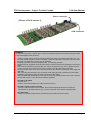
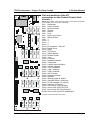
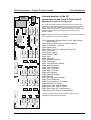
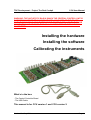
On the next page, you will see a drawing of the Central Control Unit, with each individual
number of each connector printed on it. On the Central Control Unit itself, you will find the
number of the connector printed on the product just on the left hand top side when you hold the
board towards you, with the connectors facing up and the power and USB connector on the
right hand side.
Caution: The Central Control Unit is a delicate electronic device. Static electricity may
damage the board. This is not covered by warranty! Please discharge yourselves before
touching the board. It is recommended to hold the board only by the edges and leave it
in the anti-static bag before using it.
WARNING: THE ANTI-STATIC BAG MAY NEVER BE IN CONTACT WITH ANY
PARTS OF THE BOARD WHEN THE BOARD IS CONNECTED TO THE POWER
SUPPLY OR TO THE USB CONNECTOR AND YOUR PC. THIS WILL CAUSE
SHORT-CIRCUIT AND MAY CAUSE FIRE!
Version1.2 – May 2004
Page 6