1
USER’S MANUAL
Again, note that the use of macros is purely procedural in nature. It would be impossible to use a macro call in the
context of an expression due to both the syntax involved (the use of spaces as parameter separators) and the fact
that no function or command value concept is exhibited.
6.1.2
Control Flow
Macros are given real programming power with statements that control conditional execution. These are
presented in a strictly structured fashion and, in fact, are implemented using a parameter free macro system
themselves. The functions available are IF/ELSE, WHILE and FOR, and their formats are described on the
following sections. The logical expression which controls the conditional statements can be formed as a
comparison between two numeric values or a numeric expression which evaluates to a logical result. In this sense
a value of zero equates to logical FALSE. The functions available for comparison are:
> greater than
< less than
== equal to
!= not equal to
>= greater or equal
<= less or equal
<> not equal to
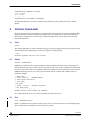
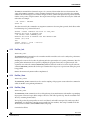
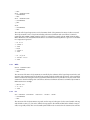
The following illustrates the use of this comparison capability:
>
>
>
>
IF
IF
IF
IF
A>=B
A
A<>B
(A*2)/3>=1
Note that comparisons cannot be nested and that comparisons between floating point values will in fact be
performed in the integer domain.
6.2
Intrinsic Macro Commands
The following sections describe the macro related command statements and flow control structures.
6.2.1
Define
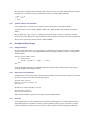
DEFINE <MACRO> <PARAMETERS>
The DEFINE command allows the creation of command macro procedures. The macros possess a name and a
number of formal parameters which are supplied on the definition line. The content of the macro is a sequence of
command statements, declarations, assignments, etc.
There is no restriction on the contents of a macro, but the validity of the contents is only checked at execution
time and any error will terminate execution. Macros can be defined recursively (be careful!) and can contain
other macro definitions. Entry of the definition of a macro will terminate when the number of END (or EXIT)
statements equals the number of DEFINE statements in the body (including the initial DEFINE statement).
Macro names are subject to the same restrictions as other symbols and additionally may not clash with existing
command names or other macro definitions. If there is a macro defined in the current scope of the same name in
an enclosing scope, the more global definition will be replaced by the new definition.
6.2.2
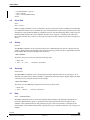
If and Else
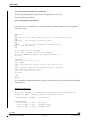
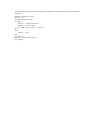
IF <COMPARISON>
> STATEMENTS
TST 20/24
STMicroelectronics Confidential
Version 1.7
03 November 2006